Visual      Wednesday 13 July 2011
Studio
Command     devenv
Line Tool
                               Muthu Swamy S
Visual Studio Command Line Tool


Visual Studio Command Line
                    Usage:

                    devenv [solutionfile | projectfile | anyfile.ext] [switches]


The first argument for devenv is usually a solution file or project file.

You can also use any other file as the first argument if you want to have the file open automatically in an
editor. When you enter a project file, the IDE looks for an .sln file with the same base name as the
project file in the parent directory for the project file. If no such .sln file exists, then the IDE looks for a
single .sln file that references the project. If no such single .sln file exists, then the IDE creates an
unsaved solution with a default .sln file name that has the same base name as the project file.

    1. Build                                                    12.Rebuild
    2. Clean                                                    13.ResetAddin
    3. Command                                                  14.InstallVSTemplates
    4. DebugExe                                                 15.ResetSettings
    5. Deploy                                                   16.ResetSkipPkgs
    6. Edit                                                     17.Run
    7. LCID                                                     18.Runexit
    8. Log                                                      19.SafeMode
    9. Out                                                      20.Setup
    10.Project                                                  21.Upgrade
    11.ProjectConfig                                            22.UseEnv


NOTES

    1. For build-related tasks, it is now recommended that you use MSBuild instead of devenv.
       For more information, see MSBuild Command Line Reference
    2. You must run devenv as an adminstrator in order to use the /Setup (devenv.exe) and
       /InstallVSTemplates (devenv.exe) switches. For more information, see User Permissions
       and Visual Studio


             1   Posted on http://virams.wordpress.com
Visual Studio Command Line Tool

Available command line switches:


Command line                                       Description
/Command       Starts the IDE and executes the specified command.
/DebugExe      Loads a Visual C++ executable under the control of the debugger. This switch
               is not available for Visual Basic or Visual C# executables.
/LCID          Sets the default language for the IDE. If the specified language is not included
               in your installation of Visual Studio, this setting will be ignored.
/Log           Starts Visual Studio and logs all activity to the log file.
/Run or /r     Compiles and runs the specified solution.
/Runexit       Compiles and runs the specified solution, minimizes the IDE when the
               solution is run, and closes the IDE after the solution has finished running.
/UseEnv        Causes the IDE to use PATH, INCLUDE, and LIB environment variables for
               Visual C++ compilation instead of the settings specified in the VC++
               Directories section of Projects options in the Options dialog box.
/Edit          Opens the specified files in a running instance of this application. If there are
               no running instances, it will start a new instance with a simplified window
               layout.
/ResetAddin    Starts an instance of the Visual Studio IDE without loading the specified Add-
               in.
/SafeMode      Starts Visual Studio in safe mode, and loads only the default environment and
               services, and shipped versions of third-party packages.
/ResetSkipPkgs Clears all SkipLoading tags that have been added to VSPackages by users who
               want to avoid loading problem VSPackages.
/Setup         Forces Visual Studio to merge resource metadata that describes menus,
               toolbars, and command groups, from all VSPackages available.
/NoVSIP           Disables the VSIP developer's license key for VSIP testing.


           2   Posted on http://virams.wordpress.com
Visual Studio Command Line Tool

Application Based Options


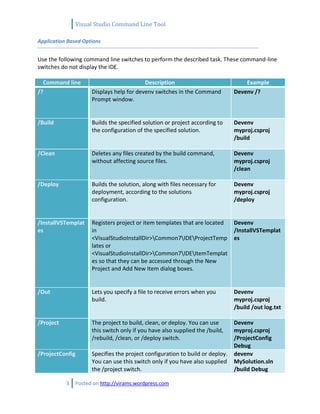
Use the following command line switches to perform the described task. These command-line
switches do not display the IDE.

  Command line                            Description                              Example
/?                   Displays help for devenv switches in the Command          Devenv /?
                     Prompt window.


/Build               Builds the specified solution or project according to     Devenv
                     the configuration of the specified solution.              myproj.csproj
                                                                               /build

/Clean               Deletes any files created by the build command,           Devenv
                     without affecting source files.                           myproj.csproj
                                                                               /clean

/Deploy              Builds the solution, along with files necessary for       Devenv
                     deployment, according to the solutions                    myproj.csproj
                     configuration.                                            /deploy


/InstallVSTemplat    Registers project or item templates that are located      Devenv
es                   in                                                        /InstallVSTemplat
                     <VisualStudioInstallDir>Common7IDEProjectTemp          es
                     lates or
                     <VisualStudioInstallDir>Common7IDEItemTemplat
                     es so that they can be accessed through the New
                     Project and Add New Item dialog boxes.


/Out                 Lets you specify a file to receive errors when you        Devenv
                     build.                                                    myproj.csproj
                                                                               /build /out log.txt

/Project             The project to build, clean, or deploy. You can use       Devenv
                     this switch only if you have also supplied the /build,    myproj.csproj
                     /rebuild, /clean, or /deploy switch.                      /ProjectConfig
                                                                               Debug
/ProjectConfig       Specifies the project configuration to build or deploy.   devenv
                     You can use this switch only if you have also supplied    MySolution.sln
                     the /project switch.                                      /build Debug

           3   Posted on http://virams.wordpress.com
Visual Studio Command Line Tool

                                                                                /project
                                                                                MyProject.csproj
                                                                                /projectconfig
                                                                                Debug


/Rebuild             Cleans and then builds the specified solution or           devenv
                     project according to the configuration of the              MySolution.sln
                     specified solution.                                        /Rebuild Debug
                                                                                /project
                                                                                MyProject.csproj
                                                                                /projectconfig
                                                                                Debug


/Upgrade             Upgrades the specified solution file and all its project   devenv
                     files, or the specified project file, to the current       MyProject.sln
                     Visual Studio formats for these files.                     /upgrade


/ResetSettings       Restores Visual Studio default settings. Optionally        Devenv.exe
                     resets the settings to the specified .vssettings file.     /ResetSettings


           4   Posted on http://virams.wordpress.com

Devenv command line

  • 1.
    Visual Wednesday 13 July 2011 Studio Command devenv Line Tool Muthu Swamy S
  • 2.
    Visual Studio CommandLine Tool Visual Studio Command Line Usage: devenv [solutionfile | projectfile | anyfile.ext] [switches] The first argument for devenv is usually a solution file or project file. You can also use any other file as the first argument if you want to have the file open automatically in an editor. When you enter a project file, the IDE looks for an .sln file with the same base name as the project file in the parent directory for the project file. If no such .sln file exists, then the IDE looks for a single .sln file that references the project. If no such single .sln file exists, then the IDE creates an unsaved solution with a default .sln file name that has the same base name as the project file. 1. Build 12.Rebuild 2. Clean 13.ResetAddin 3. Command 14.InstallVSTemplates 4. DebugExe 15.ResetSettings 5. Deploy 16.ResetSkipPkgs 6. Edit 17.Run 7. LCID 18.Runexit 8. Log 19.SafeMode 9. Out 20.Setup 10.Project 21.Upgrade 11.ProjectConfig 22.UseEnv NOTES 1. For build-related tasks, it is now recommended that you use MSBuild instead of devenv. For more information, see MSBuild Command Line Reference 2. You must run devenv as an adminstrator in order to use the /Setup (devenv.exe) and /InstallVSTemplates (devenv.exe) switches. For more information, see User Permissions and Visual Studio 1 Posted on http://virams.wordpress.com
  • 3.
    Visual Studio CommandLine Tool Available command line switches: Command line Description /Command Starts the IDE and executes the specified command. /DebugExe Loads a Visual C++ executable under the control of the debugger. This switch is not available for Visual Basic or Visual C# executables. /LCID Sets the default language for the IDE. If the specified language is not included in your installation of Visual Studio, this setting will be ignored. /Log Starts Visual Studio and logs all activity to the log file. /Run or /r Compiles and runs the specified solution. /Runexit Compiles and runs the specified solution, minimizes the IDE when the solution is run, and closes the IDE after the solution has finished running. /UseEnv Causes the IDE to use PATH, INCLUDE, and LIB environment variables for Visual C++ compilation instead of the settings specified in the VC++ Directories section of Projects options in the Options dialog box. /Edit Opens the specified files in a running instance of this application. If there are no running instances, it will start a new instance with a simplified window layout. /ResetAddin Starts an instance of the Visual Studio IDE without loading the specified Add- in. /SafeMode Starts Visual Studio in safe mode, and loads only the default environment and services, and shipped versions of third-party packages. /ResetSkipPkgs Clears all SkipLoading tags that have been added to VSPackages by users who want to avoid loading problem VSPackages. /Setup Forces Visual Studio to merge resource metadata that describes menus, toolbars, and command groups, from all VSPackages available. /NoVSIP Disables the VSIP developer's license key for VSIP testing. 2 Posted on http://virams.wordpress.com
  • 4.
    Visual Studio CommandLine Tool Application Based Options Use the following command line switches to perform the described task. These command-line switches do not display the IDE. Command line Description Example /? Displays help for devenv switches in the Command Devenv /? Prompt window. /Build Builds the specified solution or project according to Devenv the configuration of the specified solution. myproj.csproj /build /Clean Deletes any files created by the build command, Devenv without affecting source files. myproj.csproj /clean /Deploy Builds the solution, along with files necessary for Devenv deployment, according to the solutions myproj.csproj configuration. /deploy /InstallVSTemplat Registers project or item templates that are located Devenv es in /InstallVSTemplat <VisualStudioInstallDir>Common7IDEProjectTemp es lates or <VisualStudioInstallDir>Common7IDEItemTemplat es so that they can be accessed through the New Project and Add New Item dialog boxes. /Out Lets you specify a file to receive errors when you Devenv build. myproj.csproj /build /out log.txt /Project The project to build, clean, or deploy. You can use Devenv this switch only if you have also supplied the /build, myproj.csproj /rebuild, /clean, or /deploy switch. /ProjectConfig Debug /ProjectConfig Specifies the project configuration to build or deploy. devenv You can use this switch only if you have also supplied MySolution.sln the /project switch. /build Debug 3 Posted on http://virams.wordpress.com
  • 5.
    Visual Studio CommandLine Tool /project MyProject.csproj /projectconfig Debug /Rebuild Cleans and then builds the specified solution or devenv project according to the configuration of the MySolution.sln specified solution. /Rebuild Debug /project MyProject.csproj /projectconfig Debug /Upgrade Upgrades the specified solution file and all its project devenv files, or the specified project file, to the current MyProject.sln Visual Studio formats for these files. /upgrade /ResetSettings Restores Visual Studio default settings. Optionally Devenv.exe resets the settings to the specified .vssettings file. /ResetSettings 4 Posted on http://virams.wordpress.com