




Google Web Toolkit

   Sonal V. Patil
Topics Covered
•   Short Introduction to GWT
•   Architectural Overview
•   Features of GWT
•   Why, When & Who’s use GWT ?
•   Simple Code Example
•   Server Communication using GWT – RPC
•   Intro of Various Web Frameworks
Logo of GWT
Overview of GWT
• Google announced GWT @ JavaOne Conference
  in 2006 & on 16 May 2006 GWT 1.0 was released.
• Latest version is GWT 2.1.1 on 17 Dec 2010.
• Open source(Apache 2.0 Liscense) Java s/w
  dévelopement framework.
• Allows web developers to create and maintain
  complex JavaScript front-end applications.
• Supported by all the java IDE : Eclipse, NetBeans,
  IntelliJ IDEA, JDeveloper… etc.
• Once the code is finished the GWT compiler
  translates the Java code into Javascript.
• Applications can be run in two modes.
  1) Development mode (Hosted mode): The
  application is run as Java byte code within the Java
  Virtual Machine (JVM). Used for development,
  supporting hot swapping of code and debugging.
   2) Web mode : Application is translated into
  javascript & HTML code and can be deployed on a
  web server.
• Uses MVC Design Pattern
• The based line : ‘’ First the user, second the
  developer ’’ - Bruce Johnson.
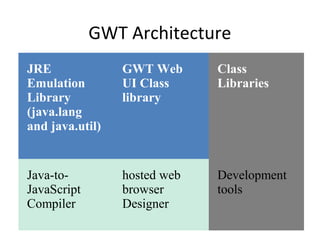
GWT Architecture
JRE              GWT Web      Class
Emulation        UI Class     Libraries
Library          library
(java.lang
and java.util)


Java-to-         hosted web   Development
JavaScript       browser      tools
Compiler         Designer
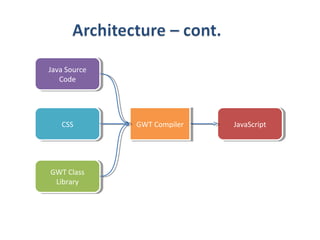
Java Source
 Java Source
   Code
    Code


   CSS
    CSS        GWT Compiler
                GWT Compiler   JavaScript
                                JavaScript


GWT Class
GWT Class
 Library
  Library
Major Components Include
1. GWT Java-to-JavaScript Compiler
 Translates the Java programming language to the
 JavaScript programming language.
2. GWT Hosted Web Browser
  Allows the developers to run and execute GWT
 applications in hosted mode. It is commonly used
  for debugging.
Components cont…..
3. JRE emulation library
  JavaScript implementations of the commonly used
 classes in the Java standard class library like java.lang
 and a subset of the java.util package classes.
4. GWT Web UI class library
 A set of custom interfaces & classes for creating
 widgets.
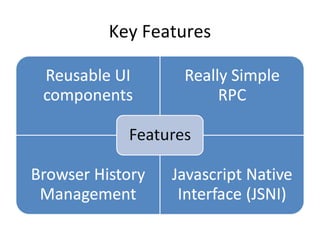
Key Features


Read more on GWT Overview Page
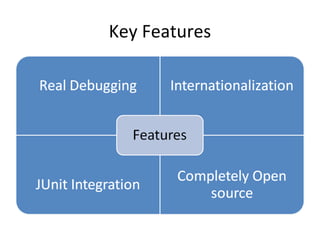
Key Features


Read more on GWT Overview Page
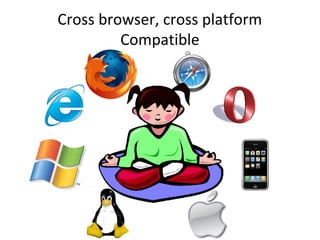
Cross browser, cross platform
         Compatible
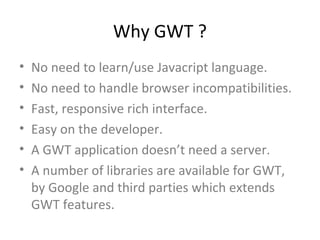
Why GWT ?
•   No need to learn/use Javacript language.
•   No need to handle browser incompatibilities.
•   Fast, responsive rich interface.
•   Easy on the developer.
•   A GWT application doesn’t need a server.
•   A number of libraries are available for GWT,
    by Google and third parties which extends
    GWT features.
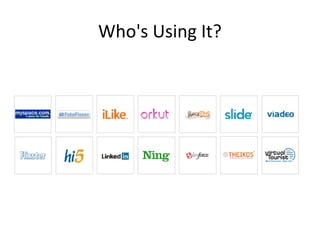
Who's Using It?
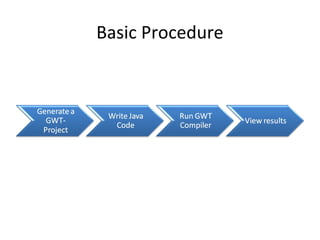
Basic Procedure
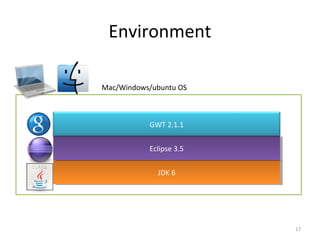
Environment

Mac/Windows/ubuntu OS


           GWT 2.1.1


           Eclipse 3.5
            Eclipse 3.5

             JDK 66
              JDK


                          17
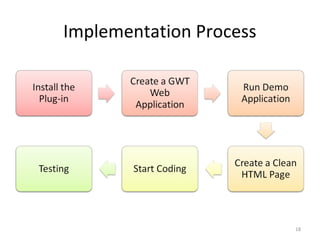
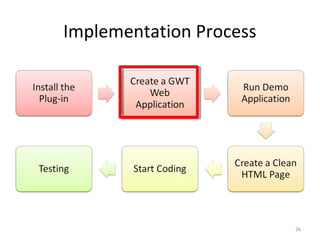
Implementation Process


                         18
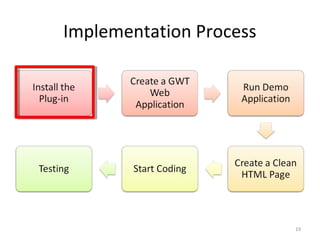
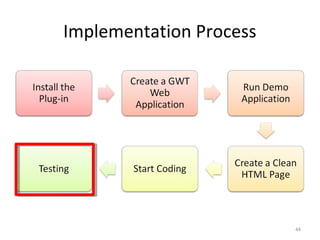
Implementation Process


                         19
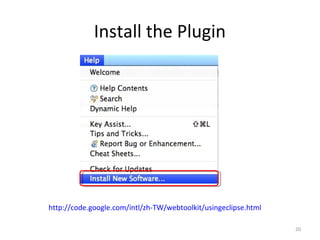
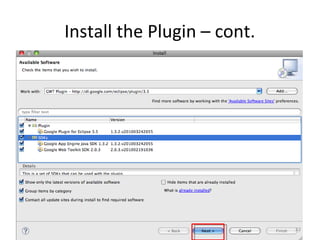
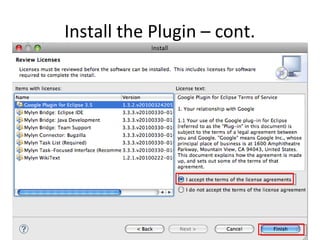
Install the Plugin


http://code.google.com/intl/zh-TW/webtoolkit/usingeclipse.html

                                                                 20
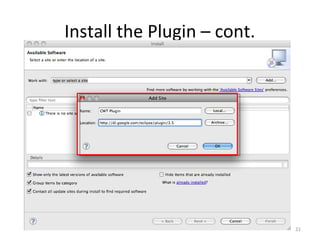
Install the Plugin – cont.


                             21
Install the Plugin – cont.


                             22
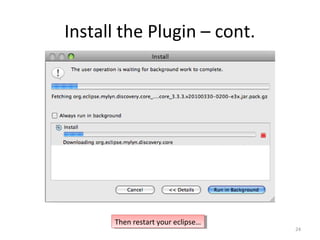
Install the Plugin – cont.


                             23
Install the Plugin – cont.


      Then restart your eclipse…
       Then restart your eclipse…
                                    24
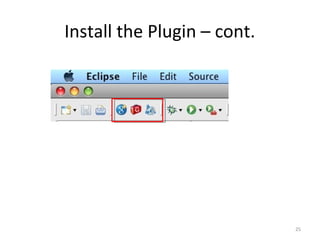
Install the Plugin – cont.


                             25
Implementation Process


                         26
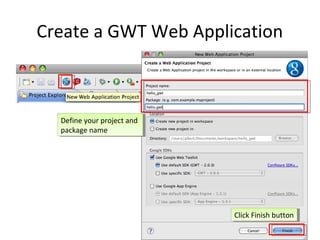
Create a GWT Web Application


  Define your project and
   Define your project and
  package name
   package name


                             Click Finish button
                              Click Finish button
                                                27
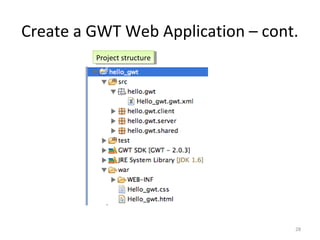
Create a GWT Web Application – cont.
         Project structure
          Project structure


                                   28
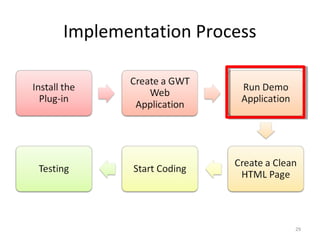
Implementation Process


                         29
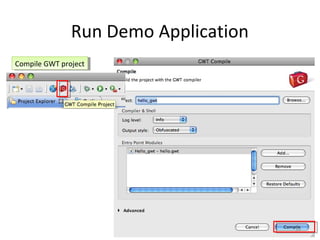
Run Demo Application
Compile GWT project
 Compile GWT project


                                      30
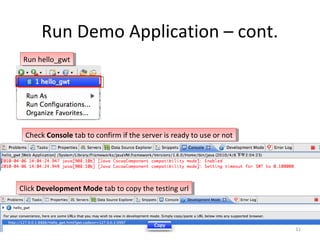
Run Demo Application – cont.
 Run hello_gwt
  Run hello_gwt


 Check Console tab to confirm if the server is ready to use or not
  Check Console tab to confirm if the server is ready to use or not


Click Development Mode tab to copy the testing url
 Click Development Mode tab to copy the testing url


                                                                      31
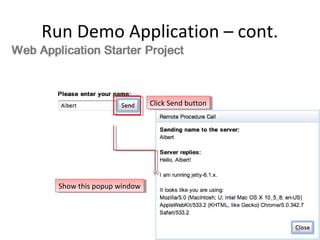
Run Demo Application – cont.


                            Click Send button
                             Click Send button


  Show this popup window
   Show this popup window


                                                 32
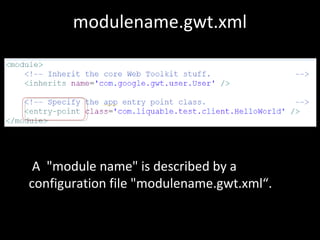
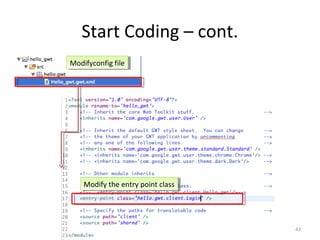
modulename.gwt.xml


 A "module name" is described by a
configuration file "modulename.gwt.xml“.
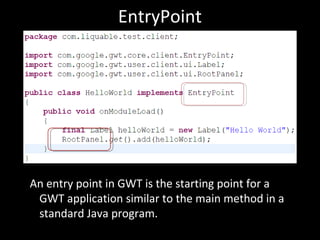
EntryPoint


An entry point in GWT is the starting point for a
 GWT application similar to the main method in a
 standard Java program.
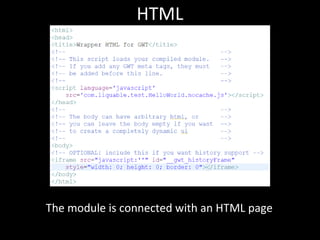
HTML


The module is connected with an HTML page
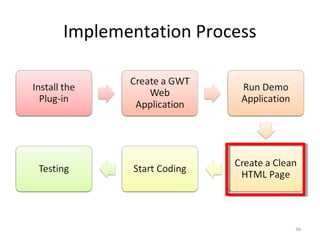
Implementation Process


                         36
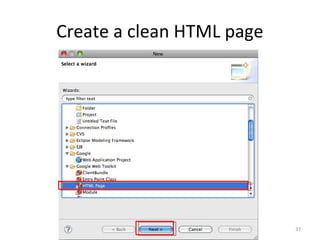
Create a clean HTML page


                           37
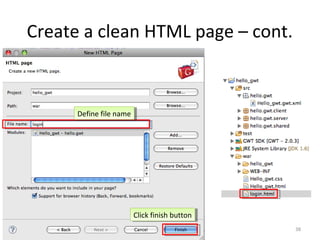
Create a clean HTML page – cont.


      Define file name
       Define file name


                          Click finish button
                           Click finish button
                                                 38
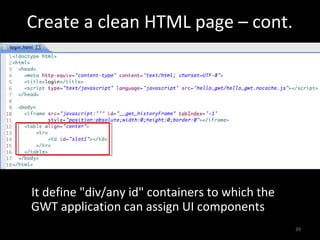
Create a clean HTML page – cont.


It define "div/any id" containers to which the
GWT application can assign UI components
                                                 39
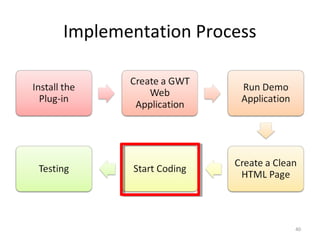
Implementation Process


                         40
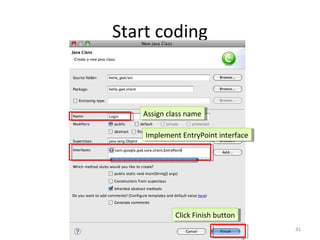
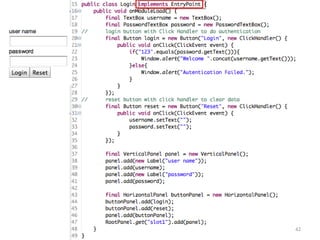
Start coding


   Assign class name
    Assign class name

    Implement EntryPoint interface
     Implement EntryPoint interface


            Click Finish button
             Click Finish button
                                      41
42
Start Coding – cont.
Modifyconfig file
Modifyconfig file


    Modify the entry point class
    Modify the entry point class


                                   43
Implementation Process


                         44
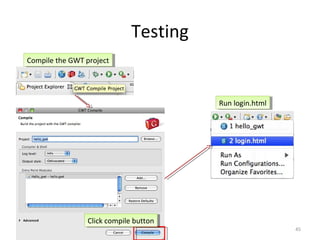
Testing
Compile the GWT project
 Compile the GWT project


                                         Run login.html
                                          Run login.html


                 Click compile button
                  Click compile button
                                                           45
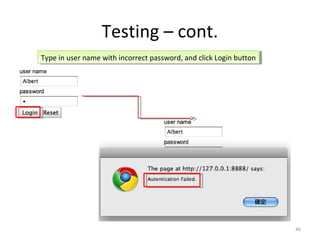
Testing – cont.
Type in user name with incorrect password, and click Login button
 Type in user name with incorrect password, and click Login button


                                                                     46
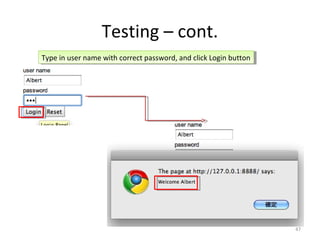
Testing – cont.
Type in user name with correct password, and click Login button
 Type in user name with correct password, and click Login button


                                                                   47
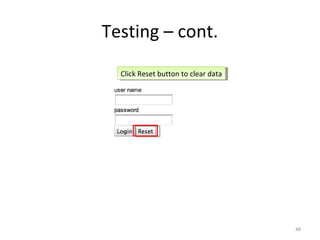
Testing – cont.
  Click Reset button to clear data
   Click Reset button to clear data


                                      48
Various Component of GWT
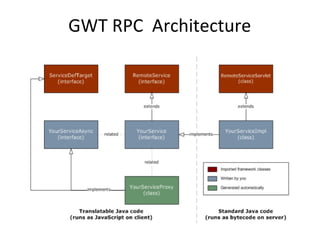
GWT RPC Architecture
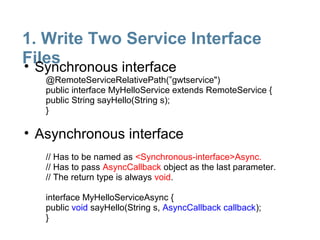
1. Write Two Service Interface
Files
• Synchronous interface
   @RemoteServiceRelativePath(”gwtservice")
   public interface MyHelloService extends RemoteService {
   public String sayHello(String s);
   }

• Asynchronous interface
   // Has to be named as <Synchronous-interface>Async.
   // Has to pass AsyncCallback object as the last parameter.
   // The return type is always void.

   interface MyHelloServiceAsync {
   public void sayHello(String s, AsyncCallback callback);
   }
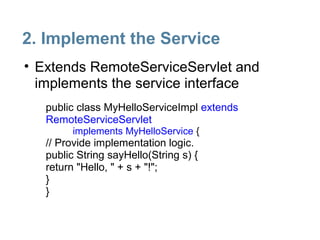
2. Implement the Service
• Extends RemoteServiceServlet and
  implements the service interface
   public class MyHelloServiceImpl extends
   RemoteServiceServlet
         implements MyHelloService {
   // Provide implementation logic.
   public String sayHello(String s) {
   return "Hello, " + s + "!";
   }
   }
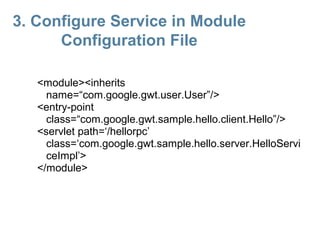
3. Configure Service in Module
      Configuration File

   <module><inherits
     name=“com.google.gwt.user.User”/>
   <entry-point
     class=“com.google.gwt.sample.hello.client.Hello”/>
   <servlet path=‘/hellorpc’
     class=‘com.google.gwt.sample.hello.server.HelloServi
     ceImpl’>
   </module>
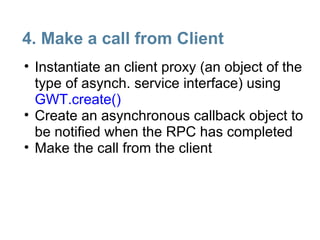
4. Make a call from Client
• Instantiate an client proxy (an object of the
  type of asynch. service interface) using
  GWT.create()
• Create an asynchronous callback object to
  be notified when the RPC has completed
• Make the call from the client
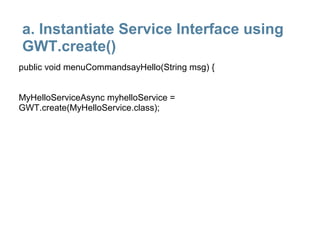
a. Instantiate Service Interface using
GWT.create()
public void menuCommandsayHello(String msg) {


MyHelloServiceAsync myhelloService =
GWT.create(MyHelloService.class);
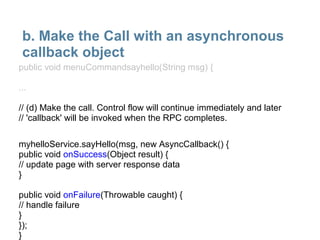
b. Make the Call with an asynchronous
 callback object
public void menuCommandsayhello(String msg) {

...

// (d) Make the call. Control flow will continue immediately and later
// 'callback' will be invoked when the RPC completes.

myhelloService.sayHello(msg, new AsyncCallback() {
public void onSuccess(Object result) {
// update page with server response data
}

public void onFailure(Throwable caught) {
// handle failure
}
});
}
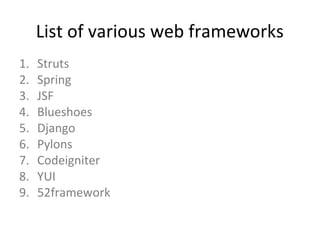
List of various web frameworks
1.   Struts
2.   Spring
3.   JSF
4.   Blueshoes
5.   Django
6.   Pylons
7.   Codeigniter
8.   YUI
9.   52framework
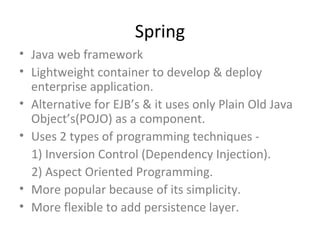
Spring
• Java web framework
• Lightweight container to develop & deploy
  enterprise application.
• Alternative for EJB’s & it uses only Plain Old Java
  Object’s(POJO) as a component.
• Uses 2 types of programming techniques -
  1) Inversion Control (Dependency Injection).
  2) Aspect Oriented Programming.
• More popular because of its simplicity.
• More flexible to add persistence layer.
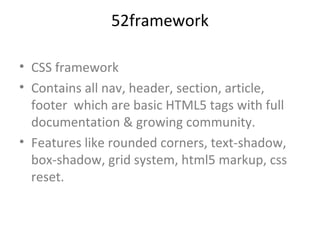
52framework

• CSS framework
• Contains all nav, header, section, article,
  footer which are basic HTML5 tags with full
  documentation & growing community.
• Features like rounded corners, text-shadow,
  box-shadow, grid system, html5 markup, css
  reset.
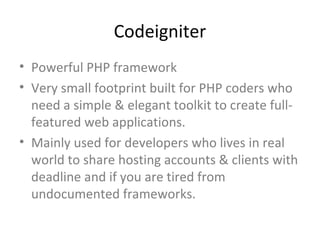
Codeigniter
• Powerful PHP framework
• Very small footprint built for PHP coders who
  need a simple & elegant toolkit to create full-
  featured web applications.
• Mainly used for developers who lives in real
  world to share hosting accounts & clients with
  deadline and if you are tired from
  undocumented frameworks.
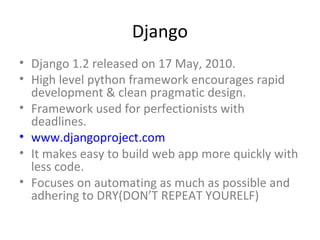
Django
• Django 1.2 released on 17 May, 2010.
• High level python framework encourages rapid
  development & clean pragmatic design.
• Framework used for perfectionists with
  deadlines.
• www.djangoproject.com
• It makes easy to build web app more quickly with
  less code.
• Focuses on automating as much as possible and
  adhering to DRY(DON’T REPEAT YOURELF)
Documentation
• GWT Reference -
http://code.google.com/webtoolkit/

• Active Forum -
http://groups.google.com/group/Google-Web-Toolkit

• GWT Blog -
http://googlewebtoolkit.blogspot.com/

• On GWT, Tracking news on GWT -
http://www.ongwt.com/

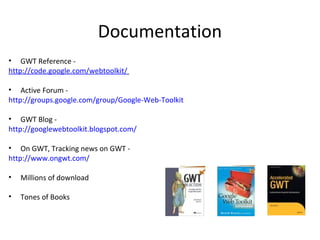
•   Millions of download

•   Tones of Books
Any ?
GWT_Framework

GWT_Framework

  • 1.
    Google Web Toolkit Sonal V. Patil
  • 2.
    Topics Covered • Short Introduction to GWT • Architectural Overview • Features of GWT • Why, When & Who’s use GWT ? • Simple Code Example • Server Communication using GWT – RPC • Intro of Various Web Frameworks
  • 3.
  • 4.
    Overview of GWT •Google announced GWT @ JavaOne Conference in 2006 & on 16 May 2006 GWT 1.0 was released. • Latest version is GWT 2.1.1 on 17 Dec 2010. • Open source(Apache 2.0 Liscense) Java s/w dévelopement framework. • Allows web developers to create and maintain complex JavaScript front-end applications. • Supported by all the java IDE : Eclipse, NetBeans, IntelliJ IDEA, JDeveloper… etc. • Once the code is finished the GWT compiler translates the Java code into Javascript.
  • 5.
    • Applications canbe run in two modes. 1) Development mode (Hosted mode): The application is run as Java byte code within the Java Virtual Machine (JVM). Used for development, supporting hot swapping of code and debugging. 2) Web mode : Application is translated into javascript & HTML code and can be deployed on a web server. • Uses MVC Design Pattern • The based line : ‘’ First the user, second the developer ’’ - Bruce Johnson.
  • 6.
    GWT Architecture JRE GWT Web Class Emulation UI Class Libraries Library library (java.lang and java.util) Java-to- hosted web Development JavaScript browser tools Compiler Designer
  • 7.
    Java Source JavaSource Code Code CSS CSS GWT Compiler GWT Compiler JavaScript JavaScript GWT Class GWT Class Library Library
  • 8.
    Major Components Include 1.GWT Java-to-JavaScript Compiler Translates the Java programming language to the JavaScript programming language. 2. GWT Hosted Web Browser Allows the developers to run and execute GWT applications in hosted mode. It is commonly used for debugging.
  • 9.
    Components cont….. 3. JREemulation library JavaScript implementations of the commonly used classes in the Java standard class library like java.lang and a subset of the java.util package classes. 4. GWT Web UI class library A set of custom interfaces & classes for creating widgets.
  • 10.
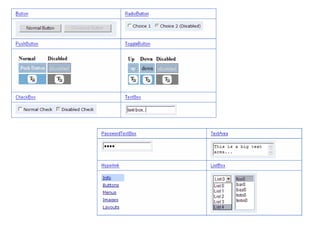
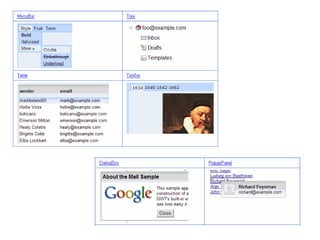
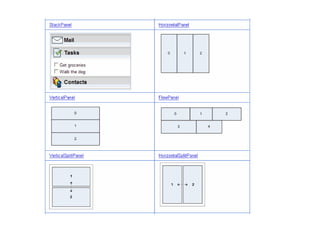
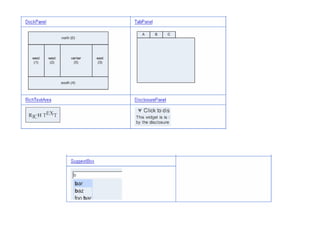
    Key Features Read moreon GWT Overview Page
  • 11.
    Key Features Read moreon GWT Overview Page
  • 12.
    Cross browser, crossplatform Compatible
  • 14.
    Why GWT ? • No need to learn/use Javacript language. • No need to handle browser incompatibilities. • Fast, responsive rich interface. • Easy on the developer. • A GWT application doesn’t need a server. • A number of libraries are available for GWT, by Google and third parties which extends GWT features.
  • 15.
  • 16.
  • 17.
    Environment Mac/Windows/ubuntu OS GWT 2.1.1 Eclipse 3.5 Eclipse 3.5 JDK 66 JDK 17
  • 18.
  • 19.
  • 20.
  • 21.
    Install the Plugin– cont. 21
  • 22.
    Install the Plugin– cont. 22
  • 23.
    Install the Plugin– cont. 23
  • 24.
    Install the Plugin– cont. Then restart your eclipse… Then restart your eclipse… 24
  • 25.
    Install the Plugin– cont. 25
  • 26.
  • 27.
    Create a GWTWeb Application Define your project and Define your project and package name package name Click Finish button Click Finish button 27
  • 28.
    Create a GWTWeb Application – cont. Project structure Project structure 28
  • 29.
  • 30.
    Run Demo Application CompileGWT project Compile GWT project 30
  • 31.
    Run Demo Application– cont. Run hello_gwt Run hello_gwt Check Console tab to confirm if the server is ready to use or not Check Console tab to confirm if the server is ready to use or not Click Development Mode tab to copy the testing url Click Development Mode tab to copy the testing url 31
  • 32.
    Run Demo Application– cont. Click Send button Click Send button Show this popup window Show this popup window 32
  • 33.
    modulename.gwt.xml A "modulename" is described by a configuration file "modulename.gwt.xml“.
  • 34.
    EntryPoint An entry pointin GWT is the starting point for a GWT application similar to the main method in a standard Java program.
  • 35.
    HTML The module isconnected with an HTML page
  • 36.
  • 37.
    Create a cleanHTML page 37
  • 38.
    Create a cleanHTML page – cont. Define file name Define file name Click finish button Click finish button 38
  • 39.
    Create a cleanHTML page – cont. It define "div/any id" containers to which the GWT application can assign UI components 39
  • 40.
  • 41.
    Start coding Assign class name Assign class name Implement EntryPoint interface Implement EntryPoint interface Click Finish button Click Finish button 41
  • 42.
  • 43.
    Start Coding –cont. Modifyconfig file Modifyconfig file Modify the entry point class Modify the entry point class 43
  • 44.
  • 45.
    Testing Compile the GWTproject Compile the GWT project Run login.html Run login.html Click compile button Click compile button 45
  • 46.
    Testing – cont. Typein user name with incorrect password, and click Login button Type in user name with incorrect password, and click Login button 46
  • 47.
    Testing – cont. Typein user name with correct password, and click Login button Type in user name with correct password, and click Login button 47
  • 48.
    Testing – cont. Click Reset button to clear data Click Reset button to clear data 48
  • 49.
  • 54.
  • 55.
    1. Write TwoService Interface Files • Synchronous interface @RemoteServiceRelativePath(”gwtservice") public interface MyHelloService extends RemoteService { public String sayHello(String s); } • Asynchronous interface // Has to be named as <Synchronous-interface>Async. // Has to pass AsyncCallback object as the last parameter. // The return type is always void. interface MyHelloServiceAsync { public void sayHello(String s, AsyncCallback callback); }
  • 56.
    2. Implement theService • Extends RemoteServiceServlet and implements the service interface public class MyHelloServiceImpl extends RemoteServiceServlet implements MyHelloService { // Provide implementation logic. public String sayHello(String s) { return "Hello, " + s + "!"; } }
  • 57.
    3. Configure Servicein Module Configuration File <module><inherits name=“com.google.gwt.user.User”/> <entry-point class=“com.google.gwt.sample.hello.client.Hello”/> <servlet path=‘/hellorpc’ class=‘com.google.gwt.sample.hello.server.HelloServi ceImpl’> </module>
  • 58.
    4. Make acall from Client • Instantiate an client proxy (an object of the type of asynch. service interface) using GWT.create() • Create an asynchronous callback object to be notified when the RPC has completed • Make the call from the client
  • 59.
    a. Instantiate ServiceInterface using GWT.create() public void menuCommandsayHello(String msg) { MyHelloServiceAsync myhelloService = GWT.create(MyHelloService.class);
  • 60.
    b. Make theCall with an asynchronous callback object public void menuCommandsayhello(String msg) { ... // (d) Make the call. Control flow will continue immediately and later // 'callback' will be invoked when the RPC completes. myhelloService.sayHello(msg, new AsyncCallback() { public void onSuccess(Object result) { // update page with server response data } public void onFailure(Throwable caught) { // handle failure } }); }
  • 61.
    List of variousweb frameworks 1. Struts 2. Spring 3. JSF 4. Blueshoes 5. Django 6. Pylons 7. Codeigniter 8. YUI 9. 52framework
  • 62.
    Spring • Java webframework • Lightweight container to develop & deploy enterprise application. • Alternative for EJB’s & it uses only Plain Old Java Object’s(POJO) as a component. • Uses 2 types of programming techniques - 1) Inversion Control (Dependency Injection). 2) Aspect Oriented Programming. • More popular because of its simplicity. • More flexible to add persistence layer.
  • 63.
    52framework • CSS framework •Contains all nav, header, section, article, footer which are basic HTML5 tags with full documentation & growing community. • Features like rounded corners, text-shadow, box-shadow, grid system, html5 markup, css reset.
  • 64.
    Codeigniter • Powerful PHPframework • Very small footprint built for PHP coders who need a simple & elegant toolkit to create full- featured web applications. • Mainly used for developers who lives in real world to share hosting accounts & clients with deadline and if you are tired from undocumented frameworks.
  • 65.
    Django • Django 1.2released on 17 May, 2010. • High level python framework encourages rapid development & clean pragmatic design. • Framework used for perfectionists with deadlines. • www.djangoproject.com • It makes easy to build web app more quickly with less code. • Focuses on automating as much as possible and adhering to DRY(DON’T REPEAT YOURELF)
  • 66.
    Documentation • GWT Reference- http://code.google.com/webtoolkit/ • Active Forum - http://groups.google.com/group/Google-Web-Toolkit • GWT Blog - http://googlewebtoolkit.blogspot.com/ • On GWT, Tracking news on GWT - http://www.ongwt.com/ • Millions of download • Tones of Books
  • 68.

Editor's Notes

  • #7 GWT Java-to-JavaScript Compiler GWT Hosted Web Browser GWT Designer JRE emulation library GWT contains JavaScript implementations of the most widely used classes in the Java standard class library GWT Web UI class library Similar to Swing UI Parses the original Java code Full parser, almost all Java constructs will be parsed correctly. Generates a full Abstract Syntax Tree (AST) ‏ GWT&apos;s compiler isn&apos;t a parlor trick, it&apos;s a real code parser and cross-language compiler Performs optimization, dead-code elimination, dynamic analysis, and other code fixups The generated JS is fast and efficient, sometimes faster than what you might write yourself Optimization All code is optimized, including some unusual tricks (like turning some methods into wrapped statics) ‏ Dead-Code Elimination Remove any code that cannot be reached, or always returns the same value(s) ‏ Javascript Generation Generate Javascript, including all necessary browser-specific checks and workarounds Javascript obfuscation and size reduction Javascript is (optionally) obfuscated to protect your trade-secrets, and to reduce it&apos;s size