Diversified Automation
Testing Framework – Initial
version
May 27, 2015
Zhang Yu Tao
c55597b8-8ad5-4a5b-95da-0d85b5ad9047-160122083725
- 2 -
Table of Contents
1. Automation Testing Framework - 3 -
1.1 Diagram of Automation Testing Framework - 3 -
1.2 Execution Environment - 3 -
1.3 Testing Tools - 3 -
1.4 Development Environment - 4 -
1.5 Code Structure - 4 -
1.6 Data Management - 5 -
1.7 Web Element Management - 6 -
1.8 API of Restful Web Service Management - 7 -
1.9 Command line of checking Windows VMManagement - 9 -
1.10 Command line of checking Linux VMManagement - 10 -
1.11 Write a Test Class - 12 -
1.12 Run scripts in Jenkins - 12 -
1.13 Run test class - 14 -
2. Approach for Test Automation - 14 -
2.1 Description - 14 -
3. Reporting - 16 -
c55597b8-8ad5-4a5b-95da-0d85b5ad9047-160122083725
- 3 -
1. Automation Testing Framework
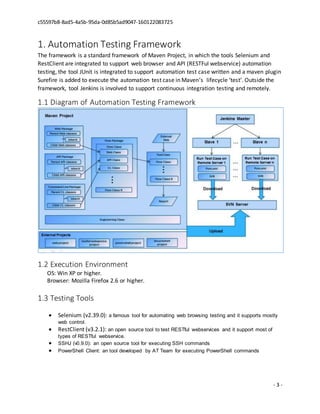
The framework is a standard framework of Maven Project, in which the tools Selenium and
RestClient are integrated to support web browser and API (RESTFul webservice) automation
testing, the tool JUnit is integrated to support automation test case written and a maven plugin
Surefire is added to execute the automation test case in Maven’s lifecycle ‘test’. Outside the
framework, tool Jenkins is involved to support continuous integration testing and remotely.
1.1 Diagram of Automation Testing Framework
1.2 Execution Environment
OS: Win XP or higher.
Browser: Mozilla Firefox 2.6 or higher.
1.3 Testing Tools
 Selenium (v2.39.0): a famous tool for automating web browsing testing and it supports mostly
web control.
 RestClient (v3.2.1): an open source tool to test RESTful webservices and it support most of
types of RESTful webservice.
 SSHJ (v0.9.0): an open source tool for executing SSH commands
 PowerShell Client: an tool developed by AT Team for executing PowerShell commands
c55597b8-8ad5-4a5b-95da-0d85b5ad9047-160122083725
- 4 -
1.4 Development Environment
 Java (v1.7.0): a language supports to integrate and develop new automation features.
 JUnit (v4.11): an environment is easy to write and execute test case.
 Maven (v3.1.1): a tool is easy to build java project and provides a good way to execute
JUnit test case.
 SVN (v1.7.x): a tool for storing code and version control.
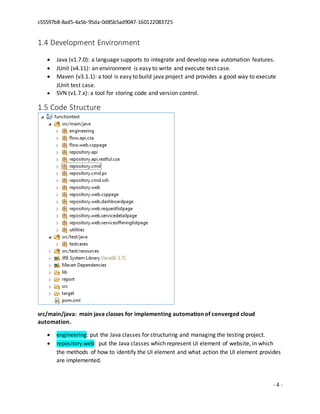
1.5 Code Structure
src/main/java: main java classes for implementing automation of converged cloud
automation.
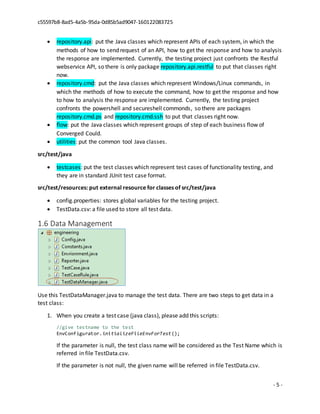
 engineering: put the Java classes for structuring and managing the testing project.
 repository.web: put the Java classes which represent UI element of website, in which
the methods of how to identify the UI element and what action the UI element provides
are implemented.
c55597b8-8ad5-4a5b-95da-0d85b5ad9047-160122083725
- 5 -
 repository.api: put the Java classes which represent APIs of each system, in which the
methods of how to send request of an API, how to get the response and how to analysis
the response are implemented. Currently, the testing project just confronts the Restful
webservice API, so there is only package repository.api.restful to put that classes right
now.
 repository.cmd: put the Java classes which represent Windows/Linux commands, in
which the methods of how to execute the command, how to get the response and how
to how to analysis the response are implemented. Currently, the testing project
confronts the powershell and secureshell commonds, so there are packages
repository.cmd.ps and repository.cmd.ssh to put that classes right now.
 flow: put the Java classes which represent groups of step of each business flow of
Converged Could.
 utilities: put the common tool Java classes.
src/test/java
 testcases: put the test classes which represent test cases of functionality testing, and
they are in standard JUnit test case format.
src/test/resources: put external resource for classes of src/test/java
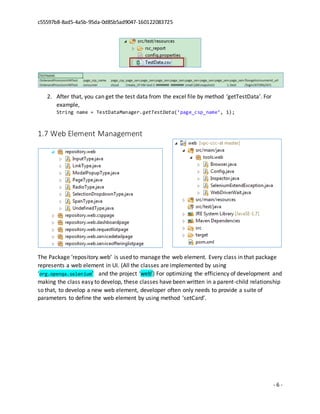
 config.properties: stores global variables for the testing project.
 TestData.csv: a file used to store all test data.
1.6 Data Management
Use this TestDataManager.java to manage the test data. There are two steps to get data in a
test class:
1. When you create a test case (java class), please add this scripts:
//give testname to the test
EnvConfigurator.initializeFileEnvForTest();
If the parameter is null, the test class name will be considered as the Test Name which is
referred in file TestData.csv.
If the parameter is not null, the given name will be referred in file TestData.csv.
c55597b8-8ad5-4a5b-95da-0d85b5ad9047-160122083725
- 6 -
2. After that, you can get the test data from the excel file by method ‘getTestData’. For
example,
String name = TestDataManager.getTestData(‘page_csp_name’, 1);
1.7 Web Element Management
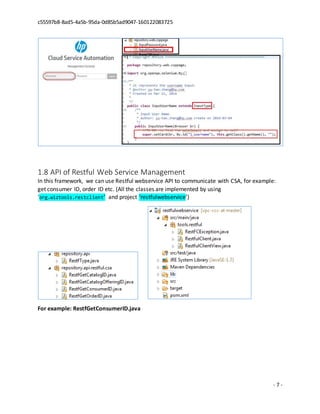
The Package ‘repository.web’ is used to manage the web element. Every class in that package
represents a web element in UI. (All the classes are implemented by using
‘org.openqa.selenium’ and the project ‘web’) For optimizing the efficiency of development and
making the class easy to develop, these classes have been written in a parent-child relationship
so that, to develop a new web element, developer often only needs to provide a suite of
parameters to define the web element by using method ‘setCard’.
c55597b8-8ad5-4a5b-95da-0d85b5ad9047-160122083725
- 7 -
1.8 API of Restful Web Service Management
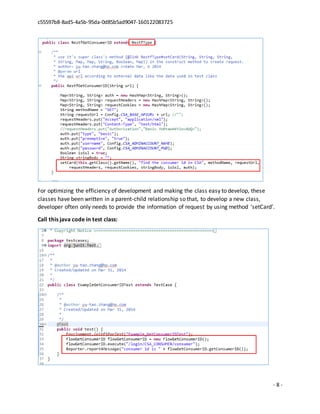
In this framework, we can use Restful webservice API to communicate with CSA, for example:
get consumer ID, order ID etc. (All the classes are implemented by using
‘org.wiztools.restclient’ and project ‘restfulwebservice’)
For example: RestfGetConsumerID.java
c55597b8-8ad5-4a5b-95da-0d85b5ad9047-160122083725
- 8 -
For optimizing the efficiency of development and making the class easy to develop, these
classes have been written in a parent-child relationship so that, to develop a new class,
developer often only needs to provide the information of request by using method ‘setCard’.
Call this java code in test class:
c55597b8-8ad5-4a5b-95da-0d85b5ad9047-160122083725
- 9 -
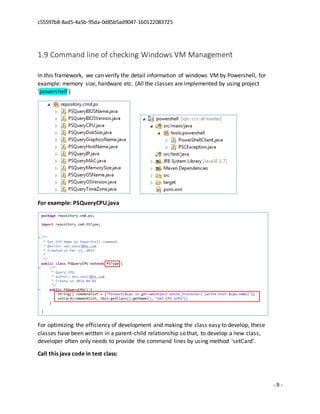
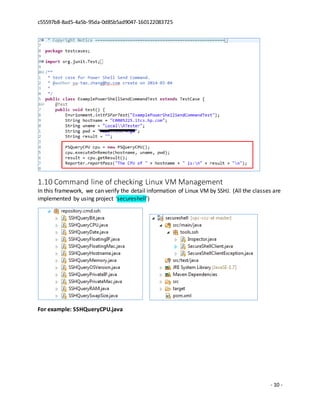
1.9 Command line of checking Windows VM Management
In this framework, we can verify the detail information of windows VM by Powershell, for
example: memory size, hardware etc. (All the classes are implemented by using project
‘powershell’)
For example: PSQueryCPU.java
For optimizing the efficiency of development and making the class easy to develop, these
classes have been written in a parent-child relationship so that, to develop a new class,
developer often only needs to provide the command lines by using method ‘setCard’.
Call this java code in test class:
c55597b8-8ad5-4a5b-95da-0d85b5ad9047-160122083725
- 10 -
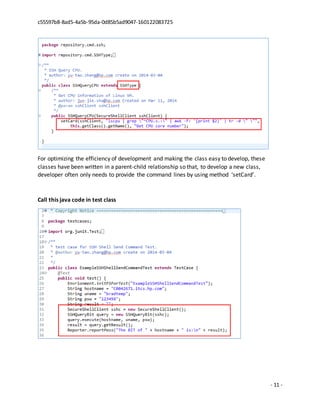
1.10 Command line of checking Linux VM Management
In this framework, we can verify the detail information of Linux VM by SSHJ. (All the classes are
implemented by using project ‘secureshell’)
For example: SSHQueryCPU.java
c55597b8-8ad5-4a5b-95da-0d85b5ad9047-160122083725
- 11 -
For optimizing the efficiency of development and making the class easy to develop, these
classes have been written in a parent-child relationship so that, to develop a new class,
developer often only needs to provide the command lines by using method ‘setCard’.
Call this java code in test class
c55597b8-8ad5-4a5b-95da-0d85b5ad9047-160122083725
- 12 -
1.11 Write a Test Class
The progress is:
1. Create a new Class in package ‘testcases’ of source folder ‘src/test/java’.
2. The class must extends class ‘TestCase’
3. Call classes of packages ‘flow’ according to your necessary.
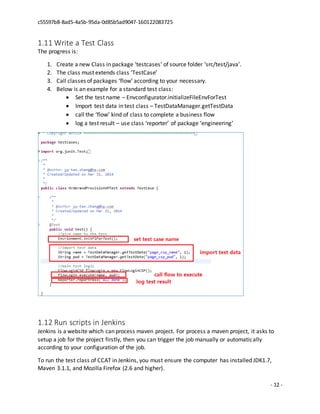
4. Below is an example for a standard test class:
 Set the test name – Envconfigurator.initializeFileEnvForTest
 Import test data in test class – TestDataManager.getTestData
 call the ‘flow’ kind of class to complete a business flow
 log a test result – use class ‘reporter’ of package ‘engineering’
1.12 Run scripts in Jenkins
Jenkins is a website which can process maven project. For process a maven project, it asks to
setup a job for the project firstly, then you can trigger the job manually or automatically
according to your configuration of the job.
To run the test class of CCAT in Jenkins, you must ensure the computer has installed JDK1.7,
Maven 3.1.1, and Mozilla Firefox (2.6 and higher).
c55597b8-8ad5-4a5b-95da-0d85b5ad9047-160122083725
- 13 -
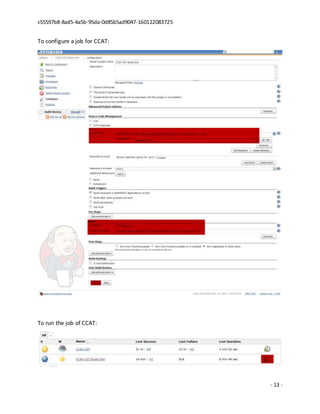
To configure a job for CCAT:
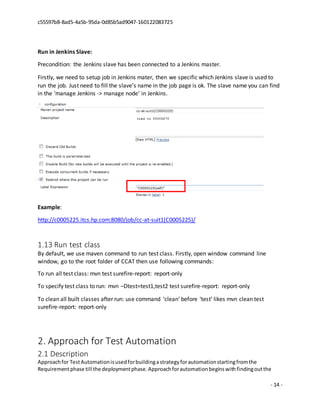
To run the job of CCAT:
c55597b8-8ad5-4a5b-95da-0d85b5ad9047-160122083725
- 14 -
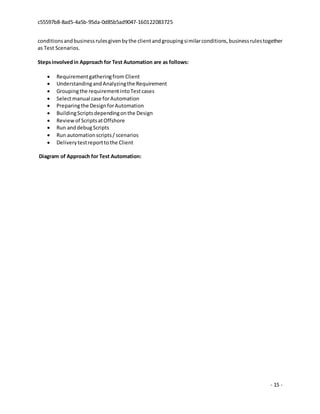
Run in Jenkins Slave:
Precondition: the Jenkins slave has been connected to a Jenkins master.
Firstly, we need to setup job in Jenkins mater, then we specific which Jenkins slave is used to
run the job. Just need to fill the slave’s name in the job page is ok. The slave name you can find
in the ‘manage Jenkins -> manage node’ in Jenkins.
Example:
http://c0005225.itcs.hp.com:8080/job/cc-at-suit1(C0005225)/
1.13 Run test class
By default, we use maven command to run test class. Firstly, open window command line
window, go to the root folder of CCAT then use following commands:
To run all test class: mvn test surefire-report: report-only
To specify test class to run: mvn –Dtest=test1,test2 test surefire-report: report-only
To clean all built classes after run: use command ‘clean’ before ‘test’ likes mvn clean test
surefire-report: report-only
2. Approach for Test Automation
2.1 Description
Approachfor TestAutomationisusedforbuildingastrategyforautomationstartingfromthe
Requirementphase till the deploymentphase.Approachforautomationbeginswithfindingoutthe
c55597b8-8ad5-4a5b-95da-0d85b5ad9047-160122083725
- 15 -
conditionsandbusinessrulesgivenbythe clientandgroupingsimilarconditions,businessrulestogether
as Test Scenarios.
Stepsinvolvedin Approach for Test Automation are as follows:
 Requirementgatheringfrom Client
 UnderstandingandAnalyzingthe Requirement
 Groupingthe requirementintoTestcases
 Selectmanual case forAutomation
 Preparingthe DesignforAutomation
 BuildingScriptsdependingonthe Design
 Reviewof ScriptsatOffshore
 Run anddebugScripts
 Run automationscripts/ scenarios
 Deliverytestreporttothe Client
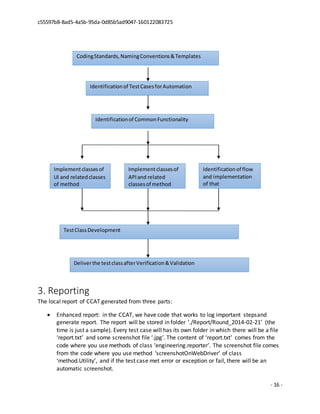
Diagram of Approach for Test Automation:
c55597b8-8ad5-4a5b-95da-0d85b5ad9047-160122083725
- 16 -
3. Reporting
The local report of CCAT generated from three parts:
 Enhanced report: in the CCAT, we have code that works to log important stepsand
generate report. The report will be stored in folder ‘./Report/Round_2014-02-21’ (the
time is just a sample). Every test case will has its own folder in which there will be a file
‘report.txt’ and some screenshot file ‘.jpg’. The content of ‘report.txt’ comes from the
code where you use methods of class ‘engineering.reporter’. The screenshot file comes
from the code where you use method ‘screenshotOnWebDriver’ of class
‘method.Utility’, and if the test case met error or exception or fail, there will be an
automatic screenshot.
Identificationof TestCasesforAutomation
Identificationof CommonFunctionality
CodingStandards,NamingConventions&Templates
Implementclassesof
UI and relatedclasses
of method
Implementclassesof
API and related
classesof method
Identification of flow
and implementation
of that
TestClassDevelopment
Deliverthe testclassafterVerification&Validation
c55597b8-8ad5-4a5b-95da-0d85b5ad9047-160122083725
- 17 -
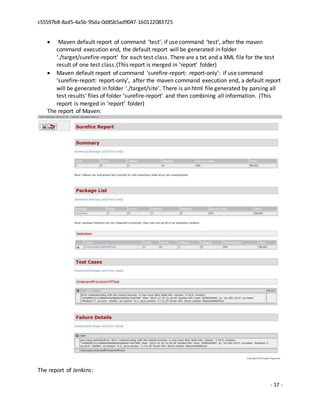
 Maven default report of command ‘test’: if use command ‘test’, after the maven
command execution end, the default report will be generated in folder
‘./target/surefire-report’ for each test class. There are a txt and a XML file for the test
result of one test class.(This report is merged in ‘report’ folder)
 Maven default report of command ‘surefire-report: report-only’: if use command
‘surefire-report: report-only’, after the maven command execution end, a default report
will be generated in folder ‘./target/site’. There is an html file generated by parsing all
test results’ files of folder ‘surefire-report’ and then combining all information. (This
report is merged in ‘report’ folder)
The report of Maven:
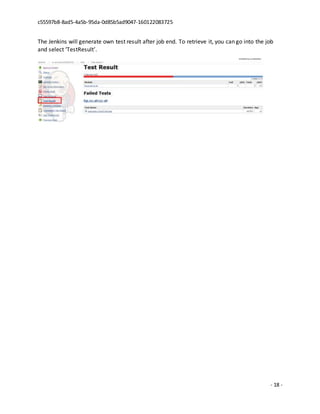
The report of Jenkins:
c55597b8-8ad5-4a5b-95da-0d85b5ad9047-160122083725
- 18 -
The Jenkins will generate own test result after job end. To retrieve it, you can go into the job
and select ‘TestResult’.

Diversified AT Framework - Initial Version

  • 1.
    Diversified Automation Testing Framework– Initial version May 27, 2015 Zhang Yu Tao
  • 2.
    c55597b8-8ad5-4a5b-95da-0d85b5ad9047-160122083725 - 2 - Tableof Contents 1. Automation Testing Framework - 3 - 1.1 Diagram of Automation Testing Framework - 3 - 1.2 Execution Environment - 3 - 1.3 Testing Tools - 3 - 1.4 Development Environment - 4 - 1.5 Code Structure - 4 - 1.6 Data Management - 5 - 1.7 Web Element Management - 6 - 1.8 API of Restful Web Service Management - 7 - 1.9 Command line of checking Windows VMManagement - 9 - 1.10 Command line of checking Linux VMManagement - 10 - 1.11 Write a Test Class - 12 - 1.12 Run scripts in Jenkins - 12 - 1.13 Run test class - 14 - 2. Approach for Test Automation - 14 - 2.1 Description - 14 - 3. Reporting - 16 -
  • 3.
    c55597b8-8ad5-4a5b-95da-0d85b5ad9047-160122083725 - 3 - 1.Automation Testing Framework The framework is a standard framework of Maven Project, in which the tools Selenium and RestClient are integrated to support web browser and API (RESTFul webservice) automation testing, the tool JUnit is integrated to support automation test case written and a maven plugin Surefire is added to execute the automation test case in Maven’s lifecycle ‘test’. Outside the framework, tool Jenkins is involved to support continuous integration testing and remotely. 1.1 Diagram of Automation Testing Framework 1.2 Execution Environment OS: Win XP or higher. Browser: Mozilla Firefox 2.6 or higher. 1.3 Testing Tools  Selenium (v2.39.0): a famous tool for automating web browsing testing and it supports mostly web control.  RestClient (v3.2.1): an open source tool to test RESTful webservices and it support most of types of RESTful webservice.  SSHJ (v0.9.0): an open source tool for executing SSH commands  PowerShell Client: an tool developed by AT Team for executing PowerShell commands
  • 4.
    c55597b8-8ad5-4a5b-95da-0d85b5ad9047-160122083725 - 4 - 1.4Development Environment  Java (v1.7.0): a language supports to integrate and develop new automation features.  JUnit (v4.11): an environment is easy to write and execute test case.  Maven (v3.1.1): a tool is easy to build java project and provides a good way to execute JUnit test case.  SVN (v1.7.x): a tool for storing code and version control. 1.5 Code Structure src/main/java: main java classes for implementing automation of converged cloud automation.  engineering: put the Java classes for structuring and managing the testing project.  repository.web: put the Java classes which represent UI element of website, in which the methods of how to identify the UI element and what action the UI element provides are implemented.
  • 5.
    c55597b8-8ad5-4a5b-95da-0d85b5ad9047-160122083725 - 5 - repository.api: put the Java classes which represent APIs of each system, in which the methods of how to send request of an API, how to get the response and how to analysis the response are implemented. Currently, the testing project just confronts the Restful webservice API, so there is only package repository.api.restful to put that classes right now.  repository.cmd: put the Java classes which represent Windows/Linux commands, in which the methods of how to execute the command, how to get the response and how to how to analysis the response are implemented. Currently, the testing project confronts the powershell and secureshell commonds, so there are packages repository.cmd.ps and repository.cmd.ssh to put that classes right now.  flow: put the Java classes which represent groups of step of each business flow of Converged Could.  utilities: put the common tool Java classes. src/test/java  testcases: put the test classes which represent test cases of functionality testing, and they are in standard JUnit test case format. src/test/resources: put external resource for classes of src/test/java  config.properties: stores global variables for the testing project.  TestData.csv: a file used to store all test data. 1.6 Data Management Use this TestDataManager.java to manage the test data. There are two steps to get data in a test class: 1. When you create a test case (java class), please add this scripts: //give testname to the test EnvConfigurator.initializeFileEnvForTest(); If the parameter is null, the test class name will be considered as the Test Name which is referred in file TestData.csv. If the parameter is not null, the given name will be referred in file TestData.csv.
  • 6.
    c55597b8-8ad5-4a5b-95da-0d85b5ad9047-160122083725 - 6 - 2.After that, you can get the test data from the excel file by method ‘getTestData’. For example, String name = TestDataManager.getTestData(‘page_csp_name’, 1); 1.7 Web Element Management The Package ‘repository.web’ is used to manage the web element. Every class in that package represents a web element in UI. (All the classes are implemented by using ‘org.openqa.selenium’ and the project ‘web’) For optimizing the efficiency of development and making the class easy to develop, these classes have been written in a parent-child relationship so that, to develop a new web element, developer often only needs to provide a suite of parameters to define the web element by using method ‘setCard’.
  • 7.
    c55597b8-8ad5-4a5b-95da-0d85b5ad9047-160122083725 - 7 - 1.8API of Restful Web Service Management In this framework, we can use Restful webservice API to communicate with CSA, for example: get consumer ID, order ID etc. (All the classes are implemented by using ‘org.wiztools.restclient’ and project ‘restfulwebservice’) For example: RestfGetConsumerID.java
  • 8.
    c55597b8-8ad5-4a5b-95da-0d85b5ad9047-160122083725 - 8 - Foroptimizing the efficiency of development and making the class easy to develop, these classes have been written in a parent-child relationship so that, to develop a new class, developer often only needs to provide the information of request by using method ‘setCard’. Call this java code in test class:
  • 9.
    c55597b8-8ad5-4a5b-95da-0d85b5ad9047-160122083725 - 9 - 1.9Command line of checking Windows VM Management In this framework, we can verify the detail information of windows VM by Powershell, for example: memory size, hardware etc. (All the classes are implemented by using project ‘powershell’) For example: PSQueryCPU.java For optimizing the efficiency of development and making the class easy to develop, these classes have been written in a parent-child relationship so that, to develop a new class, developer often only needs to provide the command lines by using method ‘setCard’. Call this java code in test class:
  • 10.
    c55597b8-8ad5-4a5b-95da-0d85b5ad9047-160122083725 - 10 - 1.10Command line of checking Linux VM Management In this framework, we can verify the detail information of Linux VM by SSHJ. (All the classes are implemented by using project ‘secureshell’) For example: SSHQueryCPU.java
  • 11.
    c55597b8-8ad5-4a5b-95da-0d85b5ad9047-160122083725 - 11 - Foroptimizing the efficiency of development and making the class easy to develop, these classes have been written in a parent-child relationship so that, to develop a new class, developer often only needs to provide the command lines by using method ‘setCard’. Call this java code in test class
  • 12.
    c55597b8-8ad5-4a5b-95da-0d85b5ad9047-160122083725 - 12 - 1.11Write a Test Class The progress is: 1. Create a new Class in package ‘testcases’ of source folder ‘src/test/java’. 2. The class must extends class ‘TestCase’ 3. Call classes of packages ‘flow’ according to your necessary. 4. Below is an example for a standard test class:  Set the test name – Envconfigurator.initializeFileEnvForTest  Import test data in test class – TestDataManager.getTestData  call the ‘flow’ kind of class to complete a business flow  log a test result – use class ‘reporter’ of package ‘engineering’ 1.12 Run scripts in Jenkins Jenkins is a website which can process maven project. For process a maven project, it asks to setup a job for the project firstly, then you can trigger the job manually or automatically according to your configuration of the job. To run the test class of CCAT in Jenkins, you must ensure the computer has installed JDK1.7, Maven 3.1.1, and Mozilla Firefox (2.6 and higher).
  • 13.
    c55597b8-8ad5-4a5b-95da-0d85b5ad9047-160122083725 - 13 - Toconfigure a job for CCAT: To run the job of CCAT:
  • 14.
    c55597b8-8ad5-4a5b-95da-0d85b5ad9047-160122083725 - 14 - Runin Jenkins Slave: Precondition: the Jenkins slave has been connected to a Jenkins master. Firstly, we need to setup job in Jenkins mater, then we specific which Jenkins slave is used to run the job. Just need to fill the slave’s name in the job page is ok. The slave name you can find in the ‘manage Jenkins -> manage node’ in Jenkins. Example: http://c0005225.itcs.hp.com:8080/job/cc-at-suit1(C0005225)/ 1.13 Run test class By default, we use maven command to run test class. Firstly, open window command line window, go to the root folder of CCAT then use following commands: To run all test class: mvn test surefire-report: report-only To specify test class to run: mvn –Dtest=test1,test2 test surefire-report: report-only To clean all built classes after run: use command ‘clean’ before ‘test’ likes mvn clean test surefire-report: report-only 2. Approach for Test Automation 2.1 Description Approachfor TestAutomationisusedforbuildingastrategyforautomationstartingfromthe Requirementphase till the deploymentphase.Approachforautomationbeginswithfindingoutthe
  • 15.
    c55597b8-8ad5-4a5b-95da-0d85b5ad9047-160122083725 - 15 - conditionsandbusinessrulesgivenbytheclientandgroupingsimilarconditions,businessrulestogether as Test Scenarios. Stepsinvolvedin Approach for Test Automation are as follows:  Requirementgatheringfrom Client  UnderstandingandAnalyzingthe Requirement  Groupingthe requirementintoTestcases  Selectmanual case forAutomation  Preparingthe DesignforAutomation  BuildingScriptsdependingonthe Design  Reviewof ScriptsatOffshore  Run anddebugScripts  Run automationscripts/ scenarios  Deliverytestreporttothe Client Diagram of Approach for Test Automation:
  • 16.
    c55597b8-8ad5-4a5b-95da-0d85b5ad9047-160122083725 - 16 - 3.Reporting The local report of CCAT generated from three parts:  Enhanced report: in the CCAT, we have code that works to log important stepsand generate report. The report will be stored in folder ‘./Report/Round_2014-02-21’ (the time is just a sample). Every test case will has its own folder in which there will be a file ‘report.txt’ and some screenshot file ‘.jpg’. The content of ‘report.txt’ comes from the code where you use methods of class ‘engineering.reporter’. The screenshot file comes from the code where you use method ‘screenshotOnWebDriver’ of class ‘method.Utility’, and if the test case met error or exception or fail, there will be an automatic screenshot. Identificationof TestCasesforAutomation Identificationof CommonFunctionality CodingStandards,NamingConventions&Templates Implementclassesof UI and relatedclasses of method Implementclassesof API and related classesof method Identification of flow and implementation of that TestClassDevelopment Deliverthe testclassafterVerification&Validation
  • 17.
    c55597b8-8ad5-4a5b-95da-0d85b5ad9047-160122083725 - 17 - Maven default report of command ‘test’: if use command ‘test’, after the maven command execution end, the default report will be generated in folder ‘./target/surefire-report’ for each test class. There are a txt and a XML file for the test result of one test class.(This report is merged in ‘report’ folder)  Maven default report of command ‘surefire-report: report-only’: if use command ‘surefire-report: report-only’, after the maven command execution end, a default report will be generated in folder ‘./target/site’. There is an html file generated by parsing all test results’ files of folder ‘surefire-report’ and then combining all information. (This report is merged in ‘report’ folder) The report of Maven: The report of Jenkins:
  • 18.
    c55597b8-8ad5-4a5b-95da-0d85b5ad9047-160122083725 - 18 - TheJenkins will generate own test result after job end. To retrieve it, you can go into the job and select ‘TestResult’.