Developing Advanced 
Universal Apps Using 
HTML and JS 
COMMUNITY CAMP, 17-21 NOV 2014
Agenda 
About Me 
Introduction to Universal Apps 
◦ What is Universal App? 
◦ Web App Vs Native App 
Universal App Template 
◦ Project Structure 
◦ Shared Project 
◦ Demo 
Background Tasks 
◦ Create Task 
◦ Consume Task
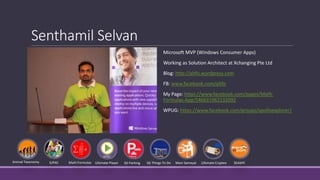
Senthamil Selvan 
Microsoft MVP (Windows Consumer Apps) 
Working as Solution Architect at Xchanging Pte Ltd 
Blog: http://altfo.wordpress.com 
FB: www.facebook.com/altfo 
My Page: https://www.facebook.com/pages/Math- 
Formulas-App/546631962132092 
WPUG: https://www.facebook.com/groups/apolloexplorer/ 
Animal Taxonomy IUPAC Math Formulas Ultimate Player SG Parking SG Things To Do Mani Samayal Ultimate Cryptex SEASPC
Introduction to Universal Apps 
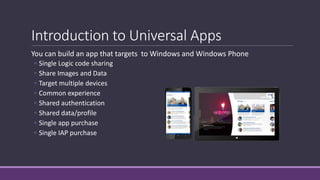
You can build an app that targets to Windows and Windows Phone 
◦ Single Logic code sharing 
◦ Share Images and Data 
◦ Target multiple devices 
◦ Common experience 
◦ Shared authentication 
◦ Shared data/profile 
◦ Single app purchase 
◦ Single IAP purchase
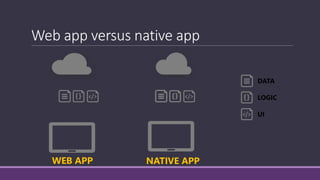
Web app versus native app 
WEB APP NATIVE APP 
DATA 
LOGIC 
UI
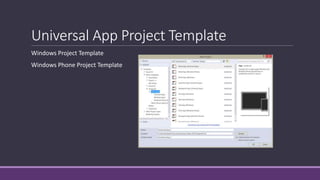
Universal App Project Template 
Windows Project Template 
Windows Phone Project Template
Project Structure 
DEMO
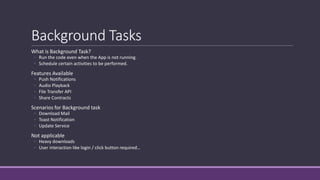
Background Tasks 
What is Background Task? 
◦ Run the code even when the App is not running. 
◦ Schedule certain activities to be performed. 
Features Available 
◦ Push Notifications 
◦ Audio Playback 
◦ File Transfer API 
◦ Share Contracts 
Scenarios for Background task 
◦ Download Mail 
◦ Toast Notification 
◦ Update Service 
Not applicable 
◦ Heavy downloads 
◦ User interaction like login / click button required…
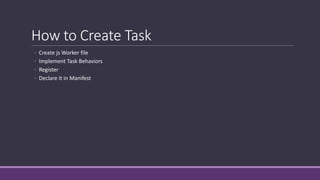
How to Create Task 
◦ Create jsWorker file 
◦ Implement Task Behaviors 
◦ Register 
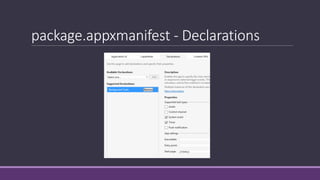
◦ Declare it in Manifest
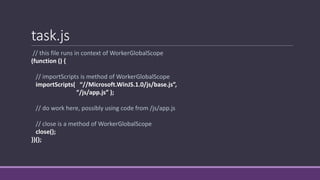
task.js 
// this file runs in context of WorkerGlobalScope 
(function () { 
// importScripts is method of WorkerGlobalScope 
importScripts( “//Microsoft.WinJS.1.0/js/base.js”, 
“/js/app.js” ); 
// do work here, possibly using code from /js/app.js 
// close is a method of WorkerGlobalScope 
close(); 
})();
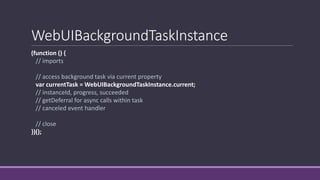
WebUIBackgroundTaskInstance 
(function () { 
// imports 
// access background task via current property 
var currentTask = WebUIBackgroundTaskInstance.current; 
// instanceId, progress, succeeded 
// getDeferral for async calls within task 
// canceled event handler 
// close 
})();
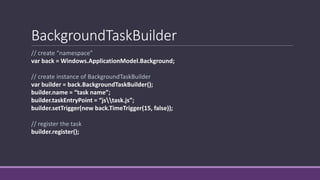
BackgroundTaskBuilder 
// create “namespace” 
var back = Windows.ApplicationModel.Background; 
// create instance of BackgroundTaskBuilder 
var builder = back.BackgroundTaskBuilder(); 
builder.name = “task name”; 
builder.taskEntryPoint = “jstask.js”; 
builder.setTrigger(new back.TimeTrigger(15, false)); 
// register the task 
builder.register();
package.appxmanifest - Declarations
Consume Tasks 
How Tasks Triggered 
Conditional Tasks 
Lock Screen Scenario
Tasks 
DEMO

Developing advanced universal apps using html & js

  • 1.
    Developing Advanced UniversalApps Using HTML and JS COMMUNITY CAMP, 17-21 NOV 2014
  • 2.
    Agenda About Me Introduction to Universal Apps ◦ What is Universal App? ◦ Web App Vs Native App Universal App Template ◦ Project Structure ◦ Shared Project ◦ Demo Background Tasks ◦ Create Task ◦ Consume Task
  • 3.
    Senthamil Selvan MicrosoftMVP (Windows Consumer Apps) Working as Solution Architect at Xchanging Pte Ltd Blog: http://altfo.wordpress.com FB: www.facebook.com/altfo My Page: https://www.facebook.com/pages/Math- Formulas-App/546631962132092 WPUG: https://www.facebook.com/groups/apolloexplorer/ Animal Taxonomy IUPAC Math Formulas Ultimate Player SG Parking SG Things To Do Mani Samayal Ultimate Cryptex SEASPC
  • 4.
    Introduction to UniversalApps You can build an app that targets to Windows and Windows Phone ◦ Single Logic code sharing ◦ Share Images and Data ◦ Target multiple devices ◦ Common experience ◦ Shared authentication ◦ Shared data/profile ◦ Single app purchase ◦ Single IAP purchase
  • 5.
    Web app versusnative app WEB APP NATIVE APP DATA LOGIC UI
  • 6.
    Universal App ProjectTemplate Windows Project Template Windows Phone Project Template
  • 7.
  • 8.
    Background Tasks Whatis Background Task? ◦ Run the code even when the App is not running. ◦ Schedule certain activities to be performed. Features Available ◦ Push Notifications ◦ Audio Playback ◦ File Transfer API ◦ Share Contracts Scenarios for Background task ◦ Download Mail ◦ Toast Notification ◦ Update Service Not applicable ◦ Heavy downloads ◦ User interaction like login / click button required…
  • 9.
    How to CreateTask ◦ Create jsWorker file ◦ Implement Task Behaviors ◦ Register ◦ Declare it in Manifest
  • 10.
    task.js // thisfile runs in context of WorkerGlobalScope (function () { // importScripts is method of WorkerGlobalScope importScripts( “//Microsoft.WinJS.1.0/js/base.js”, “/js/app.js” ); // do work here, possibly using code from /js/app.js // close is a method of WorkerGlobalScope close(); })();
  • 11.
    WebUIBackgroundTaskInstance (function (){ // imports // access background task via current property var currentTask = WebUIBackgroundTaskInstance.current; // instanceId, progress, succeeded // getDeferral for async calls within task // canceled event handler // close })();
  • 12.
    BackgroundTaskBuilder // create“namespace” var back = Windows.ApplicationModel.Background; // create instance of BackgroundTaskBuilder var builder = back.BackgroundTaskBuilder(); builder.name = “task name”; builder.taskEntryPoint = “jstask.js”; builder.setTrigger(new back.TimeTrigger(15, false)); // register the task builder.register();
  • 13.
  • 14.
    Consume Tasks HowTasks Triggered Conditional Tasks Lock Screen Scenario
  • 15.

Editor's Notes

  • #11 name of file does not matter this is an example shell not a script tag in default.htm, associated later in app manifest how the worker file is registered and executed is what gives it WorkerGlobalScope context
  • #12 this is code that runs in context of task.js provides data about task, a method for async calls, and an event for handling the cancelation of task
  • #13 this is code that is called from foreground application example shows how to create task triggered by time (other trigger types will be discussed later)