Mobile App Development using
Dss Prakash
Agenda
• Why cross platform for mobile development .
• What is PhoneGAP ?
• How does phonegap work..?
• PhoneGap features.
• Setting-up Your PhoneGap Environment.
• Creating “Hello World!” using PhoneGap.
• PhoneGap Plugin development
Dss Prakash
Cross-Platform Mobile Apps
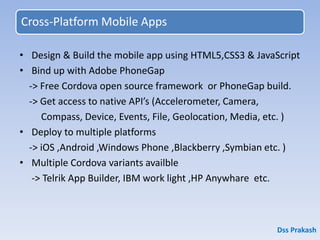
• Design & Build the mobile app using HTML5,CSS3 & JavaScript
• Bind up with Adobe PhoneGap
-> Free Cordova open source framework or PhoneGap build.
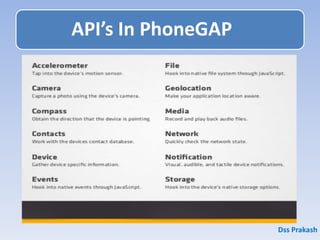
-> Get access to native API’s (Accelerometer, Camera,
Compass, Device, Events, File, Geolocation, Media, etc. )
• Deploy to multiple platforms
-> iOS ,Android ,Windows Phone ,Blackberry ,Symbian etc. )
• Multiple Cordova variants availble
-> Telrik App Builder, IBM work light ,HP Anywhare etc.
Dss Prakash
1. PhoneGap is still a product of Adobe. It is a distribution of
Apache Cordova.
Think of Apache Cordova as the engine that powers
PhoneGap.
Dss Prakash
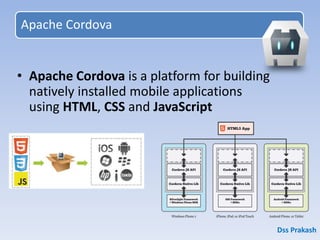
Apache Cordova
• Apache Cordova is a platform for building
natively installed mobile applications
using HTML, CSS and JavaScript
Dss Prakash
What is PhoneGap?
• Build mobile apps using HTML5, Javascript & CSS3
• PhoneGap was originally developed by Nitobi
• In 2011, Adobe acquired Nitobi
• PhoneGap was donated to the Apache Software Foundation
(ASF) under the name Apache Cordova
• Through the ASF, PhoneGap remains free and open source
under the Apache License, Version 2.0
• PhoneGap adds extra features to Cordova (e.g. cloud build)
• http://cordova.apache.org/
• http://phonegap.com/
Dss Prakash
Installing PhoneGap
C:> npm install -g phonegap
$ phonegap create my-app
$ cd my-app
$ phonegap run android
To Install, ensure that you have NodeJS installed, then open your command-line and
run the following:
Install
Usage
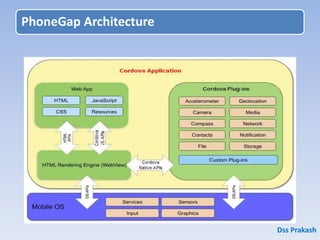
PhoneGap Architecture
Dss Prakash
How does PhoneGap Work?
• Include web code in a native app project:
- assets/www/js/, css/, images/, etc.
• Native code loads a URL to the web code through
the device’s internal browser:
- Extend a CordovaWebViewClient
- super.loadUrl( “file:///android_asset/www/login.html” );
• Apache Cordova exposes native device APIs
through JavaScript:
- navigator.device.capture.captureImage( captureSuccess(),
captureError(), [options] );
Dss Prakash
API’s In PhoneGAP
Dss Prakash
1. HTML5 and CCS 3 support.
2. Debugging and profiling .
3. Performance and memory usage.
4. Screen size and orientation .
5. DPI’s .(Dots per inch (dpi) is
a measure of a display's pixel density).
6. User interface – or use just native look.
7. Performance and optimization
Challenges in PhoneGap ..?
1. PhoneGap is not UI framework .
2. PhoneGap doesn't include a browser
and /or rendering engine.
3. PhoneGap doesn't compile .
4. Every platform needs its own compilation.
5. HTML5/CSS3 compatibility.
What is NOT PhoneGap ..?
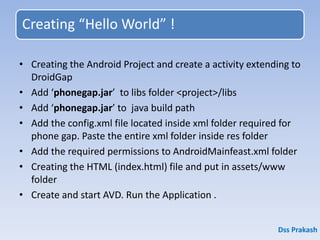
Creating “Hello World” !
• Creating the Android Project and create a activity extending to
DroidGap
• Add ‘phonegap.jar’ to libs folder <project>/libs
• Add ‘phonegap.jar’ to java build path
• Add the config.xml file located inside xml folder required for
phone gap. Paste the entire xml folder inside res folder
• Add the required permissions to AndroidMainfeast.xml folder
• Creating the HTML (index.html) file and put in assets/www
folder
• Create and start AVD. Run the Application .
Dss Prakash
Dss Prakash
Html Code ..!
Dss Prakash
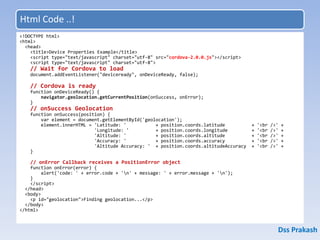
<!DOCTYPE html>
<html>
<head>
<title>Device Properties Example</title>
<script type="text/javascript" charset="utf-8" src="cordova-2.0.0.js"></script>
<script type="text/javascript" charset="utf-8">
// Wait for Cordova to load
document.addEventListener("deviceready", onDeviceReady, false);
// Cordova is ready
function onDeviceReady() {
navigator.geolocation.getCurrentPosition(onSuccess, onError);
}
// onSuccess Geolocation
function onSuccess(position) {
var element = document.getElementById('geolocation');
element.innerHTML = 'Latitude: ' + position.coords.latitude + '<br />' +
'Longitude: ' + position.coords.longitude + '<br />' +
'Altitude: ' + position.coords.altitude + '<br />' +
'Accuracy: ' + position.coords.accuracy + '<br />' +
'Altitude Accuracy: ' + position.coords.altitudeAccuracy + '<br />' +
}
// onError Callback receives a PositionError object
function onError(error) {
alert('code: ' + error.code + 'n' + message: ' + error.message + 'n');
}
</script>
</head>
<body>
<p id="geolocation">Finding geolocation...</p>
</body>
</html>
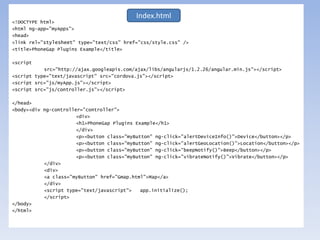
<!DOCTYPE html>
<html ng-app="myApps">
<head>
<link rel="stylesheet" type="text/css" href="css/style.css" />
<title>PhoneGap Plugins Example</title>
<script
src="http://ajax.googleapis.com/ajax/libs/angularjs/1.2.26/angular.min.js"></script>
<script type="text/javascript" src="cordova.js"></script>
<script src="js/myApp.js"></script>
<script src="js/controller.js"></script>
</head>
<body><div ng-controller="controller">
<div>
<h1>PhoneGap Plugins Example</h1>
</div>
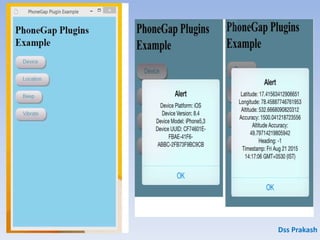
<p><button class="myButton" ng-click="alertDeviceInfo()">Device</button></p>
<p><button class="myButton" ng-click="alertGeoLocation()">Location</button></p>
<p><button class="myButton" ng-click="beepNotify()">Beep</button></p>
<p><button class="myButton" ng-click="vibrateNotify()">Vibrate</button></p>
</div>
<div>
<a class="myButton" href="Gmap.html">Map</a>
</div>
<script type="text/javascript"> app.initialize();
</script>
</body>
</html>
Index.html
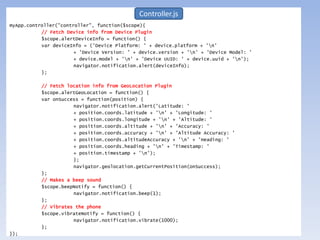
myApp.controller("controller", function($scope){
// Fetch Device info from Device Plugin
$scope.alertDeviceInfo = function() {
var deviceInfo = ('Device Platform: ' + device.platform + 'n'
+ 'Device Version: ' + device.version + 'n' + 'Device Model: '
+ device.model + 'n' + 'Device UUID: ' + device.uuid + 'n');
navigator.notification.alert(deviceInfo);
};
// Fetch location info from GeoLocation Plugin
$scope.alertGeoLocation = function() {
var onSuccess = function(position) {
navigator.notification.alert('Latitude: '
+ position.coords.latitude + 'n' + 'Longitude: '
+ position.coords.longitude + 'n' + 'Altitude: '
+ position.coords.altitude + 'n' + 'Accuracy: '
+ position.coords.accuracy + 'n' + 'Altitude Accuracy: '
+ position.coords.altitudeAccuracy + 'n' + 'Heading: '
+ position.coords.heading + 'n' + 'Timestamp: '
+ position.timestamp + 'n');
};
navigator.geolocation.getCurrentPosition(onSuccess);
};
// Makes a beep sound
$scope.beepNotify = function() {
navigator.notification.beep(1);
};
// Vibrates the phone
$scope.vibrateNotify = function() {
navigator.notification.vibrate(1000);
};
});
Controller.js
var app = {
// Application Constructor
initialize: function() {
this.bindEvents();
},
// Bind Event Listeners
// Bind any events that are required on startup. Common events are:
// 'load', 'deviceready', 'offline', and 'online'.
bindEvents: function() {
document.addEventListener('deviceready', this.onDeviceReady, false);
},
// deviceready Event Handler
// The scope of 'this' is the event. In order to call the 'receivedEvent'
// function, we must explicity call 'app.receivedEvent(...);'
onDeviceReady: function() {
app.receivedEvent('deviceready');
},
// Update DOM on a Received Event
receivedEvent: function(id) {
console.log('Received Event: ' + id);
}
};
var myApp = angular.module('myApps', []);
Index.js
myApp.js
PhoneGAP Advantages..!
• Not required any programming language
• Supportive for all major platforms
• Support for Various API’s
Dss Prakash
Disadvantages of PhoneGAP ..!
• Conditions Apply .
• Can be inefficient when working for native apps .
• Does not support all the functionality.
Dss Prakash
Dss Prakash
• https://build.phonegap.com/
• https://platform.telerik.com/
• https://appery.io/
Thank You
Dss Prakash

phonegap with angular js for freshers

  • 1.
    Mobile App Developmentusing Dss Prakash
  • 2.
    Agenda • Why crossplatform for mobile development . • What is PhoneGAP ? • How does phonegap work..? • PhoneGap features. • Setting-up Your PhoneGap Environment. • Creating “Hello World!” using PhoneGap. • PhoneGap Plugin development Dss Prakash
  • 3.
    Cross-Platform Mobile Apps •Design & Build the mobile app using HTML5,CSS3 & JavaScript • Bind up with Adobe PhoneGap -> Free Cordova open source framework or PhoneGap build. -> Get access to native API’s (Accelerometer, Camera, Compass, Device, Events, File, Geolocation, Media, etc. ) • Deploy to multiple platforms -> iOS ,Android ,Windows Phone ,Blackberry ,Symbian etc. ) • Multiple Cordova variants availble -> Telrik App Builder, IBM work light ,HP Anywhare etc. Dss Prakash
  • 4.
    1. PhoneGap isstill a product of Adobe. It is a distribution of Apache Cordova. Think of Apache Cordova as the engine that powers PhoneGap. Dss Prakash
  • 5.
    Apache Cordova • ApacheCordova is a platform for building natively installed mobile applications using HTML, CSS and JavaScript Dss Prakash
  • 6.
    What is PhoneGap? •Build mobile apps using HTML5, Javascript & CSS3 • PhoneGap was originally developed by Nitobi • In 2011, Adobe acquired Nitobi • PhoneGap was donated to the Apache Software Foundation (ASF) under the name Apache Cordova • Through the ASF, PhoneGap remains free and open source under the Apache License, Version 2.0 • PhoneGap adds extra features to Cordova (e.g. cloud build) • http://cordova.apache.org/ • http://phonegap.com/ Dss Prakash
  • 7.
    Installing PhoneGap C:> npminstall -g phonegap $ phonegap create my-app $ cd my-app $ phonegap run android To Install, ensure that you have NodeJS installed, then open your command-line and run the following: Install Usage
  • 8.
  • 9.
    How does PhoneGapWork? • Include web code in a native app project: - assets/www/js/, css/, images/, etc. • Native code loads a URL to the web code through the device’s internal browser: - Extend a CordovaWebViewClient - super.loadUrl( “file:///android_asset/www/login.html” ); • Apache Cordova exposes native device APIs through JavaScript: - navigator.device.capture.captureImage( captureSuccess(), captureError(), [options] ); Dss Prakash
  • 10.
  • 11.
    1. HTML5 andCCS 3 support. 2. Debugging and profiling . 3. Performance and memory usage. 4. Screen size and orientation . 5. DPI’s .(Dots per inch (dpi) is a measure of a display's pixel density). 6. User interface – or use just native look. 7. Performance and optimization Challenges in PhoneGap ..?
  • 12.
    1. PhoneGap isnot UI framework . 2. PhoneGap doesn't include a browser and /or rendering engine. 3. PhoneGap doesn't compile . 4. Every platform needs its own compilation. 5. HTML5/CSS3 compatibility. What is NOT PhoneGap ..?
  • 13.
    Creating “Hello World”! • Creating the Android Project and create a activity extending to DroidGap • Add ‘phonegap.jar’ to libs folder <project>/libs • Add ‘phonegap.jar’ to java build path • Add the config.xml file located inside xml folder required for phone gap. Paste the entire xml folder inside res folder • Add the required permissions to AndroidMainfeast.xml folder • Creating the HTML (index.html) file and put in assets/www folder • Create and start AVD. Run the Application . Dss Prakash
  • 14.
  • 15.
    Html Code ..! DssPrakash <!DOCTYPE html> <html> <head> <title>Device Properties Example</title> <script type="text/javascript" charset="utf-8" src="cordova-2.0.0.js"></script> <script type="text/javascript" charset="utf-8"> // Wait for Cordova to load document.addEventListener("deviceready", onDeviceReady, false); // Cordova is ready function onDeviceReady() { navigator.geolocation.getCurrentPosition(onSuccess, onError); } // onSuccess Geolocation function onSuccess(position) { var element = document.getElementById('geolocation'); element.innerHTML = 'Latitude: ' + position.coords.latitude + '<br />' + 'Longitude: ' + position.coords.longitude + '<br />' + 'Altitude: ' + position.coords.altitude + '<br />' + 'Accuracy: ' + position.coords.accuracy + '<br />' + 'Altitude Accuracy: ' + position.coords.altitudeAccuracy + '<br />' + } // onError Callback receives a PositionError object function onError(error) { alert('code: ' + error.code + 'n' + message: ' + error.message + 'n'); } </script> </head> <body> <p id="geolocation">Finding geolocation...</p> </body> </html>
  • 16.
    <!DOCTYPE html> <html ng-app="myApps"> <head> <linkrel="stylesheet" type="text/css" href="css/style.css" /> <title>PhoneGap Plugins Example</title> <script src="http://ajax.googleapis.com/ajax/libs/angularjs/1.2.26/angular.min.js"></script> <script type="text/javascript" src="cordova.js"></script> <script src="js/myApp.js"></script> <script src="js/controller.js"></script> </head> <body><div ng-controller="controller"> <div> <h1>PhoneGap Plugins Example</h1> </div> <p><button class="myButton" ng-click="alertDeviceInfo()">Device</button></p> <p><button class="myButton" ng-click="alertGeoLocation()">Location</button></p> <p><button class="myButton" ng-click="beepNotify()">Beep</button></p> <p><button class="myButton" ng-click="vibrateNotify()">Vibrate</button></p> </div> <div> <a class="myButton" href="Gmap.html">Map</a> </div> <script type="text/javascript"> app.initialize(); </script> </body> </html> Index.html
  • 17.
    myApp.controller("controller", function($scope){ // FetchDevice info from Device Plugin $scope.alertDeviceInfo = function() { var deviceInfo = ('Device Platform: ' + device.platform + 'n' + 'Device Version: ' + device.version + 'n' + 'Device Model: ' + device.model + 'n' + 'Device UUID: ' + device.uuid + 'n'); navigator.notification.alert(deviceInfo); }; // Fetch location info from GeoLocation Plugin $scope.alertGeoLocation = function() { var onSuccess = function(position) { navigator.notification.alert('Latitude: ' + position.coords.latitude + 'n' + 'Longitude: ' + position.coords.longitude + 'n' + 'Altitude: ' + position.coords.altitude + 'n' + 'Accuracy: ' + position.coords.accuracy + 'n' + 'Altitude Accuracy: ' + position.coords.altitudeAccuracy + 'n' + 'Heading: ' + position.coords.heading + 'n' + 'Timestamp: ' + position.timestamp + 'n'); }; navigator.geolocation.getCurrentPosition(onSuccess); }; // Makes a beep sound $scope.beepNotify = function() { navigator.notification.beep(1); }; // Vibrates the phone $scope.vibrateNotify = function() { navigator.notification.vibrate(1000); }; }); Controller.js
  • 18.
    var app ={ // Application Constructor initialize: function() { this.bindEvents(); }, // Bind Event Listeners // Bind any events that are required on startup. Common events are: // 'load', 'deviceready', 'offline', and 'online'. bindEvents: function() { document.addEventListener('deviceready', this.onDeviceReady, false); }, // deviceready Event Handler // The scope of 'this' is the event. In order to call the 'receivedEvent' // function, we must explicity call 'app.receivedEvent(...);' onDeviceReady: function() { app.receivedEvent('deviceready'); }, // Update DOM on a Received Event receivedEvent: function(id) { console.log('Received Event: ' + id); } }; var myApp = angular.module('myApps', []); Index.js myApp.js
  • 19.
    PhoneGAP Advantages..! • Notrequired any programming language • Supportive for all major platforms • Support for Various API’s Dss Prakash
  • 20.
    Disadvantages of PhoneGAP..! • Conditions Apply . • Can be inefficient when working for native apps . • Does not support all the functionality. Dss Prakash
  • 21.
  • 22.
  • 23.