html5-Web プラットフォーム部
ものえおさむ
今日は NativeScript の話です。
Introduce
of
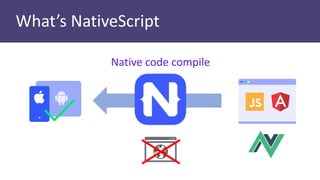
What’s NativeScript
Native code compile
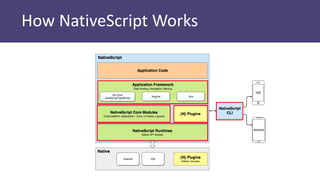
How NativeScript Works
Target device requirements
•Android API Level 17+
•iOS 9+
•The latest official version of NativeScript
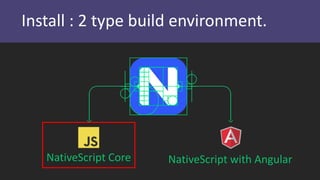
Install : 2 type build environment.
NativeScript Core NativeScript with Angular
Install : NativeScript Core
• Node.js
• Java 8 SDK
• Android SDK
• Android Emulator
• Google Chrome
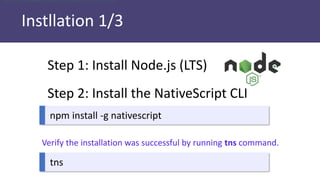
Instllation 1/3
Step 1: Install Node.js (LTS)
Step 2: Install the NativeScript CLI
npm install -g nativescript
tns
Verify the installation was successful by running tns command.
verify the installation was successful by running tns
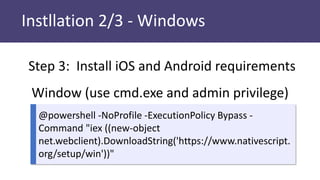
Instllation 2/3 - Windows
Step 3: Install iOS and Android requirements
Window (use cmd.exe and admin privilege)
@powershell -NoProfile -ExecutionPolicy Bypass -
Command "iex ((new-object
net.webclient).DownloadString('https://www.nativescript.
org/setup/win'))"
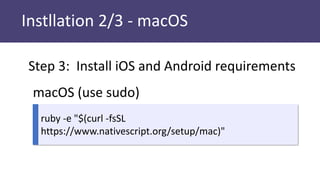
Instllation 2/3 - macOS
Step 3: Install iOS and Android requirements
macOS (use sudo)
ruby -e "$(curl -fsSL
https://www.nativescript.org/setup/mac)"
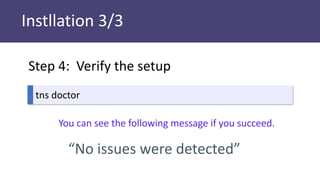
Instllation 3/3
tns doctor
You can see the following message if you succeed.
“No issues were detected”
Step 4: Verify the setup
Unfortunately,
you will not success this install work.
Maybe, probably.
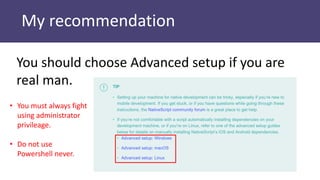
My recommendation
You should choose Advanced setup if you are
real man.
• You must always fight
using administrator
privileage.
• Do not use
Powershell never.
Create first app
with NativeScript Core
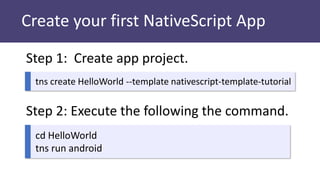
Create your first NativeScript App
tns create HelloWorld --template nativescript-template-tutorial
Step 1: Create app project.
Step 2: Execute the following the command.
cd HelloWorld
tns run android
Unfortunately,
you will not succeed run your first app
like a your first l♡ve.
Maybe, probably.
You will see the following message:
“Cannot find connected devices.”
Other disasters that attack you
Demo
Create and launch
My fist NativeScript App
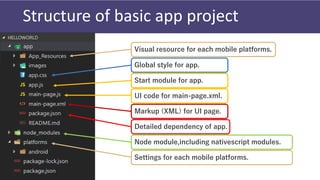
Structure of basic app project
Global style for app.
Start module for app.
UI code for main-page.xml.
Markup (XML) for UI page.
Detailed dependency of app.
Node module,including nativescript modules.
Settings for each mobile platforms.
Visual resource for each mobile platforms.
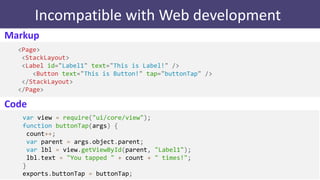
Incompatible with Web development
Markup
<Page>
<StackLayout>
<Label id="Label1" text="This is Label!" />
<Button text="This is Button!" tap="buttonTap" />
</StackLayout>
</Page>
var view = require("ui/core/view");
function buttonTap(args) {
count++;
var parent = args.object.parent;
var lbl = view.getViewById(parent, "Label1");
lbl.text = "You tapped " + count + " times!";
}
exports.buttonTap = buttonTap;
Code
Helper tools
for
NativeScript
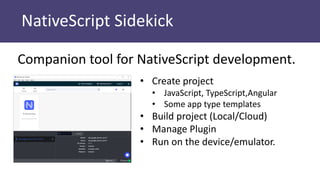
NativeScript Sidekick
Companion tool for NativeScript development.
• Create project
• JavaScript, TypeScript,Angular
• Some app type templates
• Build project (Local/Cloud)
• Manage Plugin
• Run on the device/emulator.
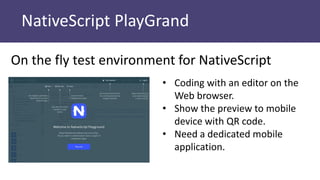
NativeScript PlayGrand
On the fly test environment for NativeScript
• Coding with an editor on the
Web browser.
• Show the preview to mobile
device with QR code.
• Need a dedicated mobile
application.
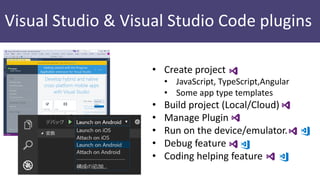
Visual Studio & Visual Studio Code plugins
• Create project
• JavaScript, TypeScript,Angular
• Some app type templates
• Build project (Local/Cloud)
• Manage Plugin
• Run on the device/emulator.
• Debug feature
• Coding helping feature
Summary
• NativeScript can develop cross platform mobile app
with Angular.js + TypeScript or JavaScript.
• The development method is not very compatible
with web development.
• Abundant tools and learning contents are prepared.
Finally
Reference
• Native mobile apps with Angular, TypeScript,
JavaScript – NativeScript
• Play and Try NativeScript on Your Device – {N}
Playground
• The total package for truly native mobile
development
NativeScript 環境のインストールとはじめてのプロジェクト実行

NativeScript 環境のインストールとはじめてのプロジェクト実行

  • 1.
  • 2.
  • 3.
  • 4.
  • 5.
    Target device requirements •AndroidAPI Level 17+ •iOS 9+ •The latest official version of NativeScript
  • 6.
    Install : 2type build environment. NativeScript Core NativeScript with Angular
  • 7.
    Install : NativeScriptCore • Node.js • Java 8 SDK • Android SDK • Android Emulator • Google Chrome
  • 8.
    Instllation 1/3 Step 1:Install Node.js (LTS) Step 2: Install the NativeScript CLI npm install -g nativescript tns Verify the installation was successful by running tns command. verify the installation was successful by running tns
  • 9.
    Instllation 2/3 -Windows Step 3: Install iOS and Android requirements Window (use cmd.exe and admin privilege) @powershell -NoProfile -ExecutionPolicy Bypass - Command "iex ((new-object net.webclient).DownloadString('https://www.nativescript. org/setup/win'))"
  • 10.
    Instllation 2/3 -macOS Step 3: Install iOS and Android requirements macOS (use sudo) ruby -e "$(curl -fsSL https://www.nativescript.org/setup/mac)"
  • 11.
    Instllation 3/3 tns doctor Youcan see the following message if you succeed. “No issues were detected” Step 4: Verify the setup
  • 12.
    Unfortunately, you will notsuccess this install work. Maybe, probably.
  • 13.
    My recommendation You shouldchoose Advanced setup if you are real man. • You must always fight using administrator privileage. • Do not use Powershell never.
  • 14.
    Create first app withNativeScript Core
  • 15.
    Create your firstNativeScript App tns create HelloWorld --template nativescript-template-tutorial Step 1: Create app project. Step 2: Execute the following the command. cd HelloWorld tns run android
  • 16.
    Unfortunately, you will notsucceed run your first app like a your first l♡ve. Maybe, probably. You will see the following message: “Cannot find connected devices.”
  • 17.
  • 18.
    Demo Create and launch Myfist NativeScript App
  • 19.
    Structure of basicapp project Global style for app. Start module for app. UI code for main-page.xml. Markup (XML) for UI page. Detailed dependency of app. Node module,including nativescript modules. Settings for each mobile platforms. Visual resource for each mobile platforms.
  • 20.
    Incompatible with Webdevelopment Markup <Page> <StackLayout> <Label id="Label1" text="This is Label!" /> <Button text="This is Button!" tap="buttonTap" /> </StackLayout> </Page> var view = require("ui/core/view"); function buttonTap(args) { count++; var parent = args.object.parent; var lbl = view.getViewById(parent, "Label1"); lbl.text = "You tapped " + count + " times!"; } exports.buttonTap = buttonTap; Code
  • 21.
  • 22.
    NativeScript Sidekick Companion toolfor NativeScript development. • Create project • JavaScript, TypeScript,Angular • Some app type templates • Build project (Local/Cloud) • Manage Plugin • Run on the device/emulator.
  • 23.
    NativeScript PlayGrand On thefly test environment for NativeScript • Coding with an editor on the Web browser. • Show the preview to mobile device with QR code. • Need a dedicated mobile application.
  • 24.
    Visual Studio &Visual Studio Code plugins • Create project • JavaScript, TypeScript,Angular • Some app type templates • Build project (Local/Cloud) • Manage Plugin • Run on the device/emulator. • Debug feature • Coding helping feature
  • 25.
    Summary • NativeScript candevelop cross platform mobile app with Angular.js + TypeScript or JavaScript. • The development method is not very compatible with web development. • Abundant tools and learning contents are prepared.
  • 26.
  • 27.
    Reference • Native mobileapps with Angular, TypeScript, JavaScript – NativeScript • Play and Try NativeScript on Your Device – {N} Playground • The total package for truly native mobile development