Con$nuous 
Deployment 
with 
Docker 
Andrew 
Aslinger 
Oct 
9. 
2014
Who 
is 
Andrew 
#1 
So#ware 
/ 
Systems 
Architect 
for 
OpenWhere 
Passion 
for 
UX, 
Big 
Data, 
and 
Cloud/DevOps 
Previously 
Designed 
and 
Implemented 
automated 
DevOps 
processes 
for 
several 
organiza@ons 
Mul$ple 
environments, 
many 
user 
/ 
developer 
groups, 
big 
data 
clusters, 
hundreds 
of 
machines 
A 
Recovering 
“Chef”
Who 
is 
Andrew 
#2 
(Andy) 
Host 
of 
AWS 
DC 
Meet 
Up 
Started 
as 
a 
developer 
who 
could 
talk 
to 
opera@ons 
and 
infrastructure 
teams 
Lived 
the 
transi@on 
from 
data 
center, 
Co-­‐Lo, 
internal 
cloud, 
to 
AWS 
To 
much 
fun 
to 
ever 
go 
back
4 
Agenda 
What 
is 
Docker 
? 
Con$nuous 
Delivery 
with 
AWS 
and 
Docker 
Docker 
Advanced 
Prac$ces 
and 
Lessons 
Learned 
Demo 
& 
Discussion
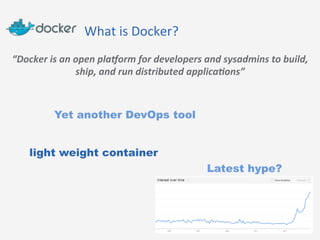
What 
is 
Docker? 
“Docker 
is 
an 
open 
pla/orm 
for 
developers 
and 
sysadmins 
to 
build, 
ship, 
and 
run 
distributed 
applica:ons” 
Yet another DevOps tool 
light weight container 
Latest hype?
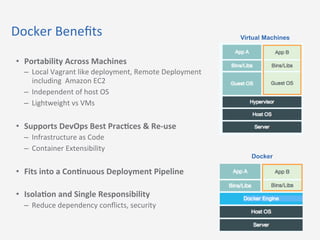
Docker 
Benefits 
• Portability 
Across 
Machines 
– Local 
Vagrant 
like 
deployment, 
Remote 
Deployment 
including 
Amazon 
EC2 
– Independent 
of 
host 
OS 
– Lightweight 
vs 
VMs 
• Supports 
DevOps 
Best 
Prac@ces 
& 
Re-­‐use 
– Infrastructure 
as 
Code 
– Container 
Extensibility 
• Fits 
into 
a 
Con@nuous 
Deployment 
Pipeline 
• Isola@on 
and 
Single 
Responsibility 
– Reduce 
dependency 
conflicts, 
security 
Virtual Machines 
Docker
7 
A 
Typical 
Docker 
Flow 
with 
six 
simple 
commands 
Docker 
Image 
docker build –t imagename . 
Dockerfile 
conf 
Docker 
Registry 
registryname: 
docker tag imagename registryname/ 
imagename 
https://registry.hub.docker.com/ 
Private registry 
Docker 
Image 
Docker 
Container 
or 
docker run –p 9000:9000 –d --name 
containername imagename 
Development 
Environment 
Host 
Environment 
docker stop/restart/start 
containername
OpenWhere 
DevOps 
Philosophy 
1. Immutable 
Infrastructure 
– Focus 
on 
one 
process 
(build) 
vs. 
two 
(build 
& 
maintain) 
2. Simplify 
the 
Tools 
– Minimize 
On-­‐boarding 
& 
Training 
– Minimize 
Tools 
3. Purpose 
Built 
Environments 
4. DevOps 
code 
should 
co-­‐exist 
with 
applica@on 
code 
– How 
to 
build 
infrastructure 
for 
project 
inline 
with 
project 
– Jenkins 
scripts 
– Docker 
5. Auto-­‐scale 
from 
start
Why 
Docker 
with 
EC2? 
• Build 
once, 
run 
many 
places 
– Dev 
Machines, 
different 
clouds, 
different 
VPCs, 
share 
and 
build 
– Not 
$ed 
to 
box 
size 
or 
guest 
OS 
• AMI’s 
are 
difficult 
to 
rebuild 
and 
more 
difficult 
to 
maintain 
– Snapshots 
retain 
baggage 
– There 
is 
no 
“git” 
version 
control 
for 
AMI 
– AMI’s 
are 
not 
cross 
region 
compa$ble 
– Other 
AMI 
tools 
like 
Amiator 
aren’t 
easy 
to 
use 
• Easier 
to 
achieve 
immutable 
infrastructure 
and 
one 
click 
deploys 
– Maintaining 
machines 
sucks 
• Treat 
your 
infrastructure 
as 
code 
with 
a 
Con@nuous 
Deployment 
Pipeline
Why 
Docker 
with 
EC2? 
• Separate 
your 
data 
and 
state 
from 
your 
image 
• Machine 
layers 
evolve 
at 
different 
velocity 
and 
have 
different 
reuse 
(Example 
Later) 
– Core 
OS 
– Organiza$on 
Level 
Requirements 
– Applica$on 
Level 
Requirements 
– Applica$on 
Code 
• Test 
and 
version 
control 
your 
deploy 
ar$facts 
and 
configura$on 
together 
– Same 
container 
for 
developers 
and 
EC2 
– Java 
Example 
• Stop 
maintaining 
AMIs 
+
Docker 
Con@nuous 
Deployment 
Flow: 
Set 
up 
AWS 
infrastructure 
Create AWS Ec2 Instances 
and install Docker 
1 
yum install -y docker-io 
service docker start 
….
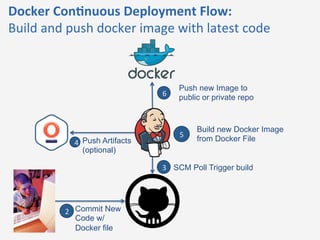
Docker 
Con@nuous 
Deployment 
Flow: 
Build 
and 
push 
docker 
image 
with 
latest 
code 
Commit New 
Code w/ 
Docker file 
SCM Poll Trigger build 
Push Artifacts 
(optional) 
Push new Image to 
public or private repo 
2 
3 
4 
6 
Build new Docker Image 
5 
from Docker File
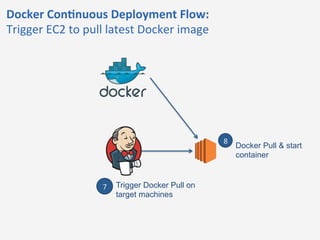
Docker 
Con@nuous 
Deployment 
Flow: 
Trigger 
EC2 
to 
pull 
latest 
Docker 
image 
Trigger Docker Pull on 
target machines 
7 
Docker Pull & start 
container 
8
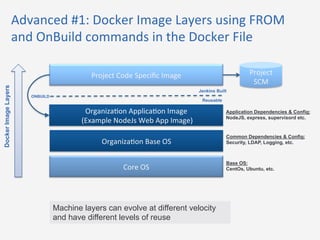
Advanced 
#1: 
Docker 
Image 
Layers 
using 
FROM 
and 
OnBuild 
commands 
in 
the 
Docker 
File 
Project 
Code 
Specific 
Image 
Organiza$on 
Applica$on 
Image 
(Example 
NodeJs 
Web 
App 
Image) 
Organiza$on 
Base 
OS 
Core 
OS 
Project 
SCM 
Application Dependencies & Config: 
NodeJS, express, supervisord etc. 
Common Dependencies & Config: 
Security, LDAP, Logging, etc. 
Base OS: 
CentOs, Ubuntu, etc. 
ONBUILD 
Docker Image Layers 
Jenkins Built 
Reusable 
Machine layers can evolve at different velocity 
and have different levels of reuse
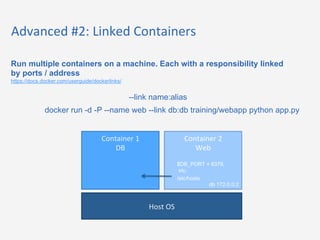
Advanced 
#2: 
Linked 
Containers 
Run multiple containers on a machine. Each with a responsibility linked 
by ports / address 
https://docs.docker.com/userguide/dockerlinks/ 
--link name:alias 
docker run -d -P --name web --link db:db training/webapp python app.py 
Host 
OS 
Container 
1 
DB 
Container 
2 
Web 
$DB_PORT = 6379, 
etc. 
/etc/hosts 
db 172.0.0.2
Advanced 
#3: 
Data 
Containers 
A container which allows sharing of data across containers 
https://docs.docker.com/userguide/dockervolumes/ 
Benefits: Change image independent of data (maintainability) 
Enables Data sharing patterns (single responsibility) 
sudo docker run -d --volumes-from dbdata --name db2 training/postgres 
Host 
OS 
Data 
Container 
(non 
running) 
Container 
2 
Web 
/volume 
Limitations: Data is Tied to Host OS 
/volume 
-file1.txt 
-file2.txt 
Physical files 
docker managed 
Container 
3 
Web 
/volume
Advanced 
#4: 
Customize 
on 
Init 
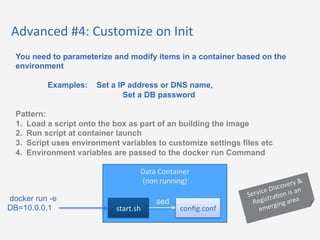
You need to parameterize and modify items in a container based on the 
environment 
Examples: Set a IP address or DNS name, 
Set a DB password 
Pattern: 
1. Load a script onto the box as part of an building the image 
2. Run script at container launch 
3. Script uses environment variables to customize settings files etc 
4. Environment variables are passed to the docker run Command 
Data 
Container 
(non 
running) 
docker run -e sed 
DB=10.0.0.1 
start.sh 
config.conf 
Discovery 
Service 
& 
is 
Registra$on 
an 
area 
emerging
OpenWhere 
Docker 
Wins 
1. Full 
con@nuous 
deployment 
and 
write 
once, 
deploy 
many 
@mes 
realized 
2. Developer 
Replacement 
for 
vagrant 
– Less 
complexity 
– Test 
with 
what 
you 
deploy! 
3. Deployment 
build 
process 
co-­‐exists 
with 
the 
so#ware! 
– Reduced 
Maintenance, 
developer 
buy-­‐in, 
testability 
4. Awesome 
Re-­‐use 
with 
minimal 
code 
– 1 
line 
Dockerfile(s) 
for 
new 
MEAN 
Stack 
apps 
5. Simplicity 
(Streamlined 
DevOps)
OpenWhere 
Docker 
Burns 
• Learning 
Curve 
/ 
Maturity 
– Learning 
a 
Docker 
way 
for 
each 
DevOps 
task 
(s$ll 
in 
progress) 
– Example: 
Need 
“tricks” 
to 
do 
things 
like 
have 
more 
than 
one 
process 
running 
in 
a 
container 
– Example: 
Learning 
layers 
are 
independent 
and 
don’t 
retain 
state 
between 
RUN 
commands 
• A 
Docker 
Container 
is 
not 
the 
same 
as 
a 
typical 
virtual 
machine 
– Basic 
stuff 
like 
syslog 
off 
and 
tar, 
wget 
not 
installed 
– Base 
Image: 
hmp://phusion.github.io/baseimage-­‐docker/ 
• Containers 
not 
restar@ng 
on 
EC2 
Restart 
– We 
hacked 
a 
cloud-­‐init 
work 
around 
• Upda@ng 
to 
new 
images 
is 
dirty 
– Manually 
clean 
up 
images 
/ 
containers 
or 
run 
out 
of 
disk! 
• Debugging 
more 
complex: 
You 
can 
only 
a`ach 
to 
a 
Docker 
container 
if 
the 
program 
you 
are 
running 
is 
a 
shell 
– Install 
SSH 
or 
we 
have 
a 
workaround 
trick
Recommenda$ons 
• Docker 
works 
great 
for 
a 
Con$nuous 
Deployment 
flow 
on 
EC2 
– Especially 
for 
stateless 
applica$ons 
or 
a 
micro-­‐service 
architecture 
• Complex 
cluster 
deployments, 
stateful 
applica$ons 
or 
databases, 
service 
discovery 
etc. 
not 
quite 
there 
yet 
– You 
may 
need 
to 
roll 
your 
own 
solu$on 
or 
integrate 
with 
another 
technology
Ques$ons
22 
Contact 
Informa$on 
Andrew 
Aslinger 
Senior 
Systems 
Architect 
OpenWhere 
aaslinger@openwhere.com 
@aaa572 
hmp://owaaa.github.io/ 
Andrew 
Heifetz 
Chief 
Cloud 
Officer 
OpenWhere 
aheifetz@openwhere.com 
@andyheifetz 
hmp://www.linkedin.com/pub/andrew-­‐heifetz 
Cell: 
240-­‐481-­‐7442

Continuous Integration with Docker on AWS

  • 1.
    Con$nuous Deployment with Docker Andrew Aslinger Oct 9. 2014
  • 2.
    Who is Andrew #1 So#ware / Systems Architect for OpenWhere Passion for UX, Big Data, and Cloud/DevOps Previously Designed and Implemented automated DevOps processes for several organiza@ons Mul$ple environments, many user / developer groups, big data clusters, hundreds of machines A Recovering “Chef”
  • 3.
    Who is Andrew #2 (Andy) Host of AWS DC Meet Up Started as a developer who could talk to opera@ons and infrastructure teams Lived the transi@on from data center, Co-­‐Lo, internal cloud, to AWS To much fun to ever go back
  • 4.
    4 Agenda What is Docker ? Con$nuous Delivery with AWS and Docker Docker Advanced Prac$ces and Lessons Learned Demo & Discussion
  • 5.
    What is Docker? “Docker is an open pla/orm for developers and sysadmins to build, ship, and run distributed applica:ons” Yet another DevOps tool light weight container Latest hype?
  • 6.
    Docker Benefits •Portability Across Machines – Local Vagrant like deployment, Remote Deployment including Amazon EC2 – Independent of host OS – Lightweight vs VMs • Supports DevOps Best Prac@ces & Re-­‐use – Infrastructure as Code – Container Extensibility • Fits into a Con@nuous Deployment Pipeline • Isola@on and Single Responsibility – Reduce dependency conflicts, security Virtual Machines Docker
  • 7.
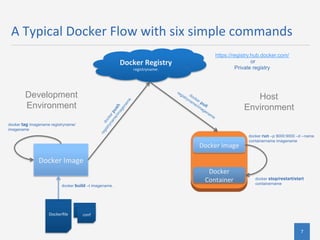
    7 A Typical Docker Flow with six simple commands Docker Image docker build –t imagename . Dockerfile conf Docker Registry registryname: docker tag imagename registryname/ imagename https://registry.hub.docker.com/ Private registry Docker Image Docker Container or docker run –p 9000:9000 –d --name containername imagename Development Environment Host Environment docker stop/restart/start containername
  • 8.
    OpenWhere DevOps Philosophy 1. Immutable Infrastructure – Focus on one process (build) vs. two (build & maintain) 2. Simplify the Tools – Minimize On-­‐boarding & Training – Minimize Tools 3. Purpose Built Environments 4. DevOps code should co-­‐exist with applica@on code – How to build infrastructure for project inline with project – Jenkins scripts – Docker 5. Auto-­‐scale from start
  • 9.
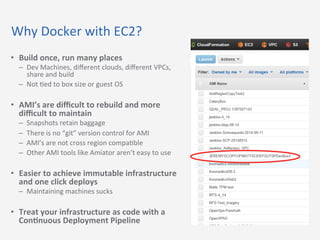
    Why Docker with EC2? • Build once, run many places – Dev Machines, different clouds, different VPCs, share and build – Not $ed to box size or guest OS • AMI’s are difficult to rebuild and more difficult to maintain – Snapshots retain baggage – There is no “git” version control for AMI – AMI’s are not cross region compa$ble – Other AMI tools like Amiator aren’t easy to use • Easier to achieve immutable infrastructure and one click deploys – Maintaining machines sucks • Treat your infrastructure as code with a Con@nuous Deployment Pipeline
  • 10.
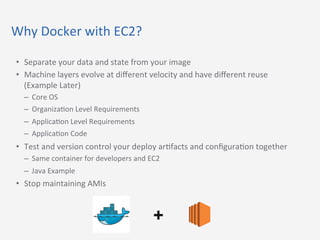
    Why Docker with EC2? • Separate your data and state from your image • Machine layers evolve at different velocity and have different reuse (Example Later) – Core OS – Organiza$on Level Requirements – Applica$on Level Requirements – Applica$on Code • Test and version control your deploy ar$facts and configura$on together – Same container for developers and EC2 – Java Example • Stop maintaining AMIs +
  • 11.
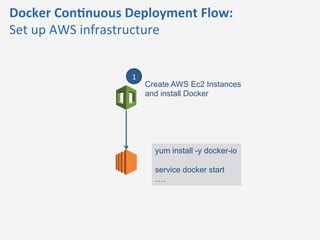
    Docker Con@nuous Deployment Flow: Set up AWS infrastructure Create AWS Ec2 Instances and install Docker 1 yum install -y docker-io service docker start ….
  • 12.
    Docker Con@nuous Deployment Flow: Build and push docker image with latest code Commit New Code w/ Docker file SCM Poll Trigger build Push Artifacts (optional) Push new Image to public or private repo 2 3 4 6 Build new Docker Image 5 from Docker File
  • 13.
    Docker Con@nuous Deployment Flow: Trigger EC2 to pull latest Docker image Trigger Docker Pull on target machines 7 Docker Pull & start container 8
  • 14.
    Advanced #1: Docker Image Layers using FROM and OnBuild commands in the Docker File Project Code Specific Image Organiza$on Applica$on Image (Example NodeJs Web App Image) Organiza$on Base OS Core OS Project SCM Application Dependencies & Config: NodeJS, express, supervisord etc. Common Dependencies & Config: Security, LDAP, Logging, etc. Base OS: CentOs, Ubuntu, etc. ONBUILD Docker Image Layers Jenkins Built Reusable Machine layers can evolve at different velocity and have different levels of reuse
  • 15.
    Advanced #2: Linked Containers Run multiple containers on a machine. Each with a responsibility linked by ports / address https://docs.docker.com/userguide/dockerlinks/ --link name:alias docker run -d -P --name web --link db:db training/webapp python app.py Host OS Container 1 DB Container 2 Web $DB_PORT = 6379, etc. /etc/hosts db 172.0.0.2
  • 16.
    Advanced #3: Data Containers A container which allows sharing of data across containers https://docs.docker.com/userguide/dockervolumes/ Benefits: Change image independent of data (maintainability) Enables Data sharing patterns (single responsibility) sudo docker run -d --volumes-from dbdata --name db2 training/postgres Host OS Data Container (non running) Container 2 Web /volume Limitations: Data is Tied to Host OS /volume -file1.txt -file2.txt Physical files docker managed Container 3 Web /volume
  • 17.
    Advanced #4: Customize on Init You need to parameterize and modify items in a container based on the environment Examples: Set a IP address or DNS name, Set a DB password Pattern: 1. Load a script onto the box as part of an building the image 2. Run script at container launch 3. Script uses environment variables to customize settings files etc 4. Environment variables are passed to the docker run Command Data Container (non running) docker run -e sed DB=10.0.0.1 start.sh config.conf Discovery Service & is Registra$on an area emerging
  • 18.
    OpenWhere Docker Wins 1. Full con@nuous deployment and write once, deploy many @mes realized 2. Developer Replacement for vagrant – Less complexity – Test with what you deploy! 3. Deployment build process co-­‐exists with the so#ware! – Reduced Maintenance, developer buy-­‐in, testability 4. Awesome Re-­‐use with minimal code – 1 line Dockerfile(s) for new MEAN Stack apps 5. Simplicity (Streamlined DevOps)
  • 19.
    OpenWhere Docker Burns • Learning Curve / Maturity – Learning a Docker way for each DevOps task (s$ll in progress) – Example: Need “tricks” to do things like have more than one process running in a container – Example: Learning layers are independent and don’t retain state between RUN commands • A Docker Container is not the same as a typical virtual machine – Basic stuff like syslog off and tar, wget not installed – Base Image: hmp://phusion.github.io/baseimage-­‐docker/ • Containers not restar@ng on EC2 Restart – We hacked a cloud-­‐init work around • Upda@ng to new images is dirty – Manually clean up images / containers or run out of disk! • Debugging more complex: You can only a`ach to a Docker container if the program you are running is a shell – Install SSH or we have a workaround trick
  • 20.
    Recommenda$ons • Docker works great for a Con$nuous Deployment flow on EC2 – Especially for stateless applica$ons or a micro-­‐service architecture • Complex cluster deployments, stateful applica$ons or databases, service discovery etc. not quite there yet – You may need to roll your own solu$on or integrate with another technology
  • 21.
  • 22.
    22 Contact Informa$on Andrew Aslinger Senior Systems Architect OpenWhere aaslinger@openwhere.com @aaa572 hmp://owaaa.github.io/ Andrew Heifetz Chief Cloud Officer OpenWhere aheifetz@openwhere.com @andyheifetz hmp://www.linkedin.com/pub/andrew-­‐heifetz Cell: 240-­‐481-­‐7442