DevelopingappsforReconHUDsXavier Hallade, Application Engineer, Intel Corporation
Agenda
- Recon devices and Recon OS
- OS, dev environment and SDK
- Apps distribution
- Examples of Apps
- Q&A
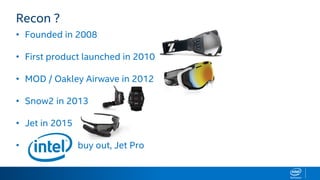
Recon ?
• Founded in 2008
• First product launched in 2010
• MOD / Oakley Airwave in 2012
• Snow2 in 2013
• Jet in 2015
• buy out, Jet Pro
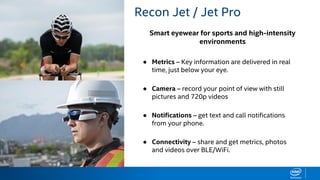
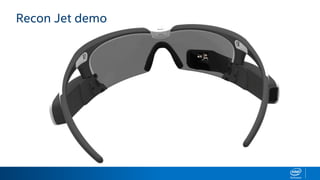
Smart eyewear for sports and high-intensity
environments
RECON JET BENEFITS Recon Jet / Jet Pro
● Metrics – Key information are delivered in real
time, just below your eye.
● Camera – record your point of view with still
pictures and 720p videos
● Notifications – get text and call notifications
from your phone.
● Connectivity – share and get metrics, photos
and videos over BLE/WiFi.
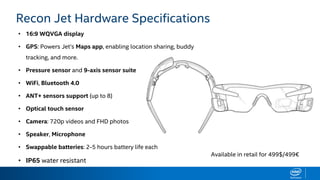
HARDWARE SPECIFICATIONS
• 16:9 WQVGA display
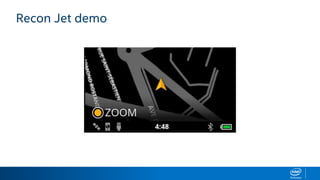
• GPS: Powers Jet’s Maps app, enabling location sharing, buddy
tracking, and more.
• Pressure sensor and 9-axis sensor suite
• WiFi, Bluetooth 4.0
• ANT+ sensors support (up to 8)
• Optical touch sensor
• Camera: 720p videos and FHD photos
• Speaker, Microphone
• Swappable batteries: 2-5 hours battery life each
• IP65 water resistant
Recon Jet Hardware Specifications
Available in retail for 499$/499€
Recon Jet demo
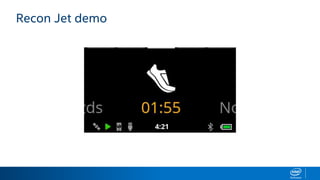
Recon Jet demo
Recon Jet demo
ReconOSandSDK
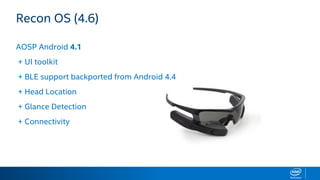
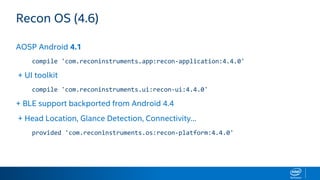
Recon OS (4.6)
AOSP Android 4.1
+ UI toolkit
+ BLE support backported from Android 4.4
+ Head Location
+ Glance Detection
+ Connectivity
Recon OS (4.6)
AOSP Android 4.1
compile 'com.reconinstruments.app:recon-application:4.4.0'
+ UI toolkit
compile 'com.reconinstruments.ui:recon-ui:4.4.0'
+ BLE support backported from Android 4.4
+ Head Location, Glance Detection, Connectivity…
provided 'com.reconinstruments.os:recon-platform:4.4.0'
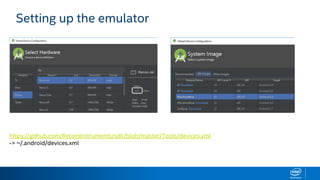
Setting up the emulator
https://github.com/ReconInstruments/sdk/blob/master/Tools/devices.xml
-> ~/.android/devices.xml
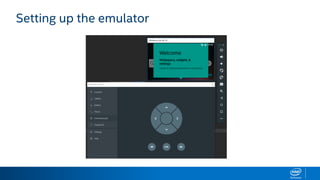
Setting up the emulator
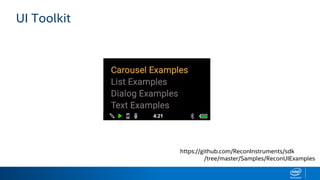
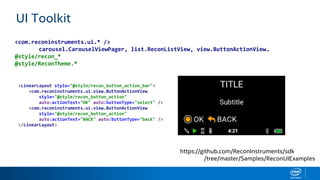
UI Toolkit
https://github.com/ReconInstruments/sdk
/tree/master/Samples/ReconUIExamples
UI Toolkit
https://github.com/ReconInstruments/sdk
/tree/master/Samples/ReconUIExamples
<com.reconinstruments.ui.* />
carousel.CarouselViewPager, list.ReconListView, view.ButtonActionView…
@style/recon_*
@style/ReconTheme.*
<LinearLayout style="@style/recon_button_action_bar">
<com.reconinstruments.ui.view.ButtonActionView
style="@style/recon_button_action"
auto:actionText="OK" auto:buttonType="select" />
<com.reconinstruments.ui.view.ButtonActionView
style="@style/recon_button_action"
auto:actionText="BACK" auto:buttonType="back" />
</LinearLayout>
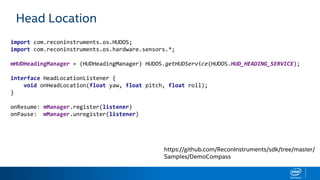
Head Location
import com.reconinstruments.os.HUDOS;
import com.reconinstruments.os.hardware.sensors.*;
mHUDHeadingManager = (HUDHeadingManager) HUDOS.getHUDService(HUDOS.HUD_HEADING_SERVICE);
interface HeadLocationListener {
void onHeadLocation(float yaw, float pitch, float roll);
}
onResume: mManager.register(listener)
onPause: mManager.unregister(listener)
https://github.com/ReconInstruments/sdk/tree/master/
Samples/DemoCompass
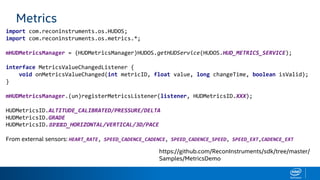
Metrics
import com.reconinstruments.os.HUDOS;
import com.reconinstruments.os.metrics.*;
mHUDMetricsManager = (HUDMetricsManager)HUDOS.getHUDService(HUDOS.HUD_METRICS_SERVICE);
interface MetricsValueChangedListener {
void onMetricsValueChanged(int metricID, float value, long changeTime, boolean isValid);
}
mHUDMetricsManager.(un)registerMetricsListener(listener, HUDMetricsID.XXX);
HUDMetricsID.ALTITUDE_CALIBRATED/PRESSURE/DELTA
HUDMetricsID.GRADE
HUDMetricsID.SPEED_HORIZONTAL/VERTICAL/3D/PACE
From external sensors: HEART_RATE, SPEED_CADENCE_CADENCE, SPEED_CADENCE_SPEED, SPEED_EXT,CADENCE_EXT
https://github.com/ReconInstruments/sdk/tree/master/
Samples/MetricsDemo
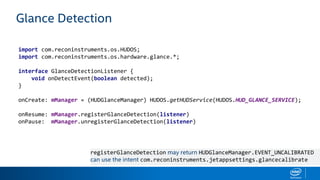
Glance Detection
import com.reconinstruments.os.HUDOS;
import com.reconinstruments.os.hardware.glance.*;
interface GlanceDetectionListener {
void onDetectEvent(boolean detected);
}
onCreate: mManager = (HUDGlanceManager) HUDOS.getHUDService(HUDOS.HUD_GLANCE_SERVICE);
onResume: mManager.registerGlanceDetection(listener)
onPause: mManager.unregisterGlanceDetection(listener)
registerGlanceDetection may return HUDGlanceManager.EVENT_UNCALIBRATED
can use the intent com.reconinstruments.jetappsettings.glancecalibrate
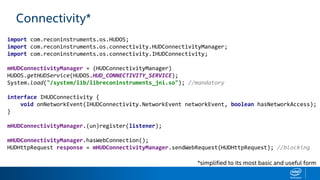
Connectivity*
import com.reconinstruments.os.HUDOS;
import com.reconinstruments.os.connectivity.HUDConnectivityManager;
import com.reconinstruments.os.connectivity.IHUDConnectivity;
mHUDConnectivityManager = (HUDConnectivityManager)
HUDOS.getHUDService(HUDOS.HUD_CONNECTIVITY_SERVICE);
System.load("/system/lib/libreconinstruments_jni.so"); //mandatory
interface IHUDConnectivity {
void onNetworkEvent(IHUDConnectivity.NetworkEvent networkEvent, boolean hasNetworkAccess);
}
mHUDConnectivityManager.(un)register(listener);
mHUDConnectivityManager.hasWebConnection();
HUDHttpRequest response = mHUDConnectivityManager.sendWebRequest(HUDHttpRequest); //blocking
*simplified to its most basic and useful form
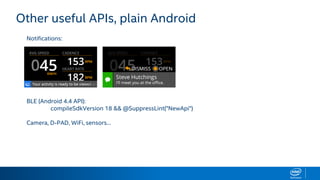
Other useful APIs, plain Android
Notifications:
BLE (Android 4.4 API):
compileSdkVersion 18 && @SuppressLint("NewApi")
Camera, D-PAD, WiFi, sensors…
DistributingApps
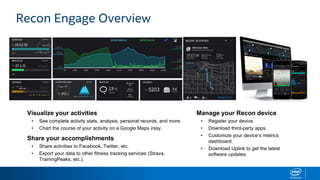
Visualize your activities
• See complete activity stats, analysis, personal records, and more.
• Chart the course of your activity on a Google Maps inlay.
Share your accomplishments
• Share activities to Facebook, Twitter, etc.
• Export your data to other fitness tracking services (Strava,
TrainingPeaks, etc.).
Manage your Recon device
• Register your device.
• Download third-party apps.
• Customize your device’s metrics
dashboard.
• Download Uplink to get the latest
software updates.
Recon Engage Overview
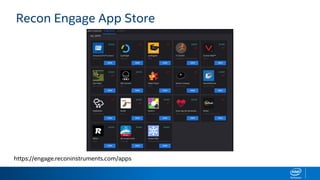
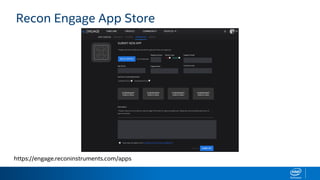
Recon Engage App Store
https://engage.reconinstruments.com/apps
Recon Engage App Store
https://engage.reconinstruments.com/apps
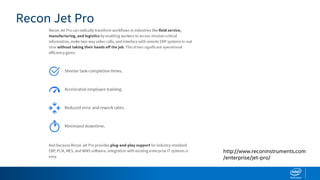
Recon Jet Pro
http://www.reconinstruments.com
/enterprise/jet-pro/
Examplesofapps
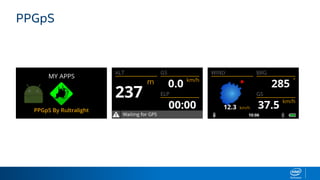
App for ultralight flyers (prototype)
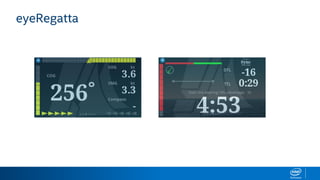
eyeRegatta
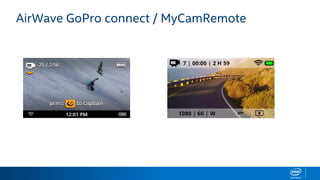
AirWave GoPro connect / MyCamRemote
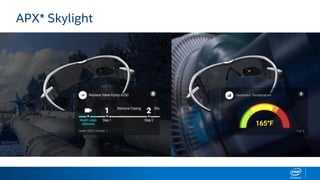
APX* Skylight
THANKYOU
xavier.hallade@intel.com - @ph0b - +XavierHallade
Apps development for Recon HUDs

Apps development for Recon HUDs

  • 1.
  • 2.
    Agenda - Recon devicesand Recon OS - OS, dev environment and SDK - Apps distribution - Examples of Apps - Q&A
  • 3.
    Recon ? • Foundedin 2008 • First product launched in 2010 • MOD / Oakley Airwave in 2012 • Snow2 in 2013 • Jet in 2015 • buy out, Jet Pro
  • 4.
    Smart eyewear forsports and high-intensity environments RECON JET BENEFITS Recon Jet / Jet Pro ● Metrics – Key information are delivered in real time, just below your eye. ● Camera – record your point of view with still pictures and 720p videos ● Notifications – get text and call notifications from your phone. ● Connectivity – share and get metrics, photos and videos over BLE/WiFi.
  • 5.
    HARDWARE SPECIFICATIONS • 16:9WQVGA display • GPS: Powers Jet’s Maps app, enabling location sharing, buddy tracking, and more. • Pressure sensor and 9-axis sensor suite • WiFi, Bluetooth 4.0 • ANT+ sensors support (up to 8) • Optical touch sensor • Camera: 720p videos and FHD photos • Speaker, Microphone • Swappable batteries: 2-5 hours battery life each • IP65 water resistant Recon Jet Hardware Specifications Available in retail for 499$/499€
  • 6.
  • 7.
  • 8.
  • 9.
  • 10.
    Recon OS (4.6) AOSPAndroid 4.1 + UI toolkit + BLE support backported from Android 4.4 + Head Location + Glance Detection + Connectivity
  • 11.
    Recon OS (4.6) AOSPAndroid 4.1 compile 'com.reconinstruments.app:recon-application:4.4.0' + UI toolkit compile 'com.reconinstruments.ui:recon-ui:4.4.0' + BLE support backported from Android 4.4 + Head Location, Glance Detection, Connectivity… provided 'com.reconinstruments.os:recon-platform:4.4.0'
  • 12.
    Setting up theemulator https://github.com/ReconInstruments/sdk/blob/master/Tools/devices.xml -> ~/.android/devices.xml
  • 13.
  • 14.
  • 15.
    UI Toolkit https://github.com/ReconInstruments/sdk /tree/master/Samples/ReconUIExamples <com.reconinstruments.ui.* /> carousel.CarouselViewPager,list.ReconListView, view.ButtonActionView… @style/recon_* @style/ReconTheme.* <LinearLayout style="@style/recon_button_action_bar"> <com.reconinstruments.ui.view.ButtonActionView style="@style/recon_button_action" auto:actionText="OK" auto:buttonType="select" /> <com.reconinstruments.ui.view.ButtonActionView style="@style/recon_button_action" auto:actionText="BACK" auto:buttonType="back" /> </LinearLayout>
  • 16.
    Head Location import com.reconinstruments.os.HUDOS; importcom.reconinstruments.os.hardware.sensors.*; mHUDHeadingManager = (HUDHeadingManager) HUDOS.getHUDService(HUDOS.HUD_HEADING_SERVICE); interface HeadLocationListener { void onHeadLocation(float yaw, float pitch, float roll); } onResume: mManager.register(listener) onPause: mManager.unregister(listener) https://github.com/ReconInstruments/sdk/tree/master/ Samples/DemoCompass
  • 17.
    Metrics import com.reconinstruments.os.HUDOS; import com.reconinstruments.os.metrics.*; mHUDMetricsManager= (HUDMetricsManager)HUDOS.getHUDService(HUDOS.HUD_METRICS_SERVICE); interface MetricsValueChangedListener { void onMetricsValueChanged(int metricID, float value, long changeTime, boolean isValid); } mHUDMetricsManager.(un)registerMetricsListener(listener, HUDMetricsID.XXX); HUDMetricsID.ALTITUDE_CALIBRATED/PRESSURE/DELTA HUDMetricsID.GRADE HUDMetricsID.SPEED_HORIZONTAL/VERTICAL/3D/PACE From external sensors: HEART_RATE, SPEED_CADENCE_CADENCE, SPEED_CADENCE_SPEED, SPEED_EXT,CADENCE_EXT https://github.com/ReconInstruments/sdk/tree/master/ Samples/MetricsDemo
  • 18.
    Glance Detection import com.reconinstruments.os.HUDOS; importcom.reconinstruments.os.hardware.glance.*; interface GlanceDetectionListener { void onDetectEvent(boolean detected); } onCreate: mManager = (HUDGlanceManager) HUDOS.getHUDService(HUDOS.HUD_GLANCE_SERVICE); onResume: mManager.registerGlanceDetection(listener) onPause: mManager.unregisterGlanceDetection(listener) registerGlanceDetection may return HUDGlanceManager.EVENT_UNCALIBRATED can use the intent com.reconinstruments.jetappsettings.glancecalibrate
  • 19.
    Connectivity* import com.reconinstruments.os.HUDOS; import com.reconinstruments.os.connectivity.HUDConnectivityManager; importcom.reconinstruments.os.connectivity.IHUDConnectivity; mHUDConnectivityManager = (HUDConnectivityManager) HUDOS.getHUDService(HUDOS.HUD_CONNECTIVITY_SERVICE); System.load("/system/lib/libreconinstruments_jni.so"); //mandatory interface IHUDConnectivity { void onNetworkEvent(IHUDConnectivity.NetworkEvent networkEvent, boolean hasNetworkAccess); } mHUDConnectivityManager.(un)register(listener); mHUDConnectivityManager.hasWebConnection(); HUDHttpRequest response = mHUDConnectivityManager.sendWebRequest(HUDHttpRequest); //blocking *simplified to its most basic and useful form
  • 20.
    Other useful APIs,plain Android Notifications: BLE (Android 4.4 API): compileSdkVersion 18 && @SuppressLint("NewApi") Camera, D-PAD, WiFi, sensors…
  • 21.
  • 22.
    Visualize your activities •See complete activity stats, analysis, personal records, and more. • Chart the course of your activity on a Google Maps inlay. Share your accomplishments • Share activities to Facebook, Twitter, etc. • Export your data to other fitness tracking services (Strava, TrainingPeaks, etc.). Manage your Recon device • Register your device. • Download third-party apps. • Customize your device’s metrics dashboard. • Download Uplink to get the latest software updates. Recon Engage Overview
  • 23.
    Recon Engage AppStore https://engage.reconinstruments.com/apps
  • 24.
    Recon Engage AppStore https://engage.reconinstruments.com/apps
  • 25.
  • 26.
  • 27.
    App for ultralightflyers (prototype)
  • 28.
  • 29.
    AirWave GoPro connect/ MyCamRemote
  • 30.
  • 31.