Designing navigation
S.Gopinath
Department of Physical Science
Vavuniya Campus,
University of Jaffna,
Sri Lanka
• People won’t use your Web site if they can’t
find their way around it.
S.Gopinath 2
S.Gopinath 3
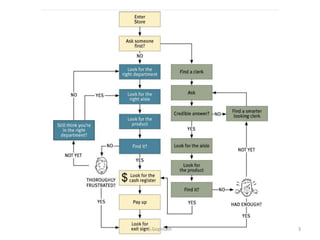
When you enter a Web site
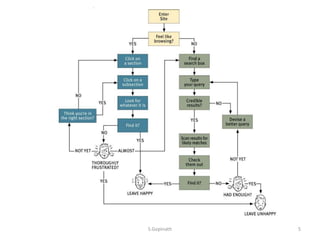
• You’re usually trying to find something.
• You decide whether to ask first or browse
first.
– “search-dominant” users
– “link-dominant” users
S.Gopinath 4
S.Gopinath 5
Oddities of Web space
• No sense of scale
– Even after we’ve used a Web site extensively,
unless it’s a very small site we tend to have very
little sense of how big it is.
• No sense of direction.
– In a Web site, there’s no left and right, no up and
down. We may talk about moving up and down
S.Gopinath 6
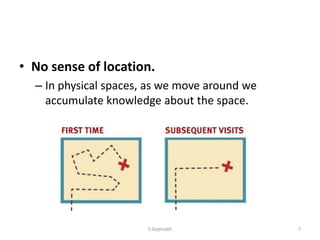
• No sense of location.
– In physical spaces, as we move around we
accumulate knowledge about the space.
S.Gopinath 7
Purposes of navigation
• It tells us what’s here.
• It tells us how to use the site.
• It gives us confidence in the people who built
it.
S.Gopinath 8
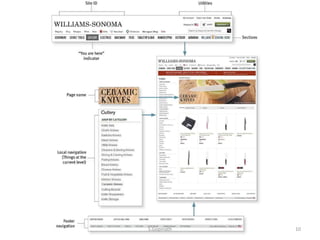
Web navigation conventions
• The conventions specify the appearance and
location of the navigation elements so we
know what to look for and where to look
when we need them.
• Putting them in a standard place lets us locate
them quickly, with a minimum of effort;
standardizing their appearance makes it easy
to distinguish them from everything else.
S.Gopinath 9
S.Gopinath 10
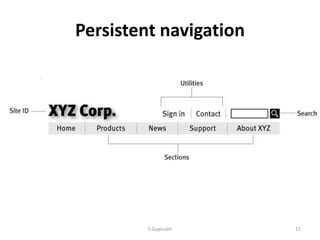
Persistent navigation
S.Gopinath 11
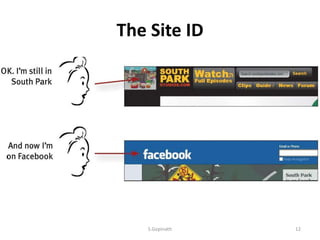
The Site ID
S.Gopinath 12
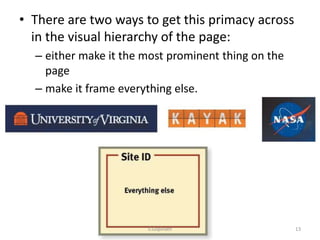
• There are two ways to get this primacy across
in the visual hierarchy of the page:
– either make it the most prominent thing on the
page
– make it frame everything else.
S.Gopinath 13
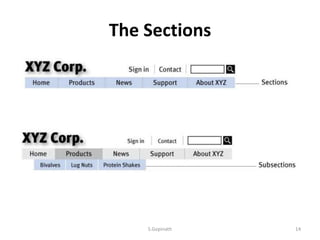
The Sections
S.Gopinath 14
The Utilities
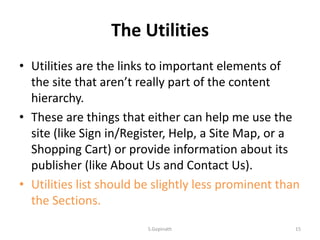
• Utilities are the links to important elements of
the site that aren’t really part of the content
hierarchy.
• These are things that either can help me use the
site (like Sign in/Register, Help, a Site Map, or a
Shopping Cart) or provide information about its
publisher (like About Us and Contact Us).
• Utilities list should be slightly less prominent than
the Sections.
S.Gopinath 15
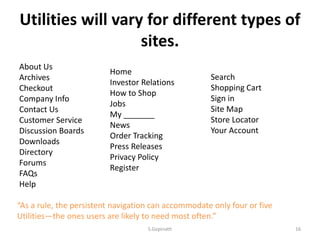
Utilities will vary for different types of
sites.
About Us
Archives
Checkout
Company Info
Contact Us
Customer Service
Discussion Boards
Downloads
Directory
Forums
FAQs
Help
Home
Investor Relations
How to Shop
Jobs
My _______
News
Order Tracking
Press Releases
Privacy Policy
Register
Search
Shopping Cart
Sign in
Site Map
Store Locator
Your Account
“As a rule, the persistent navigation can accommodate only four or five
Utilities—the ones users are likely to need most often.”
S.Gopinath 16

Designing navigation

  • 1.
    Designing navigation S.Gopinath Department ofPhysical Science Vavuniya Campus, University of Jaffna, Sri Lanka
  • 2.
    • People won’tuse your Web site if they can’t find their way around it. S.Gopinath 2
  • 3.
  • 4.
    When you entera Web site • You’re usually trying to find something. • You decide whether to ask first or browse first. – “search-dominant” users – “link-dominant” users S.Gopinath 4
  • 5.
  • 6.
    Oddities of Webspace • No sense of scale – Even after we’ve used a Web site extensively, unless it’s a very small site we tend to have very little sense of how big it is. • No sense of direction. – In a Web site, there’s no left and right, no up and down. We may talk about moving up and down S.Gopinath 6
  • 7.
    • No senseof location. – In physical spaces, as we move around we accumulate knowledge about the space. S.Gopinath 7
  • 8.
    Purposes of navigation •It tells us what’s here. • It tells us how to use the site. • It gives us confidence in the people who built it. S.Gopinath 8
  • 9.
    Web navigation conventions •The conventions specify the appearance and location of the navigation elements so we know what to look for and where to look when we need them. • Putting them in a standard place lets us locate them quickly, with a minimum of effort; standardizing their appearance makes it easy to distinguish them from everything else. S.Gopinath 9
  • 10.
  • 11.
  • 12.
  • 13.
    • There aretwo ways to get this primacy across in the visual hierarchy of the page: – either make it the most prominent thing on the page – make it frame everything else. S.Gopinath 13
  • 14.
  • 15.
    The Utilities • Utilitiesare the links to important elements of the site that aren’t really part of the content hierarchy. • These are things that either can help me use the site (like Sign in/Register, Help, a Site Map, or a Shopping Cart) or provide information about its publisher (like About Us and Contact Us). • Utilities list should be slightly less prominent than the Sections. S.Gopinath 15
  • 16.
    Utilities will varyfor different types of sites. About Us Archives Checkout Company Info Contact Us Customer Service Discussion Boards Downloads Directory Forums FAQs Help Home Investor Relations How to Shop Jobs My _______ News Order Tracking Press Releases Privacy Policy Register Search Shopping Cart Sign in Site Map Store Locator Your Account “As a rule, the persistent navigation can accommodate only four or five Utilities—the ones users are likely to need most often.” S.Gopinath 16