01
Deployments in large organizations can include dozens of applications across just as many or
more teams. When both manual and automated activities need to be synchronized to successfully
deploy, every deployment comes with significant risk.
Deployment management, as part of Plutora’s Value Stream Management Platform, helps
organizations manage and minimize the risk of each and every deployment. By connecting teams
regardless of applications or tracking and reporting system, Plutora unifies deployment activities
into a single source of truth. This allows teams to track activities in real-time to accelerate
deployments, increase success rates, and identify issues early to ensure a fast recovery.
Deployment Planning
and Management
DATASHEET
Benefits:
•	 Mitigate risks of complex deployments
•	 Plan, Automate, Rehearse, Deploy, and
Review in one application
•	 Bring together all teams involved in
a deployment during execution to
track progress with real-time updates,
notifications, checkpoints, and reports
•	 Quickly identify and respond to any
deployment issues
Features:
•	 Build comprehensive deployment plans
with manual and automated tasks
•	 Orchestrate tasks across CI, ARA, CCA and
Test Applications
•	 Detailed deployment views show activity
timelines, status, and dependencies
•	 Monitor progress and provide status
updates in real-time as plans are executed
•	 Collaborate across teams during
deployments with comments,
notifications, and Slack
•	 Easily create comprehensive audits of all
deployment activities
02
Deployment planning
Plan, automate, and rehearse complex
deployments with Plutora. Ensure that when it’s
time to deploy you have a resilient deployment
plan that enables work to flow seamlessly
between individuals, teams, and machines.
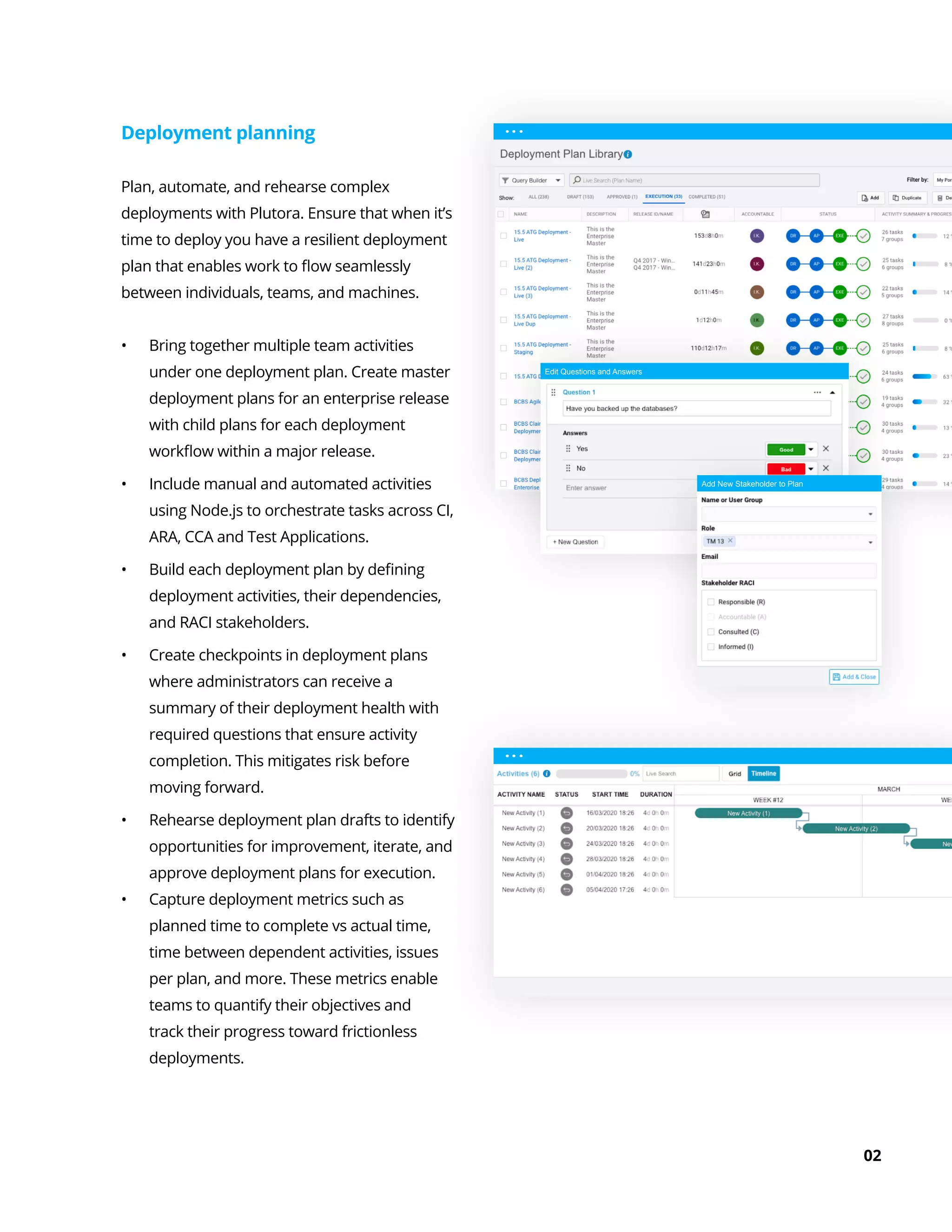
•	 Bring together multiple team activities
under one deployment plan. Create master
deployment plans for an enterprise release
with child plans for each deployment
workflow within a major release.
•	 Include manual and automated activities
using Node.js to orchestrate tasks across CI,
ARA, CCA and Test Applications.
•	 Build each deployment plan by defining
deployment activities, their dependencies,
and RACI stakeholders.
•	 Create checkpoints in deployment plans
where administrators can receive a
summary of their deployment health with
required questions that ensure activity
completion. This mitigates risk before
moving forward.
•	 Rehearse deployment plan drafts to identify
opportunities for improvement, iterate, and
approve deployment plans for execution.
•	 Capture deployment metrics such as
planned time to complete vs actual time,
time between dependent activities, issues
per plan, and more. These metrics enable
teams to quantify their objectives and
track their progress toward frictionless
deployments.
Edit Questions and Answers
Add New Stakeholder to Plan
03
Collaborative deployment
execution
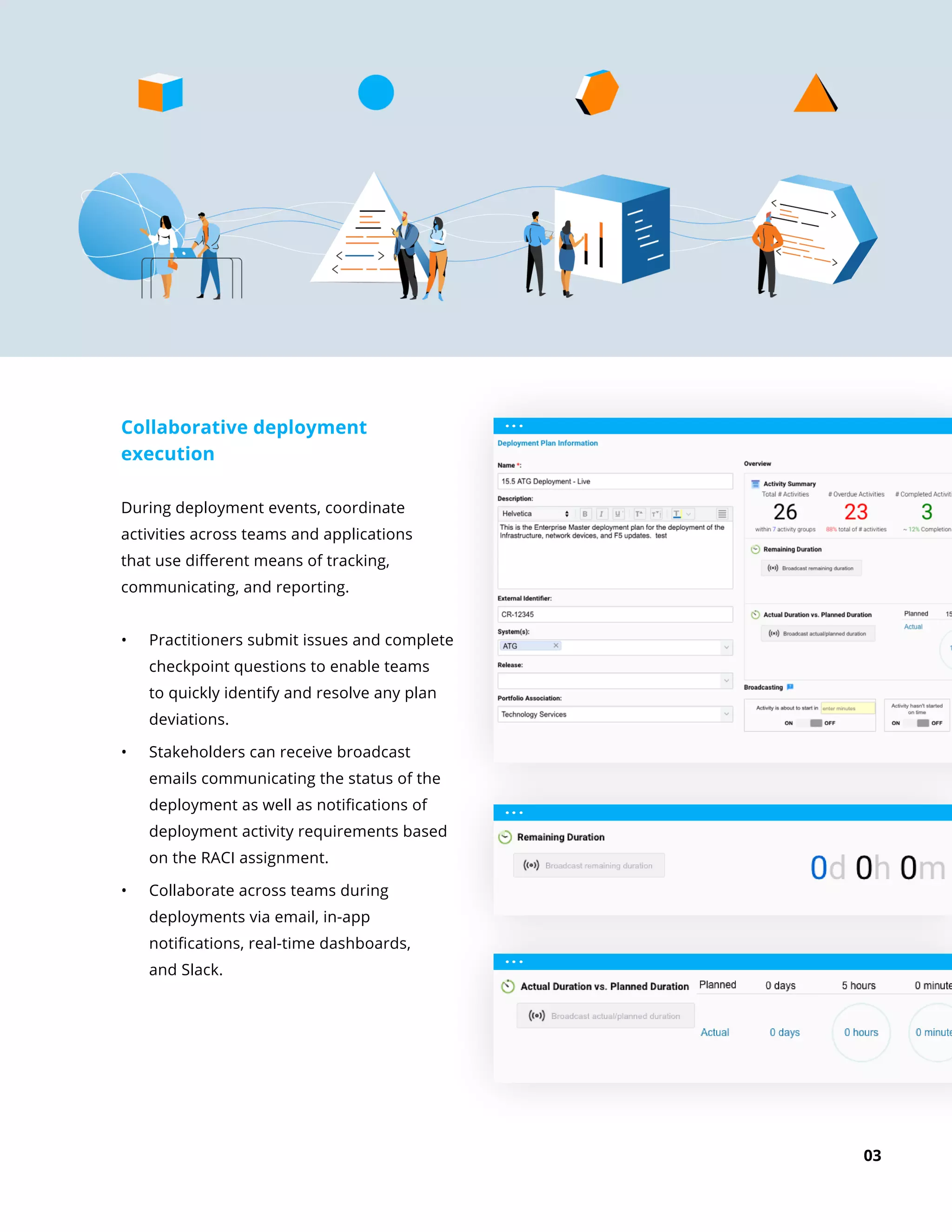
During deployment events, coordinate
activities across teams and applications
that use different means of tracking,
communicating, and reporting.
•	 Practitioners submit issues and complete
checkpoint questions to enable teams
to quickly identify and resolve any plan
deviations.
•	 Stakeholders can receive broadcast
emails communicating the status of the
deployment as well as notifications of
deployment activity requirements based
on the RACI assignment.
•	 Collaborate across teams during
deployments via email, in-app
notifications, real-time dashboards,
and Slack.
04
Manage deployments with real-time
dashboards and reports
See the whole picture and keep teams
aligned during deployment execution with a
centralized interface and real-time monitoring.
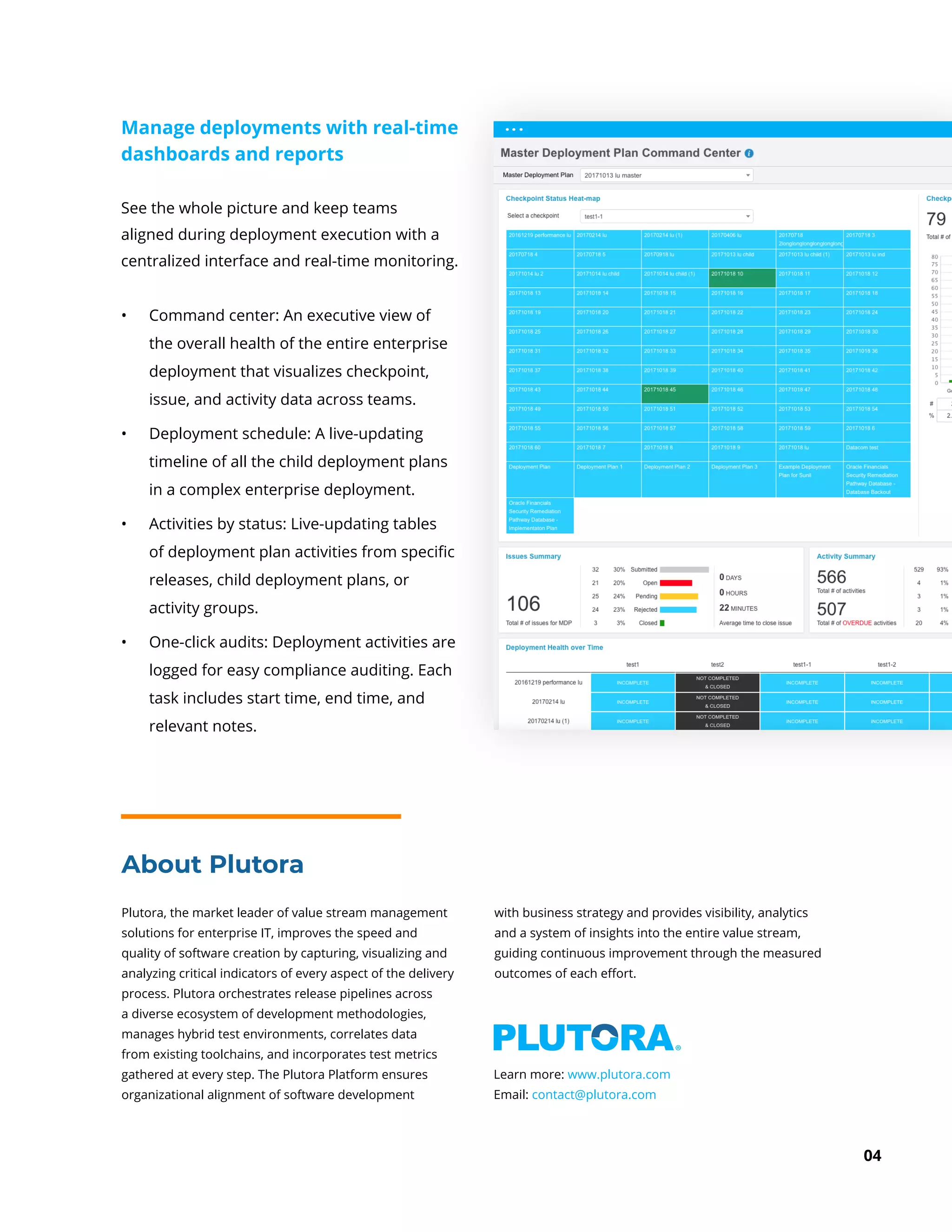
•	 Command center: An executive view of
the overall health of the entire enterprise
deployment that visualizes checkpoint,
issue, and activity data across teams.
•	 Deployment schedule: A live-updating
timeline of all the child deployment plans
in a complex enterprise deployment.
•	 Activities by status: Live-updating tables
of deployment plan activities from specific
releases, child deployment plans, or
activity groups.
•	 One-click audits: Deployment activities are
logged for easy compliance auditing. Each
task includes start time, end time, and
relevant notes.
Plutora, the market leader of value stream management
solutions for enterprise IT, improves the speed and
quality of software creation by capturing, visualizing and
analyzing critical indicators of every aspect of the delivery
process. Plutora orchestrates release pipelines across
a diverse ecosystem of development methodologies,
manages hybrid test environments, correlates data
from existing toolchains, and incorporates test metrics
gathered at every step. The Plutora Platform ensures
organizational alignment of software development
with business strategy and provides visibility, analytics
and a system of insights into the entire value stream,
guiding continuous improvement through the measured
outcomes of each effort.
About Plutora
Learn more: www.plutora.com
Email: contact@plutora.com

Deployment Planning and Management

  • 1.
    01 Deployments in largeorganizations can include dozens of applications across just as many or more teams. When both manual and automated activities need to be synchronized to successfully deploy, every deployment comes with significant risk. Deployment management, as part of Plutora’s Value Stream Management Platform, helps organizations manage and minimize the risk of each and every deployment. By connecting teams regardless of applications or tracking and reporting system, Plutora unifies deployment activities into a single source of truth. This allows teams to track activities in real-time to accelerate deployments, increase success rates, and identify issues early to ensure a fast recovery. Deployment Planning and Management DATASHEET Benefits: • Mitigate risks of complex deployments • Plan, Automate, Rehearse, Deploy, and Review in one application • Bring together all teams involved in a deployment during execution to track progress with real-time updates, notifications, checkpoints, and reports • Quickly identify and respond to any deployment issues Features: • Build comprehensive deployment plans with manual and automated tasks • Orchestrate tasks across CI, ARA, CCA and Test Applications • Detailed deployment views show activity timelines, status, and dependencies • Monitor progress and provide status updates in real-time as plans are executed • Collaborate across teams during deployments with comments, notifications, and Slack • Easily create comprehensive audits of all deployment activities
  • 2.
    02 Deployment planning Plan, automate,and rehearse complex deployments with Plutora. Ensure that when it’s time to deploy you have a resilient deployment plan that enables work to flow seamlessly between individuals, teams, and machines. • Bring together multiple team activities under one deployment plan. Create master deployment plans for an enterprise release with child plans for each deployment workflow within a major release. • Include manual and automated activities using Node.js to orchestrate tasks across CI, ARA, CCA and Test Applications. • Build each deployment plan by defining deployment activities, their dependencies, and RACI stakeholders. • Create checkpoints in deployment plans where administrators can receive a summary of their deployment health with required questions that ensure activity completion. This mitigates risk before moving forward. • Rehearse deployment plan drafts to identify opportunities for improvement, iterate, and approve deployment plans for execution. • Capture deployment metrics such as planned time to complete vs actual time, time between dependent activities, issues per plan, and more. These metrics enable teams to quantify their objectives and track their progress toward frictionless deployments. Edit Questions and Answers Add New Stakeholder to Plan
  • 3.
    03 Collaborative deployment execution During deploymentevents, coordinate activities across teams and applications that use different means of tracking, communicating, and reporting. • Practitioners submit issues and complete checkpoint questions to enable teams to quickly identify and resolve any plan deviations. • Stakeholders can receive broadcast emails communicating the status of the deployment as well as notifications of deployment activity requirements based on the RACI assignment. • Collaborate across teams during deployments via email, in-app notifications, real-time dashboards, and Slack.
  • 4.
    04 Manage deployments withreal-time dashboards and reports See the whole picture and keep teams aligned during deployment execution with a centralized interface and real-time monitoring. • Command center: An executive view of the overall health of the entire enterprise deployment that visualizes checkpoint, issue, and activity data across teams. • Deployment schedule: A live-updating timeline of all the child deployment plans in a complex enterprise deployment. • Activities by status: Live-updating tables of deployment plan activities from specific releases, child deployment plans, or activity groups. • One-click audits: Deployment activities are logged for easy compliance auditing. Each task includes start time, end time, and relevant notes. Plutora, the market leader of value stream management solutions for enterprise IT, improves the speed and quality of software creation by capturing, visualizing and analyzing critical indicators of every aspect of the delivery process. Plutora orchestrates release pipelines across a diverse ecosystem of development methodologies, manages hybrid test environments, correlates data from existing toolchains, and incorporates test metrics gathered at every step. The Plutora Platform ensures organizational alignment of software development with business strategy and provides visibility, analytics and a system of insights into the entire value stream, guiding continuous improvement through the measured outcomes of each effort. About Plutora Learn more: www.plutora.com Email: contact@plutora.com