Intro To
Continuous Delivery
(Based on the book by Jez Humble And David Farley)
By Bhanu Musunooru
If somebody thinks of a good idea,
how do we deliver it to users as quickly as
possible?
Background
 Many software development approaches
 However, the BUILD, TEST, DEPLOY process received little focus historically
 Without which impossible to achieve RELIABLE, RAPID, LOW-RISK software
releases
What happens once requirements are identified,
solutions designed, developed, and tested?
How are these activities joined together and
coordinated to make the process as efficient and
reliable as we can make it?
How do we enable developers, testers, build and
operations personnel to work together effectively?
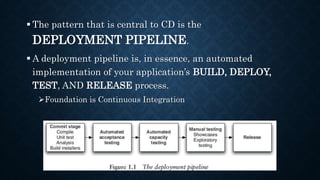
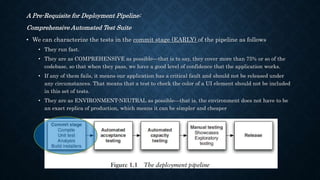
 The pattern that is central to CD is the
DEPLOYMENT PIPELINE.
 A deployment pipeline is, in essence, an automated
implementation of your application’s BUILD, DEPLOY,
TEST, AND RELEASE process.
Foundation is Continuous Integration
Aim of DEPLOYMENT PIPELINE
VISIBILITY - First, it makes every part of the process of building,
deploying, testing, and releasing software visible to everybody
involved, aiding collaboration
FEEDBACK - Second, it improves feedback so that problems are
identified, and so resolved, as early in the process as possible
RELEASE ON DEMAND - Finally, it enables teams to deploy and
release any version of their software to any environment at will
through a fully automated process.
COMMON RELEASE ANTI-PATTERNS
SYMPTOMS
Antipattern 1: Deploying Software Manually
 Reliance on MANUAL TESTING to confirm that the application is running correctly
 FREQUENT CALLS to the development team to explain why a deployment is going
wrong on a release day
 Frequent CORRECTIONS to the release process during the course of a release
 ENVIRONMENTS in a cluster that differ in their configuration, for example application
servers with different connection pool settings, filesystems with different layouts, etc.
 RELEASES that take more than a few minutes to perform
 Releases that are UNPREDICTABLE in their outcome, that often have to be rolled back
or run into unforeseen problems
 Sitting bleary-eyed in front of a monitor at 2 A.M. the day after the release day, trying to
figure out how to make it work
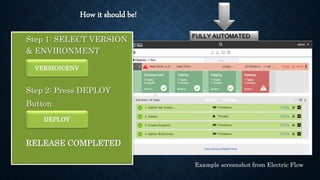
Step 1: SELECT VERSION
& ENVIRONMENT
Step 2: Press DEPLOY
Button
RELEASE COMPLETED
How it should be!
VERSION/ENV
DEPLOY
Example screenshot from Electric Flow
Rationale for Automated Deployment
 When deployments aren’t fully automated, ERRORS will occur every
time they are performed. The only question is whether or not the
errors are significant.
 Even with excellent deployment tests, bugs can be hard to track down.
 When the deployment process is not automated, it is not
REPEATABLE OR RELIABLE, leading to time wasted on debugging
deployment errors
 A manual deployment process has to be documented. Maintaining the
documentation is a COMPLEX AND TIME-CONSUMING task
involving collaboration between several people, so the documentation
is generally incomplete or out-of-date at any given time. A set of
automated deployment scripts serves as documentation, and it will
always be up-to-date and complete, or the deployment will not work.
 Automated deployments encourage COLLABORATION, because
everything is explicit in a script. Documentation has to make
assumptions about the level of knowledge of the reader and in reality
is usually written as an aide-memoire for the person performing the
deployment, making it opaque to others
 A corollary of the above: Manual deployments depend on the
deployment expert. If he or she is on vacation or quits work, you are in
trouble.
 Performing manual deployments is boring and repetitive and yet
needs SIGNIFICANT DEGREE OF EXPERTISE. Asking experts to
do boring and repetitive, and yet technically demanding tasks is
the most certain way of ensuring human error that we can think of,
short of sleep deprivation, or inebriation
 Automating deployments frees your expensive, highly skilled,
overworked staff to work on HIGHER-VALUE ACTIVITIES.
 The only way to test a manual deployment process is to do it.
 This is often TIME-CONSUMING AND EXPENSIVE.
 An automated deployment process is cheap and easy to test.
 We have heard it said that a manual process is more auditable
than an automated one.
 With a manual process, there is no guarantee that the
documentation has been followed.
 ONLY AN AUTOMATED PROCESS IS FULLY AUDITABLE.
What is more auditable than a working deployment script?
Antipattern 2: Deploying to a Production-like Environment Only after Development Is
Complete
 If testers have been involved in the process up to this point, they have tested the system
on DEVELOPMENT MACHINES.
 Releasing into staging is the first time that operations people interact with the new
release. In some organizations, separate operations teams are used to deploy the software
into staging and production. In this case, the first time an operations person sees the
software is the day it is released into production.
 Either a PRODUCTION-LIKE ENVIRONMENT is expensive enough that access to it is
strictly controlled, or it is not in place on time, or nobody bothered to create one.
 The development team assembles the correct installers, configuration files, database
migrations, and deployment documentation to pass to the people who perform the actual
deployment—all of it untested in an environment that looks like production or staging.
 There is little, if any, COLLABORATION between the development team and the people
who actually perform deployments to create this collateral.
Antipattern 3: Manual Configuration Management of Production Environments
 Many organizations manage the CONFIGURATION of their production environments
through a team of operations people.
 If a change is needed, such as a change to database connection setting or an increase in
the number of threads in a thread pool on an application server, then it is carried out
MANUALLY on the production servers.
 If a record is kept of such a change, it is probably an entry in a change management
database.
How do we achieve the goal?
 In order to achieve these goals — LOW CYCLE TIME AND HIGH QUALITY —we
need to make frequent, automated releases of our software
 AUTOMATED. If the build, deploy, test, and release process is not automated, it is
not repeatable. Every time it is done, it will be different, because of changes in the
software, the configuration of the system, the environments, and the release process.
 FREQUENT. If releases are frequent, the delta between releases will be small. This
significantly reduces the risk associated with releasing and makes it much easier to
roll back. Frequent releases also lead to faster feedback
Feedback is essential to frequent, automated releases
FEEDBACK
Feedback Process
 Any change, of whatever kind, needs to trigger the feedback process.
 The feedback must be delivered as soon as possible.
 The delivery team must receive feedback and then act on it.
Every Change Should Trigger the Feedback Process
 A working software application can be usefully decomposed into four components:
1. EXECUTABLE CODE,
2. CONFIGURATION,
3. HOST ENVIRONMENT, AND
4. DATA.
If any of them changes, it can lead to a change in the behavior of the application. Therefore we
need to keep all four of these components under control and ensure that a change in any one
of them is verified.
Every Change Should Trigger the Feedback Process
 A working software application can be usefully decomposed into four components:
1. executable code,
2. configuration,
3. host environment, and
4. data.
1. Executable Code
 Executable code changes when a change is made to the source code. Every time a
change is made to the source code, the resulting binary must be built and tested.
 In order to gain control over this process, building and testing the binary should be
automated. The practice of building and testing your application on every check-in is
known as continuous integration
Every Change Should Trigger the Feedback Process
 A working software application can be usefully decomposed into four components:
1. executable code,
2. configuration,
3. host environment, and
4. data.
2. Configuration
 Anything that changes between environments should be captured as configuration
information
 Any change to an application’s configuration, in whichever environment, should be
tested. If the software is to be installed by the users, the possible configuration
options should be tested across a representative range of example systems
Every Change Should Trigger the Feedback Process
 A working software application can be usefully decomposed into four components:
1. executable code,
2. configuration,
3. host environment, and
4. data.
3. Host Environment
 If the environments the application is to be deployed into change, the whole system
should be tested with the changes to the environment. This includes changes in the
operating system configuration, the software stack that supports the application, the
network configuration, and any infrastructure and external systems
 Requires automation of the creation and maintenance of testing and production
environments.
Every Change Should Trigger the Feedback Process
 A working software application can be usefully decomposed into four components:
1. executable code,
2. configuration,
3. host environment, and
4. data.
4. Data
 Finally, if the structure of the data changes, this change must also be tested
What is the feedback process?
 It involves TESTING EVERY CHANGE IN A FULLY AUTOMATED FASHION, as far as
possible. The tests will usually include at least the following checks.
 The process of creating the executable code must work. This verifies that the syntax of your source
code is valid.
 The software’s unit tests must pass. This checks that your application’s code behaves as expected.
 The software should fulfill certain quality criteria such as test coverage and other technology-
specific metrics.
 The software’s functional acceptance tests must pass. This checks that your application conforms to
its business acceptance criteria—that it delivers the business value that was intended.
 The software’s nonfunctional tests must pass. This checks that the application performs sufficiently
well in terms of capacity, availability, security, and so on to meet its users’ needs.
 The software must go through exploratory testing and a demonstration to the customer and a
selection of users.
 This is typically done from a manual testing environment. In this part of the process, the product owner
might decide that there are missing features, or we might find bugs that require fixing and automated tests
that need creating to prevent regressions.
The environments these tests run in must be as similar as possible to production
To verify that any changes to our environments have not affected the
application’s ability to work
The Feedback Must Be Received as Soon as Possible
 The key to fast feedback is AUTOMATION. With fully automated processes, your
only constraint is the amount of hardware that you are able to throw at the problem.
 If you have manual processes, you are dependent on people to get the job done.
People take longer, they introduce errors, and they are not auditable.
A Pre-Requisite for Deployment Pipeline:
Comprehensive Automated Test Suite
• We can characterize the tests in the commit stage (EARLY) of the pipeline as follows
• They run fast.
• They are as COMPREHENSIVE as possible—that is to say, they cover more than 75% or so of the
codebase, so that when they pass, we have a good level of confidence that the application works.
• If any of them fails, it means our application has a critical fault and should not be released under
any circumstances. That means that a test to check the color of a UI element should not be included
in this set of tests.
• They are as ENVIRONMENT-NEUTRAL as possible—that is, the environment does not have to be
an exact replica of production, which means it can be simpler and cheaper
A Pre-Requisite for Deployment Pipeline:
Comprehensive Automated Test Suite
 Tests in the LATER stages have the following general characteristics.
 They run more slowly and therefore are candidates for PARALLELIZATION.
 Some of them may fail, and we may still choose to release the application under some
circumstances (perhaps there is a critical fix in the release candidate that causes the
performance to drop below a predefined threshold—but we might make the decision to
release anyway)
 They should run on an environment that is as similar as possible to production, so in
addition to the direct focus of the test they also test the deployment process and any
changes to the production environment.
High level of confidence in the software after the first set of tests, which run fastest on
the cheapest hardware.
 If these tests fail, the release candidate does not progress to later stages.
The Delivery Team Must Receive Feedback and Then Act on It
 It is essential that everybody involved in the process of delivering software is involved in the feedback
process. That includes developers, testers, operations staff, database administrators, infrastructure
specialists, and managers.
 If people in these roles do not work together on a day-to-day basis (although we recommend that teams
should be cross-functional), it is essential that they meet frequently and work to improve the process of
delivering software.
 A process based on continuous improvement is essential to the rapid delivery of quality software
 Iterative processes help establish a regular heartbeat for this kind of activity—at least once per iteration a
retrospective meeting is held where everybody discusses how to improve the delivery process for the next iteration
 Using big, visible dashboards and other notification mechanisms is central to ensuring that feedback is,
indeed, fed-back and makes the final step into someone’s head
 One should be present in each team room.
 Feedback is no good unless it is acted upon.
 This requires discipline and planning. When something needs doing, it is the responsibility of the whole team to
stop what they are doing and decide on a course of action
Does This Process Scale?
 All the techniques and principles that are described here have been proven in real
projects in all kinds of organizations, both large and small, in all kinds of situations
 Much of this is inspired by the philosophy and ideas of the lean movement.
 The goals of lean manufacturing are to ensure the rapid delivery of high-quality
products, focusing on the removal of waste and the reduction of cost. Results in
 huge cost and resource savings,
 much higher-quality products, and
 faster time-to-market
 This philosophy is starting to become mainstream in the field of software
development too
Benefits
Creates a release process that is repeatable, reliable, and predictable, which in turn
generates large reductions in cycle time, and hence gets features and bugfixes to
users fast.
Empowering Teams
In Closing
If somebody thinks of a good idea, how do we deliver it to users as quickly as
possible?
 By implementing Continous Delivery practices
 By adopting DevOps
 And, thereby becoming truly AGILE – in spirit and body 
…In Closing
Continuous Integration doesn’t get rid of bugs, …..
(Then what’s the benefit?!!!)
…..but it does make them dramatically easier to find and remove.
Martin Fowler, Chief Scientist, ThoughtWorks

Intro To Continuous Delivery

  • 1.
    Intro To Continuous Delivery (Basedon the book by Jez Humble And David Farley) By Bhanu Musunooru
  • 2.
    If somebody thinksof a good idea, how do we deliver it to users as quickly as possible?
  • 3.
    Background  Many softwaredevelopment approaches  However, the BUILD, TEST, DEPLOY process received little focus historically  Without which impossible to achieve RELIABLE, RAPID, LOW-RISK software releases
  • 4.
    What happens oncerequirements are identified, solutions designed, developed, and tested? How are these activities joined together and coordinated to make the process as efficient and reliable as we can make it? How do we enable developers, testers, build and operations personnel to work together effectively?
  • 5.
     The patternthat is central to CD is the DEPLOYMENT PIPELINE.  A deployment pipeline is, in essence, an automated implementation of your application’s BUILD, DEPLOY, TEST, AND RELEASE process. Foundation is Continuous Integration
  • 6.
    Aim of DEPLOYMENTPIPELINE VISIBILITY - First, it makes every part of the process of building, deploying, testing, and releasing software visible to everybody involved, aiding collaboration FEEDBACK - Second, it improves feedback so that problems are identified, and so resolved, as early in the process as possible RELEASE ON DEMAND - Finally, it enables teams to deploy and release any version of their software to any environment at will through a fully automated process.
  • 7.
  • 8.
    Antipattern 1: DeployingSoftware Manually  Reliance on MANUAL TESTING to confirm that the application is running correctly  FREQUENT CALLS to the development team to explain why a deployment is going wrong on a release day  Frequent CORRECTIONS to the release process during the course of a release  ENVIRONMENTS in a cluster that differ in their configuration, for example application servers with different connection pool settings, filesystems with different layouts, etc.  RELEASES that take more than a few minutes to perform  Releases that are UNPREDICTABLE in their outcome, that often have to be rolled back or run into unforeseen problems  Sitting bleary-eyed in front of a monitor at 2 A.M. the day after the release day, trying to figure out how to make it work
  • 9.
    Step 1: SELECTVERSION & ENVIRONMENT Step 2: Press DEPLOY Button RELEASE COMPLETED How it should be! VERSION/ENV DEPLOY Example screenshot from Electric Flow
  • 10.
    Rationale for AutomatedDeployment  When deployments aren’t fully automated, ERRORS will occur every time they are performed. The only question is whether or not the errors are significant.  Even with excellent deployment tests, bugs can be hard to track down.
  • 11.
     When thedeployment process is not automated, it is not REPEATABLE OR RELIABLE, leading to time wasted on debugging deployment errors  A manual deployment process has to be documented. Maintaining the documentation is a COMPLEX AND TIME-CONSUMING task involving collaboration between several people, so the documentation is generally incomplete or out-of-date at any given time. A set of automated deployment scripts serves as documentation, and it will always be up-to-date and complete, or the deployment will not work.
  • 12.
     Automated deploymentsencourage COLLABORATION, because everything is explicit in a script. Documentation has to make assumptions about the level of knowledge of the reader and in reality is usually written as an aide-memoire for the person performing the deployment, making it opaque to others  A corollary of the above: Manual deployments depend on the deployment expert. If he or she is on vacation or quits work, you are in trouble.
  • 13.
     Performing manualdeployments is boring and repetitive and yet needs SIGNIFICANT DEGREE OF EXPERTISE. Asking experts to do boring and repetitive, and yet technically demanding tasks is the most certain way of ensuring human error that we can think of, short of sleep deprivation, or inebriation  Automating deployments frees your expensive, highly skilled, overworked staff to work on HIGHER-VALUE ACTIVITIES.
  • 14.
     The onlyway to test a manual deployment process is to do it.  This is often TIME-CONSUMING AND EXPENSIVE.  An automated deployment process is cheap and easy to test.
  • 15.
     We haveheard it said that a manual process is more auditable than an automated one.  With a manual process, there is no guarantee that the documentation has been followed.  ONLY AN AUTOMATED PROCESS IS FULLY AUDITABLE. What is more auditable than a working deployment script?
  • 16.
    Antipattern 2: Deployingto a Production-like Environment Only after Development Is Complete  If testers have been involved in the process up to this point, they have tested the system on DEVELOPMENT MACHINES.  Releasing into staging is the first time that operations people interact with the new release. In some organizations, separate operations teams are used to deploy the software into staging and production. In this case, the first time an operations person sees the software is the day it is released into production.  Either a PRODUCTION-LIKE ENVIRONMENT is expensive enough that access to it is strictly controlled, or it is not in place on time, or nobody bothered to create one.  The development team assembles the correct installers, configuration files, database migrations, and deployment documentation to pass to the people who perform the actual deployment—all of it untested in an environment that looks like production or staging.  There is little, if any, COLLABORATION between the development team and the people who actually perform deployments to create this collateral.
  • 17.
    Antipattern 3: ManualConfiguration Management of Production Environments  Many organizations manage the CONFIGURATION of their production environments through a team of operations people.  If a change is needed, such as a change to database connection setting or an increase in the number of threads in a thread pool on an application server, then it is carried out MANUALLY on the production servers.  If a record is kept of such a change, it is probably an entry in a change management database.
  • 18.
    How do weachieve the goal?  In order to achieve these goals — LOW CYCLE TIME AND HIGH QUALITY —we need to make frequent, automated releases of our software  AUTOMATED. If the build, deploy, test, and release process is not automated, it is not repeatable. Every time it is done, it will be different, because of changes in the software, the configuration of the system, the environments, and the release process.  FREQUENT. If releases are frequent, the delta between releases will be small. This significantly reduces the risk associated with releasing and makes it much easier to roll back. Frequent releases also lead to faster feedback Feedback is essential to frequent, automated releases
  • 19.
  • 20.
    Feedback Process  Anychange, of whatever kind, needs to trigger the feedback process.  The feedback must be delivered as soon as possible.  The delivery team must receive feedback and then act on it.
  • 21.
    Every Change ShouldTrigger the Feedback Process  A working software application can be usefully decomposed into four components: 1. EXECUTABLE CODE, 2. CONFIGURATION, 3. HOST ENVIRONMENT, AND 4. DATA. If any of them changes, it can lead to a change in the behavior of the application. Therefore we need to keep all four of these components under control and ensure that a change in any one of them is verified.
  • 22.
    Every Change ShouldTrigger the Feedback Process  A working software application can be usefully decomposed into four components: 1. executable code, 2. configuration, 3. host environment, and 4. data. 1. Executable Code  Executable code changes when a change is made to the source code. Every time a change is made to the source code, the resulting binary must be built and tested.  In order to gain control over this process, building and testing the binary should be automated. The practice of building and testing your application on every check-in is known as continuous integration
  • 23.
    Every Change ShouldTrigger the Feedback Process  A working software application can be usefully decomposed into four components: 1. executable code, 2. configuration, 3. host environment, and 4. data. 2. Configuration  Anything that changes between environments should be captured as configuration information  Any change to an application’s configuration, in whichever environment, should be tested. If the software is to be installed by the users, the possible configuration options should be tested across a representative range of example systems
  • 24.
    Every Change ShouldTrigger the Feedback Process  A working software application can be usefully decomposed into four components: 1. executable code, 2. configuration, 3. host environment, and 4. data. 3. Host Environment  If the environments the application is to be deployed into change, the whole system should be tested with the changes to the environment. This includes changes in the operating system configuration, the software stack that supports the application, the network configuration, and any infrastructure and external systems  Requires automation of the creation and maintenance of testing and production environments.
  • 25.
    Every Change ShouldTrigger the Feedback Process  A working software application can be usefully decomposed into four components: 1. executable code, 2. configuration, 3. host environment, and 4. data. 4. Data  Finally, if the structure of the data changes, this change must also be tested
  • 26.
    What is thefeedback process?  It involves TESTING EVERY CHANGE IN A FULLY AUTOMATED FASHION, as far as possible. The tests will usually include at least the following checks.  The process of creating the executable code must work. This verifies that the syntax of your source code is valid.  The software’s unit tests must pass. This checks that your application’s code behaves as expected.  The software should fulfill certain quality criteria such as test coverage and other technology- specific metrics.  The software’s functional acceptance tests must pass. This checks that your application conforms to its business acceptance criteria—that it delivers the business value that was intended.  The software’s nonfunctional tests must pass. This checks that the application performs sufficiently well in terms of capacity, availability, security, and so on to meet its users’ needs.  The software must go through exploratory testing and a demonstration to the customer and a selection of users.  This is typically done from a manual testing environment. In this part of the process, the product owner might decide that there are missing features, or we might find bugs that require fixing and automated tests that need creating to prevent regressions.
  • 27.
    The environments thesetests run in must be as similar as possible to production To verify that any changes to our environments have not affected the application’s ability to work
  • 28.
    The Feedback MustBe Received as Soon as Possible  The key to fast feedback is AUTOMATION. With fully automated processes, your only constraint is the amount of hardware that you are able to throw at the problem.  If you have manual processes, you are dependent on people to get the job done. People take longer, they introduce errors, and they are not auditable.
  • 29.
    A Pre-Requisite forDeployment Pipeline: Comprehensive Automated Test Suite • We can characterize the tests in the commit stage (EARLY) of the pipeline as follows • They run fast. • They are as COMPREHENSIVE as possible—that is to say, they cover more than 75% or so of the codebase, so that when they pass, we have a good level of confidence that the application works. • If any of them fails, it means our application has a critical fault and should not be released under any circumstances. That means that a test to check the color of a UI element should not be included in this set of tests. • They are as ENVIRONMENT-NEUTRAL as possible—that is, the environment does not have to be an exact replica of production, which means it can be simpler and cheaper
  • 30.
    A Pre-Requisite forDeployment Pipeline: Comprehensive Automated Test Suite  Tests in the LATER stages have the following general characteristics.  They run more slowly and therefore are candidates for PARALLELIZATION.  Some of them may fail, and we may still choose to release the application under some circumstances (perhaps there is a critical fix in the release candidate that causes the performance to drop below a predefined threshold—but we might make the decision to release anyway)  They should run on an environment that is as similar as possible to production, so in addition to the direct focus of the test they also test the deployment process and any changes to the production environment.
  • 31.
    High level ofconfidence in the software after the first set of tests, which run fastest on the cheapest hardware.  If these tests fail, the release candidate does not progress to later stages.
  • 32.
    The Delivery TeamMust Receive Feedback and Then Act on It  It is essential that everybody involved in the process of delivering software is involved in the feedback process. That includes developers, testers, operations staff, database administrators, infrastructure specialists, and managers.  If people in these roles do not work together on a day-to-day basis (although we recommend that teams should be cross-functional), it is essential that they meet frequently and work to improve the process of delivering software.  A process based on continuous improvement is essential to the rapid delivery of quality software  Iterative processes help establish a regular heartbeat for this kind of activity—at least once per iteration a retrospective meeting is held where everybody discusses how to improve the delivery process for the next iteration  Using big, visible dashboards and other notification mechanisms is central to ensuring that feedback is, indeed, fed-back and makes the final step into someone’s head  One should be present in each team room.  Feedback is no good unless it is acted upon.  This requires discipline and planning. When something needs doing, it is the responsibility of the whole team to stop what they are doing and decide on a course of action
  • 33.
    Does This ProcessScale?  All the techniques and principles that are described here have been proven in real projects in all kinds of organizations, both large and small, in all kinds of situations  Much of this is inspired by the philosophy and ideas of the lean movement.  The goals of lean manufacturing are to ensure the rapid delivery of high-quality products, focusing on the removal of waste and the reduction of cost. Results in  huge cost and resource savings,  much higher-quality products, and  faster time-to-market  This philosophy is starting to become mainstream in the field of software development too
  • 34.
    Benefits Creates a releaseprocess that is repeatable, reliable, and predictable, which in turn generates large reductions in cycle time, and hence gets features and bugfixes to users fast. Empowering Teams
  • 35.
    In Closing If somebodythinks of a good idea, how do we deliver it to users as quickly as possible?  By implementing Continous Delivery practices  By adopting DevOps  And, thereby becoming truly AGILE – in spirit and body 
  • 36.
    …In Closing Continuous Integrationdoesn’t get rid of bugs, ….. (Then what’s the benefit?!!!) …..but it does make them dramatically easier to find and remove. Martin Fowler, Chief Scientist, ThoughtWorks