Deployment diagrams are used to visualize the hardware processors/
nodes/ devices of a system, the links of communication between them
and the placement of software files on that hardware.
In this UML deployment diagram tutorial, we will cover;
Deployment Diagram Tutorial
• Deployment Diagram Definition
• Deployment Diagram Symbols
• How to Draw a Deployment Diagram
• Class Diagram Examples/Templates
A deployment diagram is a UML diagram type that shows the execution
architecture of a system, including nodes such as hardware or software
execution environments, and the middleware connecting them.
Deployment diagrams help model the hardware topology of a system
compared to other UML diagram types which mostly outline the logical
components of a system.
What is a Deployment Diagram?
In order to draw a deployment diagram, you need to first
become familiar with the following deployment diagram
notations and deployment diagram elements.
Deployment Diagram Notations
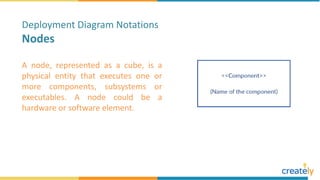
A node, represented as a cube, is a
physical entity that executes one or
more components, subsystems or
executables. A node could be a
hardware or software element.
Deployment Diagram Notations
Nodes
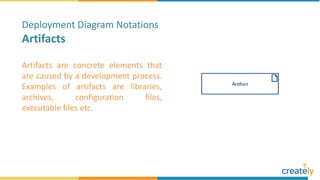
Artifacts are concrete elements that
are caused by a development process.
Examples of artifacts are libraries,
archives, configuration files,
executable files etc.
Deployment Diagram Notations
Artifacts
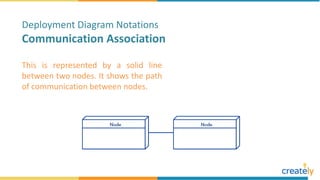
This is represented by a solid line
between two nodes. It shows the path
of communication between nodes.
Deployment Diagram Notations
Communication Association
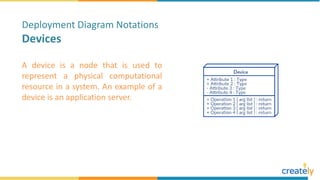
A device is a node that is used to
represent a physical computational
resource in a system. An example of a
device is an application server.
Deployment Diagram Notations
Devices
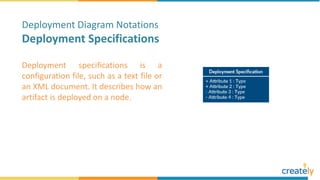
Deployment specifications is a
configuration file, such as a text file or
an XML document. It describes how an
artifact is deployed on a node.
Deployment Diagram Notations
Deployment Specifications
Follow the simple steps below to draw a deployment diagram. You can
either use the deployment diagram examples below to get a head start
or use our UML diagram tool to start from the beginning. Following are
the steps you can follow when drawing a deployment diagram.
How to Draw a Deployment Diagram
Step 1: Identify the purpose of your deployment diagram. And to do so, you need to
identify the nodes and devices within the system you’ll be visualizing with the
diagram.
Step 2: Figure out the relationships between the nodes and devices. Once you know
how they are connected, proceed to add the communication associations to
the diagram.
Step 3: Identify what other elements like components, active objects you need to
add to complete the diagram.
Step 4: Add dependencies between components and objects as required.
We’ve listed several Editable Deployment Diagram
Templates which are handy to help you start your
Diagrams. You can edit/draw your diagrams using our
online Editor, Creately.
Deployment Diagram Examples/Templates
Draw Deployment Diagrams with Creately
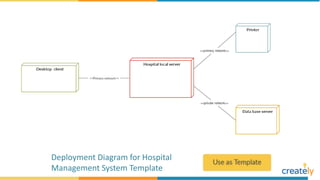
Deployment Diagram for Hospital
Management System Template
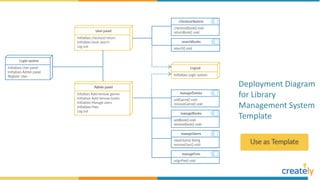
Deployment Diagram
for Library
Management System
Template
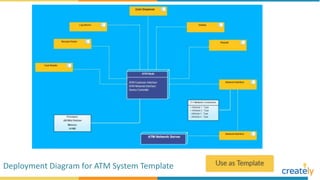
Deployment Diagram for ATM System Template
Deployment Diagram For a Vehicle
Registration System Template
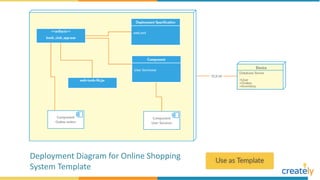
Deployment Diagram for Online Shopping
System Template
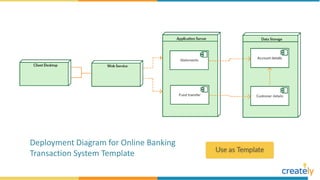
Deployment Diagram for Online Banking
Transaction System Template
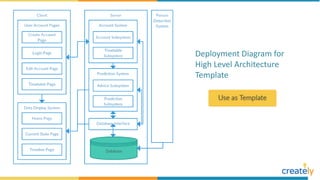
Deployment Diagram for
High Level Architecture
Template
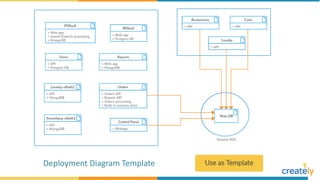
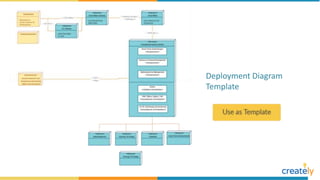
Deployment Diagram Template
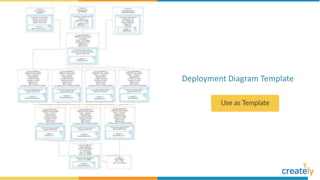
Deployment Diagram
Template
Want more details on How to draw Deployment Diagrams easily? Visit
https://creately.com/blog/diagrams/deployment-diagram-tutorial/
To create deployment diagrams, use case diagrams, flowcharts and
many more other diagrams visit
https://creately.com
For colorful diagrams and Info-graphics follow us on:

Deployment Diagram Example Templates

  • 4.
    Deployment diagrams areused to visualize the hardware processors/ nodes/ devices of a system, the links of communication between them and the placement of software files on that hardware. In this UML deployment diagram tutorial, we will cover; Deployment Diagram Tutorial • Deployment Diagram Definition • Deployment Diagram Symbols • How to Draw a Deployment Diagram • Class Diagram Examples/Templates
  • 5.
    A deployment diagramis a UML diagram type that shows the execution architecture of a system, including nodes such as hardware or software execution environments, and the middleware connecting them. Deployment diagrams help model the hardware topology of a system compared to other UML diagram types which mostly outline the logical components of a system. What is a Deployment Diagram?
  • 6.
    In order todraw a deployment diagram, you need to first become familiar with the following deployment diagram notations and deployment diagram elements. Deployment Diagram Notations
  • 7.
    A node, representedas a cube, is a physical entity that executes one or more components, subsystems or executables. A node could be a hardware or software element. Deployment Diagram Notations Nodes
  • 8.
    Artifacts are concreteelements that are caused by a development process. Examples of artifacts are libraries, archives, configuration files, executable files etc. Deployment Diagram Notations Artifacts
  • 9.
    This is representedby a solid line between two nodes. It shows the path of communication between nodes. Deployment Diagram Notations Communication Association
  • 10.
    A device isa node that is used to represent a physical computational resource in a system. An example of a device is an application server. Deployment Diagram Notations Devices
  • 11.
    Deployment specifications isa configuration file, such as a text file or an XML document. It describes how an artifact is deployed on a node. Deployment Diagram Notations Deployment Specifications
  • 12.
    Follow the simplesteps below to draw a deployment diagram. You can either use the deployment diagram examples below to get a head start or use our UML diagram tool to start from the beginning. Following are the steps you can follow when drawing a deployment diagram. How to Draw a Deployment Diagram
  • 13.
    Step 1: Identifythe purpose of your deployment diagram. And to do so, you need to identify the nodes and devices within the system you’ll be visualizing with the diagram. Step 2: Figure out the relationships between the nodes and devices. Once you know how they are connected, proceed to add the communication associations to the diagram. Step 3: Identify what other elements like components, active objects you need to add to complete the diagram. Step 4: Add dependencies between components and objects as required.
  • 14.
    We’ve listed severalEditable Deployment Diagram Templates which are handy to help you start your Diagrams. You can edit/draw your diagrams using our online Editor, Creately. Deployment Diagram Examples/Templates Draw Deployment Diagrams with Creately
  • 15.
    Deployment Diagram forHospital Management System Template
  • 16.
  • 17.
    Deployment Diagram forATM System Template
  • 18.
    Deployment Diagram Fora Vehicle Registration System Template
  • 19.
    Deployment Diagram forOnline Shopping System Template
  • 20.
    Deployment Diagram forOnline Banking Transaction System Template
  • 21.
    Deployment Diagram for HighLevel Architecture Template
  • 22.
  • 23.
  • 24.
  • 25.
    Want more detailson How to draw Deployment Diagrams easily? Visit https://creately.com/blog/diagrams/deployment-diagram-tutorial/ To create deployment diagrams, use case diagrams, flowcharts and many more other diagrams visit https://creately.com For colorful diagrams and Info-graphics follow us on: