The ELK Stack @ Linko
Jilles van Gurp - Linko Inc.
Who is Jilles?
@jillesvangurp, www.jillesvangurp.com, and jillesvangurp on Github & just
about everything else.
Java (J)Ruby Python Javascript GEO
Server stuffreluctant Devops guy Software Architecture
Universities of Utrecht (NL), Blekinge (SE), and Groningen (NL)
GX Creative Online Development (NL)
Nokia Research (FI), Nokia/Here (DE)
Localstream (DE), Linko (DE).
Logging
Stuff runs
Produces errors, warnings, debug, telemetry,
analytics events, and other information
How to make sense of it?
Old school: Cat, grep, awk, cut, ….
Good luck with that on 200GB of unstructured
logs. Think lots of coffee breaks.
The fix: ELK
Or do the same stuff in Hadoop
Works great for structured data if you know
what you are looking for.
Requires a lot of infrastructure and hassle.
Not real-time, hard to explore data
I’m not a data scientist, are you?
The fix: ELK
ELK Stack?
Elasticsearch
Logstash
Kibana
ELK - Elasticsearch
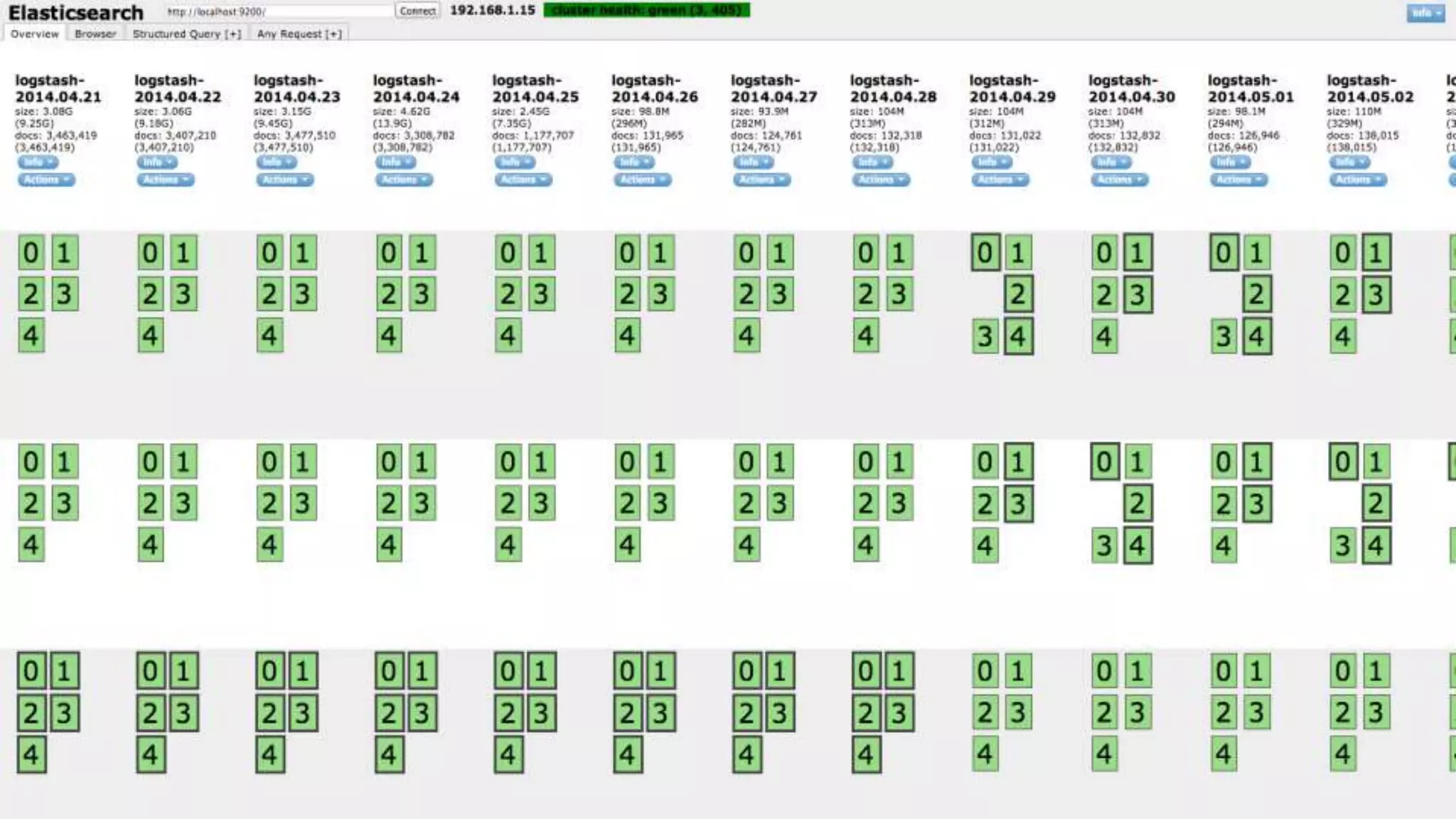
Sharded, replicated, searchable, json document store.
Used by many big name services out there - Github,
Soundcloud, Foursquare, Xing, many others.
Full text search, geo spatial search, advanced search
ranking, suggestions, … much more. It’s awesome.
Nice HTTP API
Scaling Elasticsearch
1 node, 16GB, all of open streetmap in
geojson format (+ some other stuff) ->
reverse geocode in <100ms
There are people running ES with thousands
of nodes, trillions of documents, and
petabytes ...
Bottom line
Elasticsearch scales, probably way beyond
your needs
Log data is actually easy for elasticsearch
Elk - Logstash
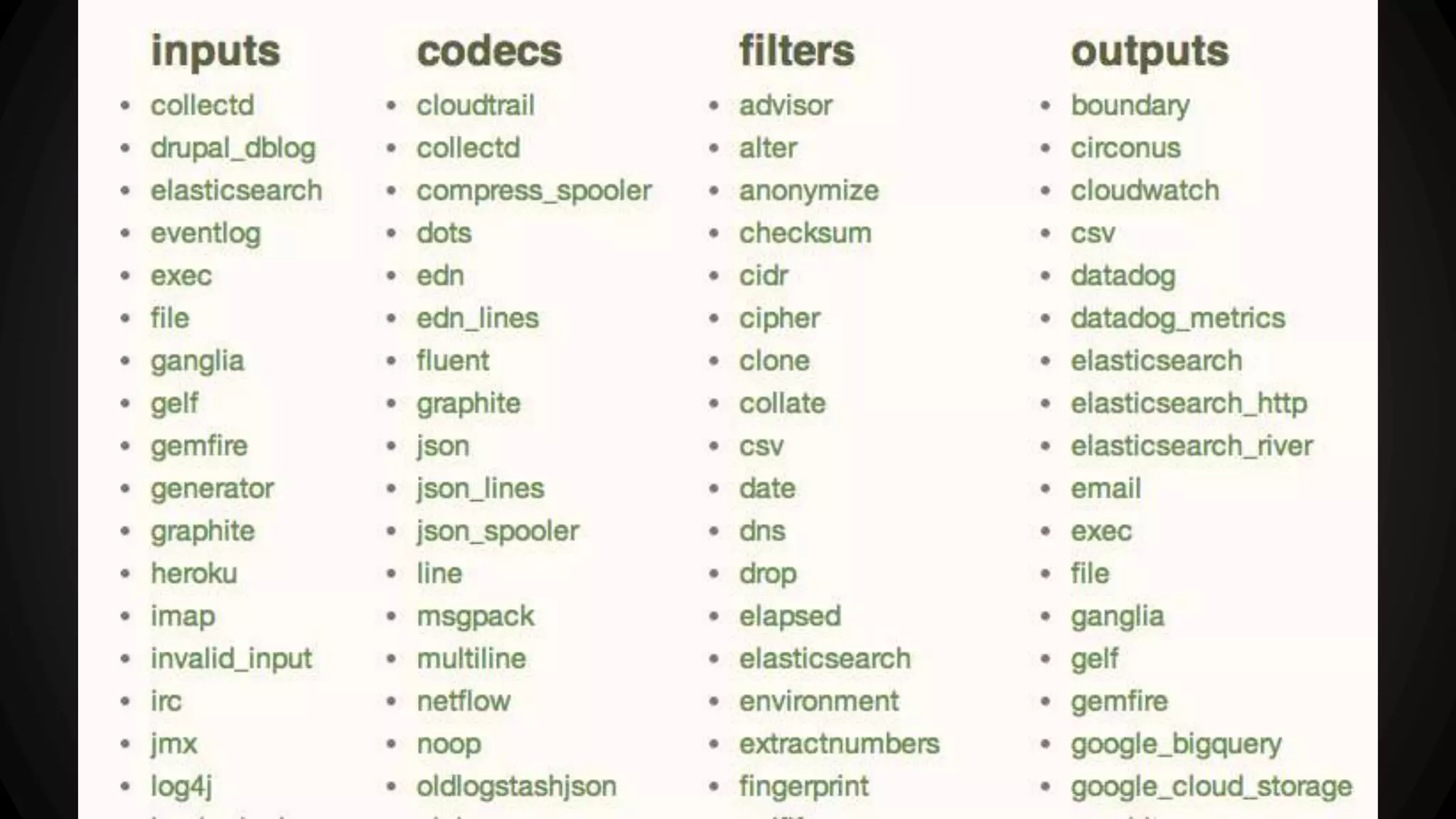
Plumbing for your logs
Many different inputs for your logs
Filtering/parsing for your logs
Many outputs for your logs: for example redis,
elasticsearch, file,
ELK - Kibana
Highly configurable dashboard to slice and
dice your logstash logs in elasticsearch.
Real-time dashboards, easily configurable
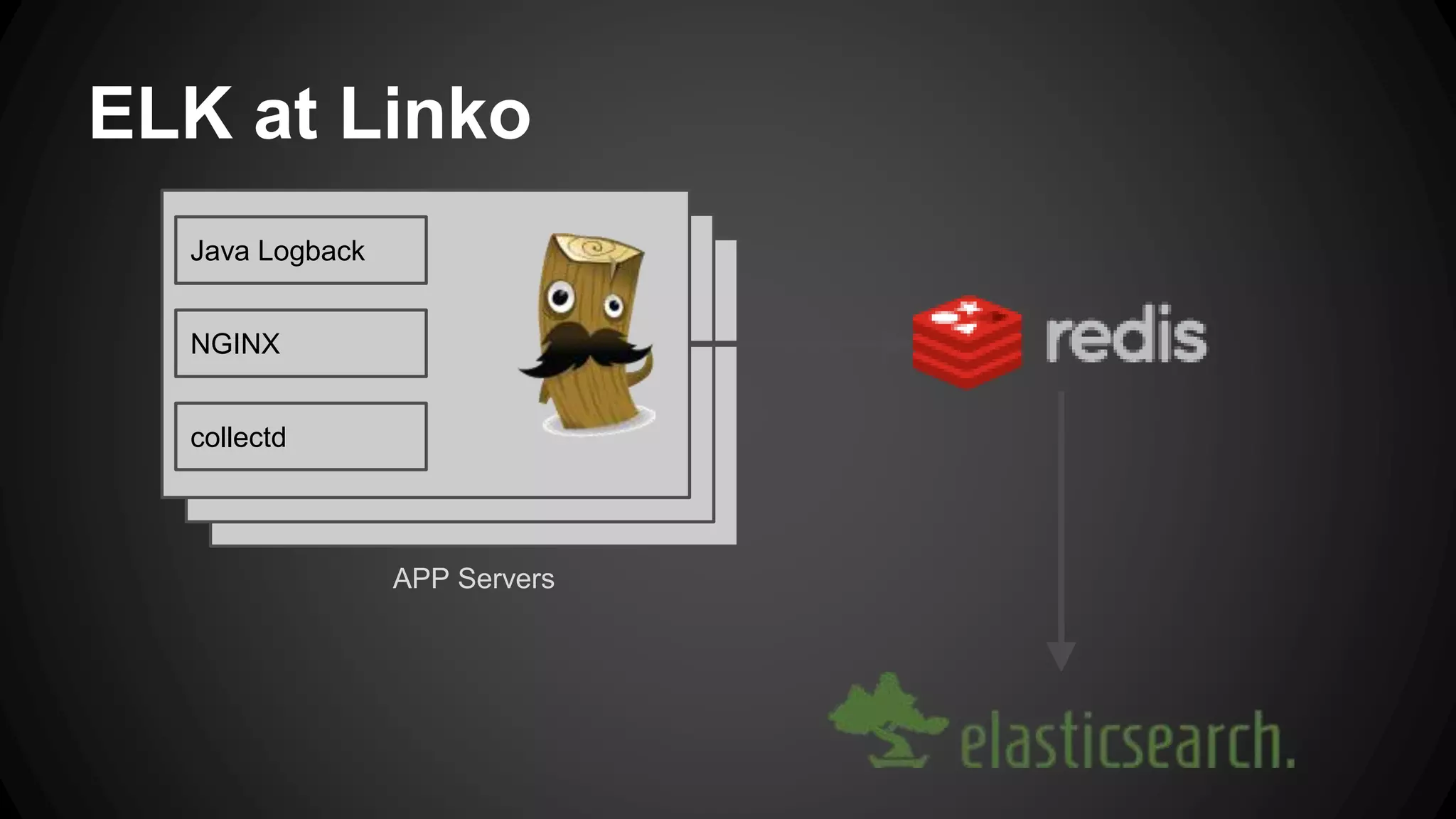
ELK at Linko
Java Logback
NGINX
collectd
APP Servers
Linko Logstash - App Server (1)
input {
file {
type => "nginx_access"
path => ["/var/log/nginx/*.log"]
exclude => ["*.gz”, “error.*"]
discover_interval => 10
sincedb_path => "/opt/logstash/sincedb-
access-nginx"
}
}
filter {
grok {
type => "nginx_access"
patterns_dir => "/opt/logstash/patterns"
pattern =>
["%{NGINXACCESSWITHUPSTR}","%{NGINXACCESS}"]
}
date {
type => "nginx_access"
locale => "en"
match => [ "time_local" ,
"dd/MMM/YYYY:HH:mm:ss Z" ]
}
}
Grok pattern for NGINX
NGINXACCESSWITHUPSTR %{IPORHOST:remote_addr} - %{USERNAME:remote_user}
[%{HTTPDATE:time_local}] "%{WORD:method} %{URIPATHPARAM:request} %{GREEDYDATA:protocol}"
%{INT:status} %{INT:body_bytes_sent} %{QS:http_referer} %{QS:http_user_agent} %{QS:backend}
%{BASE16FLOAT:duration}
NGINXACCESS %{IPORHOST:remote_addr} - %{USERNAME:remote_user} [%{HTTPDATE:time_local}]
%{QS:request} %{INT:status} %{INT:body_bytes_sent} %{QS:http_referer} %{QS:http_user_agent}
Linko Logstash - App Server (2)
input {
file {
type => "backbone"
path => "/var/log/linko-
backbone/logstash/*.log"
codec => "json"
discover_interval => 10
sincedb_path => "/opt/logstash/sincedb-
access-backbone"
}
}
input {
collectd {
type => 'collectd'
}
}
output {
redis {
host => "192.168.1.13"
data_type => "list"
key => "logstash"
}
}
Linko Logstash - Elasticsearch
input {
redis {
host => "192.168.1.13"
# these settings should match the output
of the agent
data_type => "list"
key => "logstash"
# We use the 'json' codec here because we
expect to read
# json events from redis.
codec => json
}
}
output {
elasticsearch_http {
host => "192.168.1.13"
manage_template => true
template_overwrite => true
template =>
"/opt/logstash/index_template.json"
}
}
Experience - mostly good
Many moving parts - each with their odd
problems and issues
All parts are evolving. Prepare to upgrade.
Documentation is not great.
Finding out the hard way ...
Rolling restarts with elasticsearch
Configuring caching because of OOM’s
Clicking together dashboards in Kibana
Don’t restart cluster nodes blindly
Beware: Split brain
Default ES config is not appropriate for
production
Gotchas
Kibana needs to talk to ES, but you don’t want
that exposed to the world.
ES Fielddata cache is unrestricted, by default
Elasticsearch_http can fail silently, if
misconfigured.
If you use file input, be sure to set the sincedb
Getting started
Download es & logstash to your laptop.
Simply run ES as is; worry about config later
Follow logstash cookbook to get started
Setup some simple inputs
Use elasticsearch_http, not elasticsearch output
Install kibana plugin in es
Open your browser
After getting started
RTFM, play, explore, mess up, google, …
Configure ES properly
Setup nginx/apache to proxy
Think about retention policies
...
Links
http://www.elasticsearch.org/
http://linko.io
https://groups.google.com/forum/?fromgroups
=#!forum/elasticsearch
http://www.jillesvangurp.com
Thanks!
@jillesvangurp, @linkoapp

Elk stack

  • 1.
    The ELK Stack@ Linko Jilles van Gurp - Linko Inc.
  • 3.
    Who is Jilles? @jillesvangurp,www.jillesvangurp.com, and jillesvangurp on Github & just about everything else. Java (J)Ruby Python Javascript GEO Server stuffreluctant Devops guy Software Architecture Universities of Utrecht (NL), Blekinge (SE), and Groningen (NL) GX Creative Online Development (NL) Nokia Research (FI), Nokia/Here (DE) Localstream (DE), Linko (DE).
  • 4.
    Logging Stuff runs Produces errors,warnings, debug, telemetry, analytics events, and other information How to make sense of it?
  • 5.
    Old school: Cat,grep, awk, cut, …. Good luck with that on 200GB of unstructured logs. Think lots of coffee breaks. The fix: ELK
  • 6.
    Or do thesame stuff in Hadoop Works great for structured data if you know what you are looking for. Requires a lot of infrastructure and hassle. Not real-time, hard to explore data I’m not a data scientist, are you? The fix: ELK
  • 7.
  • 8.
    ELK - Elasticsearch Sharded,replicated, searchable, json document store. Used by many big name services out there - Github, Soundcloud, Foursquare, Xing, many others. Full text search, geo spatial search, advanced search ranking, suggestions, … much more. It’s awesome. Nice HTTP API
  • 10.
    Scaling Elasticsearch 1 node,16GB, all of open streetmap in geojson format (+ some other stuff) -> reverse geocode in <100ms There are people running ES with thousands of nodes, trillions of documents, and petabytes ...
  • 11.
    Bottom line Elasticsearch scales,probably way beyond your needs Log data is actually easy for elasticsearch
  • 12.
    Elk - Logstash Plumbingfor your logs Many different inputs for your logs Filtering/parsing for your logs Many outputs for your logs: for example redis, elasticsearch, file,
  • 14.
    ELK - Kibana Highlyconfigurable dashboard to slice and dice your logstash logs in elasticsearch. Real-time dashboards, easily configurable
  • 17.
    ELK at Linko JavaLogback NGINX collectd APP Servers
  • 18.
    Linko Logstash -App Server (1) input { file { type => "nginx_access" path => ["/var/log/nginx/*.log"] exclude => ["*.gz”, “error.*"] discover_interval => 10 sincedb_path => "/opt/logstash/sincedb- access-nginx" } } filter { grok { type => "nginx_access" patterns_dir => "/opt/logstash/patterns" pattern => ["%{NGINXACCESSWITHUPSTR}","%{NGINXACCESS}"] } date { type => "nginx_access" locale => "en" match => [ "time_local" , "dd/MMM/YYYY:HH:mm:ss Z" ] } }
  • 19.
    Grok pattern forNGINX NGINXACCESSWITHUPSTR %{IPORHOST:remote_addr} - %{USERNAME:remote_user} [%{HTTPDATE:time_local}] "%{WORD:method} %{URIPATHPARAM:request} %{GREEDYDATA:protocol}" %{INT:status} %{INT:body_bytes_sent} %{QS:http_referer} %{QS:http_user_agent} %{QS:backend} %{BASE16FLOAT:duration} NGINXACCESS %{IPORHOST:remote_addr} - %{USERNAME:remote_user} [%{HTTPDATE:time_local}] %{QS:request} %{INT:status} %{INT:body_bytes_sent} %{QS:http_referer} %{QS:http_user_agent}
  • 20.
    Linko Logstash -App Server (2) input { file { type => "backbone" path => "/var/log/linko- backbone/logstash/*.log" codec => "json" discover_interval => 10 sincedb_path => "/opt/logstash/sincedb- access-backbone" } } input { collectd { type => 'collectd' } } output { redis { host => "192.168.1.13" data_type => "list" key => "logstash" } }
  • 21.
    Linko Logstash -Elasticsearch input { redis { host => "192.168.1.13" # these settings should match the output of the agent data_type => "list" key => "logstash" # We use the 'json' codec here because we expect to read # json events from redis. codec => json } } output { elasticsearch_http { host => "192.168.1.13" manage_template => true template_overwrite => true template => "/opt/logstash/index_template.json" } }
  • 22.
    Experience - mostlygood Many moving parts - each with their odd problems and issues All parts are evolving. Prepare to upgrade. Documentation is not great.
  • 23.
    Finding out thehard way ... Rolling restarts with elasticsearch Configuring caching because of OOM’s Clicking together dashboards in Kibana Don’t restart cluster nodes blindly Beware: Split brain Default ES config is not appropriate for production
  • 24.
    Gotchas Kibana needs totalk to ES, but you don’t want that exposed to the world. ES Fielddata cache is unrestricted, by default Elasticsearch_http can fail silently, if misconfigured. If you use file input, be sure to set the sincedb
  • 25.
    Getting started Download es& logstash to your laptop. Simply run ES as is; worry about config later Follow logstash cookbook to get started Setup some simple inputs Use elasticsearch_http, not elasticsearch output Install kibana plugin in es Open your browser
  • 26.
    After getting started RTFM,play, explore, mess up, google, … Configure ES properly Setup nginx/apache to proxy Think about retention policies ...
  • 27.
  • 28.