Tony Caniglia
Introduction to BPM
 Common Practise
 Identify Business Process
 Document Business Process
BPMS Overview
 Business Process lifecycle
Management
 Process Reengineering
 BPM
 BPD
 BPMN
 BPMS
 Business Process Definition
 Business Process Instance
 Activity
 Workflow
 Business Process Management
 Business Process Diagram
 Business Process Modelling Notation
 Business Process Management
System
 Configured BPD for the BPMS
 A running Process Definition
 A step in the Business Process
 The path the activities embark
 My BPM Journey
 BPM standards and specifications
 Vendor Implementations
 BPMN Process designer
 Business Process Definition
 Business Process Simulation
 Business Process Portal
 Business Process Repository
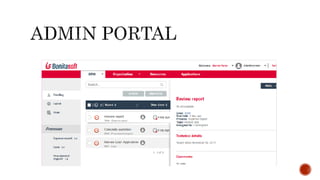
 Business Process Administration
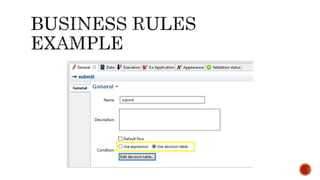
 Business Rules
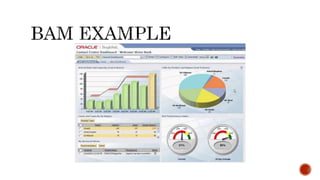
 BAM (Analytics & Insights)
 Fujitsu Australia Software Technology
 FAST
 Middleware Products
 Java Application Servers
 XBRL toolkits/applications
 Postgres Database
 Java/UML IDEs
 (Integrated Development Environments)
 Three BPMS products
 BPMS On Premise
 BOP (Business Operating Platform) Cloud
 SaaS (Software as a Service)
 Role
 Technical writer
 Course Author
 Technical Architect
 Business Process Analyst
 Create a UML course
 UML
 Standard way to visualise system and software designs
 Best used for
 Object Orientated Analysis (OOA)
 Object Orientated Design (OOD)
 Object Oriented Programming (OOP)
 Model Driven Development (MDD)
 Model Driven Architecture (MDA)
 14 diagrams
 Support different perspectives
 Two types of diagramming tools
1. Draw diagrams (conceptual)
1. Possible invalid notation
2. Create valid diagrams
 Diagramming tool features
 Diagram notation
 Validation
 Code generation and integration
 Diagram Examples
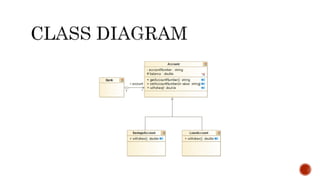
 Class Diagram
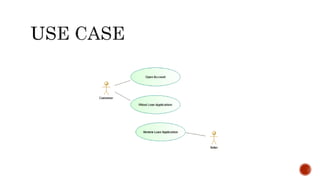
 Use Case
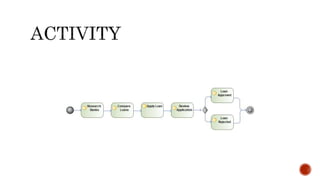
 Activity
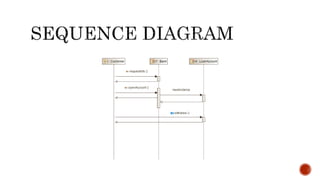
 Sequence
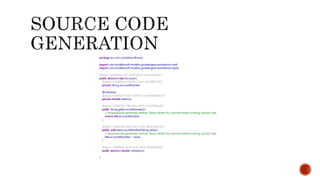
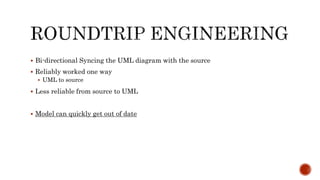
 Bi-directional Syncing the UML diagram with the source
 Reliably worked one way
 UML to source
 Less reliable from source to UML
 Model can quickly get out of date
 Success!
 Tool suite simple and effective
 Very Good Model driven support
 Excellent Integration
 Bug tracking and tickets
 Source code management
 Collaborative development environment
 Update BPM course(s)
 All six of them
 Write a white paper
 Knowledge: On the job exposure
 Business Analyst documenting the process
 Word
 Visio
 “ I don’t like green eggs and ham”
 Lengthy word document
 Diagram – non standard notation or hybrid notation
 Reviewing the documentation
 Read “diagram business process … and run it”
 3+ days to build configure BPMS
 Supports a Enterprise environment
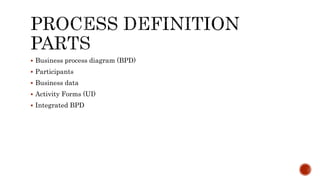
 Business process diagram (BPD)
 Participants
 Business data
 Activity Forms (UI)
 Integrated BPD
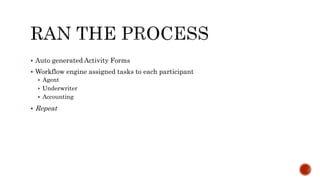
 Auto generated Activity Forms
 Workflow engine assigned tasks to each participant
 Agent
 Underwriter
 Accounting
 Repeat
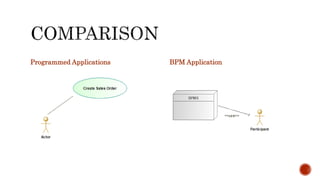
Programmed Applications BPM Application
 Participants Options
 Accept Task
 Decline Task
 Delegate Task
 Start Task (accurate measurement)
 Pause Task
 Complete Task
Specifications
Vendor Implementations
 Diagramming
 BPMN - OMG Group
 File format
 XPDL (XML Process Definition Language) - Workflow management group
 No Vendor Lock in
 Vendor Implementations
 Closely follow specifications
 Mostly based on BPMN 1.0
 Comprised of two parts
1. Diagrammed Business Process
2. BPMS configuration (vendor specific)
 Vendor specific
 Examples drawn from
 Bonitasoft
 Interstage BPM
 Oracle BPM
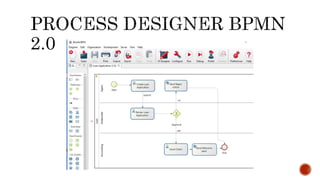
 Follows either BPMN 1.0 or 2.0
 BPMN like notation
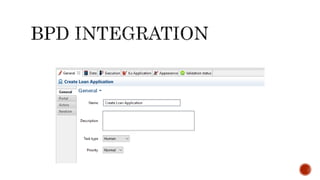
 Business user models the business process
 Technical user implements BPD
 Programming Language
 Java
 Web Services
 Database
 :
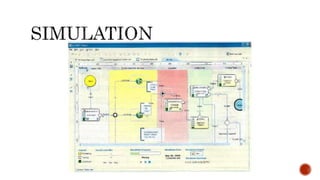
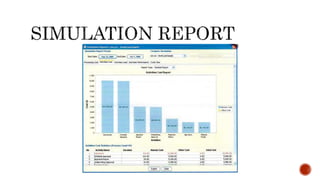
 Simulate Business Process
 Check the flow
 Estimate the time and costs
 No integration required
 Not a common BPMS feature
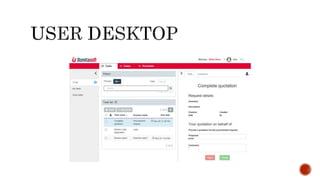
 User Desktop
 Interacting with Business Process workflow
 BPMS Management desktop
 Deploying BPM Apps
 Restarting Business Process instance
 :
 Configurable by business user
 Abstracts business logic from BPD
 Business Activity Monitoring (BAM)
 Measure time and cost of Business Process
 Numerous Analytic and Insights reporting
Demystifying BPM
Demystifying BPM

Demystifying BPM

  • 1.
  • 2.
    Introduction to BPM Common Practise  Identify Business Process  Document Business Process BPMS Overview  Business Process lifecycle Management  Process Reengineering
  • 4.
     BPM  BPD BPMN  BPMS  Business Process Definition  Business Process Instance  Activity  Workflow  Business Process Management  Business Process Diagram  Business Process Modelling Notation  Business Process Management System  Configured BPD for the BPMS  A running Process Definition  A step in the Business Process  The path the activities embark
  • 6.
     My BPMJourney  BPM standards and specifications  Vendor Implementations
  • 7.
     BPMN Processdesigner  Business Process Definition  Business Process Simulation  Business Process Portal  Business Process Repository  Business Process Administration  Business Rules  BAM (Analytics & Insights)
  • 9.
     Fujitsu AustraliaSoftware Technology  FAST
  • 10.
     Middleware Products Java Application Servers  XBRL toolkits/applications  Postgres Database  Java/UML IDEs  (Integrated Development Environments)  Three BPMS products  BPMS On Premise  BOP (Business Operating Platform) Cloud  SaaS (Software as a Service)
  • 11.
     Role  Technicalwriter  Course Author  Technical Architect  Business Process Analyst
  • 12.
     Create aUML course  UML  Standard way to visualise system and software designs  Best used for  Object Orientated Analysis (OOA)  Object Orientated Design (OOD)  Object Oriented Programming (OOP)  Model Driven Development (MDD)  Model Driven Architecture (MDA)  14 diagrams  Support different perspectives
  • 13.
     Two typesof diagramming tools 1. Draw diagrams (conceptual) 1. Possible invalid notation 2. Create valid diagrams  Diagramming tool features  Diagram notation  Validation  Code generation and integration
  • 14.
     Diagram Examples Class Diagram  Use Case  Activity  Sequence
  • 17.
     Bi-directional Syncingthe UML diagram with the source  Reliably worked one way  UML to source  Less reliable from source to UML  Model can quickly get out of date
  • 21.
     Success!  Toolsuite simple and effective  Very Good Model driven support  Excellent Integration  Bug tracking and tickets  Source code management  Collaborative development environment
  • 22.
     Update BPMcourse(s)  All six of them  Write a white paper
  • 23.
     Knowledge: Onthe job exposure  Business Analyst documenting the process  Word  Visio  “ I don’t like green eggs and ham”
  • 24.
     Lengthy worddocument  Diagram – non standard notation or hybrid notation
  • 26.
     Reviewing thedocumentation  Read “diagram business process … and run it”
  • 27.
     3+ daysto build configure BPMS  Supports a Enterprise environment
  • 30.
     Business processdiagram (BPD)  Participants  Business data  Activity Forms (UI)  Integrated BPD
  • 32.
     Auto generatedActivity Forms  Workflow engine assigned tasks to each participant  Agent  Underwriter  Accounting  Repeat
  • 33.
  • 34.
     Participants Options Accept Task  Decline Task  Delegate Task  Start Task (accurate measurement)  Pause Task  Complete Task
  • 35.
  • 36.
     Diagramming  BPMN- OMG Group  File format  XPDL (XML Process Definition Language) - Workflow management group  No Vendor Lock in  Vendor Implementations  Closely follow specifications  Mostly based on BPMN 1.0
  • 37.
     Comprised oftwo parts 1. Diagrammed Business Process 2. BPMS configuration (vendor specific)
  • 39.
     Vendor specific Examples drawn from  Bonitasoft  Interstage BPM  Oracle BPM
  • 41.
     Follows eitherBPMN 1.0 or 2.0  BPMN like notation
  • 43.
     Business usermodels the business process  Technical user implements BPD  Programming Language  Java  Web Services  Database  :
  • 45.
     Simulate BusinessProcess  Check the flow  Estimate the time and costs  No integration required  Not a common BPMS feature
  • 48.
     User Desktop Interacting with Business Process workflow
  • 50.
     BPMS Managementdesktop  Deploying BPM Apps  Restarting Business Process instance  :
  • 52.
     Configurable bybusiness user  Abstracts business logic from BPD
  • 54.
     Business ActivityMonitoring (BAM)  Measure time and cost of Business Process  Numerous Analytic and Insights reporting

Editor's Notes

  • #3 Introduction to BPM The title wasn’t catchy and I thought it could be misleading to the audience Some people could read the title and say to themselves “I already know BPM – I use it every day in my job” My presentation does cover slightly more than the common use Then I changed it to BPMS Overview but I felt this could be misleading or unclear. While I was going through this naming exercise I discovered something in my travels That there are basically at least 2 uses of BPM Identify and document of Busines Processes in document or diagram The full end to end BPM solution – Process Reengineering So I decided on Demystifying BPM to cover both aspects
  • #5 You can see BPM can mean two things to eliminate confusion I use BPD when referring to the business process diagram Business Process Management system Recently I discovered it was updated to "Business Process Management solutions"
  • #10 FAST for short
  • #11 FAST developed several and different middleware products
  • #12 My roles was to create proof of concept solutions for these products as well as create training material and white papers for them.
  • #13 My first assignment at FAST was to write a course for their new UML tool. Previously I worked for Sun Microsystems in the US as Enterprise Java Instructor Where I trained software engineers in Object Oriented Analysis and Design using the Java language UML is the diagramming language used to draw the system and software designs. UML is a technical diagramming language but it's not limited to just technical diagrams.

  • #14 In brief there are two types of diagramming tools. 1) One type allows one to draw most any type of diagrams and doesn't check if they are valid. I can't tell you how many times I’ve seen invalid diagrams. 2) Second type is designed specifically for a diagramming notation and provides features like notation validation. Some tools won't save the diagram unless its valid.
  • #15 Some UML diagram examples
  • #16 Class diagram very common used for designing objects
  • #17 Roundtrip engineering a feature of UML tool. Converts a model (diagram) to source code and source code back to the model (diagram).
  • #19 Use Case helps to define scope and requirements User stories are now used more in an Agile methodology. But Use Case diagrams aren't still used.
  • #20 Simple and easy to understand (most of the time)
  • #21 Diagram the sequence of steps Most often the UML tool allows you to even call the actual methods in the objects
  • #22 The UML tool had all these features that promoted collaboration and team development
  • #23 For the next 3 months I was going to be updating the BPM courses And had write a white paper
  • #24 Initially I was not a fan of BPM My knowledge was primarily based on my on-the-job exposure But that changed after I learned about its capability
  • #25 Typically BPM was used to identify and document the Business Process in either or both in a lengthy document or complex diagram. Then after it was shared it was filed away.
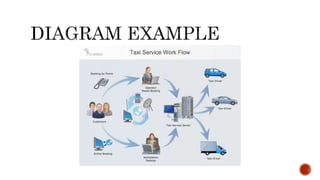
  • #26 This is contrived example of a BPM diagram to demonstrate my point of "non-standard". What does this diagram mean ? And how relevant is the information to understanding the process
  • #27 So I started reading through the course material and the software manuals to upskill myself in BPM. While reading through the material I read "you draw the business process and then run it". I thought to myself no way – you can run the diagram.
  • #28 It took several days to setup the BPMS. Because Its made up of several applications: Database, Application Server, etc. The reason it has all these components is because its designed to integrate and compliment into the organisations IT systems.
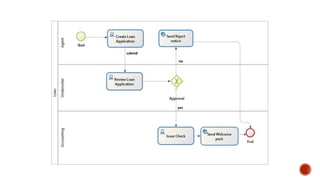
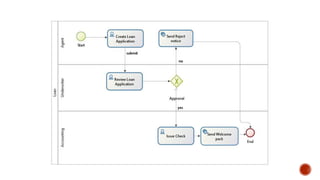
  • #30 What is this a BP of ? Loan application – and you know that how? This diagram uses a human activity and a system activity which the system performs.
  • #31 The core parts of a BPD
  • #32 What is this a BP of ? Loan application – and you know that how? Business Process Diagram Participants Define data – can’t see the data on the diagram Human Activity have forms and system do not Integrate
  • #33 I ran the BP and then ran it again a few more times
  • #34 I still wasn't convinced about BPM. On the surface they are much the same: BPM Apps and programmed applications The main difference I discovered Programmed applications - Use case diagram actor calling functions BPM Apps - BPMS calling Actor In addition the use of Task assignments which I’ll cover in more detail
  • #35 Tasks are pushed to groups and or a specific person and have the following options Accept Decline Delegate Start Pause Complete
  • #37 I'm only going to cover high-level two main specifications BPMN notation and the file format (XPDL) BPMN defines the standard symbols and proper use of BP diagramming. XPDL defines the portability of the BPD to across vendor BPMS
  • #38 The customer can retain the IP and with some effort redeploy the BP to another BPMS
  • #40 The following screen captures were created from the following sources Bonitasoft Interstage BPM Oracle's BPM product
  • #42 Most BPMS products seem to follow BPMN 1.0 notation. I believe the reason maybe for costs to implement or they prefer their BPM like notation.
  • #43 Bonitasoft BPMN 2.0 Pools were introduced in BPMN 2.0
  • #45 Screenshot from Bonitasoft
  • #47 Interstage BPM Simulation does not require implementation Configure values to simulate costs
  • #48 Interstage BPM
  • #49 A user interacts with the BPM Apps either through a desktop/portal or through an API.
  • #50 Bonitasoft desktop screenshot
  • #54 Bonitasoft screenshot
  • #56 Oracle BPM product screenshot