

Xamarin
CROSS PLATFORM DEVELOPMENT ENVIRONMENT
Entry Point
 More and more people use the mobile device to be the entry point to
internet.
http://www.cisco.com/c/en/us/solutions/collateral/service-provider/visual-networking-index-
vni/white_paper_c11-520862.html
 Something we can’t change.
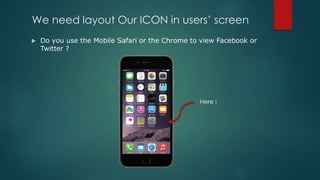
We need layout Our ICON in users’ screen
 Do you use the Mobile Safari or the Chrome to view Facebook or
Twitter ?
Here !
Mobile Development
 Native Platform
Objective-C, Swift for iOS
Java for Android
C# for Windows Phone, Universal Windows Platform
C# + Xamarin for iOS, Android and Windows Phone
 Secondary Platform
PhoneGap/Cordova
Sencha Touch
Kendo UI
Titanium
Which Platform You Need
 Content
 Performance
 Device Features
 Animation
 Human Resource
 Investment (Past/Future)
Secondary Platform
 Run on browser OR Translate to platform language
Secondary Platform
 javascript, html, css
More Easy then Objective-C, Java and C#
 Navigation, Animation, Device Features, Offline, Security are
weakness.
 You need a strong Front-End engineer team.
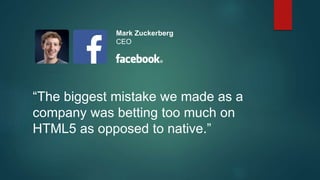
“The biggest mistake we made as a
company was betting too much on
HTML5 as opposed to native.”
Mark Zuckerberg
CEO
“HTML5 is not allowing us to do the best for our
users. [Mobile web technology is critically missing]
tooling support — having a debugger that actually
works, performance tools that tell you where the
memory is running out.”
Kiran Prasad
Sr. Director, Mobile Engineering
Secondary Platform
 You need to wait the platform to develop features’ binding
 Cordova’s Android Implement
https://github.com/apache/cordova-android/tree/master/framework
cordova-android/bin/templates/project/assets/www/cordova.js
 Cordova’s iOS Implement
https://github.com/apache/cordova-ios/tree/master/CordovaLib/Classes
https://github.com/apache/cordova-ios/blob/master/CordovaLib/cordova.js
Facebook doesn’t give up !
 React Native
https://facebook.github.io/react-native/
https://github.com/facebook/react-native
 React
http://facebook.github.io/react/
 React Version 0.13.3 (2015,10,2)
 React Native Version 0.12.0 (2015.10.2)
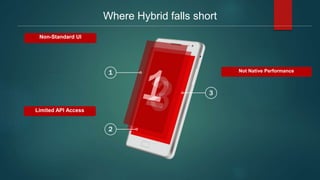
Where Hybrid falls short
1
2
3
Limited API Access
Non-Standard UI
Not Native Performance
Platform Language
 Objective-C, Swift for iOS and Mac OS X
 Java for Android
 C# for Windows Phone and Universal Windows App
Platform Language
 Full Support
 Community and Resources
 But……
Platform Language - JSON
 Java
JSONObject, JSONArray
 Objective-C
NSData, NSJSONSerialization, NSDictionary, NSArray
Platform Language - JSON
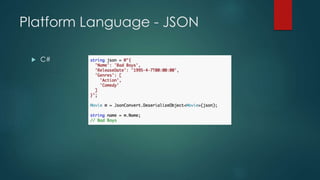
 C#
Xamarin Component Store
 https://components.xamarin.com/view/json.net
 DEMO
Protect Your Investment
Performance
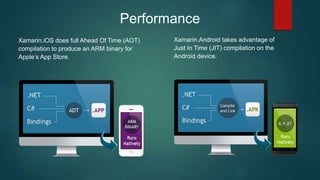
Xamarin.iOS does full Ahead Of Time (AOT)
compilation to produce an ARM binary for
Apple’s App Store.
Xamarin.Android takes advantage of
Just In Time (JIT) compilation on the
Android device.
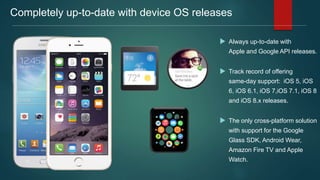
Completely up-to-date with device OS releases
 Always up-to-date with
Apple and Google API releases.
 Track record of offering
same-day support: iOS 5, iOS
6, iOS 6.1, iOS 7,iOS 7.1, iOS 8
and iOS 8.x releases.
 The only cross-platform solution
with support for the Google
Glass SDK, Android Wear,
Amazon Fire TV and Apple
Watch.
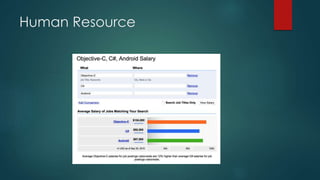
Human Resource
Enterprise Cooperation
 IBM
 SAP
 Salesforce
 Oracle
IBM and Xamarin
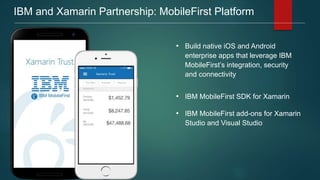
IBM and Xamarin Partnership: MobileFirst Platform
• Build native iOS and Android
enterprise apps that leverage IBM
MobileFirst’s integration, security
and connectivity
• IBM MobileFirst SDK for Xamarin
• IBM MobileFirst add-ons for Xamarin
Studio and Visual Studio
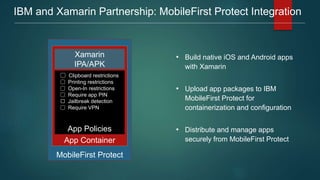
IBM and Xamarin Partnership: MobileFirst Protect Integration
• Build native iOS and Android apps
with Xamarin
• Upload app packages to IBM
MobileFirst Protect for
containerization and configuration
• Distribute and manage apps
securely from MobileFirst Protect
MobileFirst Protect
App Container
Xamarin
IPA/APK
App Policies
🔳 Clipboard restrictions
🔳 Printing restrictions
🔳 Open-In restrictions
🔳 Require app PIN
⬜️ Jailbreak detection
🔳 Require VPN
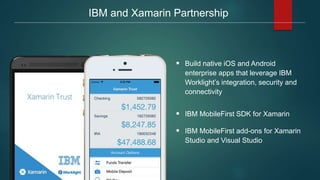
 Build native iOS and Android
enterprise apps that leverage IBM
Worklight’s integration, security and
connectivity
 IBM MobileFirst SDK for Xamarin
 IBM MobileFirst add-ons for Xamarin
Studio and Visual Studio
IBM and Xamarin Partnership
 SAP and Xamarin
Enables enterprise developers to build native iOS,
Android, and Windows mobile apps that leverage
SAP data and processes
Xamarin and SAP Partnership
 Xamarin + SAP Mobile Platform SDK
in the Component Store
 Xamarin Test Cloud with SAP Mobile
Platform data verification capabilities
 Xamarin offering Xamarin + SAP
Certified Consultant program
 Xamarin University offering expert-led
course on best practices in using
Xamarin with SAP
 Salesforce and Xamarin
Salesforce and Xamarin
 Executive Level Relationship
 Salesforce component in Xamarin
Component Store
 Joint Reference customers:
Kimberly-Clark
 Joint Go-To-Market and Events
 Xamarin Presence at Dreamforce
2013 in San Francisco (80,000
attendees)
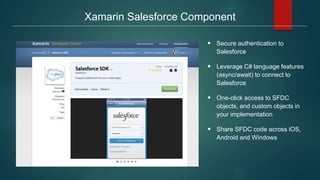
Xamarin Salesforce Component
 Secure authentication to
Salesforce
 Leverage C# language features
(async/await) to connect to
Salesforce
 One-click access to SFDC
objects, and custom objects in
your implementation
 Share SFDC code across iOS,
Android and Windows
 Oracle and Xamarin
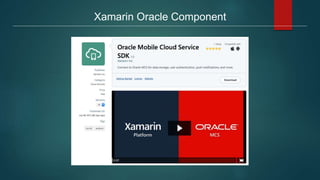
Xamarin Oracle Component
Xamarin Platform
 Visual Studio Integration
 Xamarin Studio
 Component Store
 Xamarin Designer for iOS
 Xamarin Designer for Android
Visual Studio
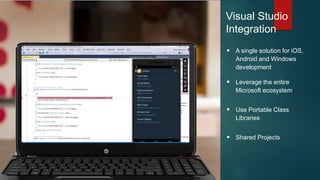
Integration
 A single solution for iOS,
Android and Windows
development
 Leverage the entire
Microsoft ecosystem
 Use Portable Class
Libraries
 Shared Projects
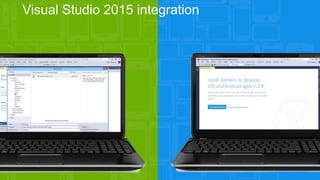
Visual Studio 2015 integration
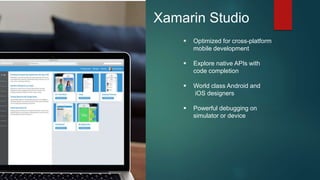
Xamarin Studio
 Optimized for cross-platform
mobile development
 Explore native APIs with
code completion
 World class Android and
iOS designers
 Powerful debugging on
simulator or device
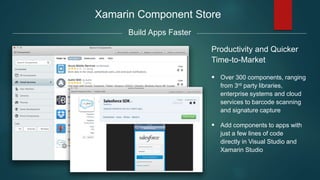
Xamarin Component Store
Productivity and Quicker
Time-to-Market
 Over 300 components, ranging
from 3rd party libraries,
enterprise systems and cloud
services to barcode scanning
and signature capture
 Add components to apps with
just a few lines of code
directly in Visual Studio and
Xamarin Studio
Build Apps Faster
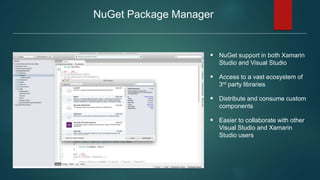
NuGet Package Manager
 NuGet support in both Xamarin
Studio and Visual Studio
 Access to a vast ecosystem of
3rd party libraries
 Distribute and consume custom
components
 Easier to collaborate with other
Visual Studio and Xamarin
Studio users
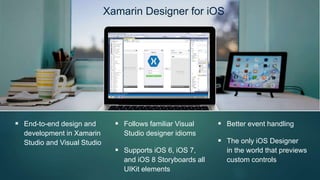
Xamarin Designer for iOS
 End-to-end design and
development in Xamarin
Studio and Visual Studio
 Follows familiar Visual
Studio designer idioms
 Supports iOS 6, iOS 7,
and iOS 8 Storyboards all
UIKit elements
 Better event handling
 The only iOS Designer
in the world that previews
custom controls
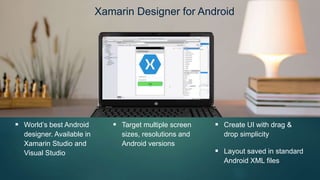
Xamarin Designer for Android
 World’s best Android
designer. Available in
Xamarin Studio and
Visual Studio
 Target multiple screen
sizes, resolutions and
Android versions
 Create UI with drag &
drop simplicity
 Layout saved in standard
Android XML files
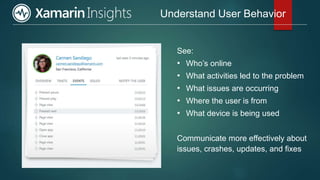
Xamarin Insight
 Real-time app monitoring to find and fix issues fast
Precise Crash Reporting & User Analytics
See:
• Who’s online
• What activities led to the problem
• What issues are occurring
• Where the user is from
• What device is being used
Communicate more effectively about
issues, crashes, updates, and fixes
Understand User Behavior

Xamarin Platform

  • 1.
  • 2.
    Entry Point  Moreand more people use the mobile device to be the entry point to internet. http://www.cisco.com/c/en/us/solutions/collateral/service-provider/visual-networking-index- vni/white_paper_c11-520862.html  Something we can’t change.
  • 3.
    We need layoutOur ICON in users’ screen  Do you use the Mobile Safari or the Chrome to view Facebook or Twitter ? Here !
  • 4.
    Mobile Development  NativePlatform Objective-C, Swift for iOS Java for Android C# for Windows Phone, Universal Windows Platform C# + Xamarin for iOS, Android and Windows Phone  Secondary Platform PhoneGap/Cordova Sencha Touch Kendo UI Titanium
  • 5.
    Which Platform YouNeed  Content  Performance  Device Features  Animation  Human Resource  Investment (Past/Future)
  • 6.
    Secondary Platform  Runon browser OR Translate to platform language
  • 7.
    Secondary Platform  javascript,html, css More Easy then Objective-C, Java and C#  Navigation, Animation, Device Features, Offline, Security are weakness.  You need a strong Front-End engineer team.
  • 8.
    “The biggest mistakewe made as a company was betting too much on HTML5 as opposed to native.” Mark Zuckerberg CEO
  • 9.
    “HTML5 is notallowing us to do the best for our users. [Mobile web technology is critically missing] tooling support — having a debugger that actually works, performance tools that tell you where the memory is running out.” Kiran Prasad Sr. Director, Mobile Engineering
  • 10.
    Secondary Platform  Youneed to wait the platform to develop features’ binding  Cordova’s Android Implement https://github.com/apache/cordova-android/tree/master/framework cordova-android/bin/templates/project/assets/www/cordova.js  Cordova’s iOS Implement https://github.com/apache/cordova-ios/tree/master/CordovaLib/Classes https://github.com/apache/cordova-ios/blob/master/CordovaLib/cordova.js
  • 11.
    Facebook doesn’t giveup !  React Native https://facebook.github.io/react-native/ https://github.com/facebook/react-native  React http://facebook.github.io/react/  React Version 0.13.3 (2015,10,2)  React Native Version 0.12.0 (2015.10.2)
  • 12.
    Where Hybrid fallsshort 1 2 3 Limited API Access Non-Standard UI Not Native Performance
  • 13.
    Platform Language  Objective-C,Swift for iOS and Mac OS X  Java for Android  C# for Windows Phone and Universal Windows App
  • 14.
    Platform Language  FullSupport  Community and Resources  But……
  • 15.
    Platform Language -JSON  Java JSONObject, JSONArray  Objective-C NSData, NSJSONSerialization, NSDictionary, NSArray
  • 16.
  • 17.
    Xamarin Component Store https://components.xamarin.com/view/json.net  DEMO
  • 18.
  • 19.
  • 20.
    Performance Xamarin.iOS does fullAhead Of Time (AOT) compilation to produce an ARM binary for Apple’s App Store. Xamarin.Android takes advantage of Just In Time (JIT) compilation on the Android device.
  • 21.
    Completely up-to-date withdevice OS releases  Always up-to-date with Apple and Google API releases.  Track record of offering same-day support: iOS 5, iOS 6, iOS 6.1, iOS 7,iOS 7.1, iOS 8 and iOS 8.x releases.  The only cross-platform solution with support for the Google Glass SDK, Android Wear, Amazon Fire TV and Apple Watch.
  • 22.
  • 23.
    Enterprise Cooperation  IBM SAP  Salesforce  Oracle
  • 24.
  • 25.
    IBM and XamarinPartnership: MobileFirst Platform • Build native iOS and Android enterprise apps that leverage IBM MobileFirst’s integration, security and connectivity • IBM MobileFirst SDK for Xamarin • IBM MobileFirst add-ons for Xamarin Studio and Visual Studio
  • 26.
    IBM and XamarinPartnership: MobileFirst Protect Integration • Build native iOS and Android apps with Xamarin • Upload app packages to IBM MobileFirst Protect for containerization and configuration • Distribute and manage apps securely from MobileFirst Protect MobileFirst Protect App Container Xamarin IPA/APK App Policies 🔳 Clipboard restrictions 🔳 Printing restrictions 🔳 Open-In restrictions 🔳 Require app PIN ⬜️ Jailbreak detection 🔳 Require VPN
  • 27.
     Build nativeiOS and Android enterprise apps that leverage IBM Worklight’s integration, security and connectivity  IBM MobileFirst SDK for Xamarin  IBM MobileFirst add-ons for Xamarin Studio and Visual Studio IBM and Xamarin Partnership
  • 28.
     SAP andXamarin
  • 29.
    Enables enterprise developersto build native iOS, Android, and Windows mobile apps that leverage SAP data and processes Xamarin and SAP Partnership  Xamarin + SAP Mobile Platform SDK in the Component Store  Xamarin Test Cloud with SAP Mobile Platform data verification capabilities  Xamarin offering Xamarin + SAP Certified Consultant program  Xamarin University offering expert-led course on best practices in using Xamarin with SAP
  • 30.
  • 31.
    Salesforce and Xamarin Executive Level Relationship  Salesforce component in Xamarin Component Store  Joint Reference customers: Kimberly-Clark  Joint Go-To-Market and Events  Xamarin Presence at Dreamforce 2013 in San Francisco (80,000 attendees)
  • 32.
    Xamarin Salesforce Component Secure authentication to Salesforce  Leverage C# language features (async/await) to connect to Salesforce  One-click access to SFDC objects, and custom objects in your implementation  Share SFDC code across iOS, Android and Windows
  • 33.
  • 34.
  • 35.
    Xamarin Platform  VisualStudio Integration  Xamarin Studio  Component Store  Xamarin Designer for iOS  Xamarin Designer for Android
  • 36.
    Visual Studio Integration  Asingle solution for iOS, Android and Windows development  Leverage the entire Microsoft ecosystem  Use Portable Class Libraries  Shared Projects
  • 37.
    Visual Studio 2015integration
  • 38.
    Xamarin Studio  Optimizedfor cross-platform mobile development  Explore native APIs with code completion  World class Android and iOS designers  Powerful debugging on simulator or device
  • 39.
    Xamarin Component Store Productivityand Quicker Time-to-Market  Over 300 components, ranging from 3rd party libraries, enterprise systems and cloud services to barcode scanning and signature capture  Add components to apps with just a few lines of code directly in Visual Studio and Xamarin Studio Build Apps Faster
  • 40.
    NuGet Package Manager NuGet support in both Xamarin Studio and Visual Studio  Access to a vast ecosystem of 3rd party libraries  Distribute and consume custom components  Easier to collaborate with other Visual Studio and Xamarin Studio users
  • 41.
    Xamarin Designer foriOS  End-to-end design and development in Xamarin Studio and Visual Studio  Follows familiar Visual Studio designer idioms  Supports iOS 6, iOS 7, and iOS 8 Storyboards all UIKit elements  Better event handling  The only iOS Designer in the world that previews custom controls
  • 42.
    Xamarin Designer forAndroid  World’s best Android designer. Available in Xamarin Studio and Visual Studio  Target multiple screen sizes, resolutions and Android versions  Create UI with drag & drop simplicity  Layout saved in standard Android XML files
  • 43.
    Xamarin Insight  Real-timeapp monitoring to find and fix issues fast
  • 44.
    Precise Crash Reporting& User Analytics
  • 45.
    See: • Who’s online •What activities led to the problem • What issues are occurring • Where the user is from • What device is being used Communicate more effectively about issues, crashes, updates, and fixes Understand User Behavior

Editor's Notes

  • #3 New generation grow up in the environment with mobile device everywhere. 這些電腦對他們來說是環境的一部分 行動裝置將是獲得資訊的入口點
  • #4 這是注意力經濟的時代 你開Google搜尋時會看幾頁的搜尋結果 上次開啟手機上的瀏覽器時,會停留在一個網站多久? 你會為了什麼樣的需求,將網站圖標置放在手機桌面?
  • #5 There’re different ways to develop mobile service. 既然要建立行動平台上的入口,那有什麼技術可以選 1. 原生開發平台 2. 次級開發平台
  • #6 Which conditions you need to think about the platform choice. 在選擇開發平台時,需要考量需多因素 這幾項都是需要考慮的因素 什麼樣的內容:影音平台與博物館導覽或是行動購物,會產生不同的內容規劃需求 會講究反應速度嗎? 有用到裝置上的特殊功能嗎?如加速器與陀螺儀,手勢,指南針與磁力計,Video與Audio,定位與GeoFence 有用到多少動畫效果? 找得到開發人員或能讓手上目前的人力轉用嗎? 能保住既有的投資,能讓投資在未來不會白費嗎?
  • #7 先來介紹二次開發平台 (澄清一下,不是二流開發平台) 基本上分成二類 一是將web page 放在app內,以內建的瀏覽器元件載入。再規劃一些裝置 API 供頁面內的 javascript 呼叫使用 二是將使用的 javascript 轉換成原生程式碼,將html 加上 css的頁面佈局,轉換成xml格式的UI notation
  • #8 假設你選擇了以瀏覽器元件做為執行方式的二次開發平台 可以使用與網頁設計相同的 javascript 與 css 看起來好像十分容易入門及與既有資源結合 但是當你實際使用時,會發現你需要一個強悍的工程師團隊,解決各類RWD問題 諸如過場效果,地圖等與裝置平台呼叫等等
  • #9 我想各位應該應該認識這位 他放棄了這種開發方式 當然還是有許多討論發生 或許我們可以組一支比 Facebook 所擁有,技術更為強大的前端團隊 不過超越Facebook是各位的商業目標嗎? 還是我們應該讓技術支援我們的商業目標?
  • #10 不要忘記 debug 及 profile 佔了開發時程的百分比 這視各團隊的狀況有所不同
  • #11 另外不要忘記與平台有關的功能 都需要這個二次平台的開發團隊實踐 第一個超連結是Cordova 團隊,以Java 撰寫 lib ,目的在編成 lib 供 第二個連結的 cordova.js 載入 第三個超連結是Cordova 團隊,以Objective-C 撰寫 lib ,目的在編成 lib 供 第四個連結的 cordova.js 載入 這些contributor 都是強人啊
  • #12 當然 Facebook 並沒有忘記 HTML, CSS 以及 javascript 不過這次慎重多了 看看那個版次號,等正式上線應該還有一段時間 另外別忘了 debug 問題
  • #14 那假設各位不選擇二次開發平台 選擇進入原生的開發平台 諸如 Objective-C 與 Java
  • #15 原生平台會提供各位最完整的支援 社群與各類資源都是圍繞原生平台運作 這些都是選擇原生平台的好處 但是有幾個問題需要思考
  • #16 都是類似的處理方法 需要一步步解析以取得 Dictionary 及 Array 型態的資料
  • #17 http://www.newtonsoft.com/json 直接解析為物件 當然可以引用很多Library 來達成一樣的目的 可是手續不會這樣簡單
  • #18 按下 Component Store 就完成新增
  • #19 完全一致的 UI notation
  • #20 完全一致的 UI notation
  • #21 Anything you can do in Objective-C, Swift, or Java can be done in C# with Xamarin.
  • #22 更新頻率
  • #26 In October 2014, Xamarin and IBM MobileFirst announced a strategic partnership, which include the IBM MobileFirst SDK for Xamarin (available in the Component Store). This makes it easy for developers to integrate, secure and manage Xamarin apps using IBM MobileFirst, directly from within Visual Studio and Xamarin Studio.  Every successful mobile app needs a consumer-grade front-end and an enterprise-grade backend, and this partnership provides an end-to-end solution for our joint customers.
  • #27 In May 2015, Xamarin announced interoperability with IBM MobileFirst Protect, IBM’s EMM (enterprise mobility management) solution. With this collaboration, we expand our partnership, offering our joint customers even more comprehensive solutions to safeguard company information and enable employee productivity. Companies build native, high quality apps with Xamarin, simply upload their IPA and APK packages to the MobileFirst portal for containerization and configuration, and can then safely distribute and manage user access from MobileFirst’s portal. The interoperability includes: data loss prevention, such as restricting device clipboard operations (copy/paste/print) and open-in functionality for apps that aren’t whitelisted; jailbreak detection, shutting down user access once jailbreak is detected; requiring users to enter PIN codes.
  • #37 As you know, Xamarin has a strong integration with Visual Studio - including Portable Class Libraries and Shared Projects, allowing developers to use the IDE and language they know to build native iOS, Android and Windows apps.  This is Visual Studio 2013 with an iPad debugging right in front of it. What is really interesting is that you don't have to context-switch whenever you move between different platforms. You can move from Windows to iPad and it literally requires one click. On top of that, if your team is using TFS or if your team is familiar with some of the profiling and code-coverage tools inside of Visual Studio, you don’t have to relearn these things. In addition, the first-run experience for you as a developer is that you install Xamarin, you re-open Visual Studio, and suddenly you can do “File - New Project” right inside of Visual Studio and start writing an iPad app without having to re-learn new tools, or new APIs that are unfamiliar to you as a .NET Developer. You can be productive in the first minute because you are staying inside of your preferred environment, yet able to target multiple mobile platforms.
  • #38 Now, developers can easily access Xamarin iOS and Android templates to start building apps immediately - they simply select a template and are prompted to download Xamarin. From there, they can start building beautiful, cross-platform native apps - straight from Visual Studio.
  • #39 Studio (only cover with non-Visual Studio users, skip entirely for a MSFT-driven lead) As an alternative to Visual Studio, we have Xamarin Studio, which is our own IDE built from the ground up for mobile development.  Xamarin Studio has all of the modern development features of a world-class IDE such as code introspection, code completion, and interactive debugging.  All of this is packaged in a user interface that is optimized for mobile.  Xcode integration means that you can access and edit storyboard and xib files just by double-clicking them.  Xcode will automatically open and you can edit those files using drag and drop functionality in Interface Builder. We also have integration with Instruments so you can profile your iOS and Mac apps.   Whether you are using Xamarin Studio or Visual Studio, we’re really excited to give you designer technologies that work in both environments to build world-class UIs.  We’ll talk about those designers in more
  • #40 An important aspect that I want everyone to know about is the Xamarin Component Store. We have built an amazing ecosystem of pre-built components that you can include into your applications to accelerate the speed of mobile app development with Xamarin. Take the Signature Pad for example.  A lot of enterprise applications require somebody, somewhere in the business to sign for something. The Signature Pad is literally three lines of code and you have a signature capture feature in your app.  All of our pre-built components are highly curated. On average, it’s really funny, on average we actually reject a component four times, based on design, lack of functionality or documentation. So by the time a component actually ends up in the Xamarin Component Store you know that it really works. It works really well, and it does what it is supposed to do.    We have over 150 components including a) cross-platform UI controls and themes, b)libraries for adding bar code scanning, charting or signatures to your apps, for example; c)cloud services that make it easy for you to connect to the most popular backend systems such as Dropbox, Azure Mobile Services, and Salesforce; and d)enterprise components that provide functionality such as password protection, SAP integration, and on-device encryption.   The component store is built right into Visual Studio and Xamarin Studio, which makes it easy to find, use and manage components.
  • #41 .NET developers have built a rich ecosystem of over 22,000 reusable components packaged as NuGets. Companies are also building their own repositories of custom NuGet packages. With NuGet support in both Xamarin Studio and Visual Studio, you can now consume and distribute mobile components in exactly the same way as you’re used to for your desktop and web apps.  NuGet support combined with the Xamarin Component Store provide Xamarin developers with comprehensive access to 3rd party libraries that can be added to apps with just a few lines of code.  NuGet support also makes it easier to collaborate with other Visual Studio and Xamarin Studio users.  
  • #42 A lot of developers like to have the option to do storyboard development in Interface Builder, but do not like it that it is their only option.  And for most C# developers, Xcode conventions such as “selectors” and “outlets” are foreign to them.  The Xamarin Designer for OS provides another choice for building app UI. You won’t need to go back and forth between Xamarin Studio and Xcode to build and modify iOS UI.  And the Xamarin Designer for iOS has capabilities that you can’t even do in Xcode.  For example, it can virtualize custom components and controls. Unlike storyboard editing in Interface Builder where adding a custom control will render a generic blue square, the Xamarin Designer for iOS will actually render the custom control and show you what you will actually see at runtime.  In addition, you can do live previews of modifications to properties, making it even faster to build a great iPhone or iPad app.  The Xamarin Designer for iOS is integrated into both Xamarin Studio and Visual Studio.
  • #43 We also have the Xamarin Designer for Android, which provides a great design experience.  With our Android designer, you can drag and drop changes in your controls, change properties and layouts, and style things, with your changes reflected in your source code.  You can modify settings such as the orientation of your device, the size, and choose different Android operating system versions all from within the designer.  With the Android designer, you quickly build your UI and see what it is going to look like with each individual device.  That’s really great and something a lot of our developers love, and we offer this in both in Xamarin and Visual Studio. Additionally, if you already have any layouts that you’ve created for Java Android apps, or simply find a layout sample on the internet, you can simply copy/paste them into your Xamarin app.  This is because we use the exact same XML markup and rendering engine that Android uses for Java apps.
  • #45 Xamarin Insights is a real time app monitoring service where you are able to quickly identify and resolve issues that are impacting your users. Integrated into Xamarin apps with a simple API,  you gain visibility into uncaught or managed exceptions. Diagnose user issues by including additional data in your code which can be amended to the reported exception data. As a developer you can utilize event tracking to see user interactions with page views, button clicks, and other event data in the UI.
  • #46 In order to address another pain point for developers, Xamarin Insights offers you the ability to not only see which users are currently using your application, but which events are occurring during their sessions, what device they are using, and their location. You can address the concerns of an individual user with a bad review by getting the full details of their user sessions and events, and communicate updates to all affected users.      Competitors Ours is more focused on crash and errors. Insights.xamarin.com/docs