Bringing open networking to the enterprise
with Dell Networking solutions
In today’s data center, rapid increases in virtualization, cloud deployments
and big data analysis have created new challenges as organizations look to
build IT infrastructures that meet today’s and tomorrow’s business demands.
Why Dell Networking?
Dell Networking
Product Portfolio Guide
Dell’s vision of the new data center networking model is an open ecosystem in
which organizations can take their pick from innovative, industry-standard network
applications, network operating systems and network hardware.
Open networking solutions enable IT managers to build an application-agnostic
infrastructure and simplify data center management with standard automation tools
and standards-based open platforms. Organizations can leverage open-source
tools and expertise to minimize costly engineering overhead and help reduce the
time and effort required to design, provision and manage networks.
Industry Leader
First vendor to offer the
disaggregated networking
model and continues to
disrupt the industry with
software-defined storage,
computing and networking
Innovative Products
Rapid execution model
with rich product pipeline
that leads the industry
in delivering networking
systems with state-of-
the-art technology
End-to-End Solutions
Exceptional solutions
encompassing best in
class servers, storage
and networking
products with global
services and reach
Active fabric solutions and
data center switches
Campus chassis switches,
campus LAN aggregation
and access switches
Wireless networking
Data center
open networking
Get started with
Dell Networking
2
3
4
5
6
Dell Networking Product Portfolio Guide
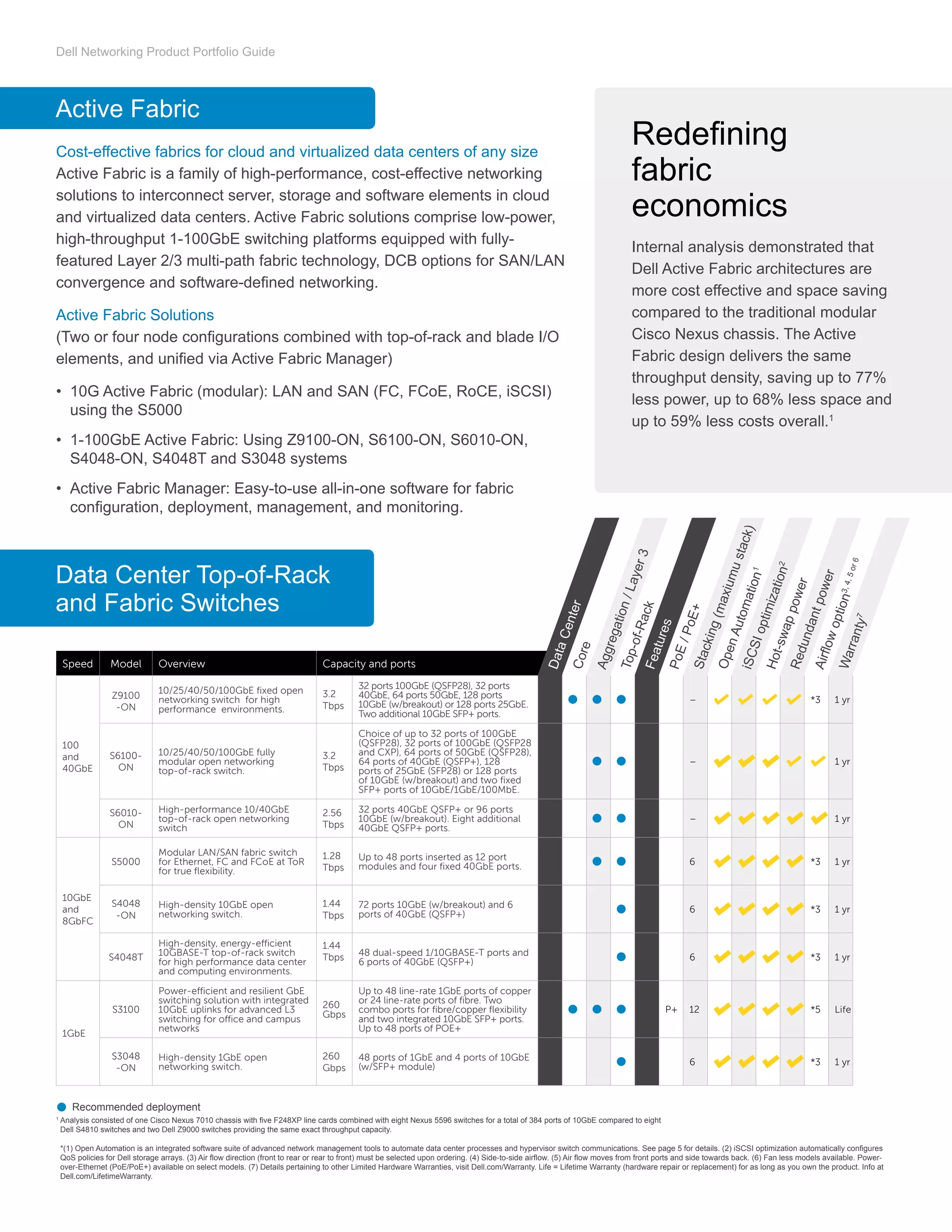
Active Fabric
Data Center Top-of-Rack
and Fabric Switches
Cost-effective fabrics for cloud and virtualized data centers of any size
Active Fabric is a family of high-performance, cost-effective networking
solutions to interconnect server, storage and software elements in cloud
and virtualized data centers. Active Fabric solutions comprise low-power,
high-throughput 1-100GbE switching platforms equipped with fully-
featured Layer 2/3 multi-path fabric technology, DCB options for SAN/LAN
convergence and software-defined networking.
Active Fabric Solutions
(Two or four node configurations combined with top-of-rack and blade I/O
elements, and unified via Active Fabric Manager)
•	 10G Active Fabric (modular): LAN and SAN (FC, FCoE, RoCE, iSCSI)
using the S5000
•	 1-100GbE Active Fabric: Using Z9100-ON, S6100-ON, S6010-ON,
S4048-ON, S4048T and S3048 systems
•	 Active Fabric Manager: Easy-to-use all-in-one software for fabric
configuration, deployment, management, and monitoring.
1
Analysis consisted of one Cisco Nexus 7010 chassis with five F248XP line cards combined with eight Nexus 5596 switches for a total of 384 ports of 10GbE compared to eight
Dell S4810 switches and two Dell Z9000 switches providing the same exact throughput capacity.
*(1) Open Automation is an integrated software suite of advanced network management tools to automate data center processes and hypervisor switch communications. See page 5 for details. (2) iSCSI optimization automatically configures
QoS policies for Dell storage arrays. (3) Air flow direction (front to rear or rear to front) must be selected upon ordering. (4) Side-to-side airflow. (5) Air flow moves from front ports and side towards back. (6) Fan less models available. Power-
over-Ethernet (PoE/PoE+) available on select models. (7) Details pertaining to other Limited Hardware Warranties, visit Dell.com/Warranty. Life = Lifetime Warranty (hardware repair or replacement) for as long as you own the product. Info at
Dell.com/LifetimeWarranty.
Recommended deployment
Redefining
fabric
economics
Internal analysis demonstrated that
Dell Active Fabric architectures are
more cost effective and space saving
compared to the traditional modular
Cisco Nexus chassis. The Active
Fabric design delivers the same
throughput density, saving up to 77%
less power, up to 68% less space and
up to 59% less costs overall.1
Speed Model Overview Capacity and ports
100
and
40GbE
Z9100
-ON
10/25/40/50/100GbE fixed open
networking switch for high
performance environments.
3.2
Tbps
32 ports 100GbE (QSFP28), 32 ports
40GbE, 64 ports 50GbE, 128 ports
10GbE (w/breakout) or 128 ports 25GbE.
Two additional 10GbE SFP+ ports.
– *3 1 yr
S6100-
ON
10/25/40/50/100GbE fully
modular open networking
top-of-rack switch.
3.2
Tbps
Choice of up to 32 ports of 100GbE
(QSFP28), 32 ports of 100GbE (QSFP28
and CXP), 64 ports of 50GbE (QSFP28),
64 ports of 40GbE (QSFP+), 128
ports of 25GbE (SFP28) or 128 ports
of 10GbE (w/breakout) and two fixed
SFP+ ports of 10GbE/1GbE/100MbE.
– 1 yr
S6010-
ON
High-performance 10/40GbE
top-of-rack open networking
switch
2.56
Tbps
32 ports 40GbE QSFP+ or 96 ports
10GbE (w/breakout). Eight additional
40GbE QSFP+ ports.
– 1 yr
10GbE
and
8GbFC
S5000
Modular LAN/SAN fabric switch
for Ethernet, FC and FCoE at ToR
for true flexibility.
1.28
Tbps
Up to 48 ports inserted as 12 port
modules and four fixed 40GbE ports. 6 *3 1 yr
S4048
-ON
High-density 10GbE open
networking switch.
1.44
Tbps
72 ports 10GbE (w/breakout) and 6
ports of 40GbE (QSFP+) 6 *3 1 yr
S4048T
High-density, energy-efficient
10GBASE-T top-of-rack switch
for high performance data center
and computing environments.
1.44
Tbps 48 dual-speed 1/10GBASE-T ports and
6 ports of 40GbE (QSFP+) 6 *3 1 yr
1GbE
S3100
Power-efficient and resilient GbE
switching solution with integrated
10GbE uplinks for advanced L3
switching for office and campus
networks
260
Gbps
Up to 48 line-rate 1GbE ports of copper
or 24 line-rate ports of fibre. Two
combo ports for fibre/copper flexibility
and two integrated 10GbE SFP+ ports.
Up to 48 ports of POE+
P+ 12 *5 Life
S3048
-ON
High-density 1GbE open
networking switch.
260
Gbps
48 ports of 1GbE and 4 ports of 10GbE
(w/SFP+ module) 6 *3 1 yr
DataCenter
Features
Core
PoE/PoE+
Top-of-Rack
OpenAutomation1
Hot-swappower
Airflowoption3,4,5or6
Aggregation/Layer3
Stacking(maxiumustack)iSCSIoptimization2
Redundantpower
Warranty7
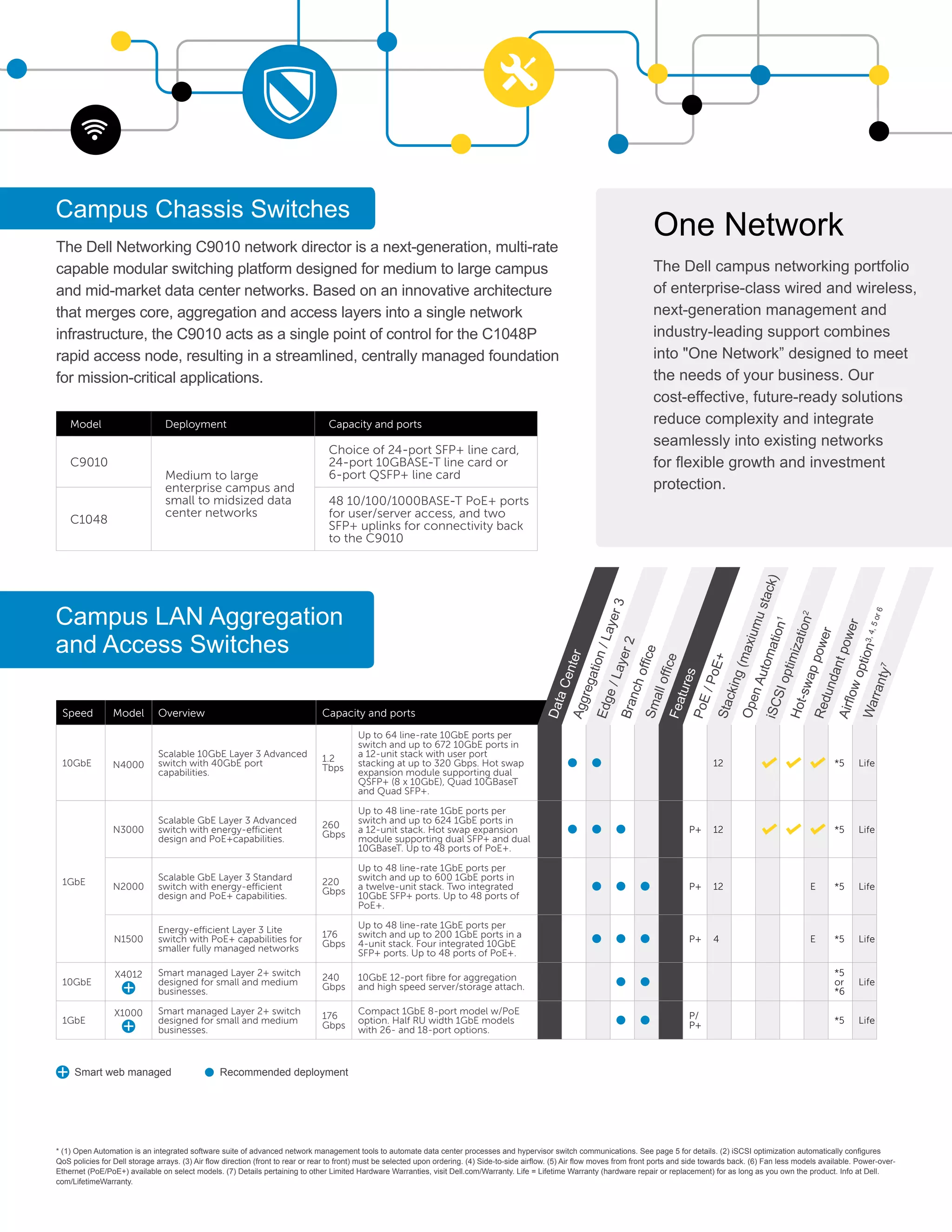
The Dell Networking C9010 network director is a next-generation, multi-rate
capable modular switching platform designed for medium to large campus
and mid-market data center networks. Based on an innovative architecture
that merges core, aggregation and access layers into a single network
infrastructure, the C9010 acts as a single point of control for the C1048P
rapid access node, resulting in a streamlined, centrally managed foundation
for mission-critical applications.
Campus Chassis Switches
Model Deployment Capacity and ports
C9010
Medium to large
enterprise campus and
small to midsized data
center networks
Choice of 24-port SFP+ line card,
24-port 10GBASE-T line card or
6-port QSFP+ line card
C1048
48 10/100/1000BASE-T PoE+ ports
for user/server access, and two
SFP+ uplinks for connectivity back
to the C9010
Campus LAN Aggregation
and Access Switches
* (1) Open Automation is an integrated software suite of advanced network management tools to automate data center processes and hypervisor switch communications. See page 5 for details. (2) iSCSI optimization automatically configures
QoS policies for Dell storage arrays. (3) Air flow direction (front to rear or rear to front) must be selected upon ordering. (4) Side-to-side airflow. (5) Air flow moves from front ports and side towards back. (6) Fan less models available. Power-over-
Ethernet (PoE/PoE+) available on select models. (7) Details pertaining to other Limited Hardware Warranties, visit Dell.com/Warranty. Life = Lifetime Warranty (hardware repair or replacement) for as long as you own the product. Info at Dell.
com/LifetimeWarranty.
Smart web managed Recommended deployment
Speed Model Overview Capacity and ports
10GbE N4000
Scalable 10GbE Layer 3 Advanced
switch with 40GbE port
capabilities.
1.2
Tbps
Up to 64 line-rate 10GbE ports per
switch and up to 672 10GbE ports in
a 12-unit stack with user port
stacking at up to 320 Gbps. Hot swap
expansion module supporting dual
QSFP+ (8 x 10GbE), Quad 10GBaseT
and Quad SFP+.
12 *5 Life
1GbE
N3000
Scalable GbE Layer 3 Advanced
switch with energy-efficient
design and PoE+capabilities.
260
Gbps
Up to 48 line-rate 1GbE ports per
switch and up to 624 1GbE ports in
a 12-unit stack. Hot swap expansion
module supporting dual SFP+ and dual
10GBaseT. Up to 48 ports of PoE+.
P+ 12 *5 Life
N2000
Scalable GbE Layer 3 Standard
switch with energy-efficient
design and PoE+ capabilities.
220
Gbps
Up to 48 line-rate 1GbE ports per
switch and up to 600 1GbE ports in
a twelve-unit stack. Two integrated
10GbE SFP+ ports. Up to 48 ports of
PoE+.
P+ 12 E *5 Life
N1500
Energy-efficient Layer 3 Lite
switch with PoE+ capabilities for
smaller fully managed networks
176
Gbps
Up to 48 line-rate 1GbE ports per
switch and up to 200 1GbE ports in a
4-unit stack. Four integrated 10GbE
SFP+ ports. Up to 48 ports of PoE+.
P+ 4 E *5 Life
10GbE
X4012 Smart managed Layer 2+ switch
designed for small and medium
businesses.
240
Gbps
10GbE 12-port fibre for aggregation
and high speed server/storage attach.
*5
or
*6
Life
1GbE
X1000 Smart managed Layer 2+ switch
designed for small and medium
businesses.
176
Gbps
Compact 1GbE 8-port model w/PoE
option. Half RU width 1GbE models
with 26- and 18-port options.
P/
P+ *5 Life
DataCenter
Features
Aggregation/Layer3
PoE/PoE+
Branchoffice
OpenAutomation1
Hot-swappower
Airflowoption3,4,5or6
Edge/Layer2
Smalloffice
Stacking(maxiumustack)iSCSIoptimization2
Redundantpower
Warranty7
One Network
The Dell campus networking portfolio
of enterprise-class wired and wireless,
next-generation management and
industry-leading support combines
into One Network” designed to meet
the needs of your business. Our
cost-effective, future-ready solutions
reduce complexity and integrate
seamlessly into existing networks
for flexible growth and investment
protection.
Dell Networking Product Portfolio Guide
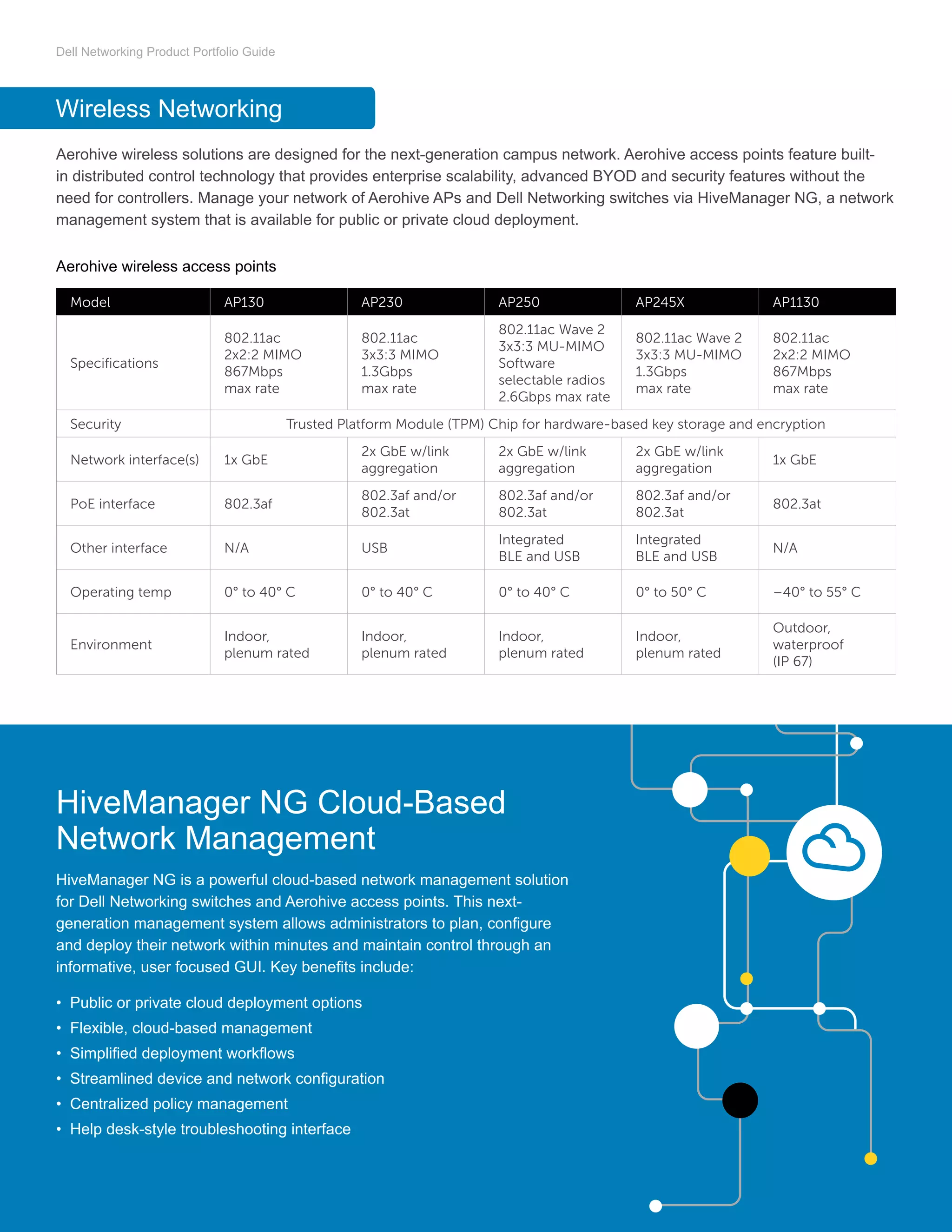
Aerohive wireless solutions are designed for the next-generation campus network. Aerohive access points feature built-
in distributed control technology that provides enterprise scalability, advanced BYOD and security features without the
need for controllers. Manage your network of Aerohive APs and Dell Networking switches via HiveManager NG, a network
management system that is available for public or private cloud deployment.
Aerohive wireless access points
Wireless Networking
Model AP130 AP230 AP250 AP245X AP1130
Specifications
802.11ac
2x2:2 MIMO
867Mbps
max rate
802.11ac
3x3:3 MIMO
1.3Gbps
max rate
802.11ac Wave 2
3x3:3 MU-MIMO
Software
selectable radios
2.6Gbps max rate
802.11ac Wave 2
3x3:3 MU-MIMO
1.3Gbps
max rate
802.11ac
2x2:2 MIMO
867Mbps
max rate
Security Trusted Platform Module (TPM) Chip for hardware-based key storage and encryption
Network interface(s) 1x GbE
2x GbE w/link
aggregation
2x GbE w/link
aggregation
2x GbE w/link
aggregation
1x GbE
PoE interface 802.3af
802.3af and/or
802.3at
802.3af and/or
802.3at
802.3af and/or
802.3at
802.3at
Other interface N/A USB
Integrated
BLE and USB
Integrated
BLE and USB
N/A
Operating temp 0° to 40° C 0° to 40° C 0° to 40° C 0° to 50° C –40° to 55° C
Environment
Indoor,
plenum rated
Indoor,
plenum rated
Indoor,
plenum rated
Indoor,
plenum rated
Outdoor,
waterproof
(IP 67)
HiveManager NG Cloud-Based
Network Management
HiveManager NG is a powerful cloud-based network management solution
for Dell Networking switches and Aerohive access points. This next-
generation management system allows administrators to plan, configure
and deploy their network within minutes and maintain control through an
informative, user focused GUI. Key benefits include:
•	 Public or private cloud deployment options
•	 Flexible, cloud-based management
•	 Simplified deployment workflows
•	 Streamlined device and network configuration
•	 Centralized policy management
•	 Help desk-style troubleshooting interface
Dell Networking Product Portfolio Guide
Dell Open Networking switch solutions are cost-effective and easy to deploy, providing a clear path to software-defined
networking (SDN). Based on our dependable, award winning Z-Series and S-Series switch hardware and featuring a
choice of third-party OS and software options, these solutions give you the power to transform your network and accelerate
data-center innovation with simplified, high-capacity network fabrics.
All Dell Open Networking switches support the open source Open Network Install Environment (ONIE) for zero-touch
installation of alternate network operating systems including feature-rich Dell Networking OS:
•	 Dell Networking OS9 – our scalable
L2 and L3 Ethernet switching with
QoS and a full complement of
standards-based IPv4 and IPv6
features, including OSPF, BGP and
PBR (Policy Based Routing) support
•	 Dell Networking OS10 – a Linux-
based infrastructure operating
system with initial enablement
on open networking data center
platforms. OS10 is designed
for modern and transitioning IT
organizations moving towards a
DevOps operational model where
agility and infrastructure automation
are critical.
•	 Big Switch Networks – Big Switch
Networks Big Cloud Fabric and Big
Monitoring Fabric products package
technology components into fabric
solutions, bringing Software-Defined
Networks advanced feature sets at
competitive price points.
•	 Cumulus Networks – Cumulus
Networks simplifies data center
operations by delivering operating
system products that run on industry
standard Ethernet switches,
converging networking into the
architectural and supply chain model
of compute and leveraging hundreds
of existing management, automation
and monitoring tools.
•	 IP Infusion – the de facto standard
for software-defined networking.
For more than a decade, tier
one and two network equipment
manufacturers (NEMs) have relied
on IP Infusion's OCNos® network
software platform to bring products
to market faster, improve ROI, and
differentiate from competitors.
•	 Pluribus Networks – A leader
in performance-oriented network
virtualization for private and public
cloud datacenters, Pluribus Networks
transforms how IT administrators
deploy applications to realize
productivity gains and enable new
business models.
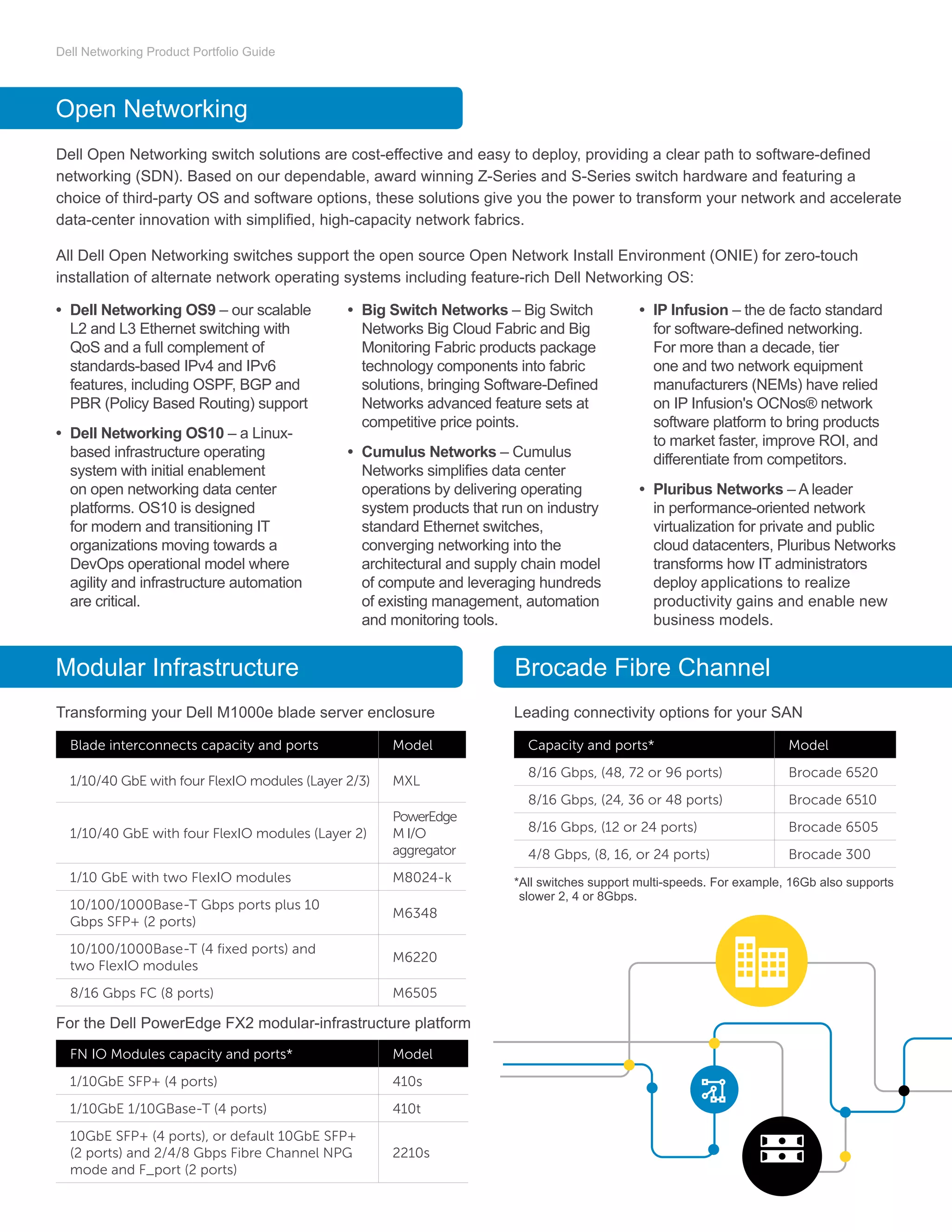
Open Networking
Modular Infrastructure Brocade Fibre Channel
Blade interconnects capacity and ports Model
1/10/40 GbE with four FlexIO modules (Layer 2/3) MXL
1/10/40 GbE with four FlexIO modules (Layer 2)
PowerEdge
M I/O
aggregator
1/10 GbE with two FlexIO modules M8024-k
10/100/1000Base-T Gbps ports plus 10
Gbps SFP+ (2 ports)
M6348
10/100/1000Base-T (4 fixed ports) and
two FlexIO modules
M6220
8/16 Gbps FC (8 ports) M6505
Capacity and ports* Model
8/16 Gbps, (48, 72 or 96 ports) Brocade 6520
8/16 Gbps, (24, 36 or 48 ports) Brocade 6510
8/16 Gbps, (12 or 24 ports) Brocade 6505
4/8 Gbps, (8, 16, or 24 ports) Brocade 300
FN IO Modules capacity and ports* Model
1/10GbE SFP+ (4 ports) 410s
1/10GbE 1/10GBase-T (4 ports) 410t
10GbE SFP+ (4 ports), or default 10GbE SFP+
(2 ports) and 2/4/8 Gbps Fibre Channel NPG
mode and F_port (2 ports)
2210s
Transforming your Dell M1000e blade server enclosure Leading connectivity options for your SAN
For the Dell PowerEdge FX2 modular-infrastructure platform
*All switches support multi-speeds. For example, 16Gb also supports
slower 2, 4 or 8Gbps.
Dell Networking Product Portfolio Guide
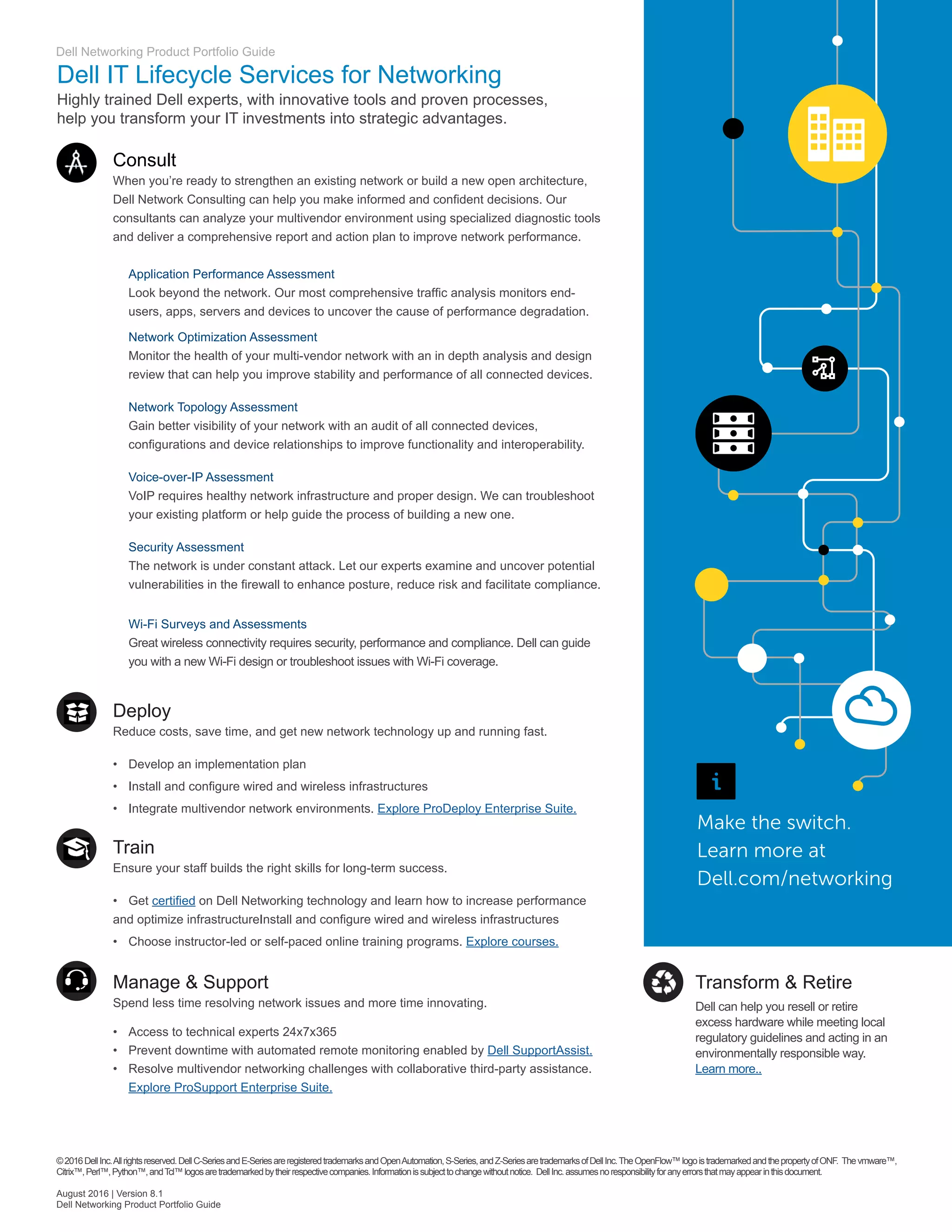
Dell IT Lifecycle Services for Networking
Highly trained Dell experts, with innovative tools and proven processes,
help you transform your IT investments into strategic advantages.
Consult
When you’re ready to strengthen an existing network or build a new open architecture,
Dell Network Consulting can help you make informed and confident decisions. Our
consultants can analyze your multivendor environment using specialized diagnostic tools
and deliver a comprehensive report and action plan to improve network performance.
	 Application Performance Assessment
	 Look beyond the network. Our most comprehensive traffic analysis monitors end-	
	 users, apps, servers and devices to uncover the cause of performance degradation.
	 Network Optimization Assessment
	 Monitor the health of your multi-vendor network with an in depth analysis and design
	 review that can help you improve stability and performance of all connected devices.
	 Network Topology Assessment
	 Gain better visibility of your network with an audit of all connected devices, 		
	 configurations and device relationships to improve functionality and interoperability.
	 Voice-over-IP Assessment
	 VoIP requires healthy network infrastructure and proper design. We can troubleshoot 	
	 your existing platform or help guide the process of building a new one.
	 Security Assessment
	 The network is under constant attack. Let our experts examine and uncover potential 	
	 vulnerabilities in the firewall to enhance posture, reduce risk and facilitate compliance.
	 Wi-Fi Surveys and Assessments
	 Great wireless connectivity requires security, performance and compliance. Dell can guide 	
	 you with a new Wi-Fi design or troubleshoot issues with Wi-Fi coverage.
Deploy
Reduce costs, save time, and get new network technology up and running fast.
•	 Develop an implementation plan
•	 Install and configure wired and wireless infrastructures
•	 Integrate multivendor network environments. Explore ProDeploy Enterprise Suite.
Train
Ensure your staff builds the right skills for long-term success.
•	 Get certified on Dell Networking technology and learn how to increase performance
and optimize infrastructureInstall and configure wired and wireless infrastructures
•	 Choose instructor-led or self-paced online training programs. Explore courses.
Manage  Support
Spend less time resolving network issues and more time innovating.
•	 Access to technical experts 24x7x365
•	 Prevent downtime with automated remote monitoring enabled by Dell SupportAssist.
•	 Resolve multivendor networking challenges with collaborative third-party assistance.
	 Explore ProSupport Enterprise Suite.
Make the switch.
Learn more at
Dell.com/networking
©2016DellInc.Allrightsreserved.DellC-SeriesandE-SeriesareregisteredtrademarksandOpenAutomation,S-Series,andZ-SeriesaretrademarksofDellInc.TheOpenFlow™logoistrademarkedandthepropertyofONF. Thevmware™,
Citrix™,Perl™,Python™,andTcl™logosaretrademarkedbytheirrespectivecompanies.Informationissubjecttochangewithoutnotice. DellInc.assumesnoresponsibilityforanyerrorsthatmayappearinthisdocument.
August 2016 | Version 8.1
Dell Networking Product Portfolio Guide
Transform  Retire
Dell can help you resell or retire
excess hardware while meeting local
regulatory guidelines and acting in an
environmentally responsible way.
Learn more..

DellEMC Networking Product Portfolio Guide

  • 1.
    Bringing open networkingto the enterprise with Dell Networking solutions In today’s data center, rapid increases in virtualization, cloud deployments and big data analysis have created new challenges as organizations look to build IT infrastructures that meet today’s and tomorrow’s business demands. Why Dell Networking? Dell Networking Product Portfolio Guide Dell’s vision of the new data center networking model is an open ecosystem in which organizations can take their pick from innovative, industry-standard network applications, network operating systems and network hardware. Open networking solutions enable IT managers to build an application-agnostic infrastructure and simplify data center management with standard automation tools and standards-based open platforms. Organizations can leverage open-source tools and expertise to minimize costly engineering overhead and help reduce the time and effort required to design, provision and manage networks. Industry Leader First vendor to offer the disaggregated networking model and continues to disrupt the industry with software-defined storage, computing and networking Innovative Products Rapid execution model with rich product pipeline that leads the industry in delivering networking systems with state-of- the-art technology End-to-End Solutions Exceptional solutions encompassing best in class servers, storage and networking products with global services and reach Active fabric solutions and data center switches Campus chassis switches, campus LAN aggregation and access switches Wireless networking Data center open networking Get started with Dell Networking 2 3 4 5 6
  • 2.
    Dell Networking ProductPortfolio Guide Active Fabric Data Center Top-of-Rack and Fabric Switches Cost-effective fabrics for cloud and virtualized data centers of any size Active Fabric is a family of high-performance, cost-effective networking solutions to interconnect server, storage and software elements in cloud and virtualized data centers. Active Fabric solutions comprise low-power, high-throughput 1-100GbE switching platforms equipped with fully- featured Layer 2/3 multi-path fabric technology, DCB options for SAN/LAN convergence and software-defined networking. Active Fabric Solutions (Two or four node configurations combined with top-of-rack and blade I/O elements, and unified via Active Fabric Manager) • 10G Active Fabric (modular): LAN and SAN (FC, FCoE, RoCE, iSCSI) using the S5000 • 1-100GbE Active Fabric: Using Z9100-ON, S6100-ON, S6010-ON, S4048-ON, S4048T and S3048 systems • Active Fabric Manager: Easy-to-use all-in-one software for fabric configuration, deployment, management, and monitoring. 1 Analysis consisted of one Cisco Nexus 7010 chassis with five F248XP line cards combined with eight Nexus 5596 switches for a total of 384 ports of 10GbE compared to eight Dell S4810 switches and two Dell Z9000 switches providing the same exact throughput capacity. *(1) Open Automation is an integrated software suite of advanced network management tools to automate data center processes and hypervisor switch communications. See page 5 for details. (2) iSCSI optimization automatically configures QoS policies for Dell storage arrays. (3) Air flow direction (front to rear or rear to front) must be selected upon ordering. (4) Side-to-side airflow. (5) Air flow moves from front ports and side towards back. (6) Fan less models available. Power- over-Ethernet (PoE/PoE+) available on select models. (7) Details pertaining to other Limited Hardware Warranties, visit Dell.com/Warranty. Life = Lifetime Warranty (hardware repair or replacement) for as long as you own the product. Info at Dell.com/LifetimeWarranty. Recommended deployment Redefining fabric economics Internal analysis demonstrated that Dell Active Fabric architectures are more cost effective and space saving compared to the traditional modular Cisco Nexus chassis. The Active Fabric design delivers the same throughput density, saving up to 77% less power, up to 68% less space and up to 59% less costs overall.1 Speed Model Overview Capacity and ports 100 and 40GbE Z9100 -ON 10/25/40/50/100GbE fixed open networking switch for high performance environments. 3.2 Tbps 32 ports 100GbE (QSFP28), 32 ports 40GbE, 64 ports 50GbE, 128 ports 10GbE (w/breakout) or 128 ports 25GbE. Two additional 10GbE SFP+ ports. – *3 1 yr S6100- ON 10/25/40/50/100GbE fully modular open networking top-of-rack switch. 3.2 Tbps Choice of up to 32 ports of 100GbE (QSFP28), 32 ports of 100GbE (QSFP28 and CXP), 64 ports of 50GbE (QSFP28), 64 ports of 40GbE (QSFP+), 128 ports of 25GbE (SFP28) or 128 ports of 10GbE (w/breakout) and two fixed SFP+ ports of 10GbE/1GbE/100MbE. – 1 yr S6010- ON High-performance 10/40GbE top-of-rack open networking switch 2.56 Tbps 32 ports 40GbE QSFP+ or 96 ports 10GbE (w/breakout). Eight additional 40GbE QSFP+ ports. – 1 yr 10GbE and 8GbFC S5000 Modular LAN/SAN fabric switch for Ethernet, FC and FCoE at ToR for true flexibility. 1.28 Tbps Up to 48 ports inserted as 12 port modules and four fixed 40GbE ports. 6 *3 1 yr S4048 -ON High-density 10GbE open networking switch. 1.44 Tbps 72 ports 10GbE (w/breakout) and 6 ports of 40GbE (QSFP+) 6 *3 1 yr S4048T High-density, energy-efficient 10GBASE-T top-of-rack switch for high performance data center and computing environments. 1.44 Tbps 48 dual-speed 1/10GBASE-T ports and 6 ports of 40GbE (QSFP+) 6 *3 1 yr 1GbE S3100 Power-efficient and resilient GbE switching solution with integrated 10GbE uplinks for advanced L3 switching for office and campus networks 260 Gbps Up to 48 line-rate 1GbE ports of copper or 24 line-rate ports of fibre. Two combo ports for fibre/copper flexibility and two integrated 10GbE SFP+ ports. Up to 48 ports of POE+ P+ 12 *5 Life S3048 -ON High-density 1GbE open networking switch. 260 Gbps 48 ports of 1GbE and 4 ports of 10GbE (w/SFP+ module) 6 *3 1 yr DataCenter Features Core PoE/PoE+ Top-of-Rack OpenAutomation1 Hot-swappower Airflowoption3,4,5or6 Aggregation/Layer3 Stacking(maxiumustack)iSCSIoptimization2 Redundantpower Warranty7
  • 3.
    The Dell NetworkingC9010 network director is a next-generation, multi-rate capable modular switching platform designed for medium to large campus and mid-market data center networks. Based on an innovative architecture that merges core, aggregation and access layers into a single network infrastructure, the C9010 acts as a single point of control for the C1048P rapid access node, resulting in a streamlined, centrally managed foundation for mission-critical applications. Campus Chassis Switches Model Deployment Capacity and ports C9010 Medium to large enterprise campus and small to midsized data center networks Choice of 24-port SFP+ line card, 24-port 10GBASE-T line card or 6-port QSFP+ line card C1048 48 10/100/1000BASE-T PoE+ ports for user/server access, and two SFP+ uplinks for connectivity back to the C9010 Campus LAN Aggregation and Access Switches * (1) Open Automation is an integrated software suite of advanced network management tools to automate data center processes and hypervisor switch communications. See page 5 for details. (2) iSCSI optimization automatically configures QoS policies for Dell storage arrays. (3) Air flow direction (front to rear or rear to front) must be selected upon ordering. (4) Side-to-side airflow. (5) Air flow moves from front ports and side towards back. (6) Fan less models available. Power-over- Ethernet (PoE/PoE+) available on select models. (7) Details pertaining to other Limited Hardware Warranties, visit Dell.com/Warranty. Life = Lifetime Warranty (hardware repair or replacement) for as long as you own the product. Info at Dell. com/LifetimeWarranty. Smart web managed Recommended deployment Speed Model Overview Capacity and ports 10GbE N4000 Scalable 10GbE Layer 3 Advanced switch with 40GbE port capabilities. 1.2 Tbps Up to 64 line-rate 10GbE ports per switch and up to 672 10GbE ports in a 12-unit stack with user port stacking at up to 320 Gbps. Hot swap expansion module supporting dual QSFP+ (8 x 10GbE), Quad 10GBaseT and Quad SFP+. 12 *5 Life 1GbE N3000 Scalable GbE Layer 3 Advanced switch with energy-efficient design and PoE+capabilities. 260 Gbps Up to 48 line-rate 1GbE ports per switch and up to 624 1GbE ports in a 12-unit stack. Hot swap expansion module supporting dual SFP+ and dual 10GBaseT. Up to 48 ports of PoE+. P+ 12 *5 Life N2000 Scalable GbE Layer 3 Standard switch with energy-efficient design and PoE+ capabilities. 220 Gbps Up to 48 line-rate 1GbE ports per switch and up to 600 1GbE ports in a twelve-unit stack. Two integrated 10GbE SFP+ ports. Up to 48 ports of PoE+. P+ 12 E *5 Life N1500 Energy-efficient Layer 3 Lite switch with PoE+ capabilities for smaller fully managed networks 176 Gbps Up to 48 line-rate 1GbE ports per switch and up to 200 1GbE ports in a 4-unit stack. Four integrated 10GbE SFP+ ports. Up to 48 ports of PoE+. P+ 4 E *5 Life 10GbE X4012 Smart managed Layer 2+ switch designed for small and medium businesses. 240 Gbps 10GbE 12-port fibre for aggregation and high speed server/storage attach. *5 or *6 Life 1GbE X1000 Smart managed Layer 2+ switch designed for small and medium businesses. 176 Gbps Compact 1GbE 8-port model w/PoE option. Half RU width 1GbE models with 26- and 18-port options. P/ P+ *5 Life DataCenter Features Aggregation/Layer3 PoE/PoE+ Branchoffice OpenAutomation1 Hot-swappower Airflowoption3,4,5or6 Edge/Layer2 Smalloffice Stacking(maxiumustack)iSCSIoptimization2 Redundantpower Warranty7 One Network The Dell campus networking portfolio of enterprise-class wired and wireless, next-generation management and industry-leading support combines into One Network” designed to meet the needs of your business. Our cost-effective, future-ready solutions reduce complexity and integrate seamlessly into existing networks for flexible growth and investment protection.
  • 4.
    Dell Networking ProductPortfolio Guide Aerohive wireless solutions are designed for the next-generation campus network. Aerohive access points feature built- in distributed control technology that provides enterprise scalability, advanced BYOD and security features without the need for controllers. Manage your network of Aerohive APs and Dell Networking switches via HiveManager NG, a network management system that is available for public or private cloud deployment. Aerohive wireless access points Wireless Networking Model AP130 AP230 AP250 AP245X AP1130 Specifications 802.11ac 2x2:2 MIMO 867Mbps max rate 802.11ac 3x3:3 MIMO 1.3Gbps max rate 802.11ac Wave 2 3x3:3 MU-MIMO Software selectable radios 2.6Gbps max rate 802.11ac Wave 2 3x3:3 MU-MIMO 1.3Gbps max rate 802.11ac 2x2:2 MIMO 867Mbps max rate Security Trusted Platform Module (TPM) Chip for hardware-based key storage and encryption Network interface(s) 1x GbE 2x GbE w/link aggregation 2x GbE w/link aggregation 2x GbE w/link aggregation 1x GbE PoE interface 802.3af 802.3af and/or 802.3at 802.3af and/or 802.3at 802.3af and/or 802.3at 802.3at Other interface N/A USB Integrated BLE and USB Integrated BLE and USB N/A Operating temp 0° to 40° C 0° to 40° C 0° to 40° C 0° to 50° C –40° to 55° C Environment Indoor, plenum rated Indoor, plenum rated Indoor, plenum rated Indoor, plenum rated Outdoor, waterproof (IP 67) HiveManager NG Cloud-Based Network Management HiveManager NG is a powerful cloud-based network management solution for Dell Networking switches and Aerohive access points. This next- generation management system allows administrators to plan, configure and deploy their network within minutes and maintain control through an informative, user focused GUI. Key benefits include: • Public or private cloud deployment options • Flexible, cloud-based management • Simplified deployment workflows • Streamlined device and network configuration • Centralized policy management • Help desk-style troubleshooting interface
  • 5.
    Dell Networking ProductPortfolio Guide Dell Open Networking switch solutions are cost-effective and easy to deploy, providing a clear path to software-defined networking (SDN). Based on our dependable, award winning Z-Series and S-Series switch hardware and featuring a choice of third-party OS and software options, these solutions give you the power to transform your network and accelerate data-center innovation with simplified, high-capacity network fabrics. All Dell Open Networking switches support the open source Open Network Install Environment (ONIE) for zero-touch installation of alternate network operating systems including feature-rich Dell Networking OS: • Dell Networking OS9 – our scalable L2 and L3 Ethernet switching with QoS and a full complement of standards-based IPv4 and IPv6 features, including OSPF, BGP and PBR (Policy Based Routing) support • Dell Networking OS10 – a Linux- based infrastructure operating system with initial enablement on open networking data center platforms. OS10 is designed for modern and transitioning IT organizations moving towards a DevOps operational model where agility and infrastructure automation are critical. • Big Switch Networks – Big Switch Networks Big Cloud Fabric and Big Monitoring Fabric products package technology components into fabric solutions, bringing Software-Defined Networks advanced feature sets at competitive price points. • Cumulus Networks – Cumulus Networks simplifies data center operations by delivering operating system products that run on industry standard Ethernet switches, converging networking into the architectural and supply chain model of compute and leveraging hundreds of existing management, automation and monitoring tools. • IP Infusion – the de facto standard for software-defined networking. For more than a decade, tier one and two network equipment manufacturers (NEMs) have relied on IP Infusion's OCNos® network software platform to bring products to market faster, improve ROI, and differentiate from competitors. • Pluribus Networks – A leader in performance-oriented network virtualization for private and public cloud datacenters, Pluribus Networks transforms how IT administrators deploy applications to realize productivity gains and enable new business models. Open Networking Modular Infrastructure Brocade Fibre Channel Blade interconnects capacity and ports Model 1/10/40 GbE with four FlexIO modules (Layer 2/3) MXL 1/10/40 GbE with four FlexIO modules (Layer 2) PowerEdge M I/O aggregator 1/10 GbE with two FlexIO modules M8024-k 10/100/1000Base-T Gbps ports plus 10 Gbps SFP+ (2 ports) M6348 10/100/1000Base-T (4 fixed ports) and two FlexIO modules M6220 8/16 Gbps FC (8 ports) M6505 Capacity and ports* Model 8/16 Gbps, (48, 72 or 96 ports) Brocade 6520 8/16 Gbps, (24, 36 or 48 ports) Brocade 6510 8/16 Gbps, (12 or 24 ports) Brocade 6505 4/8 Gbps, (8, 16, or 24 ports) Brocade 300 FN IO Modules capacity and ports* Model 1/10GbE SFP+ (4 ports) 410s 1/10GbE 1/10GBase-T (4 ports) 410t 10GbE SFP+ (4 ports), or default 10GbE SFP+ (2 ports) and 2/4/8 Gbps Fibre Channel NPG mode and F_port (2 ports) 2210s Transforming your Dell M1000e blade server enclosure Leading connectivity options for your SAN For the Dell PowerEdge FX2 modular-infrastructure platform *All switches support multi-speeds. For example, 16Gb also supports slower 2, 4 or 8Gbps.
  • 6.
    Dell Networking ProductPortfolio Guide Dell IT Lifecycle Services for Networking Highly trained Dell experts, with innovative tools and proven processes, help you transform your IT investments into strategic advantages. Consult When you’re ready to strengthen an existing network or build a new open architecture, Dell Network Consulting can help you make informed and confident decisions. Our consultants can analyze your multivendor environment using specialized diagnostic tools and deliver a comprehensive report and action plan to improve network performance. Application Performance Assessment Look beyond the network. Our most comprehensive traffic analysis monitors end- users, apps, servers and devices to uncover the cause of performance degradation. Network Optimization Assessment Monitor the health of your multi-vendor network with an in depth analysis and design review that can help you improve stability and performance of all connected devices. Network Topology Assessment Gain better visibility of your network with an audit of all connected devices, configurations and device relationships to improve functionality and interoperability. Voice-over-IP Assessment VoIP requires healthy network infrastructure and proper design. We can troubleshoot your existing platform or help guide the process of building a new one. Security Assessment The network is under constant attack. Let our experts examine and uncover potential vulnerabilities in the firewall to enhance posture, reduce risk and facilitate compliance. Wi-Fi Surveys and Assessments Great wireless connectivity requires security, performance and compliance. Dell can guide you with a new Wi-Fi design or troubleshoot issues with Wi-Fi coverage. Deploy Reduce costs, save time, and get new network technology up and running fast. • Develop an implementation plan • Install and configure wired and wireless infrastructures • Integrate multivendor network environments. Explore ProDeploy Enterprise Suite. Train Ensure your staff builds the right skills for long-term success. • Get certified on Dell Networking technology and learn how to increase performance and optimize infrastructureInstall and configure wired and wireless infrastructures • Choose instructor-led or self-paced online training programs. Explore courses. Manage Support Spend less time resolving network issues and more time innovating. • Access to technical experts 24x7x365 • Prevent downtime with automated remote monitoring enabled by Dell SupportAssist. • Resolve multivendor networking challenges with collaborative third-party assistance. Explore ProSupport Enterprise Suite. Make the switch. Learn more at Dell.com/networking ©2016DellInc.Allrightsreserved.DellC-SeriesandE-SeriesareregisteredtrademarksandOpenAutomation,S-Series,andZ-SeriesaretrademarksofDellInc.TheOpenFlow™logoistrademarkedandthepropertyofONF. Thevmware™, Citrix™,Perl™,Python™,andTcl™logosaretrademarkedbytheirrespectivecompanies.Informationissubjecttochangewithoutnotice. DellInc.assumesnoresponsibilityforanyerrorsthatmayappearinthisdocument. August 2016 | Version 8.1 Dell Networking Product Portfolio Guide Transform Retire Dell can help you resell or retire excess hardware while meeting local regulatory guidelines and acting in an environmentally responsible way. Learn more..