Introduction to Cloud Computing
Introduction
• "Cloud Computing", by definition, refers to the on-demand
delivery of IT resources and applications via the Internet
with pay-as-you-go pricing.
• With cloud computing, you don’t need to make large upfront
investments in hardware and spend a lot of time on the
heavy lifting of managing that hardware
• You can provision exactly the right type and size of
computing resources you need to power your newest bright
idea or operate your IT department.
• Pay as you need
Example
Yahoo, Gmail, Hotmail :-
Instead of running an e-mail program on your
computer, you log in to a Web e-mail account
remotely. The software and storage for your account
doesn't exist on your computer -- it's on the service's
computer cloud.
History
• Concept evolved in 1950(IBM) called RJE (Remote Job
Entry Process).
• In 2006 Amazon provided First public cloud AWS(Amazon
Web Service).
How Does it Work?
• Cloud Computing provides a simple way to access servers,
storage, databases and a broad set of application services
over the Internet.
• Cloud Computing providers such as Amazon Web Services
own and maintain the network-connected hardware required
for these application services, while you provision and use
what you need via a web application.
Advantages
• Reduce the complexity of networks.
• Do not have to buy software licenses.
• Customization.
• Cloud providers that have specialized in a
particular area (such as e-mail) can bring
advanced services that a single company
might not be able to afford or develop.
• scalability, reliability, and efficiency.
• Info. at cloud are not easily lost.
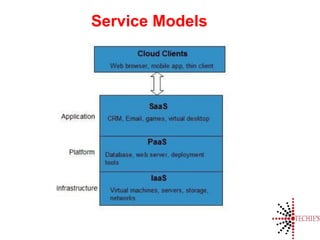
Service Models
• SaaS – Software as a Service
• IaaS – Infrastructure as a Service
• PaaS – Platform as a Service
• DaaS – Desktop as a Service
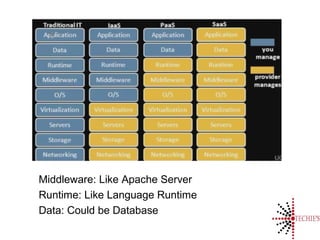
Middleware: Like Apache Server
Runtime: Like Language Runtime
Data: Could be Database
What is ARPANET?
Service Models
Saas
• SaaS is a software delivery
methodology that provides licensed
multi-tenant access to software and
its functions remotely as a Web-
based service.
– Usually billed based on usage
– Usually multi tenant environment
– Highly scalable architecture
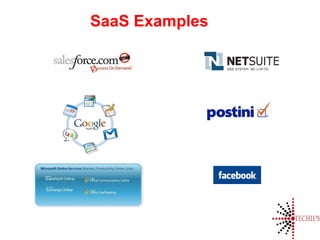
SaaS Examples
IaaS
• IaaS is the delivery of technology
infrastructure as an on demand
scalable service
– Usually billed based on usage
– Usually multi tenant virtualized
environment
– Can be coupled with Managed
Services for OS and application
support
IaaS Example
PaaS
• PaaS provides all of the facilities
required to support the complete life
cycle of building and delivering web
applications and services entirely
from the Internet.
– Typically applications must be
developed with a particular platform
in mind
– Multi tenant environments
– Highly scalable multi tier architecture
PaaS Example
Deployment Models
• Public cloud
• Private cloud
• Hybrid cloud
• Community cloud
Thank You

Basics Of Cloud Computing

  • 1.
  • 2.
    Introduction • "Cloud Computing",by definition, refers to the on-demand delivery of IT resources and applications via the Internet with pay-as-you-go pricing. • With cloud computing, you don’t need to make large upfront investments in hardware and spend a lot of time on the heavy lifting of managing that hardware • You can provision exactly the right type and size of computing resources you need to power your newest bright idea or operate your IT department. • Pay as you need
  • 3.
    Example Yahoo, Gmail, Hotmail:- Instead of running an e-mail program on your computer, you log in to a Web e-mail account remotely. The software and storage for your account doesn't exist on your computer -- it's on the service's computer cloud.
  • 4.
    History • Concept evolvedin 1950(IBM) called RJE (Remote Job Entry Process). • In 2006 Amazon provided First public cloud AWS(Amazon Web Service).
  • 5.
    How Does itWork? • Cloud Computing provides a simple way to access servers, storage, databases and a broad set of application services over the Internet. • Cloud Computing providers such as Amazon Web Services own and maintain the network-connected hardware required for these application services, while you provision and use what you need via a web application.
  • 6.
    Advantages • Reduce thecomplexity of networks. • Do not have to buy software licenses. • Customization. • Cloud providers that have specialized in a particular area (such as e-mail) can bring advanced services that a single company might not be able to afford or develop. • scalability, reliability, and efficiency. • Info. at cloud are not easily lost.
  • 9.
    Service Models • SaaS– Software as a Service • IaaS – Infrastructure as a Service • PaaS – Platform as a Service • DaaS – Desktop as a Service
  • 10.
    Middleware: Like ApacheServer Runtime: Like Language Runtime Data: Could be Database
  • 11.
  • 12.
  • 13.
    Saas • SaaS isa software delivery methodology that provides licensed multi-tenant access to software and its functions remotely as a Web- based service. – Usually billed based on usage – Usually multi tenant environment – Highly scalable architecture
  • 14.
  • 15.
    IaaS • IaaS isthe delivery of technology infrastructure as an on demand scalable service – Usually billed based on usage – Usually multi tenant virtualized environment – Can be coupled with Managed Services for OS and application support
  • 16.
  • 17.
    PaaS • PaaS providesall of the facilities required to support the complete life cycle of building and delivering web applications and services entirely from the Internet. – Typically applications must be developed with a particular platform in mind – Multi tenant environments – Highly scalable multi tier architecture
  • 18.
  • 19.
    Deployment Models • Publiccloud • Private cloud • Hybrid cloud • Community cloud
  • 20.