Delivering Large Scale Real-time
Graph Analytics with Dell
Infrastructure and TigerGraph
September 2020
© Copyright 2019 Dell Inc.2 of Y
•Project Requirements
•Hardware Configuration
•Test Plan
•Project/POC Phases
•Query Results
Agenda
© Copyright 2019 Dell Inc.3 of Y
Project Requirements
• Server Configs
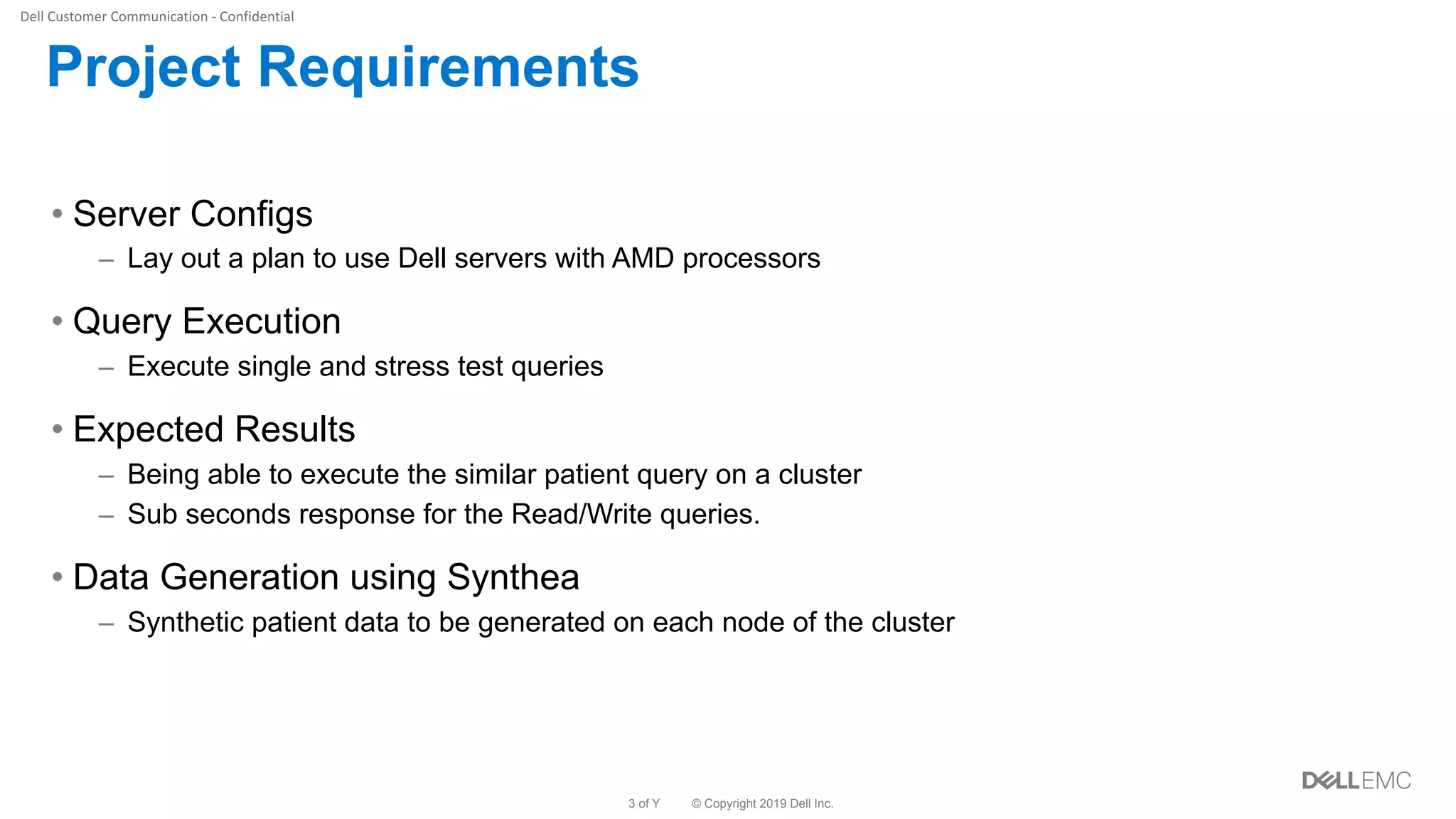
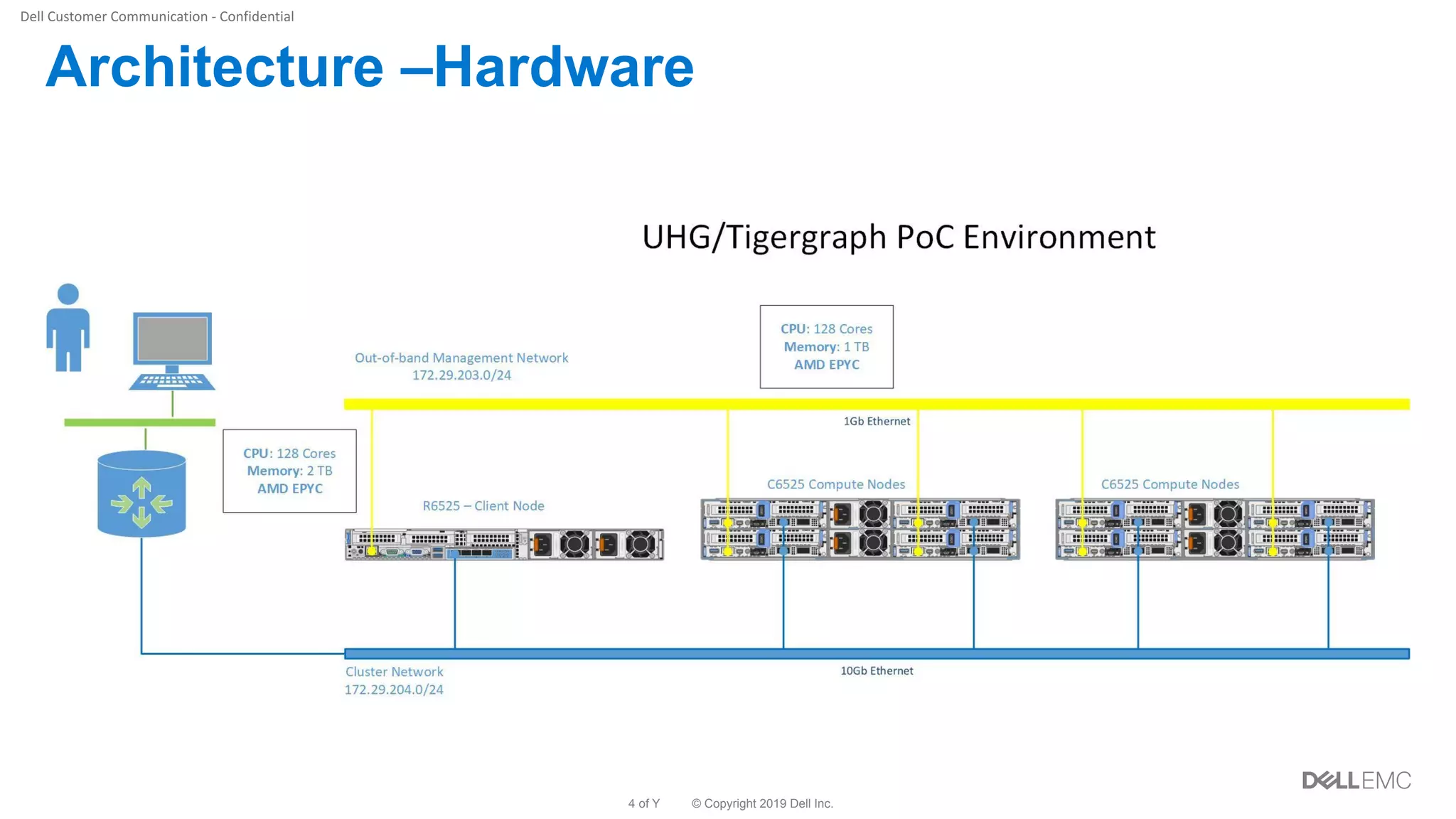
– Lay out a plan to use Dell servers with AMD processors
• Query Execution
– Execute single and stress test queries
• Expected Results
– Being able to execute the similar patient query on a cluster
– Sub seconds response for the Read/Write queries.
• Data Generation using Synthea
– Synthetic patient data to be generated on each node of the cluster
© Copyright 2019 Dell Inc.4 of Y
Architecture –Hardware
© Copyright 2019 Dell Inc.5 of Y
Test Plan
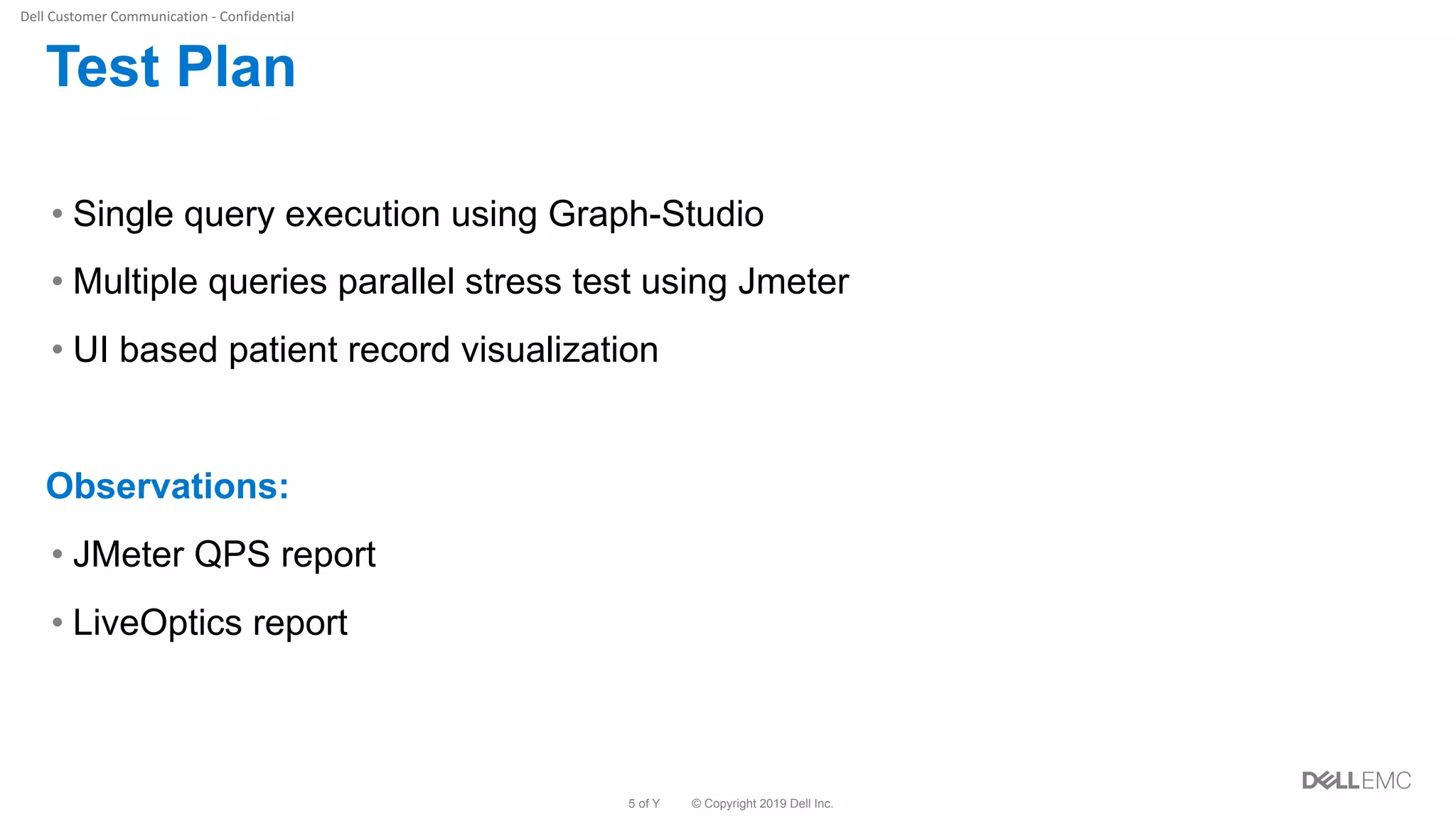
• Single query execution using Graph-Studio
• Multiple queries parallel stress test using Jmeter
• UI based patient record visualization
Observations:
• JMeter QPS report
• LiveOptics report
© Copyright 2019 Dell Inc.6 of Y
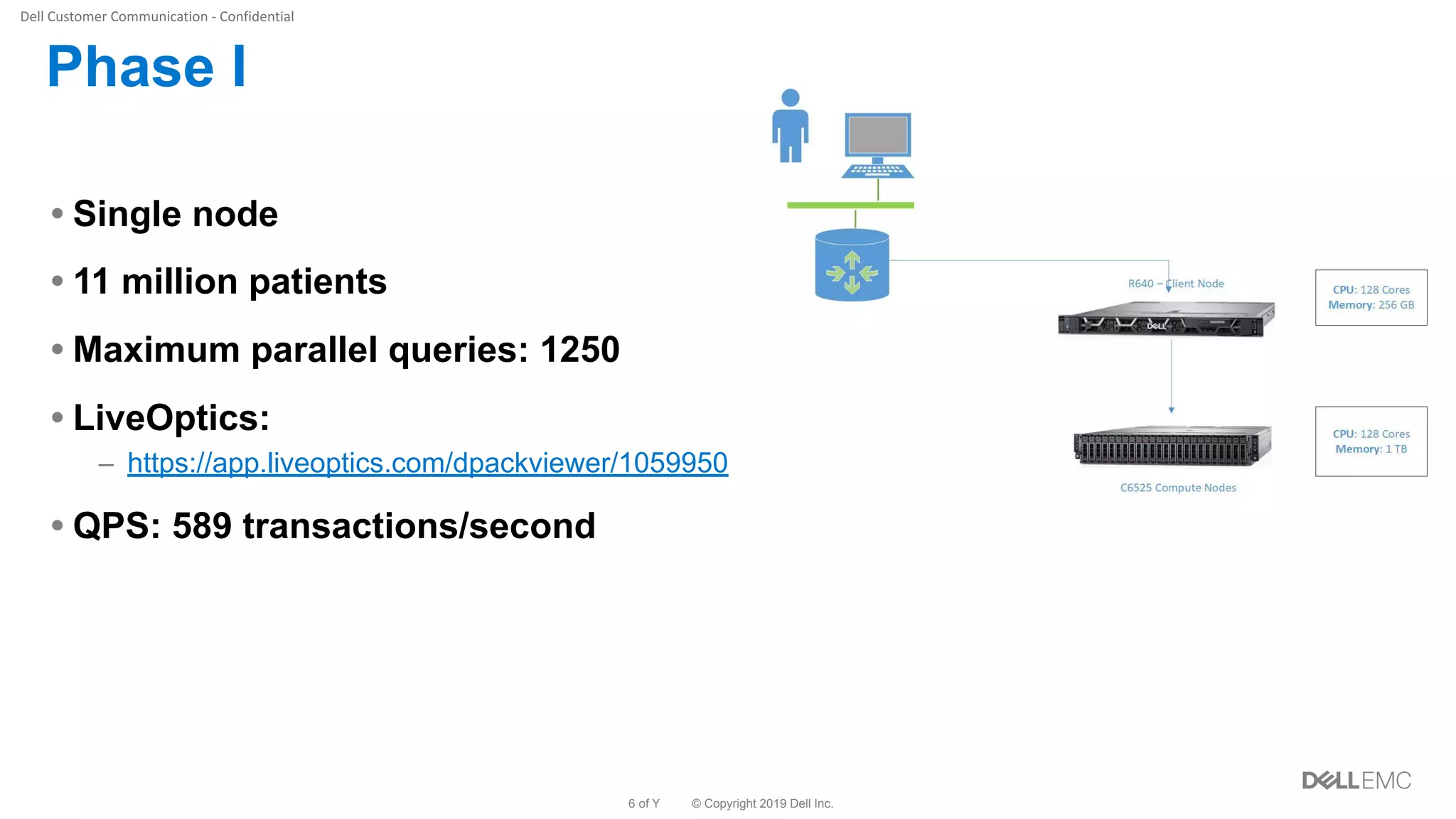
Phase I
• Single node
• 11 million patients
• Maximum parallel queries: 1250
• LiveOptics:
– https://app.liveoptics.com/dpackviewer/1059950
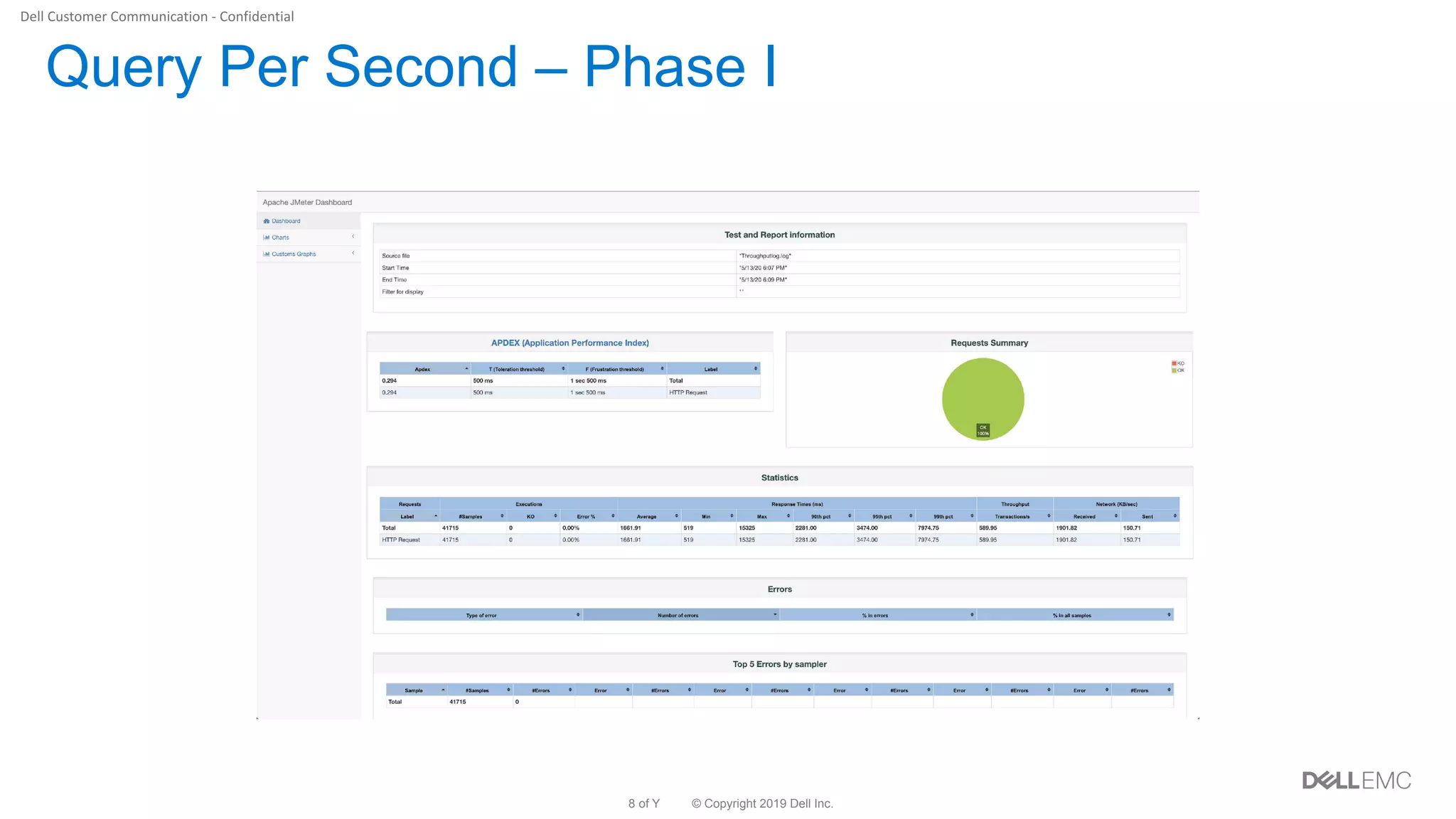
• QPS: 589 transactions/second
© Copyright 2019 Dell Inc.7 of Y
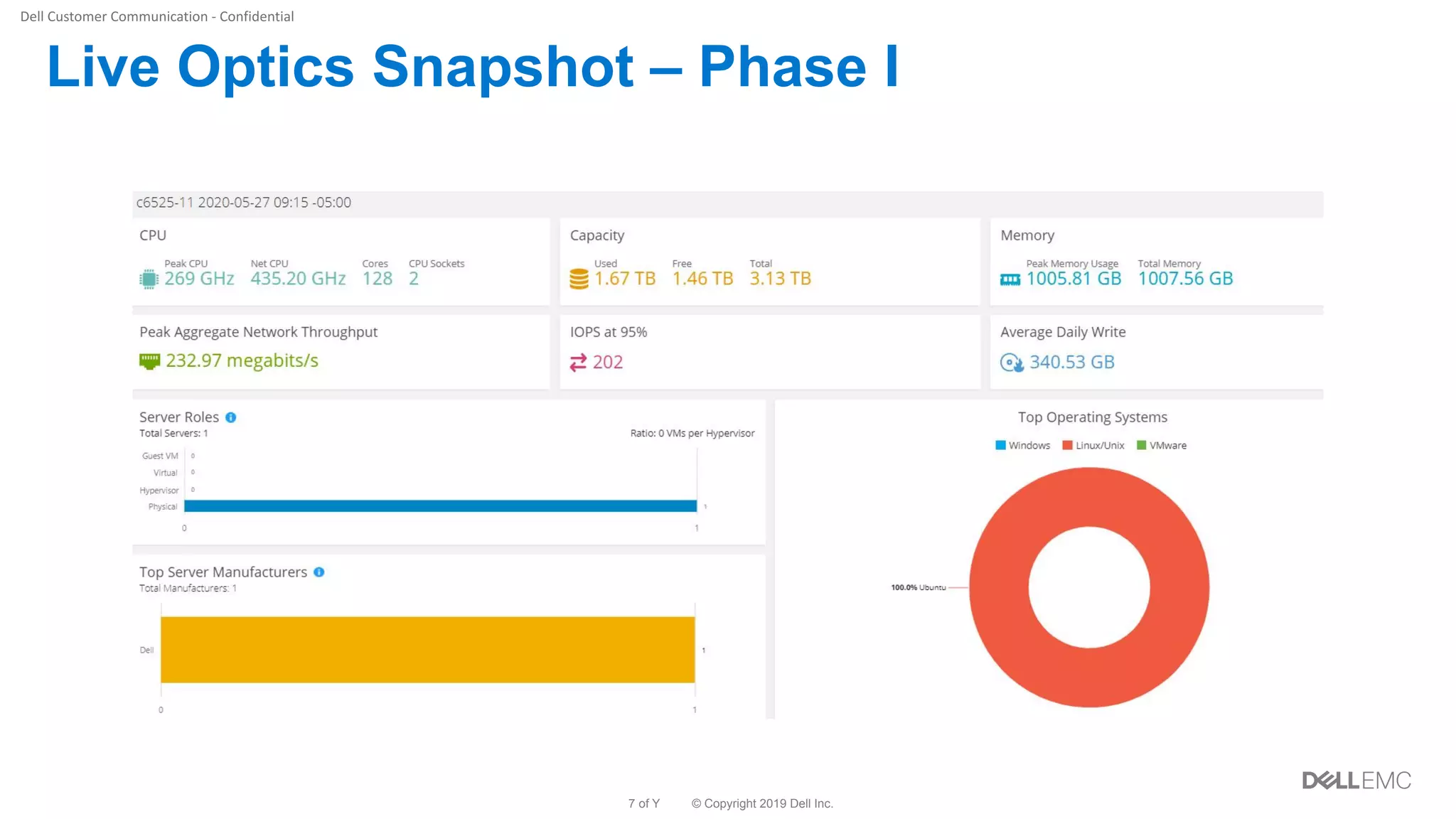
Live Optics Snapshot – Phase I
© Copyright 2019 Dell Inc.8 of Y
Query Per Second – Phase I
© Copyright 2019 Dell Inc.9 of Y
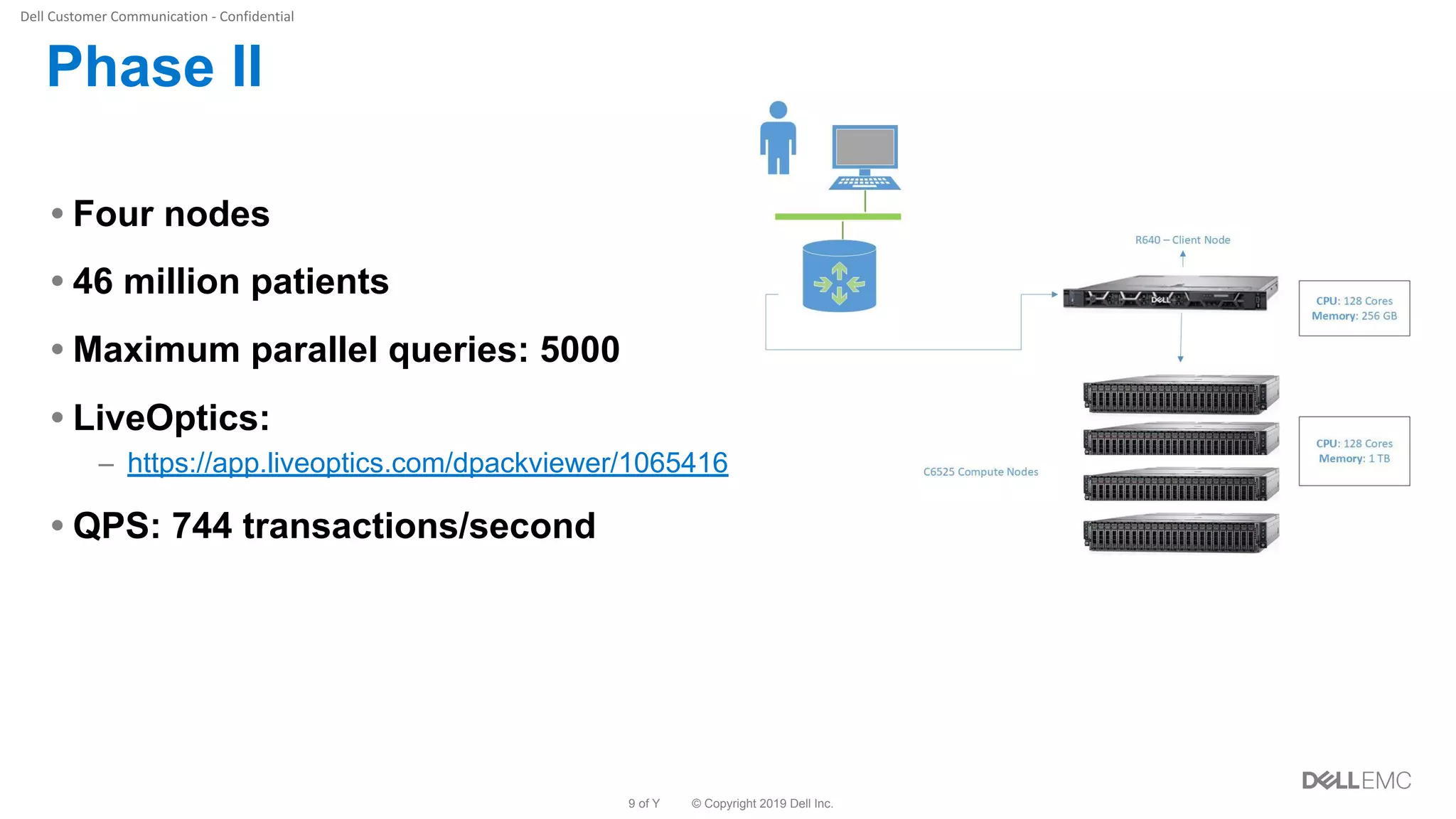
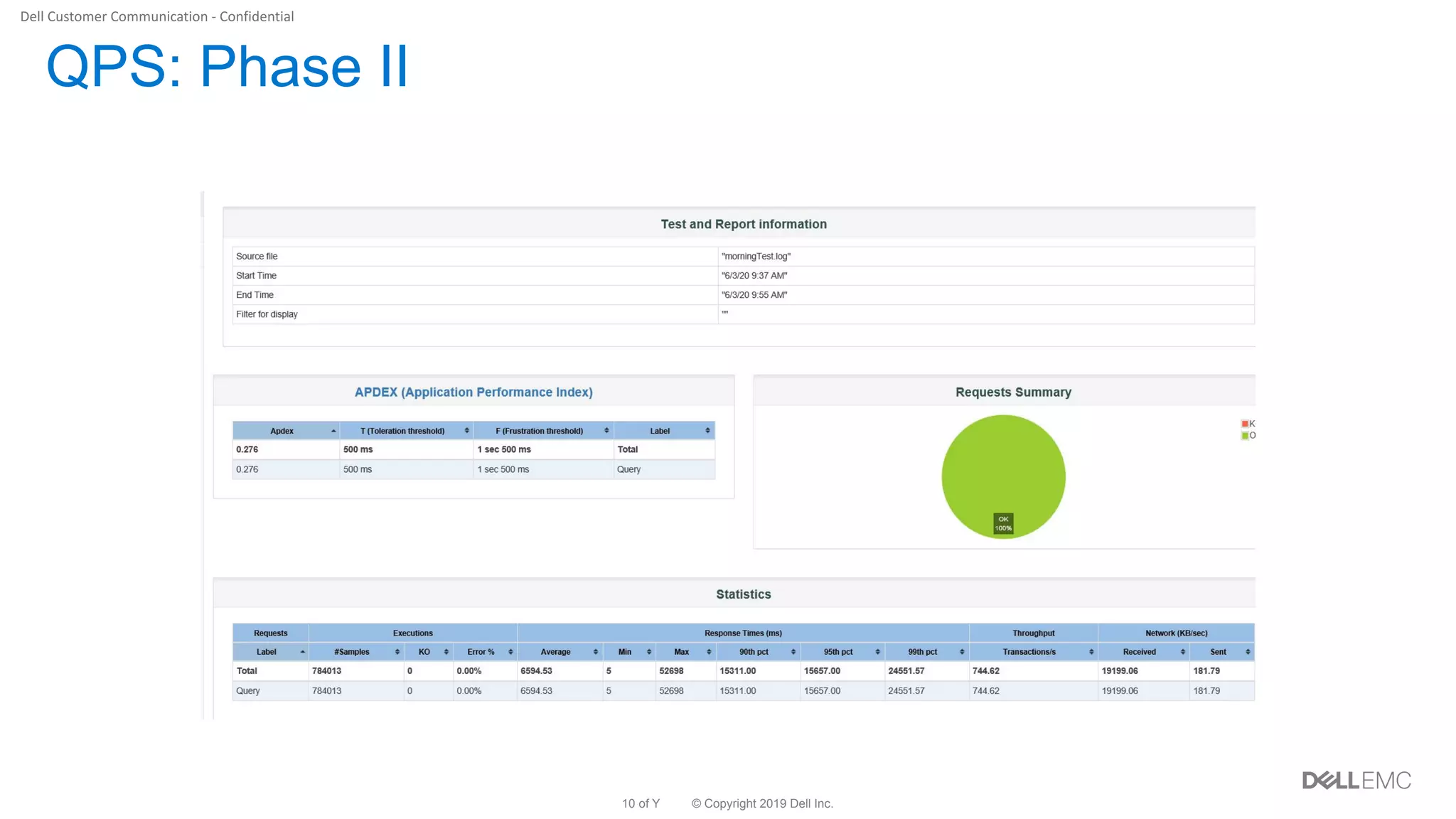
Phase II
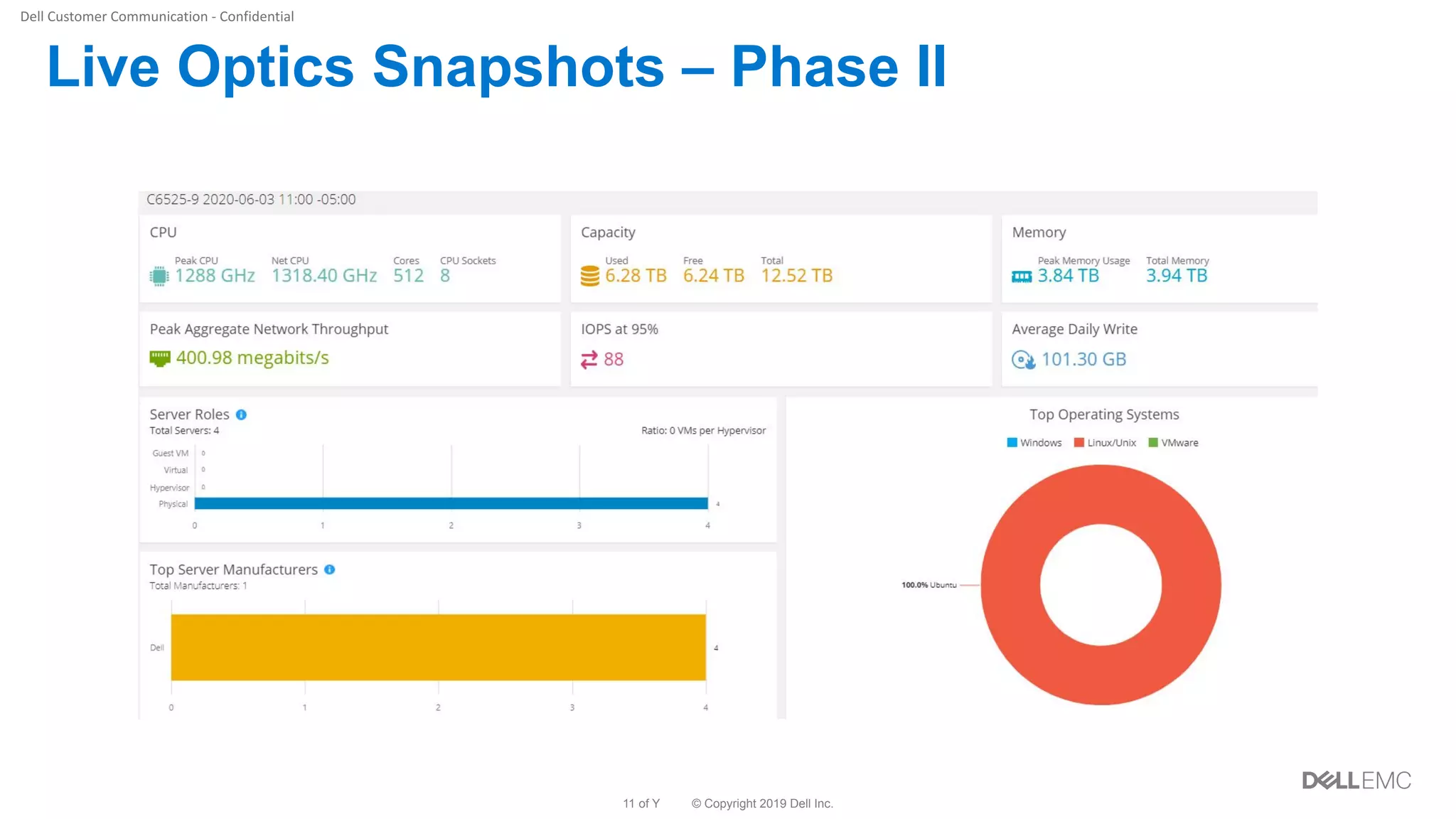
• Four nodes
• 46 million patients
• Maximum parallel queries: 5000
• LiveOptics:
– https://app.liveoptics.com/dpackviewer/1065416
• QPS: 744 transactions/second
© Copyright 2019 Dell Inc.10 of Y
QPS: Phase II
© Copyright 2019 Dell Inc.11 of Y
Live Optics Snapshots – Phase II
© Copyright 2019 Dell Inc.12 of Y
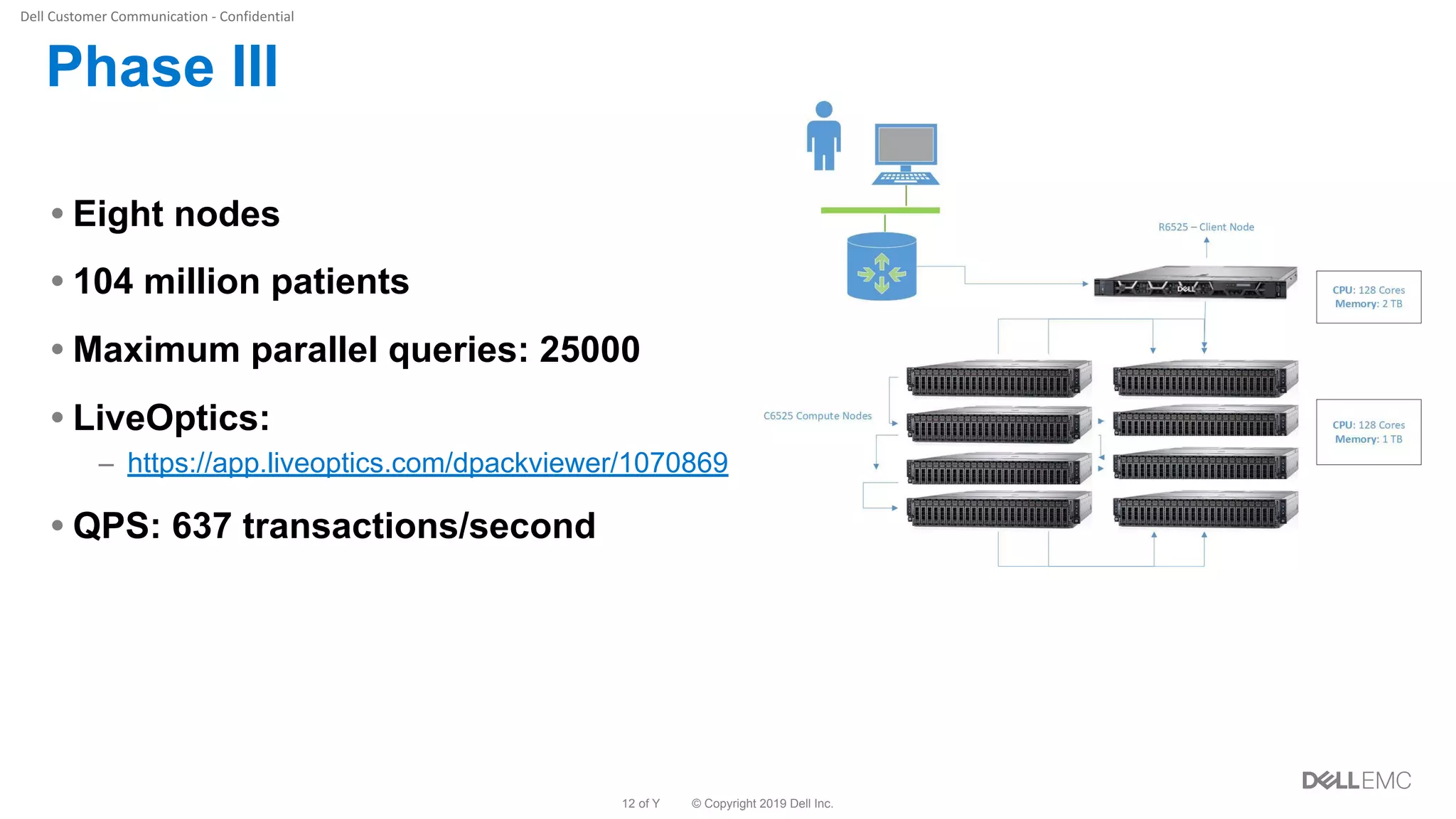
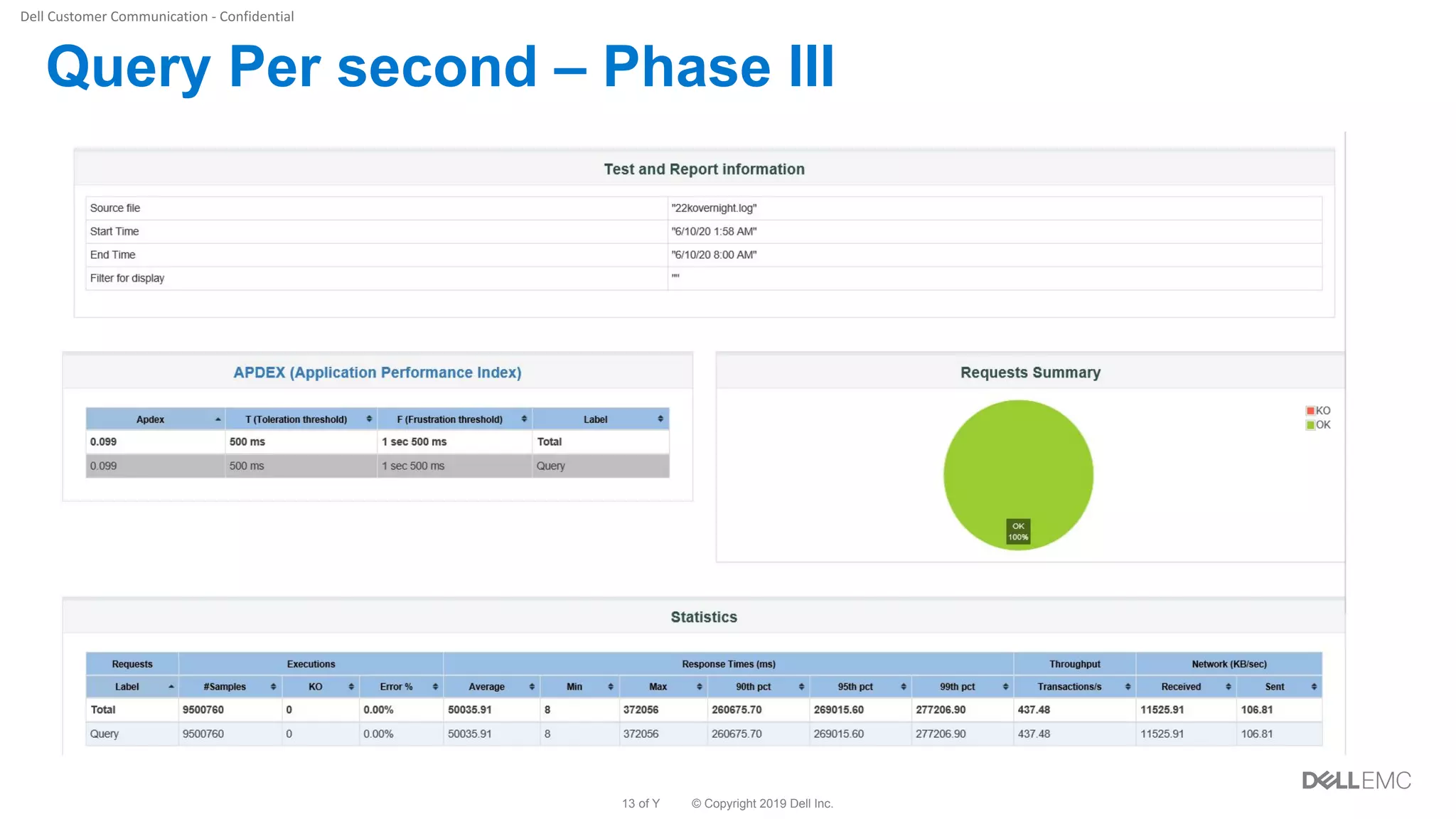
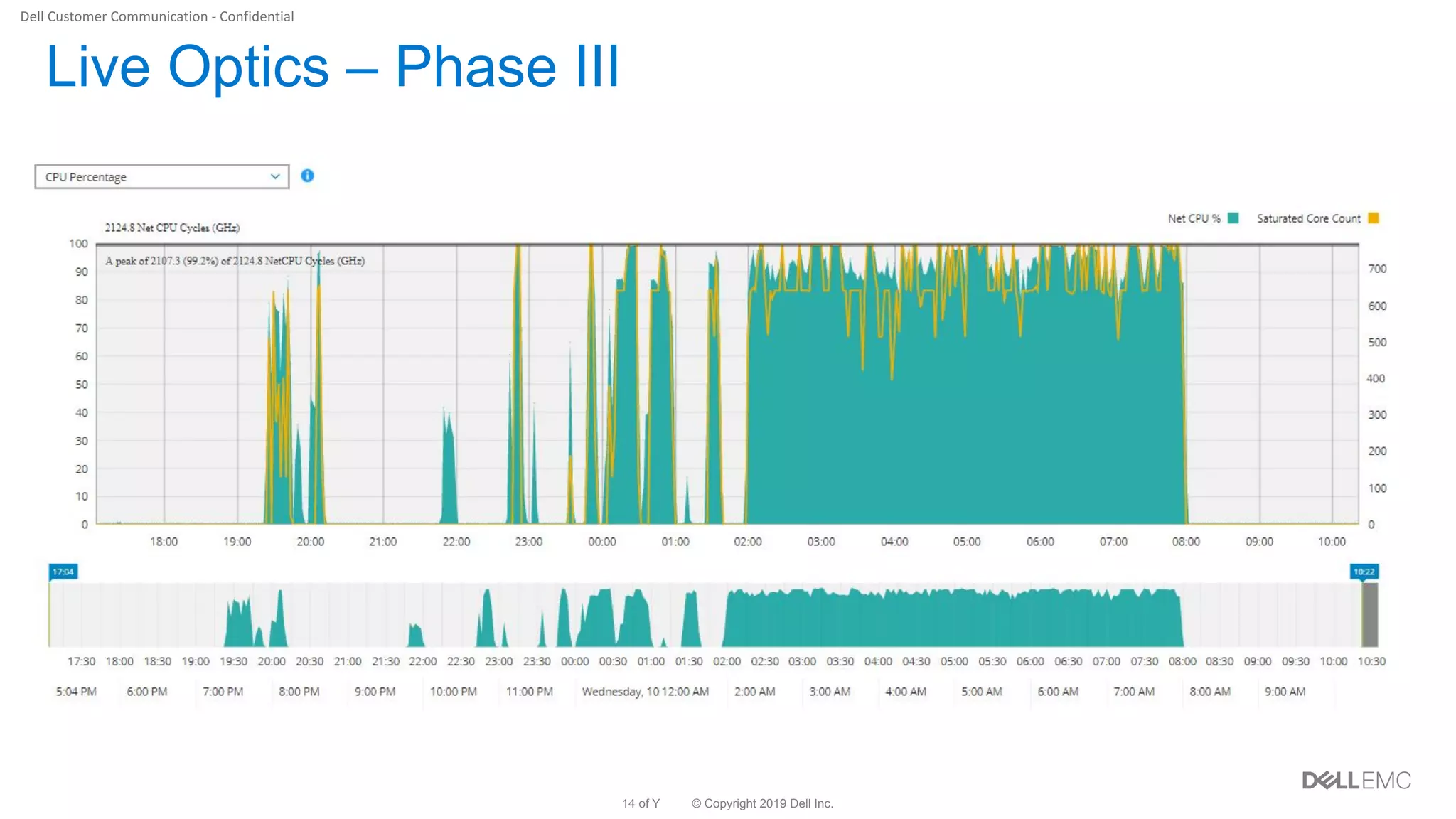
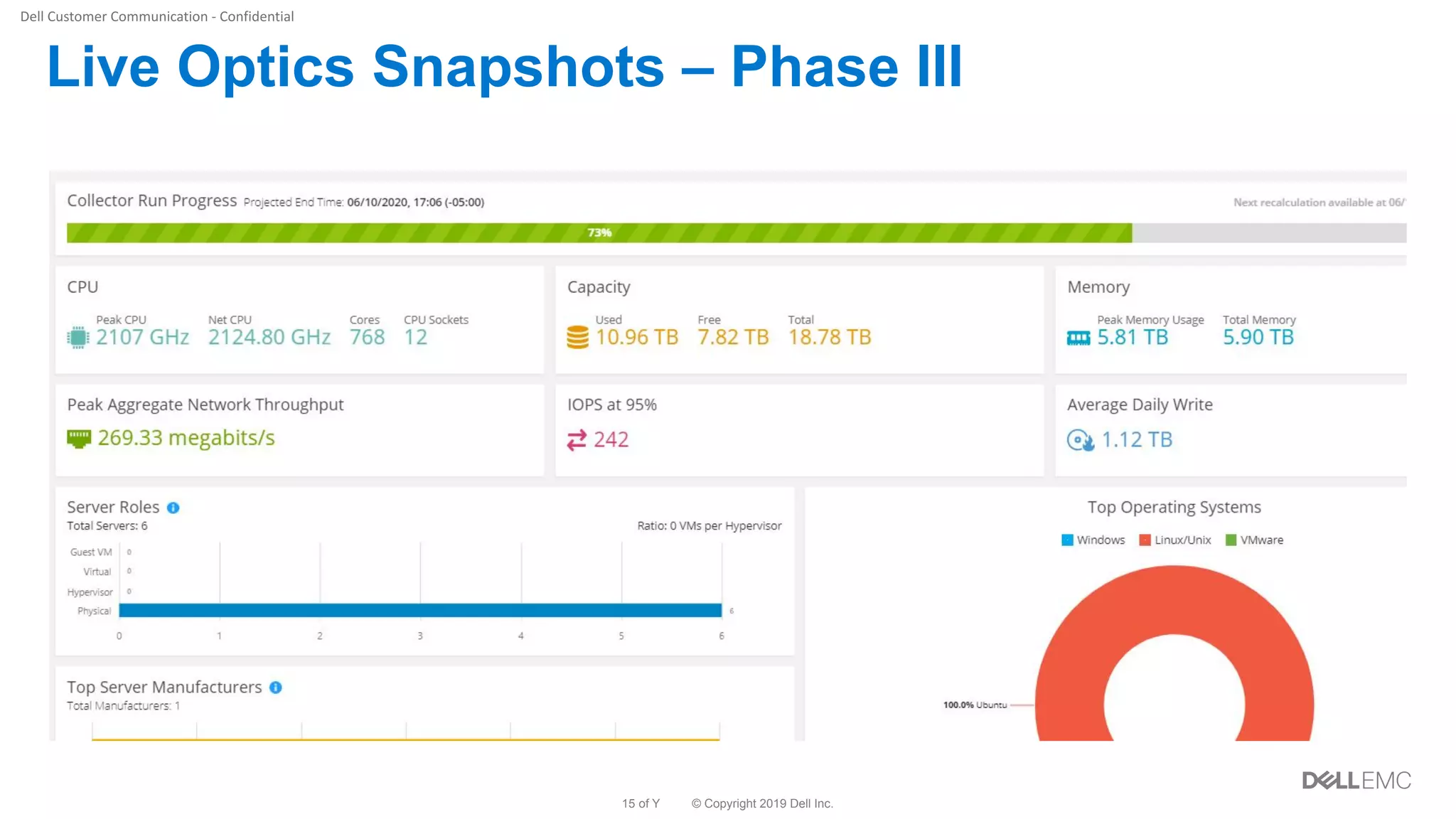
Phase III
• Eight nodes
• 104 million patients
• Maximum parallel queries: 25000
• LiveOptics:
– https://app.liveoptics.com/dpackviewer/1070869
• QPS: 637 transactions/second
© Copyright 2019 Dell Inc.13 of Y
Query Per second – Phase III
© Copyright 2019 Dell Inc.14 of Y
Live Optics – Phase III
© Copyright 2019 Dell Inc.15 of Y
Live Optics Snapshots – Phase III
© Copyright 2019 Dell Inc.16 of Y
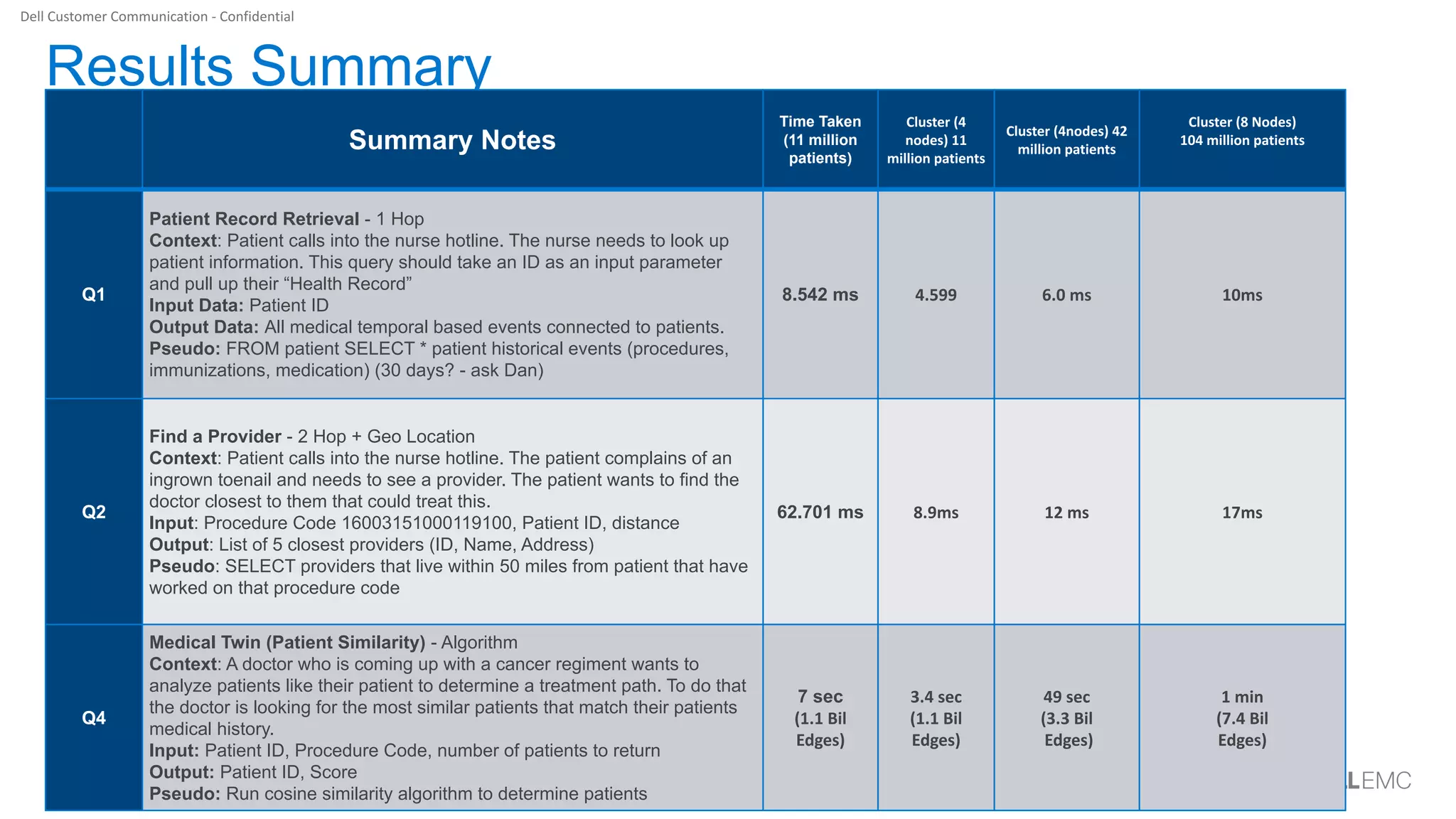
Results Summary
Summary Notes
Time Taken
(11 million
patients)
Q1
Patient Record Retrieval - 1 Hop
Context: Patient calls into the nurse hotline. The nurse needs to look up
patient information. This query should take an ID as an input parameter
and pull up their “Health Record”
Input Data: Patient ID
Output Data: All medical temporal based events connected to patients.
Pseudo: FROM patient SELECT * patient historical events (procedures,
immunizations, medication) (30 days? - ask Dan)
8.542 ms
Q2
Find a Provider - 2 Hop + Geo Location
Context: Patient calls into the nurse hotline. The patient complains of an
ingrown toenail and needs to see a provider. The patient wants to find the
doctor closest to them that could treat this.
Input: Procedure Code 16003151000119100, Patient ID, distance
Output: List of 5 closest providers (ID, Name, Address)
Pseudo: SELECT providers that live within 50 miles from patient that have
worked on that procedure code
62.701 ms
Q4
Medical Twin (Patient Similarity) - Algorithm
Context: A doctor who is coming up with a cancer regiment wants to
analyze patients like their patient to determine a treatment path. To do that
the doctor is looking for the most similar patients that match their patients
medical history.
Input: Patient ID, Procedure Code, number of patients to return
Output: Patient ID, Score
Pseudo: Run cosine similarity algorithm to determine patients
7 sec
© Copyright 2019 Dell Inc.17 of Y
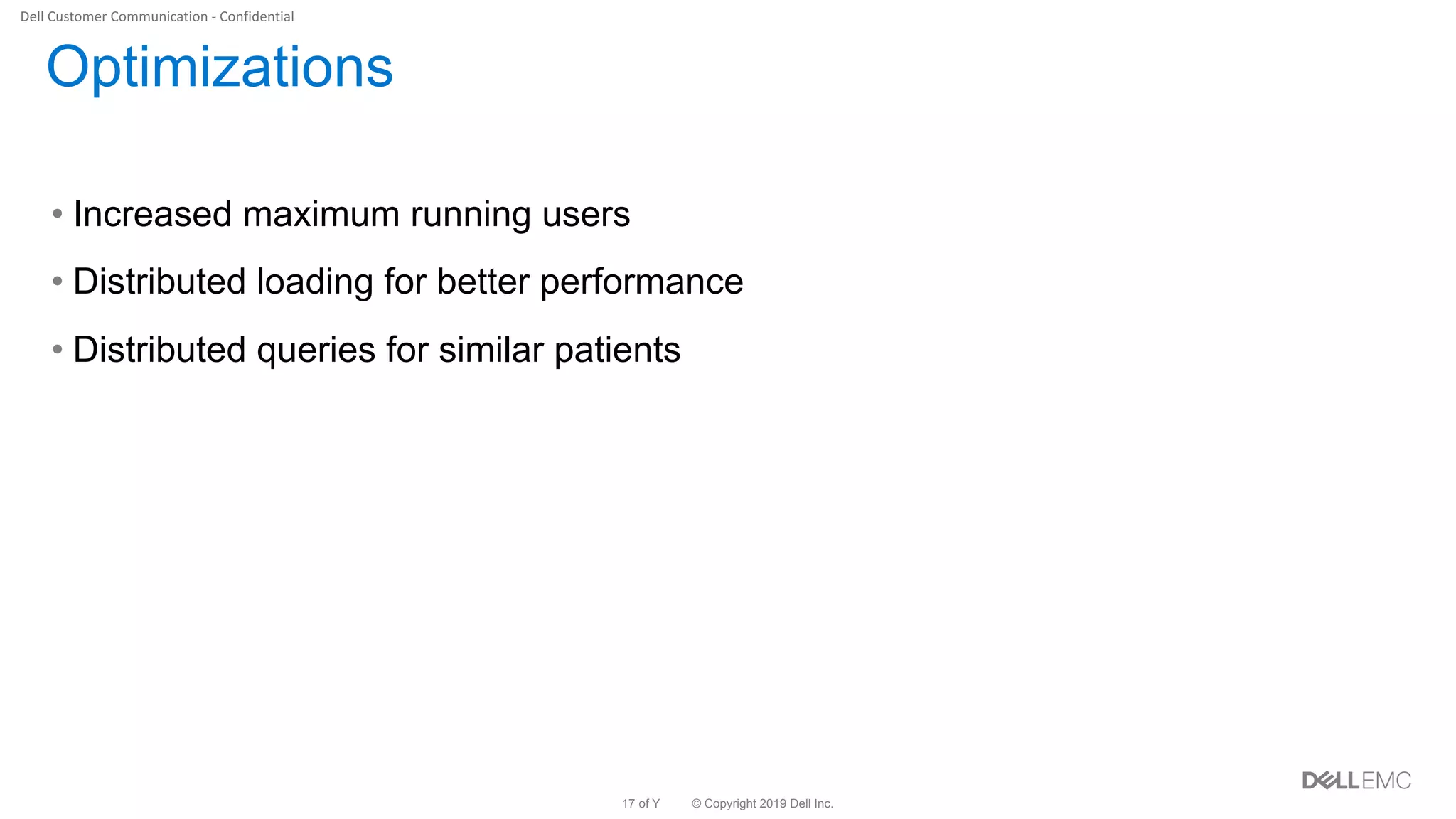
Optimizations
• Increased maximum running users
• Distributed loading for better performance
• Distributed queries for similar patients
Thank You
© Copyright 2019 Dell Inc.19 of Y
Cluster Data Statistics
• 125 minutes for ~3TB loading
• Total Vertex: 4,921,173,161
• Total Edge: 17,375,871,411
© Copyright 2019 Dell Inc.20 of Y
Next Steps
• Demo to products teams
– Netezza
• Demo to other teams
– Who?
• POC in Optum Labs
Demo

Delivering Large Scale Real-time Graph Analytics with Dell Infrastructure and TigerGraph

  • 1.
    Delivering Large ScaleReal-time Graph Analytics with Dell Infrastructure and TigerGraph September 2020
  • 2.
    © Copyright 2019Dell Inc.2 of Y •Project Requirements •Hardware Configuration •Test Plan •Project/POC Phases •Query Results Agenda
  • 3.
    © Copyright 2019Dell Inc.3 of Y Project Requirements • Server Configs – Lay out a plan to use Dell servers with AMD processors • Query Execution – Execute single and stress test queries • Expected Results – Being able to execute the similar patient query on a cluster – Sub seconds response for the Read/Write queries. • Data Generation using Synthea – Synthetic patient data to be generated on each node of the cluster
  • 4.
    © Copyright 2019Dell Inc.4 of Y Architecture –Hardware
  • 5.
    © Copyright 2019Dell Inc.5 of Y Test Plan • Single query execution using Graph-Studio • Multiple queries parallel stress test using Jmeter • UI based patient record visualization Observations: • JMeter QPS report • LiveOptics report
  • 6.
    © Copyright 2019Dell Inc.6 of Y Phase I • Single node • 11 million patients • Maximum parallel queries: 1250 • LiveOptics: – https://app.liveoptics.com/dpackviewer/1059950 • QPS: 589 transactions/second
  • 7.
    © Copyright 2019Dell Inc.7 of Y Live Optics Snapshot – Phase I
  • 8.
    © Copyright 2019Dell Inc.8 of Y Query Per Second – Phase I
  • 9.
    © Copyright 2019Dell Inc.9 of Y Phase II • Four nodes • 46 million patients • Maximum parallel queries: 5000 • LiveOptics: – https://app.liveoptics.com/dpackviewer/1065416 • QPS: 744 transactions/second
  • 10.
    © Copyright 2019Dell Inc.10 of Y QPS: Phase II
  • 11.
    © Copyright 2019Dell Inc.11 of Y Live Optics Snapshots – Phase II
  • 12.
    © Copyright 2019Dell Inc.12 of Y Phase III • Eight nodes • 104 million patients • Maximum parallel queries: 25000 • LiveOptics: – https://app.liveoptics.com/dpackviewer/1070869 • QPS: 637 transactions/second
  • 13.
    © Copyright 2019Dell Inc.13 of Y Query Per second – Phase III
  • 14.
    © Copyright 2019Dell Inc.14 of Y Live Optics – Phase III
  • 15.
    © Copyright 2019Dell Inc.15 of Y Live Optics Snapshots – Phase III
  • 16.
    © Copyright 2019Dell Inc.16 of Y Results Summary Summary Notes Time Taken (11 million patients) Q1 Patient Record Retrieval - 1 Hop Context: Patient calls into the nurse hotline. The nurse needs to look up patient information. This query should take an ID as an input parameter and pull up their “Health Record” Input Data: Patient ID Output Data: All medical temporal based events connected to patients. Pseudo: FROM patient SELECT * patient historical events (procedures, immunizations, medication) (30 days? - ask Dan) 8.542 ms Q2 Find a Provider - 2 Hop + Geo Location Context: Patient calls into the nurse hotline. The patient complains of an ingrown toenail and needs to see a provider. The patient wants to find the doctor closest to them that could treat this. Input: Procedure Code 16003151000119100, Patient ID, distance Output: List of 5 closest providers (ID, Name, Address) Pseudo: SELECT providers that live within 50 miles from patient that have worked on that procedure code 62.701 ms Q4 Medical Twin (Patient Similarity) - Algorithm Context: A doctor who is coming up with a cancer regiment wants to analyze patients like their patient to determine a treatment path. To do that the doctor is looking for the most similar patients that match their patients medical history. Input: Patient ID, Procedure Code, number of patients to return Output: Patient ID, Score Pseudo: Run cosine similarity algorithm to determine patients 7 sec
  • 17.
    © Copyright 2019Dell Inc.17 of Y Optimizations • Increased maximum running users • Distributed loading for better performance • Distributed queries for similar patients
  • 18.
  • 19.
    © Copyright 2019Dell Inc.19 of Y Cluster Data Statistics • 125 minutes for ~3TB loading • Total Vertex: 4,921,173,161 • Total Edge: 17,375,871,411
  • 20.
    © Copyright 2019Dell Inc.20 of Y Next Steps • Demo to products teams – Netezza • Demo to other teams – Who? • POC in Optum Labs
  • 21.