





Scaling the Platform for your
Startup
Dean Bryen, AWS Solutions Architect
@deanbryen
Why are you here?
•  Building the technology platform for your startup
•  You want to prepare for success
•  Learn about design patterns & scalability
•  A pragmatic approach for startups
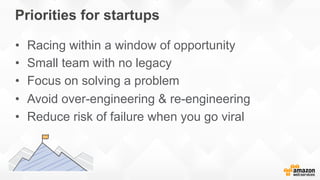
Priorities for startups
•  Racing within a window of opportunity
•  Small team with no legacy
•  Focus on solving a problem
•  Avoid over-engineering & re-engineering
•  Reduce risk of failure when you go viral
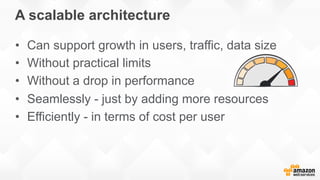
A scalable architecture
•  Can support growth in users, traffic, data size
•  Without practical limits
•  Without a drop in performance
•  Seamlessly - just by adding more resources
•  Efficiently - in terms of cost per user
Amazon Route 53
DNS service
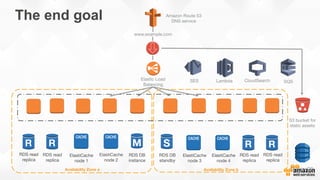
The end goal
Availability Zone a
RDS DB
instance
ElastiCache
node 2 
Availability Zone b
S3 bucket for
static assets
www.example.com
Elastic Load
Balancing
RDS DB
standby 
ElastiCache
node 3
RDS read
replica
RDS read
replica
DynamoDB
RDS read
replica
ElastiCache
node 4
RDS read
replica
ElastiCache
node 1 
CloudSearch
Lambda
SES
 SQS
Day 1
THE server
(e.g. Apache,
MySQL)
Elastic IP
www.example.com
Amazon Route 53
DNS service
Server Image (AMI)
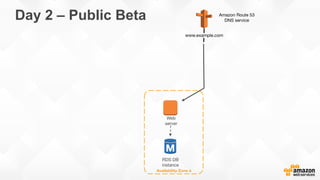
Day 2 – Public Beta
Availability Zone a
RDS DB
instance
Web
server
www.example.com
Amazon Route 53
DNS service
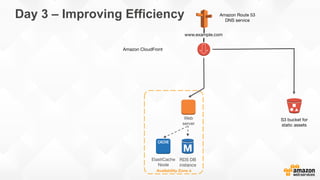
Day 3 – Improving Efficiency
Availability Zone a
RDS DB
instance
Web
server
S3 bucket for
static assets
www.example.com
Amazon Route 53
DNS service
Amazon CloudFront
ElastiCache
Node
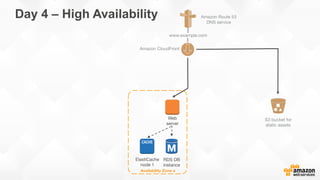
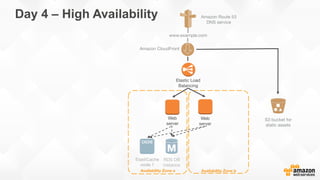
Day 4 – High Availability
Availability Zone a
RDS DB
instance
Web
server
S3 bucket for
static assets
www.example.com
Amazon Route 53
DNS service
Amazon CloudFront
ElastiCache
node 1
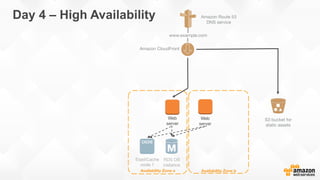
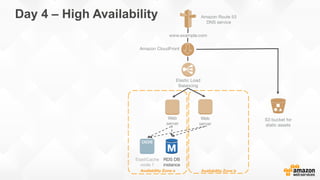
Availability Zone a
RDS DB
instance
Availability Zone b
Web
server
Web
server
S3 bucket for
static assets
www.example.com
Amazon Route 53
DNS service
Amazon CloudFront
ElastiCache
node 1 
Day 4 – High Availability
Availability Zone a
RDS DB
instance
Availability Zone b
www.example.com
Amazon Route 53
DNS service
Elastic Load
Balancing
Web
server
Web
server
S3 bucket for
static assets
Amazon CloudFront
ElastiCache
node 1 
Day 4 – High Availability
Availability Zone a
RDS DB
instance
Availability Zone b
www.example.com
Amazon Route 53
DNS service
Elastic Load
Balancing
Web
server
Web
server
S3 bucket for
static assets
ElastiCache
node 1 
Amazon CloudFront
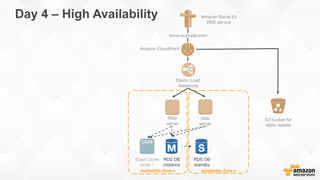
Day 4 – High Availability
Availability Zone a
RDS DB
instance
Availability Zone b
www.example.com
Amazon Route 53
DNS service
Elastic Load
Balancing
Web
server
Web
server
RDS DB
standby 
S3 bucket for
static assets
ElastiCache
node 1 
Amazon CloudFront
Day 4 – High Availability
Availability Zone a
RDS DB
instance
ElastiCache
node 1 
Availability Zone b
S3 bucket for
static assets
www.example.com
Amazon Route 53
DNS service
Elastic Load
Balancing
Web
server
Web
server
RDS DB
standby 
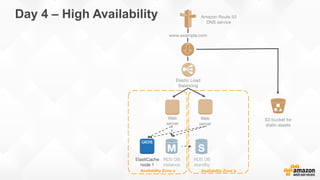
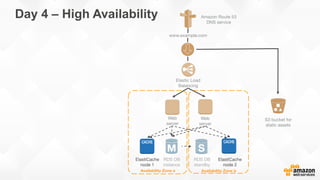
Day 4 – High Availability
Availability Zone a
RDS DB
instance
ElastiCache
node 1 
Availability Zone b
S3 bucket for
static assets
www.example.com
Amazon Route 53
DNS service
Elastic Load
Balancing
Web
server
Web
server
RDS DB
standby 
ElastiCache
node 2 
Day 4 – High Availability
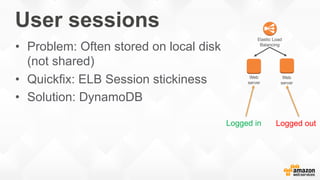
User sessions
•  Problem: Often stored on local disk
(not shared)
•  Quickfix: ELB Session stickiness
•  Solution: DynamoDB
Elastic Load
Balancing
Web
server
Web
server
Logged in Logged out
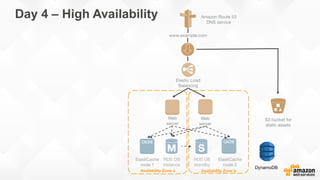
Availability Zone a
RDS DB
instance
ElastiCache
node 1 
Availability Zone b
S3 bucket for
static assets
www.example.com
Amazon Route 53
DNS service
Elastic Load
Balancing
Web
server
Web
server
RDS DB
standby 
ElastiCache
node 2 
Day 4 – High Availability
DynamoDB
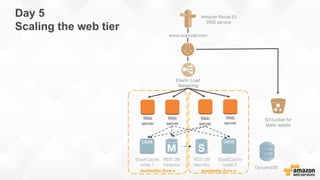
Day 5
Scaling the web tier
Availability Zone a
RDS DB
instance
ElastiCache
node 1 
Availability Zone b
S3 bucket for
static assets
www.example.com
Amazon Route 53
DNS service
Elastic Load
Balancing
Web
server
Web
server
RDS DB
standby 
ElastiCache
node 2 
Web
server
Web
server
DynamoDB
Decompose into small,
loosely coupled, stateless
building blocks
Prerequisite
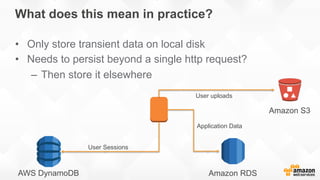
What does this mean in practice?
•  Only store transient data on local disk
•  Needs to persist beyond a single http request?
–  Then store it elsewhere
User uploads
User Sessions
Amazon S3
AWS DynamoDB
Application Data
Amazon RDS
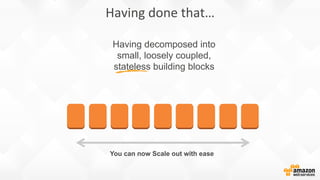
Having decomposed into
small, loosely coupled,
stateless building blocks
You can now Scale out with ease
Having	
  done	
  that…	
  
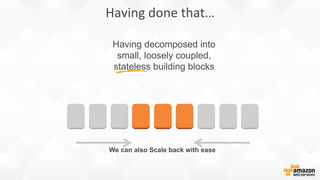
Having decomposed into
small, loosely coupled,
stateless building blocks
We can also Scale back with ease
Having	
  done	
  that…	
  
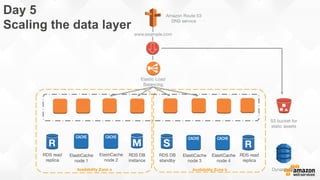
Amazon Route 53
DNS service
Day 5
Scaling the data layer
Availability Zone a
RDS DB
instance
ElastiCache
node 2 
Availability Zone b
S3 bucket for
static assets
www.example.com
Elastic Load
Balancing
RDS DB
standby 
ElastiCache
node 3
RDS read
replica
DynamoDB
ElastiCache
node 4
RDS read
replica
ElastiCache
node 1
Take the shortcut
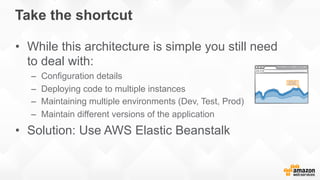
•  While this architecture is simple you still need
to deal with:
–  Configuration details
–  Deploying code to multiple instances
–  Maintaining multiple environments (Dev, Test, Prod)
–  Maintain different versions of the application
•  Solution: Use AWS Elastic Beanstalk
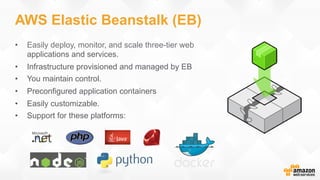
AWS Elastic Beanstalk (EB)
•  Easily deploy, monitor, and scale three-tier web
applications and services.
•  Infrastructure provisioned and managed by EB
•  You maintain control.
•  Preconfigured application containers
•  Easily customizable.
•  Support for these platforms:
Day 6 – Add more features
Mobile
Push
Notifications
Mobile
Analytics
Cognito
Cognito
Sync
Analytics
Kinesis
Data
Pipeline
RedShift EMR
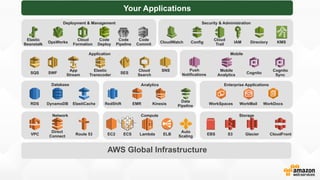
Your Applications
AWS Global Infrastructure
Network
VPC
Direct
Connect
Route 53
Storage
EBS S3 Glacier CloudFront
Database
DynamoDBRDS ElastiCache
Deployment & Management
Elastic
Beanstalk
OpsWorks
Cloud
Formation
Code
Deploy
Code
Pipeline
Code
Commit
Security & Administration
CloudWatch Config
Cloud
Trail
IAM Directory KMS
Application
SQS SWF
App
Stream
Elastic
Transcoder
SES
Cloud
Search
SNS
Enterprise Applications
WorkSpaces WorkMail WorkDocs
Compute
EC2 ELB
Auto
Scaling
LambdaECS
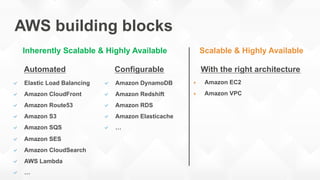
AWS building blocks
Inherently Scalable & Highly Available Scalable & Highly Available
!  Elastic Load Balancing
!  Amazon CloudFront
!  Amazon Route53
!  Amazon S3
!  Amazon SQS
!  Amazon SES
!  Amazon CloudSearch
!  AWS Lambda
!  …
!  Amazon DynamoDB
!  Amazon Redshift
!  Amazon RDS
!  Amazon Elasticache
!  …
"  Amazon EC2
"  Amazon VPC
Automated Configurable With the right architecture
Amazon Route 53
DNS service
No limit
Availability Zone a
RDS DB
instance
ElastiCache
node 2 
Availability Zone b
S3 bucket for
static assets
www.example.com
Elastic Load
Balancing
RDS DB
standby 
ElastiCache
node 3
RDS read
replica
RDS read
replica
DynamoDB
RDS read
replica
ElastiCache
node 4
RDS read
replica
ElastiCache
node 1 
CloudSearch
Lambda
SES
 SQS
Some other Architectures
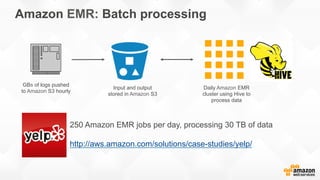
Amazon EMR: Batch processing
GBs of logs pushed
to Amazon S3 hourly
Daily Amazon EMR
cluster using Hive to
process data
Input and output
stored in Amazon S3
250 Amazon EMR jobs per day, processing 30 TB of data
http://aws.amazon.com/solutions/case-studies/yelp/
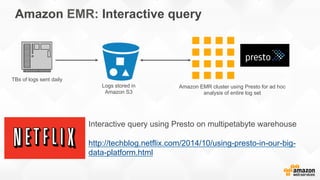
Amazon EMR: Interactive query
TBs of logs sent daily
Logs stored in
Amazon S3
Amazon EMR cluster using Presto for ad hoc
analysis of entire log set
Interactive query using Presto on multipetabyte warehouse
http://techblog.netflix.com/2014/10/using-presto-in-our-big-
data-platform.html
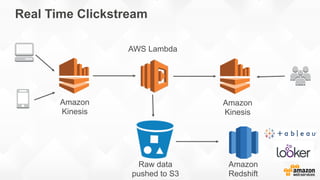
Real Time Clickstream
Raw data
pushed to S3
Amazon
Redshift
Amazon
Kinesis
Amazon
Kinesis
AWS Lambda
Summary
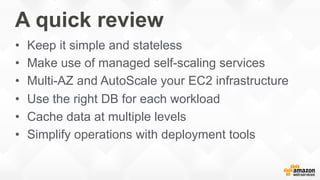
A quick review
•  Keep it simple and stateless
•  Make use of managed self-scaling services
•  Multi-AZ and AutoScale your EC2 infrastructure
•  Use the right DB for each workload
•  Cache data at multiple levels
•  Simplify operations with deployment tools
Next steps?
READ!
•  aws.amazon.com/documentation
•  aws.amazon.com/architecture
•  aws.amazon.com/start-ups
ASK FOR HELP!
•  forums.aws.amazon.com
•  aws.amazon.com/support
@deanbryen

Dean Bryen: Scaling The Platform For Your Startup

  • 1.
    Scaling the Platformfor your Startup Dean Bryen, AWS Solutions Architect @deanbryen
  • 2.
    Why are youhere? •  Building the technology platform for your startup •  You want to prepare for success •  Learn about design patterns & scalability •  A pragmatic approach for startups
  • 3.
    Priorities for startups • Racing within a window of opportunity •  Small team with no legacy •  Focus on solving a problem •  Avoid over-engineering & re-engineering •  Reduce risk of failure when you go viral
  • 4.
    A scalable architecture • Can support growth in users, traffic, data size •  Without practical limits •  Without a drop in performance •  Seamlessly - just by adding more resources •  Efficiently - in terms of cost per user
  • 5.
    Amazon Route 53 DNSservice The end goal Availability Zone a RDS DB instance ElastiCache node 2 Availability Zone b S3 bucket for static assets www.example.com Elastic Load Balancing RDS DB standby ElastiCache node 3 RDS read replica RDS read replica DynamoDB RDS read replica ElastiCache node 4 RDS read replica ElastiCache node 1 CloudSearch Lambda SES SQS
  • 6.
    Day 1 THE server (e.g.Apache, MySQL) Elastic IP www.example.com Amazon Route 53 DNS service Server Image (AMI)
  • 7.
    Day 2 –Public Beta Availability Zone a RDS DB instance Web server www.example.com Amazon Route 53 DNS service
  • 8.
    Day 3 –Improving Efficiency Availability Zone a RDS DB instance Web server S3 bucket for static assets www.example.com Amazon Route 53 DNS service Amazon CloudFront ElastiCache Node
  • 9.
    Day 4 –High Availability Availability Zone a RDS DB instance Web server S3 bucket for static assets www.example.com Amazon Route 53 DNS service Amazon CloudFront ElastiCache node 1
  • 10.
    Availability Zone a RDSDB instance Availability Zone b Web server Web server S3 bucket for static assets www.example.com Amazon Route 53 DNS service Amazon CloudFront ElastiCache node 1 Day 4 – High Availability
  • 11.
    Availability Zone a RDSDB instance Availability Zone b www.example.com Amazon Route 53 DNS service Elastic Load Balancing Web server Web server S3 bucket for static assets Amazon CloudFront ElastiCache node 1 Day 4 – High Availability
  • 12.
    Availability Zone a RDSDB instance Availability Zone b www.example.com Amazon Route 53 DNS service Elastic Load Balancing Web server Web server S3 bucket for static assets ElastiCache node 1 Amazon CloudFront Day 4 – High Availability
  • 13.
    Availability Zone a RDSDB instance Availability Zone b www.example.com Amazon Route 53 DNS service Elastic Load Balancing Web server Web server RDS DB standby S3 bucket for static assets ElastiCache node 1 Amazon CloudFront Day 4 – High Availability
  • 14.
    Availability Zone a RDSDB instance ElastiCache node 1 Availability Zone b S3 bucket for static assets www.example.com Amazon Route 53 DNS service Elastic Load Balancing Web server Web server RDS DB standby Day 4 – High Availability
  • 15.
    Availability Zone a RDSDB instance ElastiCache node 1 Availability Zone b S3 bucket for static assets www.example.com Amazon Route 53 DNS service Elastic Load Balancing Web server Web server RDS DB standby ElastiCache node 2 Day 4 – High Availability
  • 16.
    User sessions •  Problem:Often stored on local disk (not shared) •  Quickfix: ELB Session stickiness •  Solution: DynamoDB Elastic Load Balancing Web server Web server Logged in Logged out
  • 17.
    Availability Zone a RDSDB instance ElastiCache node 1 Availability Zone b S3 bucket for static assets www.example.com Amazon Route 53 DNS service Elastic Load Balancing Web server Web server RDS DB standby ElastiCache node 2 Day 4 – High Availability DynamoDB
  • 18.
    Day 5 Scaling theweb tier Availability Zone a RDS DB instance ElastiCache node 1 Availability Zone b S3 bucket for static assets www.example.com Amazon Route 53 DNS service Elastic Load Balancing Web server Web server RDS DB standby ElastiCache node 2 Web server Web server DynamoDB
  • 19.
    Decompose into small, looselycoupled, stateless building blocks Prerequisite
  • 20.
    What does thismean in practice? •  Only store transient data on local disk •  Needs to persist beyond a single http request? –  Then store it elsewhere User uploads User Sessions Amazon S3 AWS DynamoDB Application Data Amazon RDS
  • 21.
    Having decomposed into small,loosely coupled, stateless building blocks You can now Scale out with ease Having  done  that…  
  • 22.
    Having decomposed into small,loosely coupled, stateless building blocks We can also Scale back with ease Having  done  that…  
  • 23.
    Amazon Route 53 DNSservice Day 5 Scaling the data layer Availability Zone a RDS DB instance ElastiCache node 2 Availability Zone b S3 bucket for static assets www.example.com Elastic Load Balancing RDS DB standby ElastiCache node 3 RDS read replica DynamoDB ElastiCache node 4 RDS read replica ElastiCache node 1
  • 24.
    Take the shortcut • While this architecture is simple you still need to deal with: –  Configuration details –  Deploying code to multiple instances –  Maintaining multiple environments (Dev, Test, Prod) –  Maintain different versions of the application •  Solution: Use AWS Elastic Beanstalk
  • 25.
    AWS Elastic Beanstalk(EB) •  Easily deploy, monitor, and scale three-tier web applications and services. •  Infrastructure provisioned and managed by EB •  You maintain control. •  Preconfigured application containers •  Easily customizable. •  Support for these platforms:
  • 26.
    Day 6 –Add more features
  • 27.
    Mobile Push Notifications Mobile Analytics Cognito Cognito Sync Analytics Kinesis Data Pipeline RedShift EMR Your Applications AWSGlobal Infrastructure Network VPC Direct Connect Route 53 Storage EBS S3 Glacier CloudFront Database DynamoDBRDS ElastiCache Deployment & Management Elastic Beanstalk OpsWorks Cloud Formation Code Deploy Code Pipeline Code Commit Security & Administration CloudWatch Config Cloud Trail IAM Directory KMS Application SQS SWF App Stream Elastic Transcoder SES Cloud Search SNS Enterprise Applications WorkSpaces WorkMail WorkDocs Compute EC2 ELB Auto Scaling LambdaECS
  • 28.
    AWS building blocks InherentlyScalable & Highly Available Scalable & Highly Available !  Elastic Load Balancing !  Amazon CloudFront !  Amazon Route53 !  Amazon S3 !  Amazon SQS !  Amazon SES !  Amazon CloudSearch !  AWS Lambda !  … !  Amazon DynamoDB !  Amazon Redshift !  Amazon RDS !  Amazon Elasticache !  … "  Amazon EC2 "  Amazon VPC Automated Configurable With the right architecture
  • 29.
    Amazon Route 53 DNSservice No limit Availability Zone a RDS DB instance ElastiCache node 2 Availability Zone b S3 bucket for static assets www.example.com Elastic Load Balancing RDS DB standby ElastiCache node 3 RDS read replica RDS read replica DynamoDB RDS read replica ElastiCache node 4 RDS read replica ElastiCache node 1 CloudSearch Lambda SES SQS
  • 30.
  • 31.
    Amazon EMR: Batchprocessing GBs of logs pushed to Amazon S3 hourly Daily Amazon EMR cluster using Hive to process data Input and output stored in Amazon S3 250 Amazon EMR jobs per day, processing 30 TB of data http://aws.amazon.com/solutions/case-studies/yelp/
  • 32.
    Amazon EMR: Interactivequery TBs of logs sent daily Logs stored in Amazon S3 Amazon EMR cluster using Presto for ad hoc analysis of entire log set Interactive query using Presto on multipetabyte warehouse http://techblog.netflix.com/2014/10/using-presto-in-our-big- data-platform.html
  • 33.
    Real Time Clickstream Rawdata pushed to S3 Amazon Redshift Amazon Kinesis Amazon Kinesis AWS Lambda
  • 34.
  • 35.
    A quick review • Keep it simple and stateless •  Make use of managed self-scaling services •  Multi-AZ and AutoScale your EC2 infrastructure •  Use the right DB for each workload •  Cache data at multiple levels •  Simplify operations with deployment tools
  • 36.
    Next steps? READ! •  aws.amazon.com/documentation • aws.amazon.com/architecture •  aws.amazon.com/start-ups ASK FOR HELP! •  forums.aws.amazon.com •  aws.amazon.com/support
  • 37.