©2015, Amazon Web Services, Inc. or its affiliates. All rights reserved
Scale, baby, scale!
Julien Simon
Principal Technical Evangelist
Amazon Web Services
julsimon@amazon.fr
@julsimon
So let’s start from
day 1, user 1 (you)
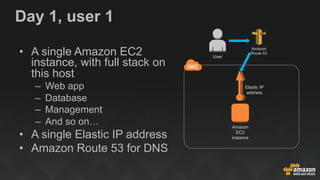
Day 1, user 1
•  A single Amazon EC2
instance, with full stack on
this host
–  Web app
–  Database
–  Management
–  And so on…
•  A single Elastic IP address
•  Amazon Route 53 for DNS
Amazon
EC2
instance
Elastic IP
address
Amazon
Route 53
User
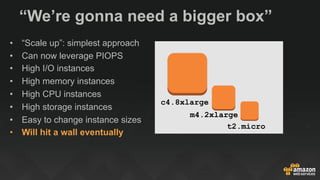
“We’re gonna need a bigger box”
•  “Scale up”: simplest approach
•  Can now leverage PIOPS
•  High I/O instances
•  High memory instances
•  High CPU instances
•  High storage instances
•  Easy to change instance sizes
•  Will hit a wall eventually
c4.8xlarge
m4.2xlarge
t2.micro
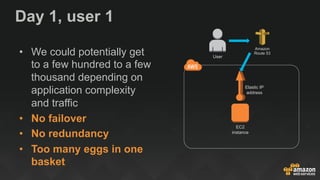
Day 1, user 1
•  We could potentially get
to a few hundred to a few
thousand depending on
application complexity
and traffic
•  No failover
•  No redundancy
•  Too many eggs in one
basket
EC2
instance
Elastic IP
address
Amazon
Route 53
User
AWSome Days 3.8
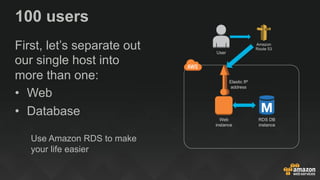
100 users
First, let’s separate out
our single host into
more than one:
•  Web
•  Database
Use Amazon RDS to make
your life easier
Web
instance
Elastic IP
address
RDS DB
instance
Amazon
Route 53
User
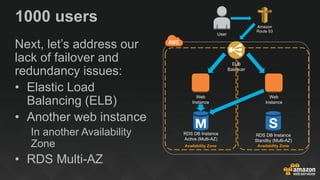
1000 users
Next, let’s address our
lack of failover and
redundancy issues:
•  Elastic Load
Balancing (ELB)
•  Another web instance
In another Availability
Zone
•  RDS Multi-AZ
Web
Instance
RDS DB Instance
Active (Multi-AZ)
Availability Zone Availability Zone
Web
Instance
RDS DB Instance
Standby (Multi-AZ)
ELB
Balancer
Amazon
Route 53
User
Scaling this horizontally and
vertically will get us pretty far
(tens to hundreds of
thousands)
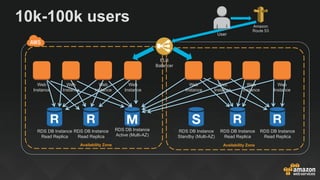
10k-100k users
RDS DB Instance
Active (Multi-AZ)
Availability Zone Availability Zone
RDS DB Instance
Standby (Multi-AZ)
ELB
Balancer
RDS DB Instance
Read Replica
RDS DB Instance
Read Replica
RDS DB Instance
Read Replica
RDS DB Instance
Read Replica
Web
Instance
Web
Instance
Web
Instance
Web
Instance
Web
Instance
Web
Instance
Web
Instance
Web
Instance
Amazon
Route 53
User
This will take us pretty far, but
we care about performance
and efficiency, so let’s
improve further
RDS DB Instance
Active (Multi-AZ)
Availability Zone
ELB
Balancer
Amazon
Route 53
User
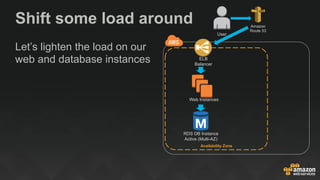
Let’s lighten the load on our
web and database instances
Shift some load around
Web Instances
RDS DB Instance
Active (Multi-AZ)
Availability Zone
ELB
Balancer
Amazon S3
Amazon
CloudFront
Amazon
Route 53
User
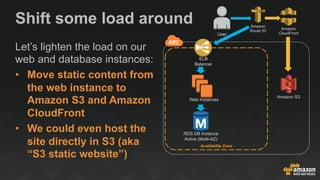
Let’s lighten the load on our
web and database instances:
•  Move static content from
the web instance to
Amazon S3 and Amazon
CloudFront
•  We could even host the
site directly in S3 (aka
“S3 static website”)
Shift some load around
Web Instances
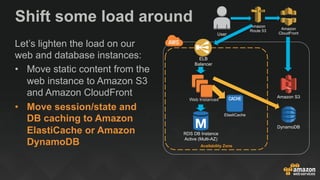
Shift some load around
Let’s lighten the load on our
web and database instances:
•  Move static content from the
web instance to Amazon S3
and Amazon CloudFront
•  Move session/state and
DB caching to Amazon
ElastiCache or Amazon
DynamoDB
RDS DB Instance
Active (Multi-AZ)
Availability Zone
ELB
Balancer
Amazon S3
Amazon
CloudFront
Amazon
Route 53
User
ElastiCache
DynamoDB
Web Instances
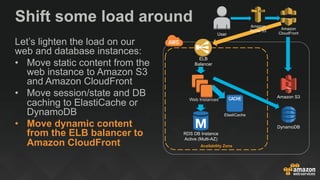
Shift some load around
Let’s lighten the load on our
web and database instances:
•  Move static content from the
web instance to Amazon S3
and Amazon CloudFront
•  Move session/state and DB
caching to ElastiCache or
DynamoDB
•  Move dynamic content
from the ELB balancer to
Amazon CloudFront
RDS DB Instance
Active (Multi-AZ)
Availability Zone
ELB
Balancer
Amazon S3
Amazon
CloudFront
Amazon
Route 53
User
ElastiCache
DynamoDB
Web Instances
Now that our web tier is
much more lightweight…
Auto Scaling!
Resize server farms automatically
based on monitoring metrics
Spot instances!
Bid on unused EC2 capacity
(typically at 80% discount)
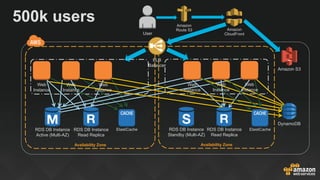
500k users
Availability Zone
Amazon
Route 53
User
Amazon S3
Amazon
CloudFront
Availability Zone
ELB
Balancer
DynamoDB
RDS DB Instance
Read Replica
Web
Instance
Web
Instance
Web
Instance
ElastiCache RDS DB Instance
Read Replica
Web
Instance
Web
Instance
Web
Instance
ElastiCacheRDS DB Instance
Standby (Multi-AZ)
RDS DB Instance
Active (Multi-AZ)
AWSome Days 3.8
There are more
improvements to be made
and we could get much
higher, but do we really
want to manage all these
instances ?
Werner Vogels, CTO, Amazon.com
AWS re:Invent 2015
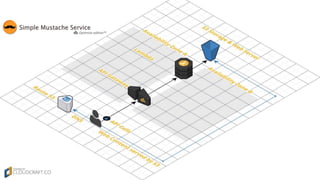
Use the Force, Luke!
Managed services
+ AWS Lambda
= Serverless architecture
AWSome Days 3.8
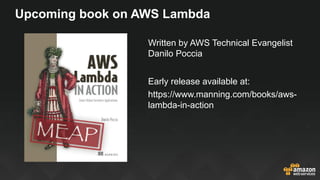
Upcoming book on AWS Lambda
Written by AWS Technical Evangelist
Danilo Poccia
Early release available at:
https://www.manning.com/books/aws-
lambda-in-action
©2015, Amazon Web Services, Inc. or its affiliates. All rights reserved
Thank You !
Julien Simon
julsimon@amazon.fr
@julsimon

Scale, baby, scale! (June 2016)

  • 1.
    ©2015, Amazon WebServices, Inc. or its affiliates. All rights reserved Scale, baby, scale! Julien Simon Principal Technical Evangelist Amazon Web Services julsimon@amazon.fr @julsimon
  • 2.
    So let’s startfrom day 1, user 1 (you)
  • 3.
    Day 1, user1 •  A single Amazon EC2 instance, with full stack on this host –  Web app –  Database –  Management –  And so on… •  A single Elastic IP address •  Amazon Route 53 for DNS Amazon EC2 instance Elastic IP address Amazon Route 53 User
  • 4.
    “We’re gonna needa bigger box” •  “Scale up”: simplest approach •  Can now leverage PIOPS •  High I/O instances •  High memory instances •  High CPU instances •  High storage instances •  Easy to change instance sizes •  Will hit a wall eventually c4.8xlarge m4.2xlarge t2.micro
  • 5.
    Day 1, user1 •  We could potentially get to a few hundred to a few thousand depending on application complexity and traffic •  No failover •  No redundancy •  Too many eggs in one basket EC2 instance Elastic IP address Amazon Route 53 User
  • 6.
  • 7.
    100 users First, let’sseparate out our single host into more than one: •  Web •  Database Use Amazon RDS to make your life easier Web instance Elastic IP address RDS DB instance Amazon Route 53 User
  • 8.
    1000 users Next, let’saddress our lack of failover and redundancy issues: •  Elastic Load Balancing (ELB) •  Another web instance In another Availability Zone •  RDS Multi-AZ Web Instance RDS DB Instance Active (Multi-AZ) Availability Zone Availability Zone Web Instance RDS DB Instance Standby (Multi-AZ) ELB Balancer Amazon Route 53 User
  • 9.
    Scaling this horizontallyand vertically will get us pretty far (tens to hundreds of thousands)
  • 10.
    10k-100k users RDS DBInstance Active (Multi-AZ) Availability Zone Availability Zone RDS DB Instance Standby (Multi-AZ) ELB Balancer RDS DB Instance Read Replica RDS DB Instance Read Replica RDS DB Instance Read Replica RDS DB Instance Read Replica Web Instance Web Instance Web Instance Web Instance Web Instance Web Instance Web Instance Web Instance Amazon Route 53 User
  • 11.
    This will takeus pretty far, but we care about performance and efficiency, so let’s improve further
  • 12.
    RDS DB Instance Active(Multi-AZ) Availability Zone ELB Balancer Amazon Route 53 User Let’s lighten the load on our web and database instances Shift some load around Web Instances
  • 13.
    RDS DB Instance Active(Multi-AZ) Availability Zone ELB Balancer Amazon S3 Amazon CloudFront Amazon Route 53 User Let’s lighten the load on our web and database instances: •  Move static content from the web instance to Amazon S3 and Amazon CloudFront •  We could even host the site directly in S3 (aka “S3 static website”) Shift some load around Web Instances
  • 14.
    Shift some loadaround Let’s lighten the load on our web and database instances: •  Move static content from the web instance to Amazon S3 and Amazon CloudFront •  Move session/state and DB caching to Amazon ElastiCache or Amazon DynamoDB RDS DB Instance Active (Multi-AZ) Availability Zone ELB Balancer Amazon S3 Amazon CloudFront Amazon Route 53 User ElastiCache DynamoDB Web Instances
  • 15.
    Shift some loadaround Let’s lighten the load on our web and database instances: •  Move static content from the web instance to Amazon S3 and Amazon CloudFront •  Move session/state and DB caching to ElastiCache or DynamoDB •  Move dynamic content from the ELB balancer to Amazon CloudFront RDS DB Instance Active (Multi-AZ) Availability Zone ELB Balancer Amazon S3 Amazon CloudFront Amazon Route 53 User ElastiCache DynamoDB Web Instances
  • 16.
    Now that ourweb tier is much more lightweight…
  • 17.
    Auto Scaling! Resize serverfarms automatically based on monitoring metrics Spot instances! Bid on unused EC2 capacity (typically at 80% discount)
  • 18.
    500k users Availability Zone Amazon Route53 User Amazon S3 Amazon CloudFront Availability Zone ELB Balancer DynamoDB RDS DB Instance Read Replica Web Instance Web Instance Web Instance ElastiCache RDS DB Instance Read Replica Web Instance Web Instance Web Instance ElastiCacheRDS DB Instance Standby (Multi-AZ) RDS DB Instance Active (Multi-AZ)
  • 19.
  • 20.
    There are more improvementsto be made and we could get much higher, but do we really want to manage all these instances ?
  • 21.
    Werner Vogels, CTO,Amazon.com AWS re:Invent 2015
  • 22.
    Use the Force,Luke! Managed services + AWS Lambda = Serverless architecture
  • 23.
  • 24.
    Upcoming book onAWS Lambda Written by AWS Technical Evangelist Danilo Poccia Early release available at: https://www.manning.com/books/aws- lambda-in-action
  • 25.
    ©2015, Amazon WebServices, Inc. or its affiliates. All rights reserved Thank You ! Julien Simon julsimon@amazon.fr @julsimon