amazon
web services
AWS 201T Workshop
Younjin Jeong
Solution Architect
younjin@amazon.com
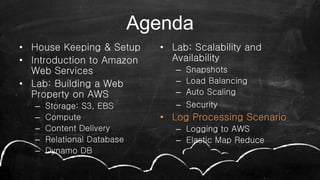
Agenda
• House Keeping & Setup
• Introduction to Amazon
Web Services
• Lab: Building a Web
Property on AWS
– Storage: S3, EBS
– Compute
– Content Delivery
– Relational Database
– Dynamo DB
• Lab: Scalability and
Availability
– Snapshots
– Load Balancing
– Auto Scaling
– Security
• Log Processing Scenario
– Logging to AWS
– Elastic Map Reduce
Questions ?
House Keeping
• Breaks
Agenda
• House Keeping & Setup
• Introduction to Amazon
Web Services
• Building a Web Property on
AWS
– Storage: S3, EBS
– Compute
– Content Delivery
– Relational Database
• Scalability and Availability
– Snapshots
– Load Balancing
– Auto Scaling
– Security
• Log Processing Scenario
– Logging to AWS
– Elastic Map Reduce
– Dynamo DB
Region GovCloud Region
Global AWS Infrastructure ][
Availability Zone
Global AWS Infrastructure ][
Edge Locations
Global AWS Infrastructure ][
Dallas (2)
St.Louis
Miami
JacksonvilleLos Angeles (2)
Palo Alto
Seattle
Ashburn
(2)
Newark
New York (3)
Dublin
London (2)Amsterdam (2)
Stockholm
Frankfurt (2)
Paris
(2)
Singapore
(2)
Hong Kong
(2)
Tokyo (2)
Sao Paulo
South Bend
San Jose
Osaka
Milan
Sydney
Hayward
Madrid
The Amazon Web Services universe[ ]
amazon
web services
The Amazon Web Services universe[ ]
SDK
API
Web Console
Command Line
[ ]
Management +
Interface
Cross
Service
Features
CloudFormationSimple WorkFlow
CloudWatch
Elastic BeanStalk
IAM
The Amazon Web Services universe
(some services are omitted here)
Simple Notification Service
[ ]
Management +
Interface
Platform
Building
blocks
RDS
EMR
DynamoDB
CloudFrontSQS
CloudSearchSES
Cross
Service
Features
The Amazon Web Services universe
(some services are omitted here)
Redshift
Infrastructure
Building
Blocks
[ ]
Management +
Interface
Platform
Building
blocks
Cross
Service
Features
Glacier EBS S3Virtual Private Cloud
The Amazon Web Services universe
(some services are omitted here)
EC2
[ ]
Management +
Interface
RDS CloudSearch
SES CloudFront SQS
EMR DynamoDB
Elastic Beanstalk
Simple WorkFlow
CloudFormation
CloudWatch
IAM
VPC EC2
EBS S3
(some services are omitted here)
Infrastructure
Building
Blocks
Platform
Building
blocks
Cross
Service
Features Command Line
Web Console
APIs
SDK
The Amazon Web Services universe
Agenda
• House Keeping & Setup
• Introduction to Amazon
Web Services
• Building a Web Property
on AWS
– Storage: S3, EBS
– Compute
– Content Delivery
– Relational Database
– Dynamo DB
• Scalability and Availability
– Snapshots
– Load Balancing
– Auto Scaling
– Security
• Log Processing Scenario
– Logging to AWS
– Elastic Map Reduce
Labs
During this workshop, we will build from
scratch a highly available, redundant,
scalable web property on AWS.
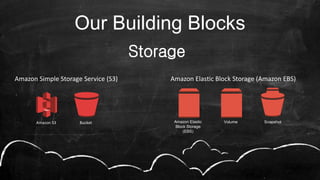
Storage
Amazon Simple Storage Service (S3)
Amazon S3 Bucket Volume SnapshotAmazon Elastic
Block Storage
(EBS)
Amazon Elastic Block Storage (Amazon EBS)
Our Building Blocks
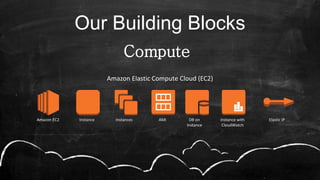
Compute
Our Building Blocks
Amazon Elastic Compute Cloud (EC2)
Amazon EC2 Instance Instances AMI DB on
Instance
Instance with
CloudWatch
Elastic IP
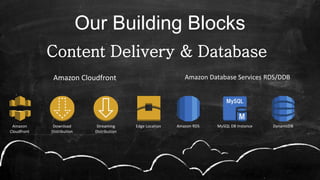
Content Delivery & Database
Our Building Blocks
Amazon Database Services RDS/DDB
Amazon RDS MySQL DB Instance DynamoDB
Amazon Cloudfront
Amazon
Cloudfront
Download
Distribution
Edge LocationStreaming
Distribution
console.aws.amazon.com
• Object-based storage
(no Filesystem)
• Easily store/retrieve data
• Durability of 99.999999999%
or 99.99%
• Integrated with other AWS
Services
• Scalable
• Redundancy is managed
transparently
• File (Object): up to 5 TB each
• HTTP, HTTPS, BitTorrent
protocols
28
Amazon S3
Simple Storage Service
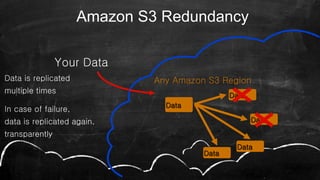
Data
Any Amazon S3 Region
Your Data
Data
Data
Data
Data
Amazon S3 Redundancy
Data is replicated
multiple times
In case of failure,
data is replicated again,
transparently
• Backup
• Archive (Glacier)
• Disaster Recovery (DR)
• Content Storage
• Website
30
Amazon S3 Use cases
Questions ?
• Delivery of content
worldwide
• Static: HTTP / HTTPS
• Streaming: RTMP
• Dynamic Content
• Origin server: S3,
EC2, non-AWS
• Public/Private
Distributions
33
Amazon CloudFront
Content Delivery Network
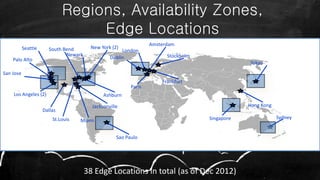
Regions, Availability Zones,
Edge Locations
Dallas
St.Louis Miami
Jacksonville
Los Angeles (2)
Palo Alto
Seattle
Ashburn
Newark
New York (2)
Dublin
London
Amsterdam
Stockholm
Frankfurt
Paris
Singapore
Hong Kong
Tokyo
Sao Paulo
South Bend
San Jose
38 Edge Locations in total (as of Dec 2012)
Sydney
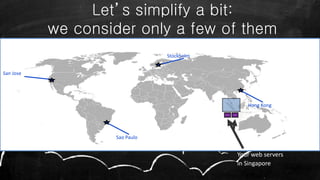
Let’s simplify a bit:
we consider only a few of them
Stockholm
Hong Kong
Sao Paulo
San Jose
Your web servers
in Singapore
Stockholm
Hong Kong
Sao Paulo
San Jose
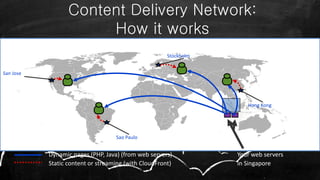
Content Delivery Network:
How it works
Dynamic pages (PHP, Java) (from web servers)
Static content or streaming (with CloudFront)
Your web servers
in Singapore
• Accelerated web content delivery
• Off-load traffic from web servers
• Big spikes in traffic
• Event streaming
• Marketing campaigns
37
Amazon CloudFront Use cases
Questions ?
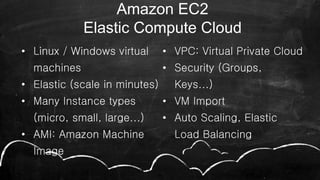
• Linux / Windows virtual
machines
• Elastic (scale in minutes)
• Many Instance types
(micro, small, large...)
• AMI: Amazon Machine
Image
• VPC: Virtual Private Cloud
• Security (Groups,
Keys...)
• VM Import
• Auto Scaling, Elastic
Load Balancing
40
Amazon EC2
Elastic Compute Cloud
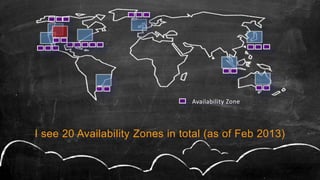
Availability Zone
I see 20 Availability Zones in total (as of Feb 2013)
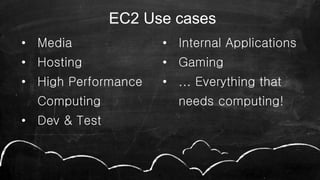
• Media
• Hosting
• High Performance
Computing
• Dev & Test
• Internal Applications
• Gaming
• ... Everything that
needs computing!
42
EC2 Use cases
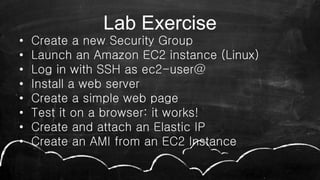
Lab Exercise
• Create a new Security Group
• Launch an Amazon EC2 instance (Linux)
• Log in with SSH as ec2-user@
• Install a web server
• Create a simple web page
• Test it on a browser: it works!
• Create and attach an Elastic IP
• Create an AMI from an EC2 Instance
Questions ?
• Block Level Storage for use
with EC2
• Volume: 1 GB to 1 TB
• Raw unformatted block
device
• Local to an Availability Zone
• Redundant
• Persistent
• Point-in-time snapshots to
Amazon S3
• Integration with CloudWatch
46
EBS
Elastic Block Storage
• Relational Database “as a
Service”
• Simple to Deploy
• Managed by the AWS team
• MySQL, SQLServer or
Oracle (as of 2012)
• Scalable
• Optional: automatic
Standby Replica
• Optional: multiple Read-
Only copies
• Easy DB Snapshots and
automated backup
49
RDS
Relational Database Service
Demo RDS
• Create a DB Instance on RDS (MySQL)
• Enable Multi-AZ Deployment
• Enable one Read Replica
• Optional: connect to the DB Instance
Agenda
• House Keeping & Setup
• Introduction to Amazon
Web Services
• Lab: Building a Web
Property on AWS
– Storage: S3, EBS
– Compute
– Content Delivery
– Relational Database
– Dynamo DB
• Lab: Scalability and
Availability
– Snapshots
– Load Balancing
– Auto Scaling
– Security
• Log Processing Scenario
– Logging to AWS
– Elastic Map Reduce
Let’s take our Web Application to
the next level
EBS
Elastic Load Balancer
• Automatically distribute incoming traffic to
multiple Amazon EC2 instances (in the same
Region).
• Automatic Health check
• IPv6 support
• Can be integrated with AutoScaling
Questions ?
Snapshots & AMIs
• Copies of EBS Volumes
• Essential to Reusability
• Copy between Regions
• Durability in S3
Lab Exercise
• Duplicate your entire architecture by
making an AMI
• Increase your availability by spreading
your application across availability
zones
• Bring up an ELB in front of your website
• Optional – Create a CNAME to the ELB
Questions ?
CloudWatch
• Integrated across AWS platform
• Nothing to install
• Custom Metrics
• Set Alarms
• View graphs and statistics
• Feeds into Autoscaling
Lab Exercise
• Check out the metrics of your web
application
• Set up an alarm to monitor your site
Questions ?
AutoScaling
• Auto Up and Auto Down
• Runs on CloudWatch metrics
• Notifications via SNS
• Spot or On-demand
• No additional Fees
AutoScaling
• Launch config: AMI to be used
• Autoscaling group: where/how to
launch
• Autoscaling policy: what should AS do
• Autoscaling trigger: what will activate
AS
Questions ?
Security
• Security Groups
• Granular tiered secure architecture
• Roles for services
• Best Practices - Bastions
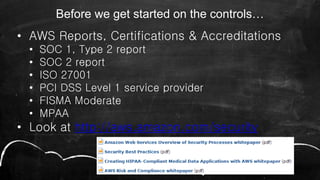
Before we get started on the controls…
• AWS Reports, Certifications & Accreditations
• SOC 1, Type 2 report
• SOC 2 report
• ISO 27001
• PCI DSS Level 1 service provider
• FISMA Moderate
• MPAA
• Look at http://aws.amazon.com/security
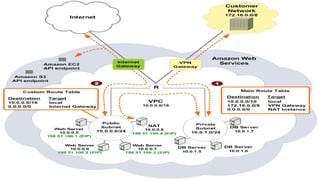
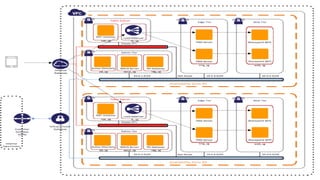
A Protected
Infrastructure:
IAM
VPC
ACL
ELB
AZ
SG
TMG
RDP
WSUS
Questions ?
Agenda
• House Keeping & Setup
• Introduction to Amazon
Web Services
• Lab: Building a Web
Property on AWS
– Storage: S3, EBS
– Compute
– Content Delivery
– Relational Database
– Dynamo DB
• Lab: Scalability and
Availability
– Snapshots
– Load Balancing
– Auto Scaling
– Security
• Log Processing Scenario
– Logging to AWS
– Elastic Map Reduce
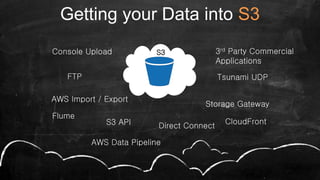
Getting your Data into S3
S3Console Upload
FTP
S3 API
AWS Import / Export
Direct Connect
Tsunami UDP
Storage Gateway
3rd Party Commercial
Applications
CloudFront
Flume
AWS Data Pipeline
S3 and Big Data
• Why S3?
• Hadoop Overview
• Hadoop on the Cloud
• Hadoop File System
Questions ?
Introducing Apache Hadoop
• Apache Hadoop
• Software for distributed data analysis
• Map/Reduce framework
• Focus on data
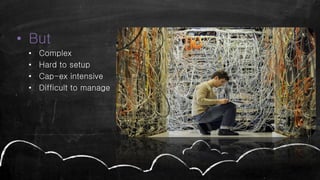
• But
• Complex
• Hard to setup
• Cap-ex intensive
• Difficult to manage
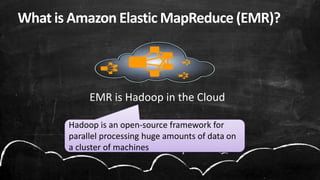
EMR is Hadoop in the Cloud
Hadoop is an open-source framework for
parallel processing huge amounts of data on
a cluster of machines
What is Amazon Elastic MapReduce (EMR)?
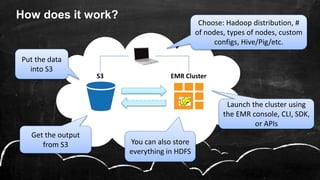
How does it work?
EMR
EMR ClusterS3
Put the data
into S3
Choose: Hadoop distribution, #
of nodes, types of nodes, custom
configs, Hive/Pig/etc.
Get the output
from S3
Launch the cluster using
the EMR console, CLI, SDK,
or APIs
You can also store
everything in HDFS
011001101
DynamoDB and Big Data
• What is Dynamo?
• Dynamo in Big Data – Volume & Velocity
Questions ?
Watch out for unexpected Costs
When the Technical Workshop comes to an end, to
avoid unwanted costs:
• Delete your S3 objects
• Destroy your CloudFront distributions
• Stop or Shut Down your EC2 and RDS instances
The customer is responsible for the resources he’s
using. AWS declines any responsibility if the
customer forgets to shut down resources.
amazon
web services
Thank You
Younjin Jeong
Solution Architect
younjin@amazon.com

[Jun AWS 201] Technical Workshop

  • 1.
    amazon web services AWS 201TWorkshop Younjin Jeong Solution Architect younjin@amazon.com
  • 2.
    Agenda • House Keeping& Setup • Introduction to Amazon Web Services • Lab: Building a Web Property on AWS – Storage: S3, EBS – Compute – Content Delivery – Relational Database – Dynamo DB • Lab: Scalability and Availability – Snapshots – Load Balancing – Auto Scaling – Security • Log Processing Scenario – Logging to AWS – Elastic Map Reduce
  • 3.
  • 4.
  • 5.
    Agenda • House Keeping& Setup • Introduction to Amazon Web Services • Building a Web Property on AWS – Storage: S3, EBS – Compute – Content Delivery – Relational Database • Scalability and Availability – Snapshots – Load Balancing – Auto Scaling – Security • Log Processing Scenario – Logging to AWS – Elastic Map Reduce – Dynamo DB
  • 6.
    Region GovCloud Region GlobalAWS Infrastructure ][
  • 7.
  • 9.
    Edge Locations Global AWSInfrastructure ][ Dallas (2) St.Louis Miami JacksonvilleLos Angeles (2) Palo Alto Seattle Ashburn (2) Newark New York (3) Dublin London (2)Amsterdam (2) Stockholm Frankfurt (2) Paris (2) Singapore (2) Hong Kong (2) Tokyo (2) Sao Paulo South Bend San Jose Osaka Milan Sydney Hayward Madrid
  • 10.
    The Amazon WebServices universe[ ] amazon web services
  • 11.
    The Amazon WebServices universe[ ] SDK API Web Console Command Line
  • 12.
    [ ] Management + Interface Cross Service Features CloudFormationSimpleWorkFlow CloudWatch Elastic BeanStalk IAM The Amazon Web Services universe (some services are omitted here) Simple Notification Service
  • 13.
  • 14.
    Infrastructure Building Blocks [ ] Management + Interface Platform Building blocks Cross Service Features GlacierEBS S3Virtual Private Cloud The Amazon Web Services universe (some services are omitted here) EC2
  • 15.
    [ ] Management + Interface RDSCloudSearch SES CloudFront SQS EMR DynamoDB Elastic Beanstalk Simple WorkFlow CloudFormation CloudWatch IAM VPC EC2 EBS S3 (some services are omitted here) Infrastructure Building Blocks Platform Building blocks Cross Service Features Command Line Web Console APIs SDK The Amazon Web Services universe
  • 16.
    Agenda • House Keeping& Setup • Introduction to Amazon Web Services • Building a Web Property on AWS – Storage: S3, EBS – Compute – Content Delivery – Relational Database – Dynamo DB • Scalability and Availability – Snapshots – Load Balancing – Auto Scaling – Security • Log Processing Scenario – Logging to AWS – Elastic Map Reduce
  • 17.
    Labs During this workshop,we will build from scratch a highly available, redundant, scalable web property on AWS.
  • 18.
    Storage Amazon Simple StorageService (S3) Amazon S3 Bucket Volume SnapshotAmazon Elastic Block Storage (EBS) Amazon Elastic Block Storage (Amazon EBS) Our Building Blocks
  • 19.
    Compute Our Building Blocks AmazonElastic Compute Cloud (EC2) Amazon EC2 Instance Instances AMI DB on Instance Instance with CloudWatch Elastic IP
  • 20.
    Content Delivery &Database Our Building Blocks Amazon Database Services RDS/DDB Amazon RDS MySQL DB Instance DynamoDB Amazon Cloudfront Amazon Cloudfront Download Distribution Edge LocationStreaming Distribution
  • 21.
  • 22.
    • Object-based storage (noFilesystem) • Easily store/retrieve data • Durability of 99.999999999% or 99.99% • Integrated with other AWS Services • Scalable • Redundancy is managed transparently • File (Object): up to 5 TB each • HTTP, HTTPS, BitTorrent protocols 28 Amazon S3 Simple Storage Service
  • 23.
    Data Any Amazon S3Region Your Data Data Data Data Data Amazon S3 Redundancy Data is replicated multiple times In case of failure, data is replicated again, transparently
  • 24.
    • Backup • Archive(Glacier) • Disaster Recovery (DR) • Content Storage • Website 30 Amazon S3 Use cases
  • 25.
  • 26.
    • Delivery ofcontent worldwide • Static: HTTP / HTTPS • Streaming: RTMP • Dynamic Content • Origin server: S3, EC2, non-AWS • Public/Private Distributions 33 Amazon CloudFront Content Delivery Network
  • 27.
    Regions, Availability Zones, EdgeLocations Dallas St.Louis Miami Jacksonville Los Angeles (2) Palo Alto Seattle Ashburn Newark New York (2) Dublin London Amsterdam Stockholm Frankfurt Paris Singapore Hong Kong Tokyo Sao Paulo South Bend San Jose 38 Edge Locations in total (as of Dec 2012) Sydney
  • 28.
    Let’s simplify abit: we consider only a few of them Stockholm Hong Kong Sao Paulo San Jose Your web servers in Singapore
  • 29.
    Stockholm Hong Kong Sao Paulo SanJose Content Delivery Network: How it works Dynamic pages (PHP, Java) (from web servers) Static content or streaming (with CloudFront) Your web servers in Singapore
  • 30.
    • Accelerated webcontent delivery • Off-load traffic from web servers • Big spikes in traffic • Event streaming • Marketing campaigns 37 Amazon CloudFront Use cases
  • 31.
  • 32.
    • Linux /Windows virtual machines • Elastic (scale in minutes) • Many Instance types (micro, small, large...) • AMI: Amazon Machine Image • VPC: Virtual Private Cloud • Security (Groups, Keys...) • VM Import • Auto Scaling, Elastic Load Balancing 40 Amazon EC2 Elastic Compute Cloud
  • 33.
    Availability Zone I see20 Availability Zones in total (as of Feb 2013)
  • 34.
    • Media • Hosting •High Performance Computing • Dev & Test • Internal Applications • Gaming • ... Everything that needs computing! 42 EC2 Use cases
  • 35.
    Lab Exercise • Createa new Security Group • Launch an Amazon EC2 instance (Linux) • Log in with SSH as ec2-user@ • Install a web server • Create a simple web page • Test it on a browser: it works! • Create and attach an Elastic IP • Create an AMI from an EC2 Instance
  • 36.
  • 37.
    • Block LevelStorage for use with EC2 • Volume: 1 GB to 1 TB • Raw unformatted block device • Local to an Availability Zone • Redundant • Persistent • Point-in-time snapshots to Amazon S3 • Integration with CloudWatch 46 EBS Elastic Block Storage
  • 38.
    • Relational Database“as a Service” • Simple to Deploy • Managed by the AWS team • MySQL, SQLServer or Oracle (as of 2012) • Scalable • Optional: automatic Standby Replica • Optional: multiple Read- Only copies • Easy DB Snapshots and automated backup 49 RDS Relational Database Service
  • 39.
    Demo RDS • Createa DB Instance on RDS (MySQL) • Enable Multi-AZ Deployment • Enable one Read Replica • Optional: connect to the DB Instance
  • 40.
    Agenda • House Keeping& Setup • Introduction to Amazon Web Services • Lab: Building a Web Property on AWS – Storage: S3, EBS – Compute – Content Delivery – Relational Database – Dynamo DB • Lab: Scalability and Availability – Snapshots – Load Balancing – Auto Scaling – Security • Log Processing Scenario – Logging to AWS – Elastic Map Reduce
  • 41.
    Let’s take ourWeb Application to the next level
  • 42.
    EBS Elastic Load Balancer •Automatically distribute incoming traffic to multiple Amazon EC2 instances (in the same Region). • Automatic Health check • IPv6 support • Can be integrated with AutoScaling
  • 43.
  • 44.
    Snapshots & AMIs •Copies of EBS Volumes • Essential to Reusability • Copy between Regions • Durability in S3
  • 45.
    Lab Exercise • Duplicateyour entire architecture by making an AMI • Increase your availability by spreading your application across availability zones • Bring up an ELB in front of your website • Optional – Create a CNAME to the ELB
  • 46.
  • 47.
    CloudWatch • Integrated acrossAWS platform • Nothing to install • Custom Metrics • Set Alarms • View graphs and statistics • Feeds into Autoscaling
  • 48.
    Lab Exercise • Checkout the metrics of your web application • Set up an alarm to monitor your site
  • 49.
  • 50.
    AutoScaling • Auto Upand Auto Down • Runs on CloudWatch metrics • Notifications via SNS • Spot or On-demand • No additional Fees
  • 51.
    AutoScaling • Launch config:AMI to be used • Autoscaling group: where/how to launch • Autoscaling policy: what should AS do • Autoscaling trigger: what will activate AS
  • 52.
  • 53.
    Security • Security Groups •Granular tiered secure architecture • Roles for services • Best Practices - Bastions
  • 55.
    Before we getstarted on the controls… • AWS Reports, Certifications & Accreditations • SOC 1, Type 2 report • SOC 2 report • ISO 27001 • PCI DSS Level 1 service provider • FISMA Moderate • MPAA • Look at http://aws.amazon.com/security
  • 57.
  • 58.
  • 59.
    Agenda • House Keeping& Setup • Introduction to Amazon Web Services • Lab: Building a Web Property on AWS – Storage: S3, EBS – Compute – Content Delivery – Relational Database – Dynamo DB • Lab: Scalability and Availability – Snapshots – Load Balancing – Auto Scaling – Security • Log Processing Scenario – Logging to AWS – Elastic Map Reduce
  • 60.
    Getting your Datainto S3 S3Console Upload FTP S3 API AWS Import / Export Direct Connect Tsunami UDP Storage Gateway 3rd Party Commercial Applications CloudFront Flume AWS Data Pipeline
  • 61.
    S3 and BigData • Why S3? • Hadoop Overview • Hadoop on the Cloud • Hadoop File System
  • 62.
  • 63.
    Introducing Apache Hadoop •Apache Hadoop • Software for distributed data analysis • Map/Reduce framework • Focus on data
  • 64.
    • But • Complex •Hard to setup • Cap-ex intensive • Difficult to manage
  • 65.
    EMR is Hadoopin the Cloud Hadoop is an open-source framework for parallel processing huge amounts of data on a cluster of machines What is Amazon Elastic MapReduce (EMR)?
  • 66.
    How does itwork? EMR EMR ClusterS3 Put the data into S3 Choose: Hadoop distribution, # of nodes, types of nodes, custom configs, Hive/Pig/etc. Get the output from S3 Launch the cluster using the EMR console, CLI, SDK, or APIs You can also store everything in HDFS 011001101
  • 67.
    DynamoDB and BigData • What is Dynamo? • Dynamo in Big Data – Volume & Velocity
  • 68.
  • 69.
    Watch out forunexpected Costs When the Technical Workshop comes to an end, to avoid unwanted costs: • Delete your S3 objects • Destroy your CloudFront distributions • Stop or Shut Down your EC2 and RDS instances The customer is responsible for the resources he’s using. AWS declines any responsibility if the customer forgets to shut down resources.
  • 70.
    amazon web services Thank You YounjinJeong Solution Architect younjin@amazon.com