An Introduction
    JMeter and its History

    Why JMeter? – Features of JMeter

    Tool Installation and Overview

    Scripting - Demo
    ◦ Recording and Playback


                                        Confidential   2
   JMeter is a performance testing tool from Apache.

   It is a 100% pure Java desktop application designed to load test functional behavior
    and measure performance.

   It was developed based on the Java Swing technology.

   Stefano Mazzocchi of the Apache Software Foundation was the original developer of
    JMeter.

   He originally wrote it to test the performance of Apache JServ (The Predecessor of
    Tomcat). Later it was redesigned to enhance the GUI and to add load testing
    capabilities.


                                                           Confidential                    3
   It’s free!

   It is an open source software.

   It has a simple and intuitive GUI.

   It is a platform-independent tool.
            - On Linux/UNIX, JMeter can be invoked by clicking on the jmeter shell script. On Windows,
    it can be invoked by starting the jmeter.bat file.

   JMeter stores its test plans in XML format. This means you can generate a test plan using a text
    editor.

   The Protocols supported by JMeter are:
    ◦ HTTP/HTTPS
    ◦ FTP
    ◦ LDAP
    ◦ JDBC
    ◦ Web Services
    ◦ SOAP/XML-RPC

                                                                     Confidential                        4
   This tool has basically 2 main parts.

    ◦ Java Swing-based GUI (For Scripting and Execution)

    ◦ ANT (Only for Execution)


                                                           Confidential   5
Java Swing GUI


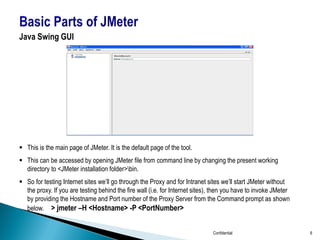
 This is the main page of JMeter. It is the default page of the tool.
 This can be accessed by opening JMeter file from command line by changing the present working
  directory to <JMeter installation folder>bin.
 So for testing Internet sites we’ll go through the Proxy and for Intranet sites we’ll start JMeter without
  the proxy. If you are testing behind the fire wall (i.e. for Internet sites), then you have to invoke JMeter
  by providing the Hostname and Port number of the Proxy Server from the Command prompt as shown
  below. > jmeter –H <Hostname> -P <PortNumber>


                                                                              Confidential                       6
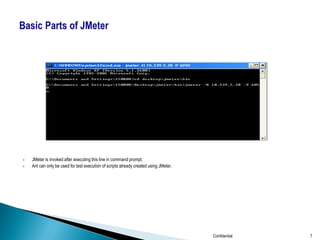
   JMeter is invoked after executing this line in command prompt.
   Ant can only be used for test execution of scripts already created using JMeter.


                                                                                       Confidential   7
   Installation
    ◦ JMeter requires a working JDK environment 1.3 or higher.

   Overview
         Test Plan
         Work Bench
         Thread Group
         Samplers
         Listeners
         Controllers
         Assertions
         Timer
         Configuration Elements
         Pre Processors
         Post Processors


                                                            Confidential   8
Test Plan
 A test plan describes a series of steps JMeter will execute when run. A complete test plan will consist
  of one or more Thread Groups, Logic Controllers, Sample generating controllers, Listeners, Timers,
  Assertions, and Configuration elements.

   At the Test Plan level, static variables can be defined that allow users to abstract values that are
    repeated throughout their tests, such as server names.

   An option exists to instruct JMeter to run the Thread Group serially rather than in parallel.

   When “Functional Test Mode” check box is checked, all information, including the full response data
    will be logged to the Listener files.

WorkBench
 The WorkBench simply provides a place to temporarily store test elements while not in use, for
  copy/paste purposes.

   When you save your test plan, WorkBench items are not saved with it.


                                                                         Confidential                      9
Thread Group
 A Thread Group defines a pool of users that will execute a particular test case against your server. In
  the Thread Group, you can control the number of users simulated (num of threads), the ramp up time
  (how long it takes to start all the threads), the number of times to perform the test, and optionally, a
  start and stop time for the test.

Samplers
 Samplers perform the actual work of JMeter. Samplers tell JMeter to send requests to a server.

 JMeter sends requests in the order that the samplers appear in the tree. Example: HTTP Request


Listeners
 Most of the listeners perform several roles in addition to "listening" to the test results. They also
   provide means to view, save, and read saved test results.
 The various listeners have a panel whereby one can specify the file to which the results will be written
   (or read from). By default, the results are stored as CSV files, typically with a ".jtl" extension.


                                                                      Confidential                     10
Controllers
 Logic Controllers let you customize the logic that JMeter uses to decide when to send requests.
  Logic Controllers may have child elements as any of the following: Samplers (requests),
  Configuration Elements, and other Logic Controllers. Example: Loop Controller

Assertions
 Assertions allow you to assert facts about responses received from the server being tested.

 Using an assertion, you can essentially "test" that your application is returning the results you
  expect it to.
 Similar to Text Check in Load Runner.


Timers
 The timer will cause JMeter to delay a certain amount of time between each request that a thread

    makes.
   Similar to Think Time.


                                                                    Confidential                      11
Config Elements
 These elements are processed at the start of the scope in which they are found, i.e. before
  any samplers in the same scope. Example: HTTP Authorization Manager, Cookie Manager

Pre Processors
 A Pre-Processor executes some action prior to a Sampler Request being made.

 If a Pre-Processor is attached to a Sampler element, then it will execute just prior to that
  sampler element running. Example: User Parameters

Post Processors
 A Post-Processor executes some action after a Sampler Request has been made.

 If a Post-Processor is attached to a Sampler element, then it will execute just after that
  sampler element runs.
 A Post-Processor is most often used to process the response data, often to extract values
  from it. Example: Regular Expression Extractor

                                                                Confidential                     12
   Recording and Playback
    ◦   Setting up Proxy
    ◦   Recording Options
    ◦   Recording http application
    ◦   Simple Playback


                                     Confidential   13
Confidential   14

Day1 JMeter_training_overview

  • 1.
  • 2.
    JMeter and its History  Why JMeter? – Features of JMeter  Tool Installation and Overview  Scripting - Demo ◦ Recording and Playback Confidential 2
  • 3.
    JMeter is a performance testing tool from Apache.  It is a 100% pure Java desktop application designed to load test functional behavior and measure performance.  It was developed based on the Java Swing technology.  Stefano Mazzocchi of the Apache Software Foundation was the original developer of JMeter.  He originally wrote it to test the performance of Apache JServ (The Predecessor of Tomcat). Later it was redesigned to enhance the GUI and to add load testing capabilities. Confidential 3
  • 4.
    It’s free!  It is an open source software.  It has a simple and intuitive GUI.  It is a platform-independent tool. - On Linux/UNIX, JMeter can be invoked by clicking on the jmeter shell script. On Windows, it can be invoked by starting the jmeter.bat file.  JMeter stores its test plans in XML format. This means you can generate a test plan using a text editor.  The Protocols supported by JMeter are: ◦ HTTP/HTTPS ◦ FTP ◦ LDAP ◦ JDBC ◦ Web Services ◦ SOAP/XML-RPC Confidential 4
  • 5.
    This tool has basically 2 main parts. ◦ Java Swing-based GUI (For Scripting and Execution) ◦ ANT (Only for Execution) Confidential 5
  • 6.
    Java Swing GUI This is the main page of JMeter. It is the default page of the tool.  This can be accessed by opening JMeter file from command line by changing the present working directory to <JMeter installation folder>bin.  So for testing Internet sites we’ll go through the Proxy and for Intranet sites we’ll start JMeter without the proxy. If you are testing behind the fire wall (i.e. for Internet sites), then you have to invoke JMeter by providing the Hostname and Port number of the Proxy Server from the Command prompt as shown below. > jmeter –H <Hostname> -P <PortNumber> Confidential 6
  • 7.
    JMeter is invoked after executing this line in command prompt.  Ant can only be used for test execution of scripts already created using JMeter. Confidential 7
  • 8.
    Installation ◦ JMeter requires a working JDK environment 1.3 or higher.  Overview  Test Plan  Work Bench  Thread Group  Samplers  Listeners  Controllers  Assertions  Timer  Configuration Elements  Pre Processors  Post Processors Confidential 8
  • 9.
    Test Plan  Atest plan describes a series of steps JMeter will execute when run. A complete test plan will consist of one or more Thread Groups, Logic Controllers, Sample generating controllers, Listeners, Timers, Assertions, and Configuration elements.  At the Test Plan level, static variables can be defined that allow users to abstract values that are repeated throughout their tests, such as server names.  An option exists to instruct JMeter to run the Thread Group serially rather than in parallel.  When “Functional Test Mode” check box is checked, all information, including the full response data will be logged to the Listener files. WorkBench  The WorkBench simply provides a place to temporarily store test elements while not in use, for copy/paste purposes.  When you save your test plan, WorkBench items are not saved with it. Confidential 9
  • 10.
    Thread Group  AThread Group defines a pool of users that will execute a particular test case against your server. In the Thread Group, you can control the number of users simulated (num of threads), the ramp up time (how long it takes to start all the threads), the number of times to perform the test, and optionally, a start and stop time for the test. Samplers  Samplers perform the actual work of JMeter. Samplers tell JMeter to send requests to a server.  JMeter sends requests in the order that the samplers appear in the tree. Example: HTTP Request Listeners  Most of the listeners perform several roles in addition to "listening" to the test results. They also provide means to view, save, and read saved test results.  The various listeners have a panel whereby one can specify the file to which the results will be written (or read from). By default, the results are stored as CSV files, typically with a ".jtl" extension. Confidential 10
  • 11.
    Controllers  Logic Controllerslet you customize the logic that JMeter uses to decide when to send requests. Logic Controllers may have child elements as any of the following: Samplers (requests), Configuration Elements, and other Logic Controllers. Example: Loop Controller Assertions  Assertions allow you to assert facts about responses received from the server being tested.  Using an assertion, you can essentially "test" that your application is returning the results you expect it to.  Similar to Text Check in Load Runner. Timers  The timer will cause JMeter to delay a certain amount of time between each request that a thread makes.  Similar to Think Time. Confidential 11
  • 12.
    Config Elements  Theseelements are processed at the start of the scope in which they are found, i.e. before any samplers in the same scope. Example: HTTP Authorization Manager, Cookie Manager Pre Processors  A Pre-Processor executes some action prior to a Sampler Request being made.  If a Pre-Processor is attached to a Sampler element, then it will execute just prior to that sampler element running. Example: User Parameters Post Processors  A Post-Processor executes some action after a Sampler Request has been made.  If a Post-Processor is attached to a Sampler element, then it will execute just after that sampler element runs.  A Post-Processor is most often used to process the response data, often to extract values from it. Example: Regular Expression Extractor Confidential 12
  • 13.
    Recording and Playback ◦ Setting up Proxy ◦ Recording Options ◦ Recording http application ◦ Simple Playback Confidential 13
  • 14.