JMETER
The load testing tool
By : Pritesh Patel
WHAT IS LOAD TESTING?
 Load testing is the process of putting demand on a
system or device and measuring its response.
 Types of tests
 Performance Testing - is usually defined as the
process of exercising the system under test by feeding it
the largest tasks it can operate with
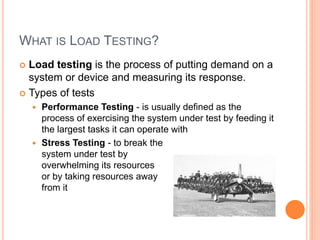
 Stress Testing - to break the
system under test by
overwhelming its resources
or by taking resources away
from it
WHY LOAD TESTING?
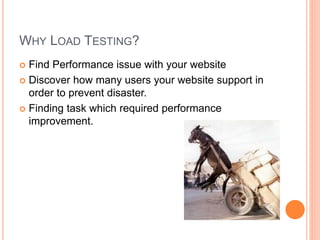
 Find Performance issue with your website
 Discover how many users your website support in
order to prevent disaster.
 Finding task which required performance
improvement.
HOW TO AVOID LOAD TESTING
 My client not ready to pay for testing?
 My manager has assign lots of work with very tight
deadline.
 I know there will be 2 to 3 users will visit this
application and server can handle that much load.
LOAD TESTING TOOLS
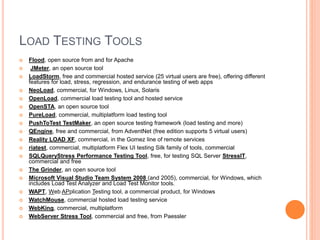
 Flood, open source from and for Apache
 JMeter, an open source tool
 LoadStorm, free and commercial hosted service (25 virtual users are free), offering different
features for load, stress, regression, and endurance testing of web apps
 NeoLoad, commercial, for Windows, Linux, Solaris
 OpenLoad, commercial load testing tool and hosted service
 OpenSTA, an open source tool
 PureLoad, commercial, multiplatform load testing tool
 PushToTest TestMaker, an open source testing framework (load testing and more)
 QEngine, free and commercial, from AdventNet (free edition supports 5 virtual users)
 Reality LOAD XF, commercial, in the Gomez line of remote services
 riatest, commercial, multiplatform Flex UI testing Silk family of tools, commercial
 SQLQueryStress Performance Testing Tool, free, for testing SQL Server StressIT,
commercial and free
 The Grinder, an open source tool
 Microsoft Visual Studio Team System 2008 (and 2005), commercial, for Windows, which
includes Load Test Analyzer and Load Test Monitor tools.
 WAPT, Web APplication Testing tool, a commercial product, for Windows
 WatchMouse, commercial hosted load testing service
 WebKing, commercial, multiplatform
 WebServer Stress Tool, commercial and free, from Paessler
WHY JMETER?
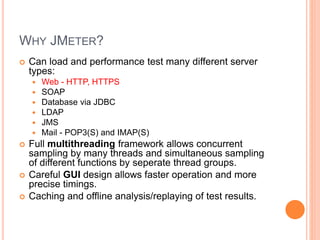
 Can load and performance test many different server
types:
 Web - HTTP, HTTPS
 SOAP
 Database via JDBC
 LDAP
 JMS
 Mail - POP3(S) and IMAP(S)
 Full multithreading framework allows concurrent
sampling by many threads and simultaneous sampling
of different functions by seperate thread groups.
 Careful GUI design allows faster operation and more
precise timings.
 Caching and offline analysis/replaying of test results.
CONTINUE…
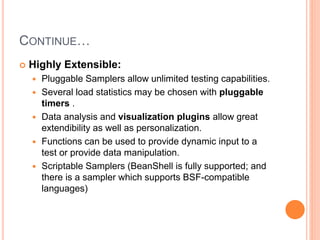
 Highly Extensible:
 Pluggable Samplers allow unlimited testing capabilities.
 Several load statistics may be chosen with pluggable
timers .
 Data analysis and visualization plugins allow great
extendibility as well as personalization.
 Functions can be used to provide dynamic input to a
test or provide data manipulation.
 Scriptable Samplers (BeanShell is fully supported; and
there is a sampler which supports BSF-compatible
languages)
INSTALLING JMETER (ON WINOW)
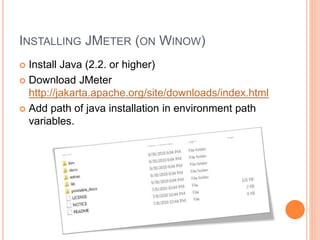
 Install Java (2.2. or higher)
 Download JMeter
http://jakarta.apache.org/site/downloads/index.html
 Add path of java installation in environment path
variables.
RUNNING JMETER IN WINDOWS
 Open command prompt (user administrative mode
to avoid unnecessary hassle).
 Traverse to [jmeter installation path]bin
 Run Jmeter.bat
If you are running test behind firewall try following
argument to pass with command prompt.
 -H [proxy server hostname or ip address]
-P [proxy server port]
-N [nonproxy hosts] (e.g. *.apache.org|localhost)
-u [username for proxy authentication - if required]
-a [password for proxy authentication - if required]
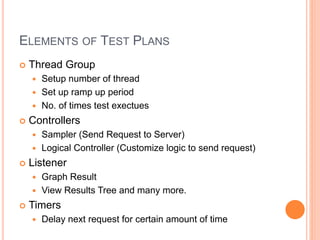
ELEMENTS OF TEST PLANS
 Thread Group
 Setup number of thread
 Set up ramp up period
 No. of times test exectues
 Controllers
 Sampler (Send Request to Server)
 Logical Controller (Customize logic to send request)
 Listener
 Graph Result
 View Results Tree and many more.
 Timers
 Delay next request for certain amount of time
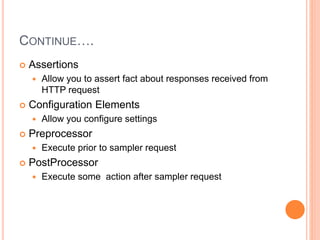
CONTINUE….
 Assertions
 Allow you to assert fact about responses received from
HTTP request
 Configuration Elements
 Allow you configure settings
 Preprocessor
 Execute prior to sampler request
 PostProcessor
 Execute some action after sampler request
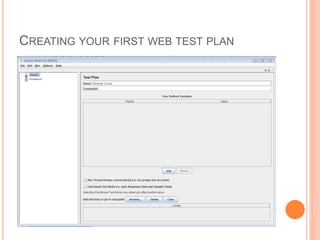
CREATING YOUR FIRST WEB TEST PLAN
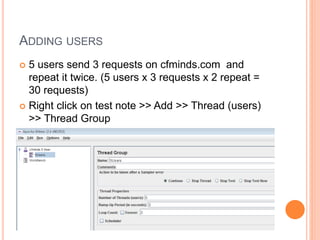
ADDING USERS
 5 users send 3 requests on cfminds.com and
repeat it twice. (5 users x 3 requests x 2 repeat =
30 requests)
 Right click on test note >> Add >> Thread (users)
>> Thread Group
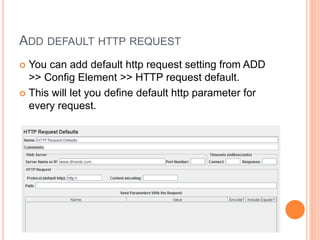
ADD DEFAULT HTTP REQUEST
 You can add default http request setting from ADD
>> Config Element >> HTTP request default.
 This will let you define default http parameter for
every request.
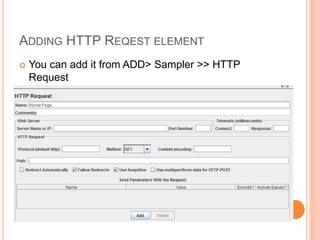
ADDING HTTP REQEST ELEMENT
 You can add it from ADD> Sampler >> HTTP
Request
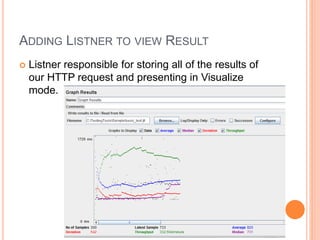
ADDING LISTNER TO VIEW RESULT
 Listner responsible for storing all of the results of
our HTTP request and presenting in Visualize
mode.
DEMO
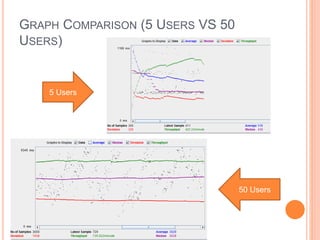
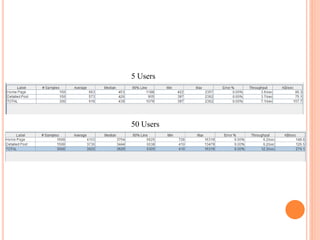
GRAPH COMPARISON (5 USERS VS 50
USERS)
5 Users
50 Users
5 Users
50 Users
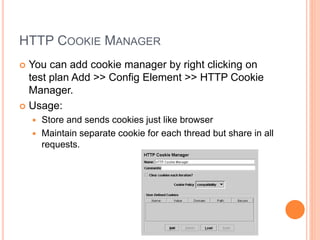
HTTP COOKIE MANAGER
 You can add cookie manager by right clicking on
test plan Add >> Config Element >> HTTP Cookie
Manager.
 Usage:
 Store and sends cookies just like browser
 Maintain separate cookie for each thread but share in all
requests.
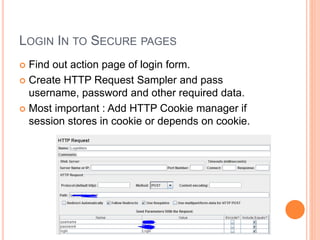
LOGIN IN TO SECURE PAGES
 Find out action page of login form.
 Create HTTP Request Sampler and pass
username, password and other required data.
 Most important : Add HTTP Cookie manager if
session stores in cookie or depends on cookie.
DEMO
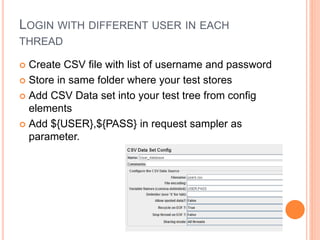
LOGIN WITH DIFFERENT USER IN EACH
THREAD
 Create CSV file with list of username and password
 Store in same folder where your test stores
 Add CSV Data set into your test tree from config
elements
 Add ${USER},${PASS} in request sampler as
parameter.
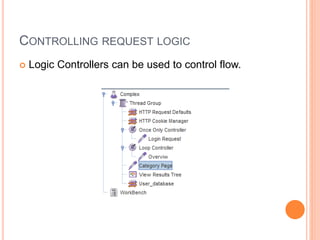
CONTROLLING REQUEST LOGIC
 Logic Controllers can be used to control flow.
DEMO
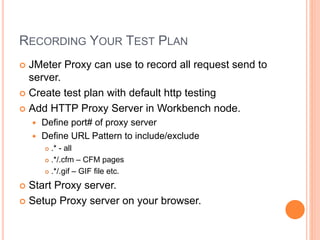
RECORDING YOUR TEST PLAN
 JMeter Proxy can use to record all request send to
server.
 Create test plan with default http testing
 Add HTTP Proxy Server in Workbench node.
 Define port# of proxy server
 Define URL Pattern to include/exclude
 .* - all
 .*/.cfm – CFM pages
 .*/.gif – GIF file etc.
 Start Proxy server.
 Setup Proxy server on your browser.
DEMO
JMETER DISTRIBUTED TESTING
 JMeter client machine may not able to simulate
enough users to stress server.
 Control multiple machine to run JMeter without
copying test samples to different machine.
 Configuration:
 Copy same version of JMeter to different computer.
 Add remote node IP in JMeter.proeprties file.
 Run JMeter on remote machine using
/JMETER_HOME/bin/jmeter-server (in command
prompt)
 Start JMeter GUI in host machine.
 Select any test plan.
 Go to Run >> Remote Start >> Remote IP Address.
DEMO
YEAH… IT’S OVER NOW..

JMeter & ColdFusion

  • 1.
    JMETER The load testingtool By : Pritesh Patel
  • 2.
    WHAT IS LOADTESTING?  Load testing is the process of putting demand on a system or device and measuring its response.  Types of tests  Performance Testing - is usually defined as the process of exercising the system under test by feeding it the largest tasks it can operate with  Stress Testing - to break the system under test by overwhelming its resources or by taking resources away from it
  • 3.
    WHY LOAD TESTING? Find Performance issue with your website  Discover how many users your website support in order to prevent disaster.  Finding task which required performance improvement.
  • 4.
    HOW TO AVOIDLOAD TESTING  My client not ready to pay for testing?  My manager has assign lots of work with very tight deadline.  I know there will be 2 to 3 users will visit this application and server can handle that much load.
  • 5.
    LOAD TESTING TOOLS Flood, open source from and for Apache  JMeter, an open source tool  LoadStorm, free and commercial hosted service (25 virtual users are free), offering different features for load, stress, regression, and endurance testing of web apps  NeoLoad, commercial, for Windows, Linux, Solaris  OpenLoad, commercial load testing tool and hosted service  OpenSTA, an open source tool  PureLoad, commercial, multiplatform load testing tool  PushToTest TestMaker, an open source testing framework (load testing and more)  QEngine, free and commercial, from AdventNet (free edition supports 5 virtual users)  Reality LOAD XF, commercial, in the Gomez line of remote services  riatest, commercial, multiplatform Flex UI testing Silk family of tools, commercial  SQLQueryStress Performance Testing Tool, free, for testing SQL Server StressIT, commercial and free  The Grinder, an open source tool  Microsoft Visual Studio Team System 2008 (and 2005), commercial, for Windows, which includes Load Test Analyzer and Load Test Monitor tools.  WAPT, Web APplication Testing tool, a commercial product, for Windows  WatchMouse, commercial hosted load testing service  WebKing, commercial, multiplatform  WebServer Stress Tool, commercial and free, from Paessler
  • 6.
    WHY JMETER?  Canload and performance test many different server types:  Web - HTTP, HTTPS  SOAP  Database via JDBC  LDAP  JMS  Mail - POP3(S) and IMAP(S)  Full multithreading framework allows concurrent sampling by many threads and simultaneous sampling of different functions by seperate thread groups.  Careful GUI design allows faster operation and more precise timings.  Caching and offline analysis/replaying of test results.
  • 7.
    CONTINUE…  Highly Extensible: Pluggable Samplers allow unlimited testing capabilities.  Several load statistics may be chosen with pluggable timers .  Data analysis and visualization plugins allow great extendibility as well as personalization.  Functions can be used to provide dynamic input to a test or provide data manipulation.  Scriptable Samplers (BeanShell is fully supported; and there is a sampler which supports BSF-compatible languages)
  • 8.
    INSTALLING JMETER (ONWINOW)  Install Java (2.2. or higher)  Download JMeter http://jakarta.apache.org/site/downloads/index.html  Add path of java installation in environment path variables.
  • 9.
    RUNNING JMETER INWINDOWS  Open command prompt (user administrative mode to avoid unnecessary hassle).  Traverse to [jmeter installation path]bin  Run Jmeter.bat If you are running test behind firewall try following argument to pass with command prompt.  -H [proxy server hostname or ip address] -P [proxy server port] -N [nonproxy hosts] (e.g. *.apache.org|localhost) -u [username for proxy authentication - if required] -a [password for proxy authentication - if required]
  • 10.
    ELEMENTS OF TESTPLANS  Thread Group  Setup number of thread  Set up ramp up period  No. of times test exectues  Controllers  Sampler (Send Request to Server)  Logical Controller (Customize logic to send request)  Listener  Graph Result  View Results Tree and many more.  Timers  Delay next request for certain amount of time
  • 11.
    CONTINUE….  Assertions  Allowyou to assert fact about responses received from HTTP request  Configuration Elements  Allow you configure settings  Preprocessor  Execute prior to sampler request  PostProcessor  Execute some action after sampler request
  • 12.
    CREATING YOUR FIRSTWEB TEST PLAN
  • 13.
    ADDING USERS  5users send 3 requests on cfminds.com and repeat it twice. (5 users x 3 requests x 2 repeat = 30 requests)  Right click on test note >> Add >> Thread (users) >> Thread Group
  • 14.
    ADD DEFAULT HTTPREQUEST  You can add default http request setting from ADD >> Config Element >> HTTP request default.  This will let you define default http parameter for every request.
  • 15.
    ADDING HTTP REQESTELEMENT  You can add it from ADD> Sampler >> HTTP Request
  • 16.
    ADDING LISTNER TOVIEW RESULT  Listner responsible for storing all of the results of our HTTP request and presenting in Visualize mode.
  • 17.
  • 18.
    GRAPH COMPARISON (5USERS VS 50 USERS) 5 Users 50 Users
  • 19.
  • 20.
    HTTP COOKIE MANAGER You can add cookie manager by right clicking on test plan Add >> Config Element >> HTTP Cookie Manager.  Usage:  Store and sends cookies just like browser  Maintain separate cookie for each thread but share in all requests.
  • 21.
    LOGIN IN TOSECURE PAGES  Find out action page of login form.  Create HTTP Request Sampler and pass username, password and other required data.  Most important : Add HTTP Cookie manager if session stores in cookie or depends on cookie.
  • 22.
  • 23.
    LOGIN WITH DIFFERENTUSER IN EACH THREAD  Create CSV file with list of username and password  Store in same folder where your test stores  Add CSV Data set into your test tree from config elements  Add ${USER},${PASS} in request sampler as parameter.
  • 24.
    CONTROLLING REQUEST LOGIC Logic Controllers can be used to control flow.
  • 25.
  • 26.
    RECORDING YOUR TESTPLAN  JMeter Proxy can use to record all request send to server.  Create test plan with default http testing  Add HTTP Proxy Server in Workbench node.  Define port# of proxy server  Define URL Pattern to include/exclude  .* - all  .*/.cfm – CFM pages  .*/.gif – GIF file etc.  Start Proxy server.  Setup Proxy server on your browser.
  • 27.
  • 28.
    JMETER DISTRIBUTED TESTING JMeter client machine may not able to simulate enough users to stress server.  Control multiple machine to run JMeter without copying test samples to different machine.  Configuration:  Copy same version of JMeter to different computer.  Add remote node IP in JMeter.proeprties file.  Run JMeter on remote machine using /JMETER_HOME/bin/jmeter-server (in command prompt)  Start JMeter GUI in host machine.  Select any test plan.  Go to Run >> Remote Start >> Remote IP Address.
  • 29.
  • 30.