www.techvilla.org.in
TECHVILLA
www.techvilla.org.in
GCC and GDB
www.techvilla.org.in
What is GCC?
 Gcc is the GNU Project C compiler
 A command-line program
 Gcc takes C source files as input
 Outputs an executable: a.out
 You can specify a different output filename
 Available for you to use on spinlock/coredump
www.techvilla.org.in
Gcc example:
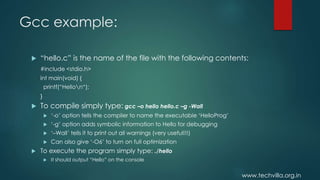
 “hello.c” is the name of the file with the following contents:
#include <stdio.h>
int main(void) {
printf(“Hellon“);
}
 To compile simply type: gcc –o hello hello.c –g -Wall
 ‘-o’ option tells the compiler to name the executable ‘HelloProg’
 ‘-g’ option adds symbolic information to Hello for debugging
 ‘–Wall’ tells it to print out all warnings (very useful!!!)
 Can also give ‘-O6’ to turn on full optimization
 To execute the program simply type: ./hello
 It should output “Hello” on the console
www.techvilla.org.in
What is Gdb?
 GDB is the GNU Project debugger
 Gdb provides some helpful functionality
 Allows you to stop your program at any given point.
 You can examine the state of your program when it’s stopped.
 Change things in your program, so you can experiment with
correcting the effects of a bug.
 Also a command-line program
 Is also available on spinlock/coredump
www.techvilla.org.in
Using Gdb:
 To start gdb with your hello program type: gdb
HelloProg
 When gdb starts, your program is not actually running.
 You have to use the run command to start execution.
 Before you do that, you should place some break points.
 Once you hit a break point, you can examine any
variable.
www.techvilla.org.in
Useful gdb commands
 run command-line-arguments
 Begin execution of your program with arguments
 break place
 place can be the name of a function or a line number
 For example: break main will stop execution at the first instruction
of your program
 delete N
 Removes breakpoints, where N is the number of the breakpoint
 step
 Executes current instruction and stops on the next one
www.techvilla.org.in
Gdb commands cont.
 next
 Same as step except this doesn’t step into functions
 print E
 Prints the value of any variable in your program when you are at
a breakpoint, where E is the name of the variable you want to
print
 help command
 Gives you more information about any command or all if you
leave out command
 quit
 Exit gdb
www.techvilla.org.in
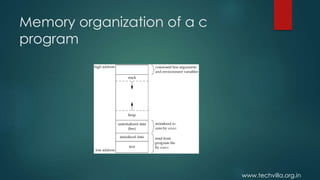
Memory organization of a c
program
www.techvilla.org.in
Text segment
 A text segment , also known as a code segment or simply as text, is
one of the sections of a program in an object file or in memory,
which contains executable instructions.
 As a memory region, a text segment may be placed below the
heap or stack in order to prevent heaps and stack overflows from
overwriting it.
 Usually, the text segment is sharable so that only a single copy
needs to be in memory for frequently executed programs, such as
text editors, the C compiler, the shells, and so on. Also, the text
segment is often read-only, to prevent a program from accidentally
modifying its instructions.
www.techvilla.org.in
Initialized Data Segment
 Initialized data segment, usually called simply the Data Segment. A
data segment is a portion of virtual address space of a program,
which contains the global variables and static variables that are
initialized by the programmer.
 Note that, data segment is not read-only, since the values of the
variables can be altered at run time.
 This segment can be further classified into initialized read-only area
and initialized read-write area.
www.techvilla.org.in
Uninitialized Data Segment:
 Uninitialized data segment, often called the “bss” segment, named
after an ancient assembler operator that stood for “block started by
symbol.” Data in this segment is initialized by the kernel to arithmetic
0 before the program starts executing.
 uninitialized data starts at the end of the data segment and
contains all global variables and static variables that are initialized
to zero or do not have explicit initialization in source code.
For instance a variable declared static int i; would be contained in
the BSS segment.
For instance a global variable declared int j; would be contained in
the BSS segment.
www.techvilla.org.in
Stack:
 The stack area traditionally adjoined the heap area and grew the
opposite direction; when the stack pointer met the heap pointer,
free memory was exhausted.
 The stack area contains the program stack, a LIFO structure,
typically located in the higher parts of memory.
 Stack, where automatic variables are stored, along with information
that is saved each time a function is called. Each time a function is
called, the address of where to return to and certain information
about the caller’s environment, such as some of the machine
registers, are saved on the stack
www.techvilla.org.in
Heap:
 Heap is the segment where dynamic memory allocation usually
takes place.
 The heap area begins at the end of the BSS segment and grows to
larger addresses from there.
 The Heap area is managed by malloc, realloc, and free, which may
use the brk and sbrk system calls to adjust its size.
 The Heap area is shared by all shared libraries and dynamically
loaded modules in a process.

Rasperry pi Part 8

  • 1.
  • 2.
  • 3.
    www.techvilla.org.in What is GCC? Gcc is the GNU Project C compiler  A command-line program  Gcc takes C source files as input  Outputs an executable: a.out  You can specify a different output filename  Available for you to use on spinlock/coredump
  • 4.
    www.techvilla.org.in Gcc example:  “hello.c”is the name of the file with the following contents: #include <stdio.h> int main(void) { printf(“Hellon“); }  To compile simply type: gcc –o hello hello.c –g -Wall  ‘-o’ option tells the compiler to name the executable ‘HelloProg’  ‘-g’ option adds symbolic information to Hello for debugging  ‘–Wall’ tells it to print out all warnings (very useful!!!)  Can also give ‘-O6’ to turn on full optimization  To execute the program simply type: ./hello  It should output “Hello” on the console
  • 5.
    www.techvilla.org.in What is Gdb? GDB is the GNU Project debugger  Gdb provides some helpful functionality  Allows you to stop your program at any given point.  You can examine the state of your program when it’s stopped.  Change things in your program, so you can experiment with correcting the effects of a bug.  Also a command-line program  Is also available on spinlock/coredump
  • 6.
    www.techvilla.org.in Using Gdb:  Tostart gdb with your hello program type: gdb HelloProg  When gdb starts, your program is not actually running.  You have to use the run command to start execution.  Before you do that, you should place some break points.  Once you hit a break point, you can examine any variable.
  • 7.
    www.techvilla.org.in Useful gdb commands run command-line-arguments  Begin execution of your program with arguments  break place  place can be the name of a function or a line number  For example: break main will stop execution at the first instruction of your program  delete N  Removes breakpoints, where N is the number of the breakpoint  step  Executes current instruction and stops on the next one
  • 8.
    www.techvilla.org.in Gdb commands cont. next  Same as step except this doesn’t step into functions  print E  Prints the value of any variable in your program when you are at a breakpoint, where E is the name of the variable you want to print  help command  Gives you more information about any command or all if you leave out command  quit  Exit gdb
  • 9.
  • 10.
    www.techvilla.org.in Text segment  Atext segment , also known as a code segment or simply as text, is one of the sections of a program in an object file or in memory, which contains executable instructions.  As a memory region, a text segment may be placed below the heap or stack in order to prevent heaps and stack overflows from overwriting it.  Usually, the text segment is sharable so that only a single copy needs to be in memory for frequently executed programs, such as text editors, the C compiler, the shells, and so on. Also, the text segment is often read-only, to prevent a program from accidentally modifying its instructions.
  • 11.
    www.techvilla.org.in Initialized Data Segment Initialized data segment, usually called simply the Data Segment. A data segment is a portion of virtual address space of a program, which contains the global variables and static variables that are initialized by the programmer.  Note that, data segment is not read-only, since the values of the variables can be altered at run time.  This segment can be further classified into initialized read-only area and initialized read-write area.
  • 12.
    www.techvilla.org.in Uninitialized Data Segment: Uninitialized data segment, often called the “bss” segment, named after an ancient assembler operator that stood for “block started by symbol.” Data in this segment is initialized by the kernel to arithmetic 0 before the program starts executing.  uninitialized data starts at the end of the data segment and contains all global variables and static variables that are initialized to zero or do not have explicit initialization in source code. For instance a variable declared static int i; would be contained in the BSS segment. For instance a global variable declared int j; would be contained in the BSS segment.
  • 13.
    www.techvilla.org.in Stack:  The stackarea traditionally adjoined the heap area and grew the opposite direction; when the stack pointer met the heap pointer, free memory was exhausted.  The stack area contains the program stack, a LIFO structure, typically located in the higher parts of memory.  Stack, where automatic variables are stored, along with information that is saved each time a function is called. Each time a function is called, the address of where to return to and certain information about the caller’s environment, such as some of the machine registers, are saved on the stack
  • 14.
    www.techvilla.org.in Heap:  Heap isthe segment where dynamic memory allocation usually takes place.  The heap area begins at the end of the BSS segment and grows to larger addresses from there.  The Heap area is managed by malloc, realloc, and free, which may use the brk and sbrk system calls to adjust its size.  The Heap area is shared by all shared libraries and dynamically loaded modules in a process.