Leveraging Docker and CoreOS
to provide always available Cassandra at
Instaclustr
Adam Zegelin
Founding Software Engineer & Co-founder of Instaclustr
adam@instaclustr.com ∙ @zegelin
Instaclustr
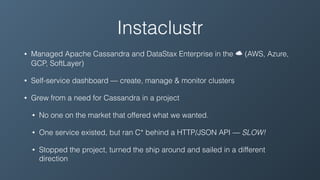
• Managed Apache Cassandra and DataStax Enterprise in the ☁ (AWS, Azure,
GCP, SoftLayer)
• Self-service dashboard — create, manage & monitor clusters
• Grew from a need for Cassandra in a project
• No one on the market that offered what we wanted.
• One service existed, but ran C* behind a HTTP/JSON API — SLOW!
• Stopped the project, turned the ship around and sailed in a different
direction
Ubuntu — The Early Years
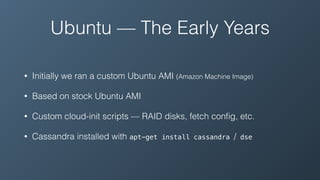
• Initially we ran a custom Ubuntu AMI (Amazon Machine Image)
• Based on stock Ubuntu AMI
• Custom cloud-init scripts — RAID disks, fetch config, etc.
• Cassandra installed with apt-get install cassandra / dse
AWS
• We use instance storage backed AWS instances
• Instance storage is fast (SSDs) and low latency (local disk) but is volatile —
terminate the machine and it’s gone!
• The alternative, EBS (Elastic Block Storage) is basically SAN — slow, higher
latency and shares instance network bandwidth
• Only way to change AMIs is to start a new machine
• Not possible to use immutable images with persistent ephemeral data
• Only feasible solution for updates is apt-get install
• One of the first “Docker Operating Systems”
• Small and minimalist — not much userland (not even man — gah!)
• Other useful software — etcd, fleet, etc.

(we currently don’t use them — but in the future)
• In-use by some big players (Rackspace, PlayStation, Instaclustr 😀)
• Recent funding from Google Ventures
• Available on GCP (Google Cloud Platform) — oddly, Ubuntu wasn’t (huh?)
• Runs systemd (vs. Ubuntu’s at-the-time upstart) & dbus — more on this later
CoreOS
• CoreOS is responsible for building images for AWS, Azure,
GCP, etc. — one less step in our build process
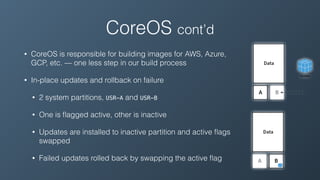
• In-place updates and rollback on failure
• 2 system partitions, USR-A and USR-B
• One is flagged active, other is inactive
• Updates are installed to inactive partition and active flags
swapped
• Failed updates rolled back by swapping the active flag
CoreOS cont’d
Docker
• Container runtime + standardised image distribution & hosting + ecosystem
• Private image hosting options available, such as quay.io
• Immutable images — Yay! 🎉
• Images running in dev, test and production environments are equal
• Software installs, upgrades and uninstalls are clean
• Components are isolated — potentially conflicting components (different library
versions, JVM versions, etc.) can co-exist
• Even different userland layouts (Ubuntu, Debian, CentOS, etc)
Docker + CoreOS
• Docker gives us immutable images for our components without
instance replacement
• CoreOS handles the rest (OS-level) via in-place updates
• Docker is provider agnostic
• CoreOS runs on all major cloud providers and bare-metal
• Instaclustr-managed C* can run anywhere
Integration
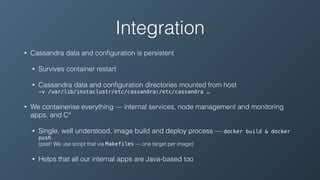
• Cassandra data and configuration is persistent
• Survives container restart
• Cassandra data and configuration directories mounted from host

-v /var/lib/instaclustr/etc/cassandra:/etc/cassandra …
• We containerise everything — internal services, node management and monitoring
apps, and C*
• Single, well understood, image build and deploy process — docker build & docker
push

(psst! We use script that via Makefiles — one target per image)
• Helps that all our internal apps are Java-based too
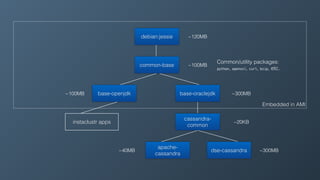
Embedded in AMI
debian:jessie
common-base
base-openjdk base-oraclejdk
instaclustr apps
cassandra-
common
apache-
cassandra
dse-cassandra
~120MB
~100MB
~300MB~100MB
~20KB
~300MB~40MB
Common/utility packages:

python, openssl, curl, bzip, etc.
DataStax OpsCenter
• 1 instance per cluster
• Accessible by users via our dashboard
• Segregated for security
• Hosted independently of the cluster
• 1 instance = 1 Docker container
• Multiple instances per host = cost effective
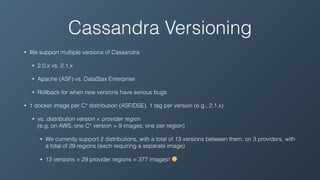
Cassandra Versioning
• We support multiple versions of Cassandra
• 2.0.x vs. 2.1.x
• Apache (ASF) vs. DataStax Enterprise
• Rollback for when new versions have serious bugs
• 1 docker image per C* distribution (ASF/DSE). 1 tag per version (e.g., 2.1.x)
• vs. distribution version × provider region

(e.g, on AWS, one C* version = 9 images, one per region)
• We currently support 2 distributions, with a total of 13 versions between them, on 3 providers, with
a total of 29 regions (each requiring a separate image)
• 13 versions × 29 provider regions = 377 images! 😳
Versioning cont’d
• Every Instaclustr cluster has a specific C* version
• Selected by user at creation time
• Version = C* version + distribution (ASF/DSE)
• New & replaced nodes run the exact same version
• Known, sane configuration on every node cluster wide
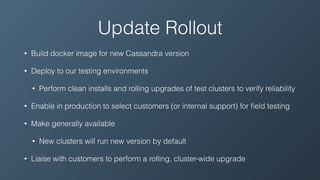
Update Rollout
• Build docker image for new Cassandra version
• Deploy to our testing environments
• Perform clean installs and rolling upgrades of test clusters to verify reliability
• Enable in production to select customers (or internal support) for field testing
• Make generally available
• New clusters will run new version by default
• Liaise with customers to perform a rolling, cluster-wide upgrade
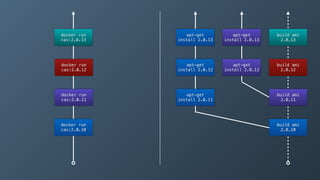
apt-get
install 2.0.11
apt-get
install 2.0.12
apt-get
install 2.0.13
docker run
cas:2.0.10
docker run
cas:2.0.11
docker run
cas:2.0.12
docker run
cas:2.0.13
build ami
2.0.10
build ami
2.0.11
build ami
2.0.12
build ami
2.0.13
apt-get
install 2.0.12
apt-get
install 2.0.13
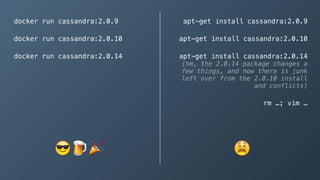
docker run cassandra:2.0.9
docker run cassandra:2.0.10
docker run cassandra:2.0.14
apt-get install cassandra:2.0.9
apt-get install cassandra:2.0.10
apt-get install cassandra:2.0.14

(hm, the 2.0.14 package changes a
few things, and now there is junk
left over from the 2.0.10 install
and conflicts)
rm …; vim …
😎🍺 🎉 😫
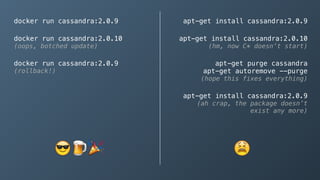
docker run cassandra:2.0.9
docker run cassandra:2.0.10

(oops, botched update)
docker run cassandra:2.0.9

(rollback!)
apt-get install cassandra:2.0.9
apt-get install cassandra:2.0.10

(hm, now C* doesn’t start)
apt-get purge cassandra

apt-get autoremove --purge

(hope this fixes everything)
apt-get install cassandra:2.0.9

(ah crap, the package doesn’t
exist any more)
😎 🍺🎉 😫
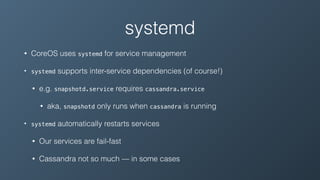
systemd
• CoreOS uses systemd for service management
• systemd supports inter-service dependencies (of course!)
• e.g. snapshotd.service requires cassandra.service
• aka, snapshotd only runs when cassandra is running
• systemd automatically restarts services
• Our services are fail-fast
• Cassandra not so much — in some cases
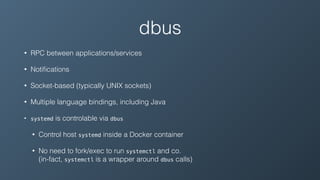
dbus
• RPC between applications/services
• Notifications
• Socket-based (typically UNIX sockets)
• Multiple language bindings, including Java
• systemd is controlable via dbus
• Control host systemd inside a Docker container
• No need to fork/exec to run systemctl and co.

(in-fact, systemctl is a wrapper around dbus calls)
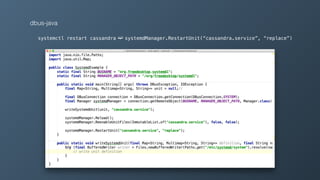
dbus-java
systemctl restart cassandra ➫ systemdManager.RestartUnit(“cassandra.service”, “replace”)
systemd + dbus + C*
• Service status = “active” — process running, or something more?
• Cassandra java process running vs. C* accepting CQL connections
• systemd dependencies start when required units become active
• CQL clients are dependencies, but shouldn’t start until CQL is available
• Small clients could fail-fast on no connectivity
• Larger, complex clients require a reconnect loop
• Cassandra is more than just CQL — Thrift + JMX too.
systemd + dbus + C* cont’d
• Notify systemd when Cassandra is accepting CQL connections
• Has to be done from the same process — systemd restriction
• Java agent (java -javaagent:agent.jar …) is best
• Agent attempts connections to CQL port.

When successful notifies systemd via dbus
• No code modification. Works with DSE
• Timeout issues when C* bootstrap takes longer. Set TimeoutStartSec=0
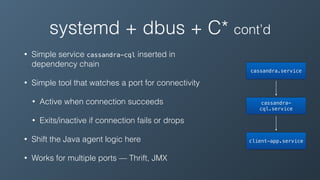
systemd + dbus + C* cont’d
• Simple service cassandra-cql inserted in
dependency chain
• Simple tool that watches a port for connectivity
• Active when connection succeeds
• Exits/inactive if connection fails or drops
• Shift the Java agent logic here
• Works for multiple ports — Thrift, JMX
cassandra.service
cassandra-
cql.service
client-app.service
Thanks
Questions?
Adam Zegelin
VP of Engineering & Co-founder of Instaclustr
adam@instaclustr.com ∙ @zegelin

Leveraging Docker and CoreOS to provide always available Cassandra at Instaclustr

  • 1.
    Leveraging Docker andCoreOS to provide always available Cassandra at Instaclustr Adam Zegelin Founding Software Engineer & Co-founder of Instaclustr adam@instaclustr.com ∙ @zegelin
  • 2.
    Instaclustr • Managed ApacheCassandra and DataStax Enterprise in the ☁ (AWS, Azure, GCP, SoftLayer) • Self-service dashboard — create, manage & monitor clusters • Grew from a need for Cassandra in a project • No one on the market that offered what we wanted. • One service existed, but ran C* behind a HTTP/JSON API — SLOW! • Stopped the project, turned the ship around and sailed in a different direction
  • 3.
    Ubuntu — TheEarly Years • Initially we ran a custom Ubuntu AMI (Amazon Machine Image) • Based on stock Ubuntu AMI • Custom cloud-init scripts — RAID disks, fetch config, etc. • Cassandra installed with apt-get install cassandra / dse
  • 4.
    AWS • We useinstance storage backed AWS instances • Instance storage is fast (SSDs) and low latency (local disk) but is volatile — terminate the machine and it’s gone! • The alternative, EBS (Elastic Block Storage) is basically SAN — slow, higher latency and shares instance network bandwidth • Only way to change AMIs is to start a new machine • Not possible to use immutable images with persistent ephemeral data • Only feasible solution for updates is apt-get install
  • 5.
    • One ofthe first “Docker Operating Systems” • Small and minimalist — not much userland (not even man — gah!) • Other useful software — etcd, fleet, etc.
 (we currently don’t use them — but in the future) • In-use by some big players (Rackspace, PlayStation, Instaclustr 😀) • Recent funding from Google Ventures • Available on GCP (Google Cloud Platform) — oddly, Ubuntu wasn’t (huh?) • Runs systemd (vs. Ubuntu’s at-the-time upstart) & dbus — more on this later CoreOS
  • 6.
    • CoreOS isresponsible for building images for AWS, Azure, GCP, etc. — one less step in our build process • In-place updates and rollback on failure • 2 system partitions, USR-A and USR-B • One is flagged active, other is inactive • Updates are installed to inactive partition and active flags swapped • Failed updates rolled back by swapping the active flag CoreOS cont’d
  • 7.
    Docker • Container runtime+ standardised image distribution & hosting + ecosystem • Private image hosting options available, such as quay.io • Immutable images — Yay! 🎉 • Images running in dev, test and production environments are equal • Software installs, upgrades and uninstalls are clean • Components are isolated — potentially conflicting components (different library versions, JVM versions, etc.) can co-exist • Even different userland layouts (Ubuntu, Debian, CentOS, etc)
  • 8.
    Docker + CoreOS •Docker gives us immutable images for our components without instance replacement • CoreOS handles the rest (OS-level) via in-place updates • Docker is provider agnostic • CoreOS runs on all major cloud providers and bare-metal • Instaclustr-managed C* can run anywhere
  • 9.
    Integration • Cassandra dataand configuration is persistent • Survives container restart • Cassandra data and configuration directories mounted from host
 -v /var/lib/instaclustr/etc/cassandra:/etc/cassandra … • We containerise everything — internal services, node management and monitoring apps, and C* • Single, well understood, image build and deploy process — docker build & docker push
 (psst! We use script that via Makefiles — one target per image) • Helps that all our internal apps are Java-based too
  • 10.
    Embedded in AMI debian:jessie common-base base-openjdkbase-oraclejdk instaclustr apps cassandra- common apache- cassandra dse-cassandra ~120MB ~100MB ~300MB~100MB ~20KB ~300MB~40MB Common/utility packages:
 python, openssl, curl, bzip, etc.
  • 11.
    DataStax OpsCenter • 1instance per cluster • Accessible by users via our dashboard • Segregated for security • Hosted independently of the cluster • 1 instance = 1 Docker container • Multiple instances per host = cost effective
  • 12.
    Cassandra Versioning • Wesupport multiple versions of Cassandra • 2.0.x vs. 2.1.x • Apache (ASF) vs. DataStax Enterprise • Rollback for when new versions have serious bugs • 1 docker image per C* distribution (ASF/DSE). 1 tag per version (e.g., 2.1.x) • vs. distribution version × provider region
 (e.g, on AWS, one C* version = 9 images, one per region) • We currently support 2 distributions, with a total of 13 versions between them, on 3 providers, with a total of 29 regions (each requiring a separate image) • 13 versions × 29 provider regions = 377 images! 😳
  • 13.
    Versioning cont’d • EveryInstaclustr cluster has a specific C* version • Selected by user at creation time • Version = C* version + distribution (ASF/DSE) • New & replaced nodes run the exact same version • Known, sane configuration on every node cluster wide
  • 14.
    Update Rollout • Builddocker image for new Cassandra version • Deploy to our testing environments • Perform clean installs and rolling upgrades of test clusters to verify reliability • Enable in production to select customers (or internal support) for field testing • Make generally available • New clusters will run new version by default • Liaise with customers to perform a rolling, cluster-wide upgrade
  • 15.
    apt-get install 2.0.11 apt-get install 2.0.12 apt-get install2.0.13 docker run cas:2.0.10 docker run cas:2.0.11 docker run cas:2.0.12 docker run cas:2.0.13 build ami 2.0.10 build ami 2.0.11 build ami 2.0.12 build ami 2.0.13 apt-get install 2.0.12 apt-get install 2.0.13
  • 16.
    docker run cassandra:2.0.9 dockerrun cassandra:2.0.10 docker run cassandra:2.0.14 apt-get install cassandra:2.0.9 apt-get install cassandra:2.0.10 apt-get install cassandra:2.0.14
 (hm, the 2.0.14 package changes a few things, and now there is junk left over from the 2.0.10 install and conflicts) rm …; vim … 😎🍺 🎉 😫
  • 17.
    docker run cassandra:2.0.9 dockerrun cassandra:2.0.10
 (oops, botched update) docker run cassandra:2.0.9
 (rollback!) apt-get install cassandra:2.0.9 apt-get install cassandra:2.0.10
 (hm, now C* doesn’t start) apt-get purge cassandra
 apt-get autoremove --purge
 (hope this fixes everything) apt-get install cassandra:2.0.9
 (ah crap, the package doesn’t exist any more) 😎 🍺🎉 😫
  • 18.
    systemd • CoreOS usessystemd for service management • systemd supports inter-service dependencies (of course!) • e.g. snapshotd.service requires cassandra.service • aka, snapshotd only runs when cassandra is running • systemd automatically restarts services • Our services are fail-fast • Cassandra not so much — in some cases
  • 19.
    dbus • RPC betweenapplications/services • Notifications • Socket-based (typically UNIX sockets) • Multiple language bindings, including Java • systemd is controlable via dbus • Control host systemd inside a Docker container • No need to fork/exec to run systemctl and co.
 (in-fact, systemctl is a wrapper around dbus calls)
  • 20.
    dbus-java systemctl restart cassandra➫ systemdManager.RestartUnit(“cassandra.service”, “replace”)
  • 21.
    systemd + dbus+ C* • Service status = “active” — process running, or something more? • Cassandra java process running vs. C* accepting CQL connections • systemd dependencies start when required units become active • CQL clients are dependencies, but shouldn’t start until CQL is available • Small clients could fail-fast on no connectivity • Larger, complex clients require a reconnect loop • Cassandra is more than just CQL — Thrift + JMX too.
  • 22.
    systemd + dbus+ C* cont’d • Notify systemd when Cassandra is accepting CQL connections • Has to be done from the same process — systemd restriction • Java agent (java -javaagent:agent.jar …) is best • Agent attempts connections to CQL port.
 When successful notifies systemd via dbus • No code modification. Works with DSE • Timeout issues when C* bootstrap takes longer. Set TimeoutStartSec=0
  • 23.
    systemd + dbus+ C* cont’d • Simple service cassandra-cql inserted in dependency chain • Simple tool that watches a port for connectivity • Active when connection succeeds • Exits/inactive if connection fails or drops • Shift the Java agent logic here • Works for multiple ports — Thrift, JMX cassandra.service cassandra- cql.service client-app.service
  • 24.
    Thanks Questions? Adam Zegelin VP ofEngineering & Co-founder of Instaclustr adam@instaclustr.com ∙ @zegelin