



Cassandra and Docker
2 years in production
instaclustr.com
@Instaclustr
Who am I and what do I do?
• Ben Bromhead
• Co-founder and CTO of Instaclustr -> www.instaclustr.com
• Instaclustr provides Cassandra-as-a-Service in the cloud.
• Currently support AWS, Azure, Heroku and Softlayer with more to come.
• 700+ nodes
Objectives
• A quick intro on docker (for the Cassandra folk).
• Our docker story
• Working with Cassandra and docker.
• Running C* in a constrained env w/ docker
• Listen to my astonishment of all the progress docker has made
since I last gave this talk
Why docker matters
• Finally Developers have a solution to build once and deploy
anywhere
• Finally Ops/Admin has a solution to configure anywhere
• Finally DevOps is easy
• Dev == Test == Staging == Production
• Move with speed
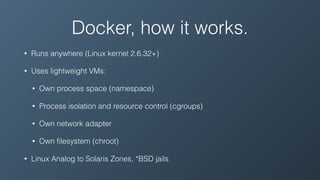
Docker, how it works.
• Runs anywhere (Linux kernel 2.6.32+)
• Uses lightweight VMs:
• Own process space (namespace)
• Process isolation and resource control (cgroups)
• Own network adapter
• Own filesystem (chroot)
• Linux Analog to Solaris Zones, *BSD jails
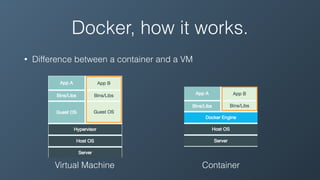
Docker, how it works.
• Difference between a container and a VM
Virtual Machine Container
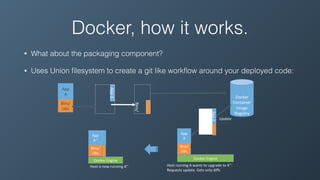
Docker, how it works.
• What about the packaging component?
• Uses Union filesystem to create a git like workflow around your deployed code:
!
!
Docker!
Container!
Image!
Registry!
Push%
!
!
!
!
Bins/!
Libs!
!
!
!
!
App!
A!
App!Δ!!
!
!
!
!
Bins/!
Docker'Engine' Docker'Engine'
Update'
Host'is'now'running'A’’'
'
App'Δ''
'
'
'
'
Bins/'
'
'
'
'
Bins/'
Libs'
'
'
'
'
App'
A'
'
'
'
'
Bins/'
'
'
'
'
Bins/'
Libs'
'
'
'
'
App'
A’’'
Host'running'A'wants'to'upgrade'to'A’’.'
Requests'update.'Gets'only'diffs'
'
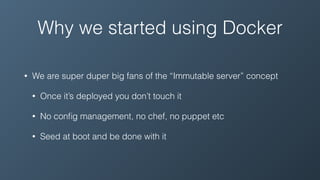
Why we started using Docker
• We are super duper big fans of the “Immutable server” concept
• Once it’s deployed you don’t touch it
• No config management, no chef, no puppet etc
• Seed at boot and be done with it
Why we started using Docker
• Before Docker, we built AMIs in Amazon
• A new AMI for every deploy, version etc
• This meant we cycled our entire fleet of instances constantly
• Which is fine for some, but we work with persistent data
• Sooo much time streaming from replicas/copying backups from
S3
Why we started using Docker
• Docker images solved this for us
• Treat the host as a sterile environment
• Everything in a few docker containers which we can simply
update
• Cycle the docker container instead of the AMI
• Yes… docker was primarily a package management tool for us
Docker at Instaclustr
• So how do we get on board the hype train an established devops
practice? Without killing performance or stability?
• Ran in dev to get comfortable with it, then non-critical systems.
• Talked to others who use it in production
• https://github.com/docker/docker/issues - https://docs.docker.com/
You will spend a lot of time here
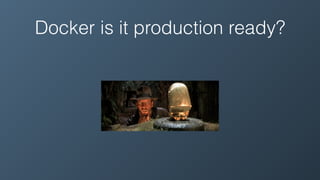
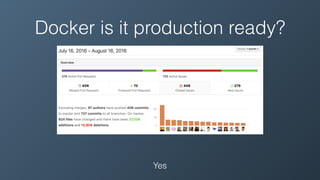
Docker is it production ready?
Yes
Docker & Cassandra - Networking
• 1st trial, throughput dropped in half!
• Writes sucked, streaming sucked, what was going on?
• Quick check with iperf showed a 50% hit in throughput
Docker & Cassandra - Networking
• Docker uses Linux Ethernet Bridges for basic software defined
routing. This will hose your network throughput (2014).
• Use the host network stack instead (—net=host), 0% impact on
Cassandra throughput (iperf still showed minor overhead)
• Also solves NAT issues in an AWS like networking environment.
Docker & Cassandra + Filesystem
• The filesystems (AUFS, BTRFS etc) that bring great benefits to Dockers
workflow around building and snapshoting containers are not very good for
databases.
• You also need keep your C* data, commitlogs & caches in a Docker volume
mount for persistence.
• UnionFS (AUFS) is terrible for writing lots of big files.
• BTRFS is a pain to use from an ops point of view. Terrible
• Hooray volume mounts use the underlying filesystem. Put cassandra data dir
on a volume mount with a decent fs (e.g. xfs)
Docker + Process Capabilities
• Docker by default drops all process capabilities except the
minimum needed to start.
• https://github.com/docker/docker/blob/master/oci/
defaults_linux.go#L64-L79
Docker + Process Capabilities
• Cassandra needs to pin files to memory using Mlockall, otherwise things
get sloooow.
• Mlockall is a process capability.
• A process needs CAP_IPC_LOCK & RLIMIT_MEMLOCK in order to
perform this operation. By default docker doesn't assign this to a running
container…
• Can use --privileged and be done with it. Kind of lazy though
• Use --cap-add instead
Docker + SIGTERM propagation
• When stopping the process docker will send a SIGTERM.
• Some interpreted languages treat PID 1 differently. E.g. Python/Bash does not
have default signal handlers when it’s PID 1.
• Bad if you use a bash script to launch Cassandra
• Java to the rescue!
• Make sure you run the cassandra bash script with -f (foreground)
• exec causes the JVM to replace the bash process… making the world a
happier place
Docker + SIGTERM propagation
• Tools like OpsCenter Server will have trouble with this.
• Can be fixed using a wacky combination of trap and wait stanzas in
your OpsCenter Server script (see http://veithen.github.io/
2014/11/16/sigterm-propagation.html)
• But now you have a bash script that duplicates init/systemd/
supervisord
• The debate rages on…
Docker + CoreOS
• Docker + fav OS + CM?, CoreOS + etcd, Swarm + Machine, Deis
etc
• We chose CoreOS (Appeared to be sane, etcd is cool, systemd if
you are into that kind of thing)
• Docker (the company) now does their own thing… did you know
they now call Docker… Docker Engine… who’d have thunk.
Docker + CoreOS
• Disable automatic updates + restarts (seriously do this)
• Fix logging, otherwise you will log to 3 locations (/var/log/
cassandra, journalctl and dockers json based log
• JVM will exit with error 143 (128 + 15 for SIGTERM). Need to ignore
that in your systemd service definition.
Docker + Dev Env
• Docker relies on Linux kernel capabilites… so no native docker in OS X
• We use OSX for dev, so we run vagrant and the CoreOS vagrant file
• Install Docker userland tools in OS X and forward ports to the vagrant box
running CoreOS
• Our env is a little strange, we a single cassandra instance on a single CoreOS
vm.
• Docker for mac now uses a lighter weight virtualisation layer native to OSX.
• Look at https://github.com/tobert/cassandra-docker for full dockerisation!
Docker + C* + Dev Env
• How do I run lots of C* instances on a VM or my dev laptop without
it falling over?
• Backwards performance tuning!
• Make it run as slowly, but as stable as possible!
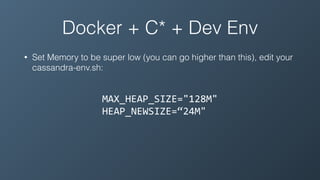
Docker + C* + Dev Env
• Set Memory to be super low (you can go higher than this), edit your
cassandra-env.sh:
MAX_HEAP_SIZE="128M"	
HEAP_NEWSIZE=“24M"
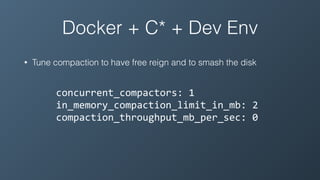
Docker + C* + Dev Env
• Tune compaction to have free reign and to smash the disk
concurrent_compactors:	1	
in_memory_compaction_limit_in_mb:	2	
compaction_throughput_mb_per_sec:	0
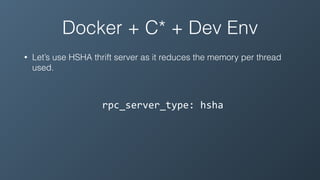
Docker + C* + Dev Env
• Let’s use HSHA thrift server as it reduces the memory per thread
used.
rpc_server_type:	hsha
Docker + C* + Dev Env
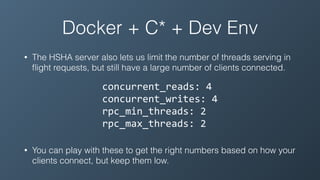
• The HSHA server also lets us limit the number of threads serving in
flight requests, but still have a large number of clients connected.
concurrent_reads:	4	
concurrent_writes:	4	
rpc_min_threads:	2	
rpc_max_threads:	2
• You can play with these to get the right numbers based on how your
clients connect, but keep them low.
Docker + C* + Dev Env
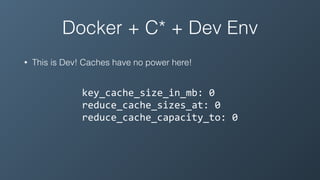
• This is Dev! Caches have no power here!
key_cache_size_in_mb:	0	
reduce_cache_sizes_at:	0	
reduce_cache_capacity_to:	0
Docker + C* + Dev Env
• How well does this work?!?!
• Will survive running the insane workload in the c* 2.1 new stresstest
tool.
• We run this on AWS t2.small instances
• Sign up at https://www.instaclustr.com and give our new Developer
nodes a spin!
Go forth and conquer!
Questions?

Cassandra and docker

  • 1.
    Cassandra and Docker 2years in production instaclustr.com @Instaclustr
  • 3.
    Who am Iand what do I do? • Ben Bromhead • Co-founder and CTO of Instaclustr -> www.instaclustr.com • Instaclustr provides Cassandra-as-a-Service in the cloud. • Currently support AWS, Azure, Heroku and Softlayer with more to come. • 700+ nodes
  • 5.
    Objectives • A quickintro on docker (for the Cassandra folk). • Our docker story • Working with Cassandra and docker. • Running C* in a constrained env w/ docker • Listen to my astonishment of all the progress docker has made since I last gave this talk
  • 6.
    Why docker matters •Finally Developers have a solution to build once and deploy anywhere • Finally Ops/Admin has a solution to configure anywhere • Finally DevOps is easy • Dev == Test == Staging == Production • Move with speed
  • 7.
    Docker, how itworks. • Runs anywhere (Linux kernel 2.6.32+) • Uses lightweight VMs: • Own process space (namespace) • Process isolation and resource control (cgroups) • Own network adapter • Own filesystem (chroot) • Linux Analog to Solaris Zones, *BSD jails
  • 8.
    Docker, how itworks. • Difference between a container and a VM Virtual Machine Container
  • 9.
    Docker, how itworks. • What about the packaging component? • Uses Union filesystem to create a git like workflow around your deployed code: ! ! Docker! Container! Image! Registry! Push% ! ! ! ! Bins/! Libs! ! ! ! ! App! A! App!Δ!! ! ! ! ! Bins/! Docker'Engine' Docker'Engine' Update' Host'is'now'running'A’’' ' App'Δ'' ' ' ' ' Bins/' ' ' ' ' Bins/' Libs' ' ' ' ' App' A' ' ' ' ' Bins/' ' ' ' ' Bins/' Libs' ' ' ' ' App' A’’' Host'running'A'wants'to'upgrade'to'A’’.' Requests'update.'Gets'only'diffs' '
  • 10.
    Why we startedusing Docker • We are super duper big fans of the “Immutable server” concept • Once it’s deployed you don’t touch it • No config management, no chef, no puppet etc • Seed at boot and be done with it
  • 11.
    Why we startedusing Docker • Before Docker, we built AMIs in Amazon • A new AMI for every deploy, version etc • This meant we cycled our entire fleet of instances constantly • Which is fine for some, but we work with persistent data • Sooo much time streaming from replicas/copying backups from S3
  • 12.
    Why we startedusing Docker • Docker images solved this for us • Treat the host as a sterile environment • Everything in a few docker containers which we can simply update • Cycle the docker container instead of the AMI • Yes… docker was primarily a package management tool for us
  • 13.
    Docker at Instaclustr •So how do we get on board the hype train an established devops practice? Without killing performance or stability? • Ran in dev to get comfortable with it, then non-critical systems. • Talked to others who use it in production • https://github.com/docker/docker/issues - https://docs.docker.com/ You will spend a lot of time here
  • 14.
    Docker is itproduction ready?
  • 15.
    Docker is itproduction ready? Yes
  • 16.
    Docker & Cassandra- Networking • 1st trial, throughput dropped in half! • Writes sucked, streaming sucked, what was going on? • Quick check with iperf showed a 50% hit in throughput
  • 17.
    Docker & Cassandra- Networking • Docker uses Linux Ethernet Bridges for basic software defined routing. This will hose your network throughput (2014). • Use the host network stack instead (—net=host), 0% impact on Cassandra throughput (iperf still showed minor overhead) • Also solves NAT issues in an AWS like networking environment.
  • 18.
    Docker & Cassandra+ Filesystem • The filesystems (AUFS, BTRFS etc) that bring great benefits to Dockers workflow around building and snapshoting containers are not very good for databases. • You also need keep your C* data, commitlogs & caches in a Docker volume mount for persistence. • UnionFS (AUFS) is terrible for writing lots of big files. • BTRFS is a pain to use from an ops point of view. Terrible • Hooray volume mounts use the underlying filesystem. Put cassandra data dir on a volume mount with a decent fs (e.g. xfs)
  • 19.
    Docker + ProcessCapabilities
  • 20.
    Docker + ProcessCapabilities • Docker by default drops all process capabilities except the minimum needed to start. • https://github.com/docker/docker/blob/master/oci/ defaults_linux.go#L64-L79
  • 21.
    Docker + ProcessCapabilities • Cassandra needs to pin files to memory using Mlockall, otherwise things get sloooow. • Mlockall is a process capability. • A process needs CAP_IPC_LOCK & RLIMIT_MEMLOCK in order to perform this operation. By default docker doesn't assign this to a running container… • Can use --privileged and be done with it. Kind of lazy though • Use --cap-add instead
  • 22.
    Docker + SIGTERMpropagation • When stopping the process docker will send a SIGTERM. • Some interpreted languages treat PID 1 differently. E.g. Python/Bash does not have default signal handlers when it’s PID 1. • Bad if you use a bash script to launch Cassandra • Java to the rescue! • Make sure you run the cassandra bash script with -f (foreground) • exec causes the JVM to replace the bash process… making the world a happier place
  • 23.
    Docker + SIGTERMpropagation • Tools like OpsCenter Server will have trouble with this. • Can be fixed using a wacky combination of trap and wait stanzas in your OpsCenter Server script (see http://veithen.github.io/ 2014/11/16/sigterm-propagation.html) • But now you have a bash script that duplicates init/systemd/ supervisord • The debate rages on…
  • 24.
    Docker + CoreOS •Docker + fav OS + CM?, CoreOS + etcd, Swarm + Machine, Deis etc • We chose CoreOS (Appeared to be sane, etcd is cool, systemd if you are into that kind of thing) • Docker (the company) now does their own thing… did you know they now call Docker… Docker Engine… who’d have thunk.
  • 25.
    Docker + CoreOS •Disable automatic updates + restarts (seriously do this) • Fix logging, otherwise you will log to 3 locations (/var/log/ cassandra, journalctl and dockers json based log • JVM will exit with error 143 (128 + 15 for SIGTERM). Need to ignore that in your systemd service definition.
  • 26.
    Docker + DevEnv • Docker relies on Linux kernel capabilites… so no native docker in OS X • We use OSX for dev, so we run vagrant and the CoreOS vagrant file • Install Docker userland tools in OS X and forward ports to the vagrant box running CoreOS • Our env is a little strange, we a single cassandra instance on a single CoreOS vm. • Docker for mac now uses a lighter weight virtualisation layer native to OSX. • Look at https://github.com/tobert/cassandra-docker for full dockerisation!
  • 27.
    Docker + C*+ Dev Env • How do I run lots of C* instances on a VM or my dev laptop without it falling over? • Backwards performance tuning! • Make it run as slowly, but as stable as possible!
  • 28.
    Docker + C*+ Dev Env • Set Memory to be super low (you can go higher than this), edit your cassandra-env.sh: MAX_HEAP_SIZE="128M" HEAP_NEWSIZE=“24M"
  • 29.
    Docker + C*+ Dev Env • Tune compaction to have free reign and to smash the disk concurrent_compactors: 1 in_memory_compaction_limit_in_mb: 2 compaction_throughput_mb_per_sec: 0
  • 30.
    Docker + C*+ Dev Env • Let’s use HSHA thrift server as it reduces the memory per thread used. rpc_server_type: hsha
  • 31.
    Docker + C*+ Dev Env • The HSHA server also lets us limit the number of threads serving in flight requests, but still have a large number of clients connected. concurrent_reads: 4 concurrent_writes: 4 rpc_min_threads: 2 rpc_max_threads: 2 • You can play with these to get the right numbers based on how your clients connect, but keep them low.
  • 32.
    Docker + C*+ Dev Env • This is Dev! Caches have no power here! key_cache_size_in_mb: 0 reduce_cache_sizes_at: 0 reduce_cache_capacity_to: 0
  • 33.
    Docker + C*+ Dev Env • How well does this work?!?! • Will survive running the insane workload in the c* 2.1 new stresstest tool. • We run this on AWS t2.small instances • Sign up at https://www.instaclustr.com and give our new Developer nodes a spin!
  • 34.
    Go forth andconquer! Questions?