DATABASE
 It is any collection of data or information,
that is specially organized for rapid search
and retrieval by a computer.
 It is structured to store, retrieve, modify, and
delete a data in conjunction with various
data-processing operations.
TWO TYPES OF DATABASE
1. MANUAL DATABASE
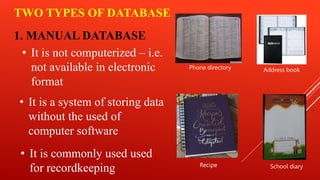
• It is not computerized – i.e.
not available in electronic
format
• It is commonly used used
for recordkeeping
• It is a system of storing data
without the used of
computer software
Phone directory Address book
Recipe School diary
• It is less vulnerable to accidental deletion or corruption
by programmers
Advantages of Manual Database
• It does not require electricity or batteries to operate.
• It allows for easier oversight of data that is not easily
categorized by machines.
• It may require less up front investment and education
than automated database.
2. COMPUTERIZED DATABASE
• It is compact, flexible and fast
• It also allows the used to enter, access, and
analyze the data quickly and easily
• It can store thousands of data without occupying
too much space
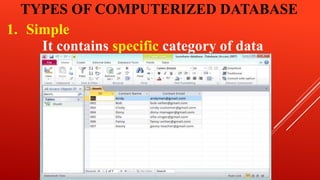
TYPES OF COMPUTERIZED DATABASE
1. Simple
It contains specific category of data
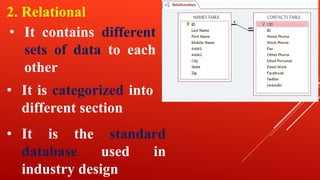
2. Relational
• It contains different
sets of data to each
other
• It is categorized into
different section
• It is the standard
database used in
industry design
DATABASE MANAGEMENT SYSTEM
(DBMS)
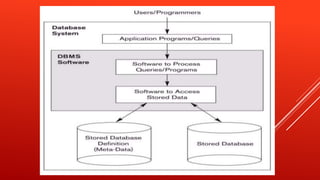
 Is a collection of data stored in computer for
easy retrieval
 It a collection of computer programs that
enables the user to store, modify and extract
information based on per requirements.
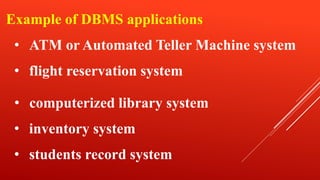
Example of DBMS applications
• ATM or Automated Teller Machine system
• flight reservation system
• computerized library system
• inventory system
• students record system
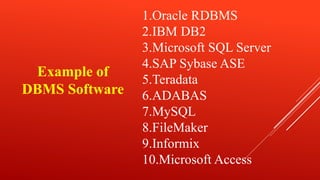
1.Oracle RDBMS
2.IBM DB2
3.Microsoft SQL Server
4.SAP Sybase ASE
5.Teradata
6.ADABAS
7.MySQL
8.FileMaker
9.Informix
10.Microsoft Access
Example of
DBMS Software
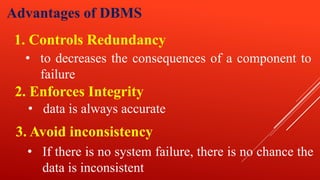
Advantages of DBMS
1. Controls Redundancy
• to decreases the consequences of a component to
failure
2. Enforces Integrity
• data is always accurate
3. Avoid inconsistency
• If there is no system failure, there is no chance the
data is inconsistent
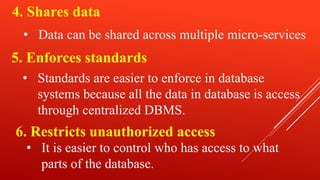
4. Shares data
• Data can be shared across multiple micro-services
5. Enforces standards
6. Restricts unauthorized access
• Standards are easier to enforce in database
systems because all the data in database is access
through centralized DBMS.
• It is easier to control who has access to what
parts of the database.
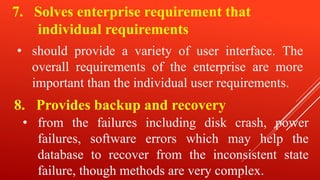
7. Solves enterprise requirement that
individual requirements
• should provide a variety of user interface. The
overall requirements of the enterprise are more
important than the individual user requirements.
8. Provides backup and recovery
• from the failures including disk crash, power
failures, software errors which may help the
database to recover from the inconsistent state
failure, though methods are very complex.
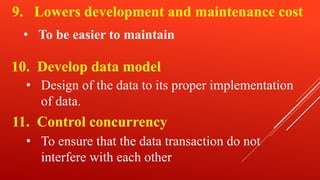
9. Lowers development and maintenance cost
10. Develop data model
• To be easier to maintain
11. Control concurrency
• Design of the data to its proper implementation
of data.
• To ensure that the data transaction do not
interfere with each other

DATABASE.pptx

  • 1.
  • 2.
     It isany collection of data or information, that is specially organized for rapid search and retrieval by a computer.  It is structured to store, retrieve, modify, and delete a data in conjunction with various data-processing operations.
  • 3.
    TWO TYPES OFDATABASE 1. MANUAL DATABASE • It is not computerized – i.e. not available in electronic format • It is commonly used used for recordkeeping • It is a system of storing data without the used of computer software Phone directory Address book Recipe School diary
  • 4.
    • It isless vulnerable to accidental deletion or corruption by programmers Advantages of Manual Database • It does not require electricity or batteries to operate. • It allows for easier oversight of data that is not easily categorized by machines. • It may require less up front investment and education than automated database.
  • 5.
    2. COMPUTERIZED DATABASE •It is compact, flexible and fast • It also allows the used to enter, access, and analyze the data quickly and easily • It can store thousands of data without occupying too much space
  • 6.
    TYPES OF COMPUTERIZEDDATABASE 1. Simple It contains specific category of data
  • 7.
    2. Relational • Itcontains different sets of data to each other • It is categorized into different section • It is the standard database used in industry design
  • 8.
    DATABASE MANAGEMENT SYSTEM (DBMS) Is a collection of data stored in computer for easy retrieval  It a collection of computer programs that enables the user to store, modify and extract information based on per requirements.
  • 10.
    Example of DBMSapplications • ATM or Automated Teller Machine system • flight reservation system • computerized library system • inventory system • students record system
  • 11.
    1.Oracle RDBMS 2.IBM DB2 3.MicrosoftSQL Server 4.SAP Sybase ASE 5.Teradata 6.ADABAS 7.MySQL 8.FileMaker 9.Informix 10.Microsoft Access Example of DBMS Software
  • 12.
    Advantages of DBMS 1.Controls Redundancy • to decreases the consequences of a component to failure 2. Enforces Integrity • data is always accurate 3. Avoid inconsistency • If there is no system failure, there is no chance the data is inconsistent
  • 13.
    4. Shares data •Data can be shared across multiple micro-services 5. Enforces standards 6. Restricts unauthorized access • Standards are easier to enforce in database systems because all the data in database is access through centralized DBMS. • It is easier to control who has access to what parts of the database.
  • 14.
    7. Solves enterpriserequirement that individual requirements • should provide a variety of user interface. The overall requirements of the enterprise are more important than the individual user requirements. 8. Provides backup and recovery • from the failures including disk crash, power failures, software errors which may help the database to recover from the inconsistent state failure, though methods are very complex.
  • 15.
    9. Lowers developmentand maintenance cost 10. Develop data model • To be easier to maintain 11. Control concurrency • Design of the data to its proper implementation of data. • To ensure that the data transaction do not interfere with each other