Database Migrations
What's the problem?
Provide upgrades of applications and databases to our
customers
Some customers require SQL scripts to run via DB admin
tools, e.g. Oracle (sqlplus)
We don't have database schemas that reflect what's been
applied in terms of updates - always the newest
We don't really understand what Hibernate is doing to
create/modify tables based on our persistent objects, we
rely on it for optimization, indexes etc...
Database Migrations
Structure SQL scripts for creation of the
schema, updates of the schema accordingly
Use a tool to run these migrations:
● In a specific order
● Against a specific database (MySQL,
Oracle)
● Recording the actions in a schema version
table
Lots of tools that do this
Flyway
Allows us to do migrations:
● From a shell script
● Programmatically
● When Spring starts
● Using Maven as a build tool
Introducing Flyway into your project
Has been done for MIF - there's a dbtool folder
in the source structure. We can provide a
template in SVN that can be used.
1. Download the dbtool structure
2. Generate an export of the schema that
Hibernate has created for your project
Introducing Flyway into your project
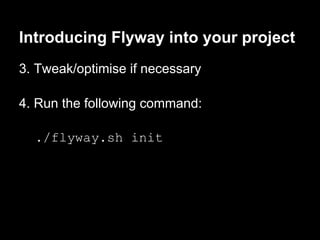
3. Tweak/optimise if necessary
4. Run the following command:
./flyway.sh init
Introducing Flyway into your project
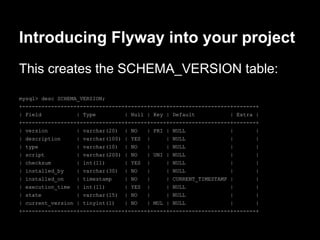
This creates the SCHEMA_VERSION table:
mysql> desc SCHEMA_VERSION;
+-----------------+--------------+------+-----+-------------------+-------+
| Field | Type | Null | Key | Default | Extra |
+-----------------+--------------+------+-----+-------------------+-------+
| version | varchar(20) | NO | PRI | NULL | |
| description | varchar(100) | YES | | NULL | |
| type | varchar(10) | NO | | NULL | |
| script | varchar(200) | NO | UNI | NULL | |
| checksum | int(11) | YES | | NULL | |
| installed_by | varchar(30) | NO | | NULL | |
| installed_on | timestamp | NO | | CURRENT_TIMESTAMP | |
| execution_time | int(11) | YES | | NULL | |
| state | varchar(15) | NO | | NULL | |
| current_version | tinyint(1) | NO | MUL | NULL | |
+-----------------+--------------+------+-----+-------------------+-------+
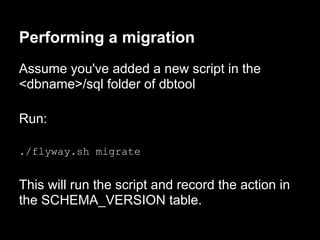
Performing a migration
Assume you've added a new script in the
<dbname>/sql folder of dbtool
Run:
./flyway.sh migrate
This will run the script and record the action in
the SCHEMA_VERSION table.
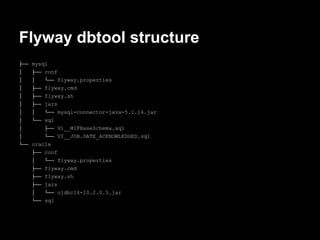
Flyway dbtool structure
├── mysql
│ ├── conf
│ │ └── flyway.properties
│ ├── flyway.cmd
│ ├── flyway.sh
│ ├── jars
│ │ └── mysql-connector-java-5.1.14.jar
│ └── sql
│ ├── V1__MIFBaseSchema.sql
│ └── V2__JOB.DATE_ACKNOWLEDGED.sql
└── oracle
├── conf
│ └── flyway.properties
├── flyway.cmd
├── flyway.sh
├── jars
│ └── ojdbc14-10.2.0.5.jar
└── sql
Process Change
Need to change the way we develop persistent
objects with Hibernate
As well as changing an object we also need to
provide a migration script (and a rollback script)
Put it in the <dbname>/sql folder.
ls -Al mysql/sql
V1__MIFBaseSchema.sql
V2__JOB.DATE_ACKNOWLEDGED.sql
Example
Change a persistent object to add a new field
Write a script with the appropriate ALTER
TABLE ADD COLUMN statement.
Write the rollback script
Test

Database migration with flyway

  • 1.
  • 2.
    What's the problem? Provideupgrades of applications and databases to our customers Some customers require SQL scripts to run via DB admin tools, e.g. Oracle (sqlplus) We don't have database schemas that reflect what's been applied in terms of updates - always the newest We don't really understand what Hibernate is doing to create/modify tables based on our persistent objects, we rely on it for optimization, indexes etc...
  • 3.
    Database Migrations Structure SQLscripts for creation of the schema, updates of the schema accordingly Use a tool to run these migrations: ● In a specific order ● Against a specific database (MySQL, Oracle) ● Recording the actions in a schema version table Lots of tools that do this
  • 4.
    Flyway Allows us todo migrations: ● From a shell script ● Programmatically ● When Spring starts ● Using Maven as a build tool
  • 5.
    Introducing Flyway intoyour project Has been done for MIF - there's a dbtool folder in the source structure. We can provide a template in SVN that can be used. 1. Download the dbtool structure 2. Generate an export of the schema that Hibernate has created for your project
  • 6.
    Introducing Flyway intoyour project 3. Tweak/optimise if necessary 4. Run the following command: ./flyway.sh init
  • 7.
    Introducing Flyway intoyour project This creates the SCHEMA_VERSION table: mysql> desc SCHEMA_VERSION; +-----------------+--------------+------+-----+-------------------+-------+ | Field | Type | Null | Key | Default | Extra | +-----------------+--------------+------+-----+-------------------+-------+ | version | varchar(20) | NO | PRI | NULL | | | description | varchar(100) | YES | | NULL | | | type | varchar(10) | NO | | NULL | | | script | varchar(200) | NO | UNI | NULL | | | checksum | int(11) | YES | | NULL | | | installed_by | varchar(30) | NO | | NULL | | | installed_on | timestamp | NO | | CURRENT_TIMESTAMP | | | execution_time | int(11) | YES | | NULL | | | state | varchar(15) | NO | | NULL | | | current_version | tinyint(1) | NO | MUL | NULL | | +-----------------+--------------+------+-----+-------------------+-------+
  • 8.
    Performing a migration Assumeyou've added a new script in the <dbname>/sql folder of dbtool Run: ./flyway.sh migrate This will run the script and record the action in the SCHEMA_VERSION table.
  • 9.
    Flyway dbtool structure ├──mysql │ ├── conf │ │ └── flyway.properties │ ├── flyway.cmd │ ├── flyway.sh │ ├── jars │ │ └── mysql-connector-java-5.1.14.jar │ └── sql │ ├── V1__MIFBaseSchema.sql │ └── V2__JOB.DATE_ACKNOWLEDGED.sql └── oracle ├── conf │ └── flyway.properties ├── flyway.cmd ├── flyway.sh ├── jars │ └── ojdbc14-10.2.0.5.jar └── sql
  • 10.
    Process Change Need tochange the way we develop persistent objects with Hibernate As well as changing an object we also need to provide a migration script (and a rollback script) Put it in the <dbname>/sql folder. ls -Al mysql/sql V1__MIFBaseSchema.sql V2__JOB.DATE_ACKNOWLEDGED.sql
  • 11.
    Example Change a persistentobject to add a new field Write a script with the appropriate ALTER TABLE ADD COLUMN statement. Write the rollback script Test