The Virtual DOM
And how React uses it internally
A first look
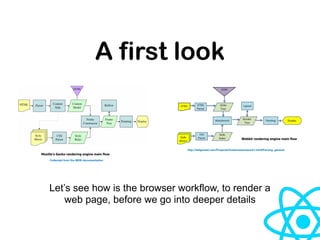
Let’s see how is the browser workflow, to render a
web page, before we go into deeper details
Mozilla's Gecko rendering engine main flow
Webkit rendering engine main flow
http://taligarsiel.com/Projects/howbrowserswork1.htm#Parsing_general
Collected from the MDN documentation
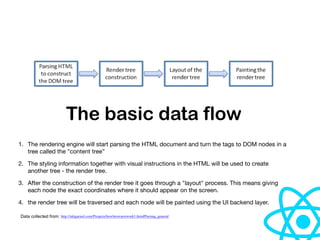
The basic data flow
1. The rendering engine will start parsing the HTML document and turn the tags to DOM nodes in a
tree called the "content tree”

2. The styling information together with visual instructions in the HTML will be used to create
another tree - the render tree.

3. After the construction of the render tree it goes through a "layout" process. This means giving
each node the exact coordinates where it should appear on the screen.

4. the render tree will be traversed and each node will be painted using the UI backend layer.
http://taligarsiel.com/Projects/howbrowserswork1.htm#Parsing_generalData collected from:
Since DOM is represented as a tree structure,
the first render into the DOM is pretty quick!
So, why do we need to use
VDOM?
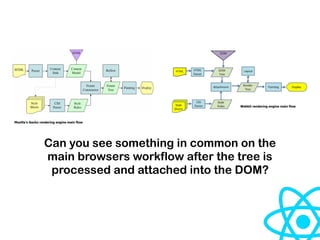
Mozilla's Gecko rendering engine main flow
Webkit rendering engine main flow
Can you see something in common on the
main browsers workflow after the tree is
processed and attached into the DOM?
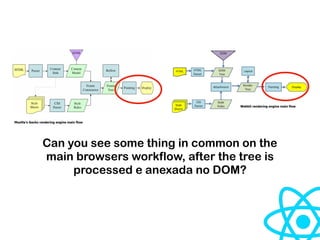
Mozilla's Gecko rendering engine main flow
Webkit rendering engine main flow
Can you see some thing in common on the
main browsers workflow, after the tree is
processed e anexada no DOM?
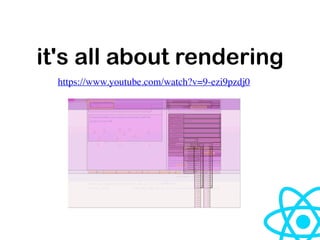
Since DOM is represented as a tree structure, the first
render into the DOM are pretty quick but the changed
element, and its children have to go through Reflow/
Layout stage and then the changes have to be Re-
painted which takes a long time. Therefore the more
items you have to reflow/repaint, the slower your app
becomes.
it's all about rendering
https://www.youtube.com/watch?v=9-ezi9pzdj0
VDOM
"it’s a virtual tree which is kept in the browser memory
and updated in runtime and therefore minimize those
two stages (reflow/repaint) and thereby having a better
performance for a big and complex app”
—Nevinha
How does it work?
When we change something in our Virtual DOM Tree, we get a new
Virtual Tree. The algorithm compares these two trees (old and new),
finds differences and makes only the necessary changes on the DOM,
so at the end it will reflect the virtual DOM.
How is it divided?
1. Node mount representation — React uses JSX and CreateElement
function in order to put it on the virtual tree later. (here) and (here)
2. Mount of the initial virtual tree — It’s possible on web because of
react-dom. (here)
3. Append the VDOM into the DOM — It can be done on the same
function that mounts the virtual tree.
4. For each changes on the virtual tree, the VDOM will compare the
old tree with the new one, in order to see what have been changed
and just re-render the necessary nodes, if and only if it’s necessary.
Node Representation
Basically an element is represented on the VDOM as an object that
contains the following attributes:

• type — The type of the element, which can be a tag name, a function
component (state less) or a class component (state full)
• props or attributes — The attributes of the tag or the custom props
• children — The children that are inside the tag or your component
{
type: "ul",
props: {className: "list"},
children: [
{
type: "li",
props: {},
children: ["item 1"]
},
//{...}
]
}
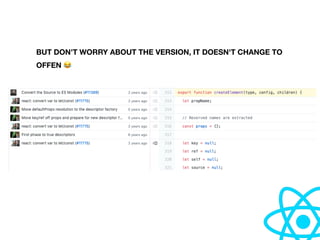
Stay tuned, it’s react based
https://github.com/facebook/react/blob/master/packages/react/src/ReactElement.js#L312
The next slides will be based on the source code of React.js v16.11.0
which can be founded on the link bellow:
BUT DON’T WORRY ABOUT THE VERSION, IT DOESN'T CHANGE TO
OFFEN 😂
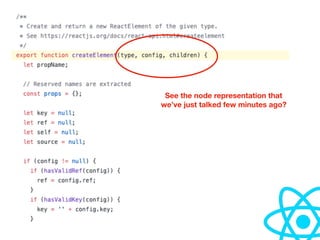
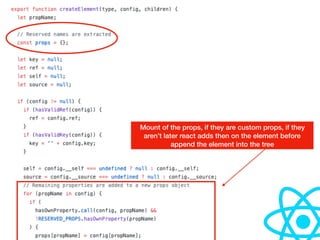
See the node representation that
we’ve just talked few minutes ago?
Mount of the props, if they are custom props, if they
aren’t later react adds then on the element before
append the element into the tree
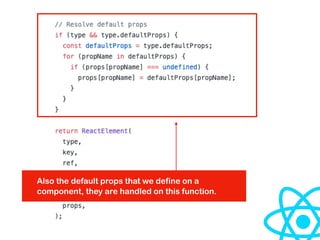
Also the default props that we define on a
component, they are handled on this function.
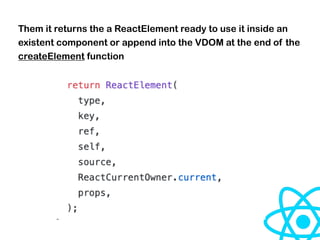
Them it returns the a ReactElement ready to use it inside an
existent component or append into the VDOM at the end of the
createElement function
So far…
Right?
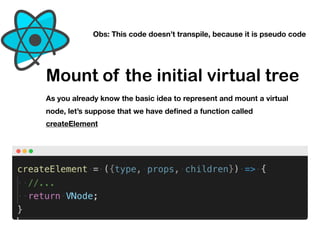
Mount of the initial virtual tree
As you already know the basic idea to represent and mount a virtual
node, let’s suppose that we have defined a function called
createElement
Obs: This code doesn’t transpile, because it is pseudo code
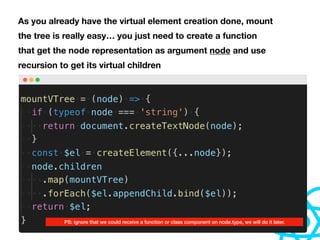
As you already have the virtual element creation done, mount
the tree is really easy… you just need to create a function
that get the node representation as argument node and use
recursion to get its virtual children
PS: ignore that we could receive a function or class component on node.type, we will do it later.
Append the VDOM into the DOM
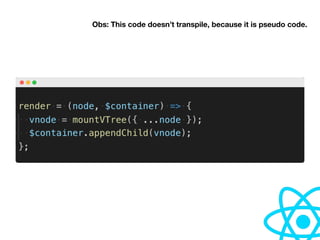
This is the easiest part of the VDOM algorithm, it just uses a function
that takes a component and a container as argument and append the
virtual component, which contains the VTree and append it into the
container.
Obs: This code doesn’t transpile, because it is pseudo code.
Compare changes - DIFF
This is the most important part of the virtual DOM algorithm, it is where
you application get its performance improvement. So basically we
need to write an algorithm, that will compare two virtual trees — old
and new — and make only necessary changes into real DOM.
How react does it?
Actually who is responsible for the DIFF is the react-dom package, on
this link, basically it does diff for the props of a current VTree node,
children and texts.
Let’s see the logic behind the DIFF algorithm that react-dom uses
internally
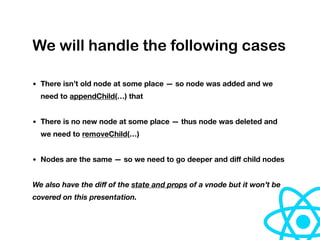
We will handle the following cases
• There isn’t old node at some place — so node was added and we
need to appendChild(…) that
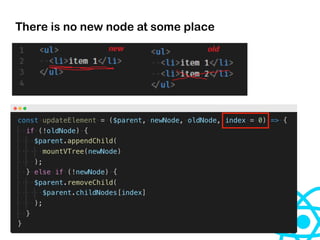
• There is no new node at some place — thus node was deleted and
we need to removeChild(…)
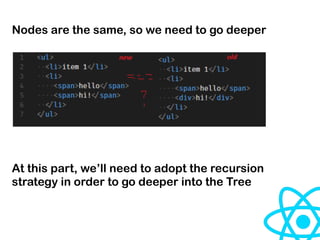
• Nodes are the same — so we need to go deeper and diff child nodes
We also have the diff of the state and props of a vnode but it won’t be
covered on this presentation.
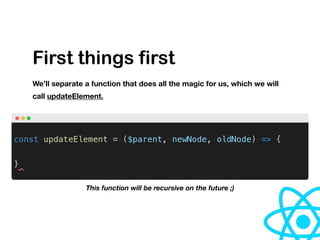
First things first
We’ll separate a function that does all the magic for us, which we will
call updateElement.
This function will be recursive on the future ;)
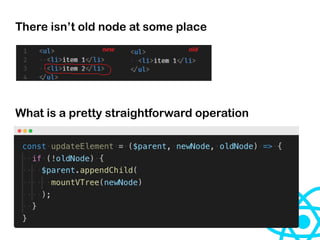
There isn’t old node at some place
What is a pretty straightforward operation
There is no new node at some place
Nodes are the same, so we need to go deeper
At this part, we’ll need to adopt the recursion
strategy in order to go deeper into the Tree
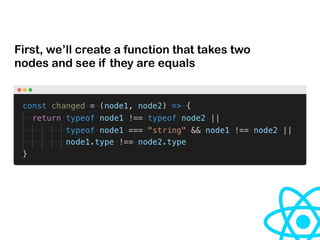
First, we’ll create a function that takes two
nodes and see if they are equals
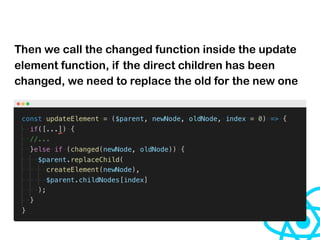
Then we call the changed function inside the update
element function, if the direct children has been
changed, we need to replace the old for the new one
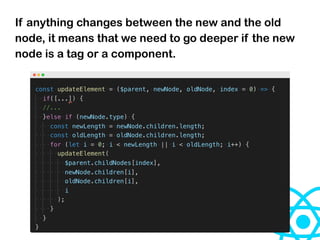
If anything changes between the new and the old
node, it means that we need to go deeper if the new
node is a tag or a component.
The magic is DONE!
You can go beyond
Questions?

The virtual DOM and how react uses it internally

  • 1.
    The Virtual DOM Andhow React uses it internally
  • 2.
    A first look Let’ssee how is the browser workflow, to render a web page, before we go into deeper details Mozilla's Gecko rendering engine main flow Webkit rendering engine main flow http://taligarsiel.com/Projects/howbrowserswork1.htm#Parsing_general Collected from the MDN documentation
  • 3.
    The basic dataflow 1. The rendering engine will start parsing the HTML document and turn the tags to DOM nodes in a tree called the "content tree” 2. The styling information together with visual instructions in the HTML will be used to create another tree - the render tree. 3. After the construction of the render tree it goes through a "layout" process. This means giving each node the exact coordinates where it should appear on the screen. 4. the render tree will be traversed and each node will be painted using the UI backend layer. http://taligarsiel.com/Projects/howbrowserswork1.htm#Parsing_generalData collected from:
  • 4.
    Since DOM isrepresented as a tree structure, the first render into the DOM is pretty quick!
  • 5.
    So, why dowe need to use VDOM?
  • 6.
    Mozilla's Gecko renderingengine main flow Webkit rendering engine main flow Can you see something in common on the main browsers workflow after the tree is processed and attached into the DOM?
  • 7.
    Mozilla's Gecko renderingengine main flow Webkit rendering engine main flow Can you see some thing in common on the main browsers workflow, after the tree is processed e anexada no DOM?
  • 8.
    Since DOM isrepresented as a tree structure, the first render into the DOM are pretty quick but the changed element, and its children have to go through Reflow/ Layout stage and then the changes have to be Re- painted which takes a long time. Therefore the more items you have to reflow/repaint, the slower your app becomes.
  • 9.
    it's all aboutrendering https://www.youtube.com/watch?v=9-ezi9pzdj0
  • 10.
    VDOM "it’s a virtualtree which is kept in the browser memory and updated in runtime and therefore minimize those two stages (reflow/repaint) and thereby having a better performance for a big and complex app” —Nevinha
  • 11.
    How does itwork? When we change something in our Virtual DOM Tree, we get a new Virtual Tree. The algorithm compares these two trees (old and new), finds differences and makes only the necessary changes on the DOM, so at the end it will reflect the virtual DOM.
  • 12.
    How is itdivided? 1. Node mount representation — React uses JSX and CreateElement function in order to put it on the virtual tree later. (here) and (here) 2. Mount of the initial virtual tree — It’s possible on web because of react-dom. (here) 3. Append the VDOM into the DOM — It can be done on the same function that mounts the virtual tree. 4. For each changes on the virtual tree, the VDOM will compare the old tree with the new one, in order to see what have been changed and just re-render the necessary nodes, if and only if it’s necessary.
  • 13.
    Node Representation Basically anelement is represented on the VDOM as an object that contains the following attributes:
 • type — The type of the element, which can be a tag name, a function component (state less) or a class component (state full) • props or attributes — The attributes of the tag or the custom props • children — The children that are inside the tag or your component
  • 14.
    { type: "ul", props: {className:"list"}, children: [ { type: "li", props: {}, children: ["item 1"] }, //{...} ] }
  • 15.
    Stay tuned, it’sreact based https://github.com/facebook/react/blob/master/packages/react/src/ReactElement.js#L312 The next slides will be based on the source code of React.js v16.11.0 which can be founded on the link bellow:
  • 16.
    BUT DON’T WORRYABOUT THE VERSION, IT DOESN'T CHANGE TO OFFEN 😂
  • 17.
    See the noderepresentation that we’ve just talked few minutes ago?
  • 18.
    Mount of theprops, if they are custom props, if they aren’t later react adds then on the element before append the element into the tree
  • 19.
    Also the defaultprops that we define on a component, they are handled on this function.
  • 20.
    Them it returnsthe a ReactElement ready to use it inside an existent component or append into the VDOM at the end of the createElement function
  • 21.
  • 22.
    Mount of theinitial virtual tree As you already know the basic idea to represent and mount a virtual node, let’s suppose that we have defined a function called createElement Obs: This code doesn’t transpile, because it is pseudo code
  • 23.
    As you alreadyhave the virtual element creation done, mount the tree is really easy… you just need to create a function that get the node representation as argument node and use recursion to get its virtual children PS: ignore that we could receive a function or class component on node.type, we will do it later.
  • 24.
    Append the VDOMinto the DOM This is the easiest part of the VDOM algorithm, it just uses a function that takes a component and a container as argument and append the virtual component, which contains the VTree and append it into the container.
  • 25.
    Obs: This codedoesn’t transpile, because it is pseudo code.
  • 26.
    Compare changes -DIFF This is the most important part of the virtual DOM algorithm, it is where you application get its performance improvement. So basically we need to write an algorithm, that will compare two virtual trees — old and new — and make only necessary changes into real DOM.
  • 27.
    How react doesit? Actually who is responsible for the DIFF is the react-dom package, on this link, basically it does diff for the props of a current VTree node, children and texts. Let’s see the logic behind the DIFF algorithm that react-dom uses internally
  • 28.
    We will handlethe following cases • There isn’t old node at some place — so node was added and we need to appendChild(…) that • There is no new node at some place — thus node was deleted and we need to removeChild(…) • Nodes are the same — so we need to go deeper and diff child nodes We also have the diff of the state and props of a vnode but it won’t be covered on this presentation.
  • 29.
    First things first We’llseparate a function that does all the magic for us, which we will call updateElement. This function will be recursive on the future ;)
  • 30.
    There isn’t oldnode at some place What is a pretty straightforward operation
  • 31.
    There is nonew node at some place
  • 32.
    Nodes are thesame, so we need to go deeper At this part, we’ll need to adopt the recursion strategy in order to go deeper into the Tree
  • 33.
    First, we’ll createa function that takes two nodes and see if they are equals
  • 34.
    Then we callthe changed function inside the update element function, if the direct children has been changed, we need to replace the old for the new one
  • 35.
    If anything changesbetween the new and the old node, it means that we need to go deeper if the new node is a tag or a component.
  • 36.
  • 39.
    You can gobeyond
  • 40.