DB BEST PRACTICES
         FOR WEB APPS


Patterns and Tools for Database Versioning, Migration,
           Data Loading and Data for Tests


         CodeWorks - Atlanta - 9/29/2009
WHO AM I?

Alan Pinstein
@apinstein
apinstein@mac.com
Serial Entrepreneur, current project is Neybor.com
PHP Since 3.0 (~1997), C/C++/Obj-C, Cocoa, etc
PHOCOA PHP Framework http://phocoa.com
On GitHub: http://github.com/apinstein
Atlanta Co-working:
IgnitionAlley.com 151Locust.com
AGENDA

Common DB management problems that cause
frustration and stress

Benefits of formalized solutions

Case Studies

Tools: MP, fixtures, rake, capistrano

Q&A
LIVE Q&A & POLLS


http://codeatl09.eventhive.com/

• Live, crowd-moderated questions & feedback
• Live polls
[production-db] update user set password_md5 = md5(password);
[production-db] alter table user drop column password;
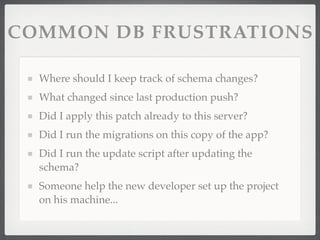
COMMON DB FRUSTRATIONS

  Where should I keep track of schema changes?
  What changed since last production push?
  Did I apply this patch already to this server?
  Did I run the migrations on this copy of the app?
  Did I run the update script after updating the
  schema?
  Someone help the new developer set up the project
  on his machine...
BENEFITS OF BEST
        PRACTICES
Reproducibility

Reduction of complexity and risk

Reduced implementation time for DB changes

Increase in development throughput

Leverage from improvements in third-party tools

Community familiarity with workflows
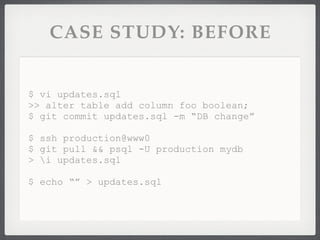
CASE STUDY: BEFORE


$ vi updates.sql
>> alter table add column foo boolean;
$ git commit updates.sql -m “DB change”

$ ssh production@www0
$ git pull && psql -U production mydb
> i updates.sql

$ echo “” > updates.sql
CASE STUDY: BEFORE


FRAGILE process.

Quickly falls apart with 2+ devs or 2+ servers.

Branches? Fugghetaboutit.
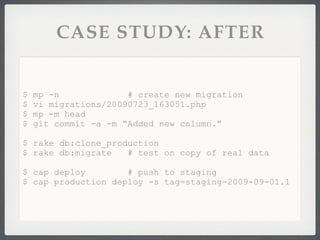
CASE STUDY: AFTER


$   mp -n             # create new migration
$   vi migrations/20090723_163051.php
$   mp -m head
$   git commit -a -m “Added new column.”

$ rake db:clone_production
$ rake db:migrate   # test on copy of real data

$ cap deploy        # push to staging
$ cap production deploy -s tag=staging-2009-09-01.1
CASE STUDY: AFTER

Each DB change encapsulated in a single migration
script
Only code what’s unique to your app
Deployment script automatically runs all necessary
migration scripts on production database
immediately after code deploys
Nothing to remember / eliminates human factor
Easy to test, easy to reproduce
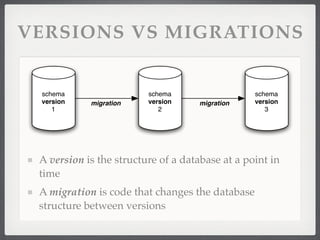
VERSIONS VS MIGRATIONS


 schema                  schema                  schema
 version    migration    version     migration   version
    1                       2                       3


 A version is the structure of a database at a point in
 time
 A migration is code that changes the database
 structure between versions
SCHEMA VERSIONING


Tracking Blocks of Changes

Sharing Changes With Others

Deploying Changes to Staging & Production
TRACKING
    SCHEMA CHANGES


Explicit

  Expressing changes as SQL or meta DDLs

Implicit

  Schema Diffs
MP: MIGRATIONS FOR PHP

 Generic migrations infrastrructure for any project

 Open Source (MIT)
 http://github.com/apinstein/mp/tree/master

   Within 3 weeks, had:
    28 public clones
    1 fork
    8 watchers

   GitHub rocks
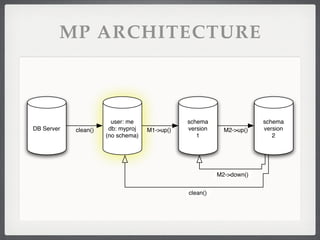
MP ARCHITECTURE


                        user: me               schema                 schema
DB Server   clean()    db: myproj   M1->up()   version     M2->up()   version
                      (no schema)                 1                      2


                                                         M2->down()


                                               clean()
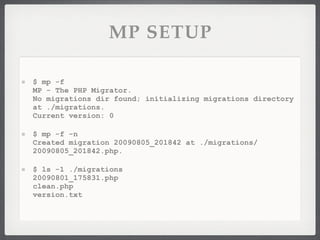
MP SETUP

$ mp -f
MP - The PHP Migrator.
No migrations dir found; initializing migrations directory
at ./migrations.
Current version: 0

$ mp -f -n
Created migration 20090805_201842 at ./migrations/
20090805_201842.php.

$ ls -1 ./migrations
20090801_175831.php
clean.php
version.txt
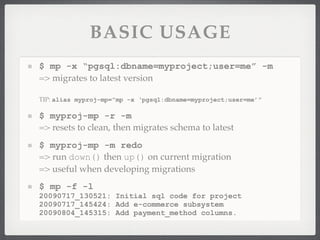
BASIC USAGE
$ mp -x “pgsql:dbname=myproject;user=me” -m
=> migrates to latest version

TIP: alias myproj-mp=”mp -x ‘pgsql:dbname=myproject;user=me’”

$ myproj-mp -r -m
=> resets to clean, then migrates schema to latest
$ myproj-mp -m redo
=> run down() then up() on current migration
=> useful when developing migrations
$ mp -f -l
20090717_130521: Initial sql code for project
20090717_145424: Add e-commerce subsystem
20090804_145315: Add payment_method columns.
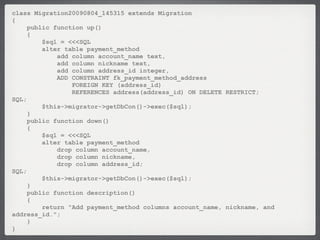
class Migration20090804_145315 extends Migration
{
     public function up()
     {
         $sql = <<<SQL
         alter table payment_method
             add column account_name text,
             add column nickname text,
             add column address_id integer,
             ADD CONSTRAINT fk_payment_method_address
                 FOREIGN KEY (address_id)
                 REFERENCES address(address_id) ON DELETE RESTRICT;
SQL;
         $this->migrator->getDbCon()->exec($sql);
     }
     public function down()
     {
         $sql = <<<SQL
         alter table payment_method
             drop column account_name,
             drop column nickname,
             drop column address_id;
SQL;
         $this->migrator->getDbCon()->exec($sql);
     }
     public function description()
     {
         return "Add payment_method columns account_name, nickname, and
address_id.";
     }
}
MP IN PRACTICE

NEVER edit a migration once it’s been relied upon by
anyone else.

  Ideally never edit once pushed to Version Control.

ALWAYS update clean.php to deal with each
migration.

ALWAYS test migrations with redo and clean.

ALWAYS test migrations against a production clone
before deployment.
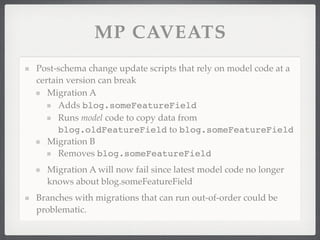
MP CAVEATS
Post-schema change update scripts that rely on model code at a
certain version can break
   Migration A
      Adds blog.someFeatureField
      Runs model code to copy data from
      blog.oldFeatureField to blog.someFeatureField
   Migration B
      Removes blog.someFeatureField
  Migration A will now fail since latest model code no longer
  knows about blog.someFeatureField
Branches with migrations that can run out-of-order could be
problematic.
MP CAVEATS


Possible solutions:

  Remove migration once it’s run everywhere

  Catch errors and fail gracefully

  Write upgrade scripts without using model code.
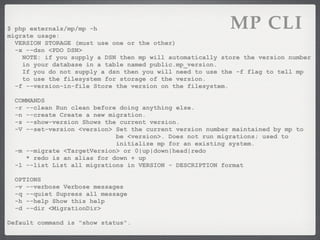
$ php externals/mp/mp -h
migrate usage:
                                                           MP CLI
  VERSION STORAGE (must use one or the other)
  -x --dsn <PDO DSN>
    NOTE: if you supply a DSN then mp will automatically store the version number
    in your database in a table named public.mp_version.
    If you do not supply a dsn then you will need to use the -f flag to tell mp
    to use the filesystem for storage of the version.
  -f --version-in-file Store the version on the filesystem.

  COMMANDS
  -r --clean Run clean before doing anything else.
  -n --create Create a new migration.
  -s --show-version Shows the current version.
  -V --set-version <version> Set the current version number maintained by mp to
                             be <version>. Does not run migrations; used to
                             initialize mp for an existing system.
  -m --migrate <TargetVersion> or 0|up|down|head|redo
     * redo is an alias for down + up
  -l --list List all migrations in VERSION - DESCRIPTION format

  OPTIONS
  -v --verbose Verbose messages
  -q --quiet Supress all message
  -h --help Show this help
  -d --dir <MigrationDir>

Default command is "show status".
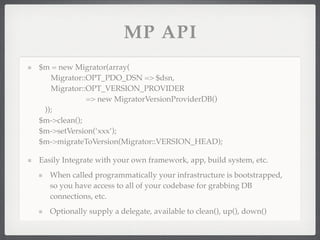
MP API
$m = new Migrator(array(
   Migrator::OPT_PDO_DSN => $dsn,
   Migrator::OPT_VERSION_PROVIDER
             => new MigratorVersionProviderDB()
 ));
$m->clean();
$m->setVersion(‘xxx’);
$m->migrateToVersion(Migrator::VERSION_HEAD);

Easily Integrate with your own framework, app, build system, etc.
   When called programmatically your infrastructure is bootstrapped,
   so you have access to all of your codebase for grabbing DB
   connections, etc.
   Optionally supply a delegate, available to clean(), up(), down()
DB BEST PRACTICES

DB Naming Conventions:
  Name: project, project_dev, project_staging
  User: user
  Password: different for each machine
Script to clone production database to local/staging

ssh -C user@host                                     
   'pg_dump                                          
      --clean --schema-only -U appUser -h 10.0.10.48 
      myProject'                                     
| psql -U appUser myProject_dev
DATA LOADING - FIXTURES


 Example - using WFFixture from phocoa php framework

   Declarative, model-aware infrastructure makes setup
   of test rigs fast and easy

   YAML for readability

   Useful for loading real baseline data as well as test
   data
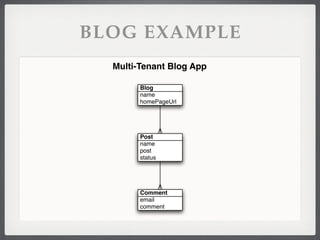
BLOG EXAMPLE
  Multi-Tenant Blog App

        Blog
        name
        homePageUrl


        Post
        name
        post
        status


        Comment
        email
        comment
$fixture = <<<END
Blog:
     reasonablyOpinionatedBlog:
         name: Reasonably Opinionated
         homePageUrl: 'http://reasonablyopinionated.com'
Post:
     rant1:
         Blog: reasonablyOpinionatedBlog
         name: Database Migration is Hard
         post: Database Migration is Hard...
         status: structureTypeId: <?php BlogStatus::NOT_YET_PUBLISHED ?>
         Comment: # to-many
             - email: rudecommenter@blah.com
               comment: this post sucks
             - email: apinstein@mac.com
               comment: you suck!
     rant2:
         Blog:   # to-one
             name: Some Other Blog
             homePageUrl: http://someotherblog.com
         name: Cantankerous rant on php 3
         post: PHP3 is so old...
         status: structureTypeId: <?php BlogStatus::PUBLISHED ?>
END;
$results = WFFixture::WFFixture()->loadFromYaml($fixture);
$this->rant1 = $results['rant1'];
WORKFLOW INTEGRATION


 AUTOMATE!!!

 Use build tools: phing, rake, capistrano etc
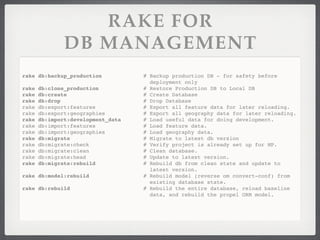
RAKE FOR
               DB MANAGEMENT
rake db:backup_production           # Backup production DB - for safety before
                                      deployment only
rake   db:clone_production          # Restore Production DB to Local DB
rake   db:create                    # Create Database
rake   db:drop                      # Drop Database
rake   db:export:features           # Export all feature data for later reloading.
rake   db:export:geographies        # Export all geography data for later reloading.
rake   db:import:development_data   # Load useful data for doing development.
rake   db:import:features           # Load feature data.
rake   db:import:geographies        # Load geography data.
rake   db:migrate                   # Migrate to latest db version
rake   db:migrate:check             # Verify project is already set up for MP.
rake   db:migrate:clean             # Clean database.
rake   db:migrate:head              # Update to latest version.
rake   db:migrate:rebuild           # Rebuild db from clean state and update to
                                      latest version.
rake db:model:rebuild               # Rebuild model (reverse om convert-conf) from
                                      existing database state.
rake db:rebuild                     # Rebuild the entire database, reload baseline
                                      data, and rebuild the propel ORM model.
MP ROADMAP


Support for pinning migrations to specific VCS tags?

Support for manifesting irreversible migrations?
Questions?

Patterns and Tools for Database Versioning, Migration, Data Loading and Test Data.

  • 1.
    DB BEST PRACTICES FOR WEB APPS Patterns and Tools for Database Versioning, Migration, Data Loading and Data for Tests CodeWorks - Atlanta - 9/29/2009
  • 2.
    WHO AM I? AlanPinstein @apinstein apinstein@mac.com Serial Entrepreneur, current project is Neybor.com PHP Since 3.0 (~1997), C/C++/Obj-C, Cocoa, etc PHOCOA PHP Framework http://phocoa.com On GitHub: http://github.com/apinstein Atlanta Co-working: IgnitionAlley.com 151Locust.com
  • 3.
    AGENDA Common DB managementproblems that cause frustration and stress Benefits of formalized solutions Case Studies Tools: MP, fixtures, rake, capistrano Q&A
  • 4.
    LIVE Q&A &POLLS http://codeatl09.eventhive.com/ • Live, crowd-moderated questions & feedback • Live polls
  • 5.
    [production-db] update userset password_md5 = md5(password); [production-db] alter table user drop column password;
  • 6.
    COMMON DB FRUSTRATIONS Where should I keep track of schema changes? What changed since last production push? Did I apply this patch already to this server? Did I run the migrations on this copy of the app? Did I run the update script after updating the schema? Someone help the new developer set up the project on his machine...
  • 7.
    BENEFITS OF BEST PRACTICES Reproducibility Reduction of complexity and risk Reduced implementation time for DB changes Increase in development throughput Leverage from improvements in third-party tools Community familiarity with workflows
  • 8.
    CASE STUDY: BEFORE $vi updates.sql >> alter table add column foo boolean; $ git commit updates.sql -m “DB change” $ ssh production@www0 $ git pull && psql -U production mydb > i updates.sql $ echo “” > updates.sql
  • 9.
    CASE STUDY: BEFORE FRAGILEprocess. Quickly falls apart with 2+ devs or 2+ servers. Branches? Fugghetaboutit.
  • 10.
    CASE STUDY: AFTER $ mp -n # create new migration $ vi migrations/20090723_163051.php $ mp -m head $ git commit -a -m “Added new column.” $ rake db:clone_production $ rake db:migrate # test on copy of real data $ cap deploy # push to staging $ cap production deploy -s tag=staging-2009-09-01.1
  • 11.
    CASE STUDY: AFTER EachDB change encapsulated in a single migration script Only code what’s unique to your app Deployment script automatically runs all necessary migration scripts on production database immediately after code deploys Nothing to remember / eliminates human factor Easy to test, easy to reproduce
  • 12.
    VERSIONS VS MIGRATIONS schema schema schema version migration version migration version 1 2 3 A version is the structure of a database at a point in time A migration is code that changes the database structure between versions
  • 13.
    SCHEMA VERSIONING Tracking Blocksof Changes Sharing Changes With Others Deploying Changes to Staging & Production
  • 14.
    TRACKING SCHEMA CHANGES Explicit Expressing changes as SQL or meta DDLs Implicit Schema Diffs
  • 15.
    MP: MIGRATIONS FORPHP Generic migrations infrastrructure for any project Open Source (MIT) http://github.com/apinstein/mp/tree/master Within 3 weeks, had: 28 public clones 1 fork 8 watchers GitHub rocks
  • 16.
    MP ARCHITECTURE user: me schema schema DB Server clean() db: myproj M1->up() version M2->up() version (no schema) 1 2 M2->down() clean()
  • 17.
    MP SETUP $ mp-f MP - The PHP Migrator. No migrations dir found; initializing migrations directory at ./migrations. Current version: 0 $ mp -f -n Created migration 20090805_201842 at ./migrations/ 20090805_201842.php. $ ls -1 ./migrations 20090801_175831.php clean.php version.txt
  • 18.
    BASIC USAGE $ mp-x “pgsql:dbname=myproject;user=me” -m => migrates to latest version TIP: alias myproj-mp=”mp -x ‘pgsql:dbname=myproject;user=me’” $ myproj-mp -r -m => resets to clean, then migrates schema to latest $ myproj-mp -m redo => run down() then up() on current migration => useful when developing migrations $ mp -f -l 20090717_130521: Initial sql code for project 20090717_145424: Add e-commerce subsystem 20090804_145315: Add payment_method columns.
  • 19.
    class Migration20090804_145315 extendsMigration { public function up() { $sql = <<<SQL alter table payment_method add column account_name text, add column nickname text, add column address_id integer, ADD CONSTRAINT fk_payment_method_address FOREIGN KEY (address_id) REFERENCES address(address_id) ON DELETE RESTRICT; SQL; $this->migrator->getDbCon()->exec($sql); } public function down() { $sql = <<<SQL alter table payment_method drop column account_name, drop column nickname, drop column address_id; SQL; $this->migrator->getDbCon()->exec($sql); } public function description() { return "Add payment_method columns account_name, nickname, and address_id."; } }
  • 20.
    MP IN PRACTICE NEVERedit a migration once it’s been relied upon by anyone else. Ideally never edit once pushed to Version Control. ALWAYS update clean.php to deal with each migration. ALWAYS test migrations with redo and clean. ALWAYS test migrations against a production clone before deployment.
  • 21.
    MP CAVEATS Post-schema changeupdate scripts that rely on model code at a certain version can break Migration A Adds blog.someFeatureField Runs model code to copy data from blog.oldFeatureField to blog.someFeatureField Migration B Removes blog.someFeatureField Migration A will now fail since latest model code no longer knows about blog.someFeatureField Branches with migrations that can run out-of-order could be problematic.
  • 22.
    MP CAVEATS Possible solutions: Remove migration once it’s run everywhere Catch errors and fail gracefully Write upgrade scripts without using model code.
  • 23.
    $ php externals/mp/mp-h migrate usage: MP CLI VERSION STORAGE (must use one or the other) -x --dsn <PDO DSN> NOTE: if you supply a DSN then mp will automatically store the version number in your database in a table named public.mp_version. If you do not supply a dsn then you will need to use the -f flag to tell mp to use the filesystem for storage of the version. -f --version-in-file Store the version on the filesystem. COMMANDS -r --clean Run clean before doing anything else. -n --create Create a new migration. -s --show-version Shows the current version. -V --set-version <version> Set the current version number maintained by mp to be <version>. Does not run migrations; used to initialize mp for an existing system. -m --migrate <TargetVersion> or 0|up|down|head|redo * redo is an alias for down + up -l --list List all migrations in VERSION - DESCRIPTION format OPTIONS -v --verbose Verbose messages -q --quiet Supress all message -h --help Show this help -d --dir <MigrationDir> Default command is "show status".
  • 24.
    MP API $m =new Migrator(array( Migrator::OPT_PDO_DSN => $dsn, Migrator::OPT_VERSION_PROVIDER => new MigratorVersionProviderDB() )); $m->clean(); $m->setVersion(‘xxx’); $m->migrateToVersion(Migrator::VERSION_HEAD); Easily Integrate with your own framework, app, build system, etc. When called programmatically your infrastructure is bootstrapped, so you have access to all of your codebase for grabbing DB connections, etc. Optionally supply a delegate, available to clean(), up(), down()
  • 25.
    DB BEST PRACTICES DBNaming Conventions: Name: project, project_dev, project_staging User: user Password: different for each machine Script to clone production database to local/staging ssh -C user@host 'pg_dump --clean --schema-only -U appUser -h 10.0.10.48 myProject' | psql -U appUser myProject_dev
  • 26.
    DATA LOADING -FIXTURES Example - using WFFixture from phocoa php framework Declarative, model-aware infrastructure makes setup of test rigs fast and easy YAML for readability Useful for loading real baseline data as well as test data
  • 27.
    BLOG EXAMPLE Multi-Tenant Blog App Blog name homePageUrl Post name post status Comment email comment
  • 28.
    $fixture = <<<END Blog: reasonablyOpinionatedBlog: name: Reasonably Opinionated homePageUrl: 'http://reasonablyopinionated.com' Post: rant1: Blog: reasonablyOpinionatedBlog name: Database Migration is Hard post: Database Migration is Hard... status: structureTypeId: <?php BlogStatus::NOT_YET_PUBLISHED ?> Comment: # to-many - email: rudecommenter@blah.com comment: this post sucks - email: apinstein@mac.com comment: you suck! rant2: Blog: # to-one name: Some Other Blog homePageUrl: http://someotherblog.com name: Cantankerous rant on php 3 post: PHP3 is so old... status: structureTypeId: <?php BlogStatus::PUBLISHED ?> END; $results = WFFixture::WFFixture()->loadFromYaml($fixture); $this->rant1 = $results['rant1'];
  • 29.
    WORKFLOW INTEGRATION AUTOMATE!!! Use build tools: phing, rake, capistrano etc
  • 30.
    RAKE FOR DB MANAGEMENT rake db:backup_production # Backup production DB - for safety before deployment only rake db:clone_production # Restore Production DB to Local DB rake db:create # Create Database rake db:drop # Drop Database rake db:export:features # Export all feature data for later reloading. rake db:export:geographies # Export all geography data for later reloading. rake db:import:development_data # Load useful data for doing development. rake db:import:features # Load feature data. rake db:import:geographies # Load geography data. rake db:migrate # Migrate to latest db version rake db:migrate:check # Verify project is already set up for MP. rake db:migrate:clean # Clean database. rake db:migrate:head # Update to latest version. rake db:migrate:rebuild # Rebuild db from clean state and update to latest version. rake db:model:rebuild # Rebuild model (reverse om convert-conf) from existing database state. rake db:rebuild # Rebuild the entire database, reload baseline data, and rebuild the propel ORM model.
  • 31.
    MP ROADMAP Support forpinning migrations to specific VCS tags? Support for manifesting irreversible migrations?
  • 32.