VISUAL BASIC 6.0 DATABASE
MANAGEMENT SYSTEM
 NAME : P.NIROJAN
 Ad.No : 0041
 GROUP : CIVIL 2nd
YEAR
 DATE OF SUBMISSION : 05 / 01 / 2016
 Question:
Create visual basic project to draw the outline of a land area of land using longitudes and
latitude values. Assume that you can use MS Access data base to store the coordinates,
Table:-
 Point ID
 Longitudes
 Latitude
 Land ID
Your project should do the followings:-
 Enter new coordinate
 Edit the coordinate
 Delete unnecessary coordinate
 List OR View all coordinate
 List OR View all coordinate of the selected land
 Draw outline of the land
 Draw outline of the select land
Use the following object in your project:-
 Connection object
 Record set object
 Commend object
Submission 1st
week January [ Interface , used control , coding ]
 Creating Data Base using MS Access
1) Starting access methods
 Start programes Microsoft Office Access
 Double click desktop microsoft Access Icon
2) In the temple window select BLANK DATABASE and then enter database name
as “LANDAREA” finally click create button. Then “LANDAREA” database window
appears with in MS Access window.
3) When you select CREATE > Table Design.A table design window appears. Enter
your field name,data type and size.finally save the table
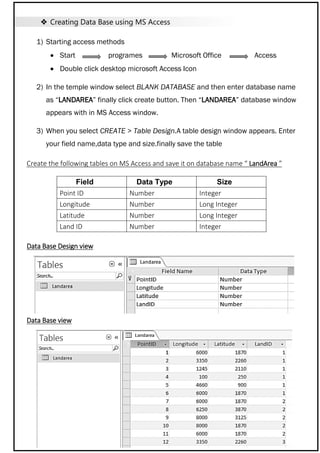
Create the following tables on MS Access and save it on database name “ LandArea ”
Data Base Design view
Data Base view
Field Data Type Size
Point ID Number Integer
Longitude Number Long Integer
Latitude Number Long Integer
Land ID Number Integer
 Saving Data Base in MS Access
Vissual basic 6.0 to connect the database in MS Access must important the Access
2002–2003 Database formate and “ _ _ .mdb” file type
 Creating programme using Visual Basic
1) Open Vissual Basic 6.0
2) Select the “Standard EXE” and then click open botton
3) In visual basic screen , go to “PROJECT” tap then click
“REFFRENCE” then select “Microsoft ActiveX Data
Objects Recordset 6.0 Library” then click “OK” Button.
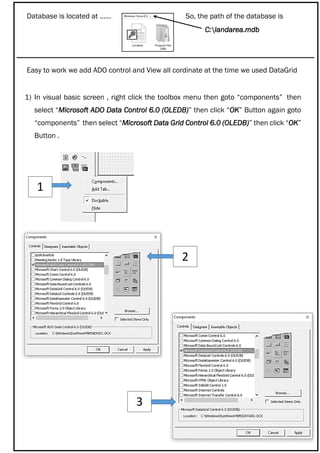
Database is located at …… So, the path of the database is
C:landarea.mdb
Easy to work we add ADO control and View all cordinate at the time we used DataGrid
1) In visual basic screen , right click the toolbox menu then goto “components” then
select “Microsoft ADO Data Control 6.0 (OLEDB)” then click “OK” Button again goto
“components” then select “Microsoft Data Grid Control 6.0 (OLEDB)” then click “OK”
Button .
1
2
3
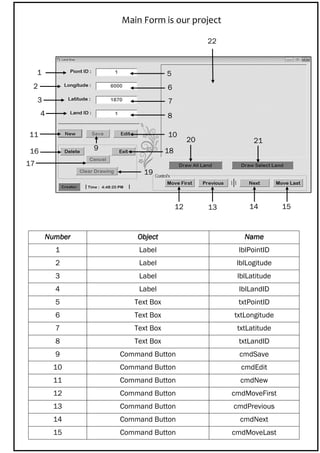
Main Form is our project
Number Object Name
1 Label lblPointID
2 Label lblLogitude
3 Label lblLatitude
4 Label lblLandID
5 Text Box txtPointID
6 Text Box txtLongitude
7 Text Box txtLatitude
8 Text Box txtLandID
9 Command Button cmdSave
10 Command Button cmdEdit
11 Command Button cmdNew
12 Command Button cmdMoveFirst
13 Command Button cmdPrevious
14 Command Button cmdNext
15 Command Button cmdMoveLast
1
2
3
1
4
5
1
6
7
1
8
1
11 10
9
12
4
13
34
14
34
15
34
16
3417
34
18
34
19
20
34
21
22
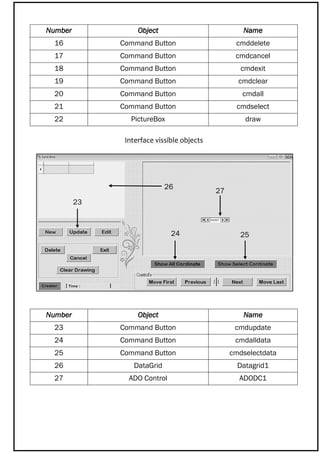
Interface vissible objects
Number Object Name
16 Command Button cmddelete
17 Command Button cmdcancel
18 Command Button cmdexit
19 Command Button cmdclear
20 Command Button cmdall
21 Command Button cmdselect
22 PictureBox draw
Number Object Name
23 Command Button cmdupdate
24 Command Button cmdalldata
25 Command Button cmdselectdata
26 DataGrid Datagrid1
27 ADO Control ADODC1
23
34
24 25
26
27
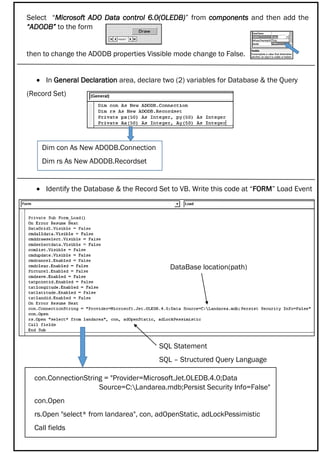
Select “Microsoft ADO Data control 6.0(OLEDB)” from components and then add the
“ADODB” to the form
then to change the ADODB properties Vissible mode change to False.
 In General Declaration area, declare two (2) variables for Database & the Query
(Record Set)
Dim con As New ADODB.Connection
Dim rs As New ADODB.Recordset
 Identify the Database & the Record Set to VB. Write this code at “FORM” Load Event
con.ConnectionString = "Provider=Microsoft.Jet.OLEDB.4.0;Data
Source=C:Landarea.mdb;Persist Security Info=False"
con.Open
rs.Open "select* from landarea", con, adOpenStatic, adLockPessimistic
Call fields
DataBase location(path)
SQL Statement
SQL – Structured Query Language
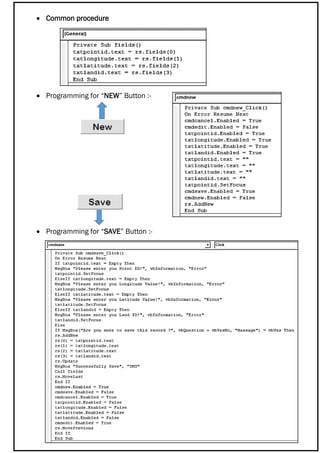
 Common procedure
 Programming for “NEW” Button :-
 Programming for “SAVE” Button :-
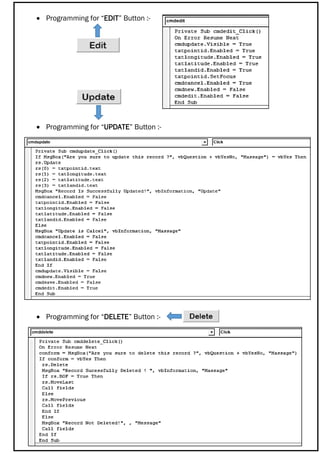
 Programming for “EDIT” Button :-
 Programming for “UPDATE” Button :-
 Programming for “DELETE” Button :-
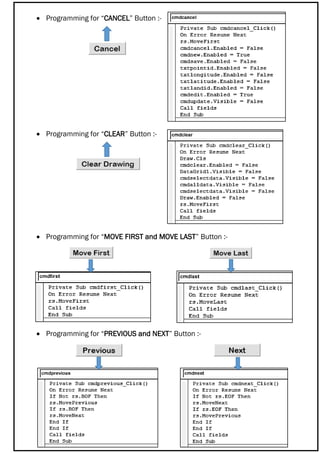
 Programming for “CANCEL” Button :-
 Programming for “CLEAR” Button :-
 Programming for “MOVE FIRST and MOVE LAST” Button :-
 Programming for “PREVIOUS and NEXT” Button :-
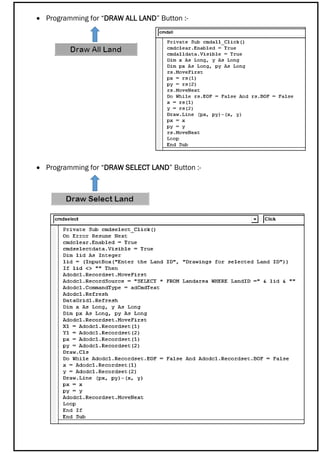
 Programming for “DRAW ALL LAND” Button :-
 Programming for “DRAW SELECT LAND” Button :-
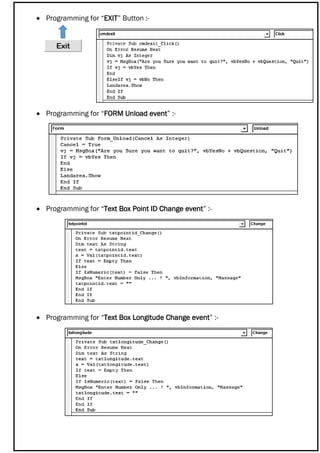
 Programming for “EXIT” Button :-
 Programming for “FORM Unload event” :-
 Programming for “Text Box Point ID Change event” :-
 Programming for “Text Box Longitude Change event” :-
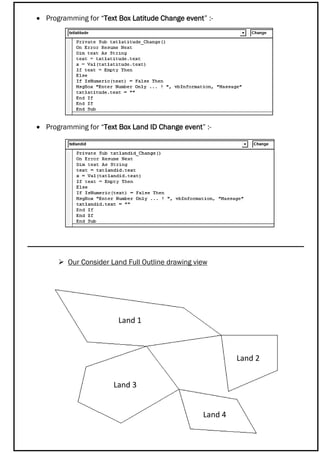
 Programming for “Text Box Latitude Change event” :-
 Programming for “Text Box Land ID Change event” :-
 Our Consider Land Full Outline drawing view
Land 1
Land 3
Land 2
Land 4

DATABASE MANAGEMENT SYSTEM

  • 1.
    VISUAL BASIC 6.0DATABASE MANAGEMENT SYSTEM  NAME : P.NIROJAN  Ad.No : 0041  GROUP : CIVIL 2nd YEAR  DATE OF SUBMISSION : 05 / 01 / 2016
  • 2.
     Question: Create visualbasic project to draw the outline of a land area of land using longitudes and latitude values. Assume that you can use MS Access data base to store the coordinates, Table:-  Point ID  Longitudes  Latitude  Land ID Your project should do the followings:-  Enter new coordinate  Edit the coordinate  Delete unnecessary coordinate  List OR View all coordinate  List OR View all coordinate of the selected land  Draw outline of the land  Draw outline of the select land Use the following object in your project:-  Connection object  Record set object  Commend object Submission 1st week January [ Interface , used control , coding ]
  • 3.
     Creating DataBase using MS Access 1) Starting access methods  Start programes Microsoft Office Access  Double click desktop microsoft Access Icon 2) In the temple window select BLANK DATABASE and then enter database name as “LANDAREA” finally click create button. Then “LANDAREA” database window appears with in MS Access window. 3) When you select CREATE > Table Design.A table design window appears. Enter your field name,data type and size.finally save the table Create the following tables on MS Access and save it on database name “ LandArea ” Data Base Design view Data Base view Field Data Type Size Point ID Number Integer Longitude Number Long Integer Latitude Number Long Integer Land ID Number Integer
  • 4.
     Saving DataBase in MS Access Vissual basic 6.0 to connect the database in MS Access must important the Access 2002–2003 Database formate and “ _ _ .mdb” file type  Creating programme using Visual Basic 1) Open Vissual Basic 6.0 2) Select the “Standard EXE” and then click open botton 3) In visual basic screen , go to “PROJECT” tap then click “REFFRENCE” then select “Microsoft ActiveX Data Objects Recordset 6.0 Library” then click “OK” Button.
  • 5.
    Database is locatedat …… So, the path of the database is C:landarea.mdb Easy to work we add ADO control and View all cordinate at the time we used DataGrid 1) In visual basic screen , right click the toolbox menu then goto “components” then select “Microsoft ADO Data Control 6.0 (OLEDB)” then click “OK” Button again goto “components” then select “Microsoft Data Grid Control 6.0 (OLEDB)” then click “OK” Button . 1 2 3
  • 6.
    Main Form isour project Number Object Name 1 Label lblPointID 2 Label lblLogitude 3 Label lblLatitude 4 Label lblLandID 5 Text Box txtPointID 6 Text Box txtLongitude 7 Text Box txtLatitude 8 Text Box txtLandID 9 Command Button cmdSave 10 Command Button cmdEdit 11 Command Button cmdNew 12 Command Button cmdMoveFirst 13 Command Button cmdPrevious 14 Command Button cmdNext 15 Command Button cmdMoveLast 1 2 3 1 4 5 1 6 7 1 8 1 11 10 9 12 4 13 34 14 34 15 34 16 3417 34 18 34 19 20 34 21 22
  • 7.
    Interface vissible objects NumberObject Name 16 Command Button cmddelete 17 Command Button cmdcancel 18 Command Button cmdexit 19 Command Button cmdclear 20 Command Button cmdall 21 Command Button cmdselect 22 PictureBox draw Number Object Name 23 Command Button cmdupdate 24 Command Button cmdalldata 25 Command Button cmdselectdata 26 DataGrid Datagrid1 27 ADO Control ADODC1 23 34 24 25 26 27
  • 8.
    Select “Microsoft ADOData control 6.0(OLEDB)” from components and then add the “ADODB” to the form then to change the ADODB properties Vissible mode change to False.  In General Declaration area, declare two (2) variables for Database & the Query (Record Set) Dim con As New ADODB.Connection Dim rs As New ADODB.Recordset  Identify the Database & the Record Set to VB. Write this code at “FORM” Load Event con.ConnectionString = "Provider=Microsoft.Jet.OLEDB.4.0;Data Source=C:Landarea.mdb;Persist Security Info=False" con.Open rs.Open "select* from landarea", con, adOpenStatic, adLockPessimistic Call fields DataBase location(path) SQL Statement SQL – Structured Query Language
  • 9.
     Common procedure Programming for “NEW” Button :-  Programming for “SAVE” Button :-
  • 10.
     Programming for“EDIT” Button :-  Programming for “UPDATE” Button :-  Programming for “DELETE” Button :-
  • 11.
     Programming for“CANCEL” Button :-  Programming for “CLEAR” Button :-  Programming for “MOVE FIRST and MOVE LAST” Button :-  Programming for “PREVIOUS and NEXT” Button :-
  • 12.
     Programming for“DRAW ALL LAND” Button :-  Programming for “DRAW SELECT LAND” Button :-
  • 13.
     Programming for“EXIT” Button :-  Programming for “FORM Unload event” :-  Programming for “Text Box Point ID Change event” :-  Programming for “Text Box Longitude Change event” :-
  • 14.
     Programming for“Text Box Latitude Change event” :-  Programming for “Text Box Land ID Change event” :-  Our Consider Land Full Outline drawing view Land 1 Land 3 Land 2 Land 4