Introducing Datacontrols by Praveen Nandagiri
Agenda Data Binding with No Code Grid View Control Data list Control Repeater Control Creating a master page and apply to other content pages
Binding Data to Controls Data controls are the controls which accept  data source and show  the data to the viewer or programmer. Here data source may be a database , xml file or any other file.
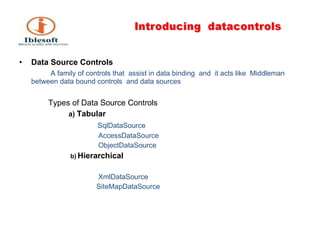
Data Source Controls A family of controls that  assist in data binding  and  it acts like  Middleman between data bound controls  and data sources Types of Data Source Controls a)  Tabular SqlDataSource AccessDataSource ObjectDataSource b)   Hierarchical XmlDataSource SiteMapDataSource
Here we have to use ADO.Net to bind data to the datacontrols . In this we have to use sql data adapter and dataset to bind to the data to the control  which are in  ADO.NET . When we update and delete data from database ,we have to use  Sql command which is in ADO.NET.
1)Grid view GridView control is a successor to the ASP.NET 1.X DataGrid control. It provides more flexibility in displaying and working with data from your database in comparison with any other controls. The GridView control enables you to connect to a datasource and display data is tabular format, however you have bunch of options to customize the look and feel.  When it is rendered on the page, generally it is implemented through <table> HTML tag. Its properties like BackColor, ForeColor, BorderColor, BorderStyle, BorderWidth, Height etc. are implemented through style properites of <tahle> tag.
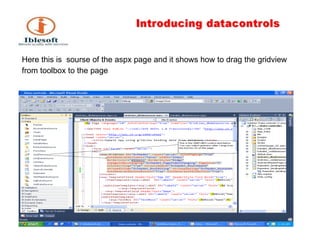
Here this is  sourse of the aspx page and it shows how to drag the gridview  from toolbox to the page
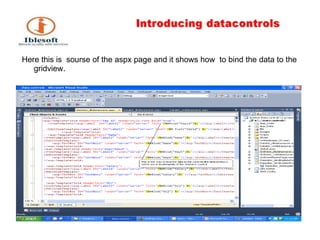
Here this is  sourse of the aspx page and it shows how  to bind the data to the gridview.
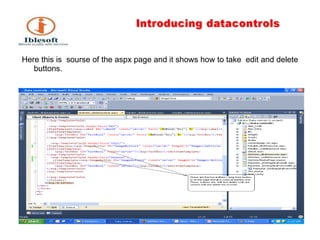
Here this is  sourse of the aspx page and it shows how to take  edit and delete buttons.
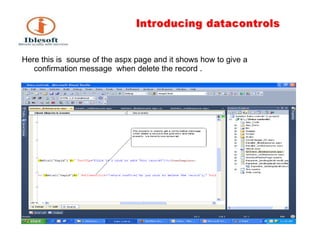
Here this is  sourse of the aspx page and it shows how to give a confirmation message  when delete the record .
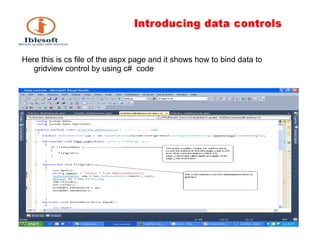
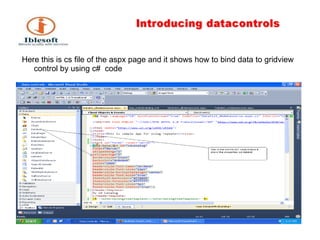
Here this is cs file of the aspx page and it shows how to bind data to gridview control by using c#  code
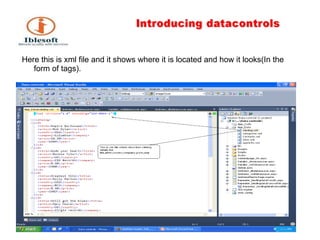
Here this is xml file and it shows where it is located and how it looks(In the form of tags).
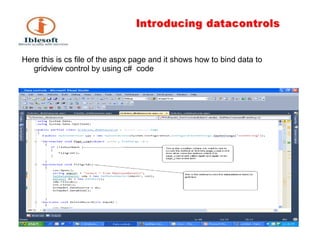
Here this is cs file of the aspx page and it shows how to bind data to gridview control by using c#  code
2)Data list  The DataList control is, like the Repeater control, used to display a repeated list of items that are bound to the control.  However, the DataList control adds a table around the data items by default. The DataList control may be bound to a database table, an XML  file, or another list of items.
Here this is cs file of the aspx page and it shows how to bind data to gridview control by using c#  code
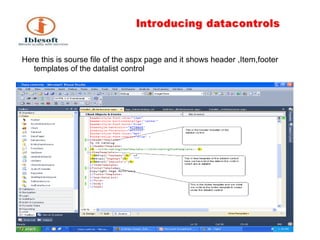
Here this is sourse file of the aspx page and it shows header ,Item,footer templates of the datalist control
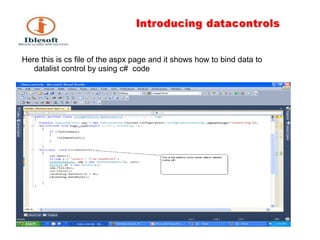
Here this is cs file of the aspx page and it shows how to bind data to datalist control by using c#  code
3)Reapeter The Repeater control is used to display a repeated list of items that are bound to the control.  The Repeater control may be bound to a database table, an XML file, or another list of items.
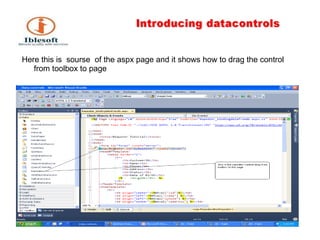
Here this is  sourse  of the aspx page and it shows how to drag the control from toolbox to page
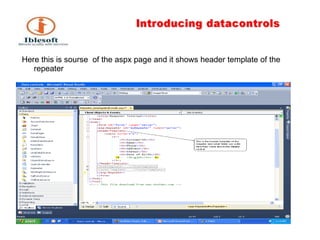
Here this is sourse  of the aspx page and it shows header template of the repeater
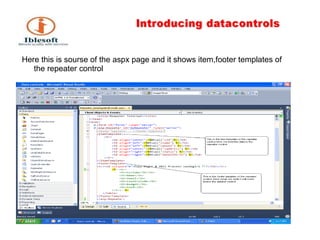
Here this is sourse of the aspx page and it shows item,footer templates of the repeater control
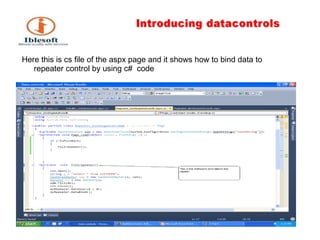
Here this is cs file of the aspx page and it shows how to bind data to repeater control by using c#  code
Features & Differences between Gridview,DataList and Repeater controls  DataGrid and DataList controls are derived from the WebControl class, while the Repeater control is derived from the Control class.  The WebControl class contains a number of aesthetic properties, such as BackColor, ForeColor, CssClass, BorderStyle and so on. In ASP .NET basically there are three kinds of the Data Presentation Controls. a) GridView or DataGrid  b) DataList   c) Repeater
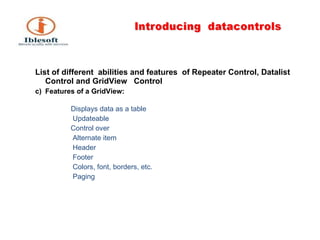
List of different  abilities and features  of Repeater Control, Datalist Control and GridView  Control  Features of a GridView:   Displays data as a table Updateable Control over Alternate item Header Footer Colors, font, borders, etc. Paging
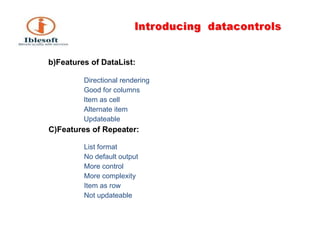
b)Features of DataList:   Directional rendering Good for columns Item as cell Alternate item Updateable C)Features of Repeater: List format No default output More control More complexity Item as row Not updateable
Master page A master page is an ASP.NET file with the extension .master (for example, MySite.master) with a predefined layout that can include static text, HTML elements, and server controls. The master page is identified by a special  @ Master  directive that replaces the  @ Page  directive that is used for ordinary .aspx pages.  The directive looks like the following. <%@ Master Language=&quot;C#&quot; %>
The @ Master directive can contain most of the same directives that a  @ Control  directive can contain. For example, the following master-page directive includes the name of a code-behind file, and assigns a class name to the master page. <%@ Master Language=&quot;C#&quot;  CodeFile=&quot;MasterPage.master.cs&quot;  Inherits=&quot;MasterPage&quot; %> In addition to the @ Master directive, the master page also contains all of the top-level HTML elements for a page, such as html, head, and form. For example, on a master page you might use an HTML table for the layout, an img element for your company logo, static text for the copyright notice, and server controls to create standard navigation for your site. You can use any HTML and any ASP.NET elements as part of your master page.
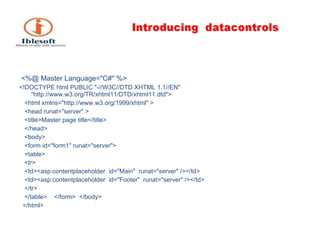
Replaceable Content Placeholders In addition to static text and controls that will appear on all pages, the master page also includes one or more  ContentPlaceHolder  controls. These placeholder controls define regions where replaceable content will appear. In turn, the replaceable content is defined in content pages. After you have defined the  ContentPlaceHolder  controls, a master page might look like the following .
<%@ Master Language=&quot;C#&quot; %>  <!DOCTYPE html PUBLIC &quot;-//W3C//DTD XHTML 1.1//EN&quot;  &quot;http://www.w3.org/TR/xhtml11/DTD/xhtml11.dtd&quot;>  <html xmlns=&quot;http://www.w3.org/1999/xhtml&quot; > <head runat=&quot;server&quot; > <title>Master page title</title>  </head> <body> <form id=&quot;form1&quot; runat=&quot;server&quot;>  <table> <tr>  <td><asp:contentplaceholder  id=&quot;Main&quot;  runat=&quot;server&quot; /></td> <td><asp:contentplaceholder  id=&quot;Footer&quot;  runat=&quot;server&quot; /></td>  </tr>  </table>  </form>  </body> </html>
Thank You !

Data controls ppt

  • 1.
    Introducing Datacontrols byPraveen Nandagiri
  • 2.
    Agenda Data Bindingwith No Code Grid View Control Data list Control Repeater Control Creating a master page and apply to other content pages
  • 3.
    Binding Data toControls Data controls are the controls which accept data source and show the data to the viewer or programmer. Here data source may be a database , xml file or any other file.
  • 4.
    Data Source ControlsA family of controls that assist in data binding and it acts like Middleman between data bound controls and data sources Types of Data Source Controls a) Tabular SqlDataSource AccessDataSource ObjectDataSource b) Hierarchical XmlDataSource SiteMapDataSource
  • 5.
    Here we haveto use ADO.Net to bind data to the datacontrols . In this we have to use sql data adapter and dataset to bind to the data to the control which are in ADO.NET . When we update and delete data from database ,we have to use Sql command which is in ADO.NET.
  • 6.
    1)Grid view GridViewcontrol is a successor to the ASP.NET 1.X DataGrid control. It provides more flexibility in displaying and working with data from your database in comparison with any other controls. The GridView control enables you to connect to a datasource and display data is tabular format, however you have bunch of options to customize the look and feel. When it is rendered on the page, generally it is implemented through <table> HTML tag. Its properties like BackColor, ForeColor, BorderColor, BorderStyle, BorderWidth, Height etc. are implemented through style properites of <tahle> tag.
  • 7.
    Here this is sourse of the aspx page and it shows how to drag the gridview from toolbox to the page
  • 8.
    Here this is sourse of the aspx page and it shows how to bind the data to the gridview.
  • 9.
    Here this is sourse of the aspx page and it shows how to take edit and delete buttons.
  • 10.
    Here this is sourse of the aspx page and it shows how to give a confirmation message when delete the record .
  • 11.
    Here this iscs file of the aspx page and it shows how to bind data to gridview control by using c# code
  • 12.
    Here this isxml file and it shows where it is located and how it looks(In the form of tags).
  • 13.
    Here this iscs file of the aspx page and it shows how to bind data to gridview control by using c# code
  • 14.
    2)Data list The DataList control is, like the Repeater control, used to display a repeated list of items that are bound to the control. However, the DataList control adds a table around the data items by default. The DataList control may be bound to a database table, an XML file, or another list of items.
  • 15.
    Here this iscs file of the aspx page and it shows how to bind data to gridview control by using c# code
  • 16.
    Here this issourse file of the aspx page and it shows header ,Item,footer templates of the datalist control
  • 17.
    Here this iscs file of the aspx page and it shows how to bind data to datalist control by using c# code
  • 18.
    3)Reapeter The Repeatercontrol is used to display a repeated list of items that are bound to the control. The Repeater control may be bound to a database table, an XML file, or another list of items.
  • 19.
    Here this is sourse of the aspx page and it shows how to drag the control from toolbox to page
  • 20.
    Here this issourse of the aspx page and it shows header template of the repeater
  • 21.
    Here this issourse of the aspx page and it shows item,footer templates of the repeater control
  • 22.
    Here this iscs file of the aspx page and it shows how to bind data to repeater control by using c# code
  • 23.
    Features & Differencesbetween Gridview,DataList and Repeater controls DataGrid and DataList controls are derived from the WebControl class, while the Repeater control is derived from the Control class. The WebControl class contains a number of aesthetic properties, such as BackColor, ForeColor, CssClass, BorderStyle and so on. In ASP .NET basically there are three kinds of the Data Presentation Controls. a) GridView or DataGrid b) DataList c) Repeater
  • 24.
    List of different abilities and features of Repeater Control, Datalist Control and GridView Control Features of a GridView: Displays data as a table Updateable Control over Alternate item Header Footer Colors, font, borders, etc. Paging
  • 25.
    b)Features of DataList: Directional rendering Good for columns Item as cell Alternate item Updateable C)Features of Repeater: List format No default output More control More complexity Item as row Not updateable
  • 26.
    Master page Amaster page is an ASP.NET file with the extension .master (for example, MySite.master) with a predefined layout that can include static text, HTML elements, and server controls. The master page is identified by a special @ Master directive that replaces the @ Page directive that is used for ordinary .aspx pages. The directive looks like the following. <%@ Master Language=&quot;C#&quot; %>
  • 27.
    The @ Master directivecan contain most of the same directives that a @ Control directive can contain. For example, the following master-page directive includes the name of a code-behind file, and assigns a class name to the master page. <%@ Master Language=&quot;C#&quot; CodeFile=&quot;MasterPage.master.cs&quot; Inherits=&quot;MasterPage&quot; %> In addition to the @ Master directive, the master page also contains all of the top-level HTML elements for a page, such as html, head, and form. For example, on a master page you might use an HTML table for the layout, an img element for your company logo, static text for the copyright notice, and server controls to create standard navigation for your site. You can use any HTML and any ASP.NET elements as part of your master page.
  • 28.
    Replaceable Content PlaceholdersIn addition to static text and controls that will appear on all pages, the master page also includes one or more ContentPlaceHolder controls. These placeholder controls define regions where replaceable content will appear. In turn, the replaceable content is defined in content pages. After you have defined the ContentPlaceHolder controls, a master page might look like the following .
  • 29.
    <%@ Master Language=&quot;C#&quot;%> <!DOCTYPE html PUBLIC &quot;-//W3C//DTD XHTML 1.1//EN&quot; &quot;http://www.w3.org/TR/xhtml11/DTD/xhtml11.dtd&quot;> <html xmlns=&quot;http://www.w3.org/1999/xhtml&quot; > <head runat=&quot;server&quot; > <title>Master page title</title> </head> <body> <form id=&quot;form1&quot; runat=&quot;server&quot;> <table> <tr> <td><asp:contentplaceholder id=&quot;Main&quot; runat=&quot;server&quot; /></td> <td><asp:contentplaceholder id=&quot;Footer&quot; runat=&quot;server&quot; /></td> </tr> </table> </form> </body> </html>
  • 30.