Microsoft .NET FrameworkCh. Vishwa MohanM.Sc., M.TechFreelance Software Consultant &  Corporate Trainer
What is .NET ?Microsoft.NET is a set of Microsoft software technologies for connecting information, people, systems and devices. It enables high level of software integration through the use of XML Web Services.The .NET is a platform that provides a standardized set of services:  It’s just like Windows, except distributed over the Internet.It exports a common interface so that it’s programs can be run on any system that supports .Net.Goals of .NETTie all devices to the InternetSoftware as a serviceData and applications accessible on all devicesTruly compile once, run anywhereScalability
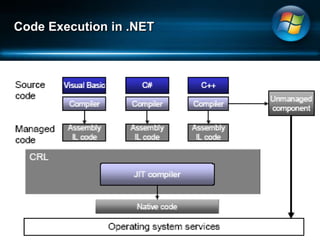
An  Overview on .NET.NET was designed to replace all legacy Microsoft LanguagesJ++, C++, ASP, Visual Basic. Offers Language uniformity..NET Provides Common Intermediate Language IL (or MSIL)IL concept is based on CLI. CLI is a standard not a language. C#, VB.NET, J# compiles into IL. Non-interpreted, Just-In-Time (JIT) Compiled Code. Each client has CLR. CLR is your sandbox. Provides safe environment for code execution.
Code Execution in .NET
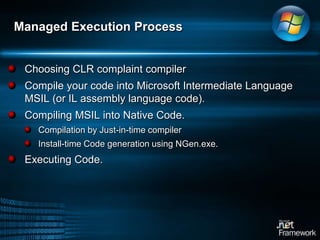
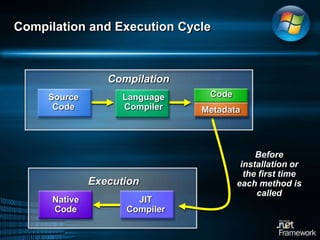
Managed Execution ProcessChoosing CLR complaint compilerCompile your code into Microsoft Intermediate Language MSIL (or IL assembly language code). Compiling MSIL into Native Code.Compilation by Just-in-time compilerInstall-time Code generation using NGen.exe. Executing Code.
CodeMSILSource CodeLanguage CompilerMetadataExecutionJIT CompilerNativeCodeCompilation and Execution CycleCompilationBefore installation or the first time each method is called
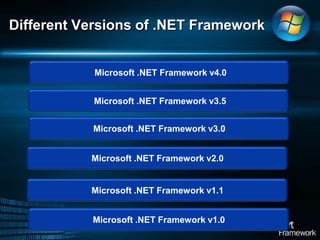
Different Versions of .NET Framework Microsoft .NET Framework v4.0 Microsoft .NET Framework v3.5Microsoft .NET Framework v3.0Microsoft .NET Framework v2.0Microsoft .NET Framework v1.1Microsoft .NET Framework v1.0
Technologies in .NET Framework V2.0Common language runtime (CLR).Support for generic types and methods.Compilers for C#, Visual Basic, C++, and J#.Base class libraries.ADO.NET.ASP.NET.Windows Forms.XML Web services..NET Remoting
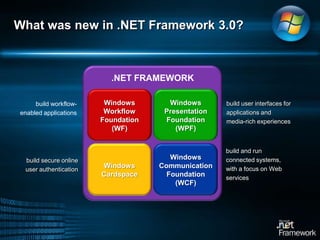
What was new in .NET Framework 3.0?.NET FRAMEWORKWindows PresentationFoundation (WPF)Windows Workflow Foundation (WF)build user interfaces for applications and media-rich experiences build workflow-enabled applicationsWindows Communication Foundation (WCF)Windows Cardspacebuild and run connected systems, with a focus on Web servicesbuild secure online user authentication
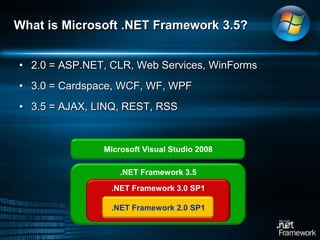
What is Microsoft .NET Framework 3.5?2.0 = ASP.NET, CLR, Web Services, WinForms3.0 = Cardspace, WCF, WF, WPF3.5 = AJAX, LINQ, REST, RSSMicrosoft Visual Studio 2008.NET Framework 3.5.NET Framework 3.0 SP1.NET Framework 2.0 SP1
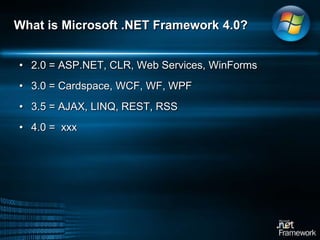
What is Microsoft .NET Framework 4.0?2.0 = ASP.NET, CLR, Web Services, WinForms3.0 = Cardspace, WCF, WF, WPF3.5 = AJAX, LINQ, REST, RSS4.0 =  xxx
VBC++C#J#
Common Language SpecificationASP.NETWeb Forms   Web ServicesWindows¼FormsADO.NET and XMLBase Class LibraryCommon Language RuntimeOperating System.NET Framework Platform & Tools
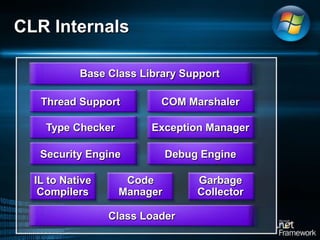
Base Class Library SupportThread SupportCOM MarshalerType CheckerException ManagerSecurity EngineDebug EngineIL to NativeCompilersCodeManagerGarbageCollectorClass LoaderCLR Internals
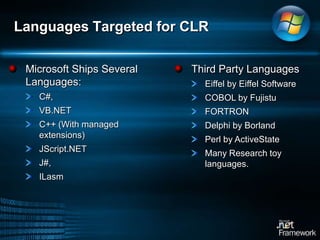
Languages Targeted for CLRMicrosoft Ships Several Languages:C#, VB.NETC++ (With managed extensions)JScript.NETJ#,ILasm Third Party LanguagesEiffel by Eiffel SoftwareCOBOL by FujistuFORTRON Delphi by BorlandPerl by ActiveStateMany Research toy languages.
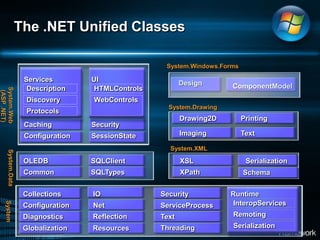
DescriptionDiscoveryProtocolsThe .NET Unified ClassesSystem.Windows.FormsServicesUIDesignComponentModelHTMLControlsWebControlsSystem.Web (ASP .NET)System.DrawingDrawing2D	PrintingCaching	SecurityImagingTextConfigurationSessionStateSystem.XMLOLEDBSQLClientXSLSerializationSystem.DataCommonSQLTypesXPathSchemaSchemaCollectionsIOSecurityRuntimeInteropServicesConfigurationNetServiceProcessSystemRemotingReflectionDiagnosticsTextSerializationThreadingResourcesGlobalization
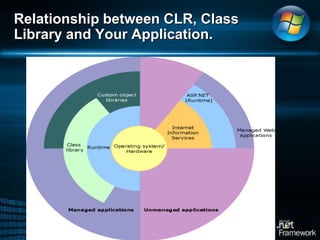
Relationship between CLR, Class Library and Your Application.
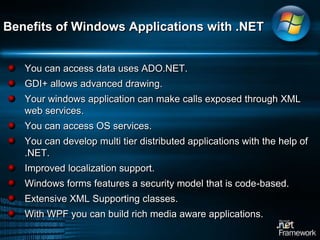
Benefits of Windows Applications with .NETYou can access data uses ADO.NET. GDI+ allows advanced drawing. Your windows application can make calls exposed through XML web services. You can access OS services. You can develop multi tier distributed applications with the help of .NET.Improved localization support. Windows forms features a security model that is code-based.Extensive XML Supporting classes.With WPF you can build rich media aware applications.
Microsoft .NET Framework Introduction to Visual Studio IDE
Introducing Visual StudioVisual Studio is a completed set of development tool for building Desktop ApplicationsASP.NET Web ApplicationsXML Web ServicesMobile Applications.Class Libraries, .NET Components & Active X ControlsSupporting Languages are:Visual C#Visual Basic.NETVisual C++More and more.., In addition to above languages you can also access functionality of .NET Framework, which provides access to key technologies that simplifies the development of ASP.NET applications and XML Web Services.
Introducing Visual StudioBenefits of Visual Studio over manually writing code on text editors.It make application development faster, easier, and more reliable. Code-aware editors that include statement completion, syntax checking, and other IntelliSense features.Visual designers for forms with drag and drop controls. Visual designers for Windows Presentation Foundation. Integrated compilation and Debugging. Source Control.Project management tools for creating and managing application files, including deployment locally, over an intranet or over the Internet.Support for Win32 based applications and wizards.
Introducing Visual Studio Visual Studio gives a very sophisticated MDI application environment. In which you can do just about every thing related to developing your code. It offers the following: Text EditorDesign View EditorSupporting Windows Ability to compile from within the environmentIntegrated DebuggerIntegrated MSDN HelpAccess to other programs.
Opening new project in Visual Studio
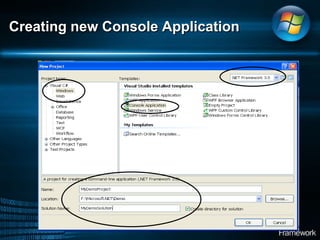
Creating new Console Application
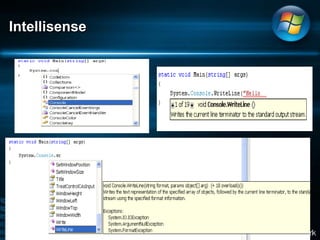
Intellisense
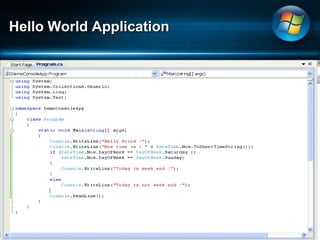
Hello World Application
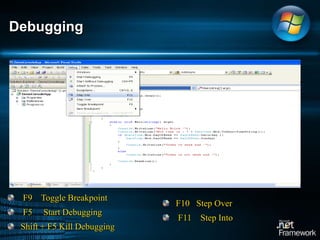
DebuggingF9    Toggle Breakpoint    F5     Start Debugging   Shift + F5 Kill DebuggingF10   Step Over    F11    Step Into
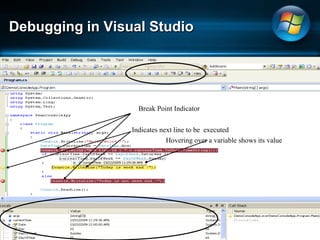
Debugging in Visual StudioBreak Point IndicatorIndicates next line to be  executedHovering over a variable shows its value
Thank You !Thank You !

Microsoft.net architecturte

  • 1.
    Microsoft .NET FrameworkCh.Vishwa MohanM.Sc., M.TechFreelance Software Consultant & Corporate Trainer
  • 2.
    What is .NET?Microsoft.NET is a set of Microsoft software technologies for connecting information, people, systems and devices. It enables high level of software integration through the use of XML Web Services.The .NET is a platform that provides a standardized set of services: It’s just like Windows, except distributed over the Internet.It exports a common interface so that it’s programs can be run on any system that supports .Net.Goals of .NETTie all devices to the InternetSoftware as a serviceData and applications accessible on all devicesTruly compile once, run anywhereScalability
  • 3.
    An Overviewon .NET.NET was designed to replace all legacy Microsoft LanguagesJ++, C++, ASP, Visual Basic. Offers Language uniformity..NET Provides Common Intermediate Language IL (or MSIL)IL concept is based on CLI. CLI is a standard not a language. C#, VB.NET, J# compiles into IL. Non-interpreted, Just-In-Time (JIT) Compiled Code. Each client has CLR. CLR is your sandbox. Provides safe environment for code execution.
  • 4.
  • 5.
    Managed Execution ProcessChoosingCLR complaint compilerCompile your code into Microsoft Intermediate Language MSIL (or IL assembly language code). Compiling MSIL into Native Code.Compilation by Just-in-time compilerInstall-time Code generation using NGen.exe. Executing Code.
  • 6.
    CodeMSILSource CodeLanguage CompilerMetadataExecutionJITCompilerNativeCodeCompilation and Execution CycleCompilationBefore installation or the first time each method is called
  • 7.
    Different Versions of.NET Framework Microsoft .NET Framework v4.0 Microsoft .NET Framework v3.5Microsoft .NET Framework v3.0Microsoft .NET Framework v2.0Microsoft .NET Framework v1.1Microsoft .NET Framework v1.0
  • 8.
    Technologies in .NETFramework V2.0Common language runtime (CLR).Support for generic types and methods.Compilers for C#, Visual Basic, C++, and J#.Base class libraries.ADO.NET.ASP.NET.Windows Forms.XML Web services..NET Remoting
  • 9.
    What was newin .NET Framework 3.0?.NET FRAMEWORKWindows PresentationFoundation (WPF)Windows Workflow Foundation (WF)build user interfaces for applications and media-rich experiences build workflow-enabled applicationsWindows Communication Foundation (WCF)Windows Cardspacebuild and run connected systems, with a focus on Web servicesbuild secure online user authentication
  • 10.
    What is Microsoft.NET Framework 3.5?2.0 = ASP.NET, CLR, Web Services, WinForms3.0 = Cardspace, WCF, WF, WPF3.5 = AJAX, LINQ, REST, RSSMicrosoft Visual Studio 2008.NET Framework 3.5.NET Framework 3.0 SP1.NET Framework 2.0 SP1
  • 11.
    What is Microsoft.NET Framework 4.0?2.0 = ASP.NET, CLR, Web Services, WinForms3.0 = Cardspace, WCF, WF, WPF3.5 = AJAX, LINQ, REST, RSS4.0 = xxx
  • 12.
    VBC++C#J#
Common Language SpecificationASP.NETWebForms Web ServicesWindows¼FormsADO.NET and XMLBase Class LibraryCommon Language RuntimeOperating System.NET Framework Platform & Tools
  • 13.
    Base Class LibrarySupportThread SupportCOM MarshalerType CheckerException ManagerSecurity EngineDebug EngineIL to NativeCompilersCodeManagerGarbageCollectorClass LoaderCLR Internals
  • 14.
    Languages Targeted forCLRMicrosoft Ships Several Languages:C#, VB.NETC++ (With managed extensions)JScript.NETJ#,ILasm Third Party LanguagesEiffel by Eiffel SoftwareCOBOL by FujistuFORTRON Delphi by BorlandPerl by ActiveStateMany Research toy languages.
  • 15.
    DescriptionDiscoveryProtocolsThe .NET UnifiedClassesSystem.Windows.FormsServicesUIDesignComponentModelHTMLControlsWebControlsSystem.Web (ASP .NET)System.DrawingDrawing2D PrintingCaching SecurityImagingTextConfigurationSessionStateSystem.XMLOLEDBSQLClientXSLSerializationSystem.DataCommonSQLTypesXPathSchemaSchemaCollectionsIOSecurityRuntimeInteropServicesConfigurationNetServiceProcessSystemRemotingReflectionDiagnosticsTextSerializationThreadingResourcesGlobalization
  • 16.
    Relationship between CLR,Class Library and Your Application.
  • 17.
    Benefits of WindowsApplications with .NETYou can access data uses ADO.NET. GDI+ allows advanced drawing. Your windows application can make calls exposed through XML web services. You can access OS services. You can develop multi tier distributed applications with the help of .NET.Improved localization support. Windows forms features a security model that is code-based.Extensive XML Supporting classes.With WPF you can build rich media aware applications.
  • 18.
    Microsoft .NET FrameworkIntroduction to Visual Studio IDE
  • 19.
    Introducing Visual StudioVisualStudio is a completed set of development tool for building Desktop ApplicationsASP.NET Web ApplicationsXML Web ServicesMobile Applications.Class Libraries, .NET Components & Active X ControlsSupporting Languages are:Visual C#Visual Basic.NETVisual C++More and more.., In addition to above languages you can also access functionality of .NET Framework, which provides access to key technologies that simplifies the development of ASP.NET applications and XML Web Services.
  • 20.
    Introducing Visual StudioBenefitsof Visual Studio over manually writing code on text editors.It make application development faster, easier, and more reliable. Code-aware editors that include statement completion, syntax checking, and other IntelliSense features.Visual designers for forms with drag and drop controls. Visual designers for Windows Presentation Foundation. Integrated compilation and Debugging. Source Control.Project management tools for creating and managing application files, including deployment locally, over an intranet or over the Internet.Support for Win32 based applications and wizards.
  • 21.
    Introducing Visual StudioVisual Studio gives a very sophisticated MDI application environment. In which you can do just about every thing related to developing your code. It offers the following: Text EditorDesign View EditorSupporting Windows Ability to compile from within the environmentIntegrated DebuggerIntegrated MSDN HelpAccess to other programs.
  • 22.
    Opening new projectin Visual Studio
  • 23.
  • 24.
  • 25.
  • 26.
    DebuggingF9 Toggle Breakpoint F5 Start Debugging Shift + F5 Kill DebuggingF10 Step Over F11 Step Into
  • 27.
    Debugging in VisualStudioBreak Point IndicatorIndicates next line to be executedHovering over a variable shows its value
  • 28.