B.LOGESWARAN .,ME., MISTE
PRINCIPAL
CHEYYAR POLY.COLLEGE
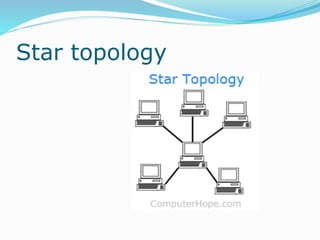
Star topology
Star topology
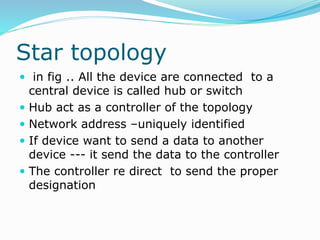
 in fig .. All the device are connected to a
central device is called hub or switch
 Hub act as a controller of the topology
 Network address –uniquely identified
 If device want to send a data to another
device --- it send the data to the controller
 The controller re direct to send the proper
designation
Advantages
 Easy to add new device
 Less expensive
 Easy to install and re configure
 Easy to monitor and trouble shoot
 Since its have multilink if one link is failure
another link is not effected
Disadvantages
 More cable required
 If controller fail means entire network fail
Mesh topology
Mesh topology
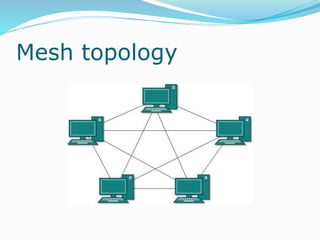
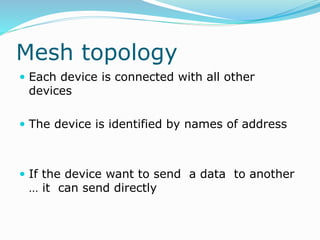
 Each device is connected with all other
devices
 The device is identified by names of address
 If the device want to send a data to another
… it can send directly
Advantages
 Data can be transmitted from different
devices simultaneously
 If one device in the network fails there is an
alternate path to do communication
 Expansion and modification cannot affect the
network
Disadvantages
 High expensive
 Maintenance very difficult
 Many conections
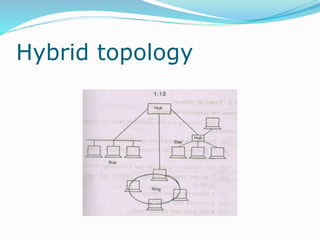
Hybrid topology
Hybrid topology
 combing more than one network topology
 Advantages :
 Fault detection very easy
 It is easy to increase the size of the network
 Adding new component without effecting the
network
Disadvantages
 Very difficult to design
 High cost hub
Types of networks
 Need for computer networks
 Files shared among different user
 It allows sharing of mass central storage
and printers
 It provides data security
 Data backup facility
 File / record and locking
Network types
 LAN (LOCAL AREA NETWORK )
MAN (METROPOLITIAN NETWORK )
WAN (WIDE AREA NETWORK )
CAN ( CONTROLLER AREA NETWORK )
 HAN ( HOME AREA NETWORK )
 INTERNET
 INTRANET
 EXTRANET
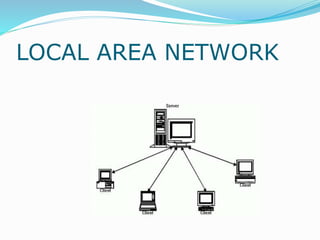
LOCAL AREA NETWORK
Explanation ….
 Network connection implemented with in
buildings and offices
 Bus ring star
 Network management is very easy
 The cost of data communication is low
 Message send through server
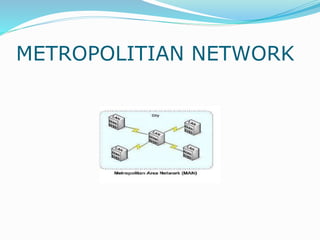
METROPOLITIAN NETWORK
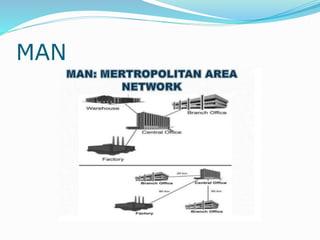
MAN
MAN
 In this connection implemented in highly
populated city
 It is interconnection of LANS
 It supports both text and voice
 It allows data sharing between LANS
 more number of user can added in than LAN
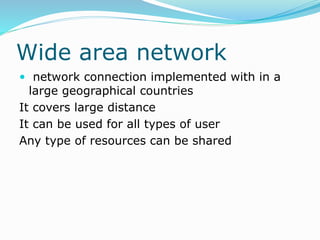
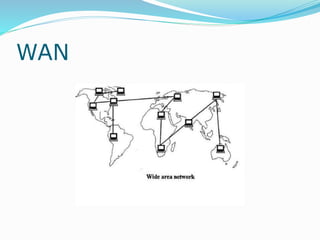
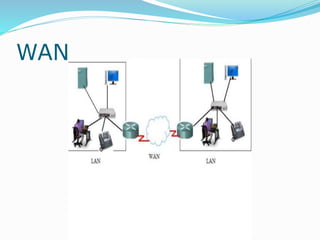
Wide area network
 network connection implemented with in a
large geographical countries
It covers large distance
It can be used for all types of user
Any type of resources can be shared
WAN
WAN
CONTROL AREA NETWORK
CAN
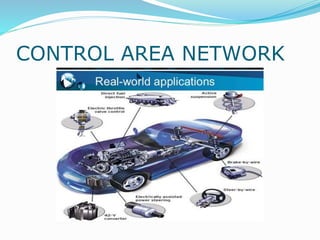
 It is a special network standard desinged to
enable communication among electronic
devices inside a vehicle (car ,bus ,ship,
aircraft ) with out help of host computer
 Host processor –micro processor used to
decide the message to send and receive
 CAN –it is hardware used to receive and send
message
CAN USES
 Engine control unit ,channel door locks
,climate control
 High reliable communication
 It reduces the connection cost between the
device
Home area network
HAN
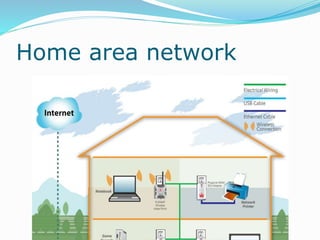
 Home area network
 Communication between the digital devices in
this home
 Two or three computers
 Printer fax scaners
 Internet connection
 A/C
 Home security system
 tv
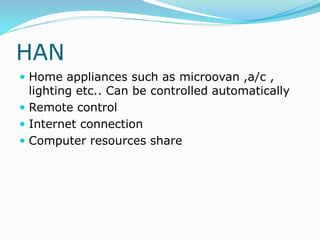
HAN
 Home appliances such as microovan ,a/c ,
lighting etc.. Can be controlled automatically
 Remote control
 Internet connection
 Computer resources share
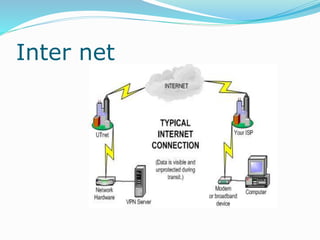
Inter net
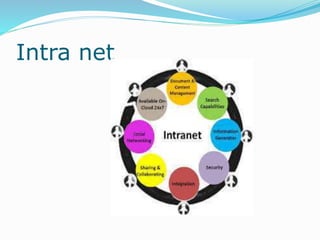
Intra net
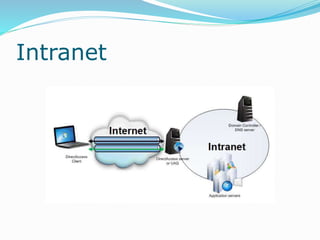
Intranet
Intranet
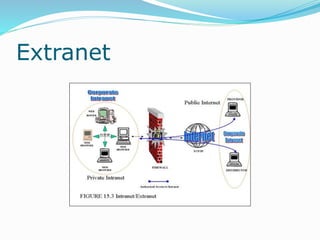
 It is a private network of computer with in an
organization
 Either using wire or wireless
 IP address
 Intranet to access the internet by using
network gate ways with a firewall
Uses
 Productivity of the organization increased
 Faster communication between the different
department
 Cost effective
 Promote common corporate culture
Uses
 Productivity of the organization increased
 Faster communication between the different
department
 Cost effective
 Promote common corporate culture
Extranet
 An extranet is a controlled private network
that allows access to partners, vendors and
suppliers or an authorized set of customers
 Uses :
 Exchange large volumes of data
using Electronic Data Interchange (EDI)
 Share product catalogs exclusively with trade
partners
 Collaborate with other companies on joint
development efforts
Extranet
Disadvantages
 Its is not secure
 Not effective cost
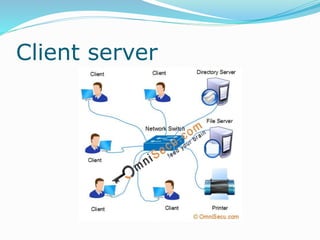
Client server
Server
 server is a power machine with multi user
operating system
 More no .of .user access at a time
CLIENT
 Client is a small computer
 The client access the data to the server
 The client request the server
 Server response the client
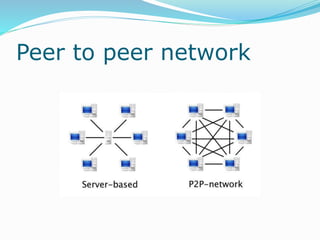
Peer to peer network
p2p
 It is an network communication model in
which system has capability it initiate
communication with other system with out
centralized device
Transmission media
 The information are transmitted between
sender and receiver in the form of
electromagnetic waves
 Transmission media are located below the
physical layer
 Computers use signals to represent data.
 Signals are transmitted in form of
electromagnetic energy.
Characteristics
 Cost effective
 High band width
 Broad band and baseband usage
 Low attenuation
 low interference
Classification
 Transmission Media
 Guided Media (Wired)
Twisted-Pair Cable
Coaxial Cable
Fiber-Optic Cable
Unguided Media (Wireless)
Radio Waves
Microwaves
Infrared
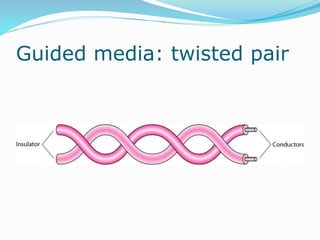
Guided media: twisted pair
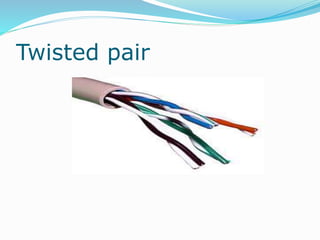
Twisted pair
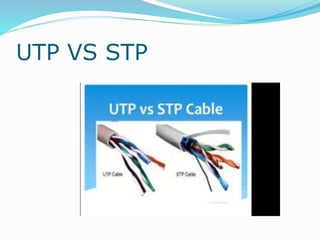
UTP VS STP
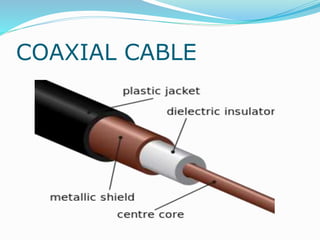
COAXIAL CABLE
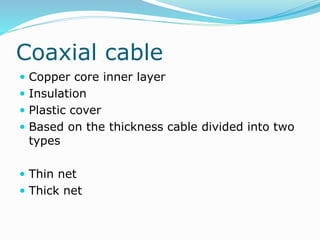
Coaxial cable
 Copper core inner layer
 Insulation
 Plastic cover
 Based on the thickness cable divided into two
types
 Thin net
 Thick net
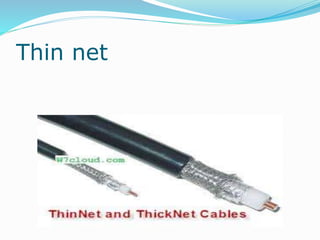
Thin net
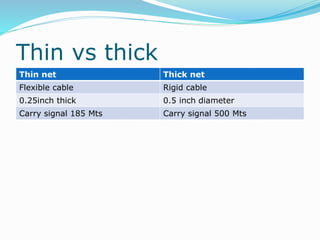
Thin vs thick
Thin net Thick net
Flexible cable Rigid cable
0.25inch thick 0.5 inch diameter
Carry signal 185 Mts Carry signal 500 Mts
Advantages of coaxial
 The transmission rate is about 10 Mbps
 Good electrical resistance
 Maximum cable lengh is 185 m
 Flexible and easy to work
Disadvantages
 Not secure
 It is easy to change the configuration
Fiber optic cable
Fiber optic
Optical fiber
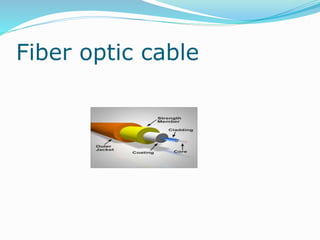
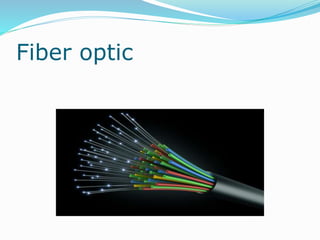
 Fiber optic cable uses lights rather than
electrical pulses to transmit signals
 Pure glass cylinder
 It surrounded by cladding
 Signal can passes only one direction
 Led and laser signals
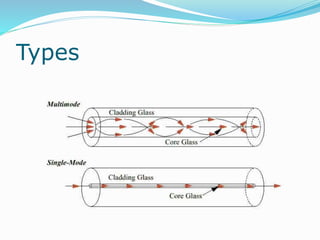
Types
 Single mode fiber
 Multimode fiber
 Plastic optical fiber
Types
Advantages
 Transmission rate 100 mbps
 Cable length is up to 200 kmeter
 Not effected by electrical interference
 Supports voice video and data
 Secured
Disadvantages
 Cabling is expensive
 Maintenance and installation is very difficult
 Break very easily
Un guided media
 Transport electromagnetically
 Wireless communication
 Signals are send through air
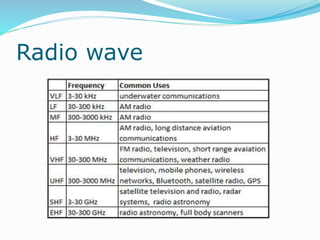
Radio wave
Micro wave
Infrared
Radio wave
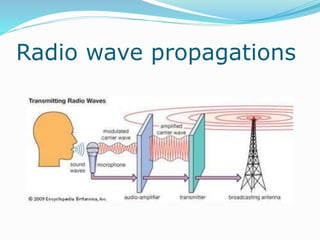
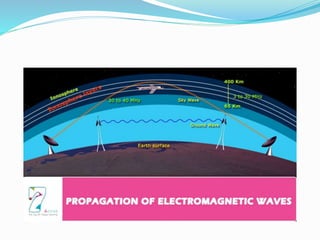
Radio wave propagations
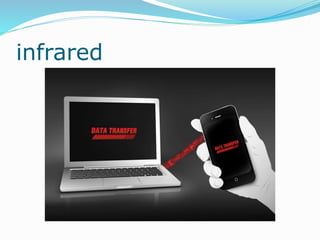
infrared
Infrared
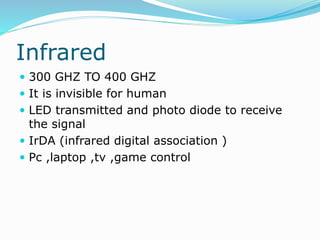
 300 GHZ TO 400 GHZ
 It is invisible for human
 LED transmitted and photo diode to receive
the signal
 IrDA (infrared digital association )
 Pc ,laptop ,tv ,game control
Advantages
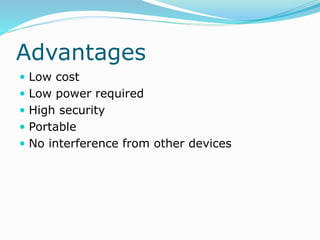
 Low cost
 Low power required
 High security
 Portable
 No interference from other devices
Disadvantages
 Short distance communication
 Transmitter must be in line with receiver
 Direct sunlight , rain dust effected the
transmittion
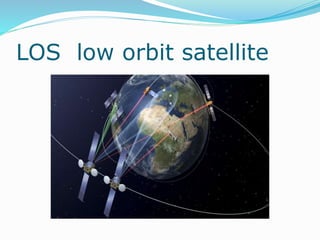
LOS low orbit satellite
LOS
 LOS is a circular orbit about 1200 mile or
1600 k meter above the earth surface
 the satellite in this orbit is called LOS
 USES :
 Data loss is low
 Used for e-mail ,video conferencing etc…
 Path loss is very less
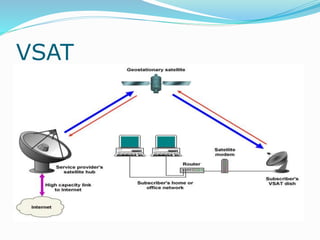
VSAT
VSAT
 Very small aperture terminal
 It is receive and transmit terminal installed in
various locations
 Transits and receive the signal in mass earth
stations
Main parts VSAT
 Central hub or Master earth station
 The satellite
 VSAT Earth stations
VSAT
 Central hub consists of internal service
provider connected with parabolic antenna
through the satellite modem and transreceiver
 Two types of VSAT communication
 One way communication : DTH
 Two way communications : internet access
and ATM Services
Cable standards
 Network cabling standards are used
internationally and are published by ISO/IEC,
CENELEC and the Telecommunications
Industry Association (TIA). ... ANSI/TIA-568-
C.3, Optical
FiberCabling Components Standard,
published 2008, plus errata issued in October,
2008.
Cable standards
 ANSI/TIA-568.0-D, Generic Telecommunications Cabling for
Customer Premises, 2015
 ANSI/TIA-568.1-D, Commercial Building
Telecommunications Infrastructure Standard, 2015
 ANSI/TIA-568-C.2, Balanced Twisted-Pair
Telecommunication Cabling and Components Standard,
published 2009
 ANSI/TIA-568-C.3, Optical Fiber Cabling Components
Standard, published 2008, plus errata issued in October,
2008.
 TIA-569-B (2004; Amd 1 2009) Commercial Building
Standard for Telecommunications Pathways and Spaces
 ANSI/TIA/EIA-606-A-2002, Administration Standard for
Commercial Telecommunications Infrastructure.
Network devices
 Switches
 router
 gateway
switches
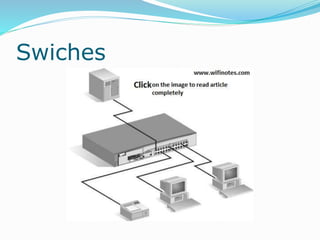
 A switch is a device in a computer
network that connects together other devices.
Multiple data cables are plugged into a switch
to enable communication between different
networked devices
Swiches
switch
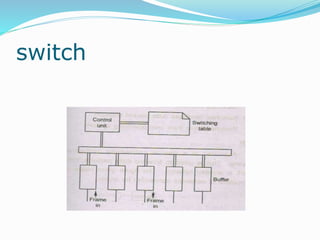
 It consists buffer for each link
 if receive the packet first store in the buffer .
 Then it checks the designation address in the
internal address table called swiching table
Types of switches
 Store and forward switches
 Cut through
 Features :
 Reduce the workload for computer
 Increase the network performance
 Decrease the data collition
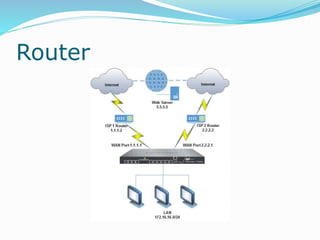
Router
 A router is a networking device that forwards
data packets between computer networks.
 Routers perform the traffic directing functions
on the Internet.
 A data packet is typically forwarded from one
router to another router through the networks
that constitute an internetwork
untilit reaches its destination node.
Router
Types of router
 Edge router
 Subscriber router
 Internal provider
 Core router
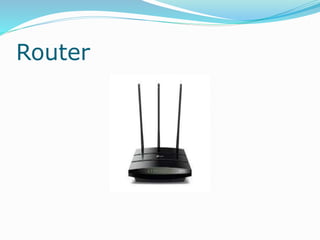
Router
gateway
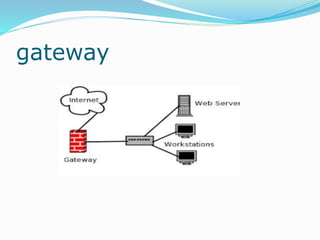
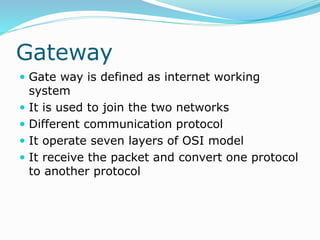
Gateway
 Gate way is defined as internet working
system
 It is used to join the two networks
 Different communication protocol
 It operate seven layers of OSI model
 It receive the packet and convert one protocol
to another protocol
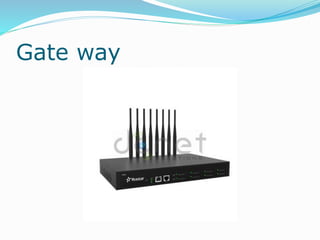
Gate way
Data communication  -Logeswaran -principal

Data communication -Logeswaran -principal

  • 1.
  • 2.
  • 3.
    Star topology  infig .. All the device are connected to a central device is called hub or switch  Hub act as a controller of the topology  Network address –uniquely identified  If device want to send a data to another device --- it send the data to the controller  The controller re direct to send the proper designation
  • 4.
    Advantages  Easy toadd new device  Less expensive  Easy to install and re configure  Easy to monitor and trouble shoot  Since its have multilink if one link is failure another link is not effected
  • 5.
    Disadvantages  More cablerequired  If controller fail means entire network fail
  • 6.
  • 7.
    Mesh topology  Eachdevice is connected with all other devices  The device is identified by names of address  If the device want to send a data to another … it can send directly
  • 8.
    Advantages  Data canbe transmitted from different devices simultaneously  If one device in the network fails there is an alternate path to do communication  Expansion and modification cannot affect the network
  • 9.
    Disadvantages  High expensive Maintenance very difficult  Many conections
  • 10.
  • 11.
    Hybrid topology  combingmore than one network topology  Advantages :  Fault detection very easy  It is easy to increase the size of the network  Adding new component without effecting the network
  • 12.
    Disadvantages  Very difficultto design  High cost hub
  • 13.
    Types of networks Need for computer networks  Files shared among different user  It allows sharing of mass central storage and printers  It provides data security  Data backup facility  File / record and locking
  • 14.
    Network types  LAN(LOCAL AREA NETWORK ) MAN (METROPOLITIAN NETWORK ) WAN (WIDE AREA NETWORK ) CAN ( CONTROLLER AREA NETWORK )  HAN ( HOME AREA NETWORK )  INTERNET  INTRANET  EXTRANET
  • 15.
  • 16.
    Explanation ….  Networkconnection implemented with in buildings and offices  Bus ring star  Network management is very easy  The cost of data communication is low  Message send through server
  • 17.
  • 18.
  • 19.
    MAN  In thisconnection implemented in highly populated city  It is interconnection of LANS  It supports both text and voice  It allows data sharing between LANS  more number of user can added in than LAN
  • 20.
    Wide area network network connection implemented with in a large geographical countries It covers large distance It can be used for all types of user Any type of resources can be shared
  • 21.
  • 22.
  • 23.
  • 24.
    CAN  It isa special network standard desinged to enable communication among electronic devices inside a vehicle (car ,bus ,ship, aircraft ) with out help of host computer  Host processor –micro processor used to decide the message to send and receive  CAN –it is hardware used to receive and send message
  • 25.
    CAN USES  Enginecontrol unit ,channel door locks ,climate control  High reliable communication  It reduces the connection cost between the device
  • 26.
  • 27.
    HAN  Home areanetwork  Communication between the digital devices in this home  Two or three computers  Printer fax scaners  Internet connection  A/C  Home security system  tv
  • 28.
    HAN  Home appliancessuch as microovan ,a/c , lighting etc.. Can be controlled automatically  Remote control  Internet connection  Computer resources share
  • 29.
  • 30.
  • 31.
  • 32.
    Intranet  It isa private network of computer with in an organization  Either using wire or wireless  IP address  Intranet to access the internet by using network gate ways with a firewall
  • 33.
    Uses  Productivity ofthe organization increased  Faster communication between the different department  Cost effective  Promote common corporate culture
  • 34.
    Uses  Productivity ofthe organization increased  Faster communication between the different department  Cost effective  Promote common corporate culture
  • 35.
    Extranet  An extranetis a controlled private network that allows access to partners, vendors and suppliers or an authorized set of customers  Uses :  Exchange large volumes of data using Electronic Data Interchange (EDI)  Share product catalogs exclusively with trade partners  Collaborate with other companies on joint development efforts
  • 36.
  • 37.
    Disadvantages  Its isnot secure  Not effective cost
  • 38.
  • 39.
    Server  server isa power machine with multi user operating system  More no .of .user access at a time
  • 40.
    CLIENT  Client isa small computer  The client access the data to the server  The client request the server  Server response the client
  • 41.
    Peer to peernetwork
  • 42.
    p2p  It isan network communication model in which system has capability it initiate communication with other system with out centralized device
  • 43.
    Transmission media  Theinformation are transmitted between sender and receiver in the form of electromagnetic waves  Transmission media are located below the physical layer  Computers use signals to represent data.  Signals are transmitted in form of electromagnetic energy.
  • 44.
    Characteristics  Cost effective High band width  Broad band and baseband usage  Low attenuation  low interference
  • 45.
    Classification  Transmission Media Guided Media (Wired) Twisted-Pair Cable Coaxial Cable Fiber-Optic Cable Unguided Media (Wireless) Radio Waves Microwaves Infrared
  • 46.
  • 47.
  • 48.
  • 50.
  • 51.
    Coaxial cable  Coppercore inner layer  Insulation  Plastic cover  Based on the thickness cable divided into two types  Thin net  Thick net
  • 52.
  • 53.
    Thin vs thick Thinnet Thick net Flexible cable Rigid cable 0.25inch thick 0.5 inch diameter Carry signal 185 Mts Carry signal 500 Mts
  • 54.
    Advantages of coaxial The transmission rate is about 10 Mbps  Good electrical resistance  Maximum cable lengh is 185 m  Flexible and easy to work
  • 55.
    Disadvantages  Not secure It is easy to change the configuration
  • 56.
  • 57.
  • 58.
    Optical fiber  Fiberoptic cable uses lights rather than electrical pulses to transmit signals  Pure glass cylinder  It surrounded by cladding  Signal can passes only one direction  Led and laser signals
  • 59.
    Types  Single modefiber  Multimode fiber  Plastic optical fiber
  • 60.
  • 61.
    Advantages  Transmission rate100 mbps  Cable length is up to 200 kmeter  Not effected by electrical interference  Supports voice video and data  Secured
  • 62.
    Disadvantages  Cabling isexpensive  Maintenance and installation is very difficult  Break very easily
  • 63.
    Un guided media Transport electromagnetically  Wireless communication  Signals are send through air Radio wave Micro wave Infrared
  • 64.
  • 65.
  • 67.
  • 68.
    Infrared  300 GHZTO 400 GHZ  It is invisible for human  LED transmitted and photo diode to receive the signal  IrDA (infrared digital association )  Pc ,laptop ,tv ,game control
  • 69.
    Advantages  Low cost Low power required  High security  Portable  No interference from other devices
  • 70.
    Disadvantages  Short distancecommunication  Transmitter must be in line with receiver  Direct sunlight , rain dust effected the transmittion
  • 71.
    LOS low orbitsatellite
  • 72.
    LOS  LOS isa circular orbit about 1200 mile or 1600 k meter above the earth surface  the satellite in this orbit is called LOS  USES :  Data loss is low  Used for e-mail ,video conferencing etc…  Path loss is very less
  • 73.
  • 74.
    VSAT  Very smallaperture terminal  It is receive and transmit terminal installed in various locations  Transits and receive the signal in mass earth stations
  • 75.
    Main parts VSAT Central hub or Master earth station  The satellite  VSAT Earth stations
  • 76.
    VSAT  Central hubconsists of internal service provider connected with parabolic antenna through the satellite modem and transreceiver  Two types of VSAT communication  One way communication : DTH  Two way communications : internet access and ATM Services
  • 77.
    Cable standards  Networkcabling standards are used internationally and are published by ISO/IEC, CENELEC and the Telecommunications Industry Association (TIA). ... ANSI/TIA-568- C.3, Optical FiberCabling Components Standard, published 2008, plus errata issued in October, 2008.
  • 78.
    Cable standards  ANSI/TIA-568.0-D,Generic Telecommunications Cabling for Customer Premises, 2015  ANSI/TIA-568.1-D, Commercial Building Telecommunications Infrastructure Standard, 2015  ANSI/TIA-568-C.2, Balanced Twisted-Pair Telecommunication Cabling and Components Standard, published 2009  ANSI/TIA-568-C.3, Optical Fiber Cabling Components Standard, published 2008, plus errata issued in October, 2008.  TIA-569-B (2004; Amd 1 2009) Commercial Building Standard for Telecommunications Pathways and Spaces  ANSI/TIA/EIA-606-A-2002, Administration Standard for Commercial Telecommunications Infrastructure.
  • 79.
  • 80.
    switches  A switchis a device in a computer network that connects together other devices. Multiple data cables are plugged into a switch to enable communication between different networked devices
  • 81.
  • 82.
  • 83.
     It consistsbuffer for each link  if receive the packet first store in the buffer .  Then it checks the designation address in the internal address table called swiching table
  • 84.
    Types of switches Store and forward switches  Cut through  Features :  Reduce the workload for computer  Increase the network performance  Decrease the data collition
  • 85.
    Router  A routeris a networking device that forwards data packets between computer networks.  Routers perform the traffic directing functions on the Internet.  A data packet is typically forwarded from one router to another router through the networks that constitute an internetwork untilit reaches its destination node.
  • 86.
  • 87.
    Types of router Edge router  Subscriber router  Internal provider  Core router
  • 88.
  • 89.
  • 90.
    Gateway  Gate wayis defined as internet working system  It is used to join the two networks  Different communication protocol  It operate seven layers of OSI model  It receive the packet and convert one protocol to another protocol
  • 91.