5 Data-Applied.com: Quick Look For Developers
Getting startedTo get the login username and password, register at:http://www.data-applied.com/App/This will work in only those browsers which support Microsoft SilverlightConfirm the registration from your email accountThe username and password set will be used to login before one can use there XML based APIOne can also use there XML based API to do the registration (to be covered later)
XML based APIOne can communicate with data-applied using there XML based APIRequests  and Replies from data-applied are sent in XML formatRequest XML should be in UTF-8 formatRequests needs to be submitted at http://www.data-applied.com/app/Execute/default.aspx
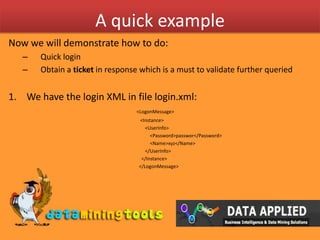
A quick exampleNow we will demonstrate how to do:Quick loginObtain a ticket in response which is a must to validate further queriedWe have the login XML in file login.xml:<LogonMessage> 				   <Instance> 		 		       <UserInfo> 			  	           <Password>passwor</Password> 				           <Name>xyz</Name>  				       </UserInfo> 				    </Instance> 				  </LogonMessage>
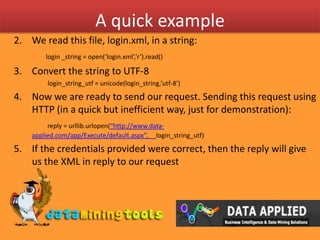
A quick exampleWe read this file, login.xml, in a string:login _string = open(‘login.xml’,’r’).read()Convert the string to UTF-8                     login_string_utf = unicode(login_string,’utf-8’)Now we are ready to send our request. Sending this request using HTTP (in a quick but inefficient way, just for demonstration): reply = urllib.urlopen(“http://www.data-applied.com/app/Execute/default.aspx”,     login_string_utf)If the credentials provided were correct, then the reply will give us the XML in reply to our requestreply_xml = reply.read()
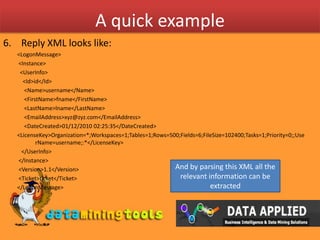
A quick exampleReply XML looks like:<LogonMessage> <Instance>  <UserInfo>    <Id>id</Id>     <Name>username</Name>     <FirstName>fname</FirstName>     <LastName>lname</LastName>     <EmailAddress>xyz@zyz.com</EmailAddress>     <DateCreated>01/12/2010 02:25:35</DateCreated><LicenseKey>Organization=*;Workspaces=1;Tables=1;Rows=500;Fields=6;FileSize=102400;Tasks=1;Priority=0;;UserName=username;:*</LicenseKey>   </UserInfo> </Instance> <Version>1.1</Version> <Ticket>ticket</Ticket></LogonMessage>And by parsing this XML all the relevant information can be extracted
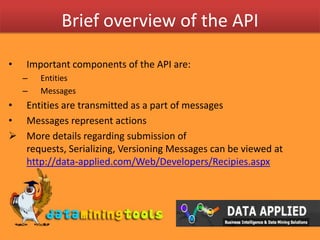
Brief overview of the APIImportant components of the API are:EntitiesMessagesEntities are transmitted as a part of messagesMessages represent actionsMore details regarding submission of requests, Serializing, Versioning Messages can be viewed at http://data-applied.com/Web/Developers/Recipies.aspxBrief overview of the APIEntities Represent objects such as workspaces, tables, fields, tasks, or task resultsEntities are transmitted through messagesEntities should be serialized to XMLEach entity has some properties, and these properties can be of the three types:Calculated: Calculated properties are automatically set by the system, and cannot be changed using update requestSet Once: Set once properties can be set by the user upon entity creation, but cannot subsequently be changed (only read)Filtered: Filtered properties are removed or filtered because they contain confidential information (searches referencing them are also blocked)The whole message specification can be viewed at http://data-applied.com/Web/Developers/Entities.aspxBrief overview of the APIMessages Represent actions such as create, retrieve, update, or deleteMessages can transmit entitiesMessages should be serialized to XML and are sent as HTTP request/responseEach message has some properties, and these properties can be of the three types:Entity: Indicates that the property contains a wrapped entity. Depending on the type of message, only some properties of the entity may need to be setObject: Indicates that the property contains a wrapped object which is not an entity. For example, this could be a condition restriction object.Array: Indicates that the property is in fact an array containing multiple simple values, multiple wrapped entities, etc.The whole message specification can be viewed at http://data-applied.com/Web/Developers/Messages.aspxAn ExampleWe want upload chunks of data from a local CSV file to one of our workspace on data-appliedFor this we will use:Entity: ChunkInfoMessage: CreateMessage
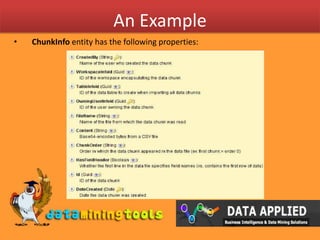
An ExampleChunkInfoentity has the following properties:
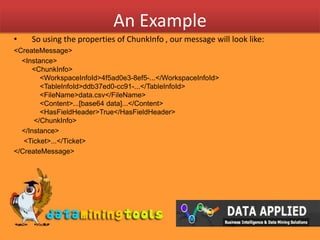
An ExampleSo using the properties of ChunkInfo , our message will look like:<CreateMessage>    <Instance><ChunkInfo>    <WorkspaceInfoId>4f5ad0e3-8ef5-...</WorkspaceInfoId>    <TableInfoId>ddb37ed0-cc91-...</TableInfoId>    <FileName>data.csv</FileName>    <Content>...[base64 data]...</Content>    <HasFieldHeader>True</HasFieldHeader> </ChunkInfo>    </Instance>     <Ticket>...</Ticket></CreateMessage>
Current status of APIAs of now data –applied has a functional C# library over its XML based APIhttp://data-applied.com/Web/Downloads/csharp_v1.0.zipFor user wanting to use some other language, one has to create there own XML messages and send them using HTTPAs communicated by Data-applied, we ‘might’ have XML templates available later
Visit more self help tutorialsPick a tutorial of your choice and browse through it at your own pace.
The tutorials section is free, self-guiding and will not involve any additional support.
Visit us at www.dataminingtools.net
Data Applied: Developer Quicklook

Data Applied: Developer Quicklook

  • 1.
    5 Data-Applied.com: QuickLook For Developers
  • 2.
    Getting startedTo getthe login username and password, register at:http://www.data-applied.com/App/This will work in only those browsers which support Microsoft SilverlightConfirm the registration from your email accountThe username and password set will be used to login before one can use there XML based APIOne can also use there XML based API to do the registration (to be covered later)
  • 3.
    XML based APIOnecan communicate with data-applied using there XML based APIRequests and Replies from data-applied are sent in XML formatRequest XML should be in UTF-8 formatRequests needs to be submitted at http://www.data-applied.com/app/Execute/default.aspx
  • 4.
    A quick exampleNowwe will demonstrate how to do:Quick loginObtain a ticket in response which is a must to validate further queriedWe have the login XML in file login.xml:<LogonMessage> <Instance> <UserInfo> <Password>passwor</Password> <Name>xyz</Name> </UserInfo> </Instance> </LogonMessage>
  • 5.
    A quick exampleWeread this file, login.xml, in a string:login _string = open(‘login.xml’,’r’).read()Convert the string to UTF-8 login_string_utf = unicode(login_string,’utf-8’)Now we are ready to send our request. Sending this request using HTTP (in a quick but inefficient way, just for demonstration): reply = urllib.urlopen(“http://www.data-applied.com/app/Execute/default.aspx”, login_string_utf)If the credentials provided were correct, then the reply will give us the XML in reply to our requestreply_xml = reply.read()
  • 6.
    A quick exampleReplyXML looks like:<LogonMessage> <Instance> <UserInfo> <Id>id</Id> <Name>username</Name> <FirstName>fname</FirstName> <LastName>lname</LastName> <EmailAddress>xyz@zyz.com</EmailAddress> <DateCreated>01/12/2010 02:25:35</DateCreated><LicenseKey>Organization=*;Workspaces=1;Tables=1;Rows=500;Fields=6;FileSize=102400;Tasks=1;Priority=0;;UserName=username;:*</LicenseKey> </UserInfo> </Instance> <Version>1.1</Version> <Ticket>ticket</Ticket></LogonMessage>And by parsing this XML all the relevant information can be extracted
  • 7.
    Brief overview ofthe APIImportant components of the API are:EntitiesMessagesEntities are transmitted as a part of messagesMessages represent actionsMore details regarding submission of requests, Serializing, Versioning Messages can be viewed at http://data-applied.com/Web/Developers/Recipies.aspxBrief overview of the APIEntities Represent objects such as workspaces, tables, fields, tasks, or task resultsEntities are transmitted through messagesEntities should be serialized to XMLEach entity has some properties, and these properties can be of the three types:Calculated: Calculated properties are automatically set by the system, and cannot be changed using update requestSet Once: Set once properties can be set by the user upon entity creation, but cannot subsequently be changed (only read)Filtered: Filtered properties are removed or filtered because they contain confidential information (searches referencing them are also blocked)The whole message specification can be viewed at http://data-applied.com/Web/Developers/Entities.aspxBrief overview of the APIMessages Represent actions such as create, retrieve, update, or deleteMessages can transmit entitiesMessages should be serialized to XML and are sent as HTTP request/responseEach message has some properties, and these properties can be of the three types:Entity: Indicates that the property contains a wrapped entity. Depending on the type of message, only some properties of the entity may need to be setObject: Indicates that the property contains a wrapped object which is not an entity. For example, this could be a condition restriction object.Array: Indicates that the property is in fact an array containing multiple simple values, multiple wrapped entities, etc.The whole message specification can be viewed at http://data-applied.com/Web/Developers/Messages.aspxAn ExampleWe want upload chunks of data from a local CSV file to one of our workspace on data-appliedFor this we will use:Entity: ChunkInfoMessage: CreateMessage
  • 8.
    An ExampleChunkInfoentity hasthe following properties:
  • 9.
    An ExampleSo usingthe properties of ChunkInfo , our message will look like:<CreateMessage> <Instance><ChunkInfo>   <WorkspaceInfoId>4f5ad0e3-8ef5-...</WorkspaceInfoId>   <TableInfoId>ddb37ed0-cc91-...</TableInfoId>   <FileName>data.csv</FileName>   <Content>...[base64 data]...</Content>   <HasFieldHeader>True</HasFieldHeader> </ChunkInfo> </Instance> <Ticket>...</Ticket></CreateMessage>
  • 10.
    Current status ofAPIAs of now data –applied has a functional C# library over its XML based APIhttp://data-applied.com/Web/Downloads/csharp_v1.0.zipFor user wanting to use some other language, one has to create there own XML messages and send them using HTTPAs communicated by Data-applied, we ‘might’ have XML templates available later
  • 11.
    Visit more selfhelp tutorialsPick a tutorial of your choice and browse through it at your own pace.
  • 12.
    The tutorials sectionis free, self-guiding and will not involve any additional support.
  • 13.
    Visit us atwww.dataminingtools.net