

INTRODUCTION TO
HTML
FUNDAMENTAL CONCEPTS
Title and Content Layout
Introduction
HTML Tags
HTML Elements
Text formatting
HTML Links, Images, List
Introduction to HTML
WHAT IS A WEB PAGE?
Introduction Continues…
Web pages are text files containing HTML
HTML – Hyper Text Mark-up Language
With HTML you can create your own web site using Notepad.
Basic HTML Tags
Start tag = <HTML>
End tag =</HTML>
Start and end tags are also called opening tags and closing tags
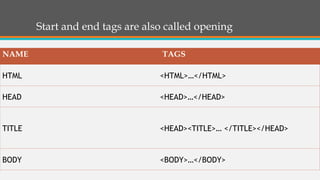
Start and end tags are also called opening
NAME TAGS
HTML <HTML>…</HTML>
HEAD <HEAD>…</HEAD>
TITLE <HEAD><TITLE>… </TITLE></HEAD>
BODY <BODY>…</BODY>
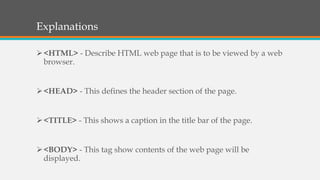
Explanations
<HTML> - Describe HTML web page that is to be viewed by a web
browser.
<HEAD> - This defines the header section of the page.
<TITLE> - This shows a caption in the title bar of the page.
<BODY> - This tag show contents of the web page will be
displayed.
Heading Element
• There are six heading elements
H1 = Giant-sized and bold
H2 = Large and bold
H3 = Normal-sized and bold
H4 = Small and bold
H5 = Very Small and bold
H6 = Tiny and bold
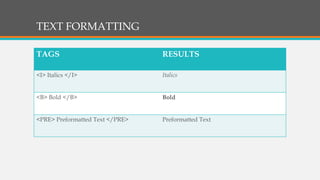
TEXT FORMATTING
TAGS RESULTS
<I> Italics </I> Italics
<B> Bold </B> Bold
<PRE> Preformatted Text </PRE> Preformatted Text
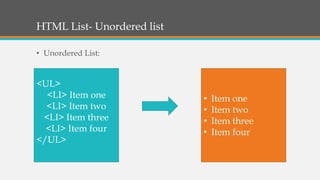
HTML List- Unordered list
• Unordered List:
<UL>
<LI> Item one
<LI> Item two
<LI> Item three
<LI> Item four
</UL>
• Item one
• Item two
• Item three
• Item four
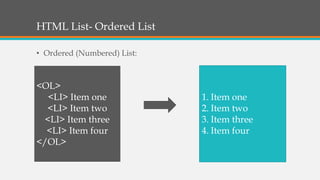
HTML List- Ordered List
• Ordered (Numbered) List:
<OL>
<LI> Item one
<LI> Item two
<LI> Item three
<LI> Item four
</OL>
1. Item one
2. Item two
3. Item three
4. Item four
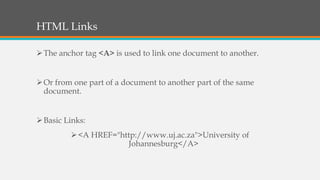
HTML Links
The anchor tag <A> is used to link one document to another.
Or from one part of a document to another part of the same
document.
Basic Links:
<A HREF="http://www.uj.ac.za">University of
Johannesburg</A>
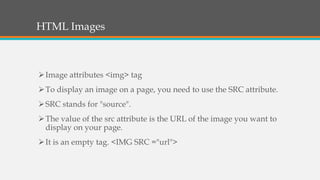
HTML Images
Image attributes <img> tag
To display an image on a page, you need to use the SRC attribute.
SRC stands for "source".
The value of the src attribute is the URL of the image you want to
display on your page.
It is an empty tag. <IMG SRC ="url">
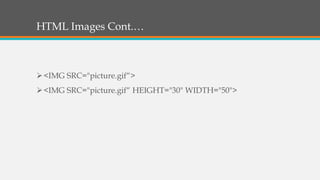
HTML Images Cont.…
<IMG SRC="picture.gif“>
<IMG SRC="picture.gif“ HEIGHT="30" WIDTH="50">
Test Your Skills
You are required to write a short essay about yourself using
notepad.
Include a picture of yourself and format is as follows:
 Width: “30”
 Hight: “50”
Produce a numbered list of your hobbis.
The End
Reference List
Callisto, M. (2012). Slides 2 – HTML. Available from slide share at:
https://goo.gl/P4Fay6 (Accessed 02 September 2018).
Ezor, J. (2018). html/CSS Crash course w/ interactive slides link.
Available from slide share at: https://goo.gl/UuqUff (Accessed 02
September 2018).
Matthew, H. (2016). At Endicott College. Available at
https://www.theodysseyonline.com/the-importance-the-end
(Accessed 02 September 2018).
Mvidanes, M. (2018). Html with examples. Available from slide
share at: https://goo.gl/dPb3ax (Accessed 02 September 2018).

Introduction to html fundamental concepts

  • 1.
  • 2.
    Title and ContentLayout Introduction HTML Tags HTML Elements Text formatting HTML Links, Images, List
  • 3.
  • 4.
    Introduction Continues… Web pagesare text files containing HTML HTML – Hyper Text Mark-up Language With HTML you can create your own web site using Notepad.
  • 5.
    Basic HTML Tags Starttag = <HTML> End tag =</HTML> Start and end tags are also called opening tags and closing tags
  • 6.
    Start and endtags are also called opening NAME TAGS HTML <HTML>…</HTML> HEAD <HEAD>…</HEAD> TITLE <HEAD><TITLE>… </TITLE></HEAD> BODY <BODY>…</BODY>
  • 7.
    Explanations <HTML> - DescribeHTML web page that is to be viewed by a web browser. <HEAD> - This defines the header section of the page. <TITLE> - This shows a caption in the title bar of the page. <BODY> - This tag show contents of the web page will be displayed.
  • 8.
    Heading Element • Thereare six heading elements H1 = Giant-sized and bold H2 = Large and bold H3 = Normal-sized and bold H4 = Small and bold H5 = Very Small and bold H6 = Tiny and bold
  • 9.
    TEXT FORMATTING TAGS RESULTS <I>Italics </I> Italics <B> Bold </B> Bold <PRE> Preformatted Text </PRE> Preformatted Text
  • 10.
    HTML List- Unorderedlist • Unordered List: <UL> <LI> Item one <LI> Item two <LI> Item three <LI> Item four </UL> • Item one • Item two • Item three • Item four
  • 11.
    HTML List- OrderedList • Ordered (Numbered) List: <OL> <LI> Item one <LI> Item two <LI> Item three <LI> Item four </OL> 1. Item one 2. Item two 3. Item three 4. Item four
  • 12.
    HTML Links The anchortag <A> is used to link one document to another. Or from one part of a document to another part of the same document. Basic Links: <A HREF="http://www.uj.ac.za">University of Johannesburg</A>
  • 13.
    HTML Images Image attributes<img> tag To display an image on a page, you need to use the SRC attribute. SRC stands for "source". The value of the src attribute is the URL of the image you want to display on your page. It is an empty tag. <IMG SRC ="url">
  • 14.
    HTML Images Cont.… <IMGSRC="picture.gif“> <IMG SRC="picture.gif“ HEIGHT="30" WIDTH="50">
  • 15.
    Test Your Skills Youare required to write a short essay about yourself using notepad. Include a picture of yourself and format is as follows:  Width: “30”  Hight: “50” Produce a numbered list of your hobbis.
  • 16.
  • 17.
    Reference List Callisto, M.(2012). Slides 2 – HTML. Available from slide share at: https://goo.gl/P4Fay6 (Accessed 02 September 2018). Ezor, J. (2018). html/CSS Crash course w/ interactive slides link. Available from slide share at: https://goo.gl/UuqUff (Accessed 02 September 2018). Matthew, H. (2016). At Endicott College. Available at https://www.theodysseyonline.com/the-importance-the-end (Accessed 02 September 2018). Mvidanes, M. (2018). Html with examples. Available from slide share at: https://goo.gl/dPb3ax (Accessed 02 September 2018).

Editor's Notes

  • #2 To change the image on this slide, select the picture and delete it. Then click the Pictures icon in the placeholder to insert your own image.