




Has this happened to you?Email to users results in 50+ undeliverableNeed to verify the users in Active DirectoryThen “deactivate” former employees in Crowd750 mouse clicks later, you’re done!2http://www.flickr.com/photos/left-hand/4231405740/
3Automate That!
AgendaUse cases for scriptingAtlassian APIs available for scriptingThe awesome power and simplicity of pythonExamples4
When is scripting useful?Automate time consuming tasksPerform data analysisCross-reference data from multiple systems5
Some specific use casesCrowd – Deactivate Users and remove from all groupsBamboo – Disable all plans in a projectJIRA – Release NotesSubversion – custom commit acceptanceCustom build processes – pull code linked to a specific issue into a patch archive6
Why Scripts?Why Not Plugins?7I’m not a Java Developer
Installing new plugins can require a restart
Prefer to minimize ad hoc changes on the server
Need to correlate information from several systems
Need an agile process to accommodate changing requirementsAPIs for scripting(that we avoid if possible)The user interfaceCan do anything a user can doReporting tasks are relatively easy (particularly when xml is available)Actions are relatively hard (and prone to breakage)Capture browser traffic with livehttpheaders, firebug, etcForm token checking can be an obstacleXML-RPC and SOAPRelatively low-level interfaceMany actions availableRelatively complex to use8
More APIs for scripting(the ones we prefer to use)RESTful Remote APIs (now deprecated)High level interfaceSupports a handful of actionsNow emerging:  “real” REST interfacesHigh level interfaceSupports a handful of actionshttp://confluence.atlassian.com/display/REST/Guidelines+for+Atlassian+REST+API+Design9
Why Python?Powerful standard librariesHttp(s) with cookie handlingXML and JSONUnicodeThird Party LibrariesSOAPRESTTemplatesSubversionPortable, cross-platform10
Python Versions2.xShips with most linux distributionsLots of third-party packages available3.xLatest versionDeliberately incompatible with 2.xNot as many third-party libraries11
HTTP(s) with PythonPython 2httplib – low level, all HTTP verbsurllib – GET and POST, utilitiesurllib2 – GET and POST using Request class, easier manipulation of headers, handlers for cookies, proxies, etc.Python 3http.client – low level, all HTTP verbshttp.parse - utilitiesurllib.request – similar to urllib2Third-Partyhttplib2 – high-level interface with all HTTP verbs, plus caching, compression, etc.12
Example 1JIRA Issue Query & Retrieval13
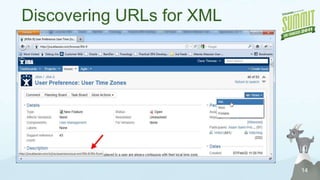
14Discovering URLs for XML
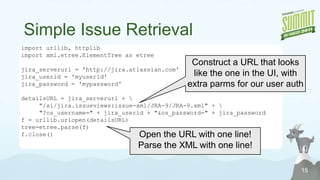
Simple Issue Retrieval15import urllib, httplibimport xml.etree.ElementTree as etreejira_serverurl = 'http://jira.atlassian.com'jira_userid = 'myuserid'jira_password = 'mypassword'detailsURL = jira_serverurl + \	"/si/jira.issueviews:issue-xml/JRA-9/JRA-9.xml" + \	"?os_username=" + jira_userid + "&os_password=" + jira_passwordf = urllib.urlopen(detailsURL)tree=etree.parse(f)f.close()Construct a URL that looks like the one in the UI, with extra parms for our user authOpen the URL with one line!Parse the XML with one line!
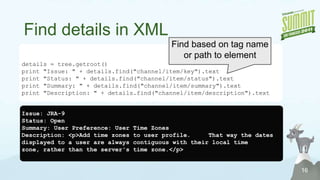
Find details in XML16Find based on tag name or path to elementdetails = tree.getroot()print "Issue: " + details.find("channel/item/key").textprint "Status: " + details.find("channel/item/status").textprint "Summary: " + details.find("channel/item/summary").textprint "Description: " + details.find("channel/item/description").textIssue: JRA-9Status: OpenSummary: User Preference: User Time ZonesDescription: <p>Add time zones to user profile.     That way the dates displayed to a user are always contiguous with their local time zone, rather than the server's time zone.</p>
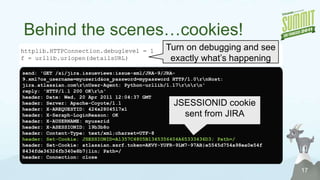
Behind the scenes…cookies!17Turn on debugging and see exactly what’s happeninghttplib.HTTPConnection.debuglevel= 1f = urllib.urlopen(detailsURL)send: 'GET /si/jira.issueviews:issue-xml/JRA-9/JRA-9.xml?os_username=myuserid&os_password=mypassword HTTP/1.0\r\nHost: jira.atlassian.com\r\nUser-Agent: Python-urllib/1.17\r\n\r\n'reply: 'HTTP/1.1 200 OK\r\n'header: Date: Wed, 20 Apr 2011 12:04:37 GMTheader: Server: Apache-Coyote/1.1header: X-AREQUESTID: 424x2804517x1header: X-Seraph-LoginReason: OKheader: X-AUSERNAME: myuseridheader: X-ASESSIONID: 19b3b8oheader: Content-Type: text/xml;charset=UTF-8header: Set-Cookie: JSESSIONID=A1357C4805B1345356404A65333436D3; Path=/header: Set-Cookie: atlassian.xsrf.token=AKVY-YUFR-9LM7-97AB|e5545d754a98ea0e54f8434fde36326fb340e8b7|lin; Path=/header: Connection: closeJSESSIONID cookie sent from JIRA
AuthenticationUser credentials determine:The data returnedThe operations allowedMethods Available:Basic AuthenticationJSESSIONID CookieToken Method18
Basic AuthenticationAuthentication credentials passed with each requestCan be used with REST API19
JSESSIONID CookieAuthentication credentials passed once; then cookie is usedUsed when scripting the user interfaceCan be used with REST API for JIRA, Confluence, and Bamboo20
Token MethodAuthentication credentials passed once; then token is usedUsed with Fisheye/Crucible RESTUsed with Deprecated Bamboo Remote API21
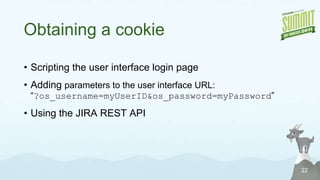
Obtaining a cookieScripting the user interface login pageAdding parameters to the user interface URL: “?os_username=myUserID&os_password=myPassword”Using the JIRA REST API22
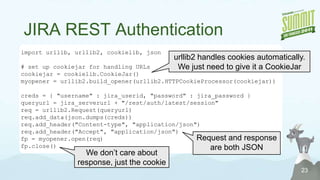
JIRA REST Authentication23import urllib, urllib2, cookielib, json# set up cookiejar for handling URLscookiejar = cookielib.CookieJar()myopener= urllib2.build_opener(urllib2.HTTPCookieProcessor(cookiejar))creds = { "username" : jira_userid, "password" : jira_password }queryurl = jira_serverurl + "/rest/auth/latest/session"req = urllib2.Request(queryurl)req.add_data(json.dumps(creds))req.add_header("Content-type", "application/json")req.add_header("Accept", "application/json")fp= myopener.open(req) fp.close()urllib2 handles cookies automatically.  We just need to give it a CookieJarRequest and response are both JSONWe don’t care about response, just the cookie
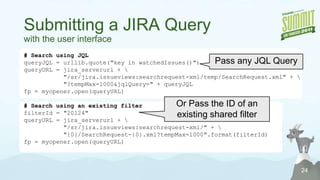
Submitting a JIRA Querywith the user interface24# Search using JQLqueryJQL = urllib.quote("key in watchedIssues()")queryURL = jira_serverurl + \           "/sr/jira.issueviews:searchrequest-xml/temp/SearchRequest.xml" + \           "?tempMax=1000&jqlQuery=" + queryJQLfp = myopener.open(queryURL)# Search using an existing filterfilterId = "20124"queryURL = jira_serverurl + \           "/sr/jira.issueviews:searchrequest-xml/" + \           "{0}/SearchRequest-{0}.xml?tempMax=1000".format(filterId)fp = myopener.open(queryURL)Pass any JQL QueryOr Pass the ID of an existing shared filter
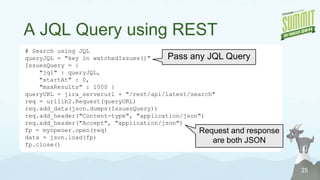
A JQL Query using REST25# Search using JQLqueryJQL= "key in watchedIssues()"IssuesQuery= {    "jql" : queryJQL,    "startAt" : 0,    "maxResults" : 1000 }queryURL = jira_serverurl + "/rest/api/latest/search"req = urllib2.Request(queryURL)req.add_data(json.dumps(IssuesQuery))req.add_header("Content-type", "application/json")req.add_header("Accept", "application/json")fp= myopener.open(req)data = json.load(fp)fp.close()Pass any JQL QueryRequest and response are both JSON
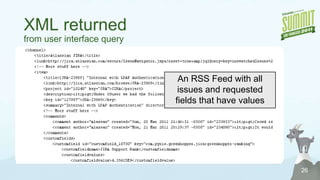
XML returned from user interface query26An RSS Feed with all issues and requested fields that have values
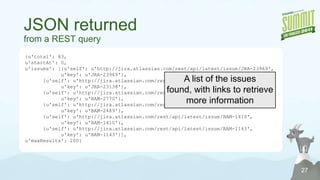
JSON returnedfrom a REST query27{u'total': 83, u'startAt': 0, u'issues': [{u'self': u'http://jira.atlassian.com/rest/api/latest/issue/JRA-23969', u'key': u'JRA-23969'}, 	{u'self': u'http://jira.atlassian.com/rest/api/latest/issue/JRA-23138', u'key': u'JRA-23138'}, 	{u'self': u'http://jira.atlassian.com/rest/api/latest/issue/BAM-2770', u'key': u'BAM-2770'}, 	{u'self': u'http://jira.atlassian.com/rest/api/latest/issue/BAM-2489', u'key': u'BAM-2489'}, 	{u'self': u'http://jira.atlassian.com/rest/api/latest/issue/BAM-1410', u'key': u'BAM-1410'}, 	{u'self': u'http://jira.atlassian.com/rest/api/latest/issue/BAM-1143', u'key': u'BAM-1143'}], u'maxResults': 200}A list of the issues found, with links to retrieve more information
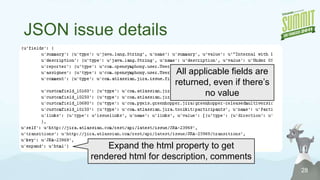
JSON issue details28All applicable fields are returned, even if there’s no valueExpand the html property to get rendered html for description, comments
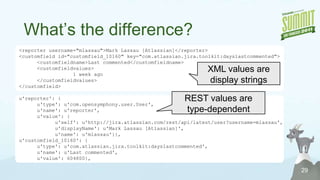
What’s the difference?29<reporter username="mlassau">Mark Lassau [Atlassian]</reporter><customfield id="customfield_10160" key="com.atlassian.jira.toolkit:dayslastcommented">	<customfieldname>Last commented</customfieldname>	<customfieldvalues>			1 week ago	</customfieldvalues></customfield>u'reporter': {u'type': u'com.opensymphony.user.User', u'name': u'reporter', u'value': {u'self': u'http://jira.atlassian.com/rest/api/latest/user?username=mlassau', u'displayName': u'MarkLassau [Atlassian]', u'name': u'mlassau'}}, u'customfield_10160': {u'type': u'com.atlassian.jira.toolkit:dayslastcommented', u'name': u'Last commented', u'value': 604800}, XML values are display stringsREST values are type-dependent
REST vs. non-REST30RESTMore roundtrips to query JIRA and get issue details
Returns all fields
Values require type-specific interpretation
Easier to transition issues
Easier to get info for projects, componentsNon-RESTCan query based on existing filter
XML returns only fields that contain values
Values always one or more display strings
Can do anything a user can do (with a little work)Example 2Cross-referencing JIRA, Fisheye, and Bamboo build results31
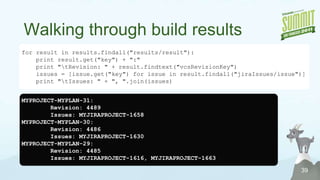
Which build resolved my issue?Bamboo keeps track of “related issues” (based on issue IDs included in commit comments), but doesn’t know when issues are resolved.If we know the issue is resolved in JIRA, we can look to see the latest build that lists our ID as a “related issue”Not a continuous integration build?   We’ll need to look in fisheye to determine the highest revision related to this issue and then look in bamboo to see if a build using this revision has completed successfully.32
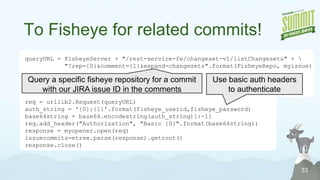
To Fisheye for related commits!33queryURL= FisheyeServer + "/rest-service-fe/changeset-v1/listChangesets" + \           "?rep={0}&comment={1}&expand=changesets".format(FisheyeRepo, myissue)req= urllib2.Request(queryURL)auth_string = '{0}:{1}'.format(fisheye_userid,fisheye_password)base64string = base64.encodestring(auth_string)[:-1]req.add_header("Authorization", "Basic {0}".format(base64string))response = myopener.open(req)issuecommits=etree.parse(response).getroot()response.close()Query a specific fisheye repository for a commit with our JIRA issue ID in the commentsUse basic auth headers to authenticate
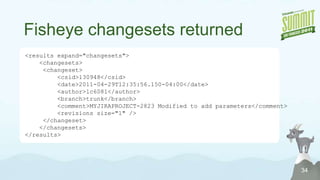
Fisheye changesets returned34<results expand="changesets">    <changesets>    	<changeset>	    <csid>130948</csid>	    <date>2011-04-29T12:35:56.150-04:00</date>	    <author>lc6081</author>	    <branch>trunk</branch>	    <comment>MYJIRAPROJECT-2823 Modified to add parameters</comment>	    <revisions size="1" />    	</changeset>    </changesets></results>
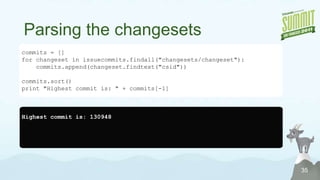
Parsing the changesets35commits = []for changeset in issuecommits.findall("changesets/changeset"):commits.append(changeset.findtext("csid"))commits.sort()print "Highest commit is: " + commits[-1]Highest commit is: 130948

Automate That! Scripting Atlassian applications in Python

  • 2.
    Has this happenedto you?Email to users results in 50+ undeliverableNeed to verify the users in Active DirectoryThen “deactivate” former employees in Crowd750 mouse clicks later, you’re done!2http://www.flickr.com/photos/left-hand/4231405740/
  • 3.
  • 4.
    AgendaUse cases forscriptingAtlassian APIs available for scriptingThe awesome power and simplicity of pythonExamples4
  • 5.
    When is scriptinguseful?Automate time consuming tasksPerform data analysisCross-reference data from multiple systems5
  • 6.
    Some specific usecasesCrowd – Deactivate Users and remove from all groupsBamboo – Disable all plans in a projectJIRA – Release NotesSubversion – custom commit acceptanceCustom build processes – pull code linked to a specific issue into a patch archive6
  • 7.
    Why Scripts?Why NotPlugins?7I’m not a Java Developer
  • 8.
    Installing new pluginscan require a restart
  • 9.
    Prefer to minimizead hoc changes on the server
  • 10.
    Need to correlateinformation from several systems
  • 11.
    Need an agileprocess to accommodate changing requirementsAPIs for scripting(that we avoid if possible)The user interfaceCan do anything a user can doReporting tasks are relatively easy (particularly when xml is available)Actions are relatively hard (and prone to breakage)Capture browser traffic with livehttpheaders, firebug, etcForm token checking can be an obstacleXML-RPC and SOAPRelatively low-level interfaceMany actions availableRelatively complex to use8
  • 12.
    More APIs forscripting(the ones we prefer to use)RESTful Remote APIs (now deprecated)High level interfaceSupports a handful of actionsNow emerging: “real” REST interfacesHigh level interfaceSupports a handful of actionshttp://confluence.atlassian.com/display/REST/Guidelines+for+Atlassian+REST+API+Design9
  • 13.
    Why Python?Powerful standardlibrariesHttp(s) with cookie handlingXML and JSONUnicodeThird Party LibrariesSOAPRESTTemplatesSubversionPortable, cross-platform10
  • 14.
    Python Versions2.xShips withmost linux distributionsLots of third-party packages available3.xLatest versionDeliberately incompatible with 2.xNot as many third-party libraries11
  • 15.
    HTTP(s) with PythonPython2httplib – low level, all HTTP verbsurllib – GET and POST, utilitiesurllib2 – GET and POST using Request class, easier manipulation of headers, handlers for cookies, proxies, etc.Python 3http.client – low level, all HTTP verbshttp.parse - utilitiesurllib.request – similar to urllib2Third-Partyhttplib2 – high-level interface with all HTTP verbs, plus caching, compression, etc.12
  • 16.
    Example 1JIRA IssueQuery & Retrieval13
  • 17.
  • 18.
    Simple Issue Retrieval15importurllib, httplibimport xml.etree.ElementTree as etreejira_serverurl = 'http://jira.atlassian.com'jira_userid = 'myuserid'jira_password = 'mypassword'detailsURL = jira_serverurl + \ "/si/jira.issueviews:issue-xml/JRA-9/JRA-9.xml" + \ "?os_username=" + jira_userid + "&os_password=" + jira_passwordf = urllib.urlopen(detailsURL)tree=etree.parse(f)f.close()Construct a URL that looks like the one in the UI, with extra parms for our user authOpen the URL with one line!Parse the XML with one line!
  • 19.
    Find details inXML16Find based on tag name or path to elementdetails = tree.getroot()print "Issue: " + details.find("channel/item/key").textprint "Status: " + details.find("channel/item/status").textprint "Summary: " + details.find("channel/item/summary").textprint "Description: " + details.find("channel/item/description").textIssue: JRA-9Status: OpenSummary: User Preference: User Time ZonesDescription: <p>Add time zones to user profile. That way the dates displayed to a user are always contiguous with their local time zone, rather than the server's time zone.</p>
  • 20.
    Behind the scenes…cookies!17Turnon debugging and see exactly what’s happeninghttplib.HTTPConnection.debuglevel= 1f = urllib.urlopen(detailsURL)send: 'GET /si/jira.issueviews:issue-xml/JRA-9/JRA-9.xml?os_username=myuserid&os_password=mypassword HTTP/1.0\r\nHost: jira.atlassian.com\r\nUser-Agent: Python-urllib/1.17\r\n\r\n'reply: 'HTTP/1.1 200 OK\r\n'header: Date: Wed, 20 Apr 2011 12:04:37 GMTheader: Server: Apache-Coyote/1.1header: X-AREQUESTID: 424x2804517x1header: X-Seraph-LoginReason: OKheader: X-AUSERNAME: myuseridheader: X-ASESSIONID: 19b3b8oheader: Content-Type: text/xml;charset=UTF-8header: Set-Cookie: JSESSIONID=A1357C4805B1345356404A65333436D3; Path=/header: Set-Cookie: atlassian.xsrf.token=AKVY-YUFR-9LM7-97AB|e5545d754a98ea0e54f8434fde36326fb340e8b7|lin; Path=/header: Connection: closeJSESSIONID cookie sent from JIRA
  • 21.
    AuthenticationUser credentials determine:Thedata returnedThe operations allowedMethods Available:Basic AuthenticationJSESSIONID CookieToken Method18
  • 22.
    Basic AuthenticationAuthentication credentialspassed with each requestCan be used with REST API19
  • 23.
    JSESSIONID CookieAuthentication credentialspassed once; then cookie is usedUsed when scripting the user interfaceCan be used with REST API for JIRA, Confluence, and Bamboo20
  • 24.
    Token MethodAuthentication credentialspassed once; then token is usedUsed with Fisheye/Crucible RESTUsed with Deprecated Bamboo Remote API21
  • 25.
    Obtaining a cookieScriptingthe user interface login pageAdding parameters to the user interface URL: “?os_username=myUserID&os_password=myPassword”Using the JIRA REST API22
  • 26.
    JIRA REST Authentication23importurllib, urllib2, cookielib, json# set up cookiejar for handling URLscookiejar = cookielib.CookieJar()myopener= urllib2.build_opener(urllib2.HTTPCookieProcessor(cookiejar))creds = { "username" : jira_userid, "password" : jira_password }queryurl = jira_serverurl + "/rest/auth/latest/session"req = urllib2.Request(queryurl)req.add_data(json.dumps(creds))req.add_header("Content-type", "application/json")req.add_header("Accept", "application/json")fp= myopener.open(req) fp.close()urllib2 handles cookies automatically. We just need to give it a CookieJarRequest and response are both JSONWe don’t care about response, just the cookie
  • 27.
    Submitting a JIRAQuerywith the user interface24# Search using JQLqueryJQL = urllib.quote("key in watchedIssues()")queryURL = jira_serverurl + \ "/sr/jira.issueviews:searchrequest-xml/temp/SearchRequest.xml" + \ "?tempMax=1000&jqlQuery=" + queryJQLfp = myopener.open(queryURL)# Search using an existing filterfilterId = "20124"queryURL = jira_serverurl + \ "/sr/jira.issueviews:searchrequest-xml/" + \ "{0}/SearchRequest-{0}.xml?tempMax=1000".format(filterId)fp = myopener.open(queryURL)Pass any JQL QueryOr Pass the ID of an existing shared filter
  • 28.
    A JQL Queryusing REST25# Search using JQLqueryJQL= "key in watchedIssues()"IssuesQuery= { "jql" : queryJQL, "startAt" : 0, "maxResults" : 1000 }queryURL = jira_serverurl + "/rest/api/latest/search"req = urllib2.Request(queryURL)req.add_data(json.dumps(IssuesQuery))req.add_header("Content-type", "application/json")req.add_header("Accept", "application/json")fp= myopener.open(req)data = json.load(fp)fp.close()Pass any JQL QueryRequest and response are both JSON
  • 29.
    XML returned fromuser interface query26An RSS Feed with all issues and requested fields that have values
  • 30.
    JSON returnedfrom aREST query27{u'total': 83, u'startAt': 0, u'issues': [{u'self': u'http://jira.atlassian.com/rest/api/latest/issue/JRA-23969', u'key': u'JRA-23969'}, {u'self': u'http://jira.atlassian.com/rest/api/latest/issue/JRA-23138', u'key': u'JRA-23138'}, {u'self': u'http://jira.atlassian.com/rest/api/latest/issue/BAM-2770', u'key': u'BAM-2770'}, {u'self': u'http://jira.atlassian.com/rest/api/latest/issue/BAM-2489', u'key': u'BAM-2489'}, {u'self': u'http://jira.atlassian.com/rest/api/latest/issue/BAM-1410', u'key': u'BAM-1410'}, {u'self': u'http://jira.atlassian.com/rest/api/latest/issue/BAM-1143', u'key': u'BAM-1143'}], u'maxResults': 200}A list of the issues found, with links to retrieve more information
  • 31.
    JSON issue details28Allapplicable fields are returned, even if there’s no valueExpand the html property to get rendered html for description, comments
  • 32.
    What’s the difference?29<reporterusername="mlassau">Mark Lassau [Atlassian]</reporter><customfield id="customfield_10160" key="com.atlassian.jira.toolkit:dayslastcommented"> <customfieldname>Last commented</customfieldname> <customfieldvalues> 1 week ago </customfieldvalues></customfield>u'reporter': {u'type': u'com.opensymphony.user.User', u'name': u'reporter', u'value': {u'self': u'http://jira.atlassian.com/rest/api/latest/user?username=mlassau', u'displayName': u'MarkLassau [Atlassian]', u'name': u'mlassau'}}, u'customfield_10160': {u'type': u'com.atlassian.jira.toolkit:dayslastcommented', u'name': u'Last commented', u'value': 604800}, XML values are display stringsREST values are type-dependent
  • 33.
    REST vs. non-REST30RESTMoreroundtrips to query JIRA and get issue details
  • 34.
  • 35.
  • 36.
  • 37.
    Easier to getinfo for projects, componentsNon-RESTCan query based on existing filter
  • 38.
    XML returns onlyfields that contain values
  • 39.
    Values always oneor more display strings
  • 40.
    Can do anythinga user can do (with a little work)Example 2Cross-referencing JIRA, Fisheye, and Bamboo build results31
  • 41.
    Which build resolvedmy issue?Bamboo keeps track of “related issues” (based on issue IDs included in commit comments), but doesn’t know when issues are resolved.If we know the issue is resolved in JIRA, we can look to see the latest build that lists our ID as a “related issue”Not a continuous integration build? We’ll need to look in fisheye to determine the highest revision related to this issue and then look in bamboo to see if a build using this revision has completed successfully.32
  • 42.
    To Fisheye forrelated commits!33queryURL= FisheyeServer + "/rest-service-fe/changeset-v1/listChangesets" + \ "?rep={0}&comment={1}&expand=changesets".format(FisheyeRepo, myissue)req= urllib2.Request(queryURL)auth_string = '{0}:{1}'.format(fisheye_userid,fisheye_password)base64string = base64.encodestring(auth_string)[:-1]req.add_header("Authorization", "Basic {0}".format(base64string))response = myopener.open(req)issuecommits=etree.parse(response).getroot()response.close()Query a specific fisheye repository for a commit with our JIRA issue ID in the commentsUse basic auth headers to authenticate
  • 43.
    Fisheye changesets returned34<resultsexpand="changesets"> <changesets> <changeset> <csid>130948</csid> <date>2011-04-29T12:35:56.150-04:00</date> <author>lc6081</author> <branch>trunk</branch> <comment>MYJIRAPROJECT-2823 Modified to add parameters</comment> <revisions size="1" /> </changeset> </changesets></results>
  • 44.
    Parsing the changesets35commits= []for changeset in issuecommits.findall("changesets/changeset"):commits.append(changeset.findtext("csid"))commits.sort()print "Highest commit is: " + commits[-1]Highest commit is: 130948

Editor's Notes

  • #4 FIS is part of the S&amp;P 500 and is one of the world&apos;s top-ranked technology providers to the banking industry.
  • #6 Three basic scenarios where scripting is useful
  • #7 JIRA – JQL provides amazing ability to search for issues. The presentation choices are limited, however, particularly if you want a report that you can email to others.
  • #8 We have 2,000 users, so we tend to value server stability
  • #13 All examples here in python 2
  • #16 No proper error handling in any of these examples
  • #17 Note that fields with wiki markup are returned as-is
  • #24 Here, we’re going to use cookies. The JSESSIONID cookie can be used interchangeably between REST and non-REST callsYou can also use basic auth
  • #25 No fields specified, so all fields are returned for all issues
  • #26 Currently not possible to search based on an existing filter using REST
  • #28 No fields are returned…. Just a list of the issues
  • #29 Custom fields are listed alongside system fields
  • #30 The contents of the “value” are highly dependent on the field type
  • #35 The revisions “size” attribute tells us how many files were committed in that changeset
  • #36 In practice, it seems that changesets are returned in decreasing order. The documentation doesn’t specify any order, however, so we’ll make no assumptions here
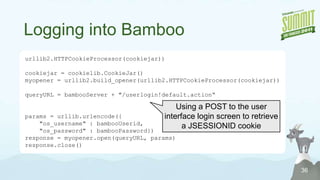
  • #37 Bamboo allows basic auth, but you have to supply “os_authType=basic” as a query parameter in addition to the basicauth header. Here, we elect to exercise the user interface and obtain a cookie instead.
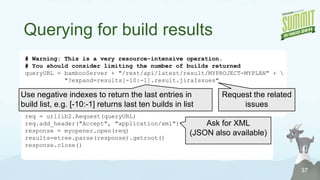
  • #38 Just asking for the last 10 build results – would really want to loop backwards a chunk at a timeExpanding the related jira issues – can expand other fields as well Requesting the results in xml. Json also available
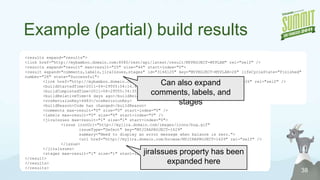
  • #39 Note that we can also expand comment, labels, and stages (in addition to related issues)