DROID-FF – THE ANDROID
FUZZING FRAMEWORK
TWITTER : @ANTOJOSEP007
GITHUB : @ANTOJOSEPH
@WHOAMI
• security engineer @ intel
• android security enthusiast
• speaker / trainer @ brucon / hackinparis / blackhat / nullcon / ground zero
/ c0c0n …
• when not hacking , you can see me travelling / djing / cooking
DROID-FF : WHY ?
• attempts to solve fuzzing in mobile devices (* android )
• challenges in fuzzing :
• data – generation
• low powered devices
• crash logging
• crash triage
• exploitable or not ?
DROID-FF : APPROACH
• scripts written in python
• integrates with peach / pyzuff / radamsa
• custom crash logging
• custom crash triaging
• exploitable checks via gdb plugin J
• mostly automated
DROID-FF : DATA GENERATION
• two approaches
• dump fuzzing using radamsa / pyzuff
• generation based fuzzing using peach
• to counter checksums / magic numbers , custom fixers are added (for eg : dex repair for
fixing checksums in randomly mutated dex files (credits : github.com/anestisb )
• Grammar specified in pit files for peach
DROID-FF : FUZZING CAMPAIGN
• Runs the generated files against the target binary ( for eg :
/system/xbin/dexdump crash1.dex )
• Makes use of adb_android python module to push generated files to device
• Makes use of adb shell command to execute the file against the target binary
• Adds a custom log to the android logcat so that we can track any files
responsible for the crash ( for eg : log -p F -t CRASH_LOGGER SIGSEGV :
filename.dex )
DROID-FF : BUILDING ANDROID MODULES
• Navigate to the module directory ( eg : /frameworks/av/cmd/stagefright/)
• Use the make helper
• source build/envsetup.sh
• edit (/frameworks/av/cmd/stagefright/Android.mk) and LOCAL_MODULE
=$BUILD_EXECUTABLE
• mma ( /out/target/product/generic/system/xbin/dexdump)
DROID-FF : PROCESSING THE LOGS
• Pulls the adb logcat data from the device by saving it to a file and adb pull
• Parse the log file and look for crashes ("SIGSEGV", "SIGSEGV",
"SIGFPE","SIGILL”)
• If a crash is found , go up the lines until you find our custom crash file name
logger
• Queue the file responsible for the crash to double check
DROID-FF : CRASH VERIFICATION
• Runs the files responsible for crash against the target binary
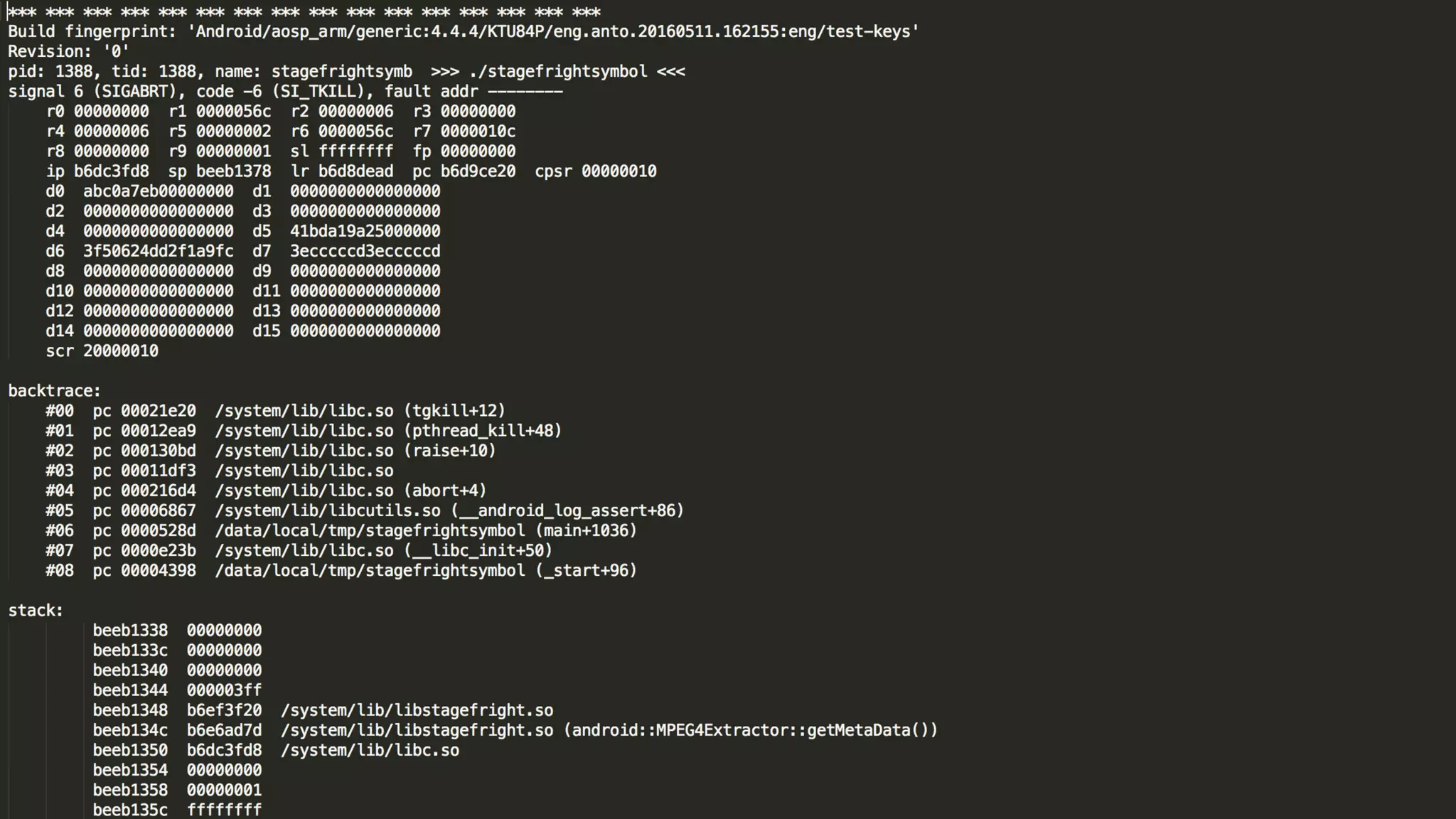
• In the event of a crash , android system writes tombstone files ( crashdump ) to
the /data/tombstones directory .
• Backup the tombstone file along with the file responsible for crash
• Look for duplicate crashes by filtering the pc register value in the tombstone
file and only save unique crashes
DROID-FF : PROCESS TOMBSTONES
• Unique crashes needs to be mapped to relevant source code
• Using ndk-stack and addr2line utilities ( android –ndk tools ) , we map the
crash to a line in the android source code
• Ndk-stack :
• /path/to/file_with_symbols
• /path/to/tombstone_file
DROID-FF : PROCESS TOMBSTONE (2)
• Addr2line
• Address of the crash obtained by running ndk-stack in the target module
• "-C","-f", "-e", symbols_file_of_crash, address_of_the_crash
• Output gives the function and filename responsible for the crash
DROIF-FF : EXPLOITABLE ?
• Uses a gdb plugin ”exploitable “ which supports arm
• Looks at the state of the process when in crashes / unwinds stack etc and
predicts based on custom rules
• Credits (https://github.com/jfoote/exploitable)
• Runs using python gdb api ( (gdb) source ../path/to/exploitable.py)
• Gdbserver for arm is pushed to the device
DROID-FF : EXPLOITABLE ? (2)
• root@goldfish: ./gdbserver :5039 /system/xbin/dexdump crash1.dex
• (gdb) set solib-absolute-prefixdb /path/to/symbols/
• (gdb) set solib-search-path /path/to/symbols/system/lib/
• (gdb) target remote : 5039
• (gdb) c
• Wait for process to crash or send it a kill sig ( kill -9 pid )
• (gdb) exploitable
• (gdb ) Stack Corruption , Exploitable : True , Description : blah blah blah
DROID-FF : ACHIEVEMENTS
• A lot of crashes , A LOOOOOOOTTTT!
• Fuzzing made easier and available for the masses
• Mostly automated
• Easily customizable
• Python J
• Source : github.com/antojoseph/droid-ff
DROID-FF : FUTURE IMPROVEMENTS
• Integration with ASAN
• Add support for automated gdb exploitability test and reporting
• Instrumented fuzzing ?
• Automate posting of exploitable crashes to android security group ? J
AFL FOR ANDROID
• Intel open sourced their implementation of afl on android
• Responsible for a lot of stagefright crashes
• Instrumented fuzzing helps in better coverage of all code paths
HONGFUZZ
• Runs within android
• Ported to android by (github.com/anestisb)
• Easy to get up and running with and very useful for quickly fuzzing binaries
• Built-in native crash logging mechanism ( over-rides android debuggered )
THANKS
• @Ananth Srivastava – for all the packaging and suggestions
• @Sumanth Naropanth – for being a cool manager
• @jduck – for inspiration to write fuzzers and all the help from droidsec irc ( those series of stagefrights J )
• @anestisb – for those tools and articles in android fuzzing
• @Alexandru Blanda – for his work in MFF and being a good friend
• @Stephen Kyle - for his articles on fuzzin in ARM
• @ Fuzzing Parcels – BH Presentation
• @kp for being awesome and keeping me sane
HOW TO : DROID-FF
HOW TO : DROID-FF : STEP 1
• Python droid-ff.py
• Select the data –generator to use
• Options ( bitflipper / radamsa / peach )
• On Error :
• (make sure you have the python requirements installed)
• pyZUFF
• adb_android
HOW TO : DROID-FF : STEP 2
• To Run the fuzzing campaign :
• Have android emulator up and running
• Android avd
• Start the emulator
• Test by checking “adb devices ” in the console
• Once running , run droif-ff.py and select option 2
HOW TO : DROID-FF : STEP 3
• Find crashes in your fuzzing campaign
• Make sure your emulator is still running and you can connect via adb
• Select step 3 in droid-ff.py
• This will pull the adb logs and search for any crashes and identify the files responsible
• On Error :
• Make sure you have all the required directories in the fuzzer folder , else moving files will fail
• Manually verify the logcat output and check if the script missed any crashes (very unlikely)
HOW TO : DROID-FF : STEP4
• To avoid false positives :
• All files which are identified to case a crash in the previous step is run again
• If crash happens , a resulting tombstone file is created
• We pull the tombstone file and identify the pc address of the crash
• We keep a dict of key value pairs of {pc , filename } and unique crashes are identified
and moved to a separate folder
HOW TO DROID-FF : STEP 5
• The crashes are resolved to a filename and method :
• Using ndk-stack tool , binary with symbols and the tombstone file , we can print the stack
frame
• Using addr2line , address from ndk-stack and binary with symbols , we resolve the crash
to a line and method in the sourcode
HOW TO : DROID-FF : STEP 6
• Check exploitability :
• Uses a gbd plugin which supports linux arm
• Loaded via .gdbinit
• Set symbol search path in gdb
• adb forward tcp:5039 tcp:5039
• gdbserver runs on the android device and listens on tcp port 5039
• gdb connects to gdb server and continues the execution of the binary until fault
• On fault signal , run exploitable and prints the result
WHAT NEXT ?
• Do a second round of manual analysis to make sure the bug is exploitable
• Reproduce the bug in different devices / architecutes
• Report and exhaustive security bug report to the android security team
• If you are lucky , get your android – security bounty $$$
THANKS J
• Questions please …

D1T3-Anto-Joseph-Droid-FF

  • 1.
    DROID-FF – THEANDROID FUZZING FRAMEWORK TWITTER : @ANTOJOSEP007 GITHUB : @ANTOJOSEPH
  • 2.
    @WHOAMI • security engineer@ intel • android security enthusiast • speaker / trainer @ brucon / hackinparis / blackhat / nullcon / ground zero / c0c0n … • when not hacking , you can see me travelling / djing / cooking
  • 3.
    DROID-FF : WHY? • attempts to solve fuzzing in mobile devices (* android ) • challenges in fuzzing : • data – generation • low powered devices • crash logging • crash triage • exploitable or not ?
  • 4.
    DROID-FF : APPROACH •scripts written in python • integrates with peach / pyzuff / radamsa • custom crash logging • custom crash triaging • exploitable checks via gdb plugin J • mostly automated
  • 5.
    DROID-FF : DATAGENERATION • two approaches • dump fuzzing using radamsa / pyzuff • generation based fuzzing using peach • to counter checksums / magic numbers , custom fixers are added (for eg : dex repair for fixing checksums in randomly mutated dex files (credits : github.com/anestisb ) • Grammar specified in pit files for peach
  • 6.
    DROID-FF : FUZZINGCAMPAIGN • Runs the generated files against the target binary ( for eg : /system/xbin/dexdump crash1.dex ) • Makes use of adb_android python module to push generated files to device • Makes use of adb shell command to execute the file against the target binary • Adds a custom log to the android logcat so that we can track any files responsible for the crash ( for eg : log -p F -t CRASH_LOGGER SIGSEGV : filename.dex )
  • 7.
    DROID-FF : BUILDINGANDROID MODULES • Navigate to the module directory ( eg : /frameworks/av/cmd/stagefright/) • Use the make helper • source build/envsetup.sh • edit (/frameworks/av/cmd/stagefright/Android.mk) and LOCAL_MODULE =$BUILD_EXECUTABLE • mma ( /out/target/product/generic/system/xbin/dexdump)
  • 8.
    DROID-FF : PROCESSINGTHE LOGS • Pulls the adb logcat data from the device by saving it to a file and adb pull • Parse the log file and look for crashes ("SIGSEGV", "SIGSEGV", "SIGFPE","SIGILL”) • If a crash is found , go up the lines until you find our custom crash file name logger • Queue the file responsible for the crash to double check
  • 10.
    DROID-FF : CRASHVERIFICATION • Runs the files responsible for crash against the target binary • In the event of a crash , android system writes tombstone files ( crashdump ) to the /data/tombstones directory . • Backup the tombstone file along with the file responsible for crash • Look for duplicate crashes by filtering the pc register value in the tombstone file and only save unique crashes
  • 11.
    DROID-FF : PROCESSTOMBSTONES • Unique crashes needs to be mapped to relevant source code • Using ndk-stack and addr2line utilities ( android –ndk tools ) , we map the crash to a line in the android source code • Ndk-stack : • /path/to/file_with_symbols • /path/to/tombstone_file
  • 13.
    DROID-FF : PROCESSTOMBSTONE (2) • Addr2line • Address of the crash obtained by running ndk-stack in the target module • "-C","-f", "-e", symbols_file_of_crash, address_of_the_crash • Output gives the function and filename responsible for the crash
  • 14.
    DROIF-FF : EXPLOITABLE? • Uses a gdb plugin ”exploitable “ which supports arm • Looks at the state of the process when in crashes / unwinds stack etc and predicts based on custom rules • Credits (https://github.com/jfoote/exploitable) • Runs using python gdb api ( (gdb) source ../path/to/exploitable.py) • Gdbserver for arm is pushed to the device
  • 15.
    DROID-FF : EXPLOITABLE? (2) • root@goldfish: ./gdbserver :5039 /system/xbin/dexdump crash1.dex • (gdb) set solib-absolute-prefixdb /path/to/symbols/ • (gdb) set solib-search-path /path/to/symbols/system/lib/ • (gdb) target remote : 5039 • (gdb) c • Wait for process to crash or send it a kill sig ( kill -9 pid ) • (gdb) exploitable • (gdb ) Stack Corruption , Exploitable : True , Description : blah blah blah
  • 17.
    DROID-FF : ACHIEVEMENTS •A lot of crashes , A LOOOOOOOTTTT! • Fuzzing made easier and available for the masses • Mostly automated • Easily customizable • Python J • Source : github.com/antojoseph/droid-ff
  • 18.
    DROID-FF : FUTUREIMPROVEMENTS • Integration with ASAN • Add support for automated gdb exploitability test and reporting • Instrumented fuzzing ? • Automate posting of exploitable crashes to android security group ? J
  • 19.
    AFL FOR ANDROID •Intel open sourced their implementation of afl on android • Responsible for a lot of stagefright crashes • Instrumented fuzzing helps in better coverage of all code paths
  • 20.
    HONGFUZZ • Runs withinandroid • Ported to android by (github.com/anestisb) • Easy to get up and running with and very useful for quickly fuzzing binaries • Built-in native crash logging mechanism ( over-rides android debuggered )
  • 21.
    THANKS • @Ananth Srivastava– for all the packaging and suggestions • @Sumanth Naropanth – for being a cool manager • @jduck – for inspiration to write fuzzers and all the help from droidsec irc ( those series of stagefrights J ) • @anestisb – for those tools and articles in android fuzzing • @Alexandru Blanda – for his work in MFF and being a good friend • @Stephen Kyle - for his articles on fuzzin in ARM • @ Fuzzing Parcels – BH Presentation • @kp for being awesome and keeping me sane
  • 22.
    HOW TO :DROID-FF
  • 23.
    HOW TO :DROID-FF : STEP 1 • Python droid-ff.py • Select the data –generator to use • Options ( bitflipper / radamsa / peach ) • On Error : • (make sure you have the python requirements installed) • pyZUFF • adb_android
  • 24.
    HOW TO :DROID-FF : STEP 2 • To Run the fuzzing campaign : • Have android emulator up and running • Android avd • Start the emulator • Test by checking “adb devices ” in the console • Once running , run droif-ff.py and select option 2
  • 25.
    HOW TO :DROID-FF : STEP 3 • Find crashes in your fuzzing campaign • Make sure your emulator is still running and you can connect via adb • Select step 3 in droid-ff.py • This will pull the adb logs and search for any crashes and identify the files responsible • On Error : • Make sure you have all the required directories in the fuzzer folder , else moving files will fail • Manually verify the logcat output and check if the script missed any crashes (very unlikely)
  • 26.
    HOW TO :DROID-FF : STEP4 • To avoid false positives : • All files which are identified to case a crash in the previous step is run again • If crash happens , a resulting tombstone file is created • We pull the tombstone file and identify the pc address of the crash • We keep a dict of key value pairs of {pc , filename } and unique crashes are identified and moved to a separate folder
  • 27.
    HOW TO DROID-FF: STEP 5 • The crashes are resolved to a filename and method : • Using ndk-stack tool , binary with symbols and the tombstone file , we can print the stack frame • Using addr2line , address from ndk-stack and binary with symbols , we resolve the crash to a line and method in the sourcode
  • 28.
    HOW TO :DROID-FF : STEP 6 • Check exploitability : • Uses a gbd plugin which supports linux arm • Loaded via .gdbinit • Set symbol search path in gdb • adb forward tcp:5039 tcp:5039 • gdbserver runs on the android device and listens on tcp port 5039 • gdb connects to gdb server and continues the execution of the binary until fault • On fault signal , run exploitable and prints the result
  • 29.
    WHAT NEXT ? •Do a second round of manual analysis to make sure the bug is exploitable • Reproduce the bug in different devices / architecutes • Report and exhaustive security bug report to the android security team • If you are lucky , get your android – security bounty $$$
  • 30.