My Journey so far
with Cypress
Introduction
• End to end testing tool which I have integrated with the github
actions to help me publish a html report on a github page
• Any push to the main branch on the `test-cypress` repository triggers
the necessary job on chrome browser in an ubuntu machine
• Few pointers compared to our current project – we need to upgrade
our node from 11.11.0 to 12.x
• Run this job once the image is deployed to the staging setup and the
pod is up.
Getting Started
• There are two top level things which we need to keep in mind –
1. describe block - It is similar to a class in JavaScript
2. it blocks - Same as functions or methods which help us divide the
program logic into much smaller components for better readability
• Clone my repository and do a `yarn` or `npm install` to have a node-
modules directory with all the required dependencies
• Change the `adarsh.staging` to `febin.staging` or `cloudyuga.staging`
Advantages and Main Functionality
• Automate the testing process to avoid repetition by a programmer
during the testing - improves productivity
• Add a working test case, just once, for a new feature being added or
the one already present
• Find a break point before deployment to production and fix bug
before it goes live for the clients and users.
• Have a screenshot of the page and point where the error happen.
• The testing code sounds more like a plain meaningful English
sentence. Of course, a few dots and brackets here and there for
syntactical sugar.
Challenges
• Logging in the user in local host dev environment bypassing the CSRF
error because of the automation script [devise has to enable this]
• Have a `data-cy=“create-new-course-button”` attribute in all the tags
which need to participate in the testing process - best practice.
• Have a new domain `test-staging.tveacher.com` to dedicate this
environment completely to testing
• Writing in the Editor JS and then saving that chapter content
• Get data from the database to verify whether all the content appears
on the screen and is visible to the user [can be done via json
response]
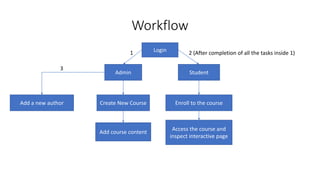
Workflow
Login
Admin Student
Create New Course
Add course content
Enroll to the course
1 2 (After completion of all the tasks inside 1)
Access the course and
inspect interactive page
Add a new author
3
Future Plans
• Work on the website interaction for a logged out user
• Upload an image for the course or author using file uploader
• Add the cypress automation for the local dev environment.
Conclusion
• If you get stuck while writing a piece of code to carry out a test, do a
google search and refer the stack overflow queries and answers
• There are open GitHub issues on their official repository to many
features which are yet to come according to their roadmap
• A real world app based on TypeScript and lowDb is developed by the
official Cypress team to give newbies a taste of testing with cypress
commands
References
• https://medium.com/swlh/publish-your-cypress-test-report-with-
github-actions-47248788713a
• https://www.youtube.com/watch?v=V-o8WzlwKmM
• https://docs.cypress.io/guides/references/best-practices.html
Suggestions
• Do a signup for the new user and test all of the functionality with that
and delete it during the clean-up process.
• Go to the home or required page instead of “/backstage/courses”
during testing to avoid getting the error message unnecessarily.
• Come up with a priority list to assign weightage to the testing
workflow which needs to be implemented first.

Cypress report

  • 1.
    My Journey sofar with Cypress
  • 2.
    Introduction • End toend testing tool which I have integrated with the github actions to help me publish a html report on a github page • Any push to the main branch on the `test-cypress` repository triggers the necessary job on chrome browser in an ubuntu machine • Few pointers compared to our current project – we need to upgrade our node from 11.11.0 to 12.x • Run this job once the image is deployed to the staging setup and the pod is up.
  • 3.
    Getting Started • Thereare two top level things which we need to keep in mind – 1. describe block - It is similar to a class in JavaScript 2. it blocks - Same as functions or methods which help us divide the program logic into much smaller components for better readability • Clone my repository and do a `yarn` or `npm install` to have a node- modules directory with all the required dependencies • Change the `adarsh.staging` to `febin.staging` or `cloudyuga.staging`
  • 4.
    Advantages and MainFunctionality • Automate the testing process to avoid repetition by a programmer during the testing - improves productivity • Add a working test case, just once, for a new feature being added or the one already present • Find a break point before deployment to production and fix bug before it goes live for the clients and users. • Have a screenshot of the page and point where the error happen. • The testing code sounds more like a plain meaningful English sentence. Of course, a few dots and brackets here and there for syntactical sugar.
  • 5.
    Challenges • Logging inthe user in local host dev environment bypassing the CSRF error because of the automation script [devise has to enable this] • Have a `data-cy=“create-new-course-button”` attribute in all the tags which need to participate in the testing process - best practice. • Have a new domain `test-staging.tveacher.com` to dedicate this environment completely to testing • Writing in the Editor JS and then saving that chapter content • Get data from the database to verify whether all the content appears on the screen and is visible to the user [can be done via json response]
  • 6.
    Workflow Login Admin Student Create NewCourse Add course content Enroll to the course 1 2 (After completion of all the tasks inside 1) Access the course and inspect interactive page Add a new author 3
  • 7.
    Future Plans • Workon the website interaction for a logged out user • Upload an image for the course or author using file uploader • Add the cypress automation for the local dev environment.
  • 8.
    Conclusion • If youget stuck while writing a piece of code to carry out a test, do a google search and refer the stack overflow queries and answers • There are open GitHub issues on their official repository to many features which are yet to come according to their roadmap • A real world app based on TypeScript and lowDb is developed by the official Cypress team to give newbies a taste of testing with cypress commands
  • 9.
  • 10.
    Suggestions • Do asignup for the new user and test all of the functionality with that and delete it during the clean-up process. • Go to the home or required page instead of “/backstage/courses” during testing to avoid getting the error message unnecessarily. • Come up with a priority list to assign weightage to the testing workflow which needs to be implemented first.