www.cyberoam.com 
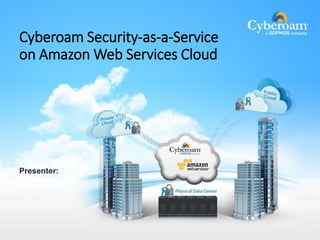
Cyberoam Security-as-a-Service 
on Amazon Web Services Cloud 
Presenter:
www.cyberoam.com 
About Amazon Web Services (AWS)
www.cyberoam.com 
What is Amazon Web Services (AWS)? 
Amazon Elastic Compute Cloud 
 Rent computing capacity or infrastructure on the cloud 
 A Web service that provides resizable compute capacity in the cloud 
 Pay only for what you use 
 Elastic in nature 
- On-demand instances 
- Auto-Scaling 
- Elastic load balancing 
You can rent 
 Computing power of a Super computer 
 Hosting Servers 
 Applications e.g. Video streaming applications 
 Space on the Internet 
 Everything on the Internet
www.cyberoam.com 
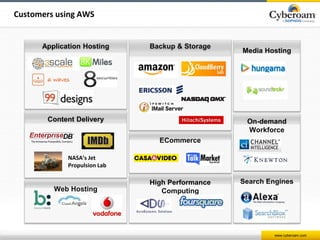
Customers using AWS 
Application Hosting Backup & Storage 
Content Delivery 
NASA’s Jet 
Propulsion Lab 
ECommerce 
High Performance 
Computing 
Media Hosting 
On-demand 
Workforce 
Search Engines 
Web Hosting
www.cyberoam.com 
The Opportunity: 
Security on AWS hosted Infrastructure
Not Available 
www.cyberoam.com 
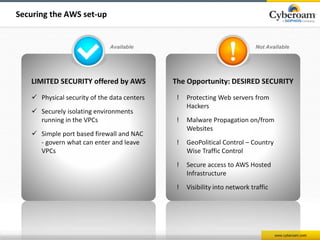
Securing the AWS set-up 
The Opportunity: DESIRED SECURITY 
! Protecting Web servers from 
Hackers 
! Malware Propagation on/from 
Websites 
! GeoPolitical Control – Country 
Wise Traffic Control 
! Secure access to AWS Hosted 
Infrastructure 
! Visibility into network traffic 
Available 
LIMITED SECURITY offered by AWS 
 Physical security of the data centers 
 Securely isolating environments 
running in the VPCs 
 Simple port based firewall and NAC 
- govern what can enter and leave 
VPCs
Introducing Cyberoam Security as a Service on Amazon 
www.cyberoam.com 
Web Services Cloud
www.cyberoam.com 
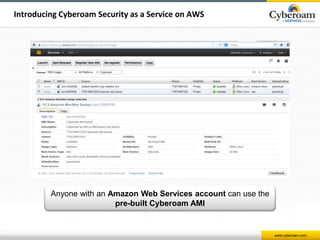
Introducing Cyberoam Security as a Service on AWS 
Anyone with an Amazon Web Services account can use the 
pre-built Cyberoam AMI
www.cyberoam.com 
Introducing Cyberoam Security as a Service on AWS 
 AMI (Amazon Machine Image) Virtual Appliance 
 Cyberoam Security as a Service on AWS 
o WAF for AWS hosted websites 
o Full Security for Amazon Cloud Infrastructure 
o VPN Connectivity to Private Cloud 
o Full Traffic Visibility and Control 
- E.g. Country based rules 
 Comprehensive Value Subscription (CVS) Security 
 Licensing options 
 Hourly ‘On Demand’ 
 Bring Your Own License – BYOL 
Cyberoam Security on AWS allows customers to use advanced 
protection that they’re used to in the real world
www.cyberoam.com 
Use-cases
www.cyberoam.com 
Securing AWS hosted Websites 
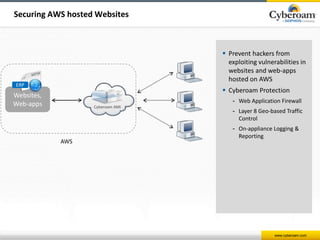
 Prevent hackers from 
exploiting vulnerabilities in 
websites and web-apps 
hosted on AWS 
 Cyberoam Protection 
- Web Application Firewall 
- Layer 8 Geo-based Traffic 
Control 
- On-appliance Logging & 
Reporting 
AWS 
ERP 
Websites, 
Web-apps 
Cyberoam AMI
www.cyberoam.com 
Securing AWS hosted Servers 
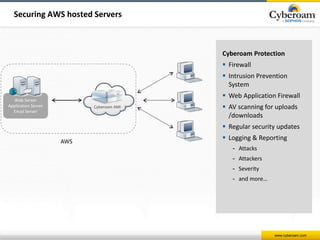
Cyberoam Protection 
 Firewall 
 Intrusion Prevention 
System 
 Web Application Firewall 
 AV scanning for uploads 
/downloads 
 Regular security updates 
 Logging & Reporting 
- Attacks 
- Attackers 
- Severity 
- and more… 
Web Server 
Application Server 
Email Server 
AWS 
Cyberoam AMI
www.cyberoam.com 
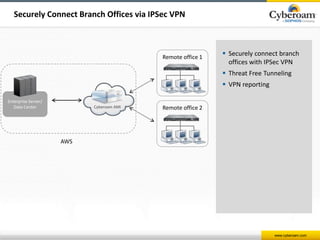
Securely Connect Branch Offices via IPSec VPN 
 Securely connect branch 
offices with IPSec VPN 
 Threat Free Tunneling 
 VPN reporting 
Enterprise Server/ 
Data Center 
Remote office 1 
Remote office 2 
AWS 
Cyberoam AMI
www.cyberoam.com 
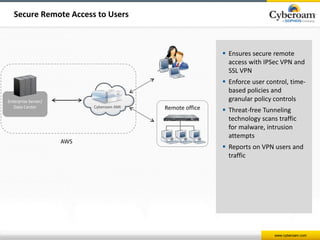
Secure Remote Access to Users 
 Ensures secure remote 
access with IPSec VPN and 
SSL VPN 
 Enforce user control, time-based 
policies and 
granular policy controls 
 Threat-free Tunneling 
technology scans traffic 
for malware, intrusion 
attempts 
 Reports on VPN users and 
traffic 
Remote office 
Enterprise Server/ 
Data Center 
AWS 
Cyberoam AMI
www.cyberoam.com 
Full Security for Amazon Cloud Infrastructure 
 Augment or Replace AWS Firewall 
 Threat Protection with IPS, AV, AS 
 Protect web-apps with WAF 
 Securely remote access with VPN 
 Complete Visibility into user and network activities 
- Visibility into attacks, attackers 
- Visibility into source and destination countries 
- VPN reports 
- Inbuilt compliance reports
www.cyberoam.com 
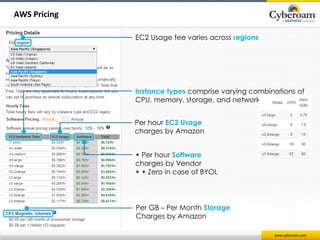
AWS Pricing 
EC2 Usage fee varies across regions 
Instance types comprise varying combinations of 
CPU, memory, storage, and networking capacity 
Per hour EC2 Usage 
charges by Amazon 
• Per hour Software 
charges by Vendor 
• • Zero in case of BYOL 
Per GB – Per Month Storage 
Charges by Amazon
www.cyberoam.com 
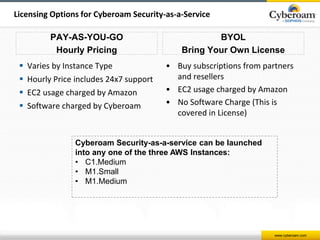
Licensing Options for Cyberoam Security-as-a-Service 
PAY-AS-YOU-GO 
Hourly Pricing 
 Varies by Instance Type 
 Hourly Price includes 24x7 support 
 EC2 usage charged by Amazon 
 Software charged by Cyberoam 
BYOL 
Bring Your Own License 
• Buy subscriptions from partners 
and resellers 
• EC2 usage charged by Amazon 
• No Software Charge (This is 
covered in License) 
Cyberoam Security-as-a-service can be launched 
into any one of the three AWS Instances: 
• C1.Medium 
• M1.Small 
• M1.Medium
www.cyberoam.com 
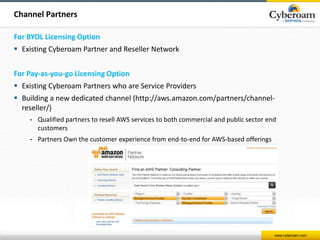
Channel Partners 
For BYOL Licensing Option 
 Existing Cyberoam Partner and Reseller Network 
For Pay-as-you-go Licensing Option 
 Existing Cyberoam Partners who are Service Providers 
 Building a new dedicated channel (http://aws.amazon.com/partners/channel-reseller/) 
- Qualified partners to resell AWS services to both commercial and public sector end 
customers 
- Partners Own the customer experience from end-to-end for AWS-based offerings
www.cyberoam.com 
Workflow
www.cyberoam.com 
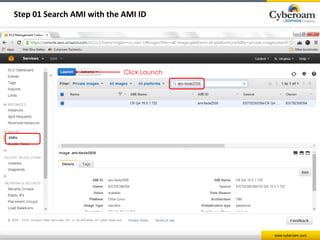
Step 01 Search AMI with the AMI ID 
Click Launch
www.cyberoam.com 
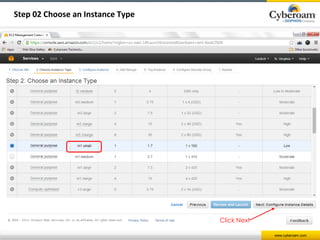
Step 02 Choose an Instance Type 
Click Next
www.cyberoam.com 
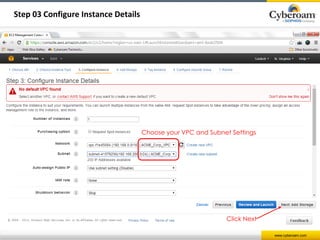
Step 03 Configure Instance Details 
Choose your VPC and Subnet Settings 
Click Next
www.cyberoam.com 
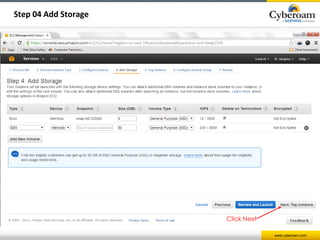
Step 04 Add Storage 
Click Next
www.cyberoam.com 
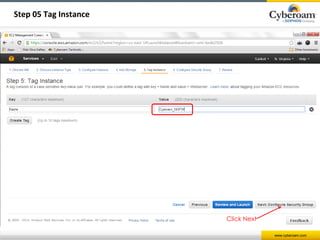
Step 05 Tag Instance 
Click Next
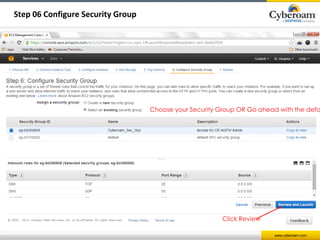
Choose your Security Group OR Go ahead with the default 
www.cyberoam.com 
Step 06 Configure Security Group 
Click Review
www.cyberoam.com 
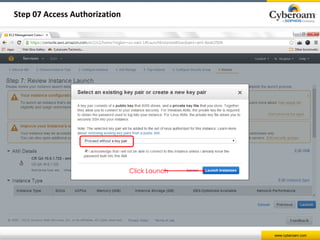
Step 07 Access Authorization 
Click Launch
www.cyberoam.com 
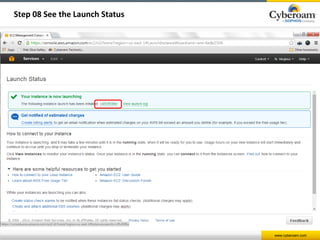
Step 08 See the Launch Status
www.cyberoam.com 
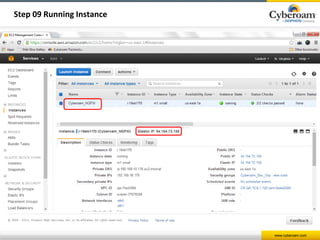
Step 09 Running Instance
www.cyberoam.com 
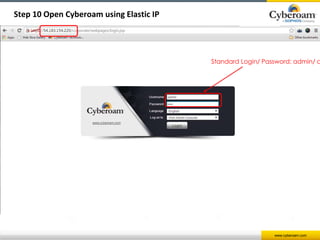
Step 10 Open Cyberoam using Elastic IP 
Standard Login/ Password: admin/ admin
www.cyberoam.com 
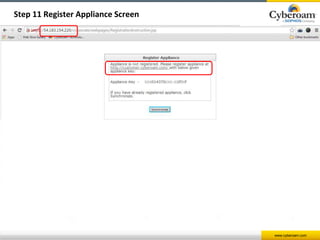
Step 11 Register Appliance Screen
www.cyberoam.com 
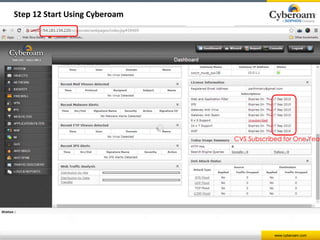
Step 12 Start Using Cyberoam 
CVS Subscribed for One Year
www.cyberoam.com 
Thank you

Cyberoam security on amazon web services

  • 1.
    www.cyberoam.com Cyberoam Security-as-a-Service on Amazon Web Services Cloud Presenter:
  • 2.
  • 3.
    www.cyberoam.com What isAmazon Web Services (AWS)? Amazon Elastic Compute Cloud  Rent computing capacity or infrastructure on the cloud  A Web service that provides resizable compute capacity in the cloud  Pay only for what you use  Elastic in nature - On-demand instances - Auto-Scaling - Elastic load balancing You can rent  Computing power of a Super computer  Hosting Servers  Applications e.g. Video streaming applications  Space on the Internet  Everything on the Internet
  • 4.
    www.cyberoam.com Customers usingAWS Application Hosting Backup & Storage Content Delivery NASA’s Jet Propulsion Lab ECommerce High Performance Computing Media Hosting On-demand Workforce Search Engines Web Hosting
  • 5.
    www.cyberoam.com The Opportunity: Security on AWS hosted Infrastructure
  • 6.
    Not Available www.cyberoam.com Securing the AWS set-up The Opportunity: DESIRED SECURITY ! Protecting Web servers from Hackers ! Malware Propagation on/from Websites ! GeoPolitical Control – Country Wise Traffic Control ! Secure access to AWS Hosted Infrastructure ! Visibility into network traffic Available LIMITED SECURITY offered by AWS  Physical security of the data centers  Securely isolating environments running in the VPCs  Simple port based firewall and NAC - govern what can enter and leave VPCs
  • 7.
    Introducing Cyberoam Securityas a Service on Amazon www.cyberoam.com Web Services Cloud
  • 8.
    www.cyberoam.com Introducing CyberoamSecurity as a Service on AWS Anyone with an Amazon Web Services account can use the pre-built Cyberoam AMI
  • 9.
    www.cyberoam.com Introducing CyberoamSecurity as a Service on AWS  AMI (Amazon Machine Image) Virtual Appliance  Cyberoam Security as a Service on AWS o WAF for AWS hosted websites o Full Security for Amazon Cloud Infrastructure o VPN Connectivity to Private Cloud o Full Traffic Visibility and Control - E.g. Country based rules  Comprehensive Value Subscription (CVS) Security  Licensing options  Hourly ‘On Demand’  Bring Your Own License – BYOL Cyberoam Security on AWS allows customers to use advanced protection that they’re used to in the real world
  • 10.
  • 11.
    www.cyberoam.com Securing AWShosted Websites  Prevent hackers from exploiting vulnerabilities in websites and web-apps hosted on AWS  Cyberoam Protection - Web Application Firewall - Layer 8 Geo-based Traffic Control - On-appliance Logging & Reporting AWS ERP Websites, Web-apps Cyberoam AMI
  • 12.
    www.cyberoam.com Securing AWShosted Servers Cyberoam Protection  Firewall  Intrusion Prevention System  Web Application Firewall  AV scanning for uploads /downloads  Regular security updates  Logging & Reporting - Attacks - Attackers - Severity - and more… Web Server Application Server Email Server AWS Cyberoam AMI
  • 13.
    www.cyberoam.com Securely ConnectBranch Offices via IPSec VPN  Securely connect branch offices with IPSec VPN  Threat Free Tunneling  VPN reporting Enterprise Server/ Data Center Remote office 1 Remote office 2 AWS Cyberoam AMI
  • 14.
    www.cyberoam.com Secure RemoteAccess to Users  Ensures secure remote access with IPSec VPN and SSL VPN  Enforce user control, time-based policies and granular policy controls  Threat-free Tunneling technology scans traffic for malware, intrusion attempts  Reports on VPN users and traffic Remote office Enterprise Server/ Data Center AWS Cyberoam AMI
  • 15.
    www.cyberoam.com Full Securityfor Amazon Cloud Infrastructure  Augment or Replace AWS Firewall  Threat Protection with IPS, AV, AS  Protect web-apps with WAF  Securely remote access with VPN  Complete Visibility into user and network activities - Visibility into attacks, attackers - Visibility into source and destination countries - VPN reports - Inbuilt compliance reports
  • 16.
    www.cyberoam.com AWS Pricing EC2 Usage fee varies across regions Instance types comprise varying combinations of CPU, memory, storage, and networking capacity Per hour EC2 Usage charges by Amazon • Per hour Software charges by Vendor • • Zero in case of BYOL Per GB – Per Month Storage Charges by Amazon
  • 17.
    www.cyberoam.com Licensing Optionsfor Cyberoam Security-as-a-Service PAY-AS-YOU-GO Hourly Pricing  Varies by Instance Type  Hourly Price includes 24x7 support  EC2 usage charged by Amazon  Software charged by Cyberoam BYOL Bring Your Own License • Buy subscriptions from partners and resellers • EC2 usage charged by Amazon • No Software Charge (This is covered in License) Cyberoam Security-as-a-service can be launched into any one of the three AWS Instances: • C1.Medium • M1.Small • M1.Medium
  • 18.
    www.cyberoam.com Channel Partners For BYOL Licensing Option  Existing Cyberoam Partner and Reseller Network For Pay-as-you-go Licensing Option  Existing Cyberoam Partners who are Service Providers  Building a new dedicated channel (http://aws.amazon.com/partners/channel-reseller/) - Qualified partners to resell AWS services to both commercial and public sector end customers - Partners Own the customer experience from end-to-end for AWS-based offerings
  • 19.
  • 20.
    www.cyberoam.com Step 01Search AMI with the AMI ID Click Launch
  • 21.
    www.cyberoam.com Step 02Choose an Instance Type Click Next
  • 22.
    www.cyberoam.com Step 03Configure Instance Details Choose your VPC and Subnet Settings Click Next
  • 23.
    www.cyberoam.com Step 04Add Storage Click Next
  • 24.
    www.cyberoam.com Step 05Tag Instance Click Next
  • 25.
    Choose your SecurityGroup OR Go ahead with the default www.cyberoam.com Step 06 Configure Security Group Click Review
  • 26.
    www.cyberoam.com Step 07Access Authorization Click Launch
  • 27.
    www.cyberoam.com Step 08See the Launch Status
  • 28.
    www.cyberoam.com Step 09Running Instance
  • 29.
    www.cyberoam.com Step 10Open Cyberoam using Elastic IP Standard Login/ Password: admin/ admin
  • 30.
    www.cyberoam.com Step 11Register Appliance Screen
  • 31.
    www.cyberoam.com Step 12Start Using Cyberoam CVS Subscribed for One Year
  • 32.