1
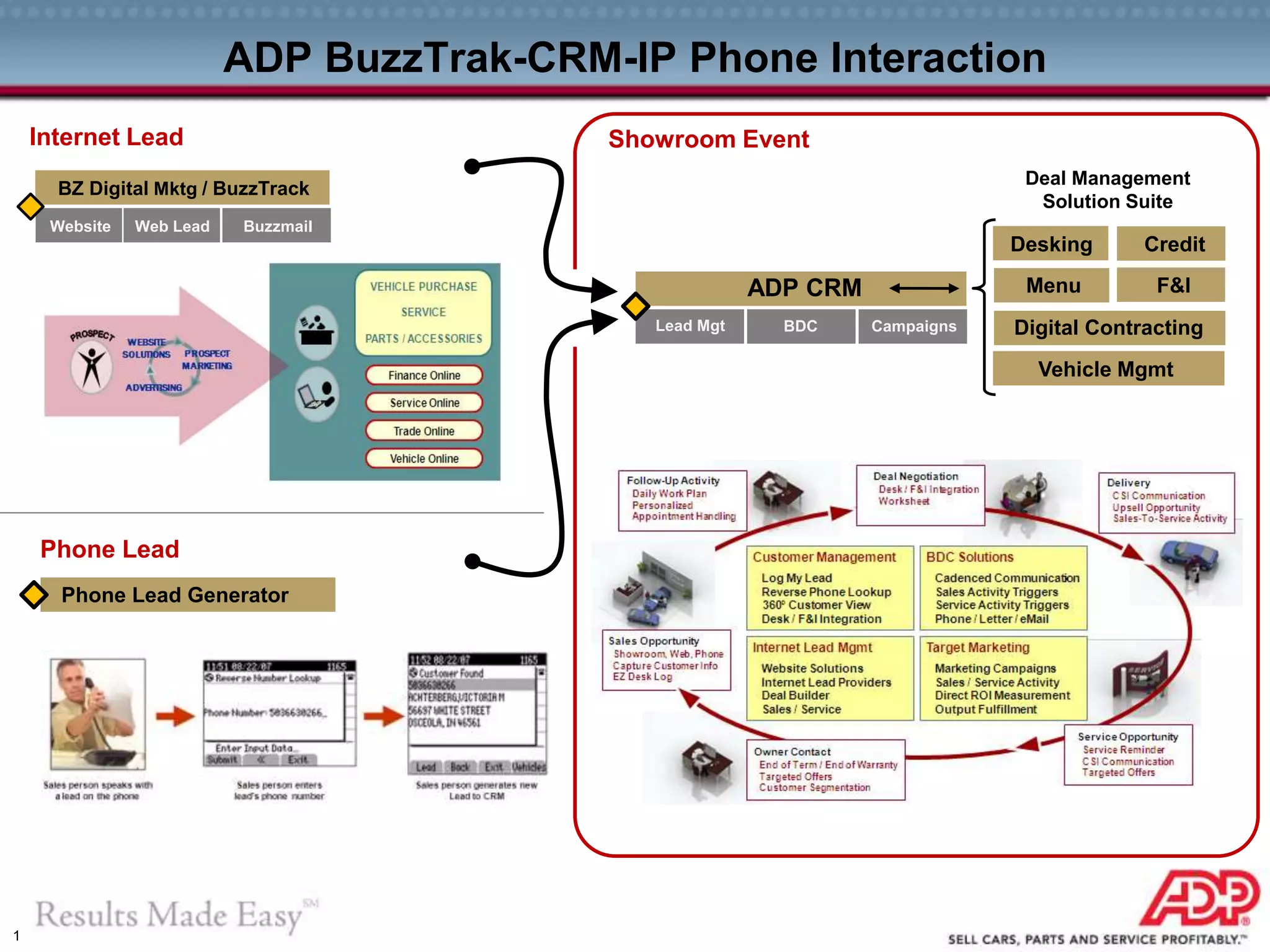
ADP BuzzTrak-CRM-IP Phone Interaction
Internet Lead
Phone Lead Generator
BZ Digital Mktg / BuzzTrack
Website Web Lead Buzzmail
Phone Lead
Showroom Event
ADP CRM
Lead Mgt BDC Campaigns
Desking Credit
Menu F&I
Digital Contracting
Vehicle Mgmt
Deal Management
Solution Suite
2
INTERNET LEADS
3
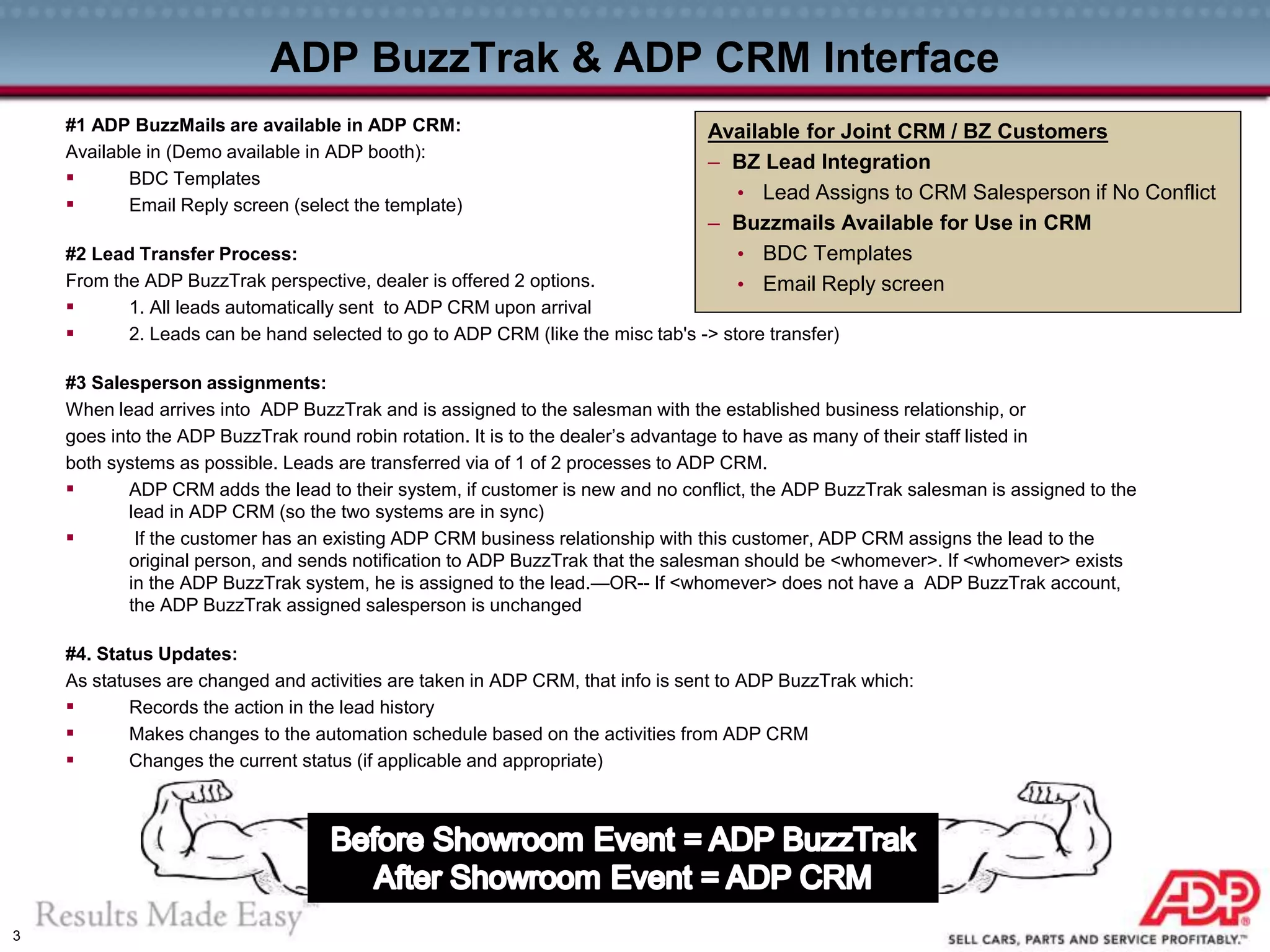
ADP BuzzTrak & ADP CRM Interface
#1 ADP BuzzMails are available in ADP CRM:
Available in (Demo available in ADP booth):
 BDC Templates
 Email Reply screen (select the template)
#2 Lead Transfer Process:
From the ADP BuzzTrak perspective, dealer is offered 2 options.
 1. All leads automatically sent to ADP CRM upon arrival
 2. Leads can be hand selected to go to ADP CRM (like the misc tab's -> store transfer)
#3 Salesperson assignments:
When lead arrives into ADP BuzzTrak and is assigned to the salesman with the established business relationship, or
goes into the ADP BuzzTrak round robin rotation. It is to the dealer’s advantage to have as many of their staff listed in
both systems as possible. Leads are transferred via of 1 of 2 processes to ADP CRM.
 ADP CRM adds the lead to their system, if customer is new and no conflict, the ADP BuzzTrak salesman is assigned to the
lead in ADP CRM (so the two systems are in sync)
 If the customer has an existing ADP CRM business relationship with this customer, ADP CRM assigns the lead to the
original person, and sends notification to ADP BuzzTrak that the salesman should be <whomever>. If <whomever> exists
in the ADP BuzzTrak system, he is assigned to the lead.—OR-- If <whomever> does not have a ADP BuzzTrak account,
the ADP BuzzTrak assigned salesperson is unchanged
#4. Status Updates:
As statuses are changed and activities are taken in ADP CRM, that info is sent to ADP BuzzTrak which:
 Records the action in the lead history
 Makes changes to the automation schedule based on the activities from ADP CRM
 Changes the current status (if applicable and appropriate)
Available for Joint CRM / BZ Customers
– BZ Lead Integration
• Lead Assigns to CRM Salesperson if No Conflict
– Buzzmails Available for Use in CRM
• BDC Templates
• Email Reply screen
4
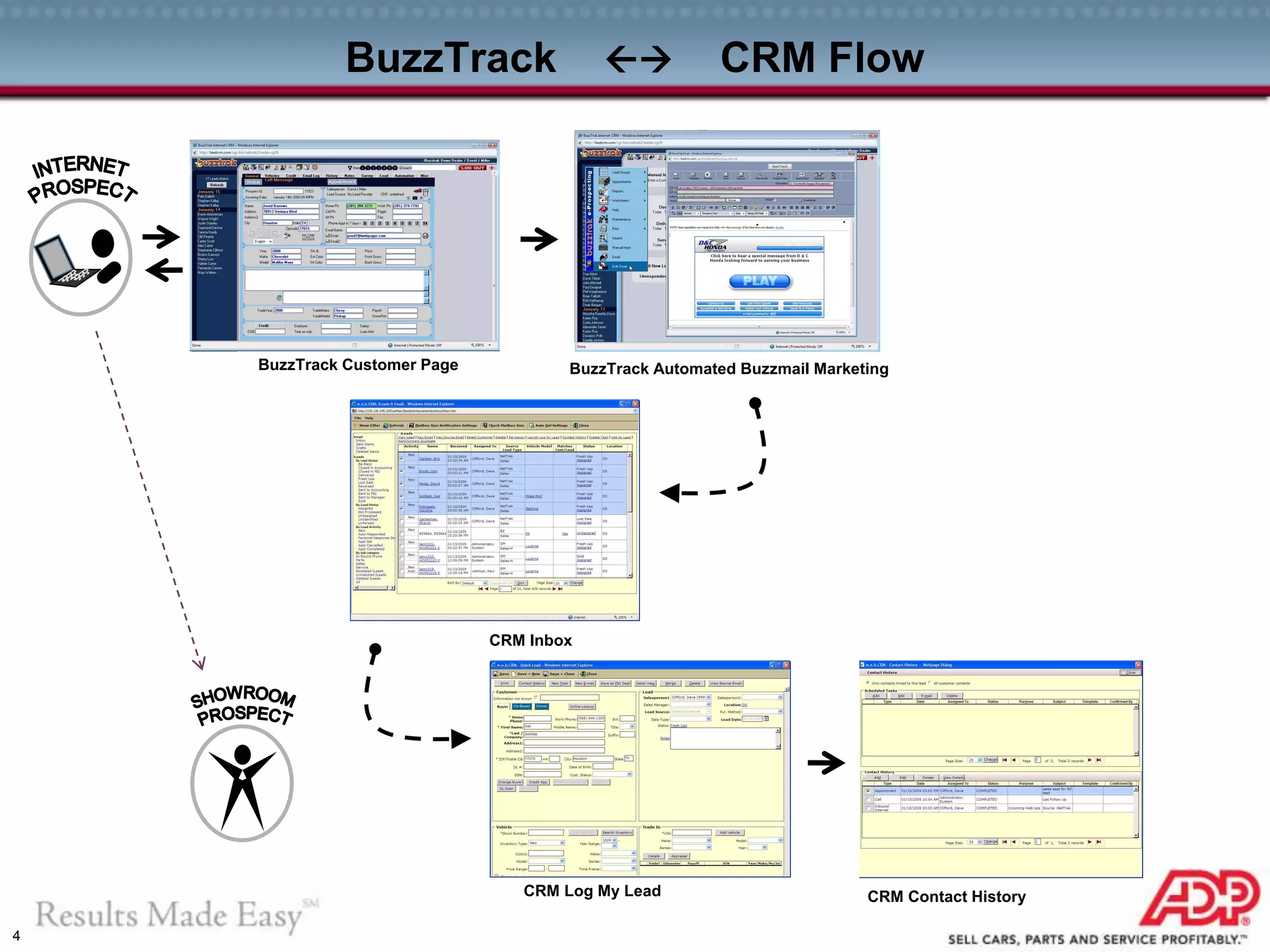
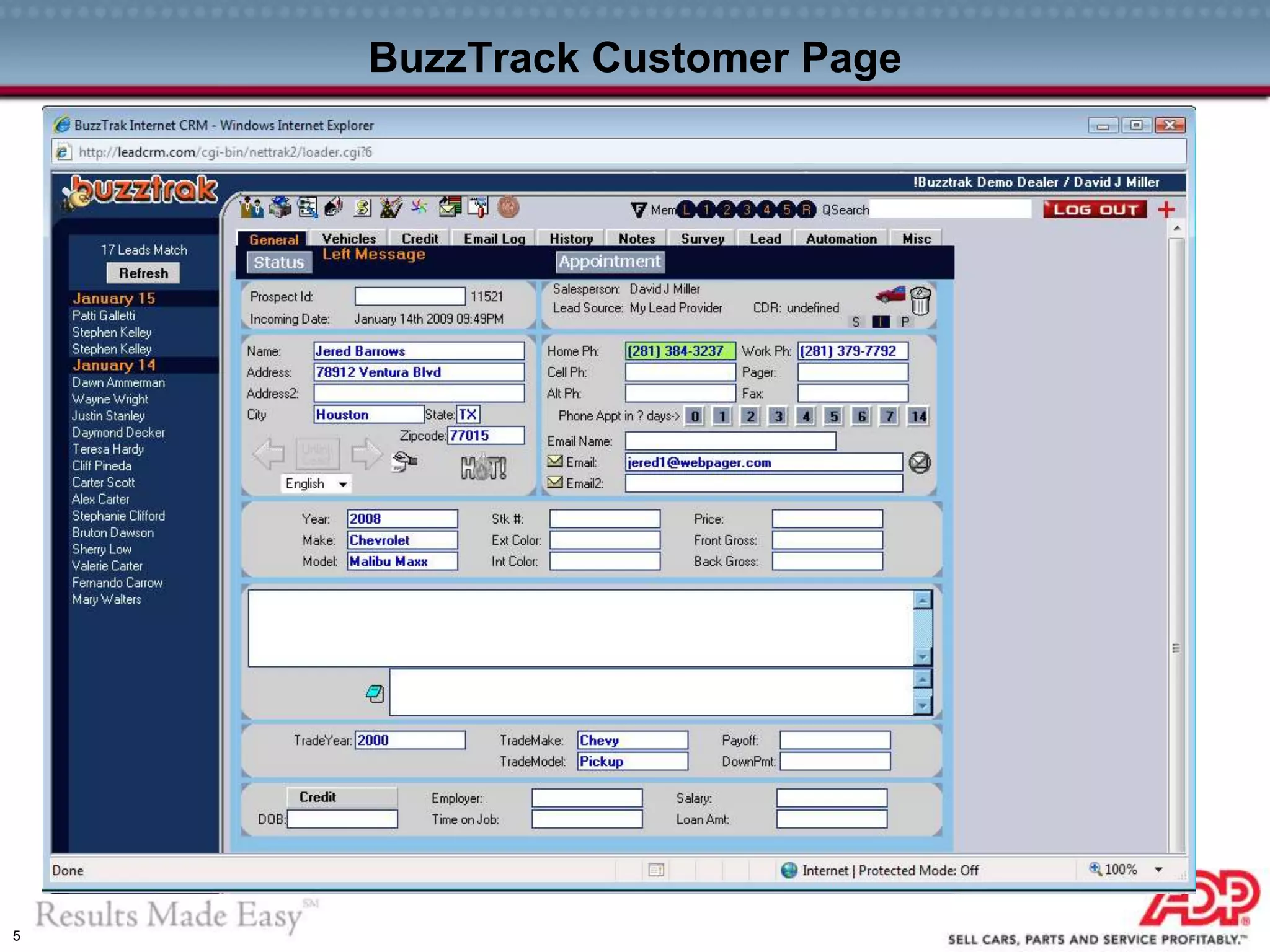
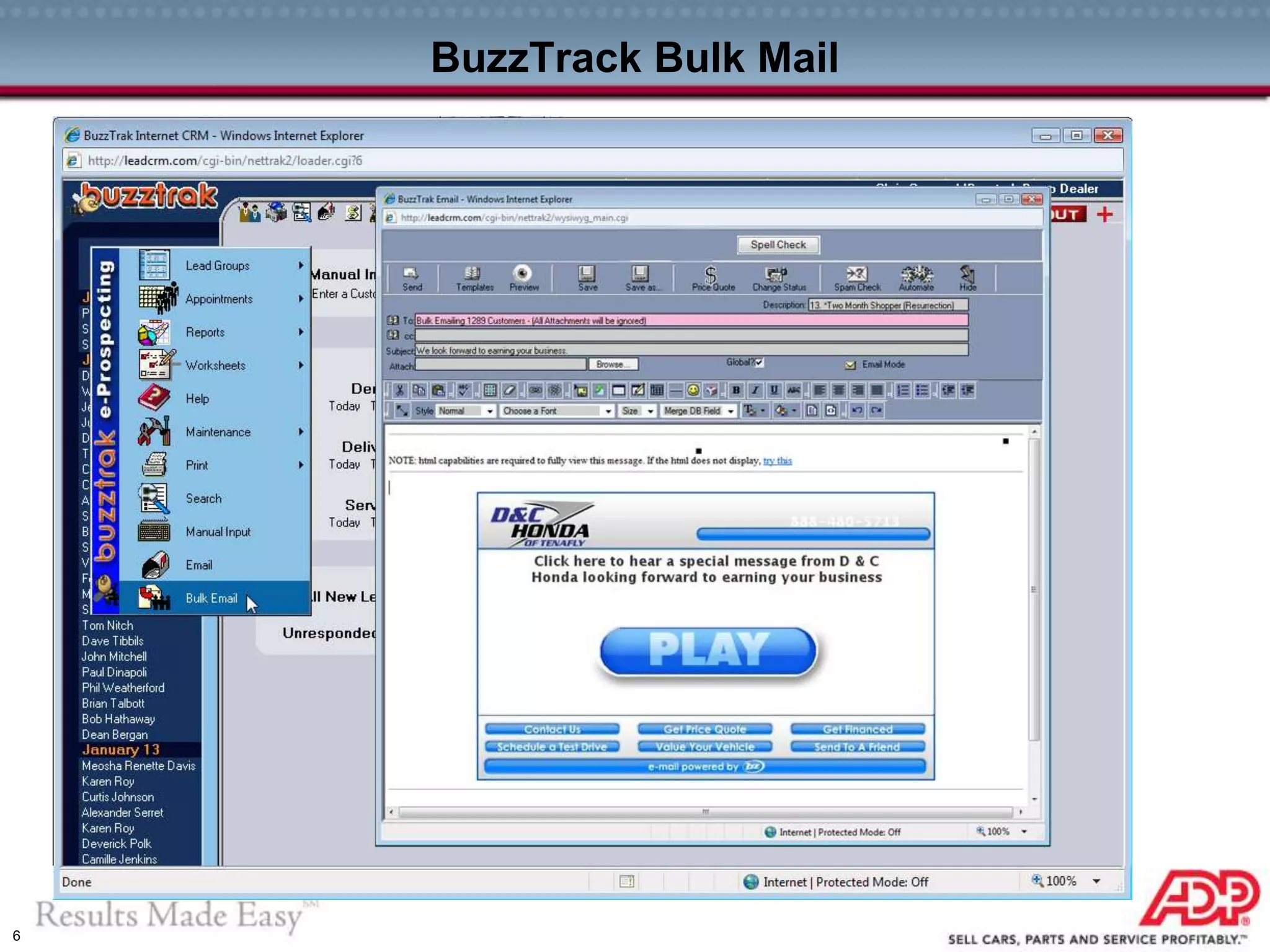
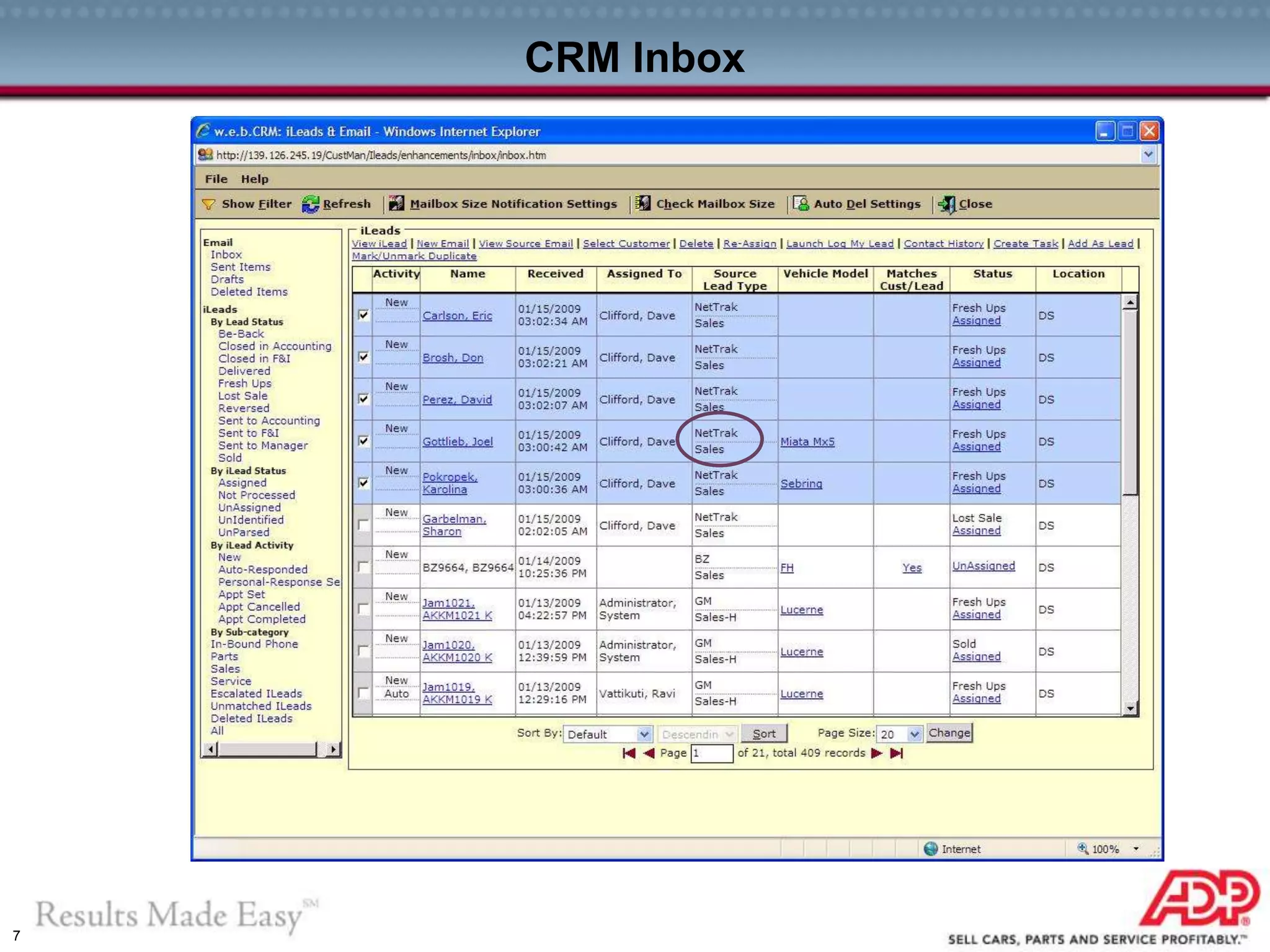
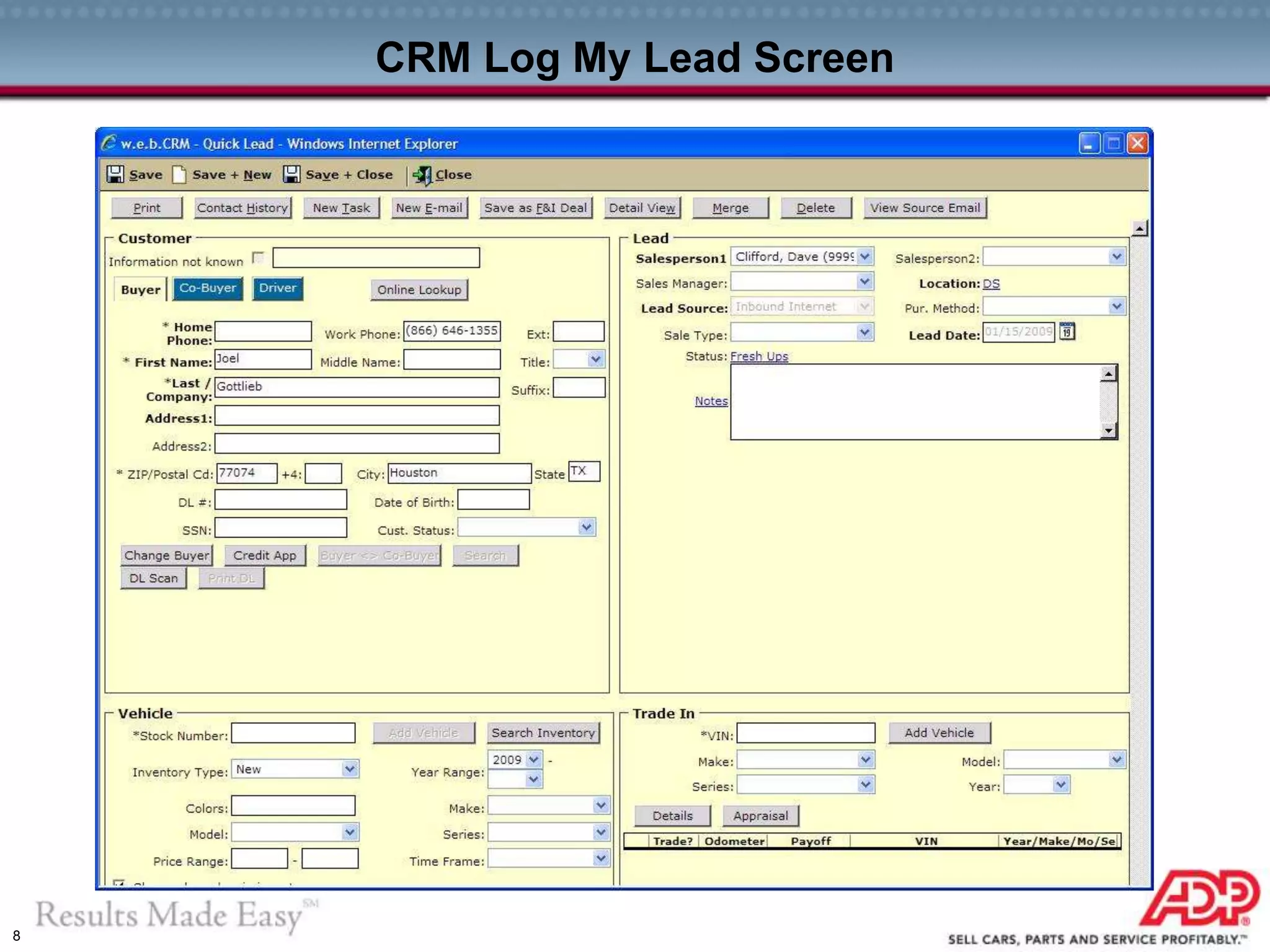
BuzzTrack  CRM Flow
BuzzTrack Customer Page BuzzTrack Automated Buzzmail Marketing
CRM Inbox
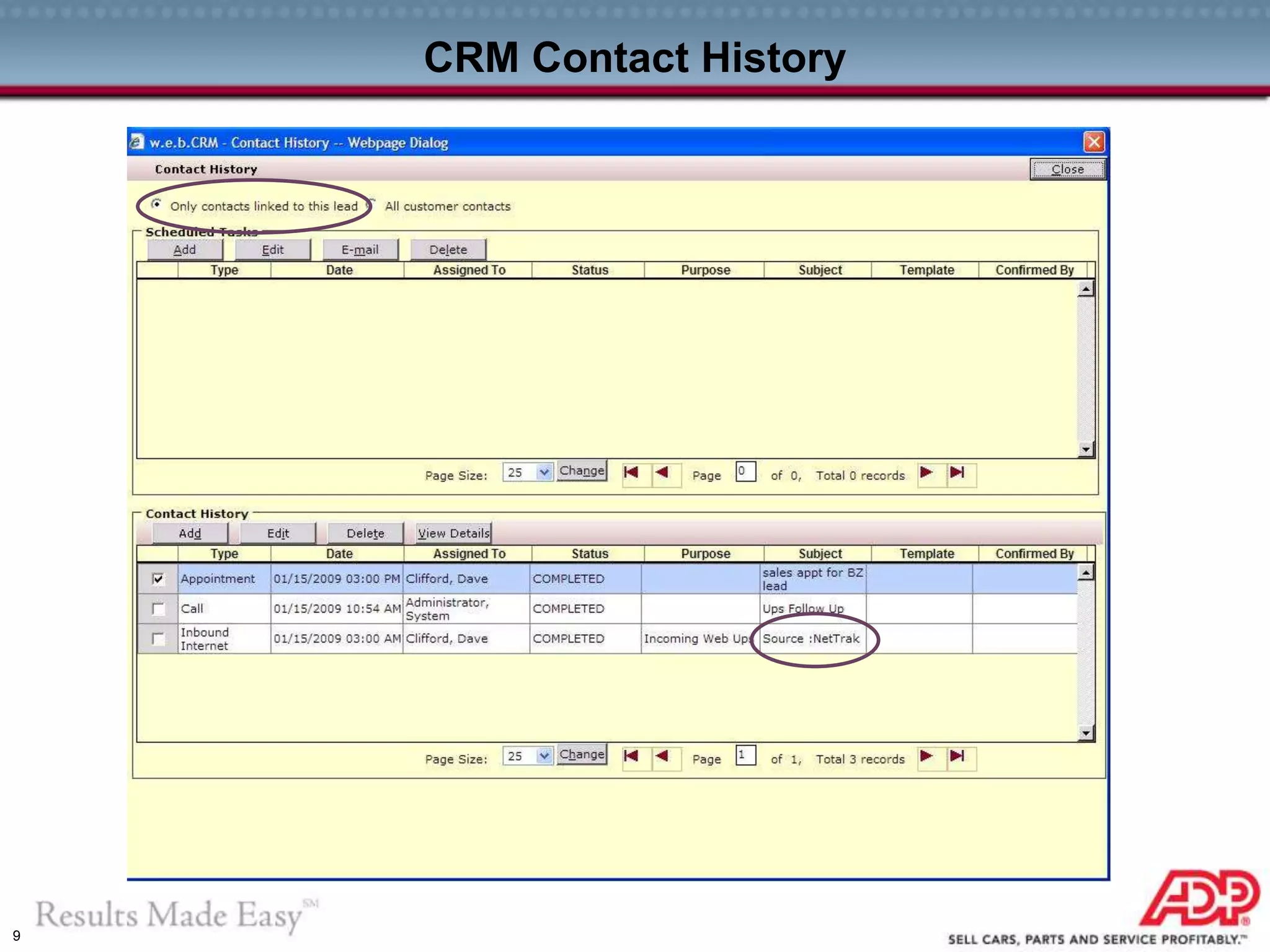
CRM Log My Lead CRM Contact History
5
BuzzTrack Customer Page
6
BuzzTrack Bulk Mail
7
CRM Inbox
8
CRM Log My Lead Screen
9
CRM Contact History
10
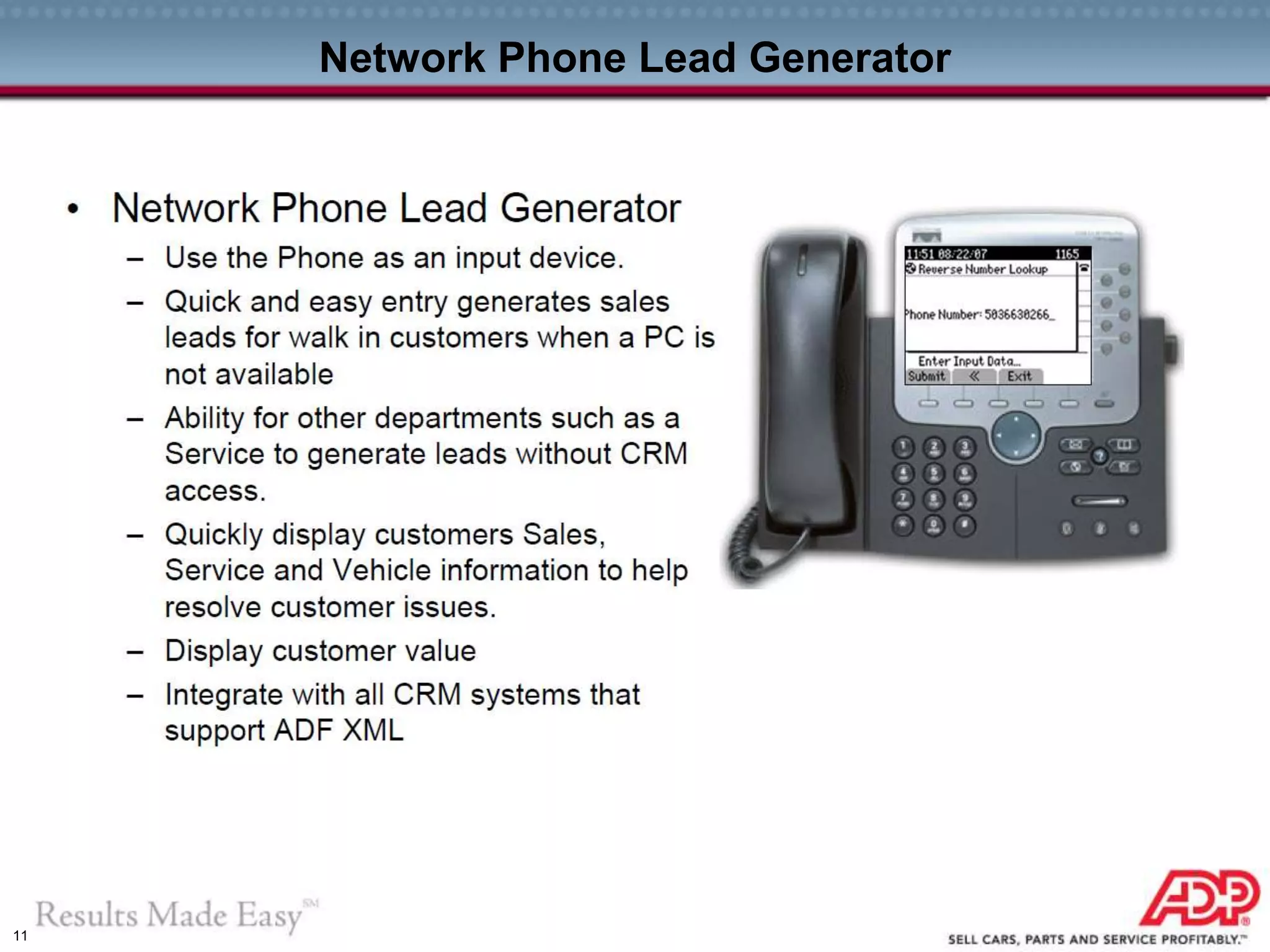
PHONE LEADS
11
Network Phone Lead Generator
12
Scenario 1: On Phone with Lead
Sales person speaks
with a lead on the phone
Sales person enters lead’s
phone number
Sales person generates
new Lead to CRM
Lead sent to CRM is
confirmed
Sales person can view
lead’s vehicle information
13
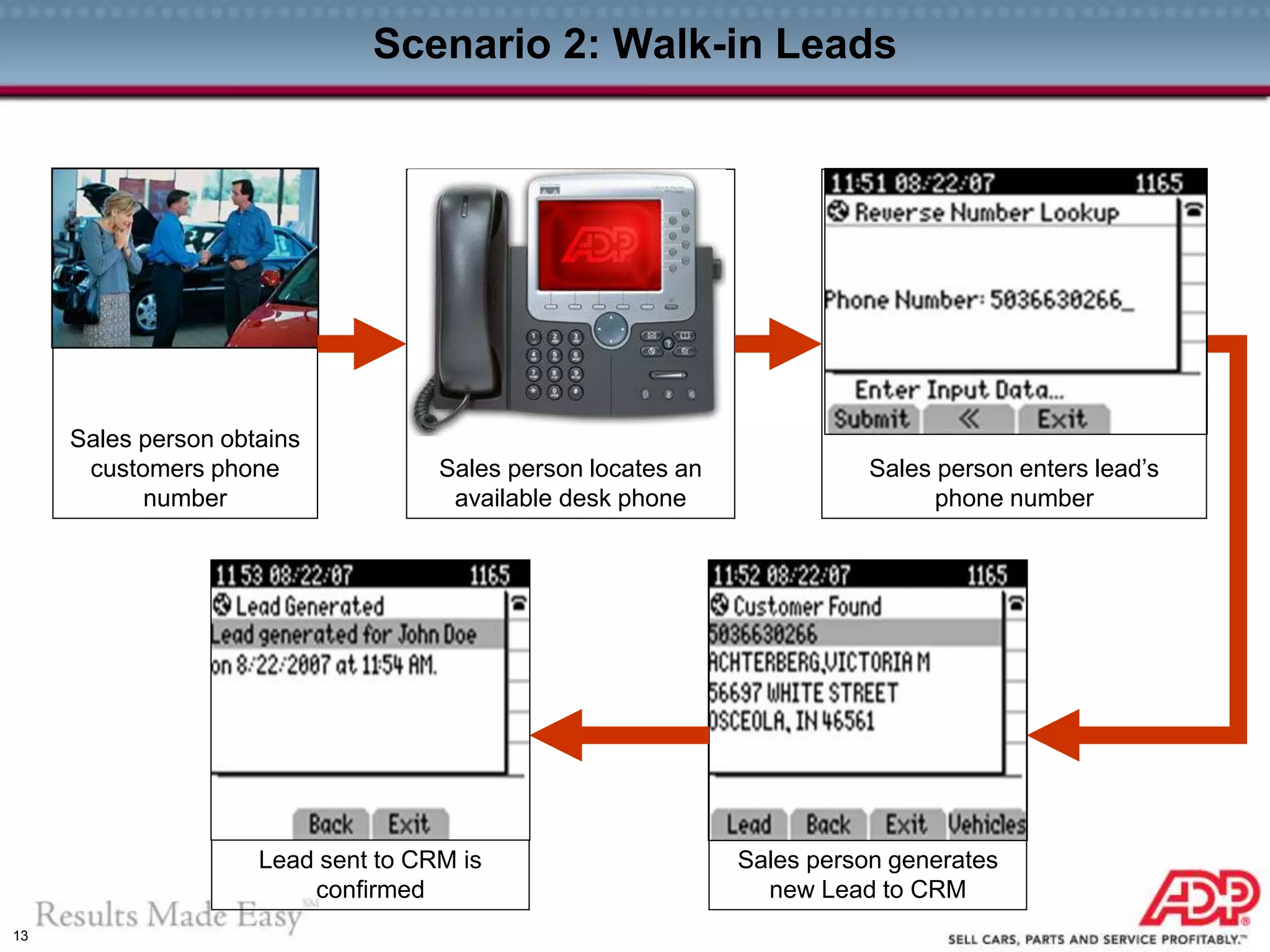
Scenario 2: Walk-in Leads
Sales person obtains
customers phone
number
Lead sent to CRM is
confirmed
Sales person generates
new Lead to CRM
Sales person enters lead’s
phone number
Sales person locates an
available desk phone

Customer Relationship Management Integration

  • 1.
    1 ADP BuzzTrak-CRM-IP PhoneInteraction Internet Lead Phone Lead Generator BZ Digital Mktg / BuzzTrack Website Web Lead Buzzmail Phone Lead Showroom Event ADP CRM Lead Mgt BDC Campaigns Desking Credit Menu F&I Digital Contracting Vehicle Mgmt Deal Management Solution Suite
  • 2.
  • 3.
    3 ADP BuzzTrak &ADP CRM Interface #1 ADP BuzzMails are available in ADP CRM: Available in (Demo available in ADP booth):  BDC Templates  Email Reply screen (select the template) #2 Lead Transfer Process: From the ADP BuzzTrak perspective, dealer is offered 2 options.  1. All leads automatically sent to ADP CRM upon arrival  2. Leads can be hand selected to go to ADP CRM (like the misc tab's -> store transfer) #3 Salesperson assignments: When lead arrives into ADP BuzzTrak and is assigned to the salesman with the established business relationship, or goes into the ADP BuzzTrak round robin rotation. It is to the dealer’s advantage to have as many of their staff listed in both systems as possible. Leads are transferred via of 1 of 2 processes to ADP CRM.  ADP CRM adds the lead to their system, if customer is new and no conflict, the ADP BuzzTrak salesman is assigned to the lead in ADP CRM (so the two systems are in sync)  If the customer has an existing ADP CRM business relationship with this customer, ADP CRM assigns the lead to the original person, and sends notification to ADP BuzzTrak that the salesman should be <whomever>. If <whomever> exists in the ADP BuzzTrak system, he is assigned to the lead.—OR-- If <whomever> does not have a ADP BuzzTrak account, the ADP BuzzTrak assigned salesperson is unchanged #4. Status Updates: As statuses are changed and activities are taken in ADP CRM, that info is sent to ADP BuzzTrak which:  Records the action in the lead history  Makes changes to the automation schedule based on the activities from ADP CRM  Changes the current status (if applicable and appropriate) Available for Joint CRM / BZ Customers – BZ Lead Integration • Lead Assigns to CRM Salesperson if No Conflict – Buzzmails Available for Use in CRM • BDC Templates • Email Reply screen
  • 4.
    4 BuzzTrack  CRMFlow BuzzTrack Customer Page BuzzTrack Automated Buzzmail Marketing CRM Inbox CRM Log My Lead CRM Contact History
  • 5.
  • 6.
  • 7.
  • 8.
    8 CRM Log MyLead Screen
  • 9.
  • 10.
  • 11.
  • 12.
    12 Scenario 1: OnPhone with Lead Sales person speaks with a lead on the phone Sales person enters lead’s phone number Sales person generates new Lead to CRM Lead sent to CRM is confirmed Sales person can view lead’s vehicle information
  • 13.
    13 Scenario 2: Walk-inLeads Sales person obtains customers phone number Lead sent to CRM is confirmed Sales person generates new Lead to CRM Sales person enters lead’s phone number Sales person locates an available desk phone