Cisco Confidential© 2013 Cisco and/or its affiliates. All rights reserved. 1
UnityConnectionQualificationfor
PrimeCollaborationDevelopment
Release10.0
© 2011 Cisco and/or its affiliates. All rights reserved. Cisco Confidential 2
Agenda
 About PCD
Cisco Prime Collaboration Deployment
Supported CUC Releases
Steps for PCD Setup
Overview of PCD Setup
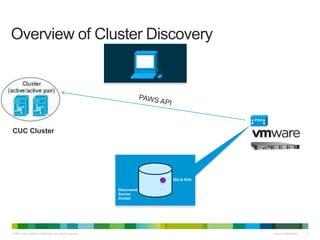
Overview of Cluster Discovery
 Supported PCD Features for CUC
 Configuration
Cluster Discovery
L2 Upgrade
Switch Version
Restart
Email Notification
© 2011 Cisco and/or its affiliates. All rights reserved. Cisco Confidential 3
Agenda (Contd.)
 Troubleshooting
Log Files (PCD)
Log Files (CUC)
Common Issues
Required Services
© 2013 Cisco and/or its affiliates. All rights reserved. Cisco Confidential 4
Cisco
Confidential
Cisco
Confidential© 2013 Cisco and/or its affiliates. All rights reserved. 4
About
Prime Collaboration Deployment
© 2013 Cisco and/or its affiliates. All rights reserved. Cisco Confidential 5
Cisco Prime Collaboration Deployment (PCD)
An application that can be used to manage the migration of legacy
CUC clusters (7.1.5, 8.x, 9.x) to new VM based servers on 10.0,
allowing Cisco customers to easily migrate to virtual servers.
It can also be used to
•Upgrade UC app software (8.6.1+)
•Install cop files (locales or device packs) on a cluster (8.6.1+)
•Switch versions
•Reboot
•Readdressing
•Fresh install a new Unified Communication, or IM&P cluster
Cisco Prime Collaboration Deployment
© 2013 Cisco and/or its affiliates. All rights reserved. Cisco Confidential 6
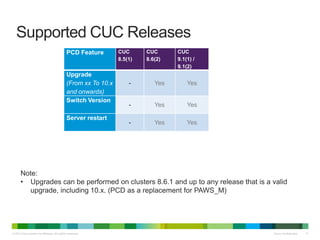
Supported CUC Releases
PCD Feature CUC
8.5(1)
CUC
8.6(2)
CUC
9.1(1) /
9.1(2)
Upgrade
(From xx To 10.x
and onwards)
- Yes Yes
Switch Version
- Yes Yes
Server restart
- Yes Yes
Note:
• Upgrades can be performed on clusters 8.6.1 and up to any release that is a valid
upgrade, including 10.x. (PCD as a replacement for PAWS_M)
© 2013 Cisco and/or its affiliates. All rights reserved. Cisco Confidential 7
Steps for PCD Setup
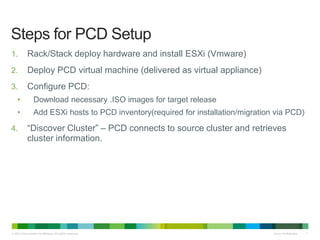
1. Rack/Stack deploy hardware and install ESXi (Vmware)
2. Deploy PCD virtual machine (delivered as virtual appliance)
3. Configure PCD:
• Download necessary .ISO images for target release
• Add ESXi hosts to PCD inventory(required for installation/migration via PCD)
4. “Discover Cluster” – PCD connects to source cluster and retrieves
cluster information.
© 2013 Cisco and/or its affiliates. All rights reserved. Cisco Confidential 8
PCD
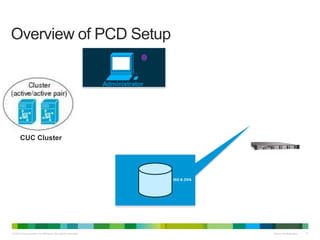
Overview of PCD Setup
CUC Cluster
Administrator
ISO & OVA
© 2013 Cisco and/or its affiliates. All rights reserved. Cisco Confidential 9
Overview of Cluster Discovery
PCD
Discovered
Source
Cluster
ISO & OVA
CUC Cluster
Cisco Confidential© 2013 Cisco and/or its affiliates. All rights reserved. 10
Supported PCD features for CUC
© 2013 Cisco and/or its affiliates. All rights reserved. Cisco Confidential 11
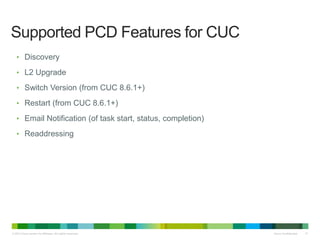
Supported PCD Features for CUC
• Discovery
• L2 Upgrade
• Switch Version (from CUC 8.6.1+)
• Restart (from CUC 8.6.1+)
• Email Notification (of task start, status, completion)
• Readdressing
© 2013 Cisco and/or its affiliates. All rights reserved. Cisco Confidential 12
Cisco
Confidential
Cisco
Confidential© 2013 Cisco and/or its affiliates. All rights reserved. 12
Configuration
Cluster Discovery
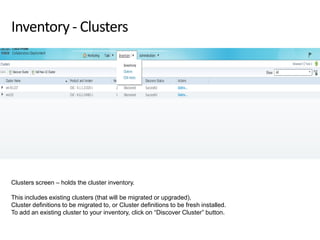
Inventory - Clusters
Clusters screen – holds the cluster inventory.
This includes existing clusters (that will be migrated or upgraded),
Cluster definitions to be migrated to, or Cluster definitions to be fresh installed.
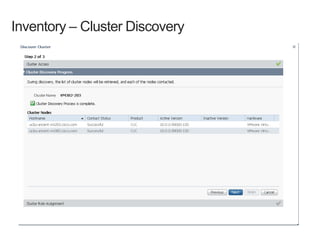
To add an existing cluster to your inventory, click on “Discover Cluster” button.
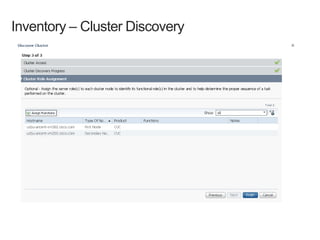
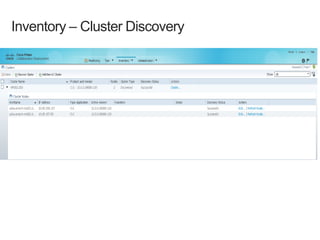
Inventory – Cluster Discovery
© 2013 Cisco and/or its affiliates. All rights reserved. Cisco Confidential 17
Cisco
Confidential
Cisco
Confidential© 2013 Cisco and/or its affiliates. All rights reserved. 17
Configuration
L2Upgrade
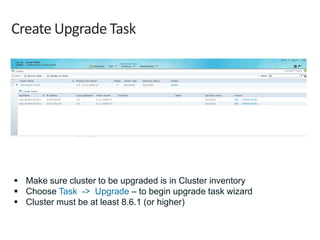
Create Upgrade Task
 Make sure cluster to be upgraded is in Cluster inventory
 Choose Task -> Upgrade – to begin upgrade task wizard
 Cluster must be at least 8.6.1 (or higher)
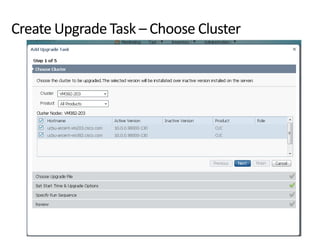
Create Upgrade Task – Choose Cluster
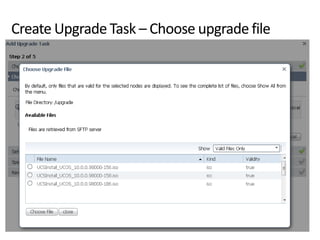
Create Upgrade Task – Choose upgrade file
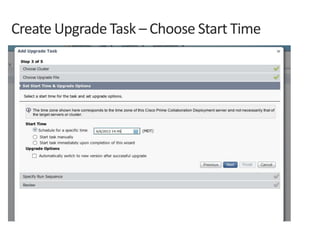
Create Upgrade Task – Choose Start Time
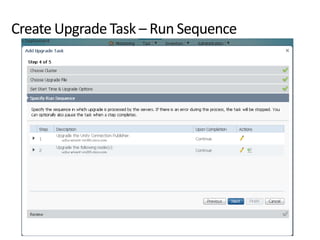
Create Upgrade Task – Run Sequence
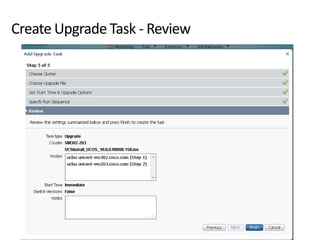
Create Upgrade Task - Review
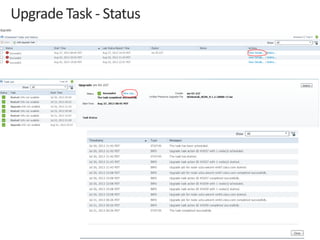
Upgrade Task - Status
© 2013 Cisco and/or its affiliates. All rights reserved. Cisco Confidential 25
Cisco
Confidential
Cisco
Confidential© 2013 Cisco and/or its affiliates. All rights reserved. 25
Configuration
Switch version
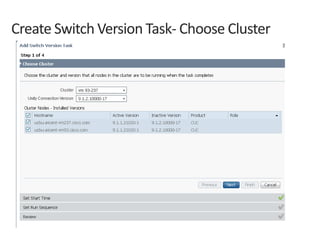
Create Switch Version Task- Choose Cluster
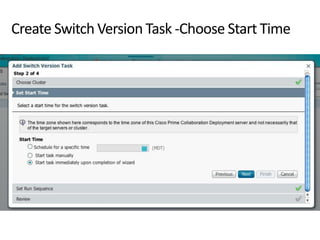
Create Switch Version Task -Choose Start Time
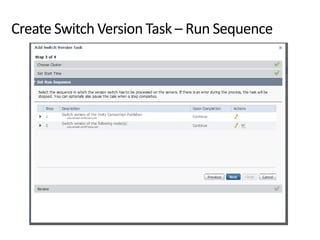
Create Switch Version Task – Run Sequence
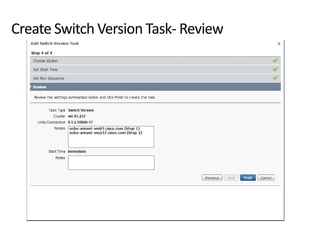
Create Switch Version Task- Review
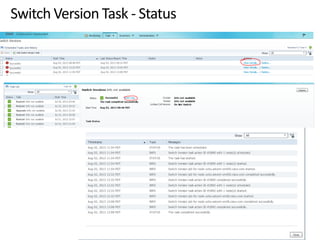
Switch Version Task - Status
© 2013 Cisco and/or its affiliates. All rights reserved. Cisco Confidential 31
Cisco
Confidential
Cisco
Confidential© 2013 Cisco and/or its affiliates. All rights reserved. 31
Configuration
Restart
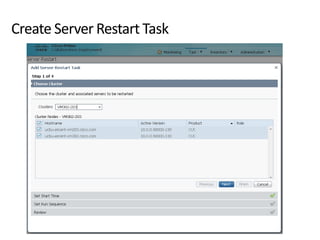
Create Server Restart Task
© 2013 Cisco and/or its affiliates. All rights reserved. Cisco Confidential 33
Cisco
Confidential
Cisco
Confidential© 2013 Cisco and/or its affiliates. All rights reserved. 33
Configuration
Email Notification
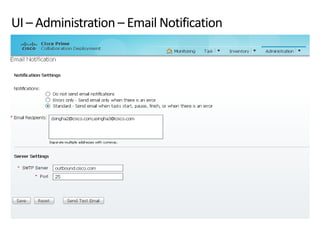
UI – Administration – Email Notification
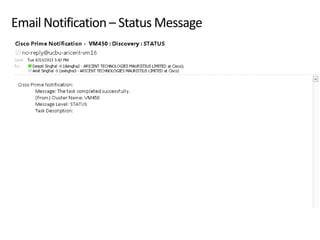
Email Notification – Status Message
© 2013 Cisco and/or its affiliates. All rights reserved. Cisco Confidential 36
Cisco
Confidential
Cisco
Confidential© 2013 Cisco and/or its affiliates. All rights reserved. 36
Troubleshooting
© 2013 Cisco and/or its affiliates. All rights reserved. Cisco Confidential 37
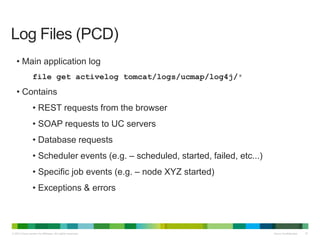
• Main application log
file get activelog tomcat/logs/ucmap/log4j/*
• Contains
• REST requests from the browser
• SOAP requests to UC servers
• Database requests
• Scheduler events (e.g. – scheduled, started, failed, etc...)
• Specific job events (e.g. – node XYZ started)
• Exceptions & errors
Log Files (PCD)
© 2013 Cisco and/or its affiliates. All rights reserved. Cisco Confidential 38
• Main application log
file get activelog tomcat/logs/platform-api/log4j/*
• Contains
• SOAP requests from PCD
• Platform API requests
• Results from OS components
Log Files (CUC Servers)
© 2013 Cisco and/or its affiliates. All rights reserved. Cisco Confidential 39
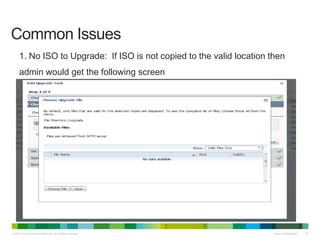
Common Issues
1. No ISO to Upgrade: If ISO is not copied to the valid location then
admin would get the following screen
© 2013 Cisco and/or its affiliates. All rights reserved. Cisco Confidential 40
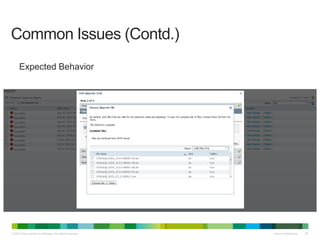
Common Issues (Contd.)
Expected Behavior
© 2013 Cisco and/or its affiliates. All rights reserved. Cisco Confidential 41
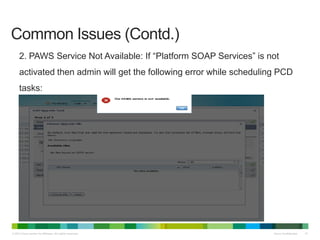
Common Issues (Contd.)
2. PAWS Service Not Available: If “Platform SOAP Services” is not
activated then admin will get the following error while scheduling PCD
tasks:
© 2013 Cisco and/or its affiliates. All rights reserved. Cisco Confidential 42
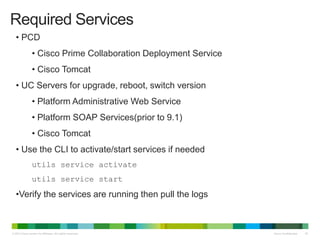
• PCD
• Cisco Prime Collaboration Deployment Service
• Cisco Tomcat
• UC Servers for upgrade, reboot, switch version
• Platform Administrative Web Service
• Platform SOAP Services(prior to 9.1)
• Cisco Tomcat
• Use the CLI to activate/start services if needed
utils service activate
utils service start
•Verify the services are running then pull the logs
Required Services
© 2013 Cisco and/or its affiliates. All rights reserved. Cisco Confidential 43
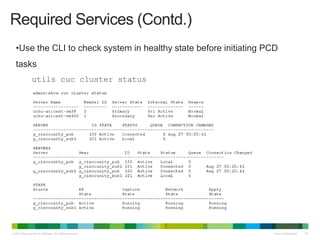
•Use the CLI to check system in healthy state before initiating PCD
tasks
utils cuc cluster status
Required Services (Contd.)
Thank you.

Cuc pcd tac_toi

  • 1.
    Cisco Confidential© 2013Cisco and/or its affiliates. All rights reserved. 1 UnityConnectionQualificationfor PrimeCollaborationDevelopment Release10.0
  • 2.
    © 2011 Ciscoand/or its affiliates. All rights reserved. Cisco Confidential 2 Agenda  About PCD Cisco Prime Collaboration Deployment Supported CUC Releases Steps for PCD Setup Overview of PCD Setup Overview of Cluster Discovery  Supported PCD Features for CUC  Configuration Cluster Discovery L2 Upgrade Switch Version Restart Email Notification
  • 3.
    © 2011 Ciscoand/or its affiliates. All rights reserved. Cisco Confidential 3 Agenda (Contd.)  Troubleshooting Log Files (PCD) Log Files (CUC) Common Issues Required Services
  • 4.
    © 2013 Ciscoand/or its affiliates. All rights reserved. Cisco Confidential 4 Cisco Confidential Cisco Confidential© 2013 Cisco and/or its affiliates. All rights reserved. 4 About Prime Collaboration Deployment
  • 5.
    © 2013 Ciscoand/or its affiliates. All rights reserved. Cisco Confidential 5 Cisco Prime Collaboration Deployment (PCD) An application that can be used to manage the migration of legacy CUC clusters (7.1.5, 8.x, 9.x) to new VM based servers on 10.0, allowing Cisco customers to easily migrate to virtual servers. It can also be used to •Upgrade UC app software (8.6.1+) •Install cop files (locales or device packs) on a cluster (8.6.1+) •Switch versions •Reboot •Readdressing •Fresh install a new Unified Communication, or IM&P cluster Cisco Prime Collaboration Deployment
  • 6.
    © 2013 Ciscoand/or its affiliates. All rights reserved. Cisco Confidential 6 Supported CUC Releases PCD Feature CUC 8.5(1) CUC 8.6(2) CUC 9.1(1) / 9.1(2) Upgrade (From xx To 10.x and onwards) - Yes Yes Switch Version - Yes Yes Server restart - Yes Yes Note: • Upgrades can be performed on clusters 8.6.1 and up to any release that is a valid upgrade, including 10.x. (PCD as a replacement for PAWS_M)
  • 7.
    © 2013 Ciscoand/or its affiliates. All rights reserved. Cisco Confidential 7 Steps for PCD Setup 1. Rack/Stack deploy hardware and install ESXi (Vmware) 2. Deploy PCD virtual machine (delivered as virtual appliance) 3. Configure PCD: • Download necessary .ISO images for target release • Add ESXi hosts to PCD inventory(required for installation/migration via PCD) 4. “Discover Cluster” – PCD connects to source cluster and retrieves cluster information.
  • 8.
    © 2013 Ciscoand/or its affiliates. All rights reserved. Cisco Confidential 8 PCD Overview of PCD Setup CUC Cluster Administrator ISO & OVA
  • 9.
    © 2013 Ciscoand/or its affiliates. All rights reserved. Cisco Confidential 9 Overview of Cluster Discovery PCD Discovered Source Cluster ISO & OVA CUC Cluster
  • 10.
    Cisco Confidential© 2013Cisco and/or its affiliates. All rights reserved. 10 Supported PCD features for CUC
  • 11.
    © 2013 Ciscoand/or its affiliates. All rights reserved. Cisco Confidential 11 Supported PCD Features for CUC • Discovery • L2 Upgrade • Switch Version (from CUC 8.6.1+) • Restart (from CUC 8.6.1+) • Email Notification (of task start, status, completion) • Readdressing
  • 12.
    © 2013 Ciscoand/or its affiliates. All rights reserved. Cisco Confidential 12 Cisco Confidential Cisco Confidential© 2013 Cisco and/or its affiliates. All rights reserved. 12 Configuration Cluster Discovery
  • 13.
    Inventory - Clusters Clustersscreen – holds the cluster inventory. This includes existing clusters (that will be migrated or upgraded), Cluster definitions to be migrated to, or Cluster definitions to be fresh installed. To add an existing cluster to your inventory, click on “Discover Cluster” button.
  • 14.
  • 15.
  • 16.
  • 17.
    © 2013 Ciscoand/or its affiliates. All rights reserved. Cisco Confidential 17 Cisco Confidential Cisco Confidential© 2013 Cisco and/or its affiliates. All rights reserved. 17 Configuration L2Upgrade
  • 18.
    Create Upgrade Task Make sure cluster to be upgraded is in Cluster inventory  Choose Task -> Upgrade – to begin upgrade task wizard  Cluster must be at least 8.6.1 (or higher)
  • 19.
    Create Upgrade Task– Choose Cluster
  • 20.
    Create Upgrade Task– Choose upgrade file
  • 21.
    Create Upgrade Task– Choose Start Time
  • 22.
    Create Upgrade Task– Run Sequence
  • 23.
  • 24.
  • 25.
    © 2013 Ciscoand/or its affiliates. All rights reserved. Cisco Confidential 25 Cisco Confidential Cisco Confidential© 2013 Cisco and/or its affiliates. All rights reserved. 25 Configuration Switch version
  • 26.
    Create Switch VersionTask- Choose Cluster
  • 27.
    Create Switch VersionTask -Choose Start Time
  • 28.
    Create Switch VersionTask – Run Sequence
  • 29.
  • 30.
  • 31.
    © 2013 Ciscoand/or its affiliates. All rights reserved. Cisco Confidential 31 Cisco Confidential Cisco Confidential© 2013 Cisco and/or its affiliates. All rights reserved. 31 Configuration Restart
  • 32.
  • 33.
    © 2013 Ciscoand/or its affiliates. All rights reserved. Cisco Confidential 33 Cisco Confidential Cisco Confidential© 2013 Cisco and/or its affiliates. All rights reserved. 33 Configuration Email Notification
  • 34.
    UI – Administration– Email Notification
  • 35.
    Email Notification –Status Message
  • 36.
    © 2013 Ciscoand/or its affiliates. All rights reserved. Cisco Confidential 36 Cisco Confidential Cisco Confidential© 2013 Cisco and/or its affiliates. All rights reserved. 36 Troubleshooting
  • 37.
    © 2013 Ciscoand/or its affiliates. All rights reserved. Cisco Confidential 37 • Main application log file get activelog tomcat/logs/ucmap/log4j/* • Contains • REST requests from the browser • SOAP requests to UC servers • Database requests • Scheduler events (e.g. – scheduled, started, failed, etc...) • Specific job events (e.g. – node XYZ started) • Exceptions & errors Log Files (PCD)
  • 38.
    © 2013 Ciscoand/or its affiliates. All rights reserved. Cisco Confidential 38 • Main application log file get activelog tomcat/logs/platform-api/log4j/* • Contains • SOAP requests from PCD • Platform API requests • Results from OS components Log Files (CUC Servers)
  • 39.
    © 2013 Ciscoand/or its affiliates. All rights reserved. Cisco Confidential 39 Common Issues 1. No ISO to Upgrade: If ISO is not copied to the valid location then admin would get the following screen
  • 40.
    © 2013 Ciscoand/or its affiliates. All rights reserved. Cisco Confidential 40 Common Issues (Contd.) Expected Behavior
  • 41.
    © 2013 Ciscoand/or its affiliates. All rights reserved. Cisco Confidential 41 Common Issues (Contd.) 2. PAWS Service Not Available: If “Platform SOAP Services” is not activated then admin will get the following error while scheduling PCD tasks:
  • 42.
    © 2013 Ciscoand/or its affiliates. All rights reserved. Cisco Confidential 42 • PCD • Cisco Prime Collaboration Deployment Service • Cisco Tomcat • UC Servers for upgrade, reboot, switch version • Platform Administrative Web Service • Platform SOAP Services(prior to 9.1) • Cisco Tomcat • Use the CLI to activate/start services if needed utils service activate utils service start •Verify the services are running then pull the logs Required Services
  • 43.
    © 2013 Ciscoand/or its affiliates. All rights reserved. Cisco Confidential 43 •Use the CLI to check system in healthy state before initiating PCD tasks utils cuc cluster status Required Services (Contd.)
  • 44.