Css Founder.com | Cssfounder Company
By:
http://cssfounder.com
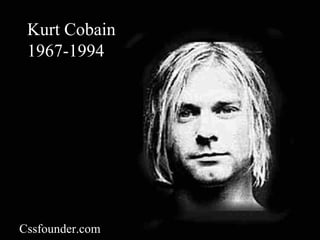
Kurt Cobain
1967-1994
Cssfounder.com
Webpage Layout and Website Design
 Technical definitions:
 A webpage is a single HTML document
 A website is a collection of related webpages
 Designing a good website requires more
than just putting together a few pages
Cssfounder.com
Examples
 www.projectpuffin.org
 www.pmlodge.com
 www.uintafishing.com
 www.uncommonadv.com
Cssfounder.com
Web Page Layout
 Layout of web pages is very important
 Poor layout makes for -
 Difficult navigation
 Hard to locate information on page
 Visually unappealing
Cssfounder.com
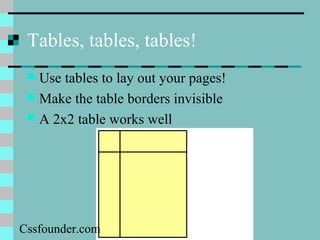
Tables, tables, tables!
 Use tables to lay out your pages!
 Make the table borders invisible
 A 2x2 table works well
Cssfounder.com
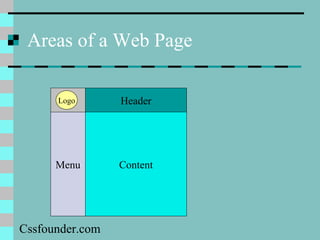
Areas of a Web Page
Menu
Header
Content
Logo
Cssfounder.com
A 2 x 2 Layout
Cssfounder.com
Other Designs
 www.adobe.com (menu on right)
 www.uintafishing.com (many columns)
Cssfounder.com
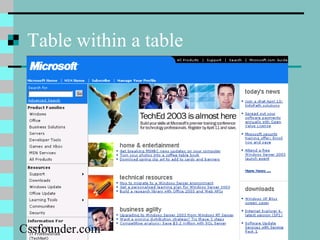
Table within a table
Cssfounder.com
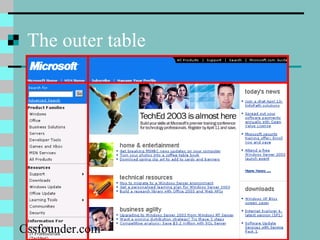
The outer table
Cssfounder.com
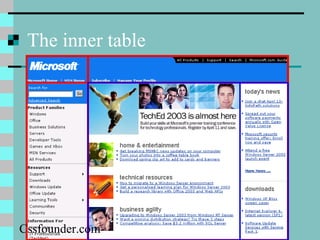
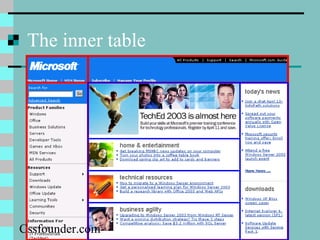
The inner table
Cssfounder.com
The inner table
Cssfounder.com
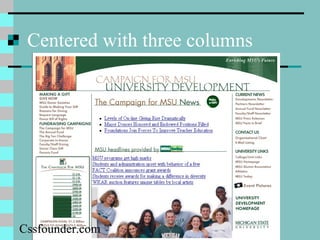
Centered with three columns
Cssfounder.com
Really complicated design!
Cssfounder.com
Monitors and Dimensions
 Monitor resolution affects how you should
lay pages out
 800x600 = 50% - 760 x 420 pixels in
browser window
 1024x768 = 35%
 640x480 = 3%* - 595 x 360 pixels
 *Was 20% three years ago
Cssfounder.com
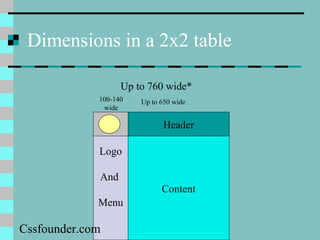
Dimensions in a 2x2 table
Logo
And
Menu
Header
Content
100-140
wide
Up to 650 wide
Up to 760 wide*
Cssfounder.com
Different Resolutions
 http://www.dreamink.com/design6.shtml
Cssfounder.com
Page Width
 Because monitors differ (640x480,
800x600, 1024x768), pages look different.
 You can use a % width for a table, for
example make it 80% of the page width
Cssfounder.com
Splash Page
 The index.html file is called the “Splash Page”
 It is the key page—the first page visitors usually
see
 Must be visually attractive, informative, and easy
to navigate
 Examples:
 www.projectpuffin.org
 www.pmlodge.com
 www.uncommonadv.com
 www.rainforestandreef.org
Cssfounder.com
Organizing Information
 Decide what info goes on each page
 Friends page
 Family page
 Personal page
 Hobbies page
Cssfounder.com
Good Web Communication
 Be Concise
 Limit choices – use a hierarchical structure
 A hierarchy is a structured organization where
some pages are at a higher level than others
 Hierarchy results in a site map with multiple
levels
Cssfounder.com
Site Map
 A site map is designed to show the
connections between pages
 A graphical site map uses lines to connect
linked pages
Cssfounder.com
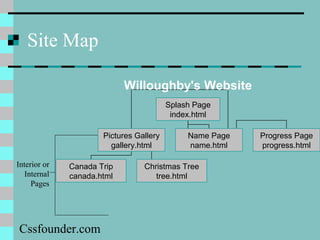
Site Map
Interior or
Internal
Pages
Willoughby's Website
Splash Page
index.html
Pictures Gallery
gallery.html
Name Page
name.html
Progress Page
progress.html
Canada Trip
canada.html
Christmas Tree
tree.html
Cssfounder.com
Design Theme
 Choose a common layout for your website.
The Splash Page will probably differ but
interior pages should be the same
 Use tables to control placement throughout
Cssfounder.com
Consistency in Design
 Use the same font throughout!
 Use consistent graphics in website – do not
use ultra modern on one page and
calligraphy on another
 Use color scheme that is consistent
Cssfounder.com
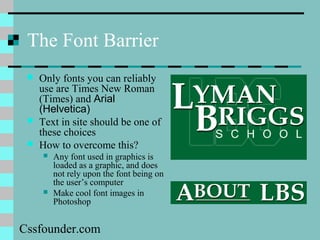
The Font Barrier
 Only fonts you can reliably
use are Times New Roman
(Times) and Arial
(Helvetica)
 Text in site should be one of
these choices
 How to overcome this?
 Any font used in graphics is
loaded as a graphic, and does
not rely upon the font being on
the user’s computer
 Make cool font images in
Photoshop
Cssfounder.com
Testing
 Test your website as you go along.
 If you’re in the computer lab and there’s an
empty computer next to you, log into it and
check out your web page from there
 Make sure it works in Netscape Navigator
and Internet Explorer
 Make sure all pictures come up on a
different machine
Cssfounder.com
Assignment 8 – Website Design
 From your existing web pages, build a website.
 Add more pages to site – whatever you want
 Some suggestions: Resume, friends page, hobbies page
 Minimum 6 pages (splash page + 5)
 Use common design theme
 Make custom graphics in PhotoShop
 Prepare graphical site map in PowerPoint to turn
in when finished
Cssfounder.com
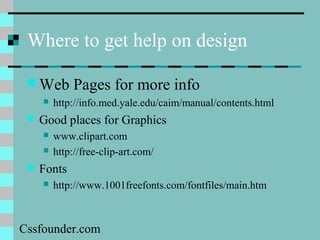
Where to get help on design
 Web Pages for more info
 http://info.med.yale.edu/caim/manual/contents.html
 Good places for Graphics
 www.clipart.com
 http://free-clip-art.com/
 Fonts
 http://www.1001freefonts.com/fontfiles/main.htm
Cssfounder.com
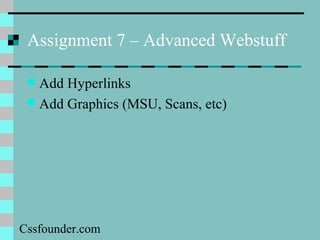
Assignment 7 – Advanced Webstuff
 Add Hyperlinks
 Add Graphics (MSU, Scans, etc)
Cssfounder.com

Css Founder.com | Cssfounder Company

  • 1.
    Css Founder.com |Cssfounder Company By: http://cssfounder.com
  • 2.
  • 3.
    Webpage Layout andWebsite Design  Technical definitions:  A webpage is a single HTML document  A website is a collection of related webpages  Designing a good website requires more than just putting together a few pages Cssfounder.com
  • 4.
    Examples  www.projectpuffin.org  www.pmlodge.com www.uintafishing.com  www.uncommonadv.com Cssfounder.com
  • 5.
    Web Page Layout Layout of web pages is very important  Poor layout makes for -  Difficult navigation  Hard to locate information on page  Visually unappealing Cssfounder.com
  • 6.
    Tables, tables, tables! Use tables to lay out your pages!  Make the table borders invisible  A 2x2 table works well Cssfounder.com
  • 7.
    Areas of aWeb Page Menu Header Content Logo Cssfounder.com
  • 8.
    A 2 x2 Layout Cssfounder.com
  • 9.
    Other Designs  www.adobe.com(menu on right)  www.uintafishing.com (many columns) Cssfounder.com
  • 10.
    Table within atable Cssfounder.com
  • 11.
  • 12.
  • 13.
  • 14.
    Centered with threecolumns Cssfounder.com
  • 15.
  • 16.
    Monitors and Dimensions Monitor resolution affects how you should lay pages out  800x600 = 50% - 760 x 420 pixels in browser window  1024x768 = 35%  640x480 = 3%* - 595 x 360 pixels  *Was 20% three years ago Cssfounder.com
  • 17.
    Dimensions in a2x2 table Logo And Menu Header Content 100-140 wide Up to 650 wide Up to 760 wide* Cssfounder.com
  • 18.
  • 19.
    Page Width  Becausemonitors differ (640x480, 800x600, 1024x768), pages look different.  You can use a % width for a table, for example make it 80% of the page width Cssfounder.com
  • 20.
    Splash Page  Theindex.html file is called the “Splash Page”  It is the key page—the first page visitors usually see  Must be visually attractive, informative, and easy to navigate  Examples:  www.projectpuffin.org  www.pmlodge.com  www.uncommonadv.com  www.rainforestandreef.org Cssfounder.com
  • 21.
    Organizing Information  Decidewhat info goes on each page  Friends page  Family page  Personal page  Hobbies page Cssfounder.com
  • 22.
    Good Web Communication Be Concise  Limit choices – use a hierarchical structure  A hierarchy is a structured organization where some pages are at a higher level than others  Hierarchy results in a site map with multiple levels Cssfounder.com
  • 23.
    Site Map  Asite map is designed to show the connections between pages  A graphical site map uses lines to connect linked pages Cssfounder.com
  • 24.
    Site Map Interior or Internal Pages Willoughby'sWebsite Splash Page index.html Pictures Gallery gallery.html Name Page name.html Progress Page progress.html Canada Trip canada.html Christmas Tree tree.html Cssfounder.com
  • 25.
    Design Theme  Choosea common layout for your website. The Splash Page will probably differ but interior pages should be the same  Use tables to control placement throughout Cssfounder.com
  • 26.
    Consistency in Design Use the same font throughout!  Use consistent graphics in website – do not use ultra modern on one page and calligraphy on another  Use color scheme that is consistent Cssfounder.com
  • 27.
    The Font Barrier Only fonts you can reliably use are Times New Roman (Times) and Arial (Helvetica)  Text in site should be one of these choices  How to overcome this?  Any font used in graphics is loaded as a graphic, and does not rely upon the font being on the user’s computer  Make cool font images in Photoshop Cssfounder.com
  • 28.
    Testing  Test yourwebsite as you go along.  If you’re in the computer lab and there’s an empty computer next to you, log into it and check out your web page from there  Make sure it works in Netscape Navigator and Internet Explorer  Make sure all pictures come up on a different machine Cssfounder.com
  • 29.
    Assignment 8 –Website Design  From your existing web pages, build a website.  Add more pages to site – whatever you want  Some suggestions: Resume, friends page, hobbies page  Minimum 6 pages (splash page + 5)  Use common design theme  Make custom graphics in PhotoShop  Prepare graphical site map in PowerPoint to turn in when finished Cssfounder.com
  • 30.
    Where to gethelp on design  Web Pages for more info  http://info.med.yale.edu/caim/manual/contents.html  Good places for Graphics  www.clipart.com  http://free-clip-art.com/  Fonts  http://www.1001freefonts.com/fontfiles/main.htm Cssfounder.com
  • 31.
    Assignment 7 –Advanced Webstuff  Add Hyperlinks  Add Graphics (MSU, Scans, etc) Cssfounder.com