Unit III: Adding Styles
and Interactivity Using
 CSS and Javascript
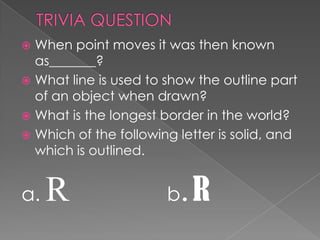
 When point moves it was then known
  as_______?
 What line is used to show the outline part
  of an object when drawn?
 What is the longest border in the world?
 Which of the following letter is solid, and
  which is outlined.


a.   R                 b .R
The CSS border properties
 specify the borders around
 an element.
The CSS outline properties
 specify the outline around
 an element.
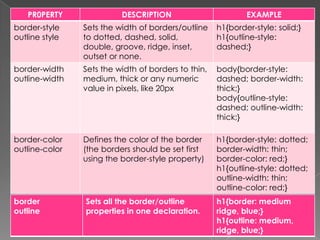
PR0PERTY               DESCRIPTION                        EXAMPLE
border-style    Sets the width of borders/outline    h1{border-style: solid;}
outline style   to dotted, dashed, solid,            h1{outline-style:
                double, groove, ridge, inset,        dashed;}
                outset or none.
border-width    Sets the width of borders to thin,   body{border-style:
outline-width   medium, thick or any numeric         dashed; border-width:
                value in pixels, like 20px           thick;}
                                                     body{outline-style:
                                                     dashed; outline-width:
                                                     thick;}

border-color    Defines the color of the border      h1{border-style: dotted;
outline-color   (the borders should be set first     border-width: thin;
                using the border-style property)     border-color: red;}
                                                     h1{outline-style: dotted;
                                                     outline-width: thin;
                                                     outline-color: red;}
border          Sets all the border/outline          h1{border: medium
outline         properties in one declaration.       ridge, blue;}
                                                     h1{outline: medium,
                                                     ridge, blue;}
PROPERTIES            DESCRIPTION                           EXAMPLE
Border-top-style      Sets the style, width, color of the   h1{border-top-style: dotted;}
Border-top-width      top border.                           h1{border-top-width: thin;}
Border-top-color                                            h1{border-top-color: blue;}
                      Sets the properties of the top
                                                            h1{border-top: thin dotted blue;}
                      border in one declaration
Border-top

Border-right-style    Sets the style, width, color of the   h1{border-right-style: dotted;}
Border-right-width    right border.                         h1{border-right-width: thin;}
Border-right-color                                          h1{border-right-color: blue;}
                      Sets the properties of the right
Border-right                                                h1{border-right: thin dotted blue;}
                      border in one declaration

Border-bottom-style   Sets the style, width, color of the   h1{border-bottom-style: dotted;}
Border-bottom-        bottom border.                        h1{border-bottom-width: thin;}
width                                                       h1{border-bottom-color: blue;}
                      Sets the properties of the bottom
Border-bottom-                                              h1{border-bottom: thin dotted
                      border in one declaration
color                                                       blue;}
Border-bottom

Border-left-style     Sets the style, width, color of the   h1{border-left-style: dotted;}
Border-left-width     left border.                          h1{border-left-width: thin;}
Border-left-color                                           h1{border-left-color: blue;}
                      Sets the properties of the left
Border-left                                                 h1{border-left: thin dotted blue;}
                      border in one declaration
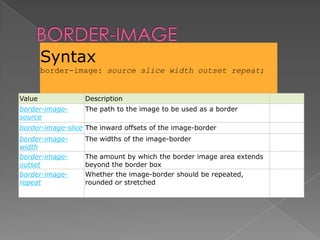
Syntax
        border-image: source slice width outset repeat;


Value              Description
border-image-      The path to the image to be used as a border
source
border-image-slice The inward offsets of the image-border
border-image-      The widths of the image-border
width
border-image-      The amount by which the border image area extends
outset             beyond the border box
border-image-      Whether the image-border should be repeated,
repeat             rounded or stretched
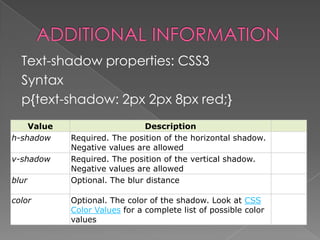
Text-shadow properties: CSS3
  Syntax
  p{text-shadow: 2px 2px 8px red;}
    Value                      Description
h-shadow    Required. The position of the horizontal shadow.
            Negative values are allowed
v-shadow    Required. The position of the vertical shadow.
            Negative values are allowed
blur        Optional. The blur distance

color       Optional. The color of the shadow. Look at CSS
            Color Values for a complete list of possible color
            values
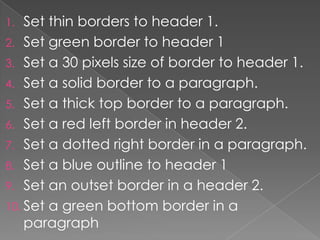
1.  Set thin borders to header 1.
2. Set green border to header 1
3. Set a 30 pixels size of border to header 1.
4. Set a solid border to a paragraph.
5. Set a thick top border to a paragraph.
6. Set a red left border in header 2.
7. Set a dotted right border in a paragraph.
8. Set a blue outline to header 1
9. Set an outset border in a header 2.
10. Set a green bottom border in a
    paragraph
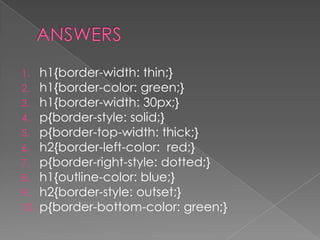
1.    h1{border-width: thin;}
2.    h1{border-color: green;}
3.    h1{border-width: 30px;}
4.    p{border-style: solid;}
5.    p{border-top-width: thick;}
6.    h2{border-left-color: red;}
7.    p{border-right-style: dotted;}
8.    h1{outline-color: blue;}
9.    h2{border-style: outset;}
10.   p{border-bottom-color: green;}

Css border and outline properties

  • 1.
    Unit III: AddingStyles and Interactivity Using CSS and Javascript
  • 2.
     When pointmoves it was then known as_______?  What line is used to show the outline part of an object when drawn?  What is the longest border in the world?  Which of the following letter is solid, and which is outlined. a. R b .R
  • 3.
    The CSS borderproperties specify the borders around an element. The CSS outline properties specify the outline around an element.
  • 4.
    PR0PERTY DESCRIPTION EXAMPLE border-style Sets the width of borders/outline h1{border-style: solid;} outline style to dotted, dashed, solid, h1{outline-style: double, groove, ridge, inset, dashed;} outset or none. border-width Sets the width of borders to thin, body{border-style: outline-width medium, thick or any numeric dashed; border-width: value in pixels, like 20px thick;} body{outline-style: dashed; outline-width: thick;} border-color Defines the color of the border h1{border-style: dotted; outline-color (the borders should be set first border-width: thin; using the border-style property) border-color: red;} h1{outline-style: dotted; outline-width: thin; outline-color: red;} border Sets all the border/outline h1{border: medium outline properties in one declaration. ridge, blue;} h1{outline: medium, ridge, blue;}
  • 5.
    PROPERTIES DESCRIPTION EXAMPLE Border-top-style Sets the style, width, color of the h1{border-top-style: dotted;} Border-top-width top border. h1{border-top-width: thin;} Border-top-color h1{border-top-color: blue;} Sets the properties of the top h1{border-top: thin dotted blue;} border in one declaration Border-top Border-right-style Sets the style, width, color of the h1{border-right-style: dotted;} Border-right-width right border. h1{border-right-width: thin;} Border-right-color h1{border-right-color: blue;} Sets the properties of the right Border-right h1{border-right: thin dotted blue;} border in one declaration Border-bottom-style Sets the style, width, color of the h1{border-bottom-style: dotted;} Border-bottom- bottom border. h1{border-bottom-width: thin;} width h1{border-bottom-color: blue;} Sets the properties of the bottom Border-bottom- h1{border-bottom: thin dotted border in one declaration color blue;} Border-bottom Border-left-style Sets the style, width, color of the h1{border-left-style: dotted;} Border-left-width left border. h1{border-left-width: thin;} Border-left-color h1{border-left-color: blue;} Sets the properties of the left Border-left h1{border-left: thin dotted blue;} border in one declaration
  • 6.
    Syntax border-image: source slice width outset repeat; Value Description border-image- The path to the image to be used as a border source border-image-slice The inward offsets of the image-border border-image- The widths of the image-border width border-image- The amount by which the border image area extends outset beyond the border box border-image- Whether the image-border should be repeated, repeat rounded or stretched
  • 7.
    Text-shadow properties: CSS3 Syntax p{text-shadow: 2px 2px 8px red;} Value Description h-shadow Required. The position of the horizontal shadow. Negative values are allowed v-shadow Required. The position of the vertical shadow. Negative values are allowed blur Optional. The blur distance color Optional. The color of the shadow. Look at CSS Color Values for a complete list of possible color values
  • 8.
    1. Setthin borders to header 1. 2. Set green border to header 1 3. Set a 30 pixels size of border to header 1. 4. Set a solid border to a paragraph. 5. Set a thick top border to a paragraph. 6. Set a red left border in header 2. 7. Set a dotted right border in a paragraph. 8. Set a blue outline to header 1 9. Set an outset border in a header 2. 10. Set a green bottom border in a paragraph
  • 9.
    1. h1{border-width: thin;} 2. h1{border-color: green;} 3. h1{border-width: 30px;} 4. p{border-style: solid;} 5. p{border-top-width: thick;} 6. h2{border-left-color: red;} 7. p{border-right-style: dotted;} 8. h1{outline-color: blue;} 9. h2{border-style: outset;} 10. p{border-bottom-color: green;}