PROGRAMMING IN C
QUESTIONS WITH ANSWERS
BY,
LAKSHMI.S, M.C.A,M.PHIL.,
ASSISTANT PROFESSOR,
DEPARTMENT OF COMPUTER SCIENCE,
SRI ADI CHUNCHANAGIRI WOMEN’S COLLEGE,
CUMBUM.
UNIT I
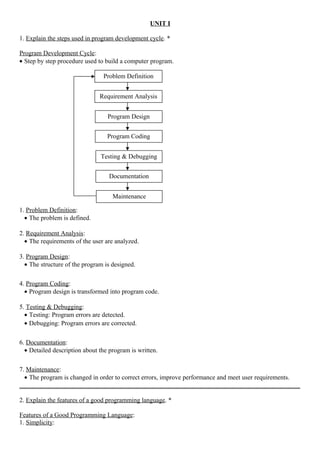
1. Explain the steps used in program development cycle. *
Program Development Cycle:
• Step by step procedure used to build a computer program.
1. Problem Definition:
• The problem is defined.
2. Requirement Analysis:
• The requirements of the user are analyzed.
3. Program Design:
• The structure of the program is designed.
4. Program Coding:
• Program design is transformed into program code.
5. Testing & Debugging:
• Testing: Program errors are detected.
• Debugging: Program errors are corrected.
6. Documentation:
• Detailed description about the program is written.
7. Maintenance:
• The program is changed in order to correct errors, improve performance and meet user requirements.
_______________________________________________________________________________________
2. Explain the features of a good programming language. *
Features of a Good Programming Language:
1. Simplicity:
Problem Definition
Requirement Analysis
Program Design
Program Coding
Testing & Debugging
Documentation
Maintenance
• Simple to learn and use.
2. Naturalness:
• Provide the data types, operators and syntax required to write programs in the specified application area.
3. Abstraction:
• Group essential details and ignore other details.
4. Efficiency:
• Occupy less memory space.
• Fast execution.
5. Structuredness:
• Provide facility to divide a problem into sub-problems and write separate sub-programs for them.
6. Compactness:
• Provide facility to write compact programs.
7. Extensibility:
• Provide facility to extend a program.
_______________________________________________________________________________________
3. Write the algorithm and draw the flowchart to find the product of the first n natural numbers. *
Product of the First n Natural Numbers:
Natural Numbers – 1, 2, 3 . . . n
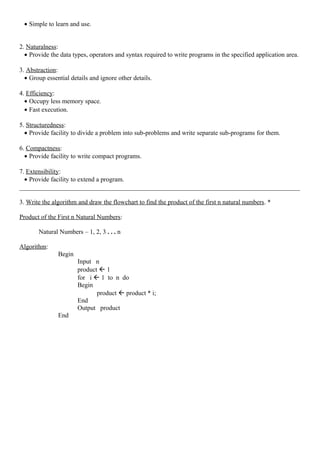
Algorithm:
Begin
Input n
product  1
for i  1 to n do
Begin
product  product * i;
End
Output product
End
Flow Chart:
False
True
_______________________________________________________________________________________________
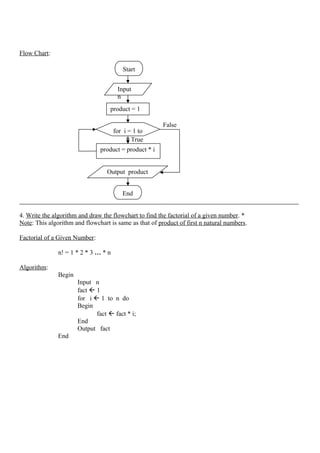
4. Write the algorithm and draw the flowchart to find the factorial of a given number. *
Note: This algorithm and flowchart is same as that of product of first n natural numbers.
Factorial of a Given Number:
n! = 1 * 2 * 3 … * n
Algorithm:
Begin
Input n
fact  1
for i  1 to n do
Begin
fact  fact * i;
End
Output fact
End
Start
Input
n
product = 1
for i = 1 to
n
product = product * i
Output product
End
Flow Chart:
False
True
_______________________________________________________________________________________________
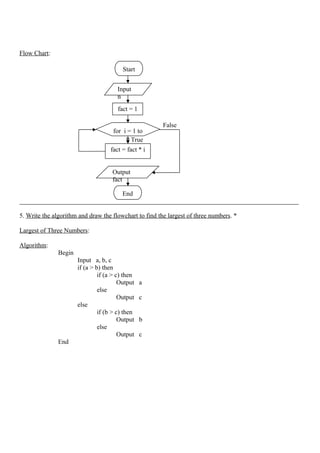
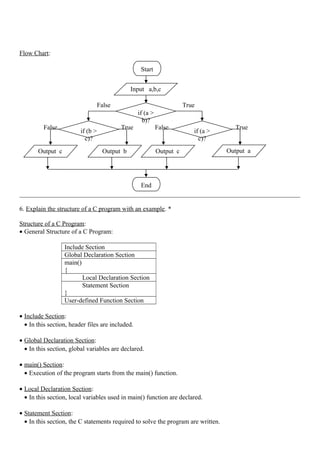
5. Write the algorithm and draw the flowchart to find the largest of three numbers. *
Largest of Three Numbers:
Algorithm:
Begin
Input a, b, c
if (a > b) then
if (a > c) then
Output a
else
Output c
else
if (b > c) then
Output b
else
Output c
End
Start
Input
n
fact = 1
for i = 1 to
n
fact = fact * i
Output
fact
End
Flow Chart:
False True
False True False True
_______________________________________________________________________________________
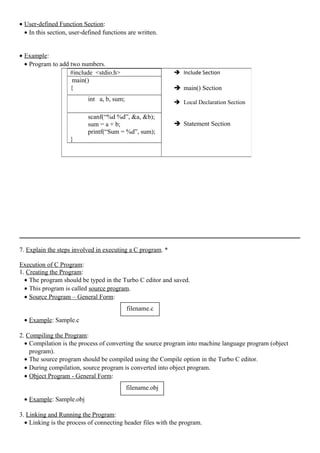
6. Explain the structure of a C program with an example. *
Structure of a C Program:
• General Structure of a C Program:
Include Section
Global Declaration Section
main()
{
Local Declaration Section
Statement Section
}
User-defined Function Section
• Include Section:
• In this section, header files are included.
• Global Declaration Section:
• In this section, global variables are declared.
• main() Section:
• Execution of the program starts from the main() function.
• Local Declaration Section:
• In this section, local variables used in main() function are declared.
• Statement Section:
• In this section, the C statements required to solve the program are written.
Start
Input a,b,c
End
if (a >
b)?
if (a >
c)?
if (b >
c)?
Output c Output b Output c Output a
• User-defined Function Section:
• In this section, user-defined functions are written.
• Example:
• Program to add two numbers.
_______________________________________________________________________________________
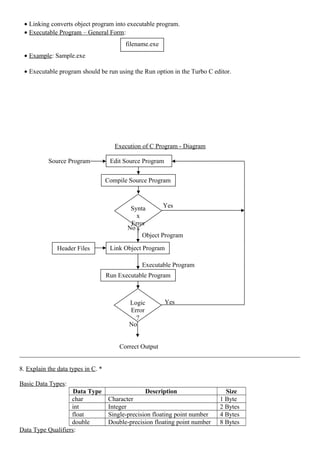
7. Explain the steps involved in executing a C program. *
Execution of C Program:
1. Creating the Program:
• The program should be typed in the Turbo C editor and saved.
• This program is called source program.
• Source Program – General Form:
• Example: Sample.c
2. Compiling the Program:
• Compilation is the process of converting the source program into machine language program (object
program).
• The source program should be compiled using the Compile option in the Turbo C editor.
• During compilation, source program is converted into object program.
• Object Program - General Form:
• Example: Sample.obj
3. Linking and Running the Program:
• Linking is the process of connecting header files with the program.
 Include Section
 main() Section
 Local Declaration Section
 Statement Section
filename.c
filename.obj
#include <stdio.h>
main()
{
int a, b, sum;
scanf(“%d %d”, &a, &b);
sum = a + b;
printf(“Sum = %d”, sum);
}
• Linking converts object program into executable program.
• Executable Program – General Form:
• Example: Sample.exe
• Executable program should be run using the Run option in the Turbo C editor.
Execution of C Program - Diagram
Source Program
Yes
No
Object Program
Executable Program
Yes
No
Correct Output
_______________________________________________________________________________________
8. Explain the data types in C. *
Basic Data Types:
Data Type Description Size
char Character 1 Byte
int Integer 2 Bytes
float Single-precision floating point number 4 Bytes
double Double-precision floating point number 8 Bytes
Data Type Qualifiers:
Edit Source Program
Compile Source Program
Synta
x
Error
?
Link Object ProgramHeader Files
Run Executable Program
Logic
Error
?
filename.exe
• Sign Qualifiers:
1. signed
2. unsigned
• These qualifiers affect the sign of the data type.
• Size Qualifiers:
1. long
2. short
• These qualifiers affect the size of the data type.
• Examples:
• signed int
• unsigned int
• long int
• short int
_______________________________________________________________________________________
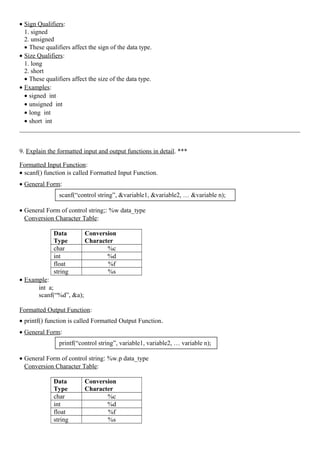
9. Explain the formatted input and output functions in detail. ***
Formatted Input Function:
• scanf() function is called Formatted Input Function.
• General Form:
• General Form of control string;: %w data_type
Conversion Character Table:
Data
Type
Conversion
Character
char %c
int %d
float %f
string %s
• Example:
int a;
scanf(“%d”, &a);
Formatted Output Function:
• printf() function is called Formatted Output Function.
• General Form:
• General Form of control string: %w.p data_type
Conversion Character Table:
Data
Type
Conversion
Character
char %c
int %d
float %f
string %s
scanf(“control string”, &variable1, &variable2, … &variable n);
printf(“control string”, variable1, variable2, … variable n);
• Printing Integer:
Example:
int x = 2000; Output:
printf(“%d”, x);
• Printing Float:
Example:
float x = 123.4567 Output:
printf(“%8.4f”, x);
• Printing String:
Example:
name = “Kandan”; Output:
printf(“%s”, name);
_______________________________________________________________________________________
10. Explain the unformatted input and output functions in detail. ***
Unformatted Input Functions:
• getchar():
• Used to read a character from the keyboard.
• General Form:
• Example:
char a;
a = getchar();
• gets():
• Used to read a string from the keyboard.
• General Form:
• Example:
char a[10];
gets(a);
Unformatted Output Functions:
• putchar():
• Used to display a character on the monitor.
• General Form:
• Example:
putchar(‘K’);
• puts():
2 0 0 0
1 2 3 . 4 5 6 7
K a n d a n
variablename = getchar();
gets(variablename);
putchar(variablename);
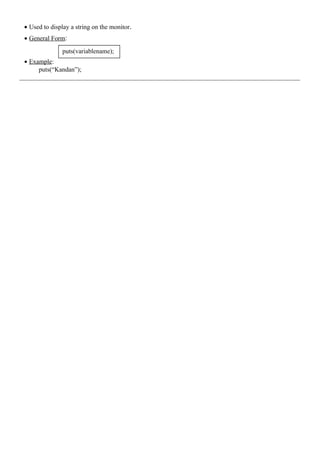
• Used to display a string on the monitor.
• General Form:
• Example:
puts(“Kandan”);
_______________________________________________________________________________________
puts(variablename);

Programming in c notes

  • 1.
    PROGRAMMING IN C QUESTIONSWITH ANSWERS BY, LAKSHMI.S, M.C.A,M.PHIL., ASSISTANT PROFESSOR, DEPARTMENT OF COMPUTER SCIENCE, SRI ADI CHUNCHANAGIRI WOMEN’S COLLEGE, CUMBUM.
  • 2.
    UNIT I 1. Explainthe steps used in program development cycle. * Program Development Cycle: • Step by step procedure used to build a computer program. 1. Problem Definition: • The problem is defined. 2. Requirement Analysis: • The requirements of the user are analyzed. 3. Program Design: • The structure of the program is designed. 4. Program Coding: • Program design is transformed into program code. 5. Testing & Debugging: • Testing: Program errors are detected. • Debugging: Program errors are corrected. 6. Documentation: • Detailed description about the program is written. 7. Maintenance: • The program is changed in order to correct errors, improve performance and meet user requirements. _______________________________________________________________________________________ 2. Explain the features of a good programming language. * Features of a Good Programming Language: 1. Simplicity: Problem Definition Requirement Analysis Program Design Program Coding Testing & Debugging Documentation Maintenance
  • 3.
    • Simple tolearn and use. 2. Naturalness: • Provide the data types, operators and syntax required to write programs in the specified application area. 3. Abstraction: • Group essential details and ignore other details. 4. Efficiency: • Occupy less memory space. • Fast execution. 5. Structuredness: • Provide facility to divide a problem into sub-problems and write separate sub-programs for them. 6. Compactness: • Provide facility to write compact programs. 7. Extensibility: • Provide facility to extend a program. _______________________________________________________________________________________ 3. Write the algorithm and draw the flowchart to find the product of the first n natural numbers. * Product of the First n Natural Numbers: Natural Numbers – 1, 2, 3 . . . n Algorithm: Begin Input n product  1 for i  1 to n do Begin product  product * i; End Output product End
  • 4.
    Flow Chart: False True _______________________________________________________________________________________________ 4. Writethe algorithm and draw the flowchart to find the factorial of a given number. * Note: This algorithm and flowchart is same as that of product of first n natural numbers. Factorial of a Given Number: n! = 1 * 2 * 3 … * n Algorithm: Begin Input n fact  1 for i  1 to n do Begin fact  fact * i; End Output fact End Start Input n product = 1 for i = 1 to n product = product * i Output product End
  • 5.
    Flow Chart: False True _______________________________________________________________________________________________ 5. Writethe algorithm and draw the flowchart to find the largest of three numbers. * Largest of Three Numbers: Algorithm: Begin Input a, b, c if (a > b) then if (a > c) then Output a else Output c else if (b > c) then Output b else Output c End Start Input n fact = 1 for i = 1 to n fact = fact * i Output fact End
  • 6.
    Flow Chart: False True FalseTrue False True _______________________________________________________________________________________ 6. Explain the structure of a C program with an example. * Structure of a C Program: • General Structure of a C Program: Include Section Global Declaration Section main() { Local Declaration Section Statement Section } User-defined Function Section • Include Section: • In this section, header files are included. • Global Declaration Section: • In this section, global variables are declared. • main() Section: • Execution of the program starts from the main() function. • Local Declaration Section: • In this section, local variables used in main() function are declared. • Statement Section: • In this section, the C statements required to solve the program are written. Start Input a,b,c End if (a > b)? if (a > c)? if (b > c)? Output c Output b Output c Output a
  • 7.
    • User-defined FunctionSection: • In this section, user-defined functions are written. • Example: • Program to add two numbers. _______________________________________________________________________________________ 7. Explain the steps involved in executing a C program. * Execution of C Program: 1. Creating the Program: • The program should be typed in the Turbo C editor and saved. • This program is called source program. • Source Program – General Form: • Example: Sample.c 2. Compiling the Program: • Compilation is the process of converting the source program into machine language program (object program). • The source program should be compiled using the Compile option in the Turbo C editor. • During compilation, source program is converted into object program. • Object Program - General Form: • Example: Sample.obj 3. Linking and Running the Program: • Linking is the process of connecting header files with the program.  Include Section  main() Section  Local Declaration Section  Statement Section filename.c filename.obj #include <stdio.h> main() { int a, b, sum; scanf(“%d %d”, &a, &b); sum = a + b; printf(“Sum = %d”, sum); }
  • 8.
    • Linking convertsobject program into executable program. • Executable Program – General Form: • Example: Sample.exe • Executable program should be run using the Run option in the Turbo C editor. Execution of C Program - Diagram Source Program Yes No Object Program Executable Program Yes No Correct Output _______________________________________________________________________________________ 8. Explain the data types in C. * Basic Data Types: Data Type Description Size char Character 1 Byte int Integer 2 Bytes float Single-precision floating point number 4 Bytes double Double-precision floating point number 8 Bytes Data Type Qualifiers: Edit Source Program Compile Source Program Synta x Error ? Link Object ProgramHeader Files Run Executable Program Logic Error ? filename.exe
  • 9.
    • Sign Qualifiers: 1.signed 2. unsigned • These qualifiers affect the sign of the data type. • Size Qualifiers: 1. long 2. short • These qualifiers affect the size of the data type. • Examples: • signed int • unsigned int • long int • short int _______________________________________________________________________________________ 9. Explain the formatted input and output functions in detail. *** Formatted Input Function: • scanf() function is called Formatted Input Function. • General Form: • General Form of control string;: %w data_type Conversion Character Table: Data Type Conversion Character char %c int %d float %f string %s • Example: int a; scanf(“%d”, &a); Formatted Output Function: • printf() function is called Formatted Output Function. • General Form: • General Form of control string: %w.p data_type Conversion Character Table: Data Type Conversion Character char %c int %d float %f string %s scanf(“control string”, &variable1, &variable2, … &variable n); printf(“control string”, variable1, variable2, … variable n);
  • 10.
    • Printing Integer: Example: intx = 2000; Output: printf(“%d”, x); • Printing Float: Example: float x = 123.4567 Output: printf(“%8.4f”, x); • Printing String: Example: name = “Kandan”; Output: printf(“%s”, name); _______________________________________________________________________________________ 10. Explain the unformatted input and output functions in detail. *** Unformatted Input Functions: • getchar(): • Used to read a character from the keyboard. • General Form: • Example: char a; a = getchar(); • gets(): • Used to read a string from the keyboard. • General Form: • Example: char a[10]; gets(a); Unformatted Output Functions: • putchar(): • Used to display a character on the monitor. • General Form: • Example: putchar(‘K’); • puts(): 2 0 0 0 1 2 3 . 4 5 6 7 K a n d a n variablename = getchar(); gets(variablename); putchar(variablename);
  • 11.
    • Used todisplay a string on the monitor. • General Form: • Example: puts(“Kandan”); _______________________________________________________________________________________ puts(variablename);