Last Time
• Orthographic projection
• Viewing transformations
     – Setting up a camera position and orientation


10/12/04            © University of Wisconsin, CS559 Spring 2004
Today
• Perspective viewing
• Homework 3 due


10/12/04       © University of Wisconsin, CS559 Spring 2004
Review
• View Space is a coordinate system with the viewer looking
  down the –z axis, with x to the right and y up
• The World->View transformation takes points in world
  space and converts them into points in view space
• The Projection matrix, or View->Canonical matrix, takes
  points in view space and converts them into points in
  Canonical View Space
     – Canonical View Space is a coordinate system with the viewer
       looking along –z, x to the right, y up, and everything to be drawn
       inside the cube [-1,1]x[-1,1]x[-1,1] using parallel projection


10/12/04            © University of Wisconsin, CS559 Spring 2004
OpenGL Camera
• The default OpenGL image plane has u aligned with the x axis, v
  aligned with y, and n aligned with z
     – Means the default camera looks along the negative z axis
     – Makes it easy to do 2D drawing (no need for any view transformation)
• glOrtho(…) sets an orthographic view->canonical matrix
     – Modifies the GL_PROJECTION matrix
• gluLookAt(…) sets the world->view matrix
     – Takes an image center point, a point along the viewing direction and an up
       vector
     – Multiplies a world->view matrix onto the current GL_MODELVIEW
       matrix
     – You could do this yourself, using glMultMatrix(…) with the matrix
       from the previous slides


10/12/04              © University of Wisconsin, CS559 Spring 2004
Typical View Spec. Usage
  glMatrixMode(GL_PROJECTION);
  glLoadIdentity();
  glOrtho(l, r, b, t, n, f);
  glMatrixMode(GL_MODELVIEW);
  glLoadIdentity();
  gluLookAt(ex,ey,ez,cx,cy,cx,ux,uy,uz);
• GLU functions, such as gluLookAt(…), are not part of the core
  OpenGL library
     – They can be implemented with other core OpenGL commands
     – For example, gluLookAt(…) uses glMultMatrix(…) with the
       matrix from the previous slides
     – They are not dependent on a particular graphics card

10/12/04          © University of Wisconsin, CS559 Spring 2004
Left vs Right Handed View
                      Space
• You can define u as right, v as up, and n as toward the
  viewer: a right handed system u×v=w
     – Advantage: Standard mathematical way of doing things
• You can also define u as right, v as up and n as into the
  scene: a left handed system v×u=w
     – Advantage: Bigger n values mean points are further away
• OpenGL is right handed
• Many older systems, notably the Renderman standard
  developed by Pixar, are left handed


10/12/04           © University of Wisconsin, CS559 Spring 2004
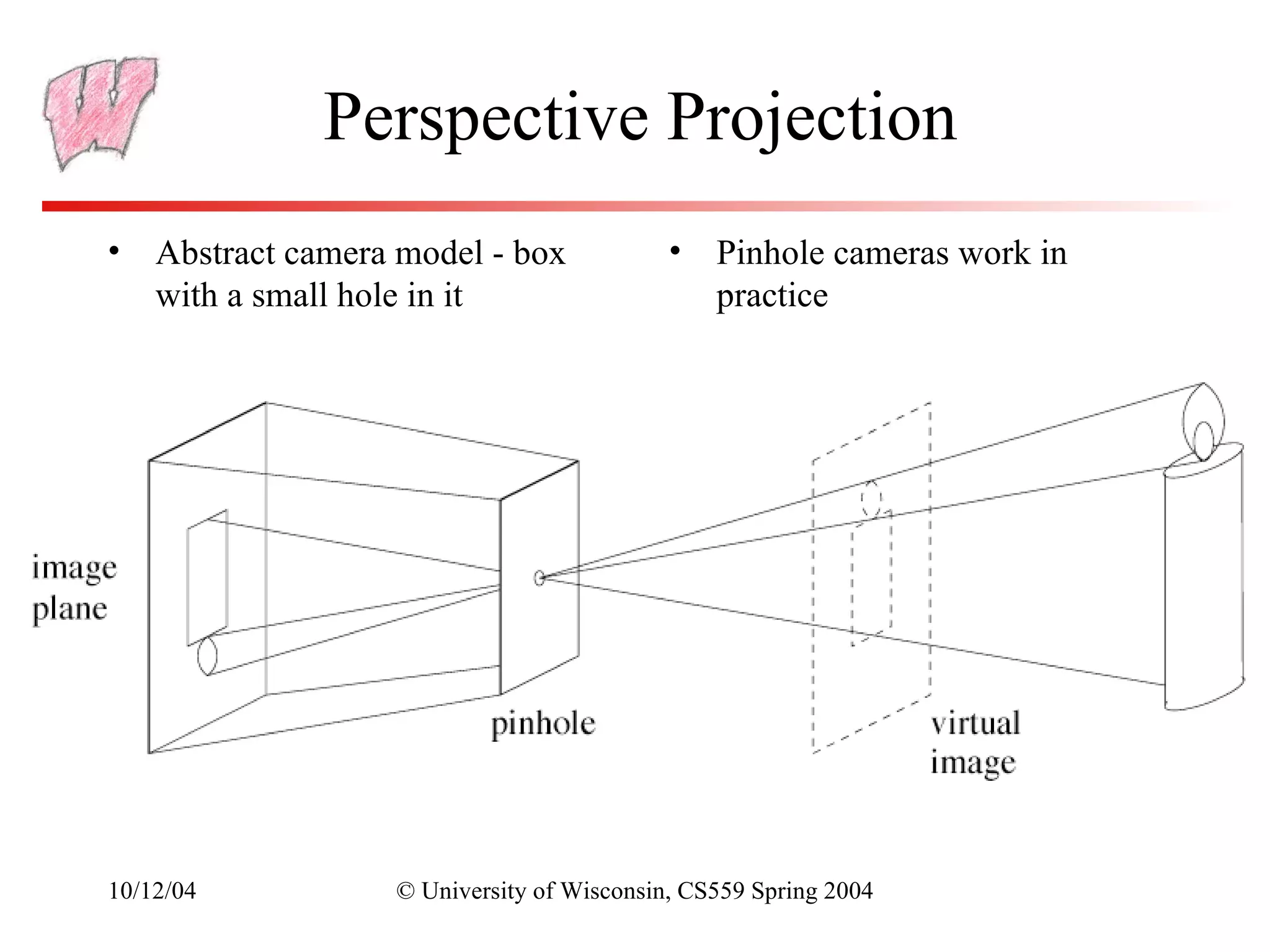
Perspective Projection
• Abstract camera model - box              •   Pinhole cameras work in
  with a small hole in it                      practice


10/12/04          © University of Wisconsin, CS559 Spring 2004
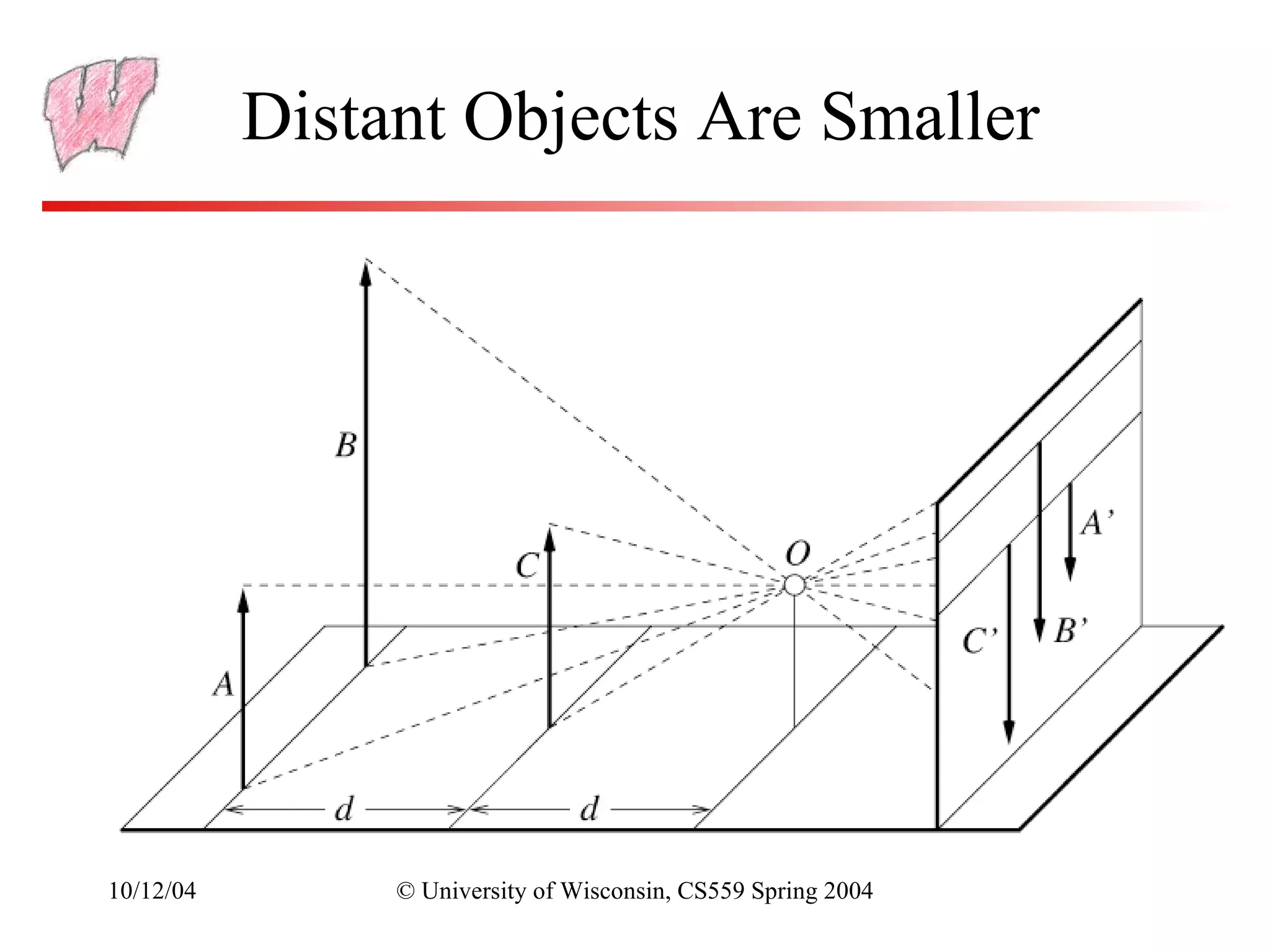
Distant Objects Are Smaller


10/12/04        © University of Wisconsin, CS559 Spring 2004
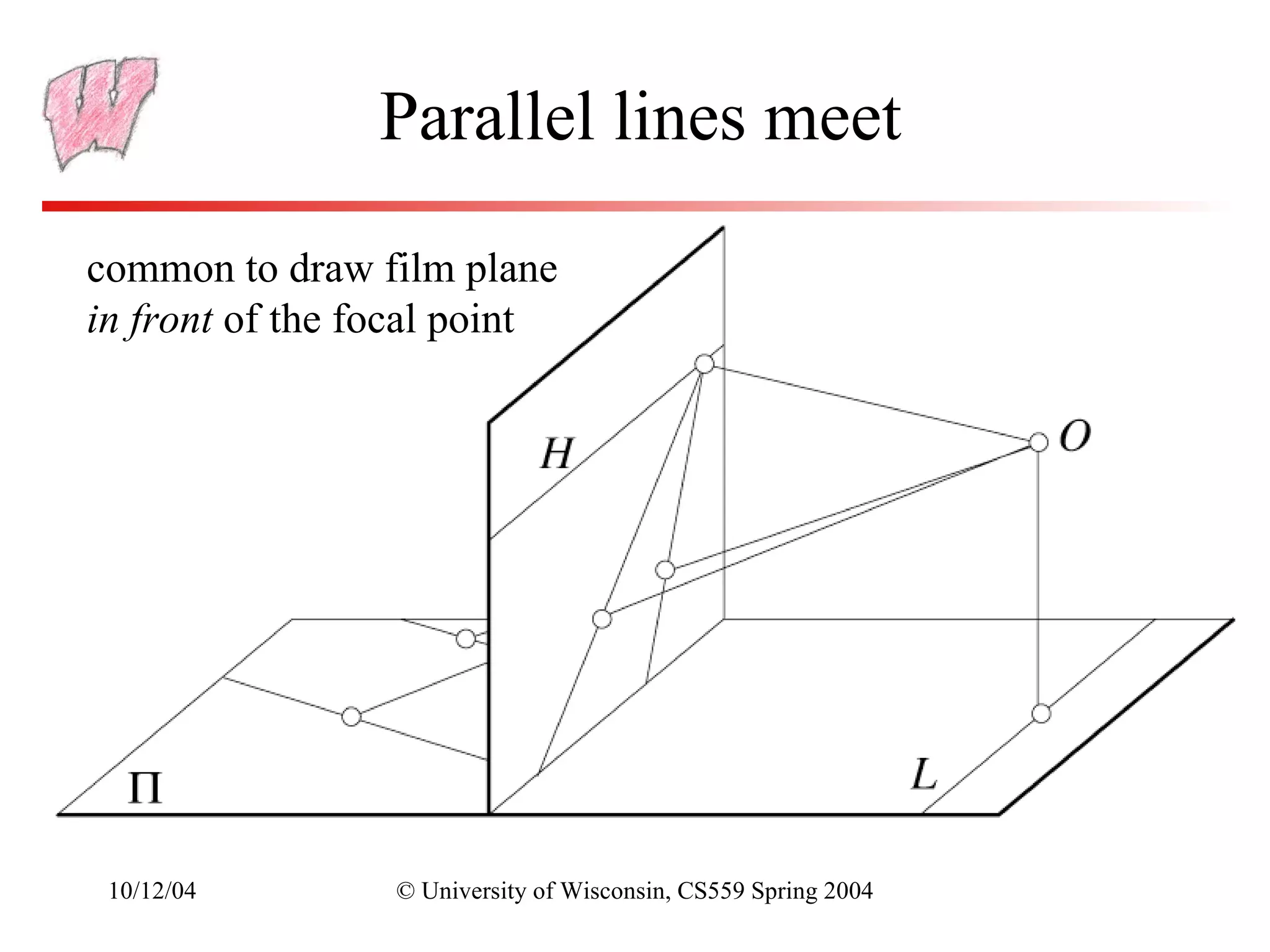
Parallel lines meet

common to draw film plane
in front of the focal point


 10/12/04        © University of Wisconsin, CS559 Spring 2004
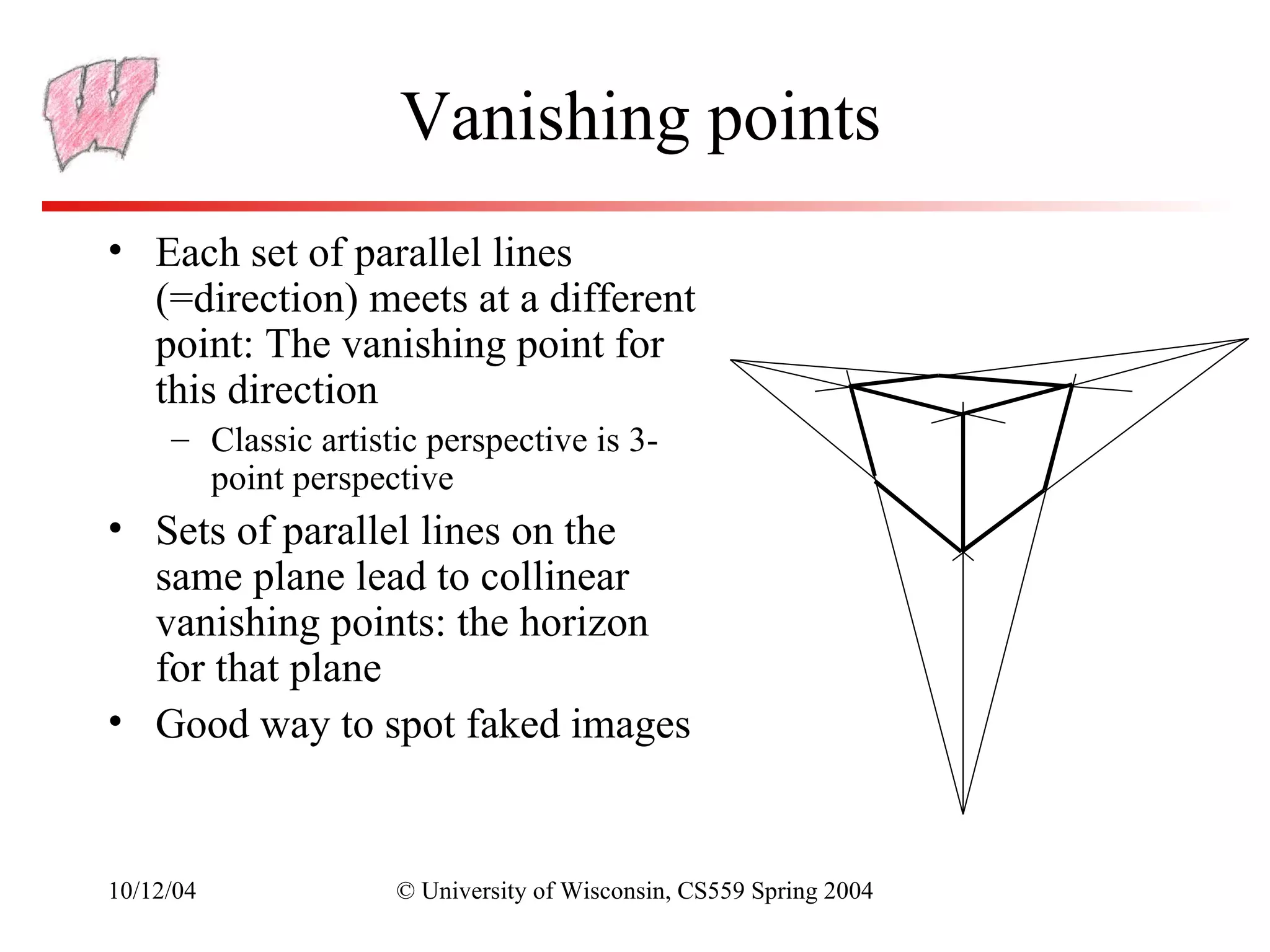
Vanishing points
• Each set of parallel lines
  (=direction) meets at a different
  point: The vanishing point for
  this direction
     – Classic artistic perspective is 3-
       point perspective
• Sets of parallel lines on the
  same plane lead to collinear
  vanishing points: the horizon
  for that plane
• Good way to spot faked images


10/12/04             © University of Wisconsin, CS559 Spring 2004
Basic Perspective Projection
• We are going to temporarily ignore canonical view space,
  and go straight from view to window
     – Easier to understand and use for Project 2
• Assume you have transformed to view space, with x to the
  right, y up, and z back toward the viewer
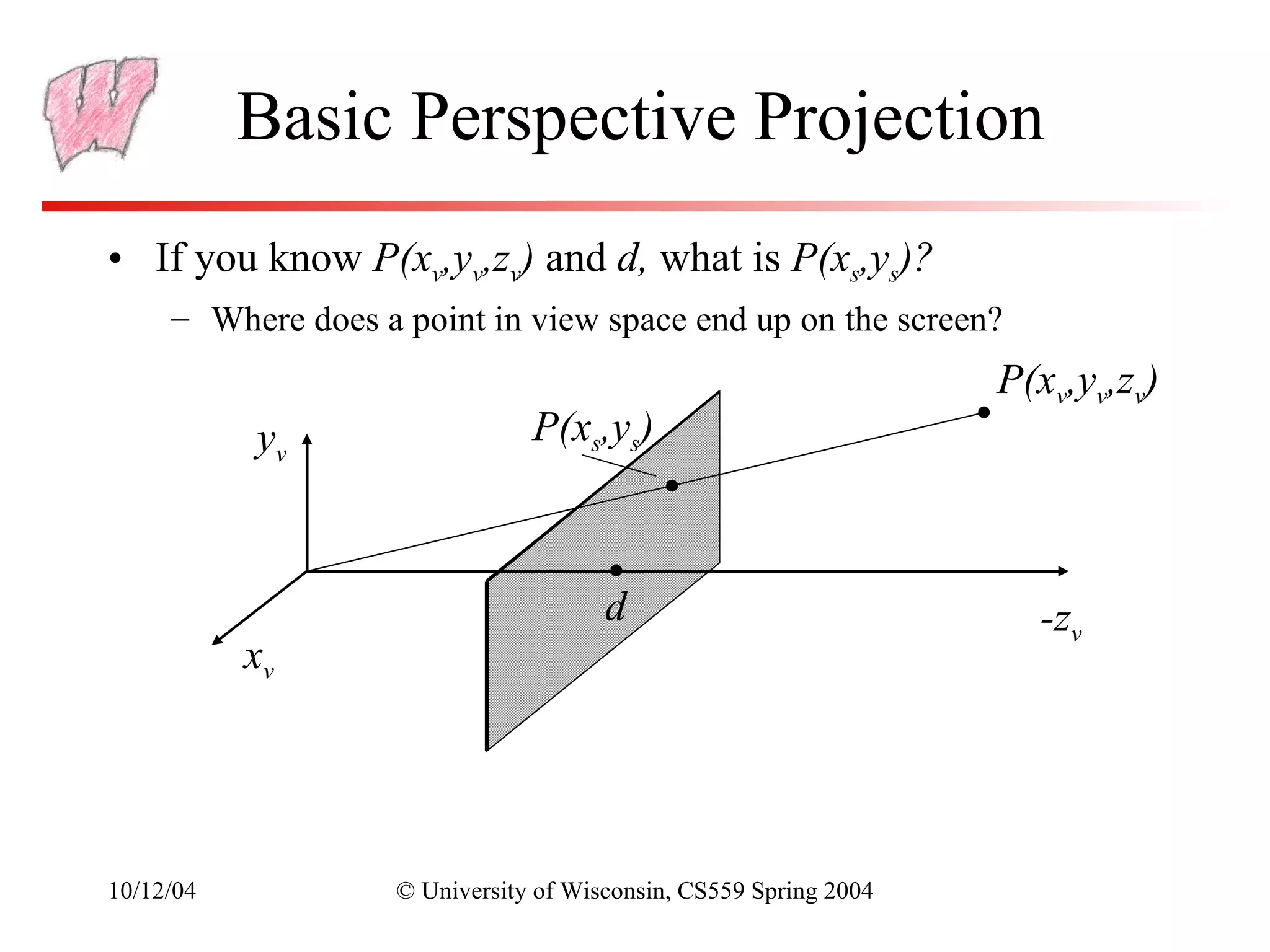
• Assume the origin of view space is at the center of
  projection (the eye)
• Define a focal distance, d, and put the image plane there
  (note d is negative)
     – You can define d to control the size of the image


10/12/04            © University of Wisconsin, CS559 Spring 2004
Basic Perspective Projection
• If you know P(xv,yv,zv) and d, what is P(xs,ys)?
     – Where does a point in view space end up on the screen?
                                                                   P(xv,yv,zv)
           yv                   P(xs,ys)


                                       d                             -zv
           xv


10/12/04            © University of Wisconsin, CS559 Spring 2004
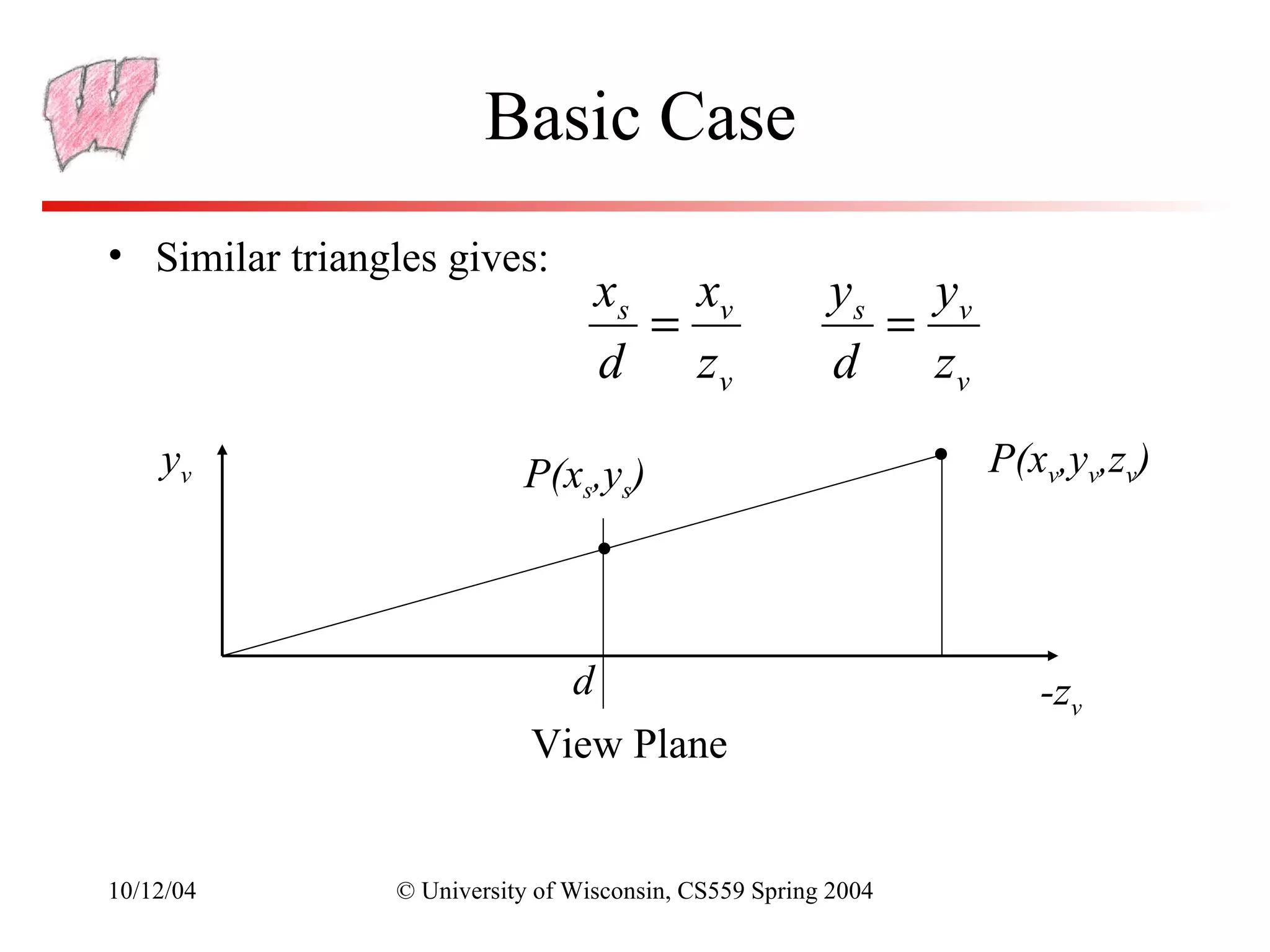
Basic Case
• Similar triangles gives:
                                  xs xv                y s yv
                                    =                     =
                                  d zv                 d    zv
    yv                     P(xs,ys)                              P(xv,yv,zv)


                              d                                     -zv
                            View Plane


10/12/04        © University of Wisconsin, CS559 Spring 2004
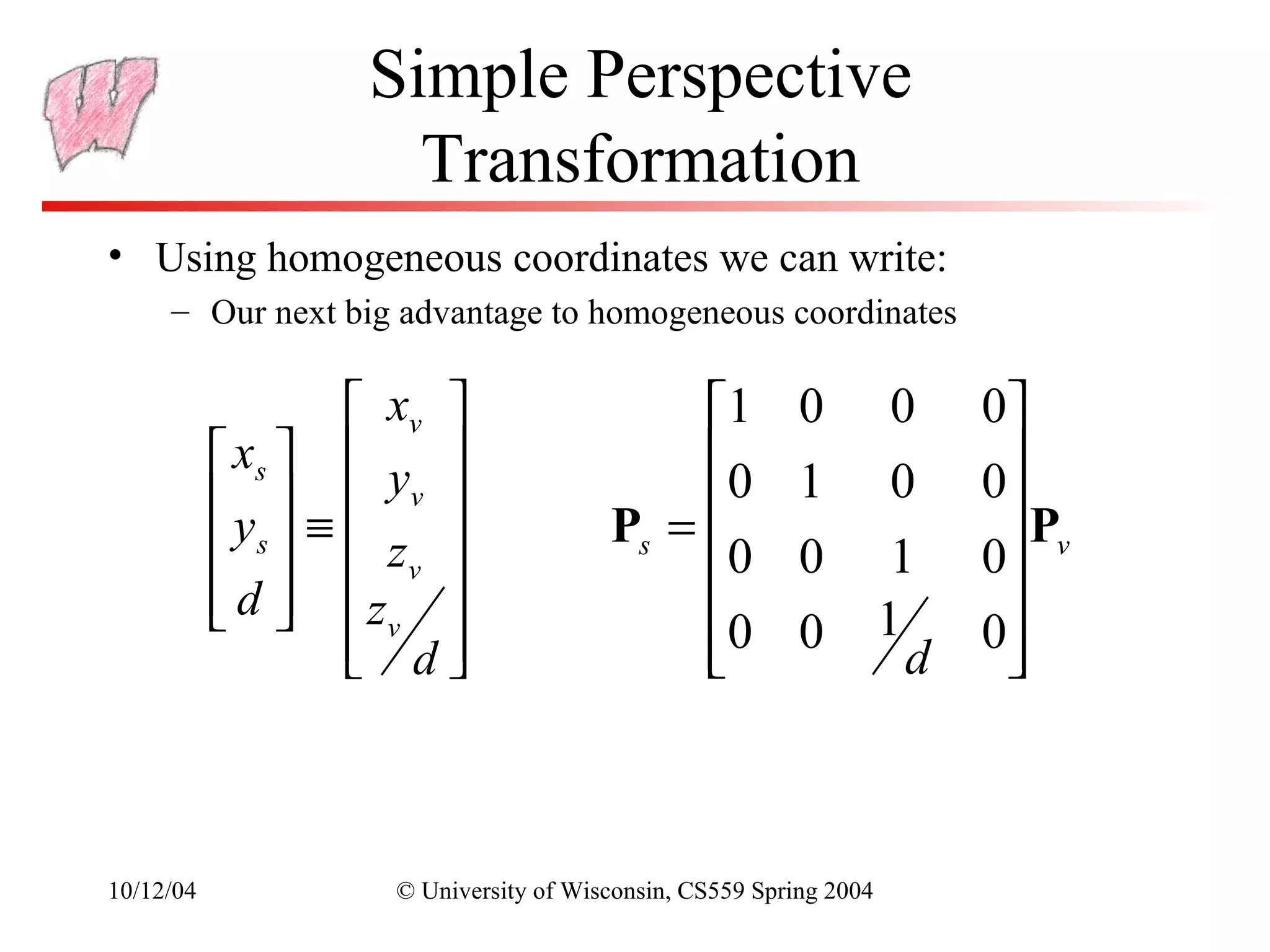
Simple Perspective
                     Transformation
• Using homogeneous coordinates we can write:
     – Our next big advantage to homogeneous coordinates

                   xv                     1           0          0    0
            xs   y                      0
           y  ≡  v                                   1          0    0
            s   zv                 Ps =                              P
                                            0           0          1    0 v
            d  z 
                                                                1      
                   vd
                                          0
                                            
                                                         0
                                                                     d
                                                                         0
                                                                          


10/12/04            © University of Wisconsin, CS559 Spring 2004
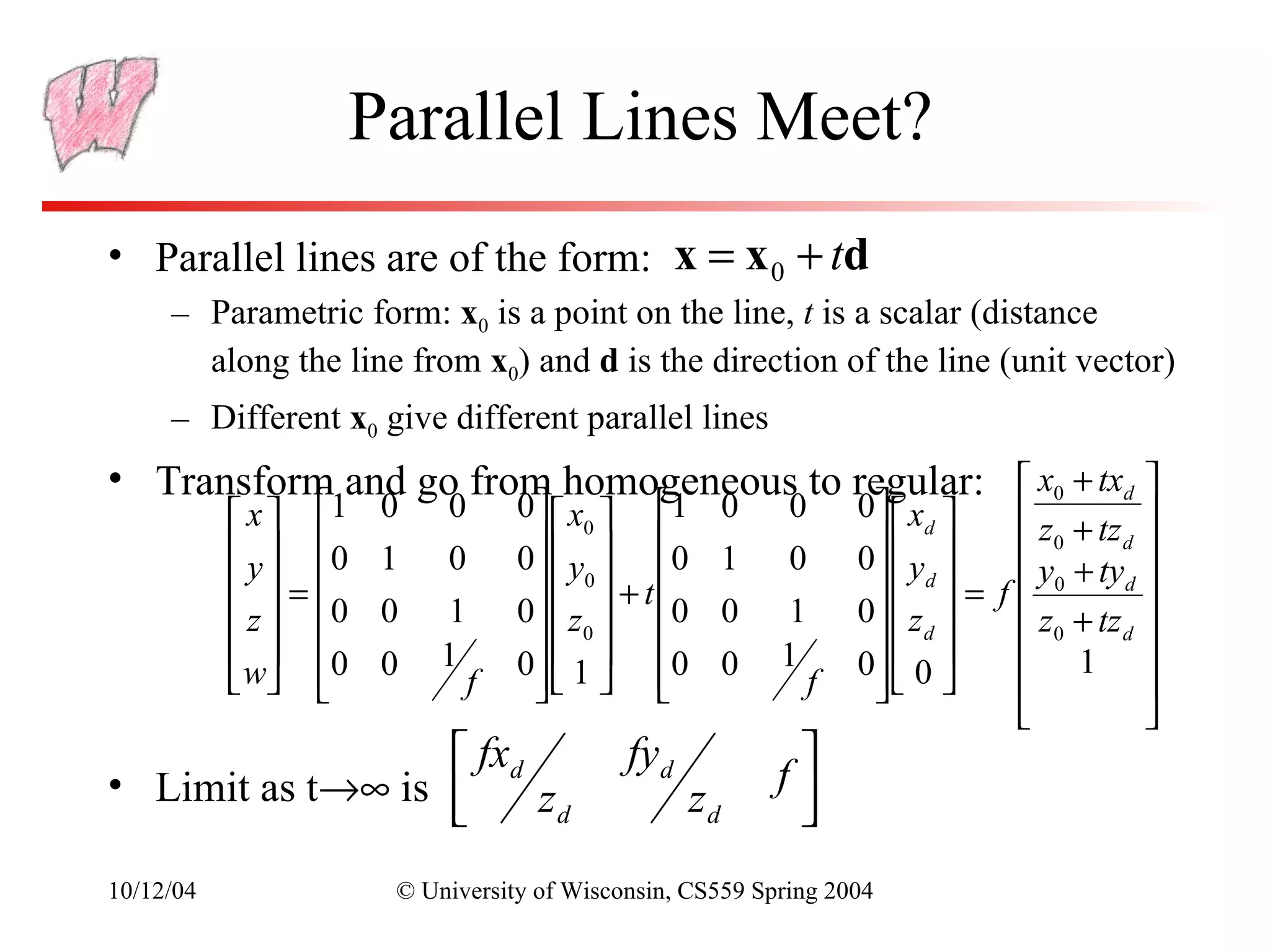
Parallel Lines Meet?
• Parallel lines are of the form: x = x 0 + td
     – Parametric form: x0 is a point on the line, t is a scalar (distance
       along the line from x0) and d is the direction of the line (unit vector)
     – Different x0 give different parallel lines
• Transform and go from homogeneous to regular:  x0 + txd 
            x  1    0   0       0  x0  1          0   0       0   xd      z + tz 
            y  0    1   0       0   y  0          1   0       0  y        0       d
                                                                                               
            =                      0  + t                        d  =      y0 + tyd 
                                                                                  f
            z  0    0   1       0   z  0          0   1       0  z        z0 + tz d 
             0      0   1          0  
                                   0   1  0          0   1          d 
                                                                     0  0        1 
            w              f                               f                           
                                                                                              
                   fxd                     fyd
                                                             f
• Limit as t→∞ is      zd                          zd        
                                                             
10/12/04               © University of Wisconsin, CS559 Spring 2004
General Perspective
• The basic equations we have seen give a flavor of what
  happens, but they are insufficient for all applications
• They do not get us to a Canonical View Volume
• They make assumptions about the viewing conditions
• To get to a Canonical Volume, we need a Perspective
  Volume …


10/12/04        © University of Wisconsin, CS559 Spring 2004
Perspective View Volume
• Recall the orthographic view volume, defined by a near, far,
  left, right, top and bottom plane
• The perspective view volume is also defined by near, far,
  left, right, top and bottom planes – the clip planes
     – Near and far planes are parallel to the image plane: zv=n, zv=f
     – Other planes all pass through the center of projection (the origin of
       view space)
     – The left and right planes intersect the image plane in vertical lines
     – The top and bottom planes intersect in horizontal lines


10/12/04             © University of Wisconsin, CS559 Spring 2004
Clipping Planes
                                                                    Left Clip
                Near Clip                                           Plane
xv
                Plane
                                                              Far Clip
                                      View                    Plane
           n       l                  Volume
                   r                                          f       -zv


                                                                  Right Clip
                                                                  Plane


10/12/04       © University of Wisconsin, CS559 Spring 2004
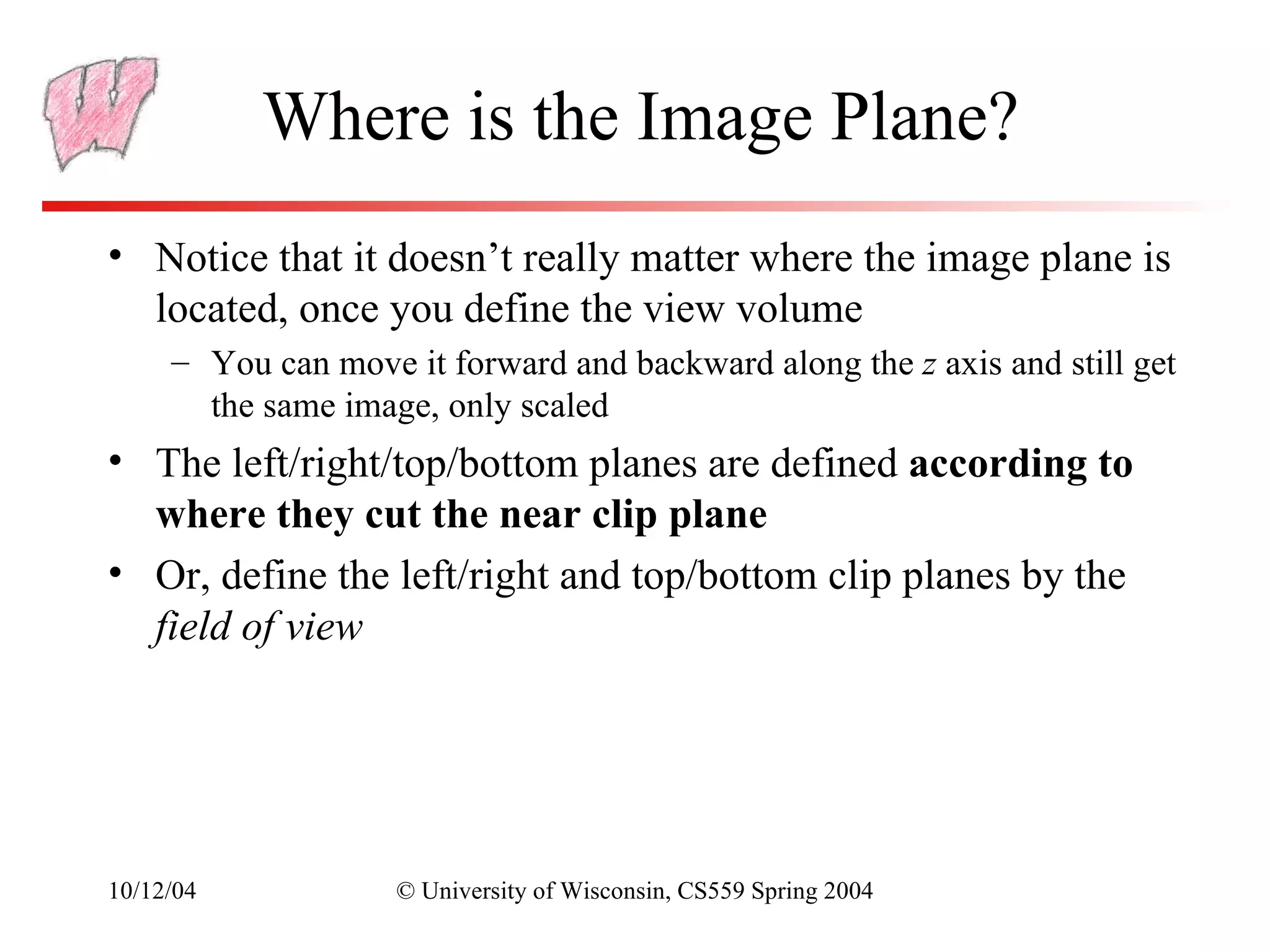
Where is the Image Plane?
• Notice that it doesn’t really matter where the image plane is
  located, once you define the view volume
     – You can move it forward and backward along the z axis and still get
       the same image, only scaled
• The left/right/top/bottom planes are defined according to
  where they cut the near clip plane
• Or, define the left/right and top/bottom clip planes by the
  field of view


10/12/04            © University of Wisconsin, CS559 Spring 2004
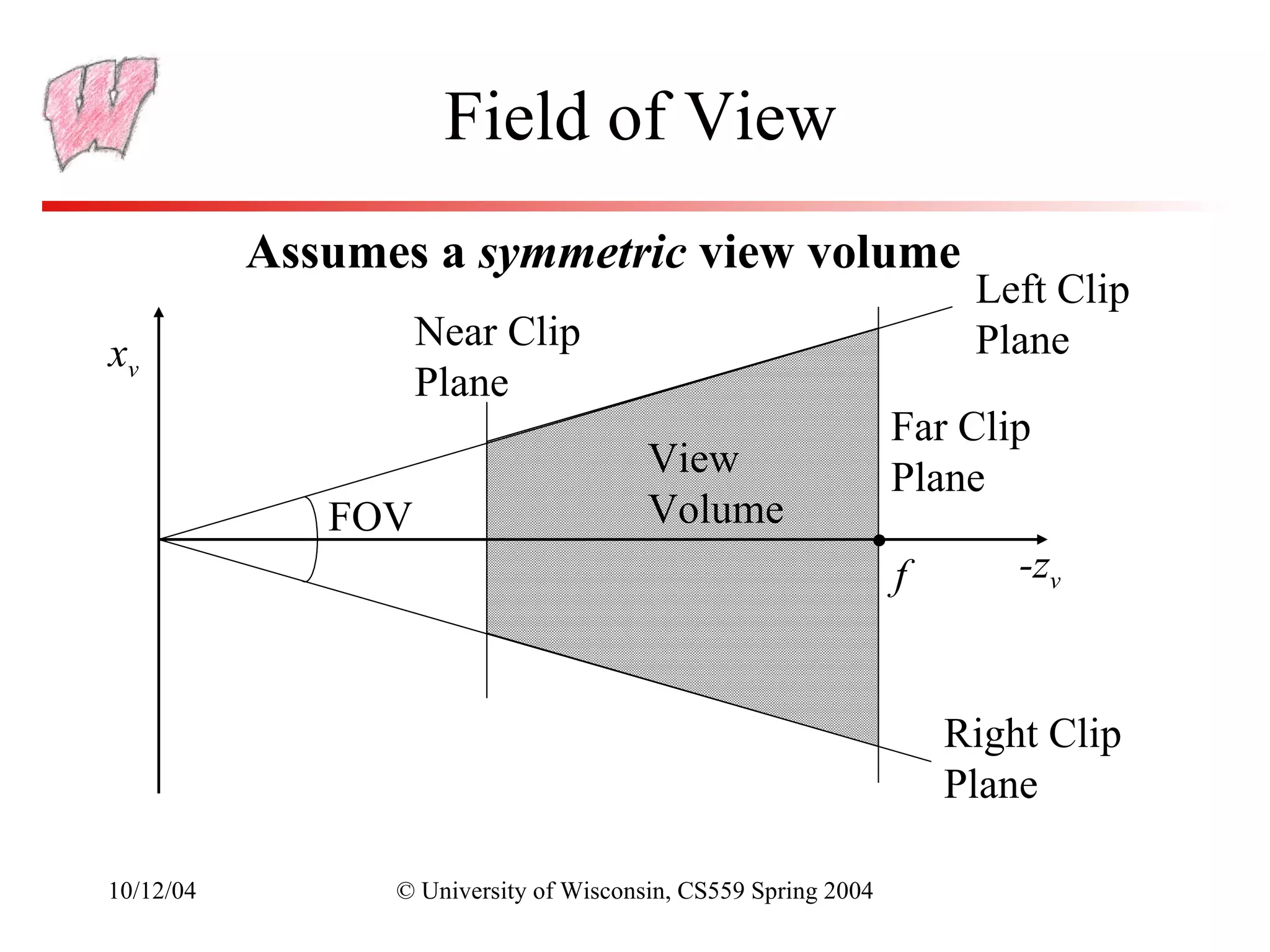
Field of View
           Assumes a symmetric view volume
                                                                     Left Clip
                    Near Clip                                        Plane
xv
                    Plane
                                                                Far Clip
                                        View                    Plane
              FOV                       Volume
                                                                f       -zv


                                                                    Right Clip
                                                                    Plane

10/12/04         © University of Wisconsin, CS559 Spring 2004
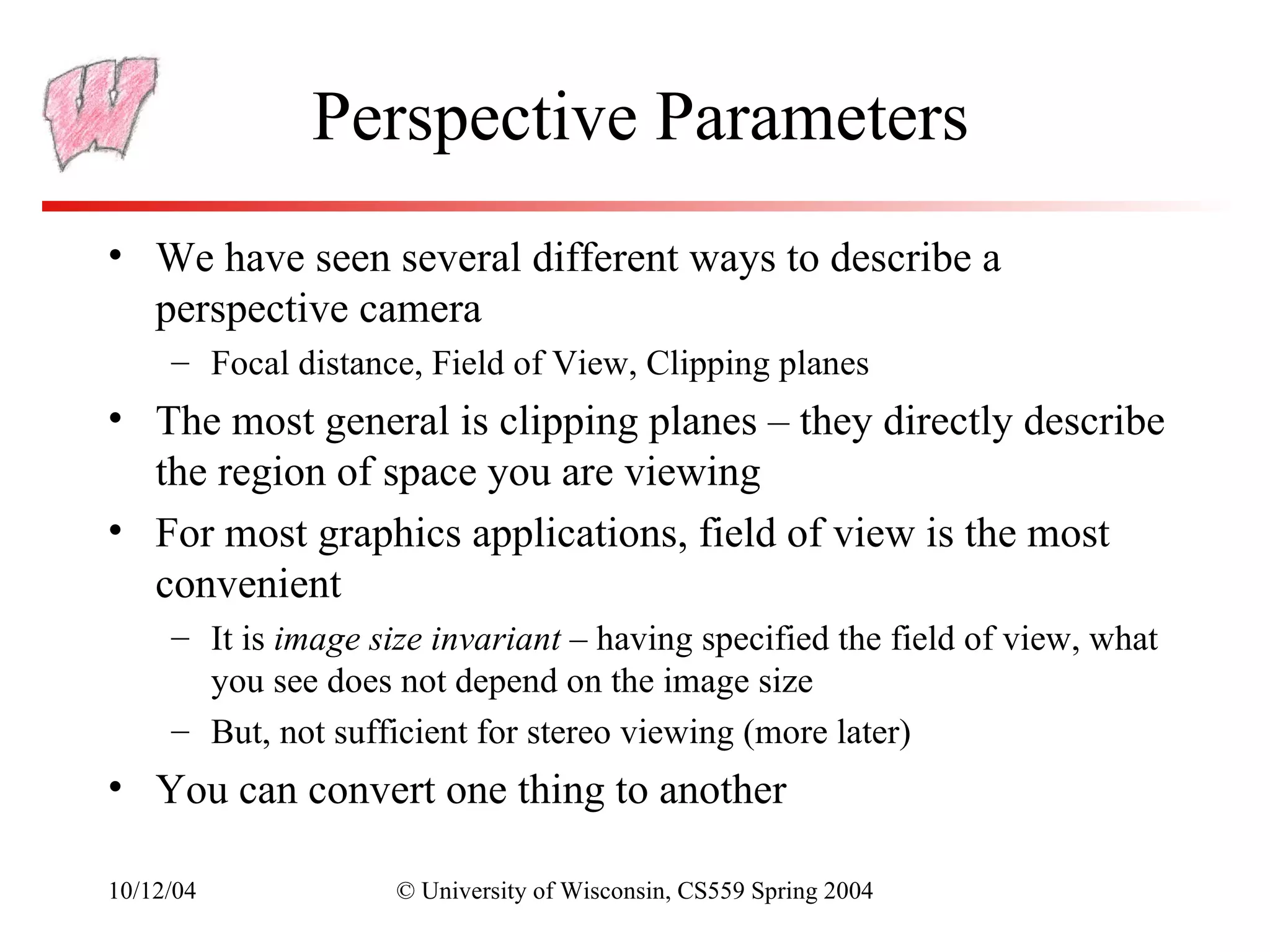
Perspective Parameters
• We have seen several different ways to describe a
  perspective camera
     – Focal distance, Field of View, Clipping planes
• The most general is clipping planes – they directly describe
  the region of space you are viewing
• For most graphics applications, field of view is the most
  convenient
     – It is image size invariant – having specified the field of view, what
       you see does not depend on the image size
     – But, not sufficient for stereo viewing (more later)
• You can convert one thing to another

10/12/04             © University of Wisconsin, CS559 Spring 2004
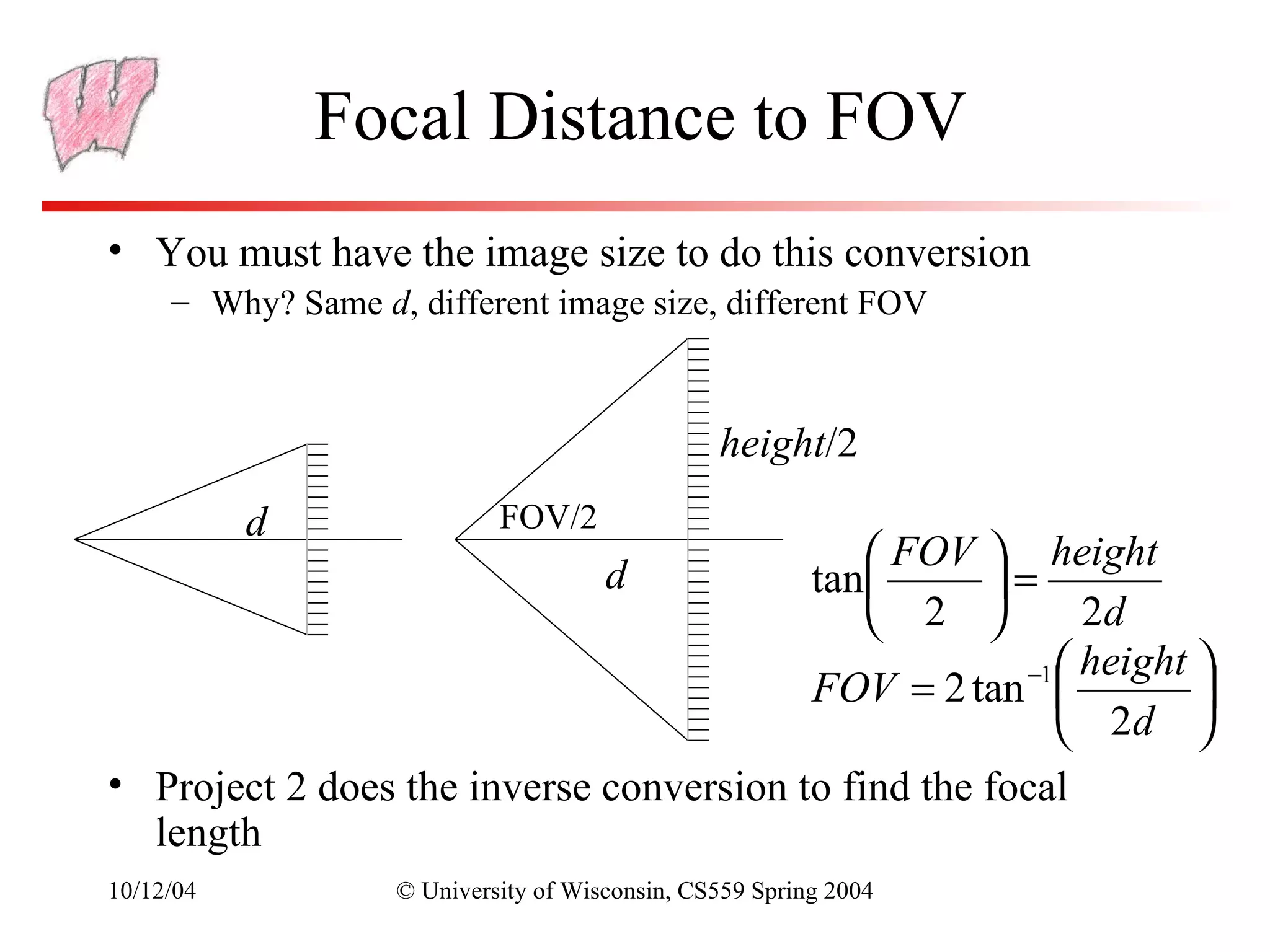
Focal Distance to FOV
• You must have the image size to do this conversion
     – Why? Same d, different image size, different FOV


                                                height/2
           d                FOV/2
                                                     height  FOV
                                      d             =   tan 
                                                          2d 2
                                                      −1  height 
                                         FOV = 2 tan             
                                                          2d 
• Project 2 does the inverse conversion to find the focal
  length
10/12/04           © University of Wisconsin, CS559 Spring 2004
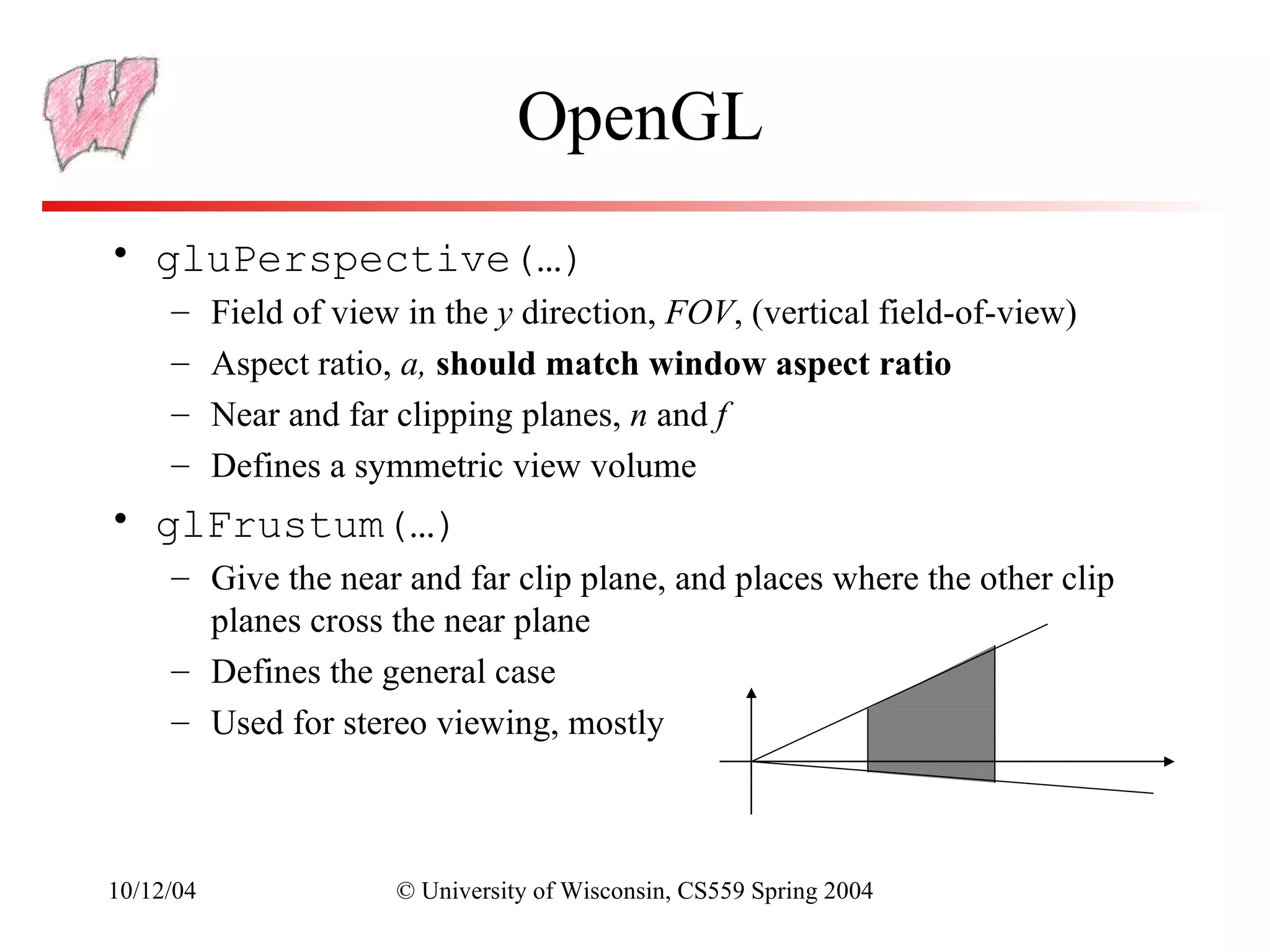
OpenGL
• gluPerspective(…)
     –     Field of view in the y direction, FOV, (vertical field-of-view)
     –     Aspect ratio, a, should match window aspect ratio
     –     Near and far clipping planes, n and f
     –     Defines a symmetric view volume
• glFrustum(…)
     – Give the near and far clip plane, and places where the other clip
       planes cross the near plane
     – Defines the general case
     – Used for stereo viewing, mostly


10/12/04                © University of Wisconsin, CS559 Spring 2004
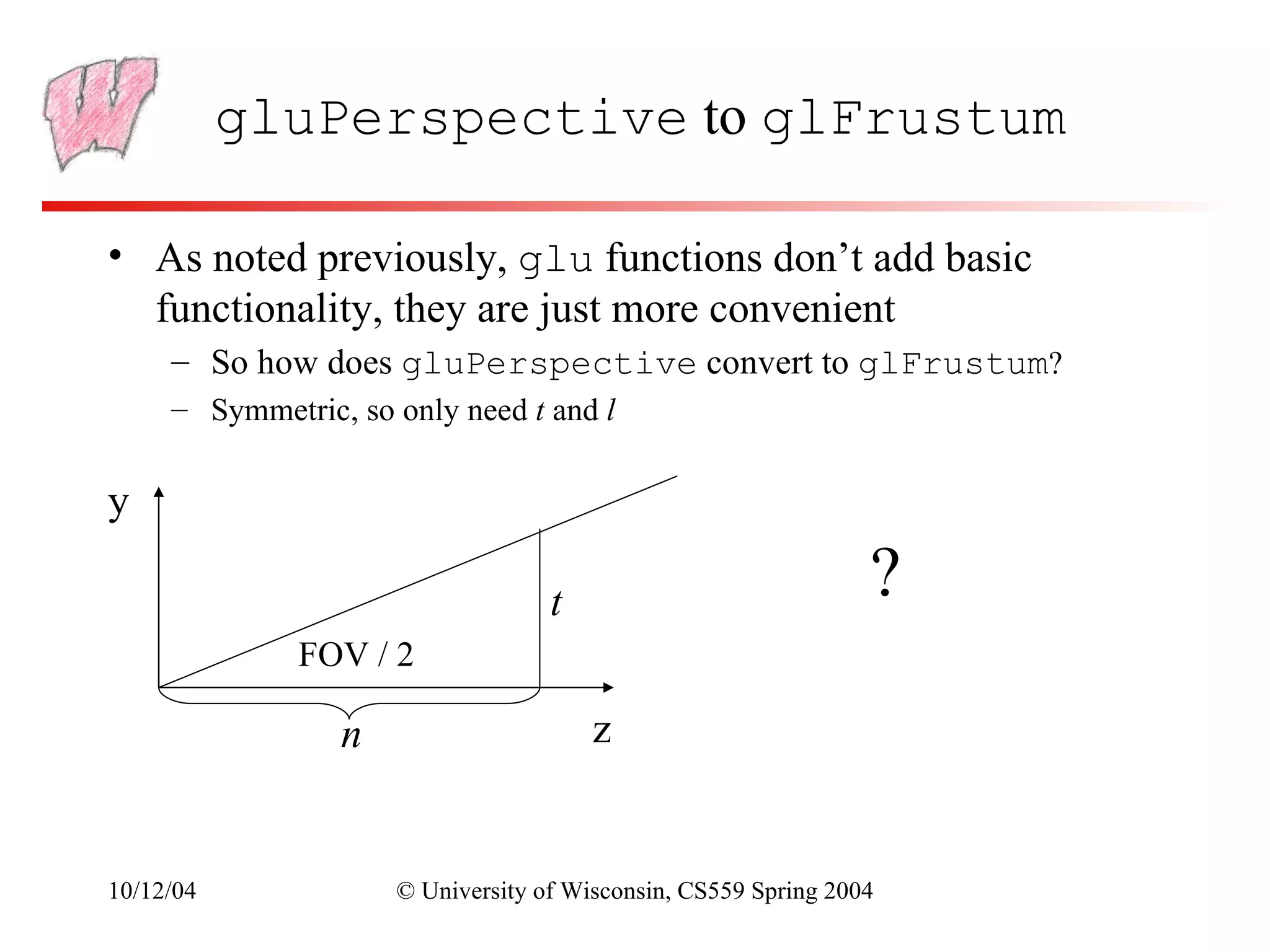
gluPerspective to glFrustum

• As noted previously, glu functions don’t add basic
  functionality, they are just more convenient
     – So how does gluPerspective convert to glFrustum?
     – Symmetric, so only need t and l


y

                                   t                            ?
              FOV / 2

                 n                     z


10/12/04             © University of Wisconsin, CS559 Spring 2004
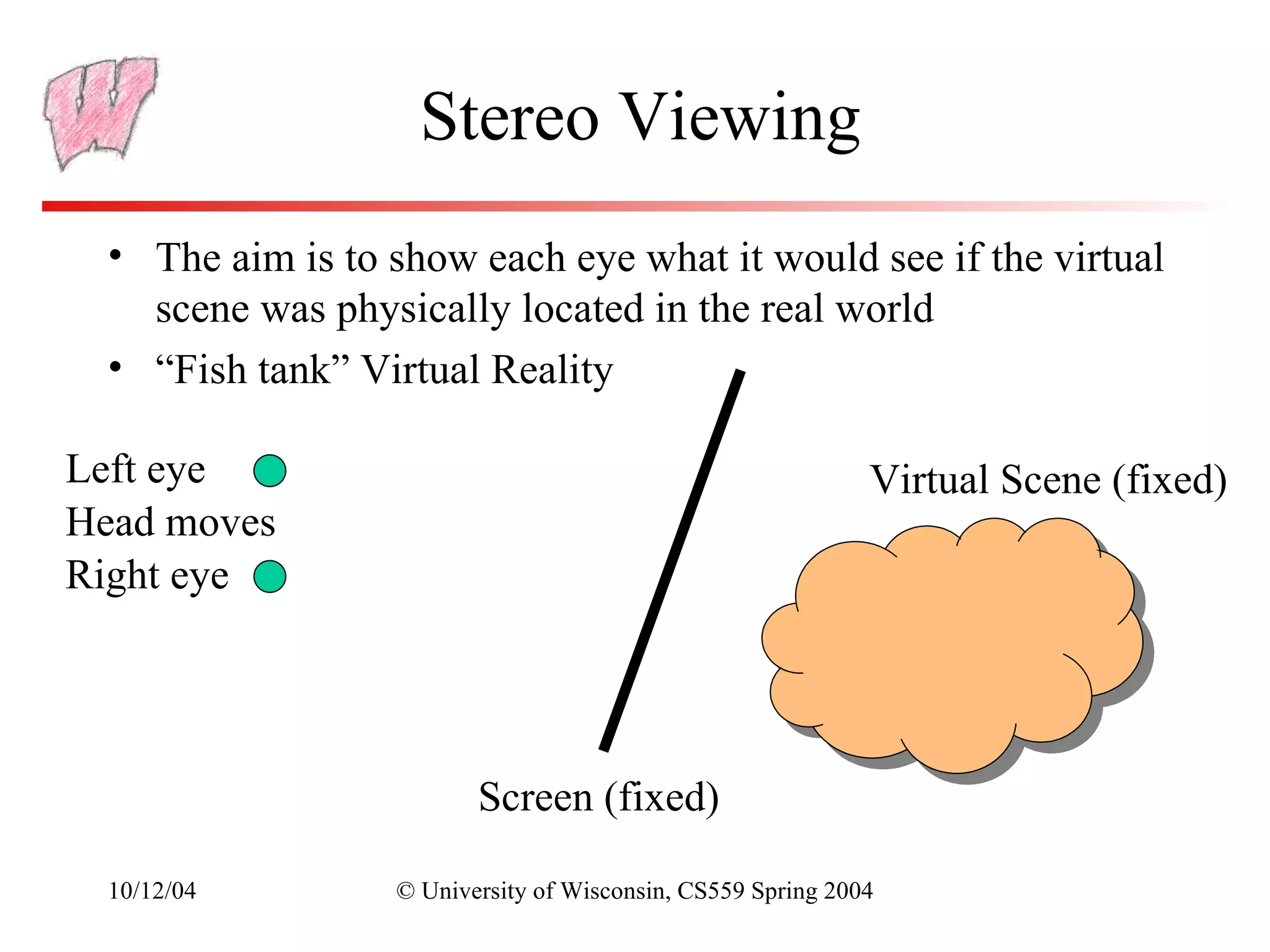
Stereo Viewing
  • The aim is to show each eye what it would see if the virtual
    scene was physically located in the real world
  • “Fish tank” Virtual Reality

Left eye                                                     Virtual Scene (fixed)
Head moves
Right eye


                         Screen (fixed)

  10/12/04        © University of Wisconsin, CS559 Spring 2004
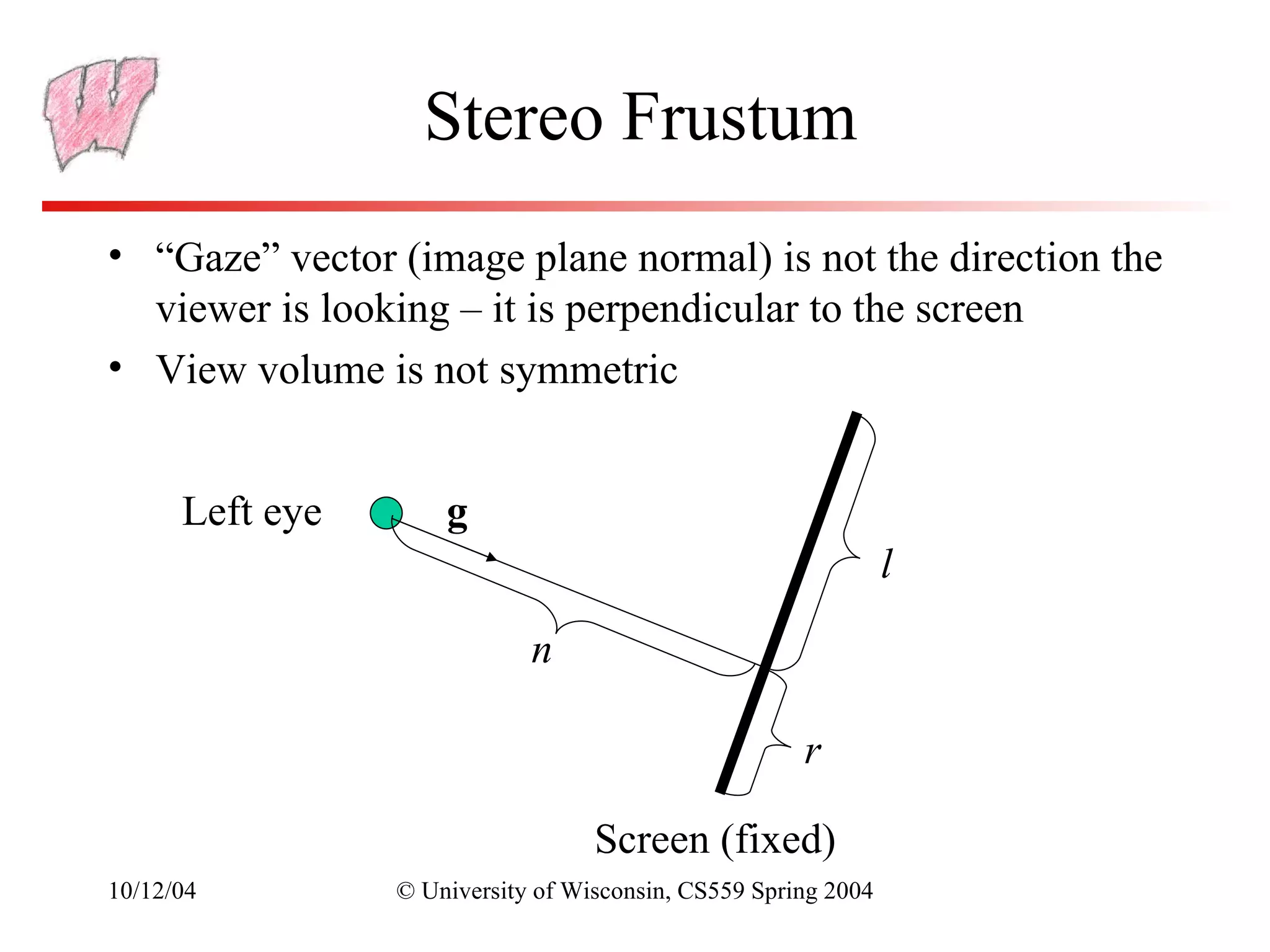
Stereo Frustum
• “Gaze” vector (image plane normal) is not the direction the
  viewer is looking – it is perpendicular to the screen
• View volume is not symmetric


      Left eye       g
                                                                l

                             n

                                                      r

                                   Screen (fixed)
10/12/04         © University of Wisconsin, CS559 Spring 2004
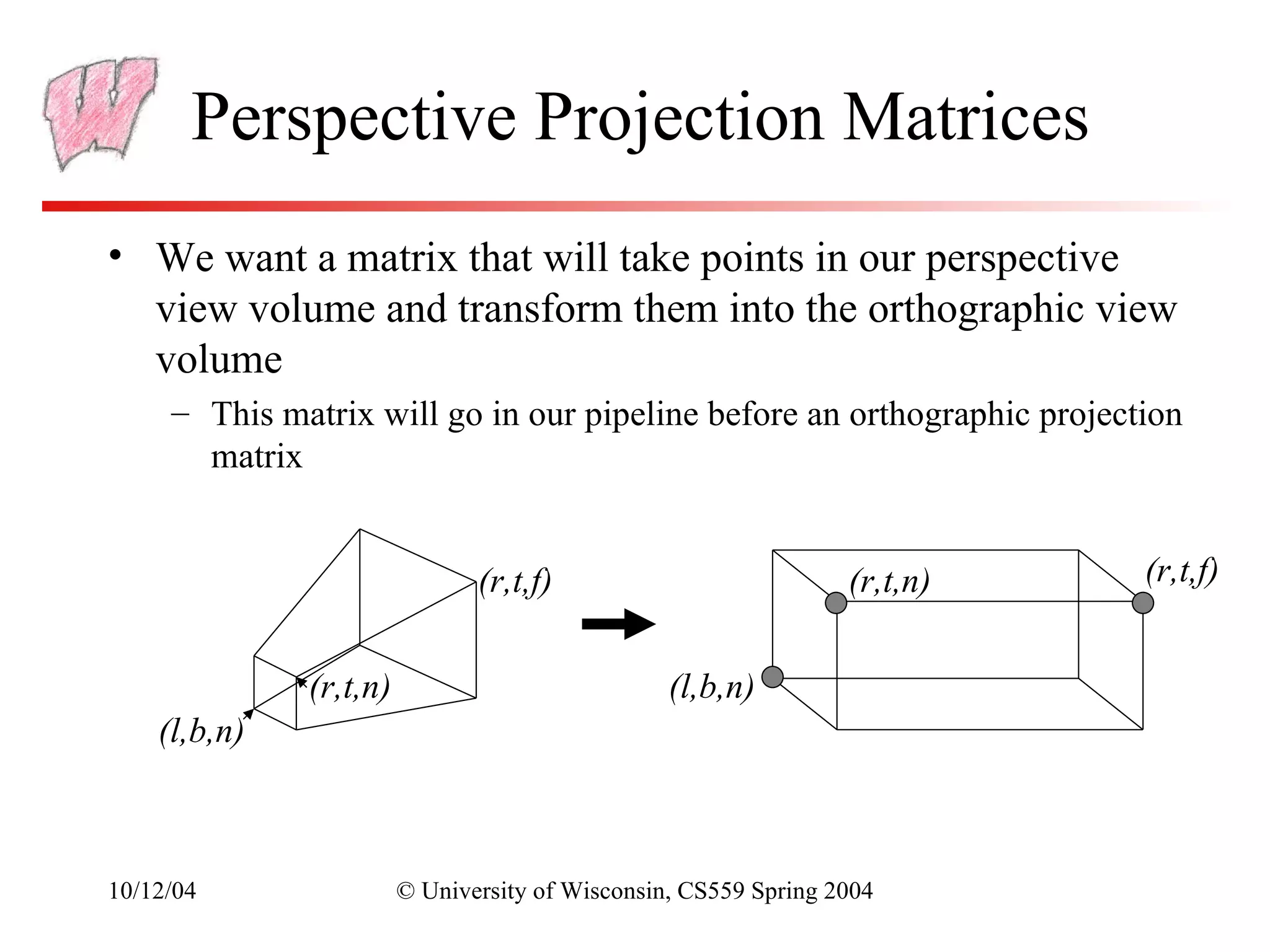
Perspective Projection Matrices
• We want a matrix that will take points in our perspective
  view volume and transform them into the orthographic view
  volume
     – This matrix will go in our pipeline before an orthographic projection
       matrix


                               (r,t,f)                           (r,t,n)   (r,t,f)


              (r,t,n)                            (l,b,n)
    (l,b,n)


10/12/04                © University of Wisconsin, CS559 Spring 2004
Mapping Lines
• We want to map all the lines through the
  center of projection to parallel lines
     – This converts the perspective case to the
       orthographic case, we can use all our existing
       methods
• The relative intersection points of lines
  with the near clip plane should not change
• The matrix that does this looks like the
  matrix for our simple perspective case


10/12/04            © University of Wisconsin, CS559 Spring 2004
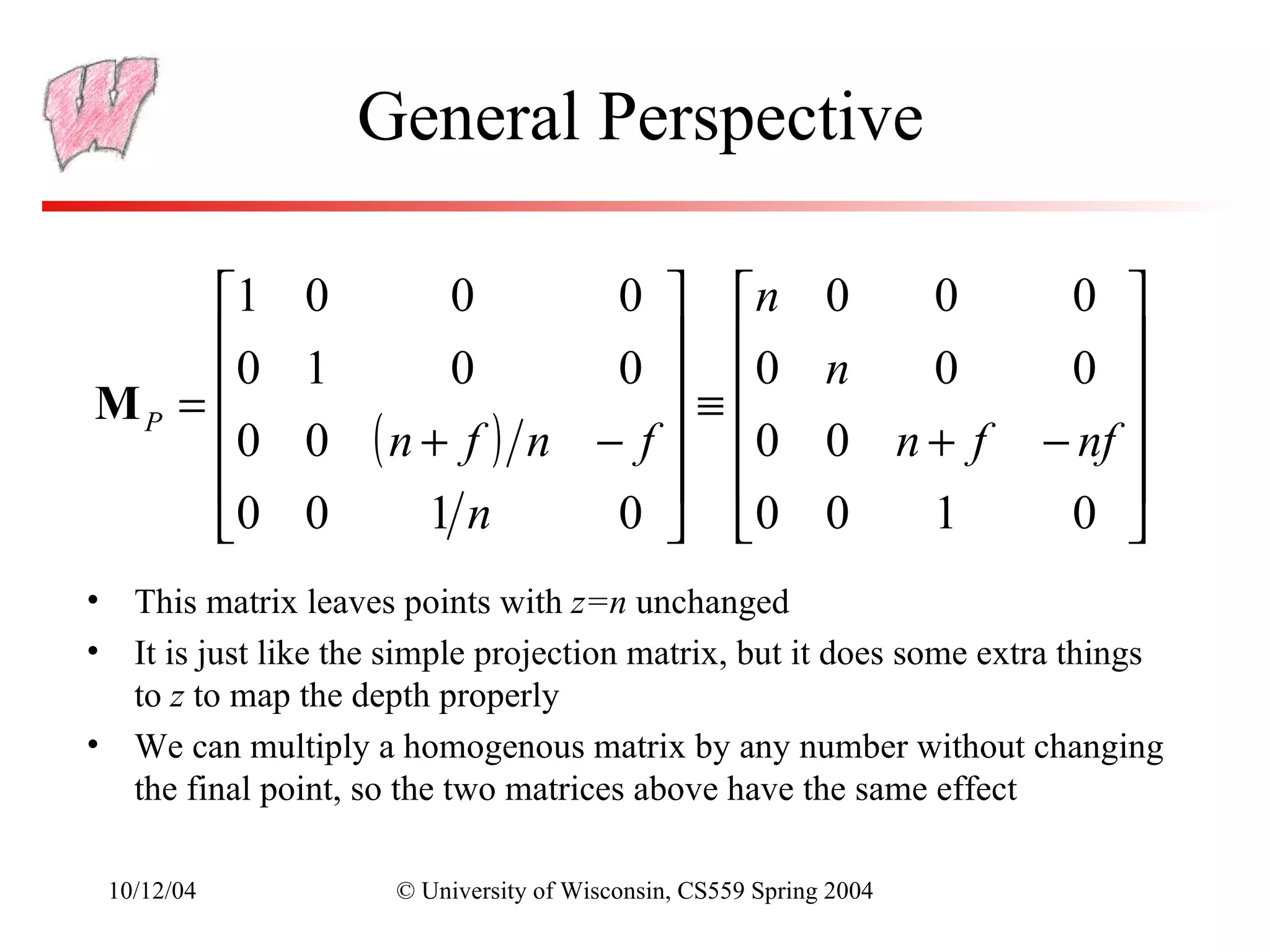
General Perspective

     1        0          0   0  n                         0       0    0 
     0        1      0       0  0                         n  0         0 
MP =                            ≡                                          
     0        0 ( n + f ) n − f  0                        0 n+ f      − nf 
                                                                           
     0        0     1n       0  0                         0  1         0 
• This matrix leaves points with z=n unchanged
• It is just like the simple projection matrix, but it does some extra things
  to z to map the depth properly
• We can multiply a homogenous matrix by any number without changing
  the final point, so the two matrices above have the same effect

 10/12/04             © University of Wisconsin, CS559 Spring 2004
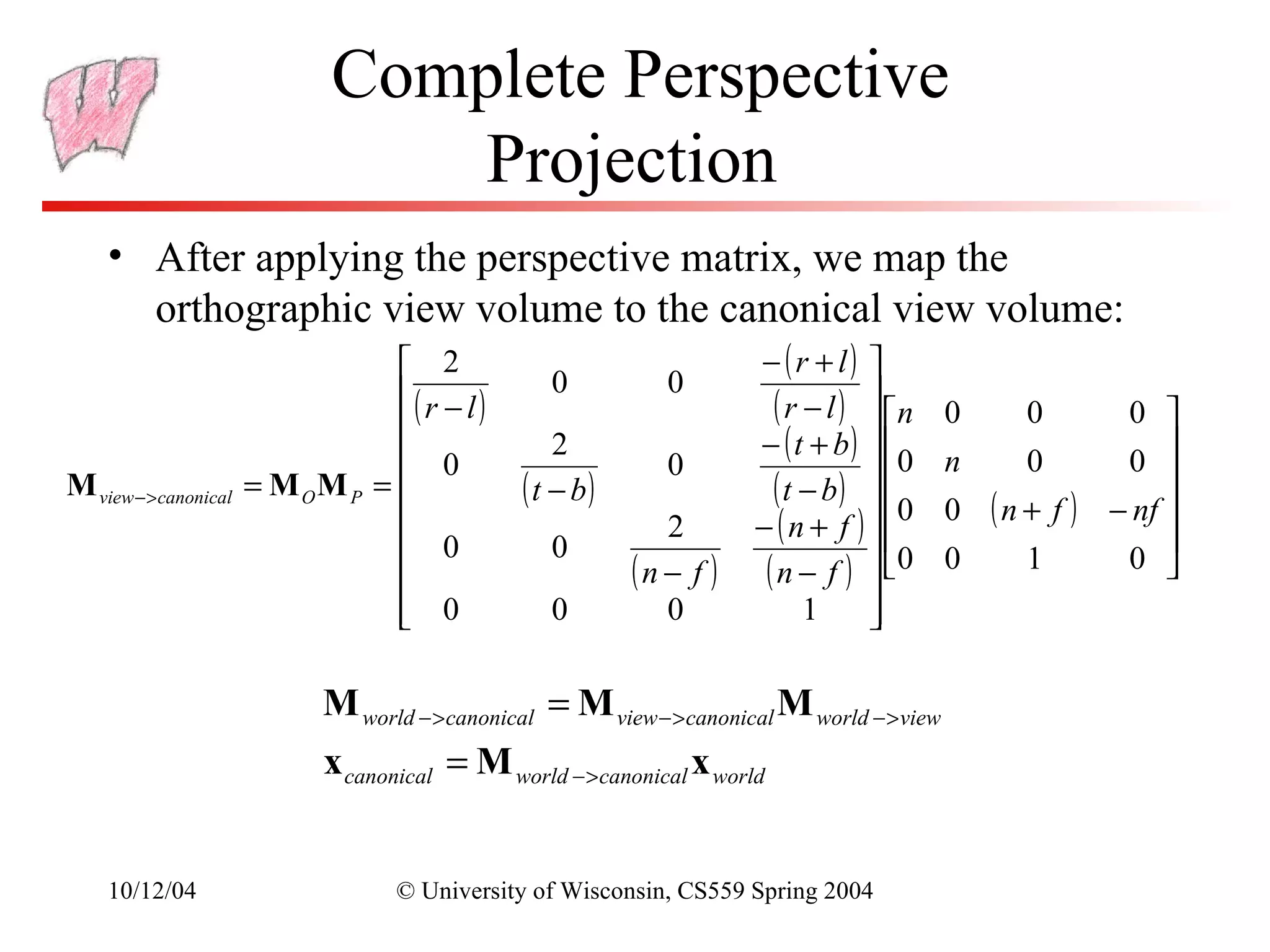
Complete Perspective
                         Projection
   • After applying the perspective matrix, we map the
          orthographic view volume to the canonical view volume:
                                 2                         − (r + l) 
                                ( r − l)     0       0
                                
                                                             ( r − l )  n 0
                                                                                 0      0 
                                                            − ( t + b)  
                                                                                         0 
                                 0           2
                                                      0                     0 n   0
M view − >canonical = M O M P =          ( t − b)           ( t − b )  0 0 ( n + f ) − nf 
                                                                                            
                                                     2     − ( n + f )                    
                                 0           0                          0 0
                                                  (n − f ) (n − f )             1      0 
                             0
                                         0          0            1     
                                                                        

                     M world − >canonical = M view − >canonical M world − >view
                     x canonical = M world − >canonical x world


   10/12/04                © University of Wisconsin, CS559 Spring 2004
OpenGL Perspective Projection

• For OpenGL you give the distance to the near and far clipping planes
• The total perspective projection matrix resulting from a glFrustum
  call is:
                          2n
                                        0
                                                 (r + l)       0
                                                                     
                                                                    
                         ( r − l)               (r − l)             
                         
                              0
                                      2n         ( t + b)       0 
                                                                     
             M OpenGL   =           ( t − b)    ( t − b)
                                                                    
                          0            0
                                                (n + f )      2f n 
                         
                         
                                                (n − f )    ( n − f )
                                                                     
                          0            0          −1           0 


10/12/04            © University of Wisconsin, CS559 Spring 2004
Near/Far and Depth Resolution
• It may seem sensible to specify a very near clipping plane
  and a very far clipping plane
     – Sure to contain entire scene
• But, a bad idea:
     – OpenGL only has a finite number of bits to store screen depth
     – Too large a range reduces resolution in depth - wrong thing may be
       considered “in front”
     – See Shirley for a more complete explanation
• Always place the near plane as far from the viewer as
  possible, and the far plane as close as possible


10/12/04            © University of Wisconsin, CS559 Spring 2004

Cs559 11

  • 1.
    Last Time • Orthographicprojection • Viewing transformations – Setting up a camera position and orientation 10/12/04 © University of Wisconsin, CS559 Spring 2004
  • 2.
    Today • Perspective viewing •Homework 3 due 10/12/04 © University of Wisconsin, CS559 Spring 2004
  • 3.
    Review • View Spaceis a coordinate system with the viewer looking down the –z axis, with x to the right and y up • The World->View transformation takes points in world space and converts them into points in view space • The Projection matrix, or View->Canonical matrix, takes points in view space and converts them into points in Canonical View Space – Canonical View Space is a coordinate system with the viewer looking along –z, x to the right, y up, and everything to be drawn inside the cube [-1,1]x[-1,1]x[-1,1] using parallel projection 10/12/04 © University of Wisconsin, CS559 Spring 2004
  • 4.
    OpenGL Camera • Thedefault OpenGL image plane has u aligned with the x axis, v aligned with y, and n aligned with z – Means the default camera looks along the negative z axis – Makes it easy to do 2D drawing (no need for any view transformation) • glOrtho(…) sets an orthographic view->canonical matrix – Modifies the GL_PROJECTION matrix • gluLookAt(…) sets the world->view matrix – Takes an image center point, a point along the viewing direction and an up vector – Multiplies a world->view matrix onto the current GL_MODELVIEW matrix – You could do this yourself, using glMultMatrix(…) with the matrix from the previous slides 10/12/04 © University of Wisconsin, CS559 Spring 2004
  • 5.
    Typical View Spec.Usage glMatrixMode(GL_PROJECTION); glLoadIdentity(); glOrtho(l, r, b, t, n, f); glMatrixMode(GL_MODELVIEW); glLoadIdentity(); gluLookAt(ex,ey,ez,cx,cy,cx,ux,uy,uz); • GLU functions, such as gluLookAt(…), are not part of the core OpenGL library – They can be implemented with other core OpenGL commands – For example, gluLookAt(…) uses glMultMatrix(…) with the matrix from the previous slides – They are not dependent on a particular graphics card 10/12/04 © University of Wisconsin, CS559 Spring 2004
  • 6.
    Left vs RightHanded View Space • You can define u as right, v as up, and n as toward the viewer: a right handed system u×v=w – Advantage: Standard mathematical way of doing things • You can also define u as right, v as up and n as into the scene: a left handed system v×u=w – Advantage: Bigger n values mean points are further away • OpenGL is right handed • Many older systems, notably the Renderman standard developed by Pixar, are left handed 10/12/04 © University of Wisconsin, CS559 Spring 2004
  • 7.
    Perspective Projection • Abstractcamera model - box • Pinhole cameras work in with a small hole in it practice 10/12/04 © University of Wisconsin, CS559 Spring 2004
  • 8.
    Distant Objects AreSmaller 10/12/04 © University of Wisconsin, CS559 Spring 2004
  • 9.
    Parallel lines meet commonto draw film plane in front of the focal point 10/12/04 © University of Wisconsin, CS559 Spring 2004
  • 10.
    Vanishing points • Eachset of parallel lines (=direction) meets at a different point: The vanishing point for this direction – Classic artistic perspective is 3- point perspective • Sets of parallel lines on the same plane lead to collinear vanishing points: the horizon for that plane • Good way to spot faked images 10/12/04 © University of Wisconsin, CS559 Spring 2004
  • 11.
    Basic Perspective Projection •We are going to temporarily ignore canonical view space, and go straight from view to window – Easier to understand and use for Project 2 • Assume you have transformed to view space, with x to the right, y up, and z back toward the viewer • Assume the origin of view space is at the center of projection (the eye) • Define a focal distance, d, and put the image plane there (note d is negative) – You can define d to control the size of the image 10/12/04 © University of Wisconsin, CS559 Spring 2004
  • 12.
    Basic Perspective Projection •If you know P(xv,yv,zv) and d, what is P(xs,ys)? – Where does a point in view space end up on the screen? P(xv,yv,zv) yv P(xs,ys) d -zv xv 10/12/04 © University of Wisconsin, CS559 Spring 2004
  • 13.
    Basic Case • Similartriangles gives: xs xv y s yv = = d zv d zv yv P(xs,ys) P(xv,yv,zv) d -zv View Plane 10/12/04 © University of Wisconsin, CS559 Spring 2004
  • 14.
    Simple Perspective Transformation • Using homogeneous coordinates we can write: – Our next big advantage to homogeneous coordinates  xv  1 0 0 0  xs   y  0 y  ≡  v  1 0 0  s   zv  Ps =  P 0 0 1 0 v  d  z     1   vd   0  0 d 0  10/12/04 © University of Wisconsin, CS559 Spring 2004
  • 15.
    Parallel Lines Meet? •Parallel lines are of the form: x = x 0 + td – Parametric form: x0 is a point on the line, t is a scalar (distance along the line from x0) and d is the direction of the line (unit vector) – Different x0 give different parallel lines • Transform and go from homogeneous to regular:  x0 + txd   x  1 0 0 0  x0  1 0 0 0   xd   z + tz   y  0 1 0 0   y  0 1 0 0  y   0 d   =  0  + t   d  = y0 + tyd  f  z  0 0 1 0   z  0 0 1 0  z   z0 + tz d    0 0 1  0   0   1  0 0 1  d  0  0   1   w  f   f       fxd fyd f • Limit as t→∞ is  zd zd    10/12/04 © University of Wisconsin, CS559 Spring 2004
  • 16.
    General Perspective • Thebasic equations we have seen give a flavor of what happens, but they are insufficient for all applications • They do not get us to a Canonical View Volume • They make assumptions about the viewing conditions • To get to a Canonical Volume, we need a Perspective Volume … 10/12/04 © University of Wisconsin, CS559 Spring 2004
  • 17.
    Perspective View Volume •Recall the orthographic view volume, defined by a near, far, left, right, top and bottom plane • The perspective view volume is also defined by near, far, left, right, top and bottom planes – the clip planes – Near and far planes are parallel to the image plane: zv=n, zv=f – Other planes all pass through the center of projection (the origin of view space) – The left and right planes intersect the image plane in vertical lines – The top and bottom planes intersect in horizontal lines 10/12/04 © University of Wisconsin, CS559 Spring 2004
  • 18.
    Clipping Planes Left Clip Near Clip Plane xv Plane Far Clip View Plane n l Volume r f -zv Right Clip Plane 10/12/04 © University of Wisconsin, CS559 Spring 2004
  • 19.
    Where is theImage Plane? • Notice that it doesn’t really matter where the image plane is located, once you define the view volume – You can move it forward and backward along the z axis and still get the same image, only scaled • The left/right/top/bottom planes are defined according to where they cut the near clip plane • Or, define the left/right and top/bottom clip planes by the field of view 10/12/04 © University of Wisconsin, CS559 Spring 2004
  • 20.
    Field of View Assumes a symmetric view volume Left Clip Near Clip Plane xv Plane Far Clip View Plane FOV Volume f -zv Right Clip Plane 10/12/04 © University of Wisconsin, CS559 Spring 2004
  • 21.
    Perspective Parameters • Wehave seen several different ways to describe a perspective camera – Focal distance, Field of View, Clipping planes • The most general is clipping planes – they directly describe the region of space you are viewing • For most graphics applications, field of view is the most convenient – It is image size invariant – having specified the field of view, what you see does not depend on the image size – But, not sufficient for stereo viewing (more later) • You can convert one thing to another 10/12/04 © University of Wisconsin, CS559 Spring 2004
  • 22.
    Focal Distance toFOV • You must have the image size to do this conversion – Why? Same d, different image size, different FOV height/2 d FOV/2  height  FOV d = tan   2d 2 −1  height  FOV = 2 tan    2d  • Project 2 does the inverse conversion to find the focal length 10/12/04 © University of Wisconsin, CS559 Spring 2004
  • 23.
    OpenGL • gluPerspective(…) – Field of view in the y direction, FOV, (vertical field-of-view) – Aspect ratio, a, should match window aspect ratio – Near and far clipping planes, n and f – Defines a symmetric view volume • glFrustum(…) – Give the near and far clip plane, and places where the other clip planes cross the near plane – Defines the general case – Used for stereo viewing, mostly 10/12/04 © University of Wisconsin, CS559 Spring 2004
  • 24.
    gluPerspective to glFrustum •As noted previously, glu functions don’t add basic functionality, they are just more convenient – So how does gluPerspective convert to glFrustum? – Symmetric, so only need t and l y t ? FOV / 2 n z 10/12/04 © University of Wisconsin, CS559 Spring 2004
  • 25.
    Stereo Viewing • The aim is to show each eye what it would see if the virtual scene was physically located in the real world • “Fish tank” Virtual Reality Left eye Virtual Scene (fixed) Head moves Right eye Screen (fixed) 10/12/04 © University of Wisconsin, CS559 Spring 2004
  • 26.
    Stereo Frustum • “Gaze”vector (image plane normal) is not the direction the viewer is looking – it is perpendicular to the screen • View volume is not symmetric Left eye g l n r Screen (fixed) 10/12/04 © University of Wisconsin, CS559 Spring 2004
  • 27.
    Perspective Projection Matrices •We want a matrix that will take points in our perspective view volume and transform them into the orthographic view volume – This matrix will go in our pipeline before an orthographic projection matrix (r,t,f) (r,t,n) (r,t,f) (r,t,n) (l,b,n) (l,b,n) 10/12/04 © University of Wisconsin, CS559 Spring 2004
  • 28.
    Mapping Lines • Wewant to map all the lines through the center of projection to parallel lines – This converts the perspective case to the orthographic case, we can use all our existing methods • The relative intersection points of lines with the near clip plane should not change • The matrix that does this looks like the matrix for our simple perspective case 10/12/04 © University of Wisconsin, CS559 Spring 2004
  • 29.
    General Perspective 1 0 0 0  n 0 0 0  0 1 0 0  0 n 0 0  MP =  ≡  0 0 ( n + f ) n − f  0 0 n+ f − nf      0 0 1n 0  0 0 1 0  • This matrix leaves points with z=n unchanged • It is just like the simple projection matrix, but it does some extra things to z to map the depth properly • We can multiply a homogenous matrix by any number without changing the final point, so the two matrices above have the same effect 10/12/04 © University of Wisconsin, CS559 Spring 2004
  • 30.
    Complete Perspective Projection • After applying the perspective matrix, we map the orthographic view volume to the canonical view volume:  2 − (r + l)  ( r − l) 0 0  ( r − l )  n 0  0 0  − ( t + b)   0   0 2 0 0 n 0 M view − >canonical = M O M P =  ( t − b) ( t − b )  0 0 ( n + f ) − nf     2 − ( n + f )    0 0  0 0  (n − f ) (n − f )  1 0   0  0 0 1   M world − >canonical = M view − >canonical M world − >view x canonical = M world − >canonical x world 10/12/04 © University of Wisconsin, CS559 Spring 2004
  • 31.
    OpenGL Perspective Projection •For OpenGL you give the distance to the near and far clipping planes • The total perspective projection matrix resulting from a glFrustum call is:  2n 0 (r + l) 0    ( r − l) (r − l)   0 2n ( t + b) 0   M OpenGL = ( t − b) ( t − b)    0 0 (n + f ) 2f n    (n − f ) ( n − f )   0 0 −1 0  10/12/04 © University of Wisconsin, CS559 Spring 2004
  • 32.
    Near/Far and DepthResolution • It may seem sensible to specify a very near clipping plane and a very far clipping plane – Sure to contain entire scene • But, a bad idea: – OpenGL only has a finite number of bits to store screen depth – Too large a range reduces resolution in depth - wrong thing may be considered “in front” – See Shirley for a more complete explanation • Always place the near plane as far from the viewer as possible, and the far plane as close as possible 10/12/04 © University of Wisconsin, CS559 Spring 2004