Creating Powerful Websites
  that Engage Audiences


                   Michael Slater,
                             CEO
                   michael@webvanta.com
                           888.670.6793

                     www.webvanta.com
Aspects of Website

     • Visual design
     • Interaction design
     • Content structure
     • Ticket purchasing
     • Donations
     • Social media
     • Search engine optimization


                                    2
Technology and User
• In the past few years, the web has become much
  more sophisticated
  – Visitors expect easy-to-use, engaging sites
  – They expect them to work on phones and tablets
  – Most 5-year-old designs look dated
• Underlying technology has changed
  – Flash no longer recommended, primarily due to iPad
  – New opportunities with the latest web technology


                                                         3
Visual and Interaction

• Visual design
  – How it looks
  – Adapting to changing, diverse content
• Interaction design
  – Navigation and browsing interfaces
  – Photo and video galleries and slideshows
  – Hiding and showing content (tabs, accordions, etc.)
  – Ticket purchasing and donations
  – Social media and commenting

                                                          4
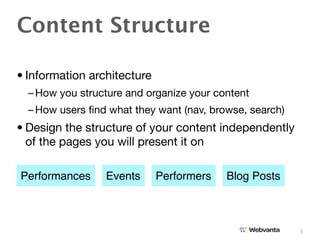
Content Structure

• Information architecture
  – How you structure and organize your content
  – How users find what they want (nav, browse, search)
• Design the structure of your content independently
  of the pages you will present it on

Performances     Events      Performers   Blog Posts


                                                         5
Building Simple Websites

• Create each page using a web authoring tool
  – Software you install, such as dreamweaver
  – Hosted service with browser-based tools, such as
    SquareSpace or Weebly
• Problems with this approach
  – Time-consuming to add pages
  – Doesn’t provide features like blog, calendar, database
  – Hard to maintain consistency and preserve design
    integrity

                                                             6
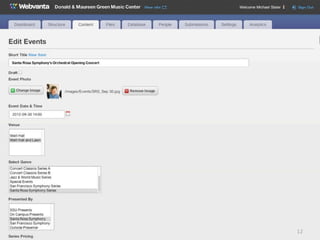
A Better Way: DB-Driven

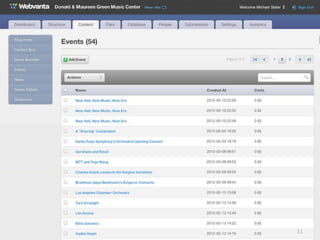
• A single “performance” page can serve for all
  performances
• The database stores all the details about each
  performance
  – Your staff enters the information into a form
  – No need for technical skills
  – No concern for page layout or styling when entering
    information
• Layout and styling determined by the single template page
  – Painless consistency

                                                          7
8
9
10
11
12
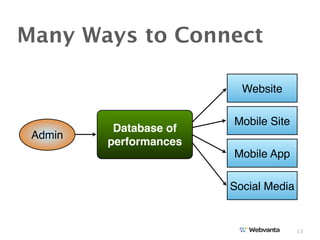
Many Ways to Connect

                          Website

                        Mobile Site
          Database of
 Admin
         performances
                        Mobile App

                        Social Media


                                       13
Media

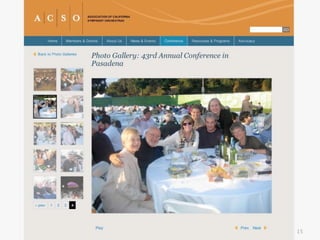
• Photos
  – Easy to include throughout site
  – Display as banners, slideshows, galleries
  – Associate with artists, performances, facilities
• Videos
  – Host on YouTube or Vimeo
  – Embed on your site
  – Organize using the database
• Audio
  – Can be hosted on your site, with embedded player

                                                       14
15
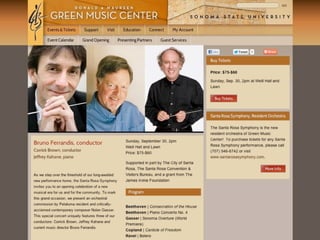
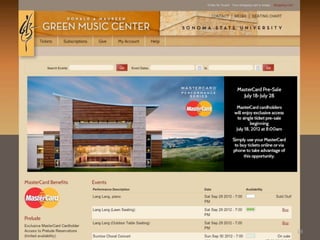
Ticket Purchasing

• Use a service focused on this function
  – AudienceView, Veritix provide features needed for
    reserved seating, etc.
  – Brown Paper Tickets, EventBrite for low cost
• A link to purchase tickets is stored in the site’s
  database and turned into a button on your site
• Ticketing service will style its pages (more or less) to
  look like your website


                                                        16
17
18
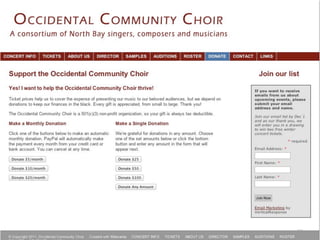
Taking Donations

• May be handled by ticket purchasing system
• Can easily accept donations via PayPal
  – One-time
  – Monthly (subscription)
• Consider how you are going to do follow-ups to
  donors
  – Customer relationship management (CRM) system
  – Ticketing special offers


                                                    19
20
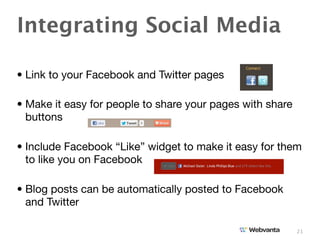
Integrating Social Media

• Link to your Facebook and Twitter pages

• Make it easy for people to share your pages with share
  buttons

• Include Facebook “Like” widget to make it easy for them
  to like you on Facebook

• Blog posts can be automatically posted to Facebook
  and Twitter

                                                           21
Search Engine

• You want to show up prominently in search results
  – The art and science of getting there is called SEO
• On-page optimization
  – Build the site using best-practice technology, coding, writing
• Off-page optimization (link building and social media)
  – Get lots of links from well-ranked sites covering related topics
• Achieving a great SEO position takes an investment and
  some time (commit to a 6-12 month plan)
  – Once you get there, your site gets lots of free traffic


                                                                     22
Choosing a Content
• Lots of choices, so focus on type first
  – Software you maintain, on a server you rent space on
    • Open Source, such as WordPress, Joomla, and Drupal
    • Commercial, such as ExpressionEngine

  – Hosted services provide CMS as a managed service
    • Provider handles all the software maintenance, server admin, backups, etc.
    • Fewer hassles and lower cost in the long run
    • Simple sites: WordPress.com, SquareSpace, Weebly, Wix, LightCMS
    • Sophisticated sites: Webvanta, Agility, Limelight, Vae Platform


                                                                                   23
Project Management

• The heart of a website project is the content
  – Be sure you have the resources to collect, manage, and
    maintain it all
• Consider outsourcing the writing and collecting of
  images, videos, etc.
• Make sure staff is trained in how to add and change
  website content


                                                         24
Don’t Neglect Mobile!

• Web access from smartphones is exploding
  – Restaurants seeing 30% mobile traffic
• Tipping points are close, within 1-2 years:
  – More than half of all phones sold in U.S. will be
    smartphones
  – More than half of web traffic for entertainment and
    hospitality sites will come from mobile devices
• Requires modest additional investment


                                                         25
Tablets Are Semi-Mobile

• Tablets use mobile browsers and touch-based
  interfaces
  – But are more often used at home
• 10” tablets have desktop-like screen size
  – Minor adjustments to desktop site
• 7” tablets are small for desktop site
  – May do better with mobile site


                                                26
Do You Need a Mobile

• Your own mobile app is a great way to connect with
  your most dedicated fans
• Provides a semi-permanent place on user’s phone
• Can use the same content as the website
• Multiple platforms to consider supporting
  – iPhone/iPad, Android, Windows Mobile
  – Phones and tablets


                                                    27
Getting Your Site Built

• Two major services: design and development
  – May come from the same or different suppliers
  – A quality site is a team effort
  – Overall project management is also critical
• Freelancers are least expensive and can be great if
  you find the right person
• Web agencies bring a team, and typically a higher
  level of sophistication and experience


                                                        28
Getting Started

• Unless you have an expert as part of your team, find
  a consultant to work with you to define needs
• Once you have a document that clearly describes
  what you need, get proposals
• Be sure you are getting the level of strategy,
  technology, and project management you need, in
  addition to design


                                                    29
We’d Be Glad to Help!

• Webvanta offers strategy, specification, and site-
  building services
• We’ve partnered with Athena Web Design to provide
  visual and interaction design for performing arts
  sites
• Call Justin at 888.670.6793 ext. 4
  – Or email sales@webvanta.com


                                                      30

Creating powerful websites that engage audiences

  • 1.
    Creating Powerful Websites that Engage Audiences Michael Slater, CEO michael@webvanta.com 888.670.6793 www.webvanta.com
  • 2.
    Aspects of Website • Visual design • Interaction design • Content structure • Ticket purchasing • Donations • Social media • Search engine optimization 2
  • 3.
    Technology and User •In the past few years, the web has become much more sophisticated – Visitors expect easy-to-use, engaging sites – They expect them to work on phones and tablets – Most 5-year-old designs look dated • Underlying technology has changed – Flash no longer recommended, primarily due to iPad – New opportunities with the latest web technology 3
  • 4.
    Visual and Interaction •Visual design – How it looks – Adapting to changing, diverse content • Interaction design – Navigation and browsing interfaces – Photo and video galleries and slideshows – Hiding and showing content (tabs, accordions, etc.) – Ticket purchasing and donations – Social media and commenting 4
  • 5.
    Content Structure • Informationarchitecture – How you structure and organize your content – How users find what they want (nav, browse, search) • Design the structure of your content independently of the pages you will present it on Performances Events Performers Blog Posts 5
  • 6.
    Building Simple Websites •Create each page using a web authoring tool – Software you install, such as dreamweaver – Hosted service with browser-based tools, such as SquareSpace or Weebly • Problems with this approach – Time-consuming to add pages – Doesn’t provide features like blog, calendar, database – Hard to maintain consistency and preserve design integrity 6
  • 7.
    A Better Way:DB-Driven • A single “performance” page can serve for all performances • The database stores all the details about each performance – Your staff enters the information into a form – No need for technical skills – No concern for page layout or styling when entering information • Layout and styling determined by the single template page – Painless consistency 7
  • 8.
  • 9.
  • 10.
  • 11.
  • 12.
  • 13.
    Many Ways toConnect Website Mobile Site Database of Admin performances Mobile App Social Media 13
  • 14.
    Media • Photos – Easy to include throughout site – Display as banners, slideshows, galleries – Associate with artists, performances, facilities • Videos – Host on YouTube or Vimeo – Embed on your site – Organize using the database • Audio – Can be hosted on your site, with embedded player 14
  • 15.
  • 16.
    Ticket Purchasing • Usea service focused on this function – AudienceView, Veritix provide features needed for reserved seating, etc. – Brown Paper Tickets, EventBrite for low cost • A link to purchase tickets is stored in the site’s database and turned into a button on your site • Ticketing service will style its pages (more or less) to look like your website 16
  • 17.
  • 18.
  • 19.
    Taking Donations • Maybe handled by ticket purchasing system • Can easily accept donations via PayPal – One-time – Monthly (subscription) • Consider how you are going to do follow-ups to donors – Customer relationship management (CRM) system – Ticketing special offers 19
  • 20.
  • 21.
    Integrating Social Media •Link to your Facebook and Twitter pages • Make it easy for people to share your pages with share buttons • Include Facebook “Like” widget to make it easy for them to like you on Facebook • Blog posts can be automatically posted to Facebook and Twitter 21
  • 22.
    Search Engine • Youwant to show up prominently in search results – The art and science of getting there is called SEO • On-page optimization – Build the site using best-practice technology, coding, writing • Off-page optimization (link building and social media) – Get lots of links from well-ranked sites covering related topics • Achieving a great SEO position takes an investment and some time (commit to a 6-12 month plan) – Once you get there, your site gets lots of free traffic 22
  • 23.
    Choosing a Content •Lots of choices, so focus on type first – Software you maintain, on a server you rent space on • Open Source, such as WordPress, Joomla, and Drupal • Commercial, such as ExpressionEngine – Hosted services provide CMS as a managed service • Provider handles all the software maintenance, server admin, backups, etc. • Fewer hassles and lower cost in the long run • Simple sites: WordPress.com, SquareSpace, Weebly, Wix, LightCMS • Sophisticated sites: Webvanta, Agility, Limelight, Vae Platform 23
  • 24.
    Project Management • Theheart of a website project is the content – Be sure you have the resources to collect, manage, and maintain it all • Consider outsourcing the writing and collecting of images, videos, etc. • Make sure staff is trained in how to add and change website content 24
  • 25.
    Don’t Neglect Mobile! •Web access from smartphones is exploding – Restaurants seeing 30% mobile traffic • Tipping points are close, within 1-2 years: – More than half of all phones sold in U.S. will be smartphones – More than half of web traffic for entertainment and hospitality sites will come from mobile devices • Requires modest additional investment 25
  • 26.
    Tablets Are Semi-Mobile •Tablets use mobile browsers and touch-based interfaces – But are more often used at home • 10” tablets have desktop-like screen size – Minor adjustments to desktop site • 7” tablets are small for desktop site – May do better with mobile site 26
  • 27.
    Do You Needa Mobile • Your own mobile app is a great way to connect with your most dedicated fans • Provides a semi-permanent place on user’s phone • Can use the same content as the website • Multiple platforms to consider supporting – iPhone/iPad, Android, Windows Mobile – Phones and tablets 27
  • 28.
    Getting Your SiteBuilt • Two major services: design and development – May come from the same or different suppliers – A quality site is a team effort – Overall project management is also critical • Freelancers are least expensive and can be great if you find the right person • Web agencies bring a team, and typically a higher level of sophistication and experience 28
  • 29.
    Getting Started • Unlessyou have an expert as part of your team, find a consultant to work with you to define needs • Once you have a document that clearly describes what you need, get proposals • Be sure you are getting the level of strategy, technology, and project management you need, in addition to design 29
  • 30.
    We’d Be Gladto Help! • Webvanta offers strategy, specification, and site- building services • We’ve partnered with Athena Web Design to provide visual and interaction design for performing arts sites • Call Justin at 888.670.6793 ext. 4 – Or email sales@webvanta.com 30