Ted Ed Lessons Creating a lesson
June 2017 John Allan
Creating a Ted Ed Lesson
1. Visit the web page http://ed.ted.com
2. Click on the button Create a Lesson
3. Paste a web address or URL (see sample below) into the Find a Video text box
https://youtu.be/c_7H6z714RI
4. Click on the Search icon
5. A video appears, in the Select a Video area, Click on the video image
6. Ensure it is the correct video
7. Click on the Continue button
8. The Lesson editor appears, with the title of the Lesson based on the Video, you can edit it
Don’t type, all of the text is provided for
you to copy and paste in the Appendix –
last page of this document.
Ted Ed Lessons Creating a lesson
June 2017 John Allan
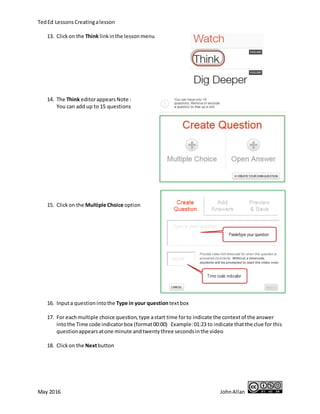
9. You can choose to have the Lesson listed for others to see or unlisted to keep it private
10. You can allow for others to customize your lesson or disallow this feature – On or Off
11. Click on Let’s Begin
12. Input introduction text into the Let’s Begin… editing box: (This is mandatory)
13. After you have finished the
introduction, click Save
14. Click on the Think link in the lesson menu
Ted Ed Lessons Creating a lesson
June 2017 John Allan
15. The Think editor offers two choices: Multiple Choice or Open Answer questions.
Note : You can add up to 15 questions
16. Click on the New multiple choice question option
17. The MC question editor appears:
18. Input a question into the Type in your question text box
19. Input the correct answer – ensuring the letter is green
20. Input the distracters
21. Input a start time for to indicate the context of the answer into the Video hint indicator box
(format 0:00)
Example: 01:23 to indicate that the clue for this question appears at one minute and twenty
three seconds in the video.
22. Click on the Save button
23. To add another question, click + Add Another
24. Click on the Open Answer Question option
25. The New open answer question editor appears:
26. Input a question into the question text box
Ted Ed Lessons Creating a lesson
June 2017 John Allan
27. Click on the Save button
28. Repeat for as many questions as your require. (for now, let’s continue along)
29. Click on the Dig Deeper menu item
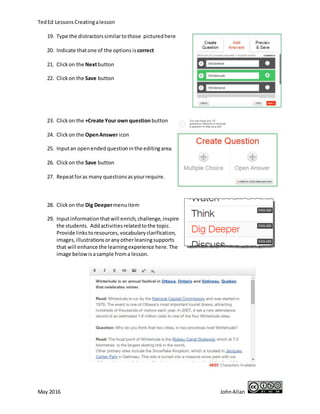
30. Input information that will enrich, challenge, inspire the students. Add activities related to
the topic. Provide links to resources, vocabulary clarification, images, illustrations or any
other leaning supports that will enhance the learning experience here. The image below is a
sample from a lesson.
31. Click on the Save button
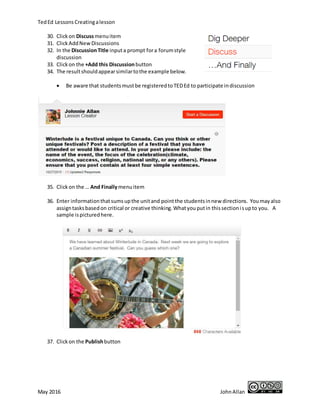
32. Click on Discuss menu item
33. In the Discussion Title input a prompt for a forum style discussion
34. Click on the Save button
35. The result should appear similar to the example below.
Ted Ed Lessons Creating a lesson
June 2017 John Allan
• Be aware that students must be registered to TED Ed to participate in discussion
36. Click on the … And Finally menu item
37. Enter information that sums up the unit and point the students in new directions. You may
also assign tasks based on critical or creative thinking. What you put in this section is up to
you. A sample is pictured here.
38. Click on the Save button
Ted Ed Lessons Creating a lesson
June 2017 John Allan
39. On the Main menu, Click on the More button
40. Several options appear
41. Choose Preview
42. Try your lesson as a student would see it.
43. Click Edit to return to the editing menu page
44. Click on the More button
45. Click on Adjust settings
46. The modules can be hidden by unchecking them
47. You can allow others to customize your lesson by checking Make my lesson customizable
Ted Ed Lessons Creating a lesson
June 2017 John Allan
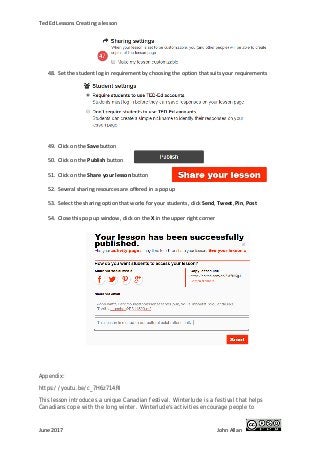
48. Set the student log in requirement by choosing the option that suits your requirements
49. Click on the Save button
50. Click on the Publish button
51. Click on the Share your lesson button
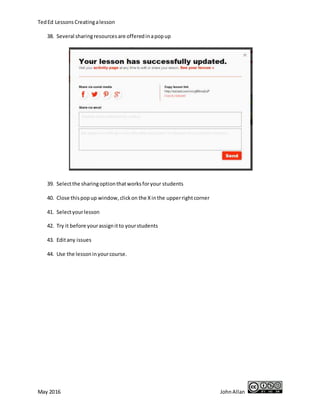
52. Several sharing resources are offered in a pop up
53. Select the sharing option that works for your students, click Send, Tweet, Pin, Post
54. Close this pop up window, click on the X in the upper right corner
Appendix:
https://youtu.be/c_7H6z714RI
This lesson introduces a unique Canadian festival. Winterlude is a festival that helps
Canadians cope with the long winter. Winterlude's activities encourage people to
Ted Ed Lessons Creating a lesson
June 2017 John Allan
participate in outdoor activities with others. Many people travel to Ottawa, Canada to
participate in Winterlude every February. Come and learn more about the festival.
What does the Mountie like about Winterlude?
the skating rink
the beavers
the largest beaver in the world
the ice sculptures
List the activities that you can do at Winterlude.
The focal point of Winterlude is the Rideau Canal Skateway which at 7.8 kilometres
(approximately 5 miles) is the largest skating rink in the world.
Other primary sites include the Snowflake Kingdom, which is located in Jacques-Cartier Park in
Gatineau. This site is turned into a massive snow park with ice slides and snow sculptures and
hosts numerous events and activities for children. It is the home away from home of the friendly
IceHog family, the Winterlude Mascots.
Confederation Park, better known as Crystal Garden, is the site for the ice sculpture competition,
the ice lounge and musical concerts. Marion Dewar Plaza at City Hall (across from Confederation
Park) is the site of the Rink of Dreams, an ice-skating rink that hosts skating shows, DJ dance
parties and interactive art displays throughout the Festival. Dow's Lake also has a large skating
area and hosts various activities.
Related activities include special exhibits at numerous Ottawa museums, special events in
the Byward Market, Sparks Street, a 'loppet' type race in Gatineau Park and a variety of other
events throughout the city.
Winterlude is a festival unique to Canada. Can you think of other unique festivals? Post a
description of a festival that you have attended or would like to attend. In your post,
please include: the name of the event, the focus of the celebration and its location.
Please ensure that your post contains at least four sentences.
We have learned about Winterlude in Canada. Next week we are going to explore this
Canadian summer festival. Can you guess which one?
https://ed.ted.com/on/Fxf7NKgJ

Creating a TED Ed lesson worksheet May 2017

  • 1.
    Ted Ed LessonsCreating a lesson June 2017 John Allan Creating a Ted Ed Lesson 1. Visit the web page http://ed.ted.com 2. Click on the button Create a Lesson 3. Paste a web address or URL (see sample below) into the Find a Video text box https://youtu.be/c_7H6z714RI 4. Click on the Search icon 5. A video appears, in the Select a Video area, Click on the video image 6. Ensure it is the correct video 7. Click on the Continue button 8. The Lesson editor appears, with the title of the Lesson based on the Video, you can edit it Don’t type, all of the text is provided for you to copy and paste in the Appendix – last page of this document.
  • 2.
    Ted Ed LessonsCreating a lesson June 2017 John Allan 9. You can choose to have the Lesson listed for others to see or unlisted to keep it private 10. You can allow for others to customize your lesson or disallow this feature – On or Off 11. Click on Let’s Begin 12. Input introduction text into the Let’s Begin… editing box: (This is mandatory) 13. After you have finished the introduction, click Save 14. Click on the Think link in the lesson menu
  • 3.
    Ted Ed LessonsCreating a lesson June 2017 John Allan 15. The Think editor offers two choices: Multiple Choice or Open Answer questions. Note : You can add up to 15 questions 16. Click on the New multiple choice question option 17. The MC question editor appears: 18. Input a question into the Type in your question text box 19. Input the correct answer – ensuring the letter is green 20. Input the distracters 21. Input a start time for to indicate the context of the answer into the Video hint indicator box (format 0:00) Example: 01:23 to indicate that the clue for this question appears at one minute and twenty three seconds in the video. 22. Click on the Save button 23. To add another question, click + Add Another 24. Click on the Open Answer Question option 25. The New open answer question editor appears: 26. Input a question into the question text box
  • 4.
    Ted Ed LessonsCreating a lesson June 2017 John Allan 27. Click on the Save button 28. Repeat for as many questions as your require. (for now, let’s continue along) 29. Click on the Dig Deeper menu item 30. Input information that will enrich, challenge, inspire the students. Add activities related to the topic. Provide links to resources, vocabulary clarification, images, illustrations or any other leaning supports that will enhance the learning experience here. The image below is a sample from a lesson. 31. Click on the Save button 32. Click on Discuss menu item 33. In the Discussion Title input a prompt for a forum style discussion 34. Click on the Save button 35. The result should appear similar to the example below.
  • 5.
    Ted Ed LessonsCreating a lesson June 2017 John Allan • Be aware that students must be registered to TED Ed to participate in discussion 36. Click on the … And Finally menu item 37. Enter information that sums up the unit and point the students in new directions. You may also assign tasks based on critical or creative thinking. What you put in this section is up to you. A sample is pictured here. 38. Click on the Save button
  • 6.
    Ted Ed LessonsCreating a lesson June 2017 John Allan 39. On the Main menu, Click on the More button 40. Several options appear 41. Choose Preview 42. Try your lesson as a student would see it. 43. Click Edit to return to the editing menu page 44. Click on the More button 45. Click on Adjust settings 46. The modules can be hidden by unchecking them 47. You can allow others to customize your lesson by checking Make my lesson customizable
  • 7.
    Ted Ed LessonsCreating a lesson June 2017 John Allan 48. Set the student log in requirement by choosing the option that suits your requirements 49. Click on the Save button 50. Click on the Publish button 51. Click on the Share your lesson button 52. Several sharing resources are offered in a pop up 53. Select the sharing option that works for your students, click Send, Tweet, Pin, Post 54. Close this pop up window, click on the X in the upper right corner Appendix: https://youtu.be/c_7H6z714RI This lesson introduces a unique Canadian festival. Winterlude is a festival that helps Canadians cope with the long winter. Winterlude's activities encourage people to
  • 8.
    Ted Ed LessonsCreating a lesson June 2017 John Allan participate in outdoor activities with others. Many people travel to Ottawa, Canada to participate in Winterlude every February. Come and learn more about the festival. What does the Mountie like about Winterlude? the skating rink the beavers the largest beaver in the world the ice sculptures List the activities that you can do at Winterlude. The focal point of Winterlude is the Rideau Canal Skateway which at 7.8 kilometres (approximately 5 miles) is the largest skating rink in the world. Other primary sites include the Snowflake Kingdom, which is located in Jacques-Cartier Park in Gatineau. This site is turned into a massive snow park with ice slides and snow sculptures and hosts numerous events and activities for children. It is the home away from home of the friendly IceHog family, the Winterlude Mascots. Confederation Park, better known as Crystal Garden, is the site for the ice sculpture competition, the ice lounge and musical concerts. Marion Dewar Plaza at City Hall (across from Confederation Park) is the site of the Rink of Dreams, an ice-skating rink that hosts skating shows, DJ dance parties and interactive art displays throughout the Festival. Dow's Lake also has a large skating area and hosts various activities. Related activities include special exhibits at numerous Ottawa museums, special events in the Byward Market, Sparks Street, a 'loppet' type race in Gatineau Park and a variety of other events throughout the city. Winterlude is a festival unique to Canada. Can you think of other unique festivals? Post a description of a festival that you have attended or would like to attend. In your post, please include: the name of the event, the focus of the celebration and its location. Please ensure that your post contains at least four sentences. We have learned about Winterlude in Canada. Next week we are going to explore this Canadian summer festival. Can you guess which one? https://ed.ted.com/on/Fxf7NKgJ