Conference theme: Making innovation work
Session: Pedagogic design
Abstract: http://altc2013.alt.ac.uk
Jago Brown
Creating a Personalised Learning
Environment (PLE) to support progress
This presentation uses animation,
so you will need to click the
‘Present’ button that looks like
the one below:
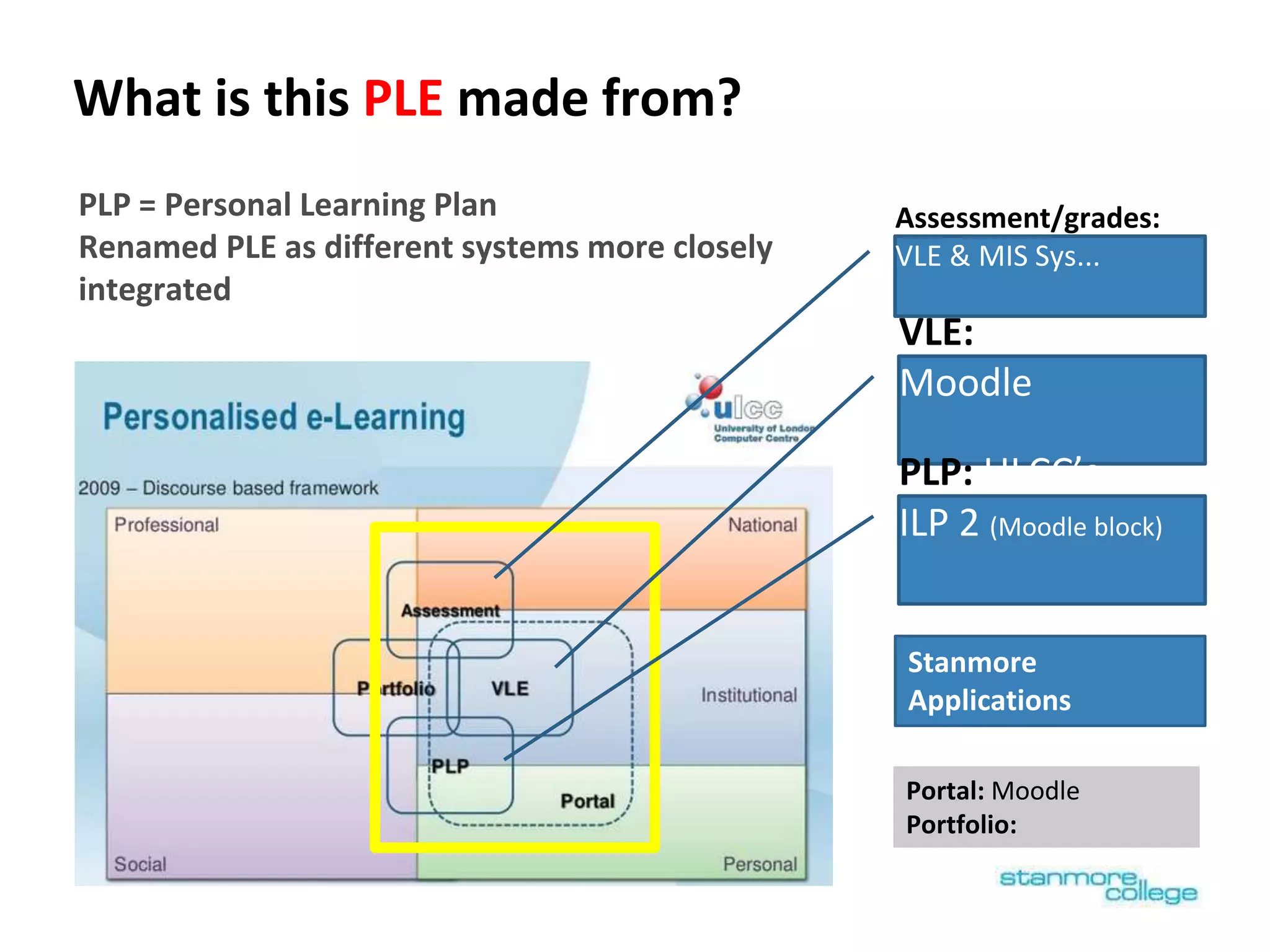
What is this PLE made from?
PLP = Personal Learning Plan
Renamed PLE as different systems more closely
integrated
VLE:
Moodle
Assessment/grades:
VLE & MIS Sys...
PLP: ULCC’s
ILP 2 (Moodle block)
Portal: Moodle
Portfolio:
Stanmore
Applications
Why create this PLE? - Improve communication, enhance
personalisation & to free up lecturer time for teaching
What users wanted:
● New system of personal tutors & study coaches , who needed to see all the
grades of their tutees by many lecturers in one place
● Students & staff wanted more information, but more simply presented
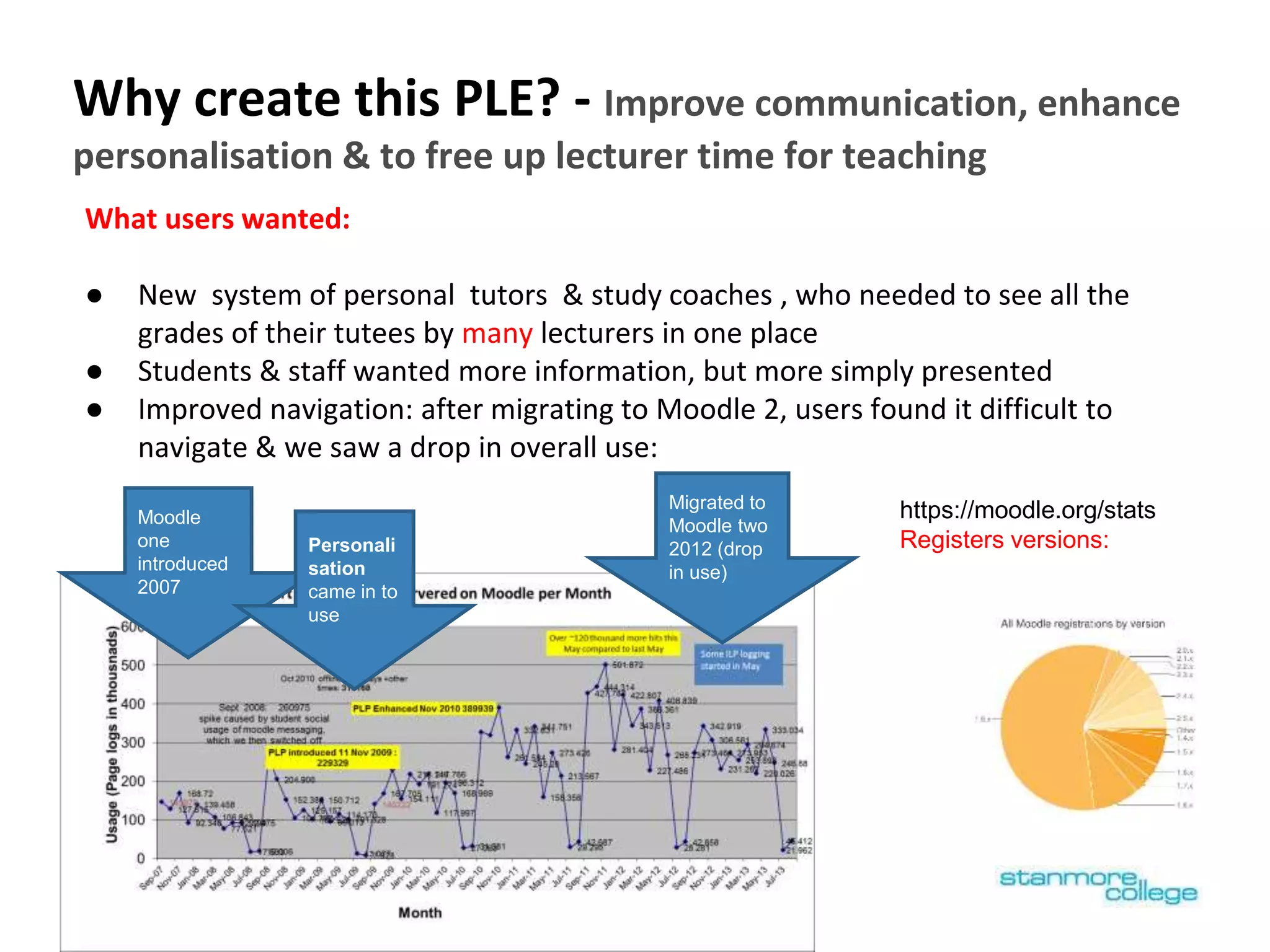
● Improved navigation: after migrating to Moodle 2, users found it difficult to
navigate & we saw a drop in overall use:
Migrated to
Moodle two
2012 (drop
in use)
Moodle
one
introduced
2007
Personali
sation
came in to
use
https://moodle.org/stats
Registers versions:
Focus of presentation
1. Visual appeal/branding - big iconic buttons make it feel
much simpler
2. Customising Moodle to create PLE home page with a
grades overview
3. Establishing a careers page in PLE with resources
4. Linking initial assessment to practice resources - EPACE
• The PLE pages which the student & parent can view
(i.e. not the staff only views)
• 14-18 year olds (although this PLE is used by HE)
• How data from different systems is juxtaposed on a few pages
in away that enables staff & students to spot patterns &
develop a conversation [supporting progress]
Areas of Innovation
2011-12
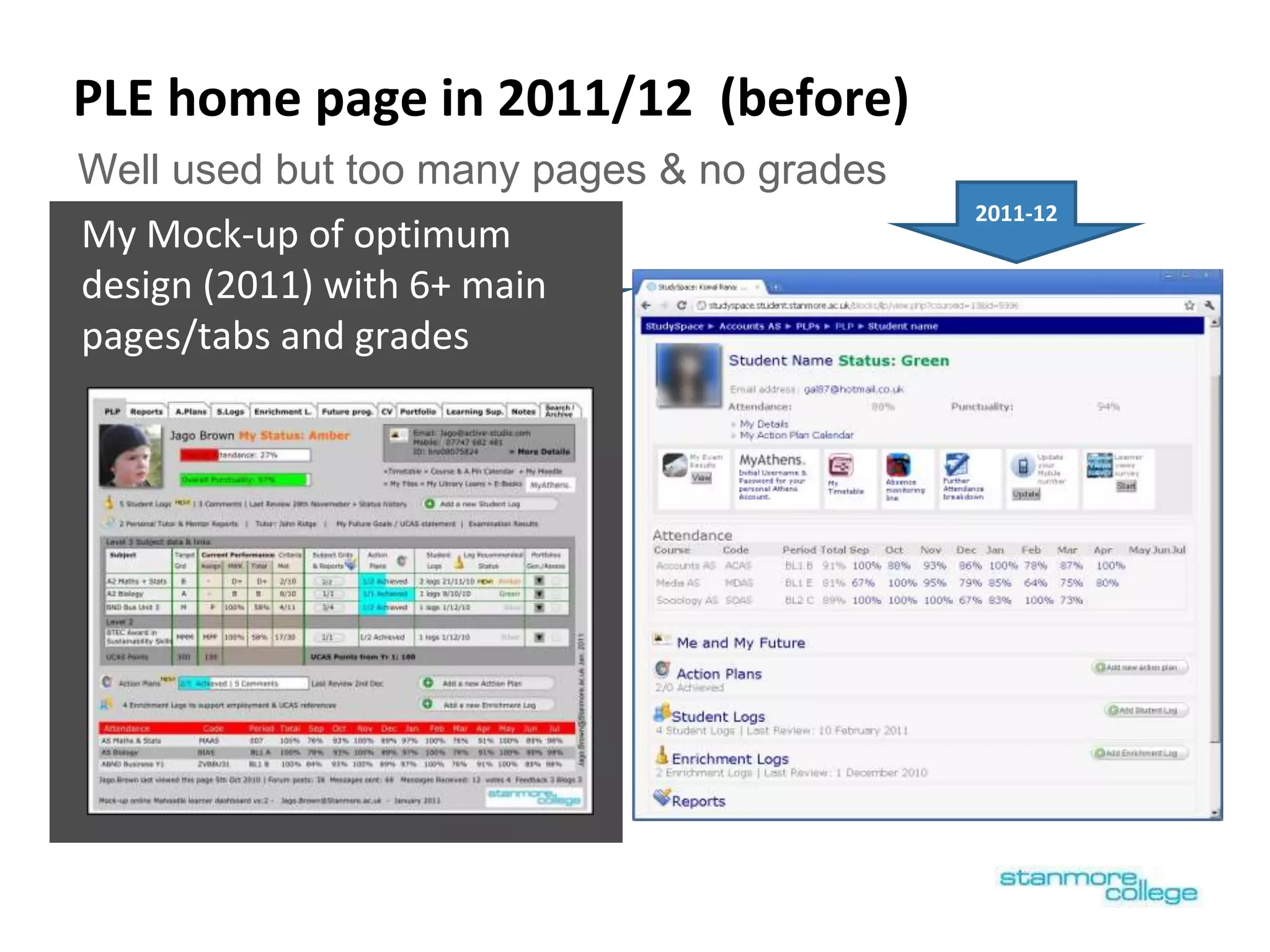
PLE home page in 2011/12 (before)
My Mock-up of optimum
design (2011) with 6+ main
pages/tabs and grades
Well used but too many pages & no grades
2011-12
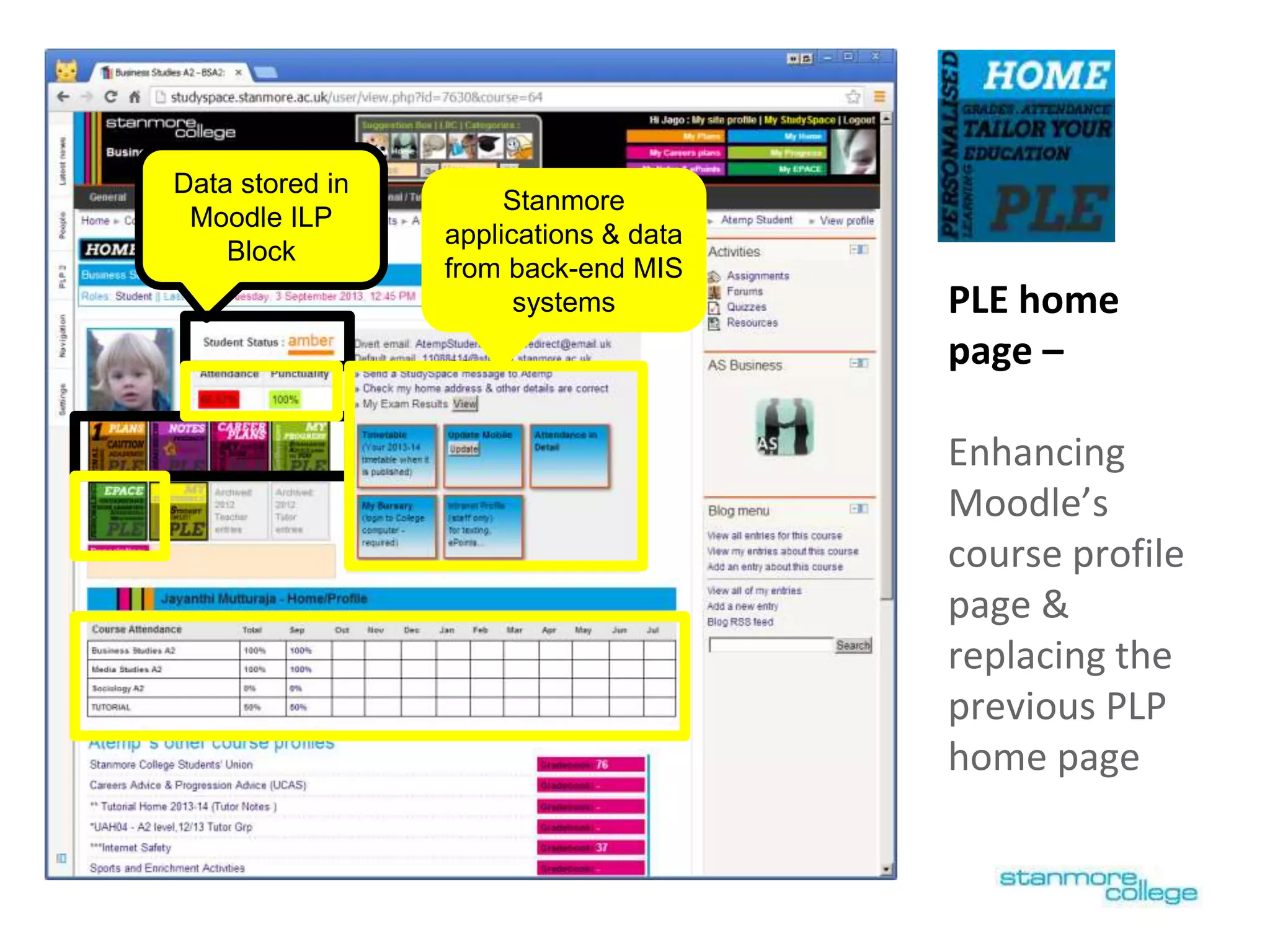
PLE home
page –
Enhancing
Moodle’s
course profile
page &
replacing the
previous PLP
home page
Data stored in
Moodle ILP
Block
Stanmore
applications & data
from back-end MIS
systems
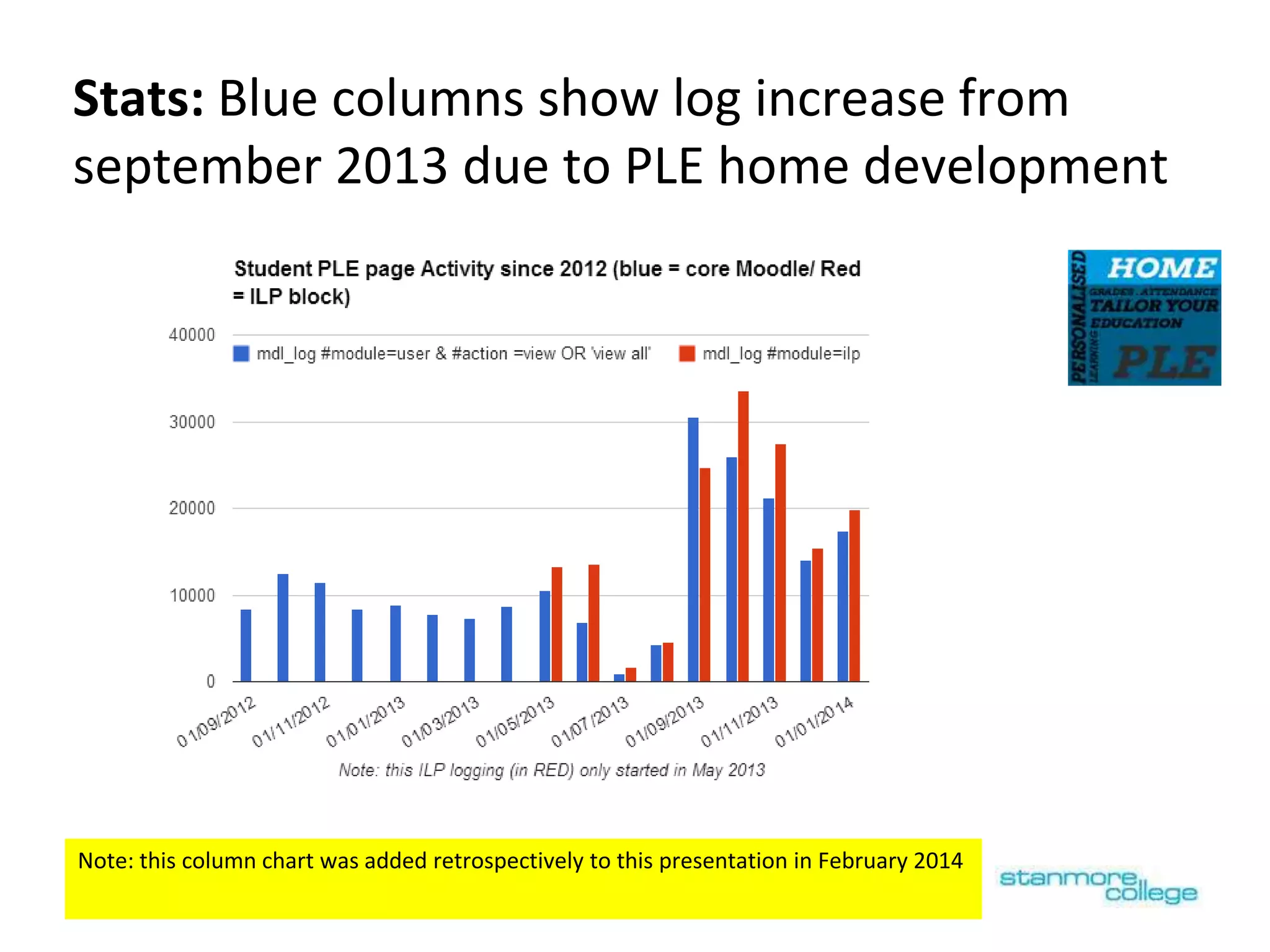
Stats: Blue columns show log increase from
september 2013 due to PLE home development
Note: this column chart was added retrospectively to this presentation in February 2014
[ Note: Click this slide to see slide animation, of how you can drill down to Moodle’s ‘user’ & ‘grader’ report ]
Enhanced with Current overall
grade for each VLE course
(grades
overview report)
Bringing the VLE course grades in to Moodle’s
course profile page (PLE home)
[ Note: Click this slide to see slide animation, of how you can drill down to Moodle’s ‘user’ & ‘grader’ report ]
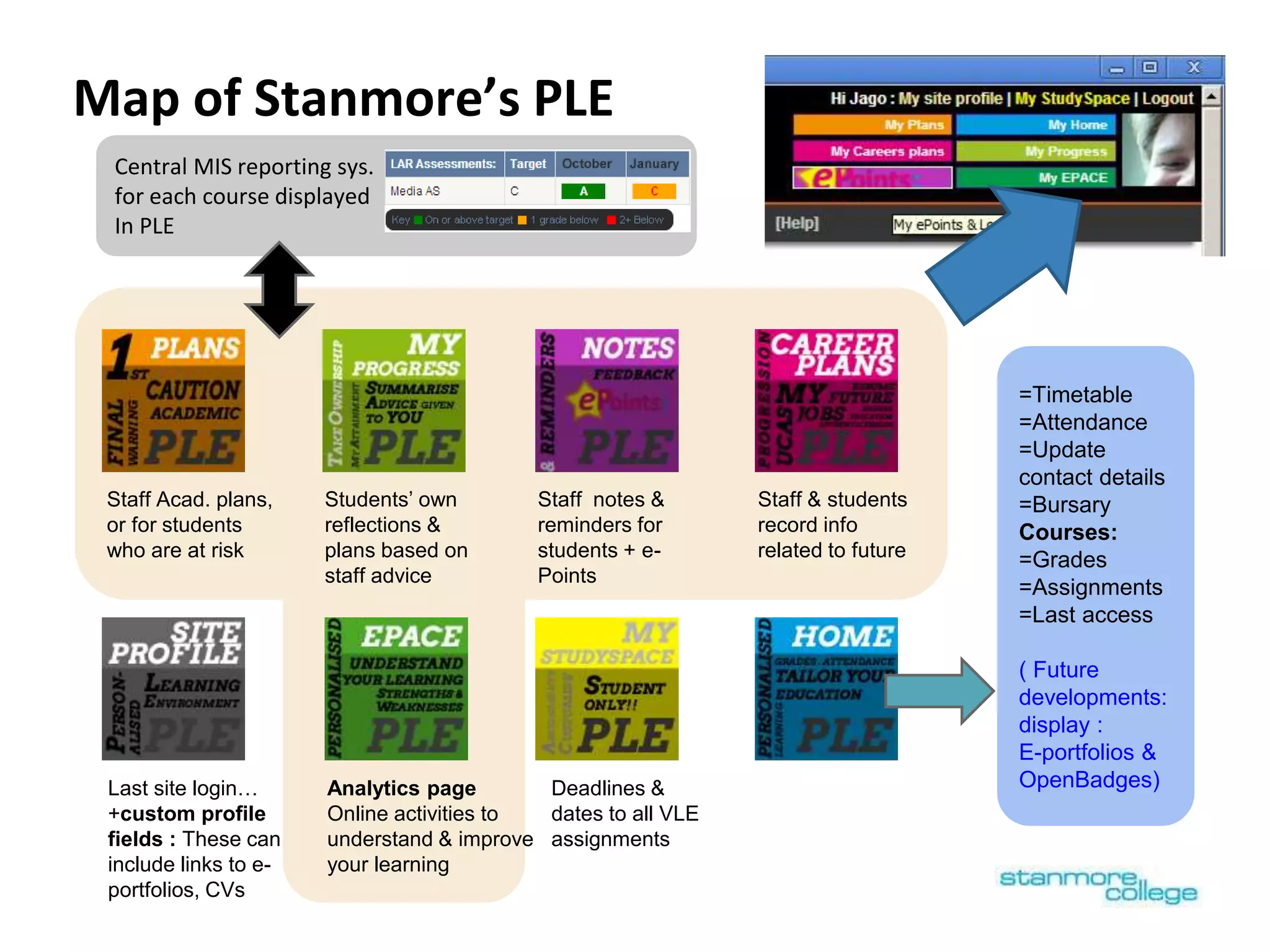
Central MIS reporting sys.
for each course displayed
In PLE
Map of Stanmore’s PLE
=Timetable
=Attendance
=Update
contact details
=Bursary
Courses:
=Grades
=Assignments
=Last access
( Future
developments:
display :
E-portfolios &
OpenBadges)Analytics page
Online activities to
understand & improve
your learning
Staff Acad. plans,
or for students
who are at risk
Students’ own
reflections &
plans based on
staff advice
Staff notes &
reminders for
students + e-
Points
Staff & students
record info
related to future
Last site login…
+custom profile
fields : These can
include links to e-
portfolios, CVs
Deadlines &
dates to all VLE
assignments
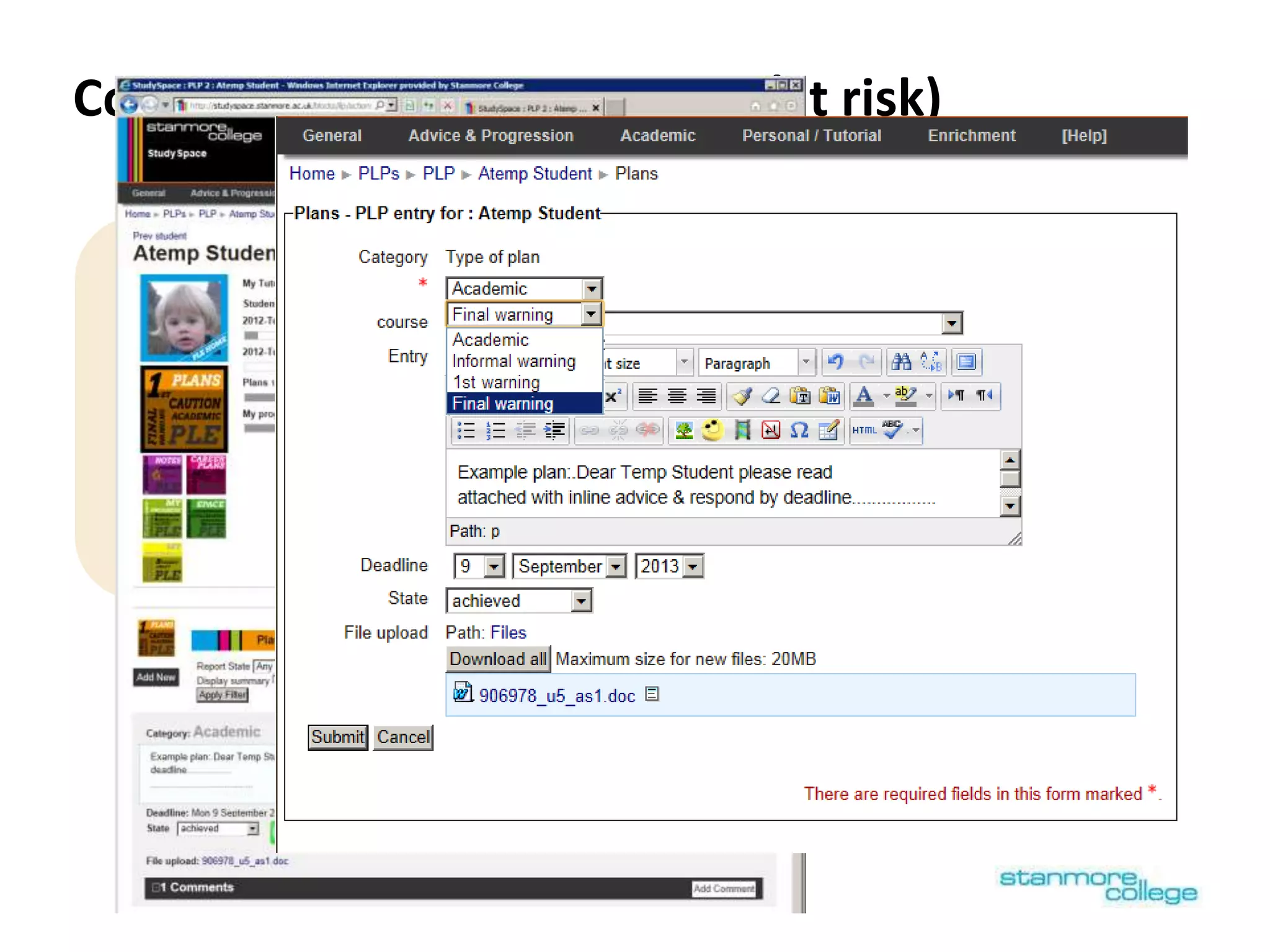
Conversations: Plans (serious/at risk)
Analytics page
Online activities to
understand & improve
your learning
Staff Acad. plans,
or for students
who are at risk
Students’ own
reflections &
plans based on
staff advice
Staff notes &
reminders for
students + e-
Points
Staff & students
record info
related to future
These pages use a customised version of ULCC’s ILP 2 block
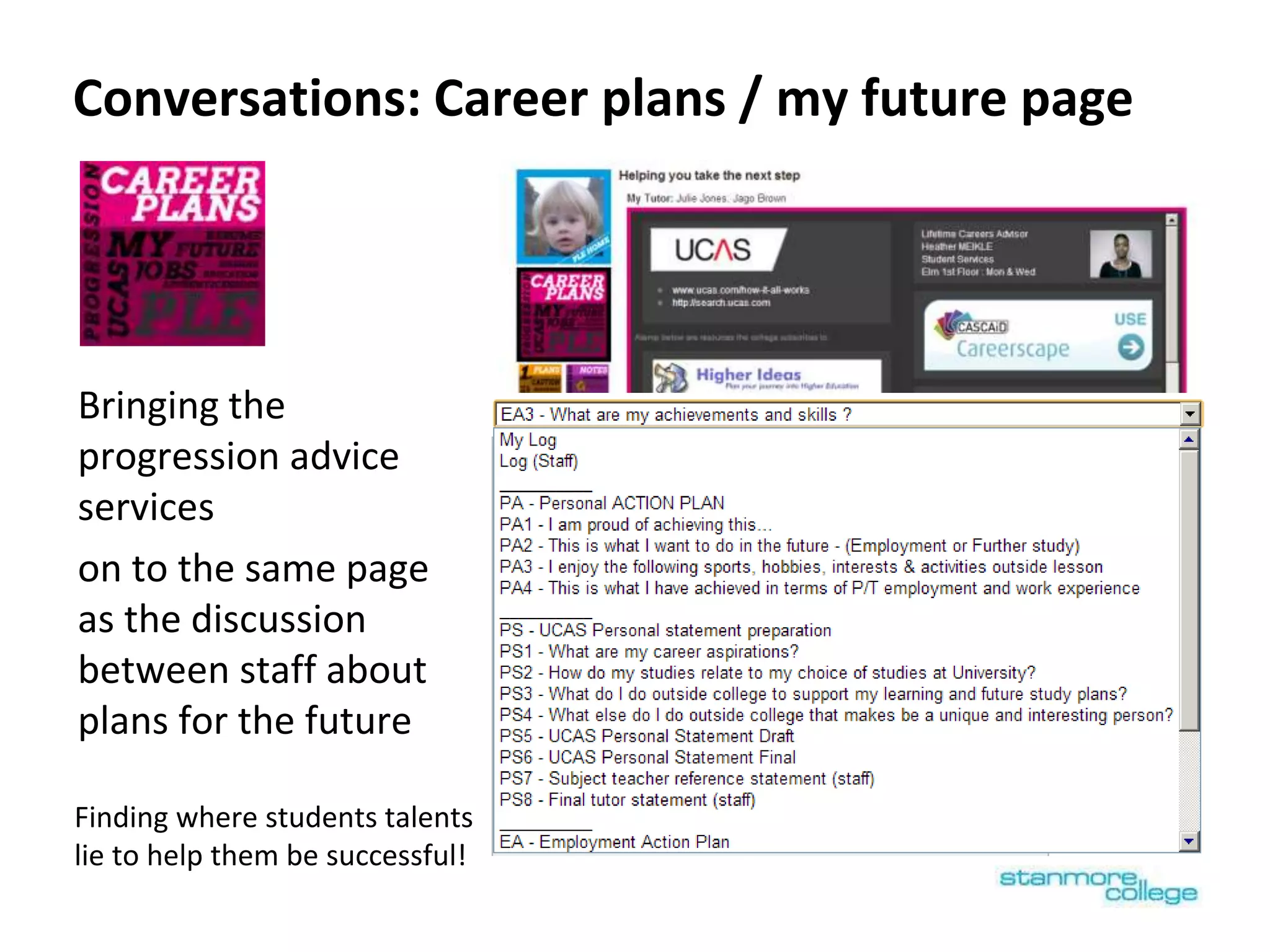
Conversations: Career plans / my future page
Bringing the
progression advice
services
on to the same page
as the discussion
between staff about
plans for the future
Finding where students talents
lie to help them be successful!
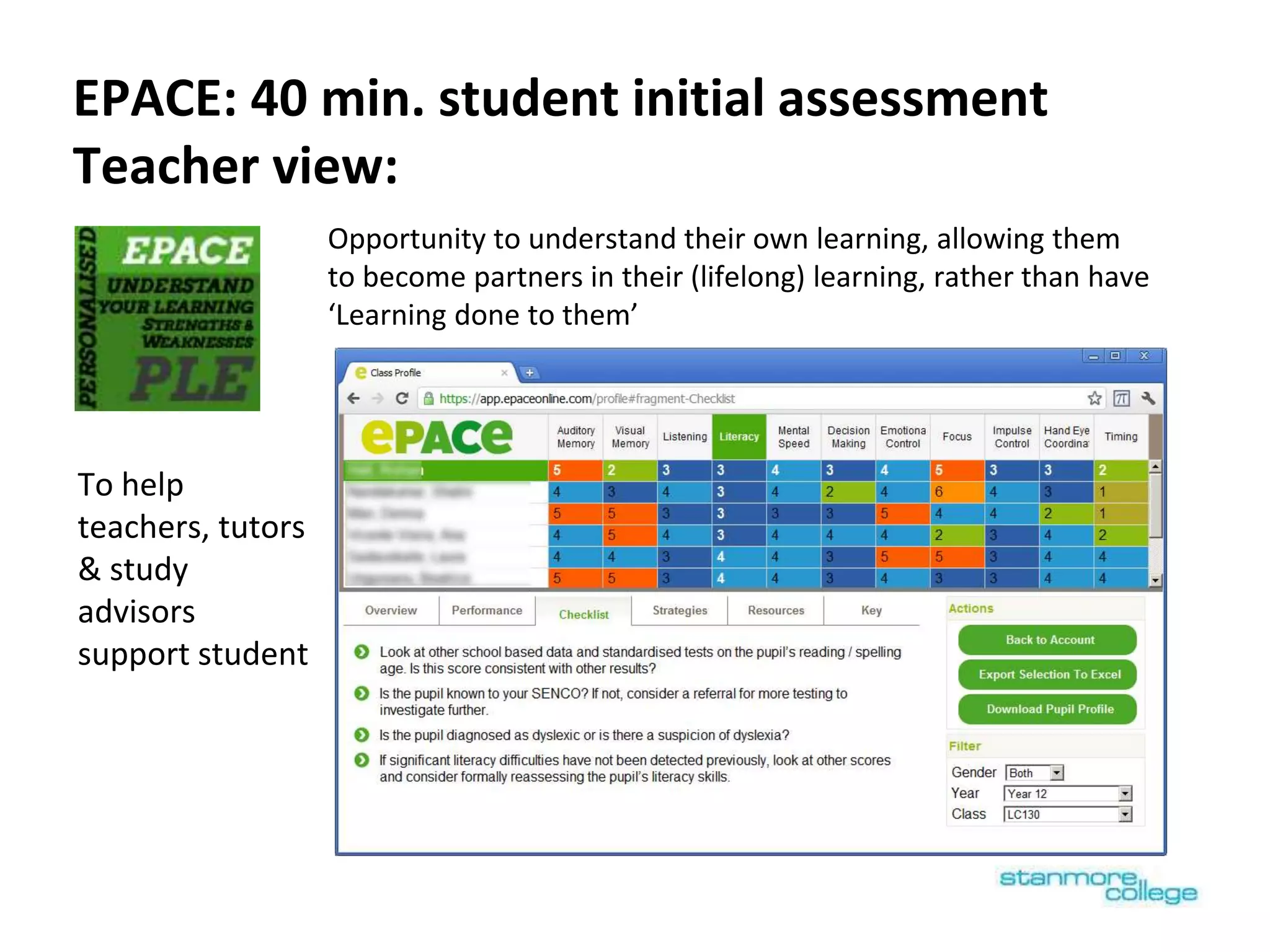
EPACE: 40 min. student initial assessment
Teacher view:
Opportunity to understand their own learning, allowing them
to become partners in their (lifelong) learning, rather than have
‘Learning done to them’
To help
teachers, tutors
& study
advisors
support student
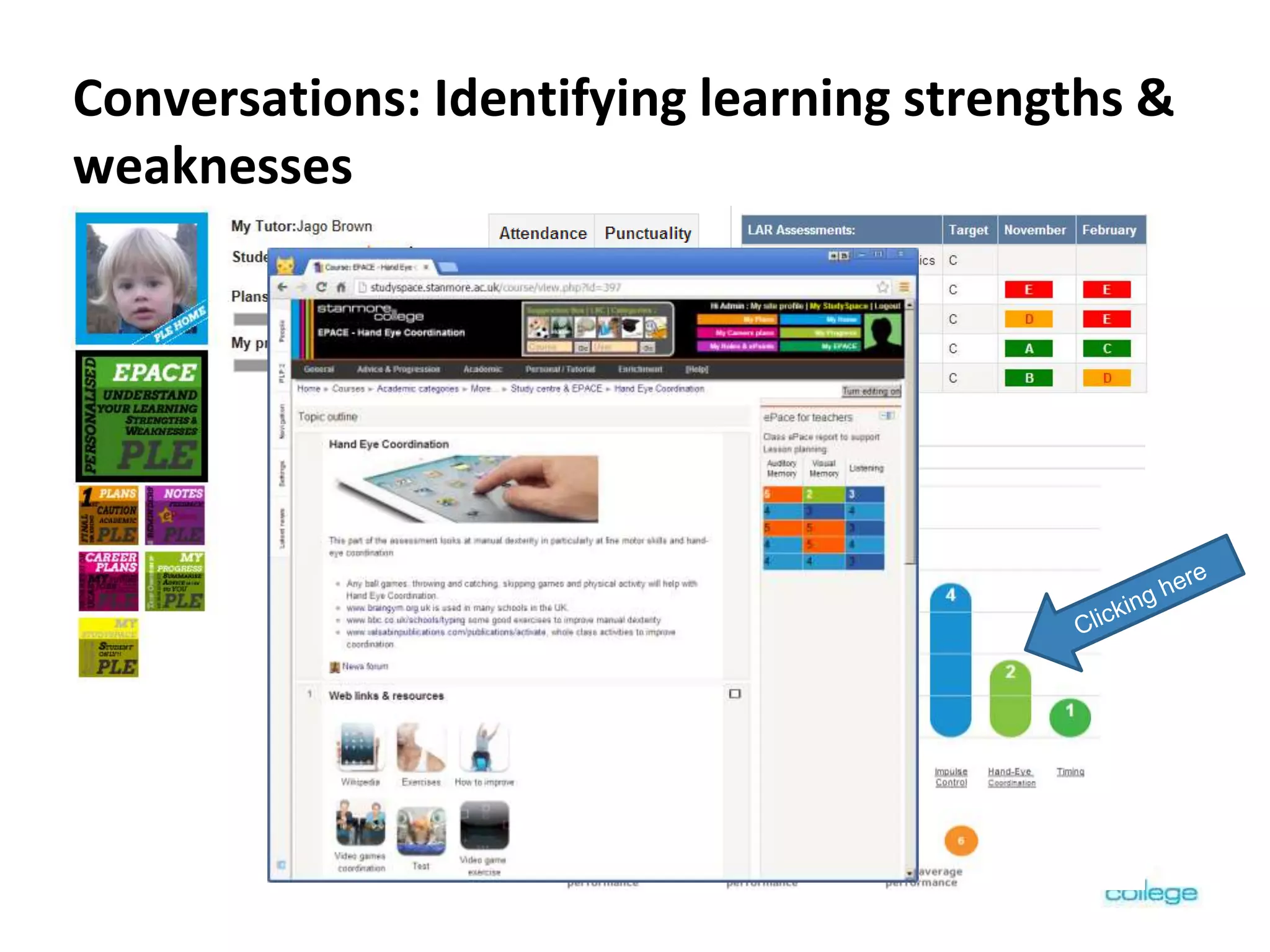
Conversations: Identifying learning strengths &
weaknesses
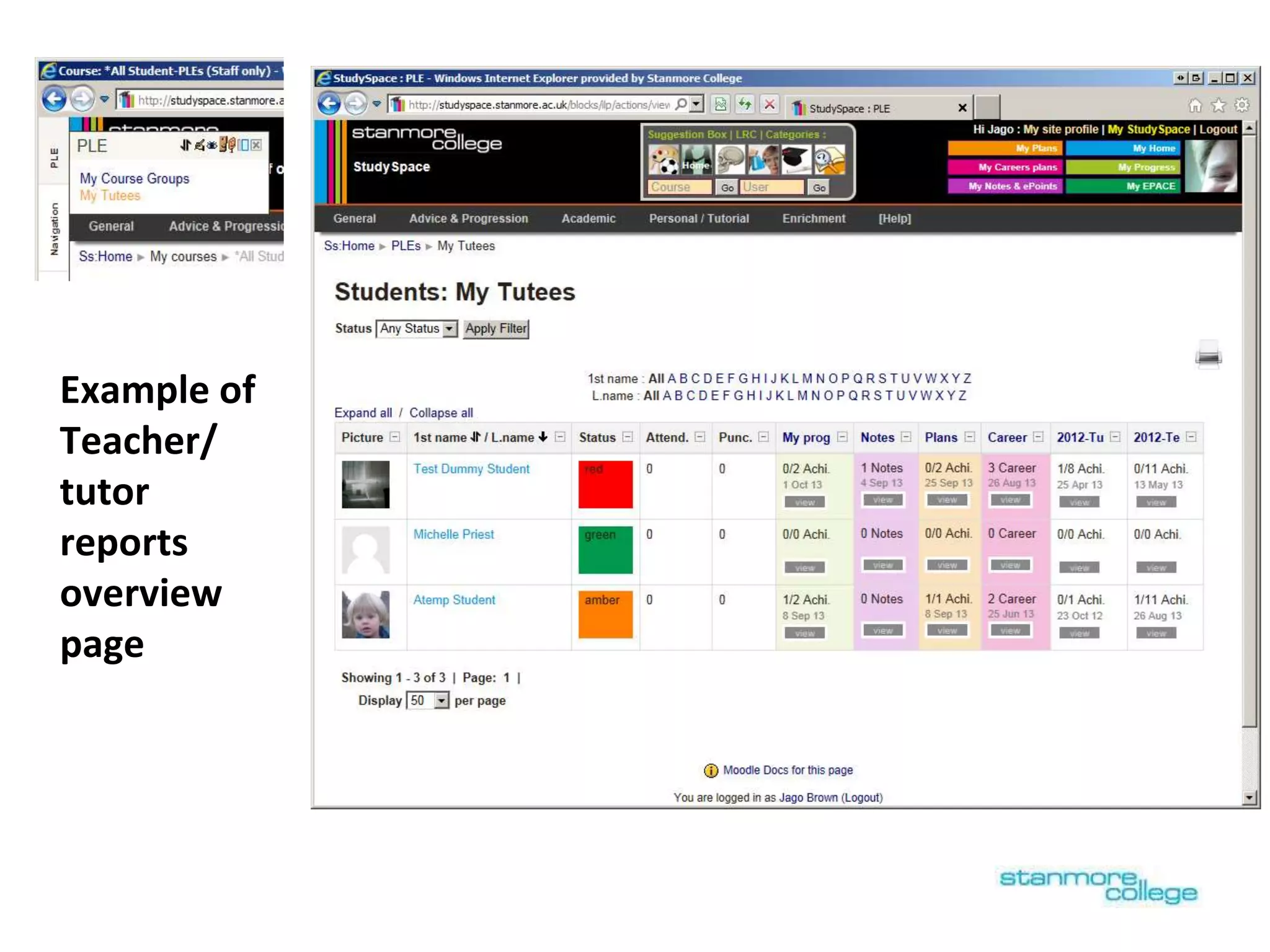
Example of
Teacher/
tutor
reports
overview
page
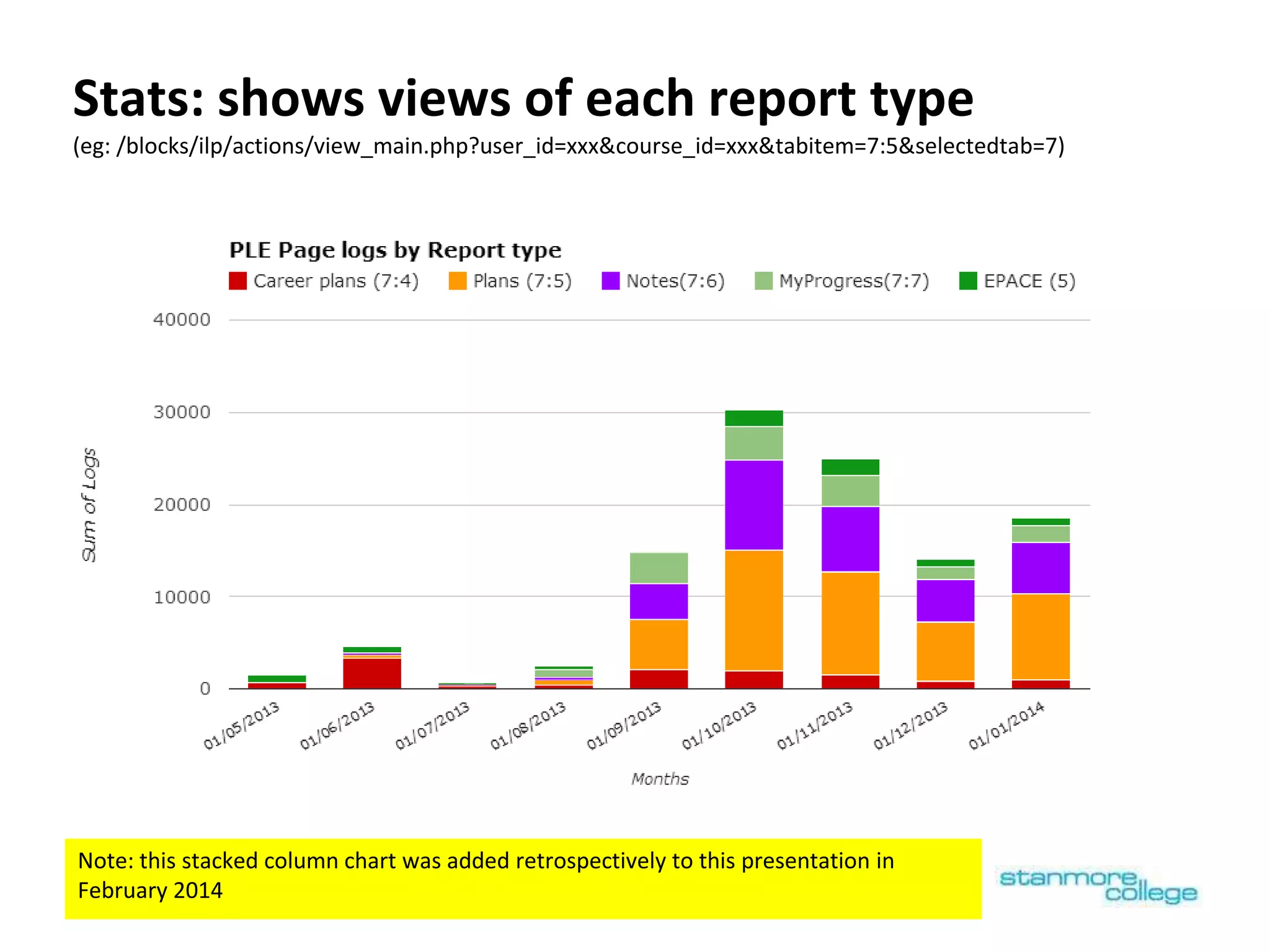
Stats: shows views of each report type
(eg: /blocks/ilp/actions/view_main.php?user_id=xxx&course_id=xxx&tabitem=7:5&selectedtab=7)
Note: this stacked column chart was added retrospectively to this presentation in
February 2014
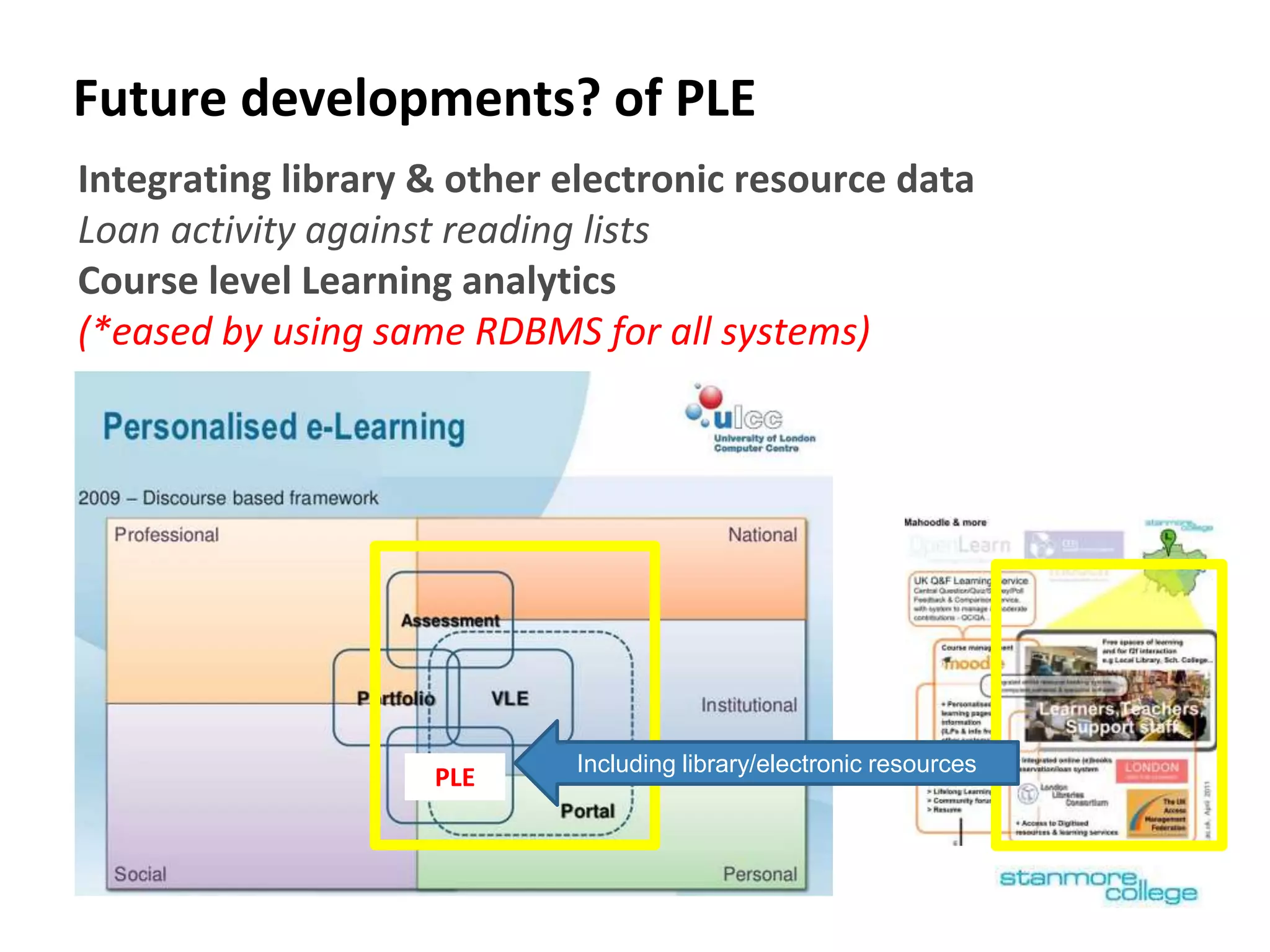
Future developments? of PLE
Including library/electronic resources
PLE
Integrating library & other electronic resource data
Loan activity against reading lists
Course level Learning analytics
(*eased by using same RDBMS for all systems)
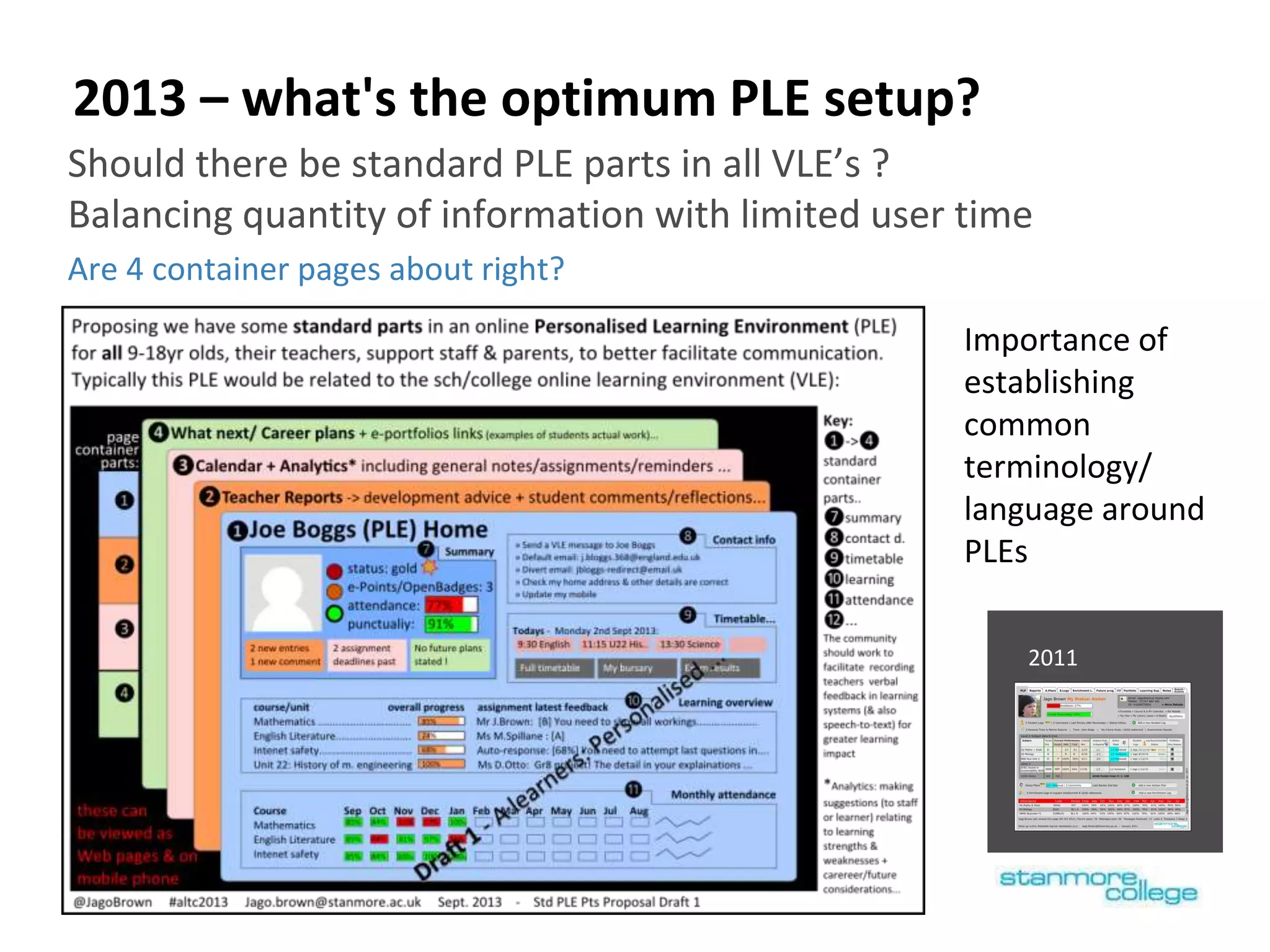
2013 – what's the optimum PLE setup?
Should there be standard PLE parts in all VLE’s ?
Balancing quantity of information with limited user time
Are 4 container pages about right?
Importance of
establishing
common
terminology/
language around
PLEs
2011
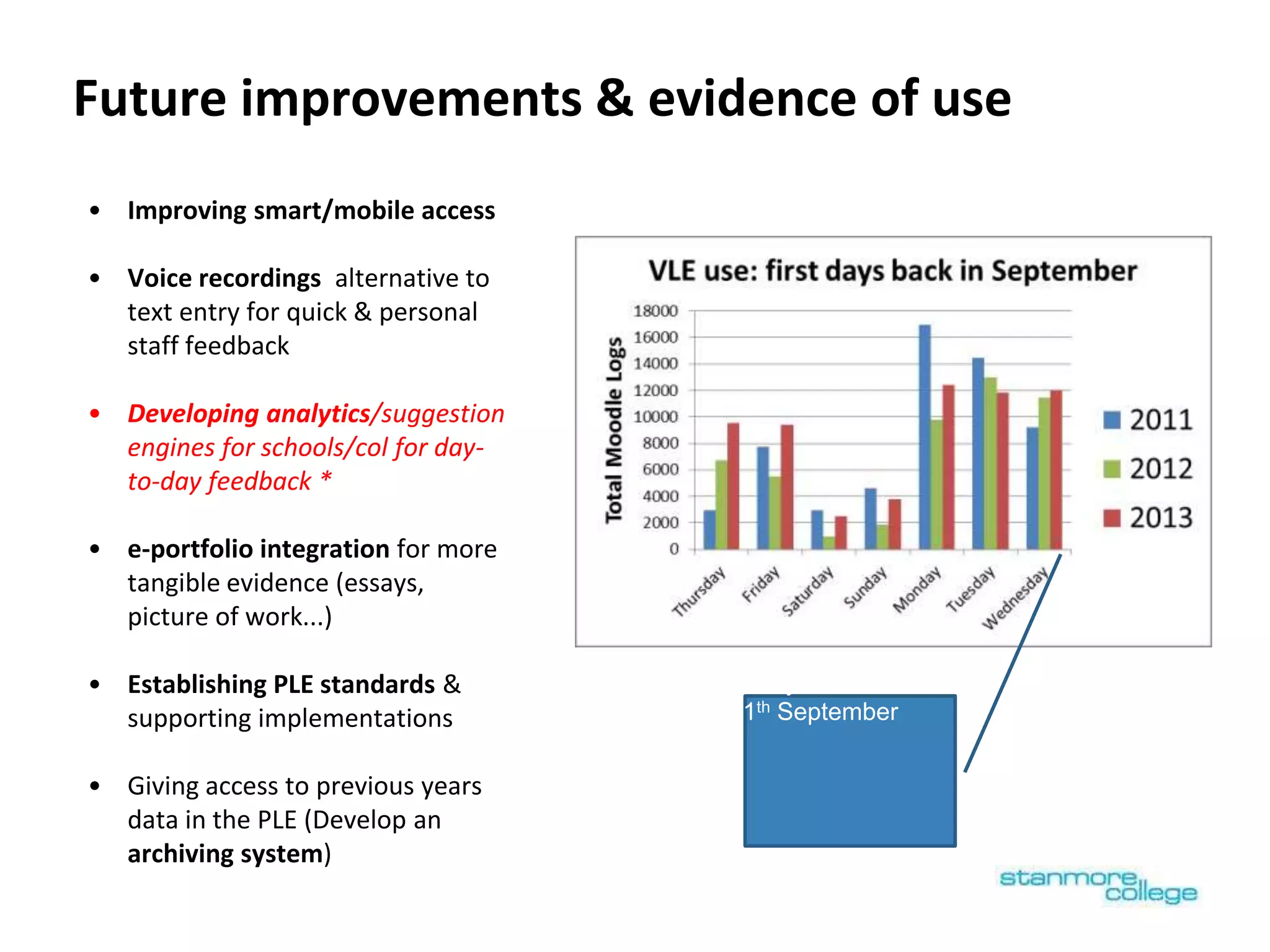
Future improvements & evidence of use
• Improving smart/mobile access
• Voice recordings alternative to
text entry for quick & personal
staff feedback
• Developing analytics/suggestion
engines for schools/col for day-
to-day feedback *
• e-portfolio integration for more
tangible evidence (essays,
picture of work...)
• Establishing PLE standards &
supporting implementations
• Giving access to previous years
data in the PLE (Develop an
archiving system)
Yesterday!
Wednesday 11th September
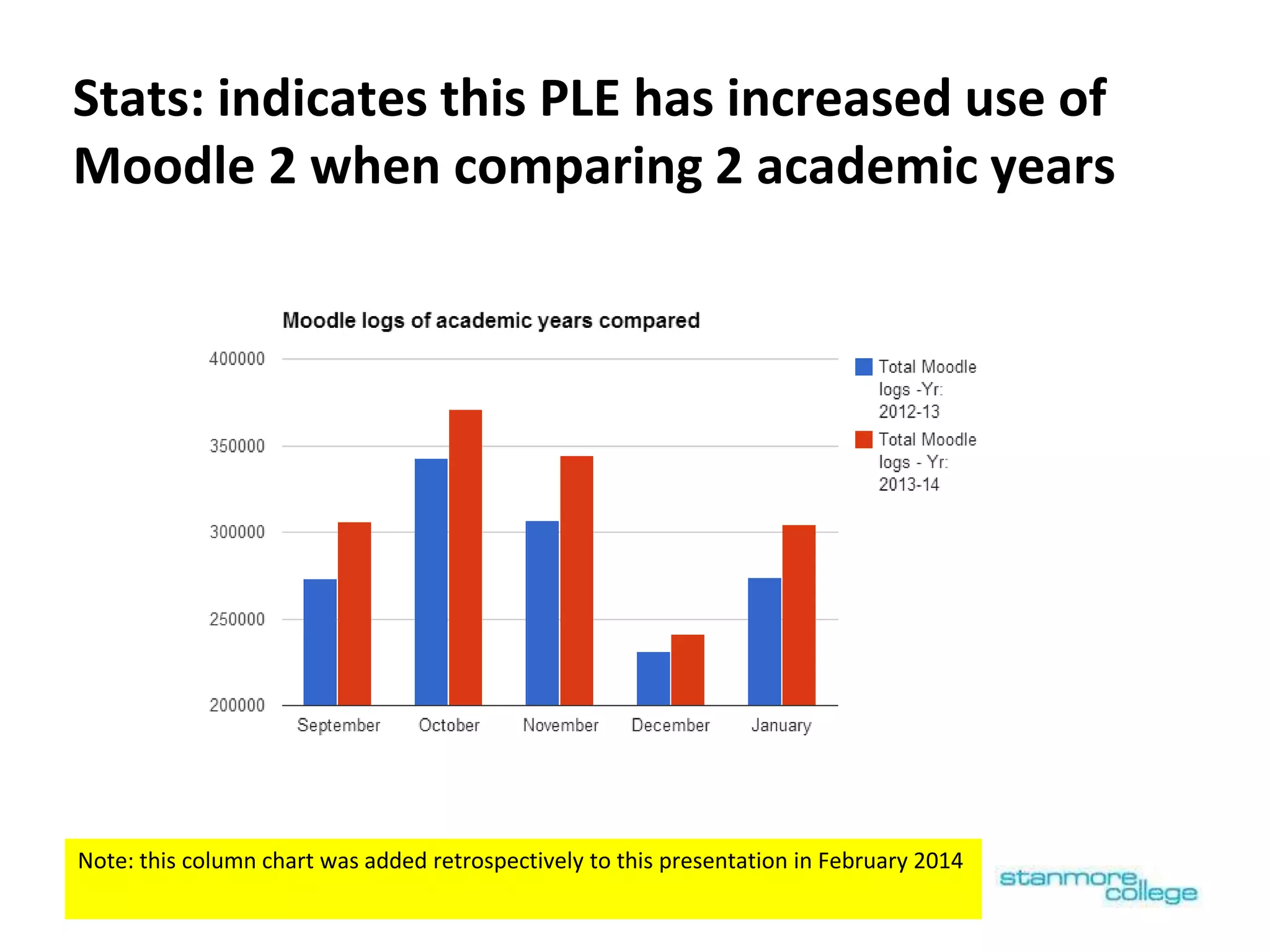
Stats: indicates this PLE has increased use of
Moodle 2 when comparing 2 academic years
Note: this column chart was added retrospectively to this presentation in February 2014
Thoughts
Policy (government, ofsted…) needs to organise funding (GLHs/following
student) & the inspection framework, so more teachers have better
access, to better learning technology, which they can more easily share
& modify, to design their lessons/courses.
More research into online personalisation environments needed!
(All maint. sch. With online att + timetable + 1x feedback rpt per year…)
Balancing online personalisation (PLE) standardisation across schools
and colleges, against institutions/users making the PLE their own - is
important and needs external support. (It can be easier to make your
own if using open source software)
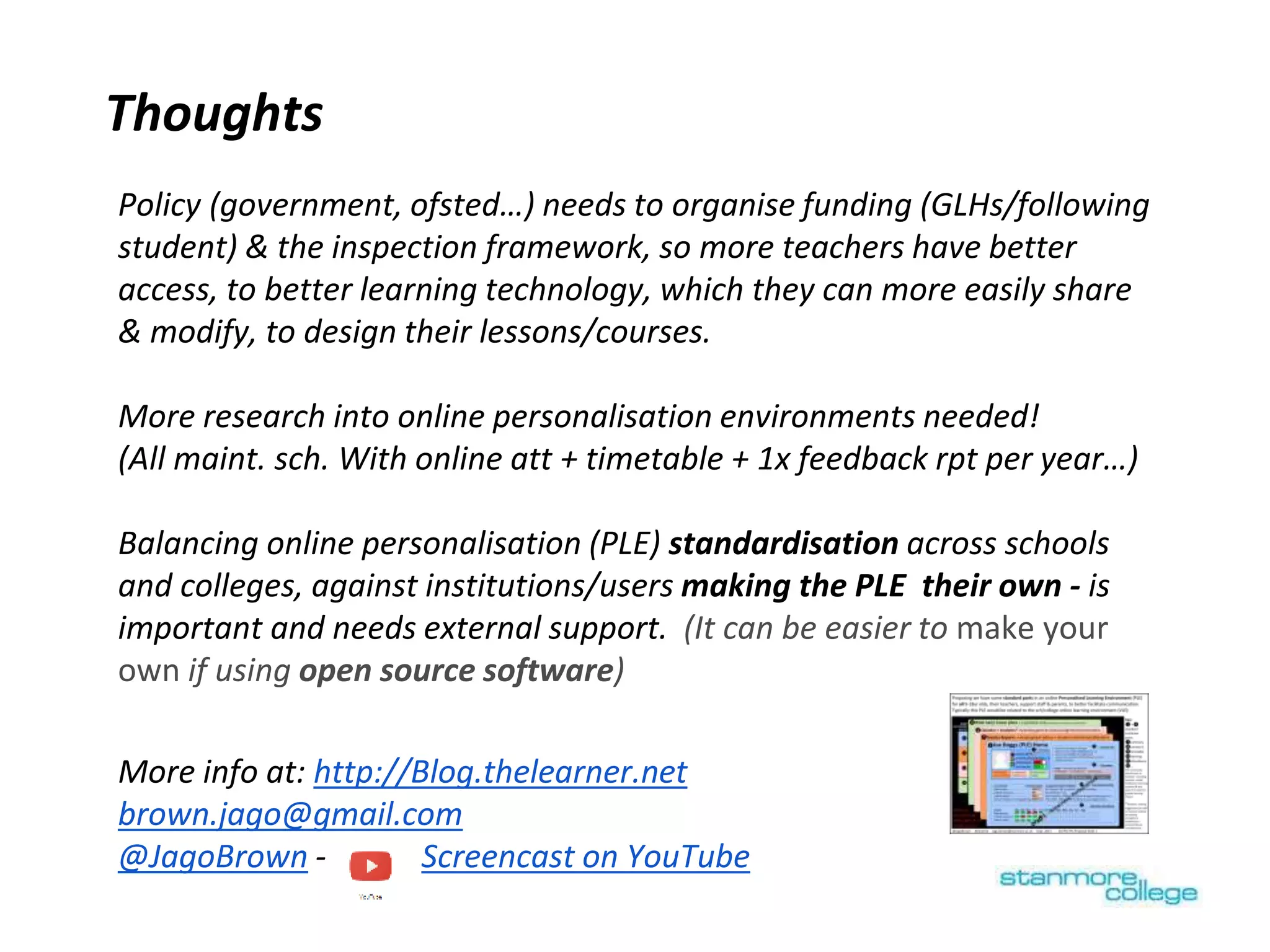
More info at: http://Blog.thelearner.net
brown.jago@gmail.com
@JagoBrown - Screencast on YouTube
# # # Archived/ unused slides follow:
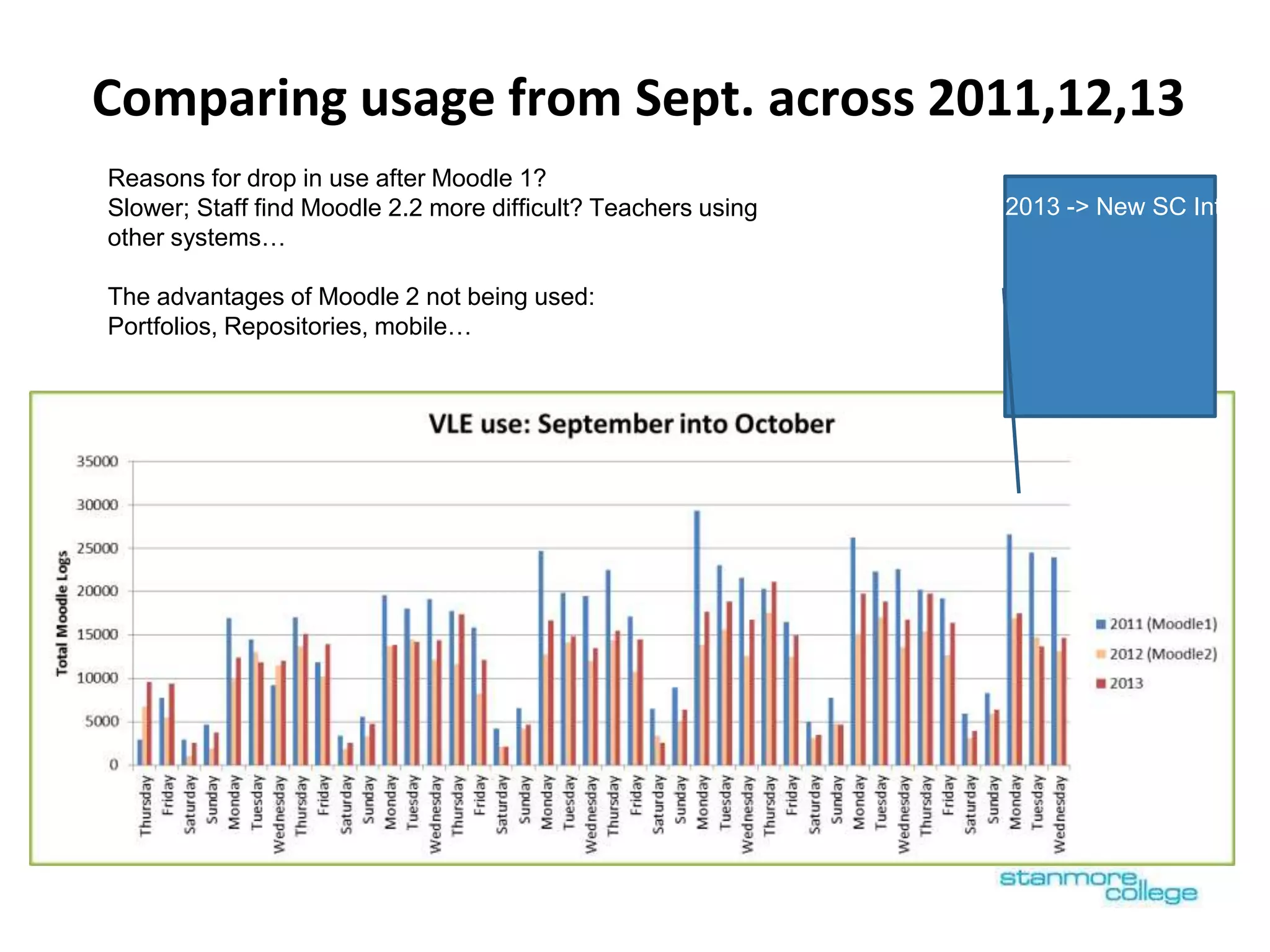
Comparing usage from Sept. across 2011,12,13
Reasons for drop in use after Moodle 1?
Slower; Staff find Moodle 2.2 more difficult? Teachers using
other systems…
The advantages of Moodle 2 not being used:
Portfolios, Repositories, mobile…
2011 -> ILP used for Rep
2013 -> New SC Intrane
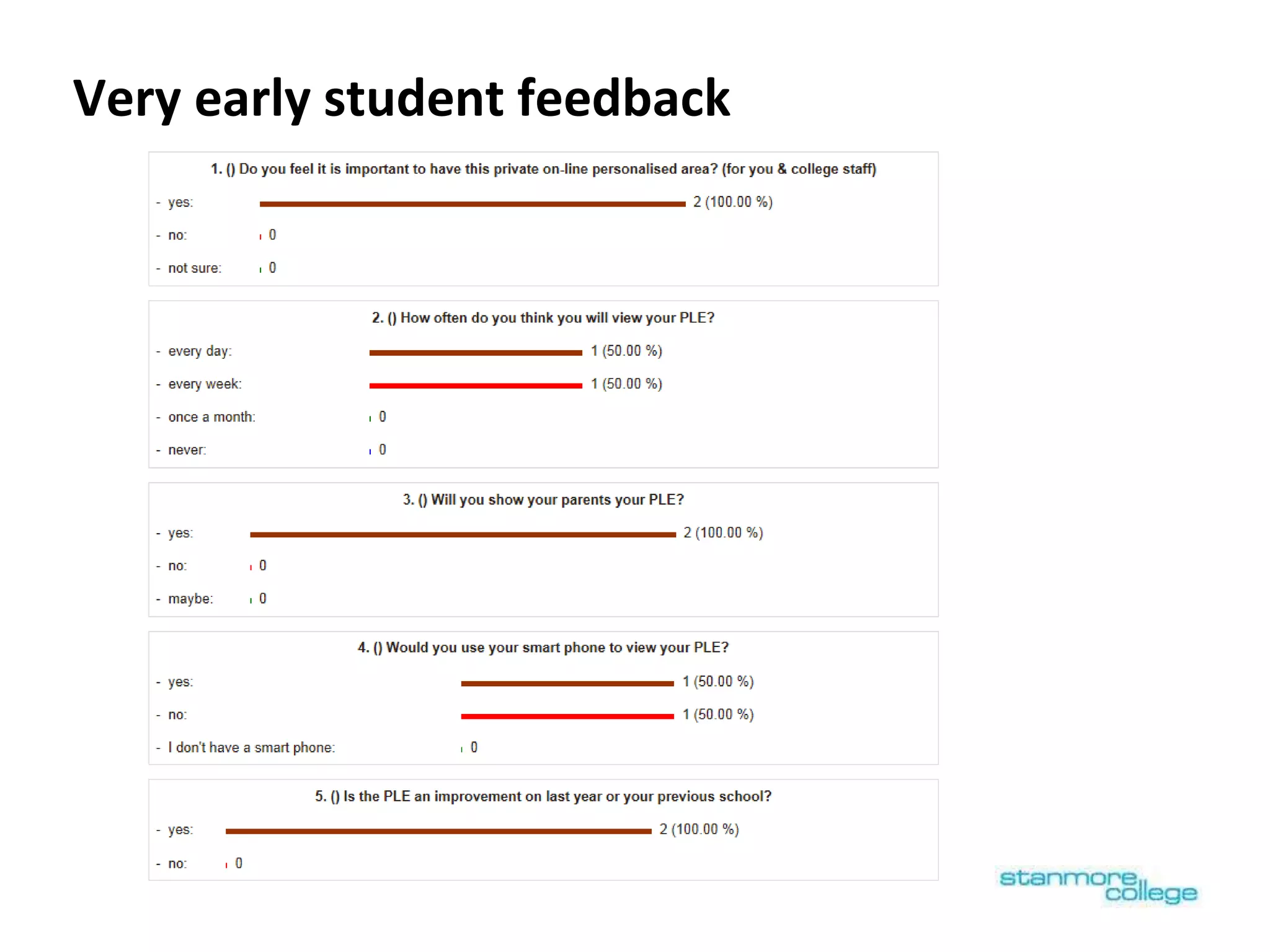
Very early student feedback

Creating a Personalised Learning Environment (PLE) to support progress

  • 1.
    Conference theme: Makinginnovation work Session: Pedagogic design Abstract: http://altc2013.alt.ac.uk Jago Brown Creating a Personalised Learning Environment (PLE) to support progress This presentation uses animation, so you will need to click the ‘Present’ button that looks like the one below:
  • 2.
    What is thisPLE made from? PLP = Personal Learning Plan Renamed PLE as different systems more closely integrated VLE: Moodle Assessment/grades: VLE & MIS Sys... PLP: ULCC’s ILP 2 (Moodle block) Portal: Moodle Portfolio: Stanmore Applications
  • 3.
    Why create thisPLE? - Improve communication, enhance personalisation & to free up lecturer time for teaching What users wanted: ● New system of personal tutors & study coaches , who needed to see all the grades of their tutees by many lecturers in one place ● Students & staff wanted more information, but more simply presented ● Improved navigation: after migrating to Moodle 2, users found it difficult to navigate & we saw a drop in overall use: Migrated to Moodle two 2012 (drop in use) Moodle one introduced 2007 Personali sation came in to use https://moodle.org/stats Registers versions:
  • 4.
    Focus of presentation 1.Visual appeal/branding - big iconic buttons make it feel much simpler 2. Customising Moodle to create PLE home page with a grades overview 3. Establishing a careers page in PLE with resources 4. Linking initial assessment to practice resources - EPACE • The PLE pages which the student & parent can view (i.e. not the staff only views) • 14-18 year olds (although this PLE is used by HE) • How data from different systems is juxtaposed on a few pages in away that enables staff & students to spot patterns & develop a conversation [supporting progress] Areas of Innovation
  • 5.
    2011-12 PLE home pagein 2011/12 (before) My Mock-up of optimum design (2011) with 6+ main pages/tabs and grades Well used but too many pages & no grades 2011-12
  • 6.
    PLE home page – Enhancing Moodle’s courseprofile page & replacing the previous PLP home page Data stored in Moodle ILP Block Stanmore applications & data from back-end MIS systems
  • 7.
    Stats: Blue columnsshow log increase from september 2013 due to PLE home development Note: this column chart was added retrospectively to this presentation in February 2014
  • 8.
    [ Note: Clickthis slide to see slide animation, of how you can drill down to Moodle’s ‘user’ & ‘grader’ report ] Enhanced with Current overall grade for each VLE course (grades overview report) Bringing the VLE course grades in to Moodle’s course profile page (PLE home) [ Note: Click this slide to see slide animation, of how you can drill down to Moodle’s ‘user’ & ‘grader’ report ]
  • 9.
    Central MIS reportingsys. for each course displayed In PLE Map of Stanmore’s PLE =Timetable =Attendance =Update contact details =Bursary Courses: =Grades =Assignments =Last access ( Future developments: display : E-portfolios & OpenBadges)Analytics page Online activities to understand & improve your learning Staff Acad. plans, or for students who are at risk Students’ own reflections & plans based on staff advice Staff notes & reminders for students + e- Points Staff & students record info related to future Last site login… +custom profile fields : These can include links to e- portfolios, CVs Deadlines & dates to all VLE assignments
  • 10.
    Conversations: Plans (serious/atrisk) Analytics page Online activities to understand & improve your learning Staff Acad. plans, or for students who are at risk Students’ own reflections & plans based on staff advice Staff notes & reminders for students + e- Points Staff & students record info related to future These pages use a customised version of ULCC’s ILP 2 block
  • 11.
    Conversations: Career plans/ my future page Bringing the progression advice services on to the same page as the discussion between staff about plans for the future Finding where students talents lie to help them be successful!
  • 12.
    EPACE: 40 min.student initial assessment Teacher view: Opportunity to understand their own learning, allowing them to become partners in their (lifelong) learning, rather than have ‘Learning done to them’ To help teachers, tutors & study advisors support student
  • 13.
  • 14.
  • 15.
    Stats: shows viewsof each report type (eg: /blocks/ilp/actions/view_main.php?user_id=xxx&course_id=xxx&tabitem=7:5&selectedtab=7) Note: this stacked column chart was added retrospectively to this presentation in February 2014
  • 16.
    Future developments? ofPLE Including library/electronic resources PLE Integrating library & other electronic resource data Loan activity against reading lists Course level Learning analytics (*eased by using same RDBMS for all systems)
  • 17.
    2013 – what'sthe optimum PLE setup? Should there be standard PLE parts in all VLE’s ? Balancing quantity of information with limited user time Are 4 container pages about right? Importance of establishing common terminology/ language around PLEs 2011
  • 18.
    Future improvements &evidence of use • Improving smart/mobile access • Voice recordings alternative to text entry for quick & personal staff feedback • Developing analytics/suggestion engines for schools/col for day- to-day feedback * • e-portfolio integration for more tangible evidence (essays, picture of work...) • Establishing PLE standards & supporting implementations • Giving access to previous years data in the PLE (Develop an archiving system) Yesterday! Wednesday 11th September
  • 19.
    Stats: indicates thisPLE has increased use of Moodle 2 when comparing 2 academic years Note: this column chart was added retrospectively to this presentation in February 2014
  • 20.
    Thoughts Policy (government, ofsted…)needs to organise funding (GLHs/following student) & the inspection framework, so more teachers have better access, to better learning technology, which they can more easily share & modify, to design their lessons/courses. More research into online personalisation environments needed! (All maint. sch. With online att + timetable + 1x feedback rpt per year…) Balancing online personalisation (PLE) standardisation across schools and colleges, against institutions/users making the PLE their own - is important and needs external support. (It can be easier to make your own if using open source software) More info at: http://Blog.thelearner.net brown.jago@gmail.com @JagoBrown - Screencast on YouTube
  • 21.
    # # #Archived/ unused slides follow:
  • 22.
    Comparing usage fromSept. across 2011,12,13 Reasons for drop in use after Moodle 1? Slower; Staff find Moodle 2.2 more difficult? Teachers using other systems… The advantages of Moodle 2 not being used: Portfolios, Repositories, mobile… 2011 -> ILP used for Rep 2013 -> New SC Intrane
  • 23.