
Creating a Compliance
Assessment Program on a
Tight Budget
ASHLEY DEUBLE
Why Do We Need A Compliance
Program
 We spend time and money creating all these policies – is the
business adhering to them?
 Are our critical assets actually being protected as we had originally
planned?
 Are there certain regulatory requirements that you must meet?
 Do we need to make the business aware of their responsibilities in
regards to information security?
The Basic Roadmap
 Create policies, procedure, standards, controls & guidelines
 Socialise these with the business
 Create a compliance assessment in alignment with your
policies/standards/controls etc.
 Review the adherence to the policies
 Create a report and present findings back to the business
 Deal with risks and issues (accept, remediate, insure etc.)
 Review and mature the process
Preparation – Create Policies,
Procedures, Standards & Guidelines
 Create Policies, Standards, Procedures & Guidelines (links to generic
template policies are at the end of the presentation)
 Talk to all parties that the policies may impact (e.g. HR, Legal etc.)
 Get policies approved by the Board or appropriate senior
management/representative
 Notify the general business of the new policies and their
responsibilities (possibly run some targeted sessions on business units
that are more heavily impacted).
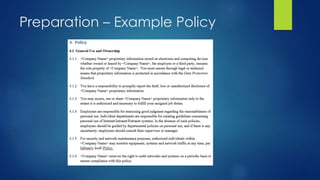
Preparation – Example Policy
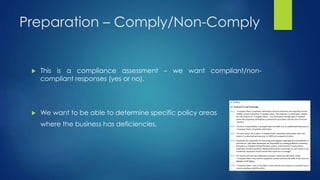
Preparation – Comply/Non-Comply
 This is a compliance assessment – we want compliant/non-
compliant responses (yes or no).
 We want to be able to determine specific policy areas
where the business has deficiencies.
Preparation – What About Partial
Compliance?
 Partial compliance can be a sliding scale
 Where does someone become non-compliant?
 Is someone truly compliant if they are only partially compliant?
 Provide notes in report to say that even though the business is non-
compliant, they are doing certain actions to provide some form of
compliance. The work needed to get them to be compliant may be
minimal. This may also reduce the level of the finding.
Preparation – Consider The Maturity
Level Of The Assessment Process
 Start with a process that your assessment team can handle
 Think about skill levels of staff here
 Either skill them up, or make the process simpler
 Does the process need to be completed by non security or IT staff at
remote locations?
 Mature and grow the process as the assessment teams get used to
the process (take them on a learning journey).
 Know what your end goal for the process is, and work towards it.
Preparation – Consider Who/What
to Assess (Scope)
 Determine the scope of your assessment.
 Are you going to assess a facility, a business unit, a process, etc.?
 Do you want to assess local staff processes against what remote
managers think are happening (could be very different results)?
 Is this a part of a larger audit body of work?
Preparation – Consider How Will We
Assess
 On-site with security staff
 Remote interviews conducted by security staff via phone or video
conference
 On-site personnel performing the assessment on behalf of the
security staff
 Self survey by the business
Assessment – Create A Process
Flow
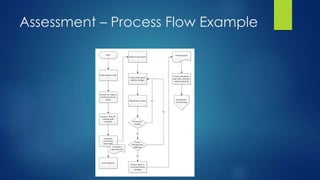
 Map out the process flow
 Sit down and run some tabletop exercises to check for
completeness
 Make sure you can tie into any additional process that you may
need (e.g. Risk Acceptance)
 Consider running a pilot assessment to test suitability
Assessment – Process Flow Example
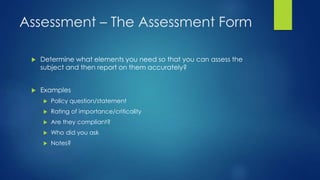
Assessment – The Assessment Form
 Determine what elements you need so that you can assess the
subject and then report on them accurately?
 Examples
 Policy question/statement
 Rating of importance/criticality
 Are they compliant?
 Who did you ask
 Notes?
Assessment – Assessment Question
Example
 Example policy statement (AUP)
 <Company Name> proprietary information stored on electronic and
computing devices whether owned or leased by <Company Name>,
the employee or a third party, remains the sole property of <Company
Name>. You must ensure through legal or technical means that
proprietary information is protected in accordance with the Data
Protection Standard.
 Example Compliance question
 Is proprietary information protected in accordance with the "Data
Protection Standard" on all electronic and computing devices (whether
owned or leased by <Company>, employees or a third party)?
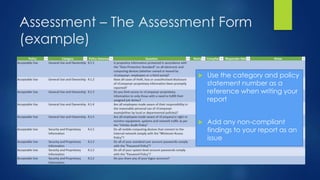
Assessment – The Assessment Form
(example)
 Use the category and policy
statement number as a
reference when writing your
report
 Add any non-compliant
findings to your report as an
issue
Assessment – Creating the Report
 Use a similar format to other reports in your organisation
 Make sure to include
 Executive summary
 Issues overview
 Detailed issues
 Recommendations
 Document control
Assessment – Reviewing the Report
 Always read the report to yourself before you send it to anyone to
review (you’ll find the majority of the mistakes before anyone else)
 Review amongst team members (peer review)
 Always keep track of any changes/amendments
 Seek management approval prior to sending to client
Assessment – Storing the
Data/Evidence
 ENCRYPT! ENCRYPT! ENCRYPT! (have a password safe – just in case)
 Create an encryption procedure to provide to the client if you
require them to send you any items of evidence.
 Use a file and folder naming system
 Keep one central “safe source” repository
Assessment – Reporting Findings
 Conduct a meeting with management to discuss high level findings
 Get their buy-in for remediation activities
 Conduct a meeting with technical staff to discuss detailed findings
 Explain the issues and provide recommendations to remediate
 Conduct a final close out meeting with all involved in the
assessment to ensure they are aware of the issues and willing to
remediate them
Improving the Program – Review
Cycles/Maturing the Process
 How often should the process be reviewed (quarterly, yearly etc.)?
 What should be reviewed?
 Should you have an “improvement team”
 How do you communicate your changes? Will it require additional
training?
 Are you moving towards your end goal?
Improving the Program – GRC Tools
 Excel isn’t the best tool for running a compliance program – but the
majority of us will have it as a standard application on our SOE.
 Create your own tool (Sharepoint etc.)?
 Purchase a commercial tool (Archer etc.)?
Resources – Policies, Standards,
Procedures & Guidelines
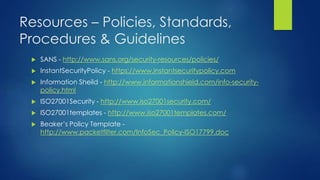
 SANS - http://www.sans.org/security-resources/policies/
 InstantSecurityPolicy - https://www.instantsecuritypolicy.com
 Information Sheild - http://www.informationshield.com/info-security-
policy.html
 ISO27001Security - http://www.iso27001security.com/
 ISO27001templates - http://www.iso27001templates.com/
 Beaker’s Policy Template -
http://www.packetfilter.com/InfoSec_Policy-ISO17799.doc
Questions?
 @ashd_au
 Linkedin.com/in/ashleydeuble

Creating a compliance assessment program on a tight budget

  • 1.
    Creating a Compliance AssessmentProgram on a Tight Budget ASHLEY DEUBLE
  • 2.
    Why Do WeNeed A Compliance Program  We spend time and money creating all these policies – is the business adhering to them?  Are our critical assets actually being protected as we had originally planned?  Are there certain regulatory requirements that you must meet?  Do we need to make the business aware of their responsibilities in regards to information security?
  • 3.
    The Basic Roadmap Create policies, procedure, standards, controls & guidelines  Socialise these with the business  Create a compliance assessment in alignment with your policies/standards/controls etc.  Review the adherence to the policies  Create a report and present findings back to the business  Deal with risks and issues (accept, remediate, insure etc.)  Review and mature the process
  • 4.
    Preparation – CreatePolicies, Procedures, Standards & Guidelines  Create Policies, Standards, Procedures & Guidelines (links to generic template policies are at the end of the presentation)  Talk to all parties that the policies may impact (e.g. HR, Legal etc.)  Get policies approved by the Board or appropriate senior management/representative  Notify the general business of the new policies and their responsibilities (possibly run some targeted sessions on business units that are more heavily impacted).
  • 5.
  • 6.
    Preparation – Comply/Non-Comply This is a compliance assessment – we want compliant/non- compliant responses (yes or no).  We want to be able to determine specific policy areas where the business has deficiencies.
  • 7.
    Preparation – WhatAbout Partial Compliance?  Partial compliance can be a sliding scale  Where does someone become non-compliant?  Is someone truly compliant if they are only partially compliant?  Provide notes in report to say that even though the business is non- compliant, they are doing certain actions to provide some form of compliance. The work needed to get them to be compliant may be minimal. This may also reduce the level of the finding.
  • 8.
    Preparation – ConsiderThe Maturity Level Of The Assessment Process  Start with a process that your assessment team can handle  Think about skill levels of staff here  Either skill them up, or make the process simpler  Does the process need to be completed by non security or IT staff at remote locations?  Mature and grow the process as the assessment teams get used to the process (take them on a learning journey).  Know what your end goal for the process is, and work towards it.
  • 9.
    Preparation – ConsiderWho/What to Assess (Scope)  Determine the scope of your assessment.  Are you going to assess a facility, a business unit, a process, etc.?  Do you want to assess local staff processes against what remote managers think are happening (could be very different results)?  Is this a part of a larger audit body of work?
  • 10.
    Preparation – ConsiderHow Will We Assess  On-site with security staff  Remote interviews conducted by security staff via phone or video conference  On-site personnel performing the assessment on behalf of the security staff  Self survey by the business
  • 11.
    Assessment – CreateA Process Flow  Map out the process flow  Sit down and run some tabletop exercises to check for completeness  Make sure you can tie into any additional process that you may need (e.g. Risk Acceptance)  Consider running a pilot assessment to test suitability
  • 12.
  • 13.
    Assessment – TheAssessment Form  Determine what elements you need so that you can assess the subject and then report on them accurately?  Examples  Policy question/statement  Rating of importance/criticality  Are they compliant?  Who did you ask  Notes?
  • 14.
    Assessment – AssessmentQuestion Example  Example policy statement (AUP)  <Company Name> proprietary information stored on electronic and computing devices whether owned or leased by <Company Name>, the employee or a third party, remains the sole property of <Company Name>. You must ensure through legal or technical means that proprietary information is protected in accordance with the Data Protection Standard.  Example Compliance question  Is proprietary information protected in accordance with the "Data Protection Standard" on all electronic and computing devices (whether owned or leased by <Company>, employees or a third party)?
  • 15.
    Assessment – TheAssessment Form (example)  Use the category and policy statement number as a reference when writing your report  Add any non-compliant findings to your report as an issue
  • 16.
    Assessment – Creatingthe Report  Use a similar format to other reports in your organisation  Make sure to include  Executive summary  Issues overview  Detailed issues  Recommendations  Document control
  • 17.
    Assessment – Reviewingthe Report  Always read the report to yourself before you send it to anyone to review (you’ll find the majority of the mistakes before anyone else)  Review amongst team members (peer review)  Always keep track of any changes/amendments  Seek management approval prior to sending to client
  • 18.
    Assessment – Storingthe Data/Evidence  ENCRYPT! ENCRYPT! ENCRYPT! (have a password safe – just in case)  Create an encryption procedure to provide to the client if you require them to send you any items of evidence.  Use a file and folder naming system  Keep one central “safe source” repository
  • 19.
    Assessment – ReportingFindings  Conduct a meeting with management to discuss high level findings  Get their buy-in for remediation activities  Conduct a meeting with technical staff to discuss detailed findings  Explain the issues and provide recommendations to remediate  Conduct a final close out meeting with all involved in the assessment to ensure they are aware of the issues and willing to remediate them
  • 20.
    Improving the Program– Review Cycles/Maturing the Process  How often should the process be reviewed (quarterly, yearly etc.)?  What should be reviewed?  Should you have an “improvement team”  How do you communicate your changes? Will it require additional training?  Are you moving towards your end goal?
  • 21.
    Improving the Program– GRC Tools  Excel isn’t the best tool for running a compliance program – but the majority of us will have it as a standard application on our SOE.  Create your own tool (Sharepoint etc.)?  Purchase a commercial tool (Archer etc.)?
  • 22.
    Resources – Policies,Standards, Procedures & Guidelines  SANS - http://www.sans.org/security-resources/policies/  InstantSecurityPolicy - https://www.instantsecuritypolicy.com  Information Sheild - http://www.informationshield.com/info-security- policy.html  ISO27001Security - http://www.iso27001security.com/  ISO27001templates - http://www.iso27001templates.com/  Beaker’s Policy Template - http://www.packetfilter.com/InfoSec_Policy-ISO17799.doc
  • 23.

Editor's Notes

  • #2 For many places the term “tight budget” means no budget .. Or a BAU activity
  • #4 MAYBE REMOVE AND CHANGE TO HAVE DELIVERABLES FOR THE PRESENTATION?
  • #5 Links to generic policies at the end of the presentation
  • #6 Links to generic policies at the end of the presentation
  • #8 Think about a lock with a 4 digit combination .. If you only have 3 digits to the combo the lock doesn’t open does it?
  • #15 We want to make sure that we can tie a compliance question directly back to a policy statement
  • #22 And Finally … If the program shows value then the business may be more willing to invest into it further